News


Google Announces The Pixel C Tablet
Google Announces The Pixel C Tablet

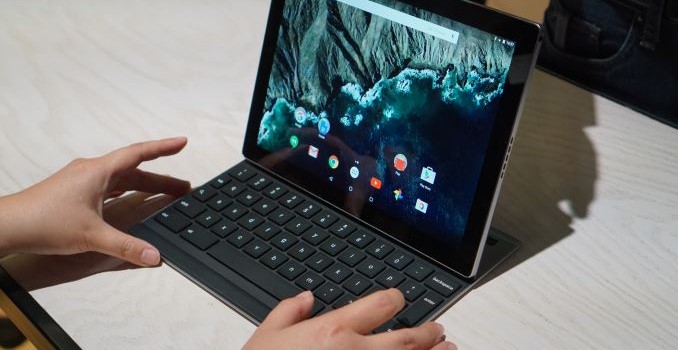
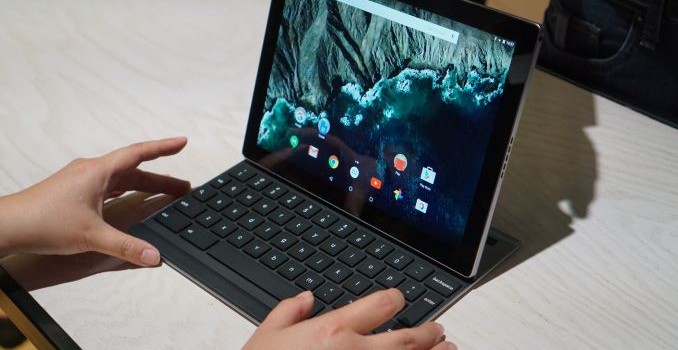
In addition to the new Chromecast devices and new Nexus phones, Google gave the world a sneak preview of a new Android tablet which they call the Pixel C. Like the Chromebook Pixel, the Pixel C is designed completely in-house by Google, and it shares many attributes with the Chromebook Pixel even though it runs Android rather than Chrome OS. The hardware is also very interesting, and while there are many unknown details about the Pixel C, what is known looks promising.

As far as specifications go, the Pixel C has a 10.2″ IPS display with a resolution of 2560×1800, which equates to a pixel density of 308ppi. Google states that the tablet’s aspect ratio is the square root of two, and that’s pretty much accurate as 2560/1800 is around 1.42. Representatives at the event stated that the display uses an LTPS backplane rather than an a-Si one, which allows for higher brightness and greater efficiency. Manufacturing LTPS displays at this size costs a considerable amount and it seems that Google felt it was necessary in order to achieve their 500 nit brightness.
As for color, Google advertises that the display covers the sRGB color gamut. I stated this in my live blog, but it’s worth repeating that gamut coverage is only loosely correlated with color accuracy. The 2015 Chromebook Pixel covers the sRGB gamut, but is significantly less accurate than a laptop like the MacBook or the QHD+ XPS 13. Based on what I saw at the event, Google has put effort into making sure their new Nexus devices are well calibrated. However, they’ve also shown lacking effort in doing the same for their $1000 Pixel-branded laptop. I’m very interested to see how accurate the Pixel C’s display is, and I’m hopeful that it can stand alongside the new Nexus smartphones and the Nexus 9 when color accuracy is considered.

Inside the Pixel C is NVIDIA’s Tegra X1 SoC. Built on TSMC’s 20nm process, the X1 packs a quartet of ARM Cortex A57 cores backed by 2MB of L2 cache, and another four A53 cores backed by 512KB of L2 cache, with NVIDIA balancing between performance and power efficiency. Meanwhile the GPU is a 256 core Maxwell implementation that should more than give other Android tablet SoCs more than a run for their money judging from what we’ve seen in other X1 devices.

It’s hard to guess what we’re dealing with in terms of clock speeds and TDP, as this is the first time that X1 has shown up in a mobile device. Ryan and Josh have done some previous analysis of X1, and so far the X1 has only been used in the SHIELD Android TV review, an Android TV console built to service 4K video playback and 1080p(ish) native gaming. Compared to the set-top Android TV, performance will obviously differ in a power and thermally constrained situation like a tablet – though by how much remains to be seen – and in any case the X1 remains as one of the most powerful Android tablet SoCs on the market at this time.
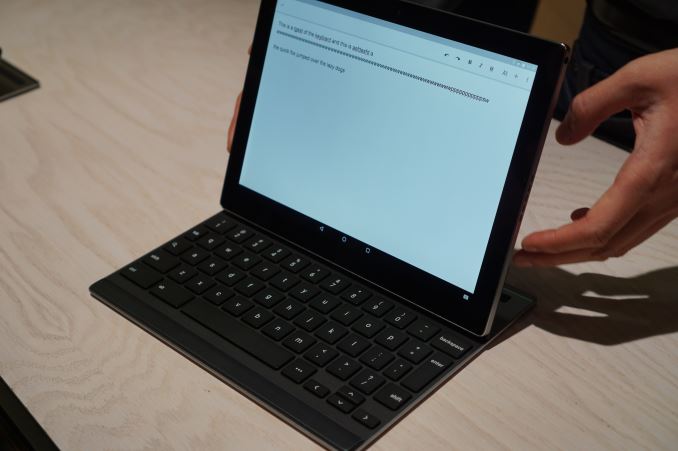
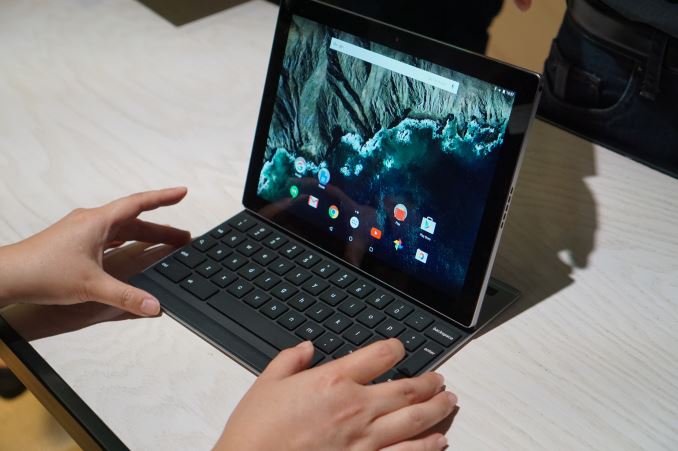
While launching the first Tegra X1 mobile device is quite a big announcement, the focus of the Pixel C is actually on the keyboard accessory that you can purchase for it. For Google, the Pixel line has always had a focus on providing users with great build quality, great keyboards, and great trackpads. The Pixel C is no exception, as it has a new bluetooth keyboard accessory designed to work specifically with it. While Apple and Microsoft have opted for soft keyboard covers, Google has decided to make their keyboard accessory out of the same aluminum as the tablet’s chassis. This means that there really aren’t any compromises as far as key feeling, size, and travel distance are concerned. The keyboard really looks and feels like a slightly condensed version of the Chromebook Pixel’s keyboard, with only the lesser used keys around the edges being less than full size.

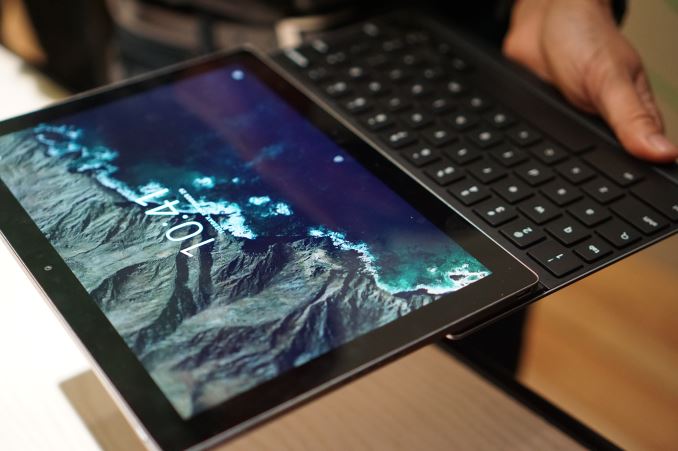
Almost as important as the keyboard itself is how it works with the tablet. Some devices use a kickstand, while others use the cover itself for support by folding. Google decided to come up with their own way, and when you see it in person you can’t help but admire its elegance. The keyboard cover attaches to the tablet magnetically. You can store it on the front to make it like a folded laptop, or on the back when you just want to hide it. When it’s on the back you can simply pull the tablet to one side, which shifts the magnetic connection and allows you to elevate the tablet and use it just like a laptop. It’s really difficult to describe, but it works incredibly well and allows for a tilt range from 100 to 130 degrees without any sort of kickstand.

Since the keyboard connects via Bluetooth, it does need to be recharged. However, Google has come up with a method of doing so that is as elegant as the keyboard itself. While it’s attached to the face of the tablet the small internal keyboard battery is charged inductively by the tablet itself. Having it in that position for only a few minutes a day allows it to stay charged perpetually, and the battery will last up to two months on a single charge. It’s just a really ingenious solution and I’m really impressed by it.

The Pixel C is the next device in an emerging category of tablets that sit between your traditional tablet and traditional laptop. How users will respond is anyone’s guess, but the Pixel C isn’t priced at the extreme high end of the market like Chromebook Pixel is so it should be more accessible to consumers. On the subject of price, the Pixel C will start at $499 for 32GB, and $599 for 64GB, with the keyboard being a $149 accessory.

Gallery: Google Pixel C

Google Announces The Pixel C Tablet

Google Announces The Pixel C Tablet

In addition to the new Chromecast devices and new Nexus phones, Google gave the world a sneak preview of a new Android tablet which they call the Pixel C. Like the Chromebook Pixel, the Pixel C is designed completely in-house by Google, and it shares many attributes with the Chromebook Pixel even though it runs Android rather than Chrome OS. The hardware is also very interesting, and while there are many unknown details about the Pixel C, what is known looks promising.

As far as specifications go, the Pixel C has a 10.2″ IPS display with a resolution of 2560×1800, which equates to a pixel density of 308ppi. Google states that the tablet’s aspect ratio is the square root of two, and that’s pretty much accurate as 2560/1800 is around 1.42. Representatives at the event stated that the display uses an LTPS backplane rather than an a-Si one, which allows for higher brightness and greater efficiency. Manufacturing LTPS displays at this size costs a considerable amount and it seems that Google felt it was necessary in order to achieve their 500 nit brightness.

As for color, Google advertises that the display covers the sRGB color gamut. I stated this in my live blog, but it’s worth repeating that gamut coverage is only loosely correlated with color accuracy. The 2015 Chromebook Pixel covers the sRGB gamut, but is significantly less accurate than a laptop like the MacBook or the QHD+ XPS 13. Based on what I saw at the event, Google has put effort into making sure their new Nexus devices are well calibrated. However, they’ve also shown lacking effort in doing the same for their $1000 Pixel-branded laptop. I’m very interested to see how accurate the Pixel C’s display is, and I’m hopeful that it can stand alongside the new Nexus smartphones and the Nexus 9 when color accuracy is considered.

Inside the Pixel C is NVIDIA’s Tegra X1 SoC. Built on TSMC’s 20nm process, the X1 packs a quartet of ARM Cortex A57 cores backed by 2MB of L2 cache, and another four A53 cores backed by 512KB of L2 cache, with NVIDIA balancing between performance and power efficiency. Meanwhile the GPU is a 256 core Maxwell implementation that should more than give other Android tablet SoCs more than a run for their money judging from what we’ve seen in other X1 devices.

It’s hard to guess what we’re dealing with in terms of clock speeds and TDP, as this is the first time that X1 has shown up in a mobile device. Ryan and Josh have done some previous analysis of X1, and so far the X1 has only been used in the SHIELD Android TV review, an Android TV console built to service 4K video playback and 1080p(ish) native gaming. Compared to the set-top Android TV, performance will obviously differ in a power and thermally constrained situation like a tablet – though by how much remains to be seen – and in any case the X1 remains as one of the most powerful Android tablet SoCs on the market at this time.

While launching the first Tegra X1 mobile device is quite a big announcement, the focus of the Pixel C is actually on the keyboard accessory that you can purchase for it. For Google, the Pixel line has always had a focus on providing users with great build quality, great keyboards, and great trackpads. The Pixel C is no exception, as it has a new bluetooth keyboard accessory designed to work specifically with it. While Apple and Microsoft have opted for soft keyboard covers, Google has decided to make their keyboard accessory out of the same aluminum as the tablet’s chassis. This means that there really aren’t any compromises as far as key feeling, size, and travel distance are concerned. The keyboard really looks and feels like a slightly condensed version of the Chromebook Pixel’s keyboard, with only the lesser used keys around the edges being less than full size.

Almost as important as the keyboard itself is how it works with the tablet. Some devices use a kickstand, while others use the cover itself for support by folding. Google decided to come up with their own way, and when you see it in person you can’t help but admire its elegance. The keyboard cover attaches to the tablet magnetically. You can store it on the front to make it like a folded laptop, or on the back when you just want to hide it. When it’s on the back you can simply pull the tablet to one side, which shifts the magnetic connection and allows you to elevate the tablet and use it just like a laptop. It’s really difficult to describe, but it works incredibly well and allows for a tilt range from 100 to 130 degrees without any sort of kickstand.

Since the keyboard connects via Bluetooth, it does need to be recharged. However, Google has come up with a method of doing so that is as elegant as the keyboard itself. While it’s attached to the face of the tablet the small internal keyboard battery is charged inductively by the tablet itself. Having it in that position for only a few minutes a day allows it to stay charged perpetually, and the battery will last up to two months on a single charge. It’s just a really ingenious solution and I’m really impressed by it.

The Pixel C is the next device in an emerging category of tablets that sit between your traditional tablet and traditional laptop. How users will respond is anyone’s guess, but the Pixel C isn’t priced at the extreme high end of the market like Chromebook Pixel is so it should be more accessible to consumers. On the subject of price, the Pixel C will start at $499 for 32GB, and $599 for 64GB, with the keyboard being a $149 accessory.

Gallery: Google Pixel C

Google Announces Chromecast (2) & Chromecast Audio

Google Announces Chromecast (2) & Chromecast Audio

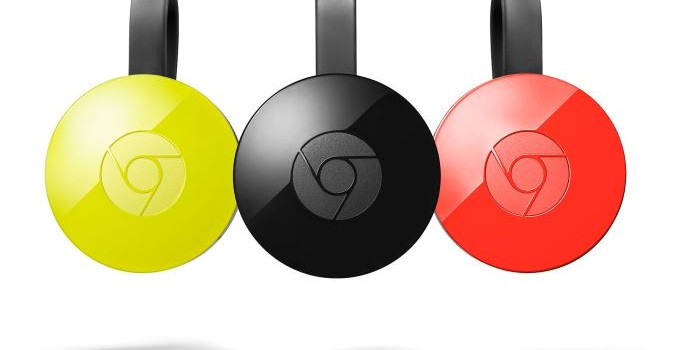
Alongside today’s suite of Nexus phone announcements, Google also spent some time addressing the big screen with an update to the company’s family of Chromecast digital media player/receivers.

First off is the new, second generation Chr…

Google Announces Chromecast (2) & Chromecast Audio

Google Announces Chromecast (2) & Chromecast Audio

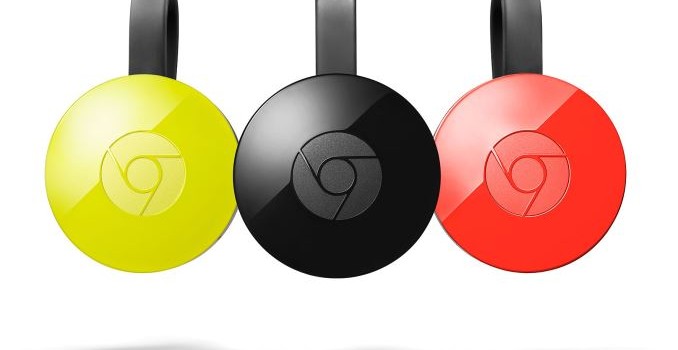
Alongside today’s suite of Nexus phone announcements, Google also spent some time addressing the big screen with an update to the company’s family of Chromecast digital media player/receivers.

First off is the new, second generation Chr…

HTC Launches the One M9+ Supreme Camera Edition

HTC Launches the One M9+ Supreme Camera Edition

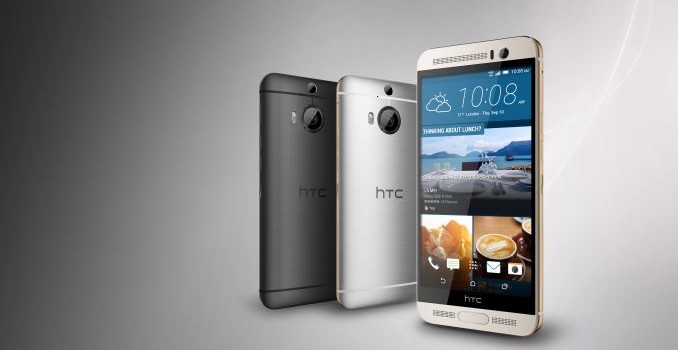
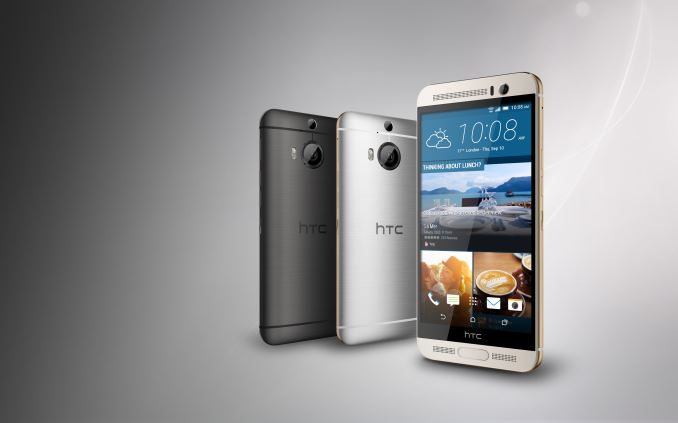
Today, HTC launched the One M9+ Supreme Camera Edition. The rather verbose and mildly surreal name probably gives away what this phone is, which is a variant of the One M9+ with some significant changes to the camera. The spec sheet below should give a pretty good idea for what to expect.

  HTC One M9+ HTC One M9+ Supreme Camera Edition
SoC MT6795 2.2GHz 8xA53 MediaTek Helio X10 MT6795 2.2GHz 8xA53 MediaTek Helio X10
RAM/NAND 3GB LPDDR3
32GB NAND + microSD
3GB LPDDR3
32GB NAND + microSD
Display 5.2” 1440p IPS LCD 5.2” 1440p IPS LCD
Network 2G / 3G / 4G LTE (MediaTek Category 4 LTE) 2G / 3G / 4G LTE (MediaTek Category 4 LTE)
Dimensions 150.99 x 71.99 x 9.61mm 168g 150.99 x 71.99 x 9.61mm 168g
Camera 20MP Rear Facing w/ 1.12 µm pixels, 1/2.4″ CMOS size, f/2.2, 27.8mm (35mm effective)
2MP Duo cam

4MP Front Facing, 2.0 µm pixels, f/2.0 26.8mm (35mm effective

21MP Rear Facing w/ 1.12 µm pixels, 1/2.4″ CMOS size, f/2.2, 27.8mm (35mm effective)
Laser AF + PDAF + OIS

4MP Front Facing, 2.0 µm pixels, f/2.0 26.8mm (35mm effective)

Battery 2840 mAh (10.79 Whr) 2840 mAh (10.79 Whr)
Connectivity 802.11a/b/g/n/ac + BT 4.1, GNSS, NFC, DLNA, microUSB 2.0 802.11a/b/g/n/ac + BT 4.1, GNSS, NFC, DLNA, microUSB 2.0
SIM Size NanoSIM NanoSIM

As you can see, the big change here is the camera. Instead of the 2.1MP secondary camera, HTC has added an IR laser rangefinder for short distances, which should dramatically speed up auto-focus in low light and macro shots. The sensor is now a Sony IMX230 with phase detect auto focus, so in conditions with good light it should be possible for the sensor to traverse straight to in-focus instead of bracketing the in-focus point with contrast detection. However, the optical characteristics are unchanged from the One M9 and M9+ with an f/2.2 aperture likely to keep edge distortions under control. OIS is also added to improve low light performance for still photos and improve video stability.

The One M9+ Supreme Camera edition will go on sale in Taiwan on October 6th for $630 USD in gunmetal grey and two-tone silver/gold. This is likely to remain an Asia-only variant, although we may see a similar camera in future devices.