News


Microsoft Surface Hub Availability And Specifications Announced
Microsoft Surface Hub Availability And Specifications Announced

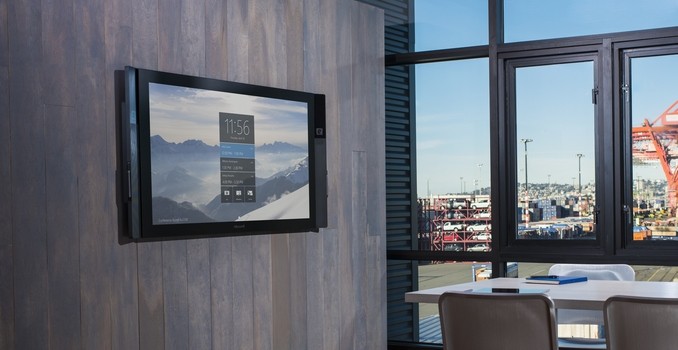
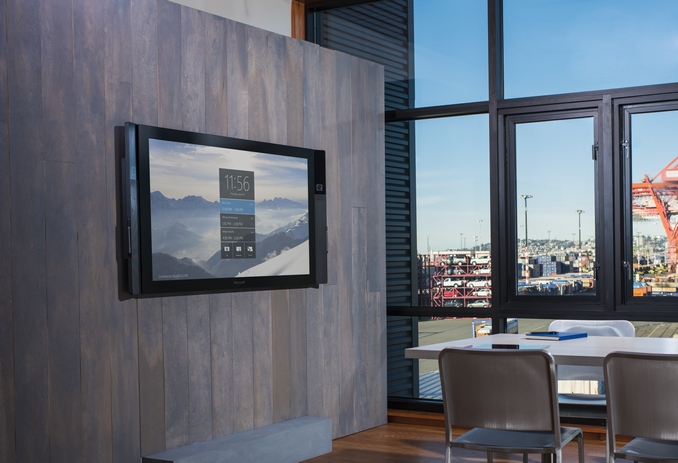
Today Microsoft announced more news regarding the Surface Hub, which is their large-screen collaboration device. Built specifically for the business conference room, the Surface Hub packs some impressive features inside.

The first bit of news though is that the Surface Hub will be available for pre-order starting on July 1st, and shipments will begin in September. It will initially be available in twenty four markets, with the United States, Canada, Australia, Austria, Belgium, Denmark, France, Finland, Germany, Ireland, Italy, Japan, Luxembourg, the Netherlands, New Zealand, Norway, Portugal, Qatar, Singapore, Spain, Sweden, Switzerland, United Arab Emirates and the United Kingdom all getting first dibs on this new device. The prices will seem steep to anyone who does not often furnish a conference room, with the smaller 55-inch model being offered for $6999, and the 84-inch model will sell for $19,999.

That is not inexpensive at all, but it should actually be less expensive that some of the other conference room solutions, and yet pack in technology that they can’t offer. Here is a table of the listed specifications:

Microsoft Surface Hub
  Surface Hub 55″ Surface Hub 84″
Dimensions H: 31.75″ (806.4 mm)
W: 59.62″ (1514.3 mm)
D: 3.38″ (85.8 mm)
H: 46.12″ (1171.5 mm)
W: 86.7″ (2202.9 mm)
D: 4.15″ (105.4 mm)
Weight 105 lbs (48 kg) 280 lbs (127 kg)
CPU Intel Haswell (4th Gen) Core i5 Intel Haswell (4th Gen) Core i7
GPU Intel HD 4600 NVIDIA Quadro K2200 640 CUDA Cores
RAM 8 GB 8 GB
Storage 128 GB SSD 128 GB SSD
Display 55″ 1920×1080 @ 120 Hz
1300:1 Contrast Ratio
100-point Multi-touch
Three Simultaneous Active Pens
Projective Capacitance optically bonded sensor
84″ 3840×2160 @ 120 Hz
1400:1 Contrast Ratio
100-point Multi-touch
Three Simultaneous Active Pens
Projective Capacitance optically bonded sensor
Networking Wired 1 Gbps
Wireless 802.11ac
Bluetooth 4.0 LE
NFC Reader
Miracast Enabled
Ports Internal PC
(1) USB 3.0 (bottom) + (1) USB 3.0 (side access)
(2) USB 2.0
Ethernet 1000 Base-T
DisplayPort Video Output
3.5mm Stereo Out
RS232 Serial Port
RJ11 Connector for system level control

Alternate PC
(2) USB 2.0 type B output, connection for:
Camera
Sensors
Microphone
Speakers
Touchback™
(1) DisplayPort Video Input

Guest PC
DisplayPort Video Input
HDMI Video Input
VGA Video Input
3.5mm Stereo Input
(1) USB 2.0 type B Touchback™ Output

Sensors (2) Passive Infrared Presence Sensors
Ambient Light Sensors
Speakers (2) Front Facing Speakers
Microphone High Performance, 4 Element Array
Cameras (2) 1080p @ 30fps
Price $6,999 $19,999

The first notable aspect is the displays, which both feature optically bonded projective capacitance sensors to minimize reflections. Both models also can support an insane 100 points of concurrent multi-touch, and three simultaneous pen inputs. The 55-inch model is a 1920×1080 panel, and the 84-inch is a 3840×2160 resolution, and both have a refresh rate of 120Hz. The touch digitizer is also 120Hz, and according to Microsoft it makes the experience much more akin to an analog counterpart.

These will not be just displays to project to either. Powering the Surface Hub is a custom version of Windows 10, which is run on a Haswell Core i5 on the smaller model and a Core i7 on the larger one. The 84-inch model also jumps from integrated graphics to the NVIDIA Quadro K2200, which is a Maxwell based GM107 GPU with 640 CUDA Cores. Both Hubs come with 128 GB of SSD storage and 8 GB of RAM, as well as Gigabit Ethernet and 802.11ac, with Bluetooth 4.0 LE, NFC, and Miracast available.

They will also feature two front-facing stereo speakers, a four element microphone, two 1080p cameras each, as well as passive infrared presence sensors and ambient light sensors.

I think the steep price is going to keep these devices closely locked to their target audience of conference and meeting rooms. It would be very cool to have an 84-inch Windows 10 powered Smart TV, but for $20,000 it would be a tough sell.

I’ve asked a couple of questions to Microsoft to get some more details about this device though, including its ability to handle HDMI 2.0 inputs and a few other things, so once I hear back I’ll update the post.

Source: Microsoft

Futuremark Announces VRMark: A Benchmark For Virtual Reality Systems

Futuremark Announces VRMark: A Benchmark For Virtual Reality Systems

Today Futuremark revealed that they are in the process of developing a benchmark for virtual reality hardware and displays. In the same naming style as PCMark and 3DMark, this new virtual reality benchmark will be called VRMark. According to Futuremark, VRMark will use a combination of software and hardware to evaluate a system’s ability to provide a high quality virtual reality experience.

Because virtual reality systems have many aspects that all need to be functioning properly to provide a good experience, the process of benchmarking them is different from how you would test a computer or a smartphone. VRMark will evaluate a system’s ability to provide a high and consistent frame rate, as with virtual reality it’s important to both have a high frame rate, as well as to ensure that the timing between those frames is consistent.

In addition to measurements of the hardware’s ability to render and display frames in a timely and smooth manner, VRMark will evaluate the sensors located in a VR head-mounted display. Lowering sensor latency has been a big part of the development process for VR headsets, and VRMark will help companies and reviewers evaluate this aspect of VR system performance.

There’s currently no word on when VRMark will be released, apart from the promise that it will launch in 2015. Virtual Reality benchmarks like VRMark will certainly be a useful tool to see how the various VR headsets currently being developed compare to one another.

Futuremark Announces VRMark: A Benchmark For Virtual Reality Systems

Futuremark Announces VRMark: A Benchmark For Virtual Reality Systems

Today Futuremark revealed that they are in the process of developing a benchmark for virtual reality hardware and displays. In the same naming style as PCMark and 3DMark, this new virtual reality benchmark will be called VRMark. According to Futuremark, VRMark will use a combination of software and hardware to evaluate a system’s ability to provide a high quality virtual reality experience.

Because virtual reality systems have many aspects that all need to be functioning properly to provide a good experience, the process of benchmarking them is different from how you would test a computer or a smartphone. VRMark will evaluate a system’s ability to provide a high and consistent frame rate, as with virtual reality it’s important to both have a high frame rate, as well as to ensure that the timing between those frames is consistent.

In addition to measurements of the hardware’s ability to render and display frames in a timely and smooth manner, VRMark will evaluate the sensors located in a VR head-mounted display. Lowering sensor latency has been a big part of the development process for VR headsets, and VRMark will help companies and reviewers evaluate this aspect of VR system performance.

There’s currently no word on when VRMark will be released, apart from the promise that it will launch in 2015. Virtual Reality benchmarks like VRMark will certainly be a useful tool to see how the various VR headsets currently being developed compare to one another.

Apple’s Metal API Comes to OS X Desktops

Apple’s Metal API Comes to OS X Desktops

At last year’s WWDC, Apple introduced their Metal API for iOS 8. A low-level graphics API, Metal was originally designed to bring the benefits of low-level graphics programming to Apple’s mobile operating system. And while we typically don’t think of mobile devices as being GPU-bound, in reality Apple has been packing some relatively powerful GPUs like GXA6850 with what are relatively speaking still fairly weak CPUs, which means Apple has ended up in a situation where they can be CPU-bottlenecked on draw calls.

Metal, despite being the 3rd such low-level API to be introduced, was the first to reach production status. Microsoft’s DirectX 12 is arguably not there yet (Windows 10 is still in testing), and Khronos’s Vulkan was still in its primordial Mantle form at this point in 2014. What this means is that out of all of the vendors, it’s arguably Apple who has the lead time advantage in low-level API development. Which is why for the last year we have been wondering if Metal would stay on iOS, or make the jump to OS X.

Yesterday we got our answer, with the announcement from Apple that Metal would be coming to OS X “10.11” El Capitan, and that it would be part of a larger investment into Metal for the company. Along with bringing Metal to OS X, Apple is going to be releasing new API kits that interface with Metal to simplify development, and internally Apple is now using Metal (when available) for parts of the desktop composition rendering chain. At this point it’s fair to say that Apple has gone all-in on Metal.

Consequently the fact that Metal is now over on OS X is not unexpected, but whether it has been planned for or not, it means that we now have 3 low-level APIs on the desktop as well as mobile. OS X’s Metal will be going head-to-head with Microsoft’s DirectX 12 and Khronos’s Vulkan, and this is the first time in a very long that we have seen a viable and competitive 3rd graphics API on the desktop, as DirectX and OpenGL have been the reigning APIs since the turn of the millennium.


Metal’s Introduction At WWDC 2014 (Image Courtesy Apple Insider)

As for what this means for Mac users, in the short run it’s a good thing. With Vulkan still in development, had Apple not implemented Metal on OS X, OS X would have needed to stick with classic OpenGL for another year until OS X 10.12. Going with their own API, as was the case with mobile, gets a low-level API on OS X sooner. Furthermore because it’s been on iOS for the last year, Apple gets to leverage all of the developer experience and code already written for Metal, and bring that over to OS X. Which is why developers like Epic are able to show off engines using Metal on OS X so early.

In the long run however there are some big unknowns left to answer, which could have a big impact on how things play out. Apple has not yet released the complete documentation for the newest version of Metal – specifically, we don’t have feature lists – so how the Mac and iOS versions compare feature-wise remains to be seen. My biggest concern here is that Apple will put OS X and iOS at parity, essentially limiting the features available to the lowest common denominator of iOS, leading to Macs in general being behind the curve in graphics features. The other big question is whether Apple will support Vulkan next year once it’s done, or whether they will stick with Metal, essentially turning OS X’s graphics stack proprietary. Which for users could lead to a reduction in game ports to the Mac if developers have to go write against a Mac-specific graphics API.


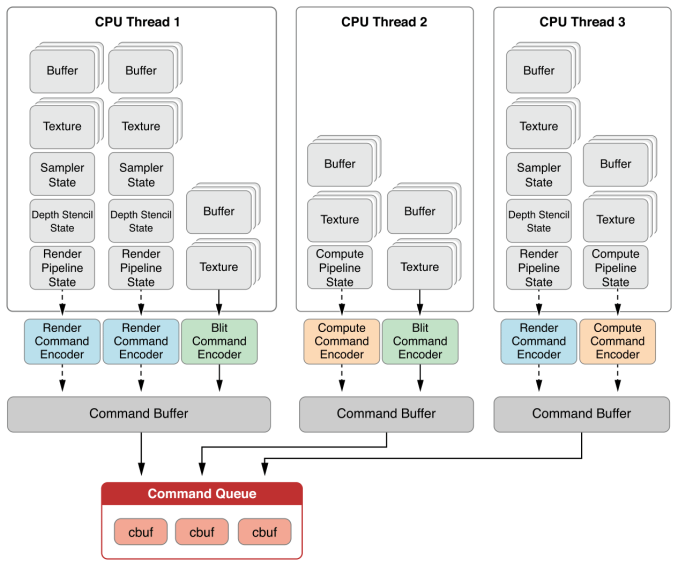
Apple iOS Metal Thread Model

One thing that is a pretty sure bet at this point is the GPUs that will support Metal. In short, don’t expect to see anything that can’t support Vulkan support Metal due to a lack of necessary features. So I’m expecting Metal compatibility to start with Intel’s Haswell (Gen 7.5) iGPUs, AMD’s GCN dGPUs, and NVIDIA’s Fermi/Kepler dGPUs. El Capitan works on a much wider range of machines of course, so this means only a fraction of those machines get to experience Metal. Though this was the same situation on mobile as well.

As for developers, things will be interesting. As I mentioned before Apple seems to be going all-in on Metal, starting with the fact that they will have Metal back-ends for their Core Graphics and Core Animation frameworks. And actually I’m a bit surprised by this, as basic compositing is not something that is draw call limited. Apple is claiming upwards of 50% performance increases here, so I’m curious just how this works out, but I suspect these are based on low-level benchmarks. Draw call performance is not the only benefit of Metal, but it is the most immediate, so Apple may be leveraging the harder to get GPU benefits here, or just wringing every last Joule of power out by getting to an API that isn’t doing high-level state checking.


OS X Metal Performance Improvements: From Apple’s Promotional Materials

In any case, by building Core frameworks off of Metal, Apple is in a position where they have to ensure Metal drivers are working well, which is to the benefit of developers. Meanwhile Apple is going one step past Metal on iOS 8 with the release of MetalKit, which is a set of utility functions for Metal to help speed Metal development. As we’ve mentioned before one of the few real pitfalls of low-level APIs is that to best utilize them you need guru-level programmers – after all, the API doesn’t have high-level safety nets to keep developers out of trouble – and with MetalKit Apple is at least partially resolving this issue by providing some base functionality for programmers.

Wrapping things up, though not an unexpected move from Apple, it will none the less be interesting to see how their efforts with Metal go. As a tightly integrated vendor they have the advantage of being able to move quickly when they choose to, which is why we’re seeing Metal come to OS X so soon and to get used by Core OS components so soon. Metal is just a graphics API, but due to Apple’s timing OS X will be the real test for low-level APIs on the desktop, and not just for gaming. Apple is in an interesting position to take advantage of these new APIs like no one else can, so in several ways they are going to be the pathfinder on just what can be done with these APIs.

Apple’s Metal API Comes to OS X Desktops

Apple’s Metal API Comes to OS X Desktops

At last year’s WWDC, Apple introduced their Metal API for iOS 8. A low-level graphics API, Metal was originally designed to bring the benefits of low-level graphics programming to Apple’s mobile operating system. And while we typically don’t think of mobile devices as being GPU-bound, in reality Apple has been packing some relatively powerful GPUs like GXA6850 with what are relatively speaking still fairly weak CPUs, which means Apple has ended up in a situation where they can be CPU-bottlenecked on draw calls.

Metal, despite being the 3rd such low-level API to be introduced, was the first to reach production status. Microsoft’s DirectX 12 is arguably not there yet (Windows 10 is still in testing), and Khronos’s Vulkan was still in its primordial Mantle form at this point in 2014. What this means is that out of all of the vendors, it’s arguably Apple who has the lead time advantage in low-level API development. Which is why for the last year we have been wondering if Metal would stay on iOS, or make the jump to OS X.

Yesterday we got our answer, with the announcement from Apple that Metal would be coming to OS X “10.11” El Capitan, and that it would be part of a larger investment into Metal for the company. Along with bringing Metal to OS X, Apple is going to be releasing new API kits that interface with Metal to simplify development, and internally Apple is now using Metal (when available) for parts of the desktop composition rendering chain. At this point it’s fair to say that Apple has gone all-in on Metal.

Consequently the fact that Metal is now over on OS X is not unexpected, but whether it has been planned for or not, it means that we now have 3 low-level APIs on the desktop as well as mobile. OS X’s Metal will be going head-to-head with Microsoft’s DirectX 12 and Khronos’s Vulkan, and this is the first time in a very long that we have seen a viable and competitive 3rd graphics API on the desktop, as DirectX and OpenGL have been the reigning APIs since the turn of the millennium.


Metal’s Introduction At WWDC 2014 (Image Courtesy Apple Insider)

As for what this means for Mac users, in the short run it’s a good thing. With Vulkan still in development, had Apple not implemented Metal on OS X, OS X would have needed to stick with classic OpenGL for another year until OS X 10.12. Going with their own API, as was the case with mobile, gets a low-level API on OS X sooner. Furthermore because it’s been on iOS for the last year, Apple gets to leverage all of the developer experience and code already written for Metal, and bring that over to OS X. Which is why developers like Epic are able to show off engines using Metal on OS X so early.

In the long run however there are some big unknowns left to answer, which could have a big impact on how things play out. Apple has not yet released the complete documentation for the newest version of Metal – specifically, we don’t have feature lists – so how the Mac and iOS versions compare feature-wise remains to be seen. My biggest concern here is that Apple will put OS X and iOS at parity, essentially limiting the features available to the lowest common denominator of iOS, leading to Macs in general being behind the curve in graphics features. The other big question is whether Apple will support Vulkan next year once it’s done, or whether they will stick with Metal, essentially turning OS X’s graphics stack proprietary. Which for users could lead to a reduction in game ports to the Mac if developers have to go write against a Mac-specific graphics API.


Apple iOS Metal Thread Model

One thing that is a pretty sure bet at this point is the GPUs that will support Metal. In short, don’t expect to see anything that can’t support Vulkan support Metal due to a lack of necessary features. So I’m expecting Metal compatibility to start with Intel’s Haswell (Gen 7.5) iGPUs, AMD’s GCN dGPUs, and NVIDIA’s Fermi/Kepler dGPUs. El Capitan works on a much wider range of machines of course, so this means only a fraction of those machines get to experience Metal. Though this was the same situation on mobile as well.

As for developers, things will be interesting. As I mentioned before Apple seems to be going all-in on Metal, starting with the fact that they will have Metal back-ends for their Core Graphics and Core Animation frameworks. And actually I’m a bit surprised by this, as basic compositing is not something that is draw call limited. Apple is claiming upwards of 50% performance increases here, so I’m curious just how this works out, but I suspect these are based on low-level benchmarks. Draw call performance is not the only benefit of Metal, but it is the most immediate, so Apple may be leveraging the harder to get GPU benefits here, or just wringing every last Joule of power out by getting to an API that isn’t doing high-level state checking.


OS X Metal Performance Improvements: From Apple’s Promotional Materials

In any case, by building Core frameworks off of Metal, Apple is in a position where they have to ensure Metal drivers are working well, which is to the benefit of developers. Meanwhile Apple is going one step past Metal on iOS 8 with the release of MetalKit, which is a set of utility functions for Metal to help speed Metal development. As we’ve mentioned before one of the few real pitfalls of low-level APIs is that to best utilize them you need guru-level programmers – after all, the API doesn’t have high-level safety nets to keep developers out of trouble – and with MetalKit Apple is at least partially resolving this issue by providing some base functionality for programmers.

Wrapping things up, though not an unexpected move from Apple, it will none the less be interesting to see how their efforts with Metal go. As a tightly integrated vendor they have the advantage of being able to move quickly when they choose to, which is why we’re seeing Metal come to OS X so soon and to get used by Core OS components so soon. Metal is just a graphics API, but due to Apple’s timing OS X will be the real test for low-level APIs on the desktop, and not just for gaming. Apple is in an interesting position to take advantage of these new APIs like no one else can, so in several ways they are going to be the pathfinder on just what can be done with these APIs.