News


Thermaltake Computex 2015 Booth Tour

Thermaltake Computex 2015 Booth Tour

Winner of Thermaltake’s modding contest

As E., our case, cooling and peripheral editor, wasn’t at Computex this year, I had the opportunity of meeting with most of the companies to see what’s new. My first stop was Thermaltake, which had several new and upcoming products to show.

To start off with external storage, Thermaltake had a USB 3.1 Type-C enclosure on display, which will be available later this year.

The enclosure is accompanied by a USB 3.1 Type-C hard drive dock, which allows easy hot-swap capability for those who deal with several drives.

For liquid cooling Thermaltake showed off a prototype of a CPU block with an integrated pump. The design above is obviously not a final design, but the concept is certainly interesting since mounting the pump on top of the CPU saves space and allows for smaller form factors. Thermaltake also displayed a DRAM kit with pre-installed liquid cooling block.

The focus of Thermaltake’s cases was definitely in modding as the WP200 has room for two complete builds, one on each side. There is also going to be a lighter W200 model that isn’t as huge as the WP200 is.

The W100 is the mode desktop-like version that is made for a single system. The top part of the case is fully modular and can be placed either on the top of bottom of the main case, where it can house the radiators or other components.

For customization Thermaltake offers a variety of different fans with LED lights and as a new product Thermaltake is introducing an RGB version of the Riing series with 256 colors. 

One of the most interesting products I saw at the Thermaltake booth was the company’s new Poseidon Z Touch keyboard. Basically all the keys act as a touchpad and by using Thermaltake’s bundled software the user can set up custom gestures, which can be handy in some games that require a large number of macros. Pricing will be about $180, which has a premium in it but I wouldn’t consider it to be too bad for a relatively unique product.

To keep things short, I’ve only included the highlights here and made a gallery of all photos I took, so head to the gallery above if you’re interested in seeing more products that Thermaltake had on display!

The Microsoft Lumia 640 Review

The group that was once Nokia’s mobile division has gone through a great number of changes in the past few years. After declining sales of Symbian devices, the company decided to go all in with Microsoft’s Windows Phone platform. In a very short time, Nokia became the number one vendor of Windows Phone smartphones in the world. Despite this, the move to Windows Phone failed to revitalize the company. In August of last year, Microsoft purchased Nokia’s mobile devices business in a 7.2 billion dollar acquisition. Less than a month later, Microsoft launched the Nokia Lumia 830, and the Nokia Lumia 735. These were the last two Lumia smartphones that would be branded as Nokia devices. With Nokia’s phone division absorbed into Microsoft, future Lumia devices would fall under the Microsoft brand.

Today’s review focuses on the Microsoft Lumia 640. This phone was announced alongside the Lumia 640 XL at MWC in February, and it’s one of the first new Lumia devices released under the Microsoft brand. At $129, the Lumia 640 occupies a fairly low price point as far as smartphones are concerned, and it serves as an entry model to the Lumia smartphone line. To see how it compares to the competition, and to its fellow Lumia devices, read on for the full review.

Apple Unveils Apple Music; Coming to Mac, iOS, Windows, and Android

Apple Unveils Apple Music; Coming to Mac, iOS, Windows, and Android

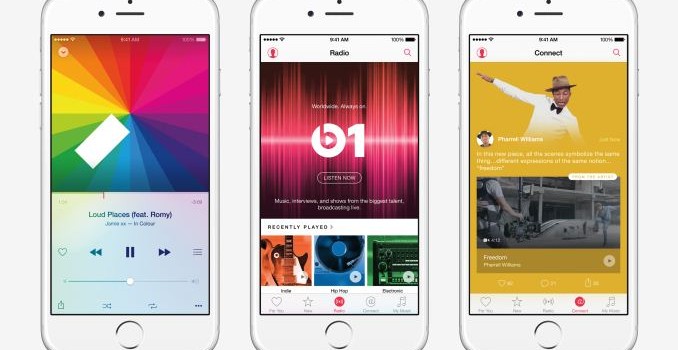
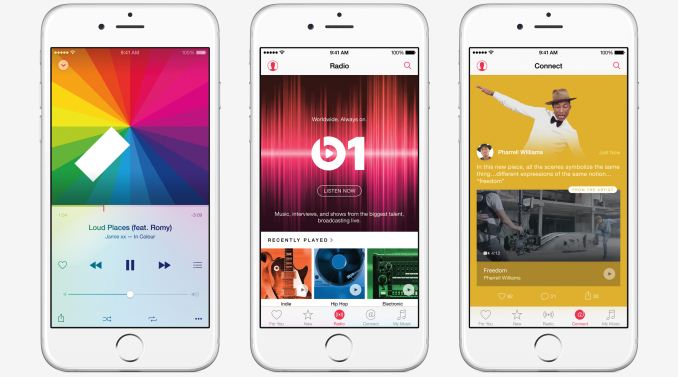
At the end of Apple’s WWDC keynote the company revealed their brand new music streaming service, Apple Music. Apple Music is the successor to Apple’s existing streaming music service, iTunes Radio, in effect building on top of the existing service with a number of additional features. The launch of the service has long been rumored ever since Apple purchased Beats and brought Jimmy Iovine into Apple along with it.

The service will go live on June 30 for OS X, iOS, and Windows, and there will be three tiers. Though not widely promoted by Apple, the free tier is being held over from iTunes Radio, giving users the ability to view the Connect service, listen to Bears 1, and listen to Apple’s curated radio stations with limited skipping. Otherwise the paid tiers are $9.99 for a single user, or $14.99 for a family of up to six users, and grant access to the rest of the service’s features, including streaming rights to the entire iTunes music catalog, and unlimited skipping on the radio stations. Apple Music will also be available on Android later in the fall, though the free tier will not be available on Android. Finally, as an added kicker, Apple is offering the first 3 months of the service for free, though it does require signing up on an account set for auto-renewal.

While Apple Music primarily acts as a competitor to other music streaming services like Spotify, it has a few features that may set it apart from other streaming services. As a radio service, Apple Music will provide recommended songs and playlists which are partially human curated, which they believe will give more relevant recommendations than those done solely by algorithms. Apple can also use your iTunes purchase history to examine what sort of music you enjoy, and base recommendations off of that. Meanwhile as a streaming music service, it allows on-demand streaming access to iTunes’ music catalog, and this includes saving music for offline listening.

Apple Music also has a feature called Connect, which allows music artists to interact with their fans. Connect can aggregate all of a musician’s social media into a single feed, which will allow them to keep their fans updated with their future events and songs. Apple hasn’t had much success in integrating social networks with iTunes and their music services, but since Connect integrates with existing services like Facebook and Twitter it has a much higher chance of success.

Apple is also launching a 24/7 radio station called Beats 1 which will feature a combination of news, interviews with musicians, and popular music. Based on the descriptions so far, I’d call the station vaguely similar to BBC Radio 1, especially given the mix of interviews and popular music. Though Apple is selling the benefits of Beats 1 to the public as a 24/7 manned radio station, I suspect it also offers some leverage for Apple, especially if it becomes a popular radio station.

It’s not clear how popular Apple Music will be with consumers. Apple can certainly leverage their brand and their existing music products, but with pricing in the hands of the industry it’s not really possible for them to compete on cost. Users will likely end up choosing their music streaming service based on features and the user experience offered, and so it’s up to Apple to provide a better experience if they want their service to take off. It’s also not clear what the launch of Apple Music means for the Beats Music streaming service that Apple currently owns.

Apple Announces iOS 9 at WWDC

Apple Announces iOS 9 at WWDC

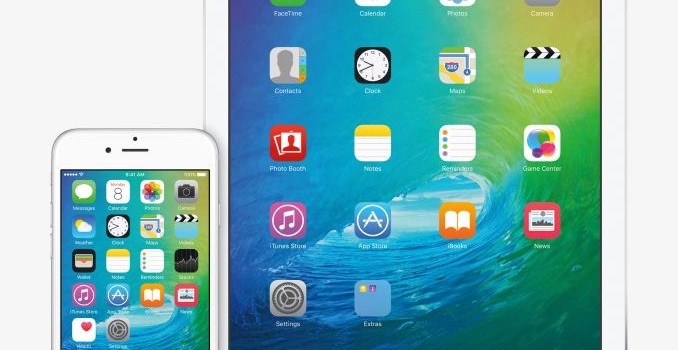
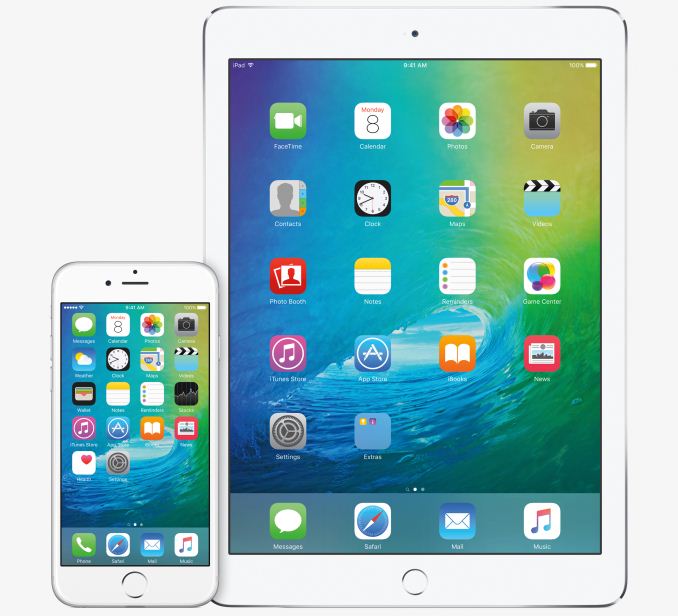
Today Apple has made a number of announcements relating to their three major operating systems. We’ve seen the announcement of WatchOS 2 for the Apple Watch, OS X El Capitan for Macs, and finally, iOS 9 for Apple’s iPhones, iPods and iPads. With the ninth major iteration of their mobile operating system, Apple is bringing some long overdue improvements to features like Siri and Spotlight, improving performance on all devices, and revamping the experience for users on the iPad.
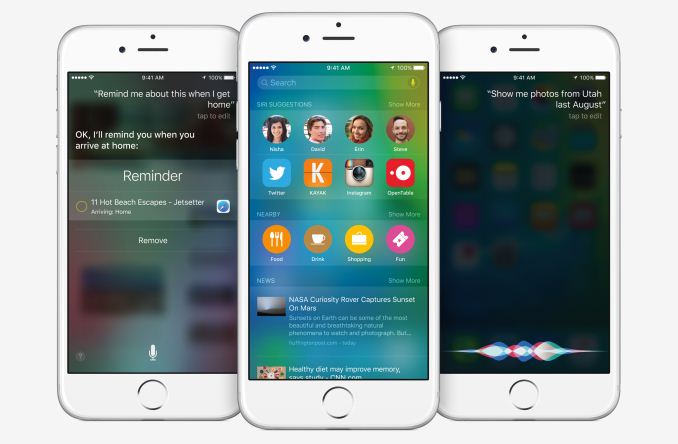
The first big change in iOS 9 that Apple introduced is a completely revamped Spotlight Search. This new screen was actually referred to as part of Siri during the keynote, and so it appears that the name Spotlight is now a thing of the past. Interesting enough, this new search screen is accessible by swiping to the right on your first home screen, which is how Spotlight was accessed up until iOS 7.

The big improvement with the new search feature is how much smarter it is than Spotlight Search was. This mirrors the improvements made to Spotlight in OS X El Capitan, with users being able to make text searches for information that they could access via voice using Siri. As you can see above, information about sports scores and weather can be accessed by typing a single search term. These results appear on the same sort of cards that you see in Siri.

In addition to search, this new screen can display relevant information based on external factors such as your location and the time of day, in the same way that Google Now does. For example, it can show nearby restaurants and stores, and can suggest applications to launch or people to contact based on your daily routine.

These improvements to search are definitely necessary to keep pace with Google. Many of the features mirror those that are available in Google Now, and even the interface of cards with information is very similar. However, Apple is quick to point out that they don’t collect any identifiable information about the user when they use these new search features, and your search terms are never linked to your or your Apple ID.
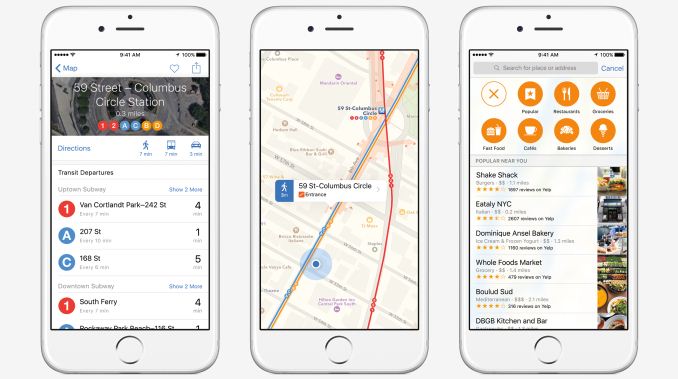
iOS 9 also brings significant improvements to Apple Maps. One of the most desired additions is maps and directions for transit. You will now be able to see maps of transit routes and get directions using public transportation in major cities. Transit will be enabled on a city-by-city basis, starting with some of the world’s major cities, but apple also made note that there will be support for over 300 cities in China, which is another step in their efforts to expand in the Chinese market.

Apple Maps in iOS 9 can also show you information about popular nearby stores. You can search by category, and can view detailed information about businesses such as their hours, their phone number, and whether or not they support Apple Pay.

Newsstand has always been an annoyance on iOS. It never really took off, and after many years of users trying to hide it in folders or remove it entirely Apple is trying something new. The new News application in iOS 9 will bring a customizable news experience to users in the United States, United Kingdom, and Australia. The app looks very similar to Flipboard, but with a heavy focus on typography, animations, and images. It also doesn’t appear that you’ll be able to add any RSS feeds you want to the app, as publishers need to sign up for the program. That said, RSS is currently supported, and though publications wanting the bset look will want to craft articles using Apple’s forthcoming news format, they can bridge the gap for the moment using RSS feeds.
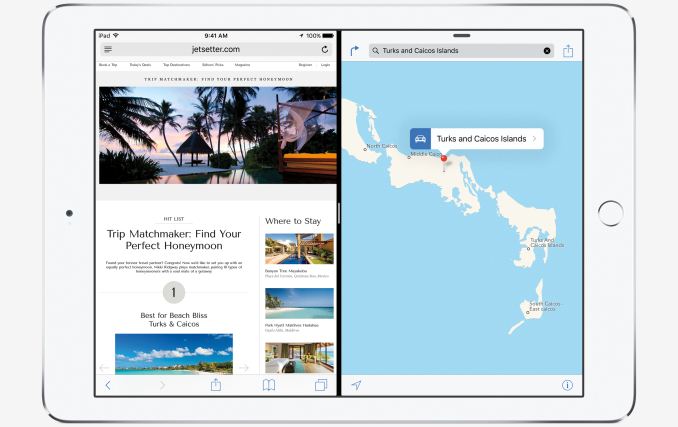
While Apple has made some nice improvements to iOS that will work across all devices, they’ve made some drastic improvements to the experience on the iPad. These upgrades are part of the new multitasking features in iOS 9. There’s a new Split View mode, which you can see above. This mode allows you to use two applications side by side, with both of them functioning as they normally would. When you’re using one app, you can still do touch input on the other. This feature will only be available on the iPad Air 2, most certainly due to its 2GB of RAM. Legacy applications will not be able to take advantage of the feature,as it requires the use of Apple’s existing flexible UI APIs, along with some new APIs just for Split View..

In addition the Split View, Apple has a new Slide Over feature that allows you to temporarily slide one application overtop of another from the side. For example, you can slide the Messages application in from the right side while you’re using Safari, respond to a message, and then slide away Messages to continue working in Safari. Apple also has a picture-in-picture mode where you can have videos playing in a window within another app. It can be resized and moved around, much like the video window feature in Google’s Youtube app. These features will be available on all iPads with Apple’s A7 and A8X chips.
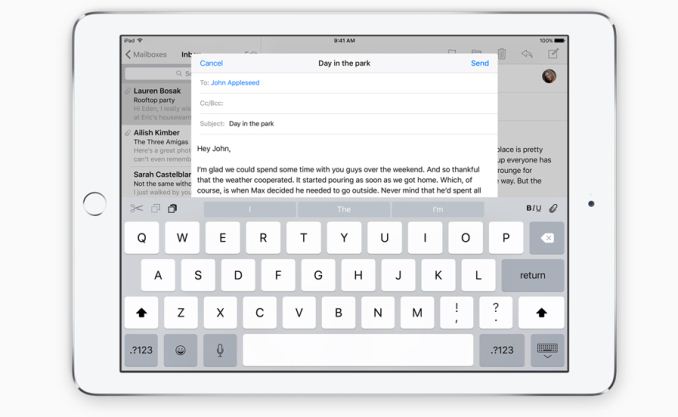
Along with the new multitasking features, the iPad keyboard receives some significant improvements in iOS 9 as well. Quick shortcuts have been added on the left and right sides in the suggestion bar, and you can now move across the keyboard with two fingers to use it as a trackpad. This allows you to move the cursor to select text without having to take your fingers off the virtual keyboard.

On top of the new features and improvements to existing features in iOS 9, there are also significant improvements to performance. Many of the iOS graphics APIs, including Core Animation and Core Graphics, are now using Metal instead of OpenGL ES on the iOS devices that support Metal. According to Apple this reduces CPU usage, and will improve the overall smoothness of the UI. Apple has also made improvements to power usage, and they claim that iPhone users will see battery life improve by up to an hour of usage. There’s also a low power mode which disables all but the core functions of the device, much like the one introduced with Android Lollipop.

Meanwhie the amount of temporary free space required for OTA updates has been reduced. By changing their update mechanism to allow what Apple calls “streaming” – effectively an in-place patching – Apple has been able to do away with requiring OTA updates to download and unpack whole updates at once. As a result the free space requirement for the iPad Air has been brought down from 4.58GB to 1.3GB. The size of OTA updates has been an issue for Apple, especially as they continue to sell 16GB devices that have even less free space after accounting for what the installed OS occupies.

iOS 9 also has a couple security improvements. Apple is now defaulting to a 6 character passcode, up from the 4 number requirement that currently exists (though falling back to 4 is an option). As Apple has been trying to drive everyone to TouchID anyhow, Apple believes this won’t be a big deal for most of their users since TouchID is still the preferred way of unlocking an iOS device. As for the benefits of longer codes, moving to 6 digits will improve security against passcode brute force attacks. Meanwhile Apple has also built in support for their 2-factor authentication for Apple ID logins.
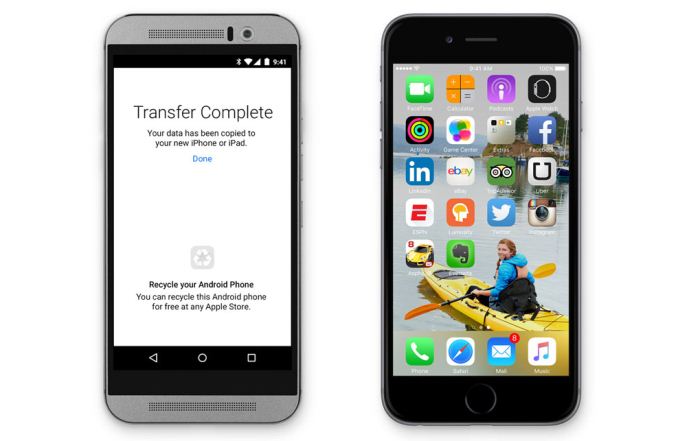
The last feature of iOS 9 is for users who are coming to the iOS platform from Android. It’s a new app called Move to iOS, and it allows users to wireless transfer their data from an Android device to their iPhone. According to Apple, the app is able to move your contacts, message history, camera photos and videos, web bookmarks, mail accounts, calendars, wallpaper, and DRM-free songs and books. It will also recommend any free apps that you had installed on your Android phone so you can easily rebuild your app library.

While iOS 9 doesn’t seem as exciting on the surface as iOS 8, there’s a number of changes under the hood that are sure to benefit users. iPad users definitely have a lot of improvements heading their way, although it’s going to be disappointing for iPad Air and iPad Mini 2/3 users that they’re unable to use the new multitasking features. 

iOS 9 will be launching alongside OS X El Capitan and WatchOS 2 in the fall of this year. Unlike previous releases where certain devices get dropped from support, iOS 9 supports every device that iOS 8 supported, which includes the Apple A5 based iPad 2 from 2011. A developer beta of iOS 9 is available now, and for the first time ever, Apple will be hosting a public beta which will begin in July.


Apple Announces OS X El Capitan

Apple Announces OS X El Capitan

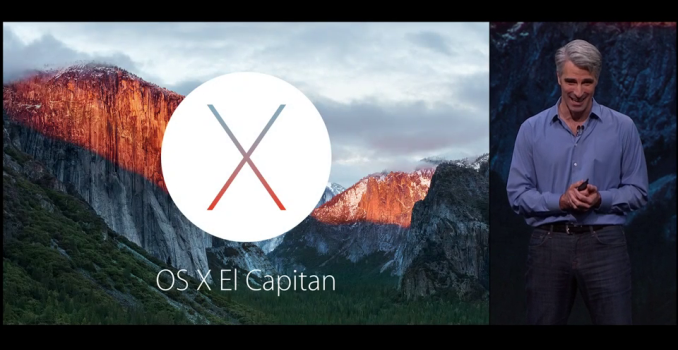
Today at WWDC Apple announced the next version of their OS X operating system. This next release, presumably version 10.11, is named OS X El Capitan. OS X Yosemite came with a comprehensive redesign which brought it in line with the new design principles that Apple introduced with iOS 7. The focus of El Capitan can be found in its name, which is a rock formation within Yosemite National Park. With Yosemite being the radical revamp, El Capitan focuses on improvements to the user experience and to performance.

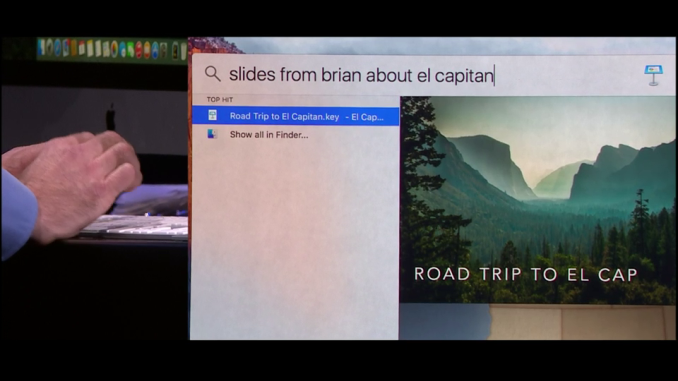
One of the areas that has seen dramatic improvements in El Capitan is Spotlight Search. In my experience, Spotlight has historically never been very smart. It was only with Yosemite that it gained the ability to search for keywords or phrases inside files. Even then, it was never able to bring up obvious results to certain queries that Siri would be able to do on the iPhone. For example, searching for the current weather would just try to find the phrase “current weather” somewhere on your Mac, which isn’t useful at all. In El Capitan Apple is applying the search functionality of Siri to text searches done via spotlight. You can ask for information on the weather, or on the scores from a hockey game. You can also ask for very specific items, such as the query in the image above where Spotlight is used to find a set of Keynote slides about a natural park that were sent by a certain person.

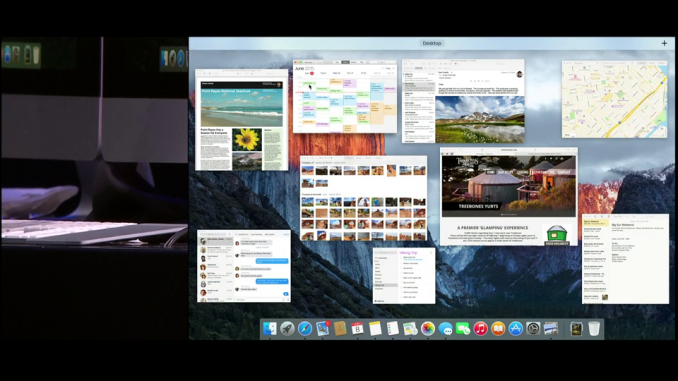
Mission Control sees a number of improvements as well. On the most basic level, there are a few changes to the interface. A blur effect is no longer applied to your wallpaper, and the bar at the top with your virtual desktops doesn’t expand if you only have a single desktop at that moment, which gives more space for application windows. Apple has also added the ability to drag windows into the bar at the top to instantly put them into fullscreen mode.

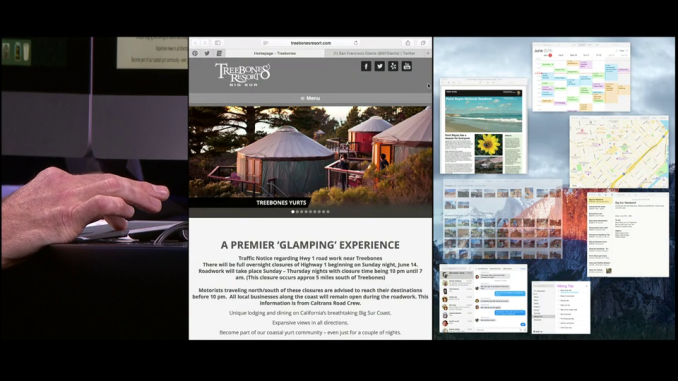
Application multitasking has also been improved. El Capitan has a new feature that essentially performs the same function as Aero Snap on Windows. Two apps or other parts of the interface can be set so they split the screen down the middle. This even works with parts of the OS like Mission Control which you can see in the photo above.

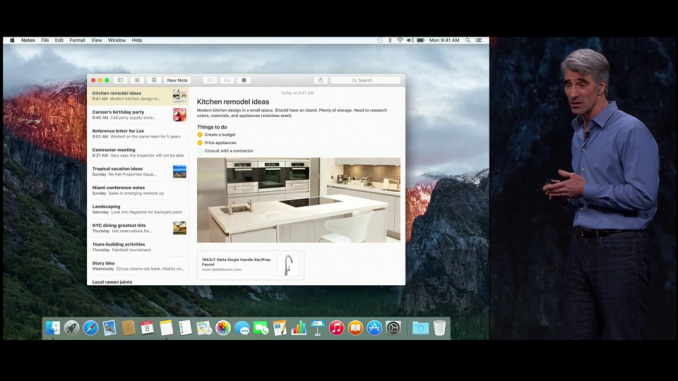
As usual, Apple has included a number of updates to their existing applications. Notes was definitely the app that saw the greatest amount of improvement. You can now embed photos and use rich type with the Notes app, which almost makes it like a very simple version of Pages, as you’re no longer limited to just typing in text with the most basic of formatting abilities.

Mail was another application that saw changes. You can now use trackpad gestures in the mailbox view to quickly mark or delete images. This is such an obvious feature, with the iOS version having had these abilities for some time now, and I’m surprised that it took this long to add it to OS X. 

Safari also received a couple of new features. You can now slide tabs to the left to pin them, which will keep them persistent even after restarting Safari or your computer. There are also indicators for which tabs are playing sound, which is something other browsers have had for some time now.

Of course, the biggest area of focus in El Capitan is performance. With the release of Yosemite it was clear that Apple needed to focus more on the performance of their OS after adding in visual effects that were taxing on the CPU and GPU. On my Retina MacBook Pro I saw considerable performance regressions compared to Mavericks, and even with OS X 10.10.3 many of those issues still remain.

There are two areas of performance that need to be considered. The first is raw speed, while the second is the frame rate of animations. El Capitan tackles some of the issues with the first aspect, but Apple has definitely been focusing on the second aspect with their announcement that the Metal graphics API is coming to OS X. Both the Core Graphics and Core Animation APIs now run on Metal rather than OpenGL. According to Apple, they’ve seen up to a 50% in rendering performance with Metal, and this will hopefully translate to improved UI smoothness for users.

The developer beta of OS X El Capitan is available today so developers can test their apps and try out new APIs. Like Yosemite, El Capitan will have a public beta beginning in July, and the final release will come this fall.