HTC Launches One M9: Hands-On
Around the end of 2012, HTC was in dire straits. The HTC One X, S, and V were supposed to be a big change in HTC’s product lineup, and was supposed to do away with the confusing nomenclature and unfocused lineup. However, it seems that the device fell flat for a wide range of reasons. HTC needed to change their direction in a big way to prevent profits and revenue from slipping. At the time, it seemed quite possible that HTC would soon go out of business and/or be acquired by some other company. With the HTC One, we saw the beginning of a somewhat unprecedented revival from HTC, as they focused on truly impressive hardware innovation in the form of the first all-metal unibody, an Ultrapixel camera with OIS, and dual front-facing speakers with speaker protection amps. On the software side, we saw an incredibly restrained version of Sense that was a far cry from the rather overdone versions of Sense that we saw with Sense 3 and 4.
The M8 was a refinement of the M7 in some ways, but distinctly different in others. Sense 6 was a continuation of Sense 5, which focused on improving design and functionality across the board. We saw a great deal of incremental improvements, such as the new Snapdragon 801 SoC, the louder speakers, and a new metal wraparound design on the back cover. However, in some ways we saw a lack of improvement. Some of the key areas where there was weakness include the rear camera, the somewhat poor ergonomics of the power button, and the slippery finish of the device. In mass use, it was also discovered that the camera lens often had a coating that was susceptible to scratching, and that these scratches significantly degraded camera quality. Overall, despite these issues due to the competitive landscape the M8 was still a strong recommendation.
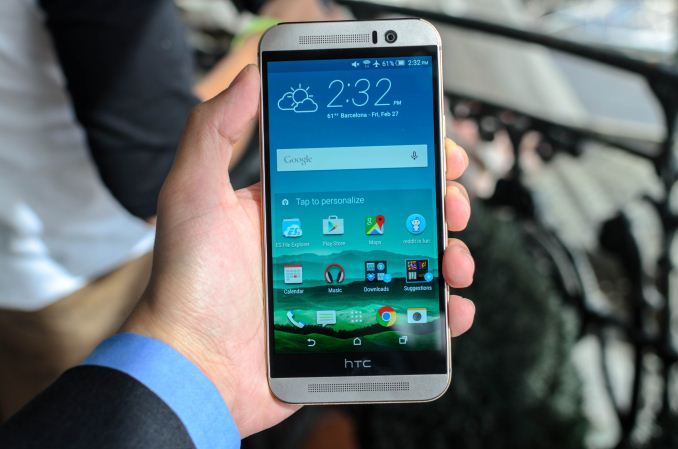
With 2015, HTC sought to fix all of these issues that were raised with the M8’s release. This brings us to the HTC One M9, which is best described as an evolution of the One M8. To get the basics out of the way, the spec sheet below should help with more details.
| HTC One M8 | HTC One M9 | |
| SoC | MSM8974ABv3 2.26 GHz Snapdragon 801 | MSM8994 2/1.5 GHz A57/A53 Snapdragon 810 |
| RAM/NAND | 2GB LPDDR3 16/32GB NAND + microSD |
3GB LPDDR4 32GB NAND + microSD |
| Display | 5” 1080p LCD | 5” 1080p LCD |
| Network | 2G / 3G / 4G LTE (Qualcomm MDM9x25 IP UE Category 4 LTE) | 2G / 3G / 4G LTE (Qualcomm UE Category 7/9 LTE) |
| Dimensions | 146.36 x 70.6 x 9.35mm max, 160 grams | 144.6 x 69.7 x 9.61mm max, 157 grams |
| Camera | 4.0 MP (2688 × 1520) Rear Facing with 2.0 µm pixels, 1/3″ CMOS size, f/2.0, 28mm (35mm effective) and rear depth camera
5MP Front Facing, f/2.0 |
20MP Rear Facing w/ 1.12 µm pixels, 1/2.4″ CMOS size, f/2.2, 27.8mm (35mm effective)
4MP Front Facing, 2.0 µm pixels, f/2.0 26.8mm (35mm effective) |
| Battery | 2600 mAh (9.88 Whr) | 2840 mAh (10.79 Whr) |
| OS | Android 5 with Sense 6 | Android 5 with Sense 7 |
| Connectivity | 802.11a/b/g/n/ac + BT 4.0, USB2.0, GPS/GNSS, MHL, DLNA, NFC | 2×2 802.11a/b/g/n/ac + BT 4.1, USB2.0, GPS/GNSS, MHL, DLNA, NFC |
| SIM Size | NanoSIM | NanoSIM |
Overall, the One M9 is mostly focused on internal and functional upgrades. In order to reduce the height of the phone, we see a move away from the DuoCam system that we saw with the M8, although HTC stated that they had not completely given up on the idea. The rear camera is a 20MP Toshiba T4KA7 sensor, which has a 1.12 micron pixel pitch. This seems to suggest that HTC is moving away from the concept of Ultrapixels, although it isn’t clear if we’ll see it make a return at some later date.
As mentioned in the spec sheet, the optics do back off on aperture a bit to f/2.2, with a 27.8mm equivalent focal length. The cover lens is now made of sapphire in order to avoid scratches on the surface. Combined with the slight camera hump, it’s likely that we’re seeing the limitations of sensor size increases as increasing sensor size dictates an increase to the thickness of the optics unless the focal length is reduced. Reducing focal length also increases distortions, as can be seen by any extremely wide angle lens.
Meanwhile there is no OIS on the rear camera, which is a bit disappointing. HTC seems to be focused on trying to make the best of this camera though, as it was mentioned that a professional mode will be available soon after launch for RAW photo capture for editing and processing in applications like Photoshop and Lightroom.


In casual testing, I saw a dramatic improvement in daytime image quality, and features like HDR as seen above are dramatically improved from the One M8. In general there seem to be fewer issues with things like field curvature and other types of optical distortion along with drastically improved dynamic range, but in low light the results I saw were indicative of poor processing and tuning. HTC representatives stated that the camera tuning, especially in low light were far from final so it remains to be seen if these issues remain in the final product. It seems that the ImageChip 2 has also been deleted from the M9, although the reasons for this are not clear.

On the design side of things, the hardware itself feels like a combination of the M7 and M9. HTC has put a great deal of effort into subtly refining the design, as the corners are no longer nearly as rounded as on the One M8, and the brushed finish has been significantly changed in texture and feel. Rather than a somewhat slick and smooth feel, the brushed finish now feels matte and has far more grip to it.

The curved edge of the M8’s back cover has also been replaced with a hard edge, which does help with grip and makes for a somewhat dramatic transition on the silver/gold version, but it can be a bit uncomfortable in the hand.

The front trim has also been improved, as the One M8’s speaker grilles have been replaced by a one-piece design that alleviates issues with uneven speaker grilles and other issues. It’s clear that this piece is still plastic, but the fit and finish overall is a good step up from the One M8. It is a bit disappointing that there is still a black bar on the bottom of the display, HTC representatives stated that this continues to be necessary to fit display drivers and other circuitry.

In terms of overall ergonomics though we see a massive improvement as the power button has been moved to the side of the phone. It is a bit low though, and requires deliberate effort in order to press it rather than resting around where one’s thumb might be. I found that the power button was generally easy to distinguish from the volume rocker due to the textured finish, although the volume buttons are a bit more difficult to distinguish as they have the same texture and are only separated by position.


On the software side of things, Sense 7 is a continued evolution of Sense 6, with some reorganization and new features. Areas like the weather clock and lock screen have been updated, along with app design in general. Although the design is somewhat like Lollipop in areas, the overall design still mostly resembles Sense 6. However, we see new features with the introduction of Sense 7. HTC focused on location and contextual information for this iteration of Sense, along with easy theming. On the lock screen, depending upon the time of day the lock screen may recommend a nearby restaurant or the morning news. In addition, HTC has introduced a new widget that will present commonly used applications in certain locations and times. It’s possible to also pin applications to make sure that they aren’t removed, although it doesn’t seem possible to force a certain application to avoid being on the widget in certain situations. There’s also a recommended apps folder in the system, although in practice it isn’t particularly useful for power users and in the build of software that we received it wasn’t possible to remove this folder.


On the theming side of things, it seems HTC has put some serious thought into enabling a thoughtful theming system. It’s now possible to do a theme with one step, by simply selecting a given wallpaper which is then processed by the phone to generate a potential theme to be edited. It seems this system goes deep, as it’s possible to theme the status bar, icons, app colors, on screen buttons, and other aspects of the system. In addition, it’s possible for users to manually create their own themes on the phone by using an application on the phone or a web application on a full PC. Themes will appear in an HTC application store, which is simply a UI that presents compatible themes from the Play Store.


While these changes to Sense 7 are interesting, it’s really more interesting to see that HTC is sticking with a grid view for multitasking by default (Google’s card view is available) with pages to allow more than 9 apps to be accessed, and the volume controls that we saw from Sense 6 on KitKat remain on the One M9 to allow for easy access to silent mode, along with easy access to all volume controls regardless of context. Priority notification mode is still present, but it’s in the settings application instead of on the volume controls.
As for the underlying SoC, it seems that a lot of the concerns with the Snapdragon 810 remain unfounded, as the One M9 was quite smooth even with this non-final build of software. I did notice a few stutters in contrast to the almost perfectly smooth M8 with Lollipop, but I suspect things will be better with final software. It’s likely that while the Snapdragon 810 SoC itself is without issue, properly tuning all of the controls in Qualcomm’s big.LITTLE implementation is a much more difficult than a standard aSMP solution. Unfortunately, due to the non-final state of the software we are unable to present benchmarks of the device, but we will be sure to do this for the full review of the device. In general use, the phone remained cool and comfortable to use, and it was hard to really tell if the phone got any hotter than the M8 in practice, even in benchmarks. The One M7 is definitely far hotter in comparison due to its 28LP process used on the SoC in comparison.
Overall, while it remains to be seen whether the One M9 is competitive with the other flagships on the market today, it seems to be a solid improvement over the One M8. There are still a great number of details left to cover when it comes to battery life, the final performance of the Snapdragon 810, the camera, and other major points of differentiation. The HTC One M9 will be available for sale starting mid-March and will come in two-tone silver/gold, dark gunmetal, gold, and pink.