News


DirectX 12 Performance Preview, Part 3: Star Swarm & Intel's iGPUs

DirectX 12 Performance Preview, Part 3: Star Swarm & Intel’s iGPUs
We’re back once again for the 3rd and likely final part to our evolving series previewing the performance of DirectX 12. After taking an initial look at discrete GPUs from NVIDIA and AMD in part 1, and then looking at AMD’s integrated GPUs in part 2, today we’ll be taking a much requested look at the performance of Intel’s integrated GPUs. Does Intel benefit from DirectX 12 in the same way the dGPUs and AMD’s iGPU have? And where does Intel’s most powerful Haswell GPU configuration, Iris Pro (GT3e) stack up? Let’s find out.

As our regular readers may recall, when we were initially given early access to WDDM 2.0 drivers and a DirectX 12 version of Star Swarm, it only included drivers for AMD and NVIDIA GPUs. Those drivers in turn only supported Kepler and newer on the NVIDIA side and GCN 1.1 and newer on the AMD side, which is why we haven’t yet been able to look at older AMD or NVIDIA cards, or for that matter any Intel iGPUs. However as of late last week that changed when Microsoft began releasing WDDM 2.0 drivers for all 3 vendors through Windows Update on Windows 10, enabling early DirectX 12 functionality on many supported products.

With Intel WDDM 2.0 drivers now in hand, we’re able to take a look at how Intel’s iGPUs are affected in this early benchmark. Driver version 10.18.15.4098, these drivers enable DirectX 12 functionality on Gen 7.5 (Haswell) and newer GPUs, with Gen 7.5 being the oldest Intel GPU generation that will support DirectX 12.

Today we’ll be looking at all 3 Haswell GPU tiers, GT1, GT2, and GT3e. We also have our AMD A10 and A8 results from earlier this month to use as a point of comparison (though please note that this combination of Mantle + SS is still non-functional on AMD APUs). With that said, before starting we’d like to once again remind everyone that this is an early driver on an early OS running an early DirectX 12 application, so everything here is subject to change. Furthermore Star Swarm itself is a very directed benchmark designed primarily to showcase batch counts, so what we see here should not be considered a well-rounded look at the benefits of DirectX 12. At the end of the day this is a test that more closely measures potential than real-world performance.

CPU: AMD A10-7800
AMD A8-7600
Intel Core i3-4330
Intel Core i5-4690
Intel Core i7-4770R
Intel Core i7-4790K
Motherboard: GIGABYTE F2A88X-UP4 for AMD
ASUS Maximus VII Impact for Intel LGA-1150
Zotac ZBOX EI750 Plus for Intel BGA
Power Supply: Rosewill Silent Night 500W Platinum
Hard Disk: OCZ Vertex 3 256GB OS SSD
Memory: G.Skill 2x4GB DDR3-2133 9-11-10 for AMD
G.Skill 2x4GB DDR3-1866 9-10-9 at 1600 for Intel
Video Cards: AMD APU Integrated
Intel CPU Integrated
Video Drivers: AMD Catalyst 15.200 Beta
Intel 10.18.15.4098
OS: Windows 10 Technical Preview 2 (Build 9926)

Since we’re looking at fully integrated products this time around, we’ll invert our usual order and start with our GPU-centric view first before taking a CPU-centric look.
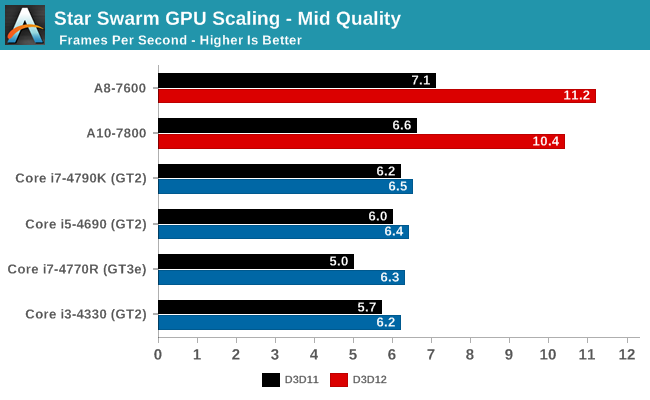
Star Swarm GPU Scaling - Mid Quality

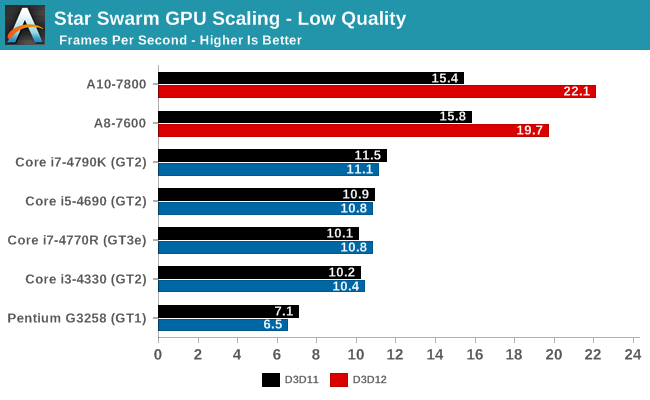
Star Swarm GPU Scaling - Low Quality

As Star Swarm was originally created to demonstrate performance on discrete GPUs, these integrated GPUs do not perform well. Even at low settings nothing cracks 30fps on DirectX 12. None the less there are a few patterns here that can help us understand what’s going on.

Right off the bat then there are two very apparent patterns, one of which is expected and one which caught us by surprise. At a high level, both AMD APUs outperform our collection of Intel processors here, and this is to be expected. AMD has invested heavily in iGPU performance across their entire lineup, where most Intel desktop SKUs come with the mid-tier GT2 GPU.

However what’s very much not expected is the ranking of the various Intel processors. Despite having all 3 Intel GPU tiers represented here, the performance between the Intel GPUs is relatively close, and this includes the Core i7-4770R and its GT3e GPU. GT3e’s performance here immediately raises some red flags – under normal circumstances it substantially outperforms GT2 – and we need to tackle this issue first before we can discuss any other aspects of Intel’s performance.

As long-time readers may recall from our look at Intel’s Gen 7.5 GPU architecture, Intel scales up from GT1 through GT3 by both duplicating the EU/texture unit blocks (the subslice) and the ROP/L3 blocks (the slice common). In the case of GT3/GT3e, it has twice as many slices as GT2 and consequently by most metrics is twice the GPU that GT2 is, with GT3e’s Crystal Well eDRAM providing an extra bandwidth kick. Immediately then there is an issue, since in none of our benchmarks does the GT3e equipped 4770R surpass any of the GT2 equipped SKUs.

The explanation, we believe, lies in the one part of an Intel GPU that doesn’t get duplicated in GT3e, which is the front-end, or as Intel calls it the Global Assets. Regardless of which GPU configuration we’re looking at – GT1, GT2, or GT3e – all Gen 7.5 configurations share what’s essentially the same front-end, which means front-end performance doesn’t scale up with the larger GPUs beyond any minor differences in GPU clockspeed.

Star Swarm for its part is no average workload, as it emphasizes batch counts (draw calls) above all else. Even though the low quality setting has much smaller batch counts than the extreme setting we use on the dGPUs, it’s still over 20K batches per frame, a far higher number than any game would use if it was trying to be playable on an iGPU. Consequently based on our GT2 results and especially our GT3e result, we believe that Star Swarm is actually exposing the batch processing limits of Gen 7.5’s front-end, with the front-end bottlenecking performance once the CPU bottleneck is scaled back by the introduction of DirectX 12.

The result of this is that while the Intel iGPUs are technically GPU limited under DirectX 12, it’s not GPU limited in a traditional sense; it’s not limited by shading performance, or memory bandwidth, or ROP throughput. This means that although Intel’s iGPUs benefit from DirectX 12, it’s not by nearly as much as AMD’s iGPUs did, never mind the dGPUs.

Update: Between when this story was written and when it was published, we heard back from Intel on our results. We are publishing our results as-is, but Intel believes that the lack of scaling with GT3e stems in part from a lack of optimizations for lower performnace GPUs in our build of Star Swarm, which is from an October branch of Oxide’s code base. Intel tells us that newer builds do show much better overall performance and more consistent gains for the GT3e, all the while the Oxide engine itself is in flux with its continued development. In any case this reiterates the fact that we’re still looking at early code here from all parties and performance is subject to change, especially on a test as directed/non-standard as Star Swarm.

So how much does Intel actually benefit from DirectX 12 under Star Swarm? As one would reasonably expect, with their desktop processors configured for very high CPU performance and much more limited GPU performance, Intel is the least CPU bottlenecked in the first place. That said, if we take a look at the mid quality results in particular, what we find is that Intel still benefits from DX12. The 4770R is especially important here, as it’s a relatively weaker GPU (base frequency 3.2GHz) coupled with a more powerful GPU. It starts out trailing the other Core processors in DX11, only to reach parity with them under DX12 when the bottleneck shifts from the CPU to the GPU front-end. The performance gain is only 25% – and at framerates in the single digits – but conceptually it shows that even Intel can benefit from DX12. Meanwhile the other Intel processors see much smaller, but none the less consistent gains, indicating that there’s at least a trivial benefit from DX12.
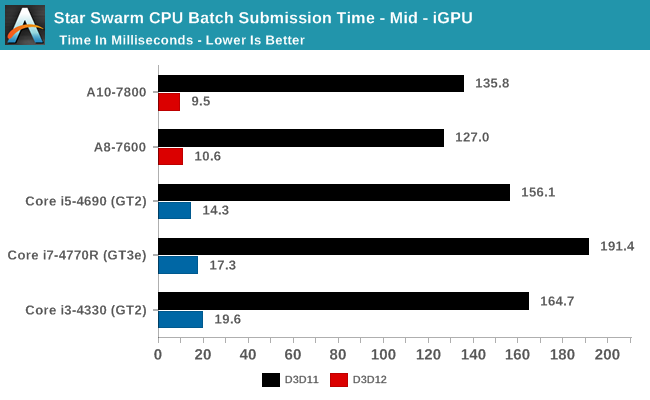
Star Swarm CPU Batch Submission Time - Mid - iGPU

Taking a look under the hood at our batch submission times, we can much more clearly see the CPU usage benefits of DX12. The Intel CPUs actually start at a notable deficit here under DX11, with batch submission times worse than the AMD APUs and their relatively weaker CPUs, and 4770R in particular taking nearly 200ms to submit a batch. Enabling DX12 in turn causes the same dramatic reduction in batch submission times we’ve seen elsewhere, with Intel’s batch submission times dropping to below 20ms. Somewhat surprisingly Intel’s times are still worse than AMD’s, though at this point we’re so badly GPU limited on all platforms that it’s largely academic. None the less it shows that Intel may have room for future improvements.
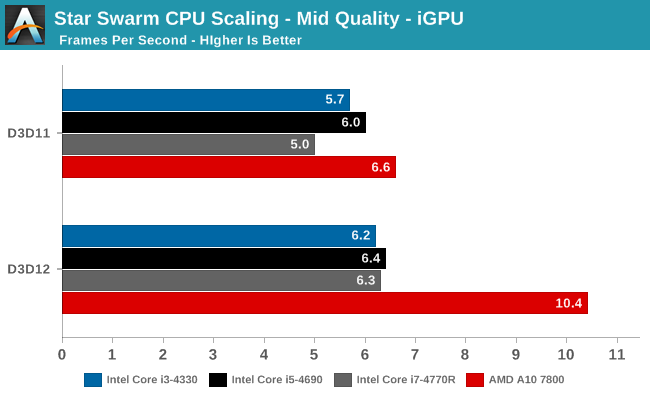
Star Swarm CPU Scaling - Mid Quality - iGPUStar Swarm CPU Scaling - Low Quality - iGPU

With this data in hand, we can finally make better sense of the results we’re seeing today. Just as with AMD and NVIDIA, using DirectX 12 has a noticeable and dramatic reduction in batch submission times for Intel’s iGPUs. However in the case of Star Swarm the batch counts are so high that it appears GT2 and GT3e are bottlenecked by their GPU front-ends, and as a result the gains from enabling DX12 at very limited. In fact at this point we’re probably at the limits of Star Swarm’s usefulness, since it’s meant more for discrete GPUs.

The end result though is that one way or another Intel ends up shifting from being CPU limited to GPU limited under DX12. And with a weaker GPU than similar AMD parts, performance tops out much sooner. That said, it’s worth pointing out that we are looking at desktop parts here, where Intel goes heavy on the CPU and light on the GPU; in mobile parts where Intel’s CPU and GPU configurations are less lopsided, it’s likely that Intel would benefit more than they do on the desktop, though again probably not as much as AMD has.

As for real world games, just as with our other GPUs we’re in a wait-and-see situation. An actual game designed to be playable on Intel’s iGPUs is very unlikely to push as many batch calls as Star Swarm, so the front-end bottleneck and GT3e’s poor performance are similarly unlikely to recur. But at the same time with Intel generally being the least CPU bottlenecked in the first place, their overall gains under DX12 may be the smallest, particularly when exploiting the API’s vastly improved draw call performance.

In the meantime GDC 2015 will be taking place next week, where we will be hearing more from Microsoft and its GPU partners about DirectX 12. With last year’s unveiling being an early teaser of the API, the sessions this year will be focusing on helping programmers ramp up for its formal launch later this year, and with any luck we’ll find the final details on feature level 12_0 and whether any current GPUs are 12_0 compliant. Along with more on OpenGL Next (aka glNext), it should make for an exciting show for GPU events.
Western Digital My Cloud NAS Updates Target Prosumers and Small Businesses

Western Digital My Cloud NAS Updates Target Prosumers and Small Businesses

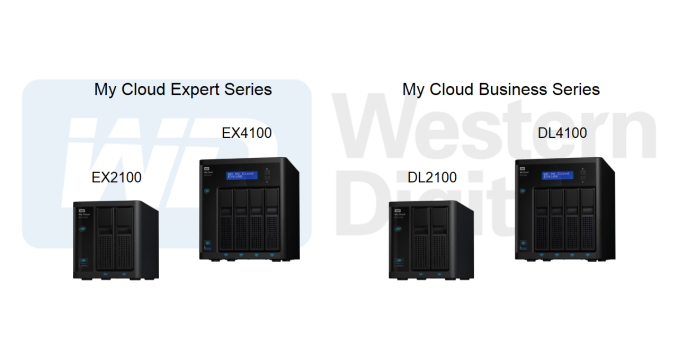
Western Digital is no stranger to the NAS market. Their Sentinel series units (based on Windows Storage Server) have targeted business users for quite some time now. The My Cloud consumer series (1- and 2-bay NAS units based on a custom embedded Linux platform) introduced a few years back targets home users. These two product lines cover the two extreme ends of the market for NAS units costing up to $5000. In late 2013, Western Digital launched the My Cloud Expert series with the introduction of the 4-bay WD My Cloud EX4. This was followed by a 2-bay version in March 2014.

It has been almost a year since Western Digital last updated their hardware offerings, but the firmware and user-experience improvements have been coming in periodically (indicating long-term commitment to this market segment). Today, two sets of products are being introduced to cover the whole range of this NAS market segment:

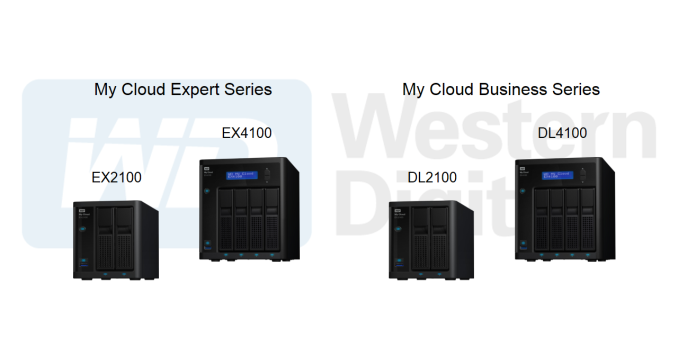
  • Updated EXpert Series (EX2100 and EX4100)
  • New Business Series (DL2100 and DL4100)

From an external viewpoint, all the NAS units being introduced today come with dual GbE ports and a couple of USB 3.0 ports. Similar to previous generation EX units, the new ones also come with two power adapter inputs.

The EX2100 and EX4100 are one of the first NAS units based on the new Marvell Riverwood platform (ARMADA 385 / 388). These are dual-core Cortex-A9-based SoCs running at up to 1.6 GHz. The 2-bay unit comes with the ARMADA 385 and has 1 GB of RAM, while the 4-bay unit sports the ARMADA 388 and has 2 GB of RAM. The main difference between the ARMADA 385 and 388 is the presence of two vs. four native SATA ports. We will look more into the SoC platform in our dedicated review.

The DL2100 and DL4100 are based on the Intel Rangeley SoCs. Based on the Silvermont Atom cores, these SoCs have been quite popular with COTS NAS vendors over the last year (with Seagate’s NAS Pro lineup as well as the Synology DSx15(+) series utilizing them). The 2-bay DL2100 is based on the 2C/2T Atom C2350 running at 1.7 GHz and sports 1 GB of RAM. The 4-bay DL4100 is based on the Atom C2338 and has 2 GB of RAM. The clock speeds and features are similar for both SoCs, though the C2350 has a slightly lower TDP (6W vs. 7W). On the software front, the DL series some with extensive Active Directory support, stressing its business focus.

The updated EX models and the new DL models round up Western Digital’s offerings in this market segment. They now have units available for different needs and performance levels. The addition of Linux-based business NAS models help in reducing the costs for the small business market segment.

Western Digital has a number of features (both in hardware and the My Cloud OS) that make it stand out amongst the multitude of offerings from various vendors in this market space:

  • Pre-installed OS / pre-configured NAS units, with OS on embedded flash: The pre-configuration is similar to Synology’s Beyond Cloud series, but valid for all models in the EX and DL series. In addition, the OS is itself not spread in a replicated manner across all installed disks, but, resides along with the settings in flash memory on the board. One downside is that system migration is not possible (allows RAID roaming, though), but the approach does have its advantages in terms of fast setup.
  • Storage scalability using dual NICs: This is a unique feature, allowing units to be daisy chained using the network links. The volumes in the daisy-chained NAS are present / visible through the primary unit’s interface. Backups / replication can be easily configured, even though it is not a true high-availability system. The daisy-chained units don’t even need to be of the same model.
  • Redundant power-supply support: This was one of the unique features in the WD EX2 and EX4 that we reviewed last year. It allows for the NAS to remain in operation even if one of the power adapters were to fail.
  • Expandable memory for the prosumer series: The DL series come with 1 GB and 2 GB of RAM for the 2-bay and 4-bay units respectively. However, end-users can opt for their own SO-DIMM modules to increase the memory in these units (up to 6 GB for the DL4100)
  • Models with pre-configured disks come with the WD Red drives (6 TB variants included) – this provides consumers with a single point-of-contact for both the NAS unit and the storage media when it comes to support purposes.

The pricing for the various models / capacities is provided in the table below:

Western Digital My Cloud NAS Introductory MSRPs [ Q1 2015 ]
Capacity EX2100 EX4100 DL2100 DL4100
Diskless $250 $400 $350 $530
4 TB $430 $530
8 TB $560 $750 $650 $880
12 TB $750 $850
16 TB $1050 $1170
24 TB $1450 $1530

Similar to Seagate’s NAS and NAS Pro offerings, the updated hardware platforms and the tying together of the NAS and the storage media will help Western Digital expand their already growing presence in this market segment. The existing channel presence will also provide an additional advantage. Performance evaluation of the EX4100 as well as the DL4100 and comparison with other models in this market segment will be available in the reviews slated to go out over the next few days.

Western Digital My Cloud NAS Updates Target Prosumers and Small Businesses

Western Digital My Cloud NAS Updates Target Prosumers and Small Businesses

Western Digital is no stranger to the NAS market. Their Sentinel series units (based on Windows Storage Server) have targeted business users for quite some time now. The My Cloud consumer series (1- and 2-bay NAS units based on a custom embedded Linux platform) introduced a few years back targets home users. These two product lines cover the two extreme ends of the market for NAS units costing up to $5000. In late 2013, Western Digital launched the My Cloud Expert series with the introduction of the 4-bay WD My Cloud EX4. This was followed by a 2-bay version in March 2014.

It has been almost a year since Western Digital last updated their hardware offerings, but the firmware and user-experience improvements have been coming in periodically (indicating long-term commitment to this market segment). Today, two sets of products are being introduced to cover the whole range of this NAS market segment:

  • Updated EXpert Series (EX2100 and EX4100)
  • New Business Series (DL2100 and DL4100)

From an external viewpoint, all the NAS units being introduced today come with dual GbE ports and a couple of USB 3.0 ports. Similar to previous generation EX units, the new ones also come with two power adapter inputs.

The EX2100 and EX4100 are one of the first NAS units based on the new Marvell Riverwood platform (ARMADA 385 / 388). These are dual-core Cortex-A9-based SoCs running at up to 1.6 GHz. The 2-bay unit comes with the ARMADA 385 and has 1 GB of RAM, while the 4-bay unit sports the ARMADA 388 and has 2 GB of RAM. The main difference between the ARMADA 385 and 388 is the presence of two vs. four native SATA ports. We will look more into the SoC platform in our dedicated review.

The DL2100 and DL4100 are based on the Intel Rangeley SoCs. Based on the Silvermont Atom cores, these SoCs have been quite popular with COTS NAS vendors over the last year (with Seagate’s NAS Pro lineup as well as the Synology DSx15(+) series utilizing them). The 2-bay DL2100 is based on the 2C/2T Atom C2350 running at 1.7 GHz and sports 1 GB of RAM. The 4-bay DL4100 is based on the Atom C2338 and has 2 GB of RAM. The clock speeds and features are similar for both SoCs, though the C2350 has a slightly lower TDP (6W vs. 7W). On the software front, the DL series some with extensive Active Directory support, stressing its business focus.

The updated EX models and the new DL models round up Western Digital’s offerings in this market segment. They now have units available for different needs and performance levels. The addition of Linux-based business NAS models help in reducing the costs for the small business market segment.

Western Digital has a number of features (both in hardware and the My Cloud OS) that make it stand out amongst the multitude of offerings from various vendors in this market space:

  • Pre-installed OS / pre-configured NAS units, with OS on embedded flash: The pre-configuration is similar to Synology’s Beyond Cloud series, but valid for all models in the EX and DL series. In addition, the OS is itself not spread in a replicated manner across all installed disks, but, resides along with the settings in flash memory on the board. One downside is that system migration is not possible (allows RAID roaming, though), but the approach does have its advantages in terms of fast setup.
  • Storage scalability using dual NICs: This is a unique feature, allowing units to be daisy chained using the network links. The volumes in the daisy-chained NAS are present / visible through the primary unit’s interface. Backups / replication can be easily configured, even though it is not a true high-availability system. The daisy-chained units don’t even need to be of the same model.
  • Redundant power-supply support: This was one of the unique features in the WD EX2 and EX4 that we reviewed last year. It allows for the NAS to remain in operation even if one of the power adapters were to fail.
  • Expandable memory for the prosumer series: The DL series come with 1 GB and 2 GB of RAM for the 2-bay and 4-bay units respectively. However, end-users can opt for their own SO-DIMM modules to increase the memory in these units (up to 6 GB for the DL4100)
  • Models with pre-configured disks come with the WD Red drives (6 TB variants included) – this provides consumers with a single point-of-contact for both the NAS unit and the storage media when it comes to support purposes.

The pricing for the various models / capacities is provided in the table below:

Western Digital My Cloud NAS Introductory MSRPs [ Q1 2015 ]
Capacity EX2100 EX4100 DL2100 DL4100
Diskless $250 $400 $350 $530
4 TB $430 $530
8 TB $560 $750 $650 $880
12 TB $750 $850
16 TB $1050 $1170
24 TB $1450 $1530

Similar to Seagate’s NAS and NAS Pro offerings, the updated hardware platforms and the tying together of the NAS and the storage media will help Western Digital expand their already growing presence in this market segment. The existing channel presence will also provide an additional advantage. Performance evaluation of the EX4100 as well as the DL4100 and comparison with other models in this market segment will be available in the reviews slated to go out over the next few days.

Gigabyte 17.3” P37X Gaming Notebook Now in North America

Gigabyte 17.3” P37X Gaming Notebook Now in North America

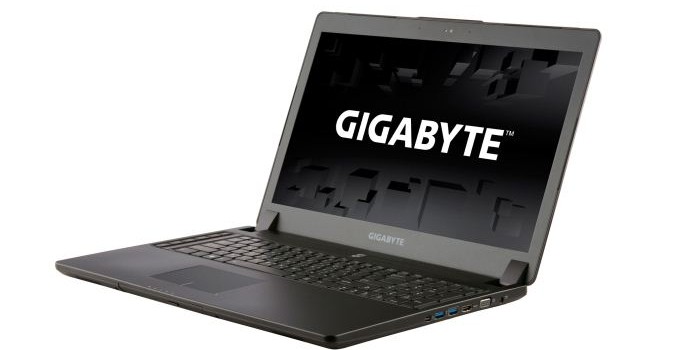
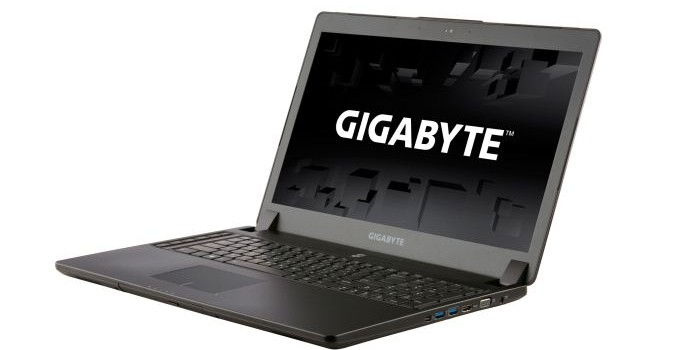
Gigabyte has an interesting line of gaming notebooks these days, including their own brand of P-series laptops as well as the AORUS brand. We’re in the process of reviewing the P35X v3, which packs a GTX 980M into a 0.82” thick 15.6” chassis, and now Gigabyte sends word that they have officially launched the big brother P37X with a 17.3” chassis in the North American market. It’s actually slightly thicker than the P35X, and the design language is very similar as well. That’s either good or bad depending on what you’re looking for in a gaming notebook.

On the one hand it’s generally slimmer (0.9”) and lighter (6.17 lbs.) than competing notebooks from Alienware, ASUS, Clevo, and MSI; however, keeping things cool in a thinner chassis generally means either more noise from the fans, higher temperatures, or both. It’s also either a conservative and subdued looking design, or it’s boring – I tend to like less bling on my laptops, but others are happier with multi-colored keyboard backlighting and a more aggressive industrial design.

In terms of features, all the core elements are essentially the same as the 15.6” model, but the keyboard adds a column of six dedicated macro keys. The top key switches between five banks of macros, so all told that gives you access to 25 macro sets. Besides the GTX 980M GPU, the system also supports Core i7 processors (Haswell series still), up to two 512GB mSATA drives in RAID 0, and two 2.5” drives are available as well. As with most other 17.3” laptops, the display remains a 1080p panel – there just aren’t many other options yet, though we’ve heard 3K/4K may be coming later this year (hopefully?) for 17.3” panels. At least the display is anti-glare and wide viewing angle (IPS most likely, though AHVA is also a possibility)

Amazon and other retailers are carrying the Gigabyte P37X, and the base model comes with i7-4720HQ, GTX 980M 8GB, 8GB system RAM, and a 1TB HDD (no SSDs in the base model, though you can always add your own) for $1999. If you prefer a slightly upgraded build, the Gigabyte P37X-CF2 also has 8GB RAM and an i7-4720HQ, but it includes a 256GB mSATA SSD and a Blu-ray burner for $2499. So yeah, just buy the base model and pick up a pair of 512GB mSATA MX200 SSDs for $440 instead – and if you really want a Blu-ray burner, that can be arranged for the remaining $60. You’ll probably want to upgrade the RAM as well, as 8GB is a bit chintzy on a high-end gaming rig these days.

Despite the odd pricing on the “upgraded” build, it’s good to see additional gaming notebook options, and for those that prefer a more subdued aesthetic the Gigabyte line might be exactly what you’re after. We’ll have the full review of the P35W v3 in the next week or two, so stay tuned.

Gigabyte 17.3” P37X Gaming Notebook Now in North America

Gigabyte 17.3” P37X Gaming Notebook Now in North America

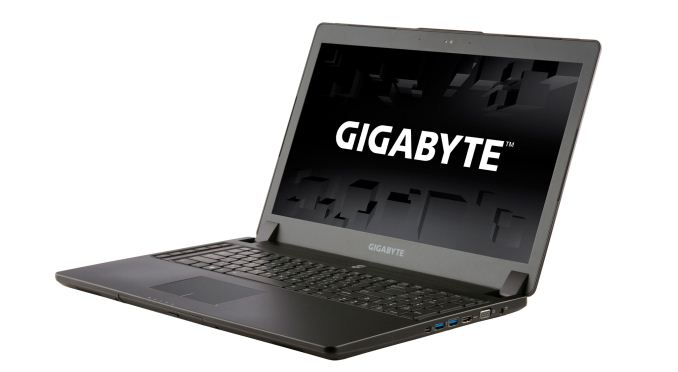
Gigabyte has an interesting line of gaming notebooks these days, including their own brand of P-series laptops as well as the AORUS brand. We’re in the process of reviewing the P35X v3, which packs a GTX 980M into a 0.82” thick 15.6” chassis, and now Gigabyte sends word that they have officially launched the big brother P37X with a 17.3” chassis in the North American market. It’s actually slightly thicker than the P35X, and the design language is very similar as well. That’s either good or bad depending on what you’re looking for in a gaming notebook.

On the one hand it’s generally slimmer (0.9”) and lighter (6.17 lbs.) than competing notebooks from Alienware, ASUS, Clevo, and MSI; however, keeping things cool in a thinner chassis generally means either more noise from the fans, higher temperatures, or both. It’s also either a conservative and subdued looking design, or it’s boring – I tend to like less bling on my laptops, but others are happier with multi-colored keyboard backlighting and a more aggressive industrial design.

In terms of features, all the core elements are essentially the same as the 15.6” model, but the keyboard adds a column of six dedicated macro keys. The top key switches between five banks of macros, so all told that gives you access to 25 macro sets. Besides the GTX 980M GPU, the system also supports Core i7 processors (Haswell series still), up to two 512GB mSATA drives in RAID 0, and two 2.5” drives are available as well. As with most other 17.3” laptops, the display remains a 1080p panel – there just aren’t many other options yet, though we’ve heard 3K/4K may be coming later this year (hopefully?) for 17.3” panels. At least the display is anti-glare and wide viewing angle (IPS most likely, though AHVA is also a possibility)

Amazon and other retailers are carrying the Gigabyte P37X, and the base model comes with i7-4720HQ, GTX 980M 8GB, 8GB system RAM, and a 1TB HDD (no SSDs in the base model, though you can always add your own) for $1999. If you prefer a slightly upgraded build, the Gigabyte P37X-CF2 also has 8GB RAM and an i7-4720HQ, but it includes a 256GB mSATA SSD and a Blu-ray burner for $2499. So yeah, just buy the base model and pick up a pair of 512GB mSATA MX200 SSDs for $440 instead – and if you really want a Blu-ray burner, that can be arranged for the remaining $60. You’ll probably want to upgrade the RAM as well, as 8GB is a bit chintzy on a high-end gaming rig these days.

Despite the odd pricing on the “upgraded” build, it’s good to see additional gaming notebook options, and for those that prefer a more subdued aesthetic the Gigabyte line might be exactly what you’re after. We’ll have the full review of the P35W v3 in the next week or two, so stay tuned.