News


Microsoft Band and Microsoft Health Updated

Microsoft Band and Microsoft Health Updated

This week Microsoft announced several updates for their wearable and health products: Microsoft Band and Microsoft Health. Microsoft stated that overall feedback has been positive, but as with any early technology, there was room for improvement.

To briefly recap the non-Band items from our Wearables 2014 article, Microsoft Health is a cloud service, such as OneDrive, that aims to help improve the health of its users through data analysis and actionable feedback (“insights”). Activity tracking devices and apps that connect to Microsoft Health publish data, with your permission, to the Microsoft Health server. Microsoft claims their cloud data framework and analysis provides the only total health service available. Additionally, Microsoft Health is referred to as an open platform, therefore other companies can interface with it as both publishers of data and subscribers of analysis. Microsoft Health also connects to another Microsoft service, HealthVault, which contains personal and family medical information and lab results.

Previously, users of Microsoft Health could only access their data and insights through a corresponding smartphone application. That changes this week with the launch of https://dashboard.microsofthealth.com (which is either ironically down or simply unavailable to those without a Microsoft Band). This is a welcome addition as smartphones, with their limited screen sizes, simply cannot match the information density of a well designed website. Microsoft was clear to state the dashboard will also work well from a mobile browser should you choose not to use the app- for example if you’re quickly using a friend’s phone.

Additionally, Microsoft Health has now officially rolled out the previously announced support to connect with MapMyFitness and Microsoft HealthVault. Users can visit the “Connected Apps” section of their dashboard to enable the integration.

The rest of the updates announced this week are for the Microsoft Band, and there are quite a few:

  • Bike Tile: The Bike Tile on users’ Microsoft Band lets them track their rides both indoors and outdoors, on the road or trail. Features include:
    • Heart Rate Monitor: When the Bike tile is active, the heart rate monitor is optimized specifically for biking activities.
    • Elevation Tracking: Track elevation and elevation gain, distance and duration and calorie burn– viewable in the Microsoft Health app. 
    • GPS: Users can activate GPS on their Band to map their ride in the mobile app and share it with their friends via email.
    • Speed Analysis: Track your current and average speeds both on the band and in the mobile app, and review your custom splits to relive those longer bike rides.
    • Recovery: From the mobile app, users can see an estimate for how long it will take their body to recover from the ride.
    • Web Dashboard: Biking functionality is supported by the Microsoft Health mobile app at launch. Integration with the Microsoft Health web dashboard is coming soon.
  • Guided Workouts: Five new indoor biking workouts have been added to the Guided Workouts portfolio, including: Indoor Bike Tabata Sprints, Indoor Bike Hour of Sweat, Indoor Bike Total Body, Indoor Bike Pyramid, and Indoor Bike Intervals.
  • Quick Read: Quick Read provides another option to scan incoming texts, emails and other notifications. When enabled, notifications are displayed in a large font size and in rapid succession of words enabling users to read messages while in motion and without the need to scroll.
  • Virtual Keyboard & Voice Replies for Windows Phone 8.1 Users: Windows Phone 8.1 users can craft replies to text messages in two ways. Users can reply to text messages using the virtual keyboard with minimal errors with the help of Microsoft’s World Flow technology, which predicts commonly used words and phrases. They can also dictate responses with voice, powered by Cortana.

Generally, the band is now suitable for biking, and Quick Read and Virtual Keyboard are added to bolster the smart watch use case. From my own experience wearing a Moto360, the Quick Read and Virtual Keyboard functionality are interesting. Receiving a text message appropriately vibrates my wrist with the Moto360, but I need to tap and slide the display around to read the contents. It appears Quick Read can save that extra step.

The Virtual Keyboard honestly sounded impossible to pull off on such a small display, and since I lack a review unit I can not try it. Windows Central has a write up and video of the functionality and it is truely impressive.

The keyboard is an option when replying to text messages and it uses similar technology present in Windows Phone 8.1, Word Flow. Anand has written about Word Flow before. This is an welcome addition, as using voice recognition simply is not perfect yet. I have sent too many voice dictated replies to my wife that state “at the Jim” or something even less recognizable.

Finally, Microsoft has unveiled the Microsoft Band SDK Developer Preview, enabling iOS, Android, and Windows Phone apps to access the Band’s sensors and create tiles linked to the application on the Band itself.

Thankfully, as every wearable (save the Samsung Gear S) lack cellular connectivity, there is typically no lengthy mobile operator validation delay. The Microsoft Band update is rolling out starting yesterday and should arrive at all owners within a few days.

Samsung SM951 (512GB) PCIe SSD Review

The PCIe SSD revolution is upon us. So far nearly every controller vendor has shown off its PCIe SSD controller design and the latest news I’ve heard is that we’ll be seeing a large number of PCIe SSDs from numerous manufacturers in the second half of 2015 (watch out for Computex and Flash Memory Summit). Samsung got a head start in 2013 with the introduction of the XP941 and to-date the company is still the only manufacturer that is shipping a PCIe 2.0 x4 client SSD in volume. Today we have its successor, the SM951, in the house, which upgrades the interface from PCIe 2.0 to 3.0. 

Microsoft Band and Microsoft Health Updated

Microsoft Band and Microsoft Health Updated

This week Microsoft announced several updates for their wearable and health products: Microsoft Band and Microsoft Health. Microsoft stated that overall feedback has been positive, but as with any early technology, there was room for improvement.

To briefly recap the non-Band items from our Wearables 2014 article, Microsoft Health is a cloud service, such as OneDrive, that aims to help improve the health of its users through data analysis and actionable feedback (“insights”). Activity tracking devices and apps that connect to Microsoft Health publish data, with your permission, to the Microsoft Health server. Microsoft claims their cloud data framework and analysis provides the only total health service available. Additionally, Microsoft Health is referred to as an open platform, therefore other companies can interface with it as both publishers of data and subscribers of analysis. Microsoft Health also connects to another Microsoft service, HealthVault, which contains personal and family medical information and lab results.

Previously, users of Microsoft Health could only access their data and insights through a corresponding smartphone application. That changes this week with the launch of https://dashboard.microsofthealth.com (which is either ironically down or simply unavailable to those without a Microsoft Band). This is a welcome addition as smartphones, with their limited screen sizes, simply cannot match the information density of a well designed website. Microsoft was clear to state the dashboard will also work well from a mobile browser should you choose not to use the app- for example if you’re quickly using a friend’s phone.

Additionally, Microsoft Health has now officially rolled out the previously announced support to connect with MapMyFitness and Microsoft HealthVault. Users can visit the “Connected Apps” section of their dashboard to enable the integration.

The rest of the updates announced this week are for the Microsoft Band, and there are quite a few:

  • Bike Tile: The Bike Tile on users’ Microsoft Band lets them track their rides both indoors and outdoors, on the road or trail. Features include:
    • Heart Rate Monitor: When the Bike tile is active, the heart rate monitor is optimized specifically for biking activities.
    • Elevation Tracking: Track elevation and elevation gain, distance and duration and calorie burn– viewable in the Microsoft Health app. 
    • GPS: Users can activate GPS on their Band to map their ride in the mobile app and share it with their friends via email.
    • Speed Analysis: Track your current and average speeds both on the band and in the mobile app, and review your custom splits to relive those longer bike rides.
    • Recovery: From the mobile app, users can see an estimate for how long it will take their body to recover from the ride.
    • Web Dashboard: Biking functionality is supported by the Microsoft Health mobile app at launch. Integration with the Microsoft Health web dashboard is coming soon.
  • Guided Workouts: Five new indoor biking workouts have been added to the Guided Workouts portfolio, including: Indoor Bike Tabata Sprints, Indoor Bike Hour of Sweat, Indoor Bike Total Body, Indoor Bike Pyramid, and Indoor Bike Intervals.
  • Quick Read: Quick Read provides another option to scan incoming texts, emails and other notifications. When enabled, notifications are displayed in a large font size and in rapid succession of words enabling users to read messages while in motion and without the need to scroll.
  • Virtual Keyboard & Voice Replies for Windows Phone 8.1 Users: Windows Phone 8.1 users can craft replies to text messages in two ways. Users can reply to text messages using the virtual keyboard with minimal errors with the help of Microsoft’s World Flow technology, which predicts commonly used words and phrases. They can also dictate responses with voice, powered by Cortana.

Generally, the band is now suitable for biking, and Quick Read and Virtual Keyboard are added to bolster the smart watch use case. From my own experience wearing a Moto360, the Quick Read and Virtual Keyboard functionality are interesting. Receiving a text message appropriately vibrates my wrist with the Moto360, but I need to tap and slide the display around to read the contents. It appears Quick Read can save that extra step.

The Virtual Keyboard honestly sounded impossible to pull off on such a small display, and since I lack a review unit I can not try it. Windows Central has a write up and video of the functionality and it is truely impressive.

The keyboard is an option when replying to text messages and it uses similar technology present in Windows Phone 8.1, Word Flow. Anand has written about Word Flow before. This is an welcome addition, as using voice recognition simply is not perfect yet. I have sent too many voice dictated replies to my wife that state “at the Jim” or something even less recognizable.

Finally, Microsoft has unveiled the Microsoft Band SDK Developer Preview, enabling iOS, Android, and Windows Phone apps to access the Band’s sensors and create tiles linked to the application on the Band itself.

Thankfully, as every wearable (save the Samsung Gear S) lack cellular connectivity, there is typically no lengthy mobile operator validation delay. The Microsoft Band update is rolling out starting yesterday and should arrive at all owners within a few days.

Samsung SM951 (512GB) PCIe SSD Review

The PCIe SSD revolution is upon us. So far nearly every controller vendor has shown off its PCIe SSD controller design and the latest news I’ve heard is that we’ll be seeing a large number of PCIe SSDs from numerous manufacturers in the second half of 2015 (watch out for Computex and Flash Memory Summit). Samsung got a head start in 2013 with the introduction of the XP941 and to-date the company is still the only manufacturer that is shipping a PCIe 2.0 x4 client SSD in volume. Today we have its successor, the SM951, in the house, which upgrades the interface from PCIe 2.0 to 3.0. 

ASUS Goes USB 3.1: Motherboards, PCIe Cards and Enclosures Tested

ASUS Goes USB 3.1: Motherboards, PCIe Cards and Enclosures Tested

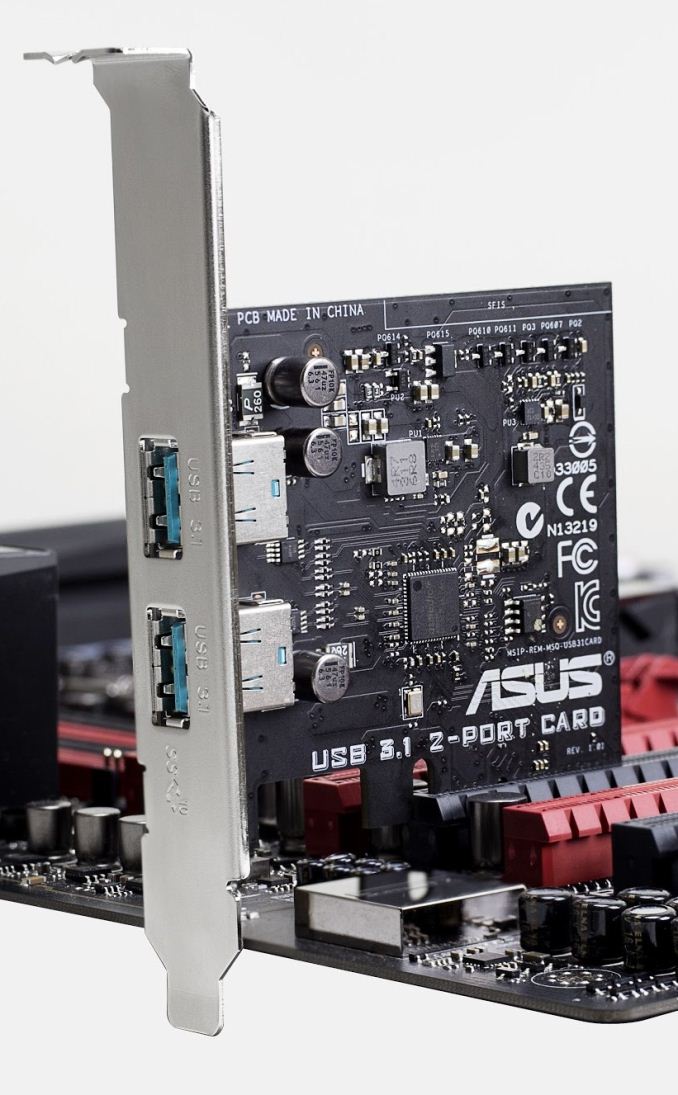
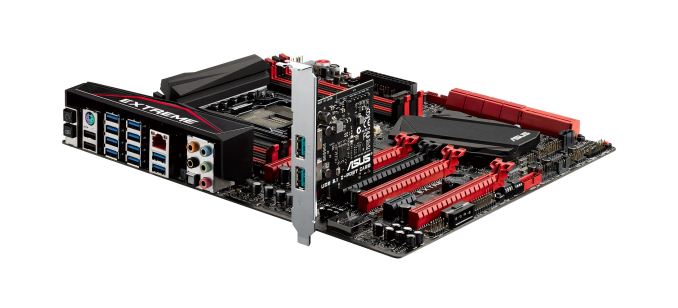
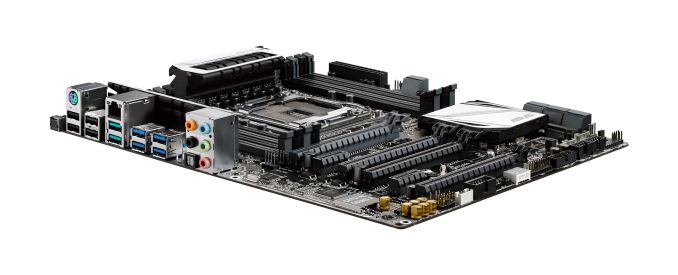
As the motherboard reviewer at AnandTech, I speak to my contacts at the motherboard manufacturers on a regular basis. All the recent talk has had a heavy sprinkling about thoughts, opinions and implementations of USB 3.1. To add to our recent testing, ASUS is today announcing the launch of their USB 3.1 PCIe card along with a variety of motherboard bundles either featuring onboard USB 3.1 or a bundled USB 3.1 card. We stuck the card in the Rampage V Extreme to run the numbers with an ASUS dual mSATA USB 3.1 enclosure.

The ASUS Plan Of Attack

As we expressed in our previous piece, USB 3.1 adoption will take an excruciating long time, especially as USB 3.0 is only now reaching price party with USB 2.0. But as with USB 3.0 we will first start to see USB 3.1 adopted on PCIe cards and extra controllers first on desktops followed by high end laptops before it becomes part of the chipset standard. Even then, with a ubiquity of ports available, it takes time for the devices to appear in the market with sufficient quantity to become cost effective for all but the early adopters.

Nevertheless, motherboard manufacturers want to tackle this head on. As far as we can tell there are a handful of IC manufactures that can provide controllers to be placed in products, but ASMedia are more ready than others to actually sell the components. ASUS’ close relationship with ASMedia allows them to approach the market in two different ways – either by an onboard controller or via a bundled PCIe card.

At this point in time, all the implementations from ASUS will be via the Type-A interface. A couple of high end motherboards will be offered with USB 3.1 PCIe cards, while those lower down the stack will be modified for the onboard controller for about a dozen in total. There will be a USB Type-C card released at a later date, available only as a separate purchase.

One tack that ASUS is implemented differently is the color of the USB 3.1 Type-A ports. Standard procedure for USB 2.0 is a black port, with USB 3.0 as blue. This is not a hard and fast rule, as we see red ports on some motherboards for gaming or green ports on the Razer Blade, but as if yet there is no clear definition for USB 3.1. In this instance, ASUS is going with a teal blue to represent USB 3.1, and offers enough contrast from USB 3.0.

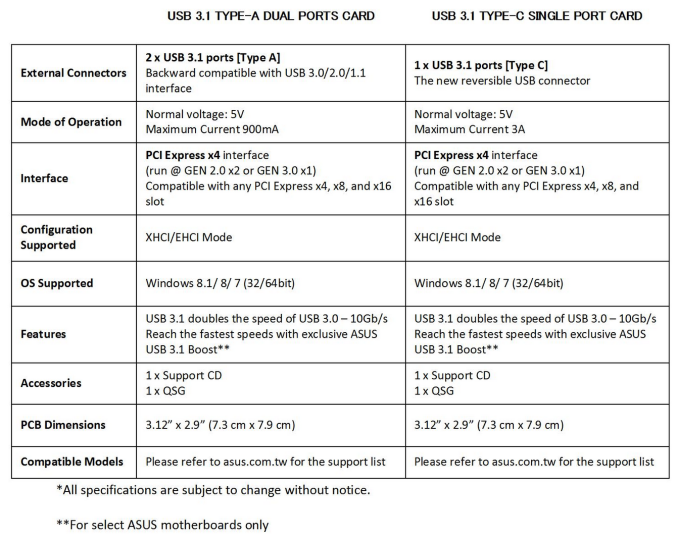
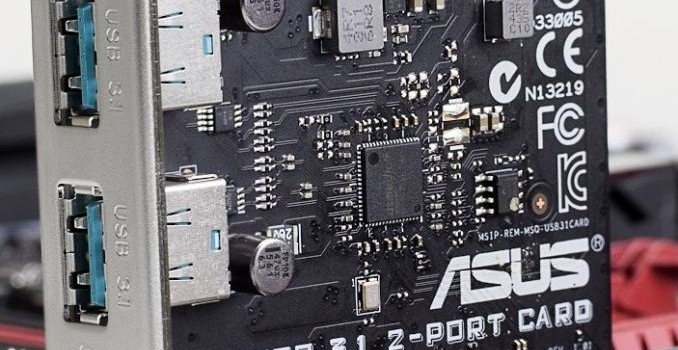
The card itself uses the ASMedia ASM1142 controller in a PCIe 2.0 x2 form factor. This should provide the 10 Gbps data rate for the USB 3.1 standard. The Type-A versions will support 900 mA charging at 5V, whereas Type-C will do 3A at 5V, suitable for 15W. In order to get the 100W charging and implement the enhanced power standard, the power delivery delivery has to be built into the power module around the USB 3.1 controller. With PCIe cards this makes more sense, although it would require the card to have an extra power connector (either SATA, molex or PCIe). When the USB 3.1 port is on the rear panel of a motherboard, it makes it more difficult to apply the approach power planes, especially on cheaper motherboards, as well as drawing power directly from the 24-pin ATX and directing the appropriate power around the processor. Thus if we ever see 100W charging on motherboards, PCIe cards might be the way forward.

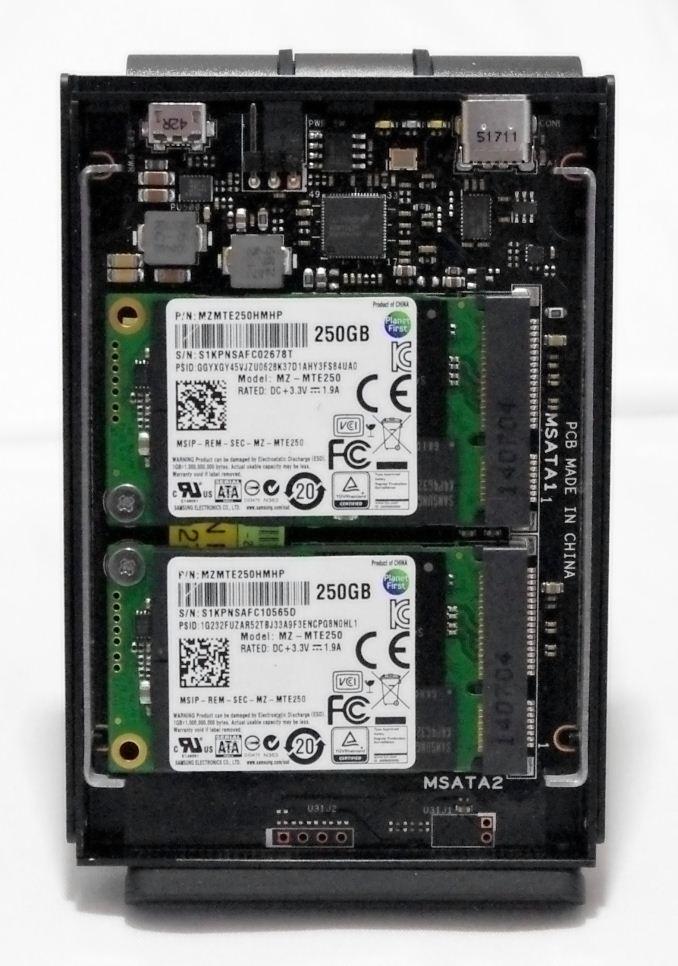
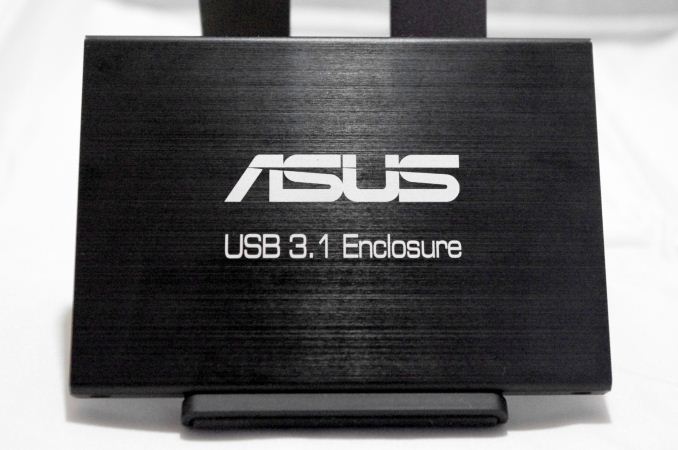
As part of the testing bundle, ASUS supplied a near-final version of a USB 3.1 storage device. This small form factor uses two 256 GB Samsung 840 EVO mSATA drives in RAID-0 for maximum throughput.

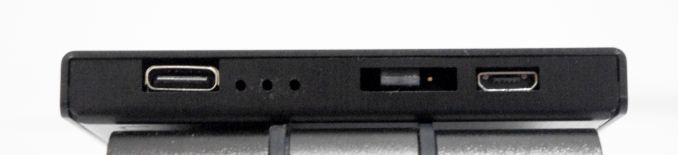
In order to keep the size of the device down, it uses a Type-C connector for data along with a micro-USB for power. This means that the device requires two USB ports in all, which is understandable for a dual mSATA device that requires power but perhaps somewhat limiting for devices with only one USB port. It is unknown if ASUS will sell this enclosure separately at this point.

Both the card and the enclosure are still in development, and we had a difficult time to get it to work. For example, with the Rampage V Extreme and the USB 3.1 card, the enclosure had to be plugged in at power up, with power and data both connected to the card. Without this, the system would not recognize the device or it would enter a speed mode indicative of PCIe 2.0 x1 data transfers eventually ending up in an IO error. Also, our setup did not want to work in USB 2.0 mode at all. But when we installed the right drivers, and booted the system with the cables set up as required, we got great performance. There was a little coil whine during system writes, but as mentioned this device is still in development, and hopefully all these issues can be ironed out.

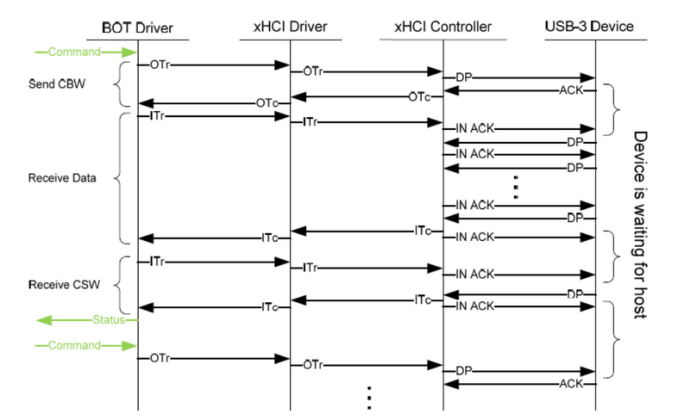
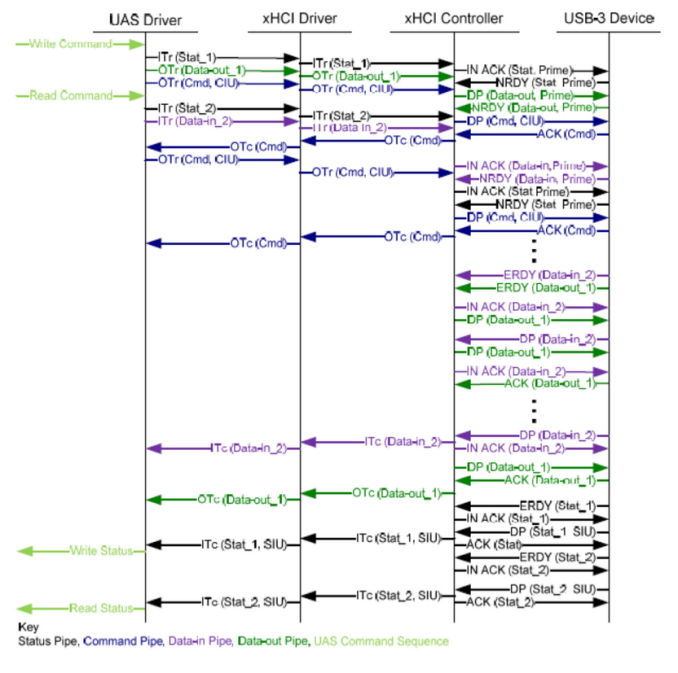
Unfortunately all the hardware for our previous USB 3.1 testing had to be sent back which means we cannot do a direct comparison due to different enclosures, but it is still interesting to see where the numbers land. ASUS is also touting an updated USB 3.0 Boost as well, dubbed USB 3.1 Boost, to help with transfers. The current state of play with USB transfer speeds is a miasma from XP drivers, base Intel drivers for Windows 7 and then UASP implementations in Windows 8.  The basic mode in Windows 7 means that Bulk Only Transfer (BOT) is par for the course:

UASP, or USB Attached SCSI Protocol, allows transfers to occur by multitasking the transfers without the need for constant iterations up and down the stack for each read or write command.

Windows 8 offers a good version of UASP, however ASUS’ customized driver for Intel and ASMedia based ports goes one better through optimization. Normally such processes sacrifice latency for peak speeds, although we are rarely latency limited with a USB drive. Windows 7 also gets a similar driver, which represents a bigger boost from the base driver there.

Test Setup

Test Setup
Processor Intel Core i7-5960X ES
8 Cores, 16 Threads, 3.0 GHz (3.5 GHz Turbo)
Motherboards ASUS Rampage V Extreme
Cooling Cooler Master Nepton 140XL
Power Supply OCZ 1250W Gold ZX Series
Corsair AX1200i Platinum PSU
Memory Corsair DDR4-2133 C15 4×8 GB 1.2V
G.Skill Ripjaws 4 DDR4-2133 C15 4×8 GB 1.2V
Memory Settings JEDEC @ 2133
Video Cards MSI GTX 770 Lightning 2GB (1150/1202 Boost)
Video Drivers NVIDIA Drivers 332.21
Hard Drive Crucial MX200 1TB CT1000MX200SSD1
Optical Drive LG GH22NS50
Case Open Test Bed
Operating System Windows 7 64-bit SP1
USB 2/3 Testing ASUS USB 3.1 Enclosure


The Results

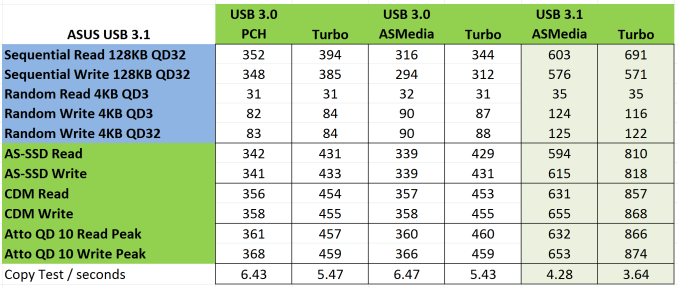
For the setup, we tested the USB 3.1 enclosure in the USB 3.1 Type-A card installed into a red slot on the Rampage V Extreme (a CPU PEG slot), the Intel PCH based USB 3.0 ports and the ASMedia controller based USB 3.0 ports. In each of these scenarios, USB 3.1 Boost is applied for a second set of data. Due to our initial issues (our first USB 3.1 card was DOA), ASUS sent a spare set of hardware and another enclosure – we can confirm that the second enclosure exhibited the same speeds, confirming a level of consistency.

Due to some issues getting IOmeter to recognize the drives without a partition, the IOmeter results for peak throughput seem low compared to the AS-SSD and CrystalDiskMark testing. But on the other hand, we easily show a ~50% boost in random write speeds, as moving from 84 MBps to 125 MBps (Intel 3.0 -> ASMedia 3.1) marks a significant shift. Our copy test shows a similar gain, even more so when USB 3.1 Boost is factored in.

When?!

As of the official announcement in the US today, a number of SKUs will be available for users to purchase (as long as you don’t mind waiting for USB 3.1 devices to come along). These motherboards will be split into two sections:

Motherboards with Bundled USB 3.1 Cards (Type-A for now):

Rampage V Extreme/U3.1 ($519, ETA 2/27)
X99-Deluxe/U3.1 ($409, ETA 3/3)

Motherboards with USB 3.1 Type-A Built-In:

X99-Pro/USB 3.1 ($339, ETA 2/27)
X99-A/USB 3.1 ($279, ETA 3/10)
X99-E WS/USB 3.1
Z97-Deluxe/USB 3.1 ($299, ETA 3/3)
Z97-PRO(Wi-Fi ac)/USB 3.1 ($229, ETA 3/3)
Z97-A/USB 3.1 ($159, ETA 3/10)
Z97-E/USB 3.1
Z97-K/USB 3.1
Sabertooth Z97 Mark 1/USB 3.1 ($259, ETA 3/3)
B85M-G PLUS/USB 3.1
B85-PLUS/USB 3.1

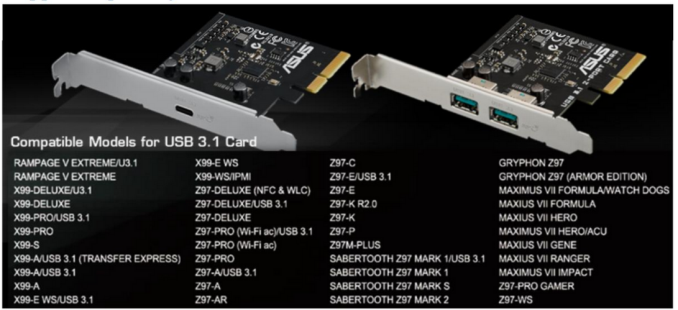
The USB 3.1 card, with the appropriate driver update, will be $39 and have an ETA of 3/10. Both cards should be compatible in the following motherboards:

Technically ASUS would prefer that these cards are used solely for use in ASUS motherboards and are being validated as such. A full validation list should be available on the product page for the USB 3.1 cards when it becomes available. Performance on any other motherboard is not guaranteed, but we wouldn’t say it was impossible. The official specifications are:

Most manufacturers will go all in with Type-A to begin with, as Type-C is still new to the market. Type-A can still be used with current devices and drives, whereas Type-C cables are still new. Given that the controller requires two PCIe 2.0 lanes, it makes interesting reading as to how freely USB 3.1 might be implemented on Intel’s next desktop platform. USB 3.1 will also be a differentiator in the laptop and notebook space, and I suspect several companies will market the functionality and charge for the privilege, despite the lack of enclosures right now. The fact that ASUS is going to sell its USB 3.1 card for $39 means that implementation costs should be low for notebook manufacturers.

As part of this release, ASUS also sent us a list of USB 3.1 devices that they plan of validating with the USB 3.1 ports. Most of the company names come from Asia and might represent a few of the ODMs that the more consumer-oriented brands use, but the list totals 34 items (Hubs, enclosures, cables) with availability for a few of them from March. I suspect that Computex time (June) will be ramping up the USB 3.1 ecosystem for the early adopters for sure.