News


Drobo 5D with BeyondRAID – Protected Direct-Attached Storage Made Simple

Drobo’s direct-attached and network-attached storage units are quite popular in the market, but we have never had the opportunity to evaluate them on AnandTech. At CES 2016, we met with Drobo and they pitched to us the advantages of Drobo’s BeyondRAID technology. BeyondRAID is used in both their DAS and NAS lineups, and we took the easier option to evaluate it by going the direct-attached route. Read on for our review of the Drobo 5D, a 5-bay DAS unit with support for seamless SSD caching.

HP Unveils Third-Gen All-In-One Z1 Workstation: 4K Display, Intel Xeon, Professional Graphics

HP Unveils Third-Gen All-In-One Z1 Workstation: 4K Display, Intel Xeon, Professional Graphics

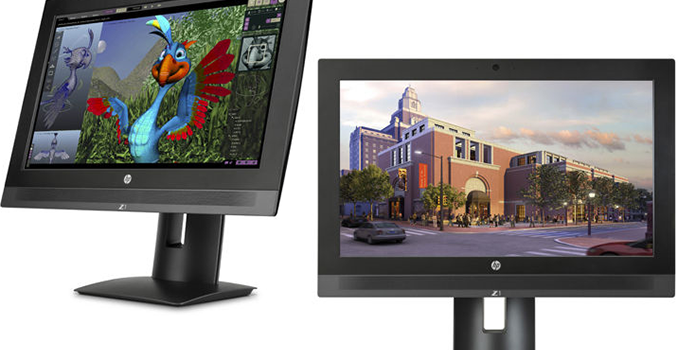
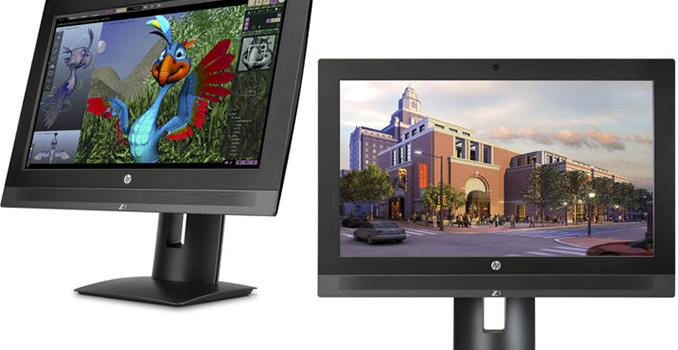
HP last week introduced its third-generation HP Z1 all-in-one workstation. The new system offers higher performance than its predecessor as well as a 4K resolution display. The new Z1 is also significantly more compact compared to prior two generations of HP’s Z1 machines, but retains upgradeablility and a serviceable design. In a bid to make the system smaller and slimmer, HP had to shrink the size of the display and move to a purely M.2/2.5-inch storage platform.

The HP Z1 G3 AIO workstation features 23.6” IPS display panel with 4K (3840×2160) resolution at a 60 Hz refresh rate, a rated 300 nits maximum brightness, 1000:1 contrast ratio as well as 178°/178° horizontal/vertical viewing angles. For comparison, the first and the second generations of HP’s Z1 featured 27” monitors with 2560×1440 resolution, but with the new incarnation of its AIO workstation the company preferred to install a smaller display panel to make the system more compact, increasing the PPI from 108.8 to 186.7.

Specifications of HP’s Z1 Workstations
  Z1 G2 Z1 G3
Display Panel 27″ IPS 23.6″ IPS
Display Resolution 2560 x 1440 3840 x 2160
CPU Intel Xeon E3-1281v3
Intel Xeon E3-1246v3
Intel Xeon E3-1226v3
Intel Core i7-4790
Intel Core i5-4590
Intel Core i3-4160
Intel Core i3-4170
Intel Xeon E3-1270 v5
Intel Xeon E3-1245 v5
Intel Xeon E3-1225 v5
Intel Core i7-6700
Intel Core i5-6500
Intel Core i3-6100
Chipset Intel C226 Intel C236
GPU Intel HD Graphics 4400 (Core i3)
Intel HD Graphics 4600 (Core i5)
Intel HD Graphics P4600 (Xeon E3-12x5v3)
NVIDIA Quadro K610M 1 GB
NVIDIA Quadro K2100M 2 GB
NVIDIA Quadro K3100M 4 GB
NVIDIA Quadro K4100M 4 GB
Intel HD Graphics 530 (Core)
Intel HD Graphics P530 (Xeon E3)
NVIDIA Quadro M1000M 2 GB
NVIDIA Quadro M2000M 4 GB
RAM Up to 32 GB of DDR3L-1600 Up to 64 GB of DDR4-2133
ECC with Core i3 and Xeon
Storage 2 x 2.5″ or 1 x 3.5″ HDDs
1 x mSATA SSD
2 x 2.5″
2 x M.2-2280
ODD Blu-ray or DVD burner
(if no Thunderbolt module installed)
No
Slots 1 MXM
2 mini-PCIe/mSATA (full-length)
1 MXM
2 M.2 for SSDs
1 M.2 for WLAN
Gigabit Ethernet Intel I217LM Intel I219LM
Wi-Fi and BT Intel 2×2 7260 802.11ac
w/ BT4.0, mini-PCIe
Intel 2×2 8260 802.11ac
w/ BT4.2 PCIe
USB 2 x USB 3.0
4 x USB 2.0
6 x USB 3.0
2 x USB 3.1 Type-C
Thunderbolt Thunderbolt 2
2 ports (if no ODD installed)
Thunderbolt 3
2 ports via Type-C
Audio 4 built-in speakers, microphone, audio connectors 4 built-in speakers with DTS Studio Sound, microphone audio connectors
Webcam 1080p
Power Supply 400 W 330 W
Dimensions (HxWxD) 20.8 x 26 x 16.5 inches
52.83 x 66.04 x 41.91 cm
23.5 x 8.3 x 21.5 inches
59.69 x 21.08 x 54.61 cm
Weight 47 lbs
21.3 kilograms
23.2 lbs
10.51 kilograms
Starting Price from $1999 from $1498
Launch 2014 2016

The new HP Z1 G3 is based on the Intel Xeon E3 v5/Core i3/i5/i7-series (Skylake) processorsas well as the Intel C236 PCH (platform controller hub). The new AIO workstation can be equipped with up to 64 GB of DDR4-2133 SO-DIMM memory (ECC is supported only by the Xeon and the Core i3 CPUs), up from 32 GB of DDR3 supported by the previous-gen model. The graphics sub-system of the new HP Z1 G3 relies on either Intel’s HD Graphics 530/P530 cores (Gen 9, 24 EUs), NVIDIA’s Quadro M1000M 2 GB (512 stream processors) or M2000M 4 GB (640 stream processors) professional graphics adapters. Since the predecessors of HP’s Z1 G3 relied on low-power professional graphics adapters from NVIDIA in MXM 3.1 form-factor, it is not surprising that the company decided to install similar cards this time. 
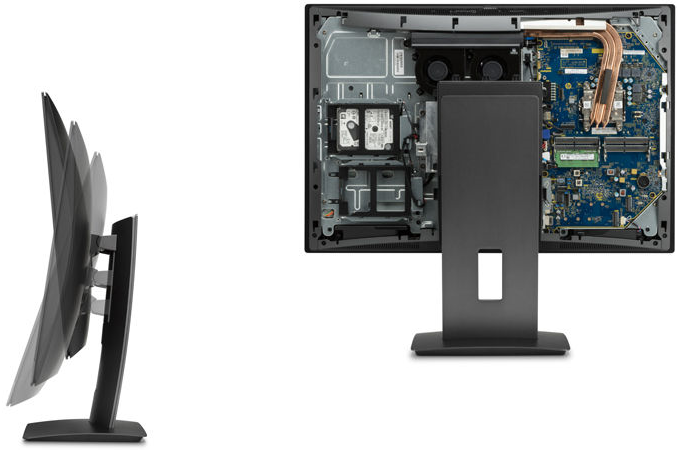
Storage in the HP Z1 G3 is something that was significantly redesigned compared to previous generations. The new workstation supports up to two 2.5” HDDs or SSDs with SATA 6 Gbps interface as well as up to two HP Z-Turbo Gen 2 NVMe SSDs in the M.2 2280 form-factor and both with PCIe 3.0 x4 interface. As a result, the Z1 G3 has inherently faster storage system than its predecessors (which did not support PCIe 3.0 SSDs), albeit without the opportunity for a large 3.5-inch mechanical. When it comes to storage space, not everything is that easy. HP itself installs SSDs and HDDs with up to 1 TB capacity, hence, it can equip its Z1 G3 machine with up to 4 TB of storage. However, since there are M.2 SSDs and 2.5” HDDs and SSDs with over 1 TB capacities, end-users could install such drives themselves due to tool-less upgrade and maintenance capabilities. Hardware RAID is supported only for 2.5” HDDs and not everything is clear with software RAID for M.2 drives. Moreover, the system no longer has an internal optical drive.

As for input/output capabilities, the new HP Z1 supports two Thunderbolt 3 ports (the number of controllers is unknown, could either be one controller per port or one controller for both) to connect USB-C and TB3 peripherals as well as external displays. There are also six USB 3.0 ports (one supports charging), one SD 4.0 media card reader, a DisplayPort 1.2 connector and a TRRS connector for headsets. Networking and wireless capabilities look standard for today’s workstations: one Intel I219LM Gigabit Ethernet controller as well as one Intel 8260 Wi-Fi 802.11ac with Bluetooth 4.2 module (installed into its own M.2 slot, thus, does not impact storage options). The system also has four internal stereo speakers with DTS Studio Sound software enhancement.
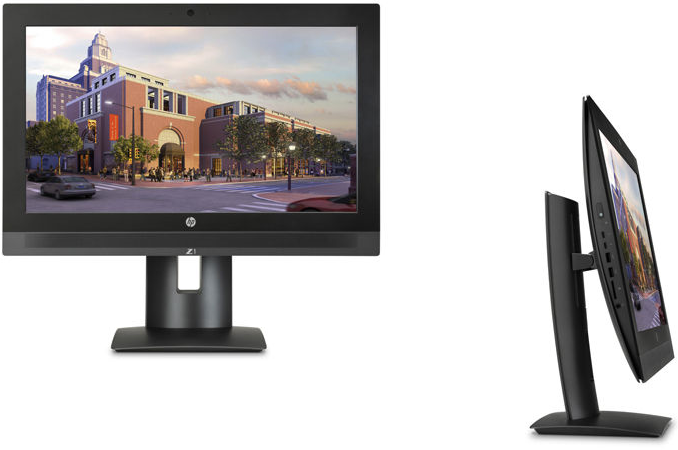
HP announced its first-generation Z1 AIO workstation back in early 2012. The machine was based on the Intel Xeon E3 v3 or the Intel Core i3/i5 processors (Ivy Bridge), NVIDIA’s mobile Quadro graphics and featured a 27” display panel, an optical drive (or an optional Thunderbolt module) module, desktop-class DDR3 DIMMs, SATA HDDs and so on. The HP Z1 G1 received the first ever 10 out of 10 AIO repairability score from iFixit because it was possible to replace all internal components (even its display panel) fairly easy. The downside of Z1’s architecture was its weight and cost. The maximum weight of the system with stand was around 21.3 kilograms and the cost started at $1899. The HP Z1 G2 followed its ancestor in many ways. However, its weight was still around 21.3 kilograms and the price started at $1999.

When designing the third-generation of its Z1 workstations, HP engineers tried to make the system lighter, thinner and more affordable. They decided to go with a smaller (yet, higher-resolution) display panel, SO-DIMMs rather than full-sized memory modules, removed the optical drive and also lost the 3.5” HDD bay. The result is evident: the system weighs 10.51 kilograms and is two times thinner than its predecessors. The cost of the workstation starts at $1498 in its basic configuration, which is lower compared to the Z1 and the Z1 G2. HP advertises tool-less upgrades and maintenance, but it remains to be seen whether the Z1 G3 is as easy to repair as its predecessors.  

The HP Z1 workstation will be available from May.

HP Unveils Third-Gen All-In-One Z1 Workstation: 4K Display, Intel Xeon, Professional Graphics

HP Unveils Third-Gen All-In-One Z1 Workstation: 4K Display, Intel Xeon, Professional Graphics

HP last week introduced its third-generation HP Z1 all-in-one workstation. The new system offers higher performance than its predecessor as well as a 4K resolution display. The new Z1 is also significantly more compact compared to prior two generations of HP’s Z1 machines, but retains upgradeablility and a serviceable design. In a bid to make the system smaller and slimmer, HP had to shrink the size of the display and move to a purely M.2/2.5-inch storage platform.

The HP Z1 G3 AIO workstation features 23.6” IPS display panel with 4K (3840×2160) resolution at a 60 Hz refresh rate, a rated 300 nits maximum brightness, 1000:1 contrast ratio as well as 178°/178° horizontal/vertical viewing angles. For comparison, the first and the second generations of HP’s Z1 featured 27” monitors with 2560×1440 resolution, but with the new incarnation of its AIO workstation the company preferred to install a smaller display panel to make the system more compact, increasing the PPI from 108.8 to 186.7.

Specifications of HP’s Z1 Workstations
  Z1 G2 Z1 G3
Display Panel 27″ IPS 23.6″ IPS
Display Resolution 2560 x 1440 3840 x 2160
CPU Intel Xeon E3-1281v3
Intel Xeon E3-1246v3
Intel Xeon E3-1226v3
Intel Core i7-4790
Intel Core i5-4590
Intel Core i3-4160
Intel Core i3-4170
Intel Xeon E3-1270 v5
Intel Xeon E3-1245 v5
Intel Xeon E3-1225 v5
Intel Core i7-6700
Intel Core i5-6500
Intel Core i3-6100
Chipset Intel C226 Intel C236
GPU Intel HD Graphics 4400 (Core i3)
Intel HD Graphics 4600 (Core i5)
Intel HD Graphics P4600 (Xeon E3-12x5v3)
NVIDIA Quadro K610M 1 GB
NVIDIA Quadro K2100M 2 GB
NVIDIA Quadro K3100M 4 GB
NVIDIA Quadro K4100M 4 GB
Intel HD Graphics 530 (Core)
Intel HD Graphics P530 (Xeon E3)
NVIDIA Quadro M1000M 2 GB
NVIDIA Quadro M2000M 4 GB
RAM Up to 32 GB of DDR3L-1600 Up to 64 GB of DDR4-2133
ECC with Core i3 and Xeon
Storage 2 x 2.5″ or 1 x 3.5″ HDDs
1 x mSATA SSD
2 x 2.5″
2 x M.2-2280
ODD Blu-ray or DVD burner
(if no Thunderbolt module installed)
No
Slots 1 MXM
2 mini-PCIe/mSATA (full-length)
1 MXM
2 M.2 for SSDs
1 M.2 for WLAN
Gigabit Ethernet Intel I217LM Intel I219LM
Wi-Fi and BT Intel 2×2 7260 802.11ac
w/ BT4.0, mini-PCIe
Intel 2×2 8260 802.11ac
w/ BT4.2 PCIe
USB 2 x USB 3.0
4 x USB 2.0
6 x USB 3.0
2 x USB 3.1 Type-C
Thunderbolt Thunderbolt 2
2 ports (if no ODD installed)
Thunderbolt 3
2 ports via Type-C
Audio 4 built-in speakers, microphone, audio connectors 4 built-in speakers with DTS Studio Sound, microphone audio connectors
Webcam 1080p
Power Supply 400 W 330 W
Dimensions (HxWxD) 20.8 x 26 x 16.5 inches
52.83 x 66.04 x 41.91 cm
23.5 x 8.3 x 21.5 inches
59.69 x 21.08 x 54.61 cm
Weight 47 lbs
21.3 kilograms
23.2 lbs
10.51 kilograms
Starting Price from $1999 from $1498
Launch 2014 2016

The new HP Z1 G3 is based on the Intel Xeon E3 v5/Core i3/i5/i7-series (Skylake) processorsas well as the Intel C236 PCH (platform controller hub). The new AIO workstation can be equipped with up to 64 GB of DDR4-2133 SO-DIMM memory (ECC is supported only by the Xeon and the Core i3 CPUs), up from 32 GB of DDR3 supported by the previous-gen model. The graphics sub-system of the new HP Z1 G3 relies on either Intel’s HD Graphics 530/P530 cores (Gen 9, 24 EUs), NVIDIA’s Quadro M1000M 2 GB (512 stream processors) or M2000M 4 GB (640 stream processors) professional graphics adapters. Since the predecessors of HP’s Z1 G3 relied on low-power professional graphics adapters from NVIDIA in MXM 3.1 form-factor, it is not surprising that the company decided to install similar cards this time. 

Storage in the HP Z1 G3 is something that was significantly redesigned compared to previous generations. The new workstation supports up to two 2.5” HDDs or SSDs with SATA 6 Gbps interface as well as up to two HP Z-Turbo Gen 2 NVMe SSDs in the M.2 2280 form-factor and both with PCIe 3.0 x4 interface. As a result, the Z1 G3 has inherently faster storage system than its predecessors (which did not support PCIe 3.0 SSDs), albeit without the opportunity for a large 3.5-inch mechanical. When it comes to storage space, not everything is that easy. HP itself installs SSDs and HDDs with up to 1 TB capacity, hence, it can equip its Z1 G3 machine with up to 4 TB of storage. However, since there are M.2 SSDs and 2.5” HDDs and SSDs with over 1 TB capacities, end-users could install such drives themselves due to tool-less upgrade and maintenance capabilities. Hardware RAID is supported only for 2.5” HDDs and not everything is clear with software RAID for M.2 drives. Moreover, the system no longer has an internal optical drive.

As for input/output capabilities, the new HP Z1 supports two Thunderbolt 3 ports (the number of controllers is unknown, could either be one controller per port or one controller for both) to connect USB-C and TB3 peripherals as well as external displays. There are also six USB 3.0 ports (one supports charging), one SD 4.0 media card reader, a DisplayPort 1.2 connector and a TRRS connector for headsets. Networking and wireless capabilities look standard for today’s workstations: one Intel I219LM Gigabit Ethernet controller as well as one Intel 8260 Wi-Fi 802.11ac with Bluetooth 4.2 module (installed into its own M.2 slot, thus, does not impact storage options). The system also has four internal stereo speakers with DTS Studio Sound software enhancement.

HP announced its first-generation Z1 AIO workstation back in early 2012. The machine was based on the Intel Xeon E3 v3 or the Intel Core i3/i5 processors (Ivy Bridge), NVIDIA’s mobile Quadro graphics and featured a 27” display panel, an optical drive (or an optional Thunderbolt module) module, desktop-class DDR3 DIMMs, SATA HDDs and so on. The HP Z1 G1 received the first ever 10 out of 10 AIO repairability score from iFixit because it was possible to replace all internal components (even its display panel) fairly easy. The downside of Z1’s architecture was its weight and cost. The maximum weight of the system with stand was around 21.3 kilograms and the cost started at $1899. The HP Z1 G2 followed its ancestor in many ways. However, its weight was still around 21.3 kilograms and the price started at $1999.

When designing the third-generation of its Z1 workstations, HP engineers tried to make the system lighter, thinner and more affordable. They decided to go with a smaller (yet, higher-resolution) display panel, SO-DIMMs rather than full-sized memory modules, removed the optical drive and also lost the 3.5” HDD bay. The result is evident: the system weighs 10.51 kilograms and is two times thinner than its predecessors. The cost of the workstation starts at $1498 in its basic configuration, which is lower compared to the Z1 and the Z1 G2. HP advertises tool-less upgrades and maintenance, but it remains to be seen whether the Z1 G3 is as easy to repair as its predecessors.  

The HP Z1 workstation will be available from May.
ZOTAC Quietly Releases GeForce GT 710 Graphics Card with PCIe x1 Interface

ZOTAC Quietly Releases GeForce GT 710 Graphics Card with PCIe x1 Interface

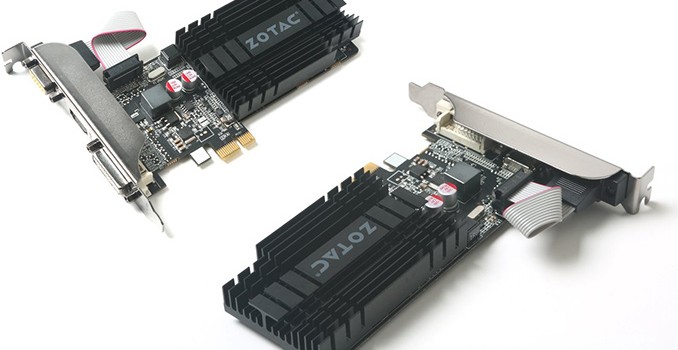
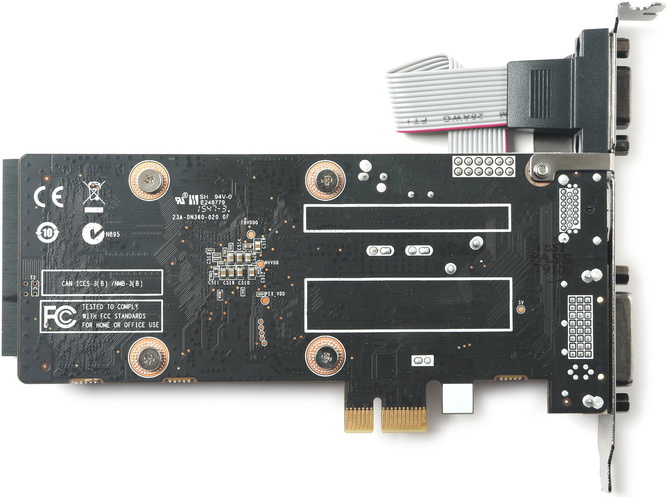
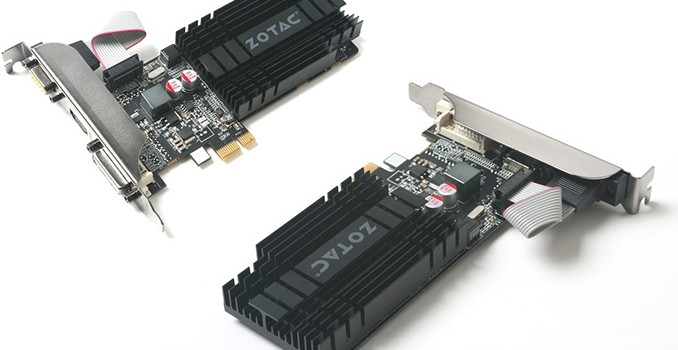
ZOTAC has quietly introduced a new video card which is compatible with virtually every desktop PC released in the recent years. The new GeForce GT 710 graphics card with PCIe 3.0 x1 interface is not going to outperform modern higher-end iGPUs in games, but it will help owners of very low-cost systems, particularly those which may not even have a PCIe x16 slot, to add support for another display, or improve over the performance of completely outdated iGPUs.

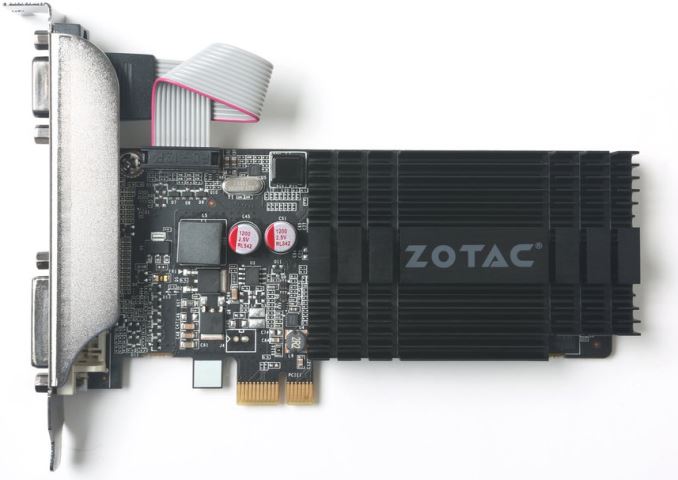
The ZOTAC GeForce GT 710 1 GB (ZT-71304-20L) video card is powered by a cut-down version of NVIDIA’s GK208 GPU with 192 CUDA cores, 16 texture units and 8 ROPs. The GPU is based on the Kepler architecture, which supports Direct3D feature level 11_0, OpenGL 4.5 as well as OpenCL 1.2 APIs. The chip is clocked at 954 MHz and has compute performance of around 366 GFLOPS (well below that of modern iGPUs). The card is equipped with 1 GB of DDR3-1600 memory featuring 12.8 GB/s bandwidth.

The card comes in half height half length (HHHL) form-factor and is shipped with two brackets (for low-profile and standard PCs) to maximize compatibility with various computers. The graphics board has minimal (19W) power consumption and does not require active cooling (which means, it is also whisper quiet).

The main selling points of the ZOTAC GT 710 are its PCIe 3.0 x1 interface as well as three display outputs — DVI, HDMI 1.4 and D-Sub. Some entry-level PCs simply do not have PCIe x16 or x8 slots to install a graphics card, but virtually all desktops released in the last ten years have at least one PCIe x1 slot. ZOTAC’s new graphics card promises to be compatible with such systems. If owners of such PCs need to add one or two more display outputs, or just find their iGPUs too slow in Windows 10, they can buy the GeForce GT 710 1 GB PCIe 3.0 x1 graphics adapter. The board supports up to three displays, which should be enough for many workloads.

NVIDIA GPU Specification Comparison
  GT 710 GT 720 GT 630 GT 610
CUDA Cores 192 192 192 48
Texture Units 16 16 16 8
ROPs 8 8 16 4
Core Clock 954MHz 797MHz 875MHz 710MHz
Shader Clock N/A N/A N/A 1620MHz
Memory Clock 1.8GHz DDR3 1.8GHz DDR3/ 5GHz GDDR5 1.8GHz DDR3 1.8GHz DDR3
Memory Bus Width 64-bit 64-bit 64-bit 64-bit
VRAM 1GB or 2GB 1GB or 2GB 1GB or 2GB 1GB
TDP 19W 19W 50W 29W
GPU GK208 GK208 GK107 GF119
Launch Timeframe January, 2016 March, 2014 April, 2012 May, 2012
Launch Price $30 – $50 $49 OEM $49

When it comes to performance in games, it is unlikely that the GeForce GT 710 is fast enough for more or less demanding titles. The product may be faster than iGPUs integrated into entry-level Celeron or Pentium processors, but only in various online games that do not require a lot of GPU horsepower anyway.

As for market perspectives of ZOTAC’s GeForce GT 710 1 GB PCIe 3.0 x1, it should be noted that this is a niche product designed for owners of low-end systems, who need a better GPU or additional display outputs. Typically, people, who use such systems do not upgrade often, hence, ZOTAC’s new video card will hardly become a bestseller. Nonetheless, it will be a unique device for those who really need it.

ZOTAC does not list recommended prices on its web-site. However two stores which sell the device in Europe have it listed €58.30 ($65.8) and €84.7 ($95). This is definitely higher than you’d otherwise expect for a bottom-tier NVIDIA card, though it may very well be that retailers are counting on its unique nature.

ZOTAC Quietly Releases GeForce GT 710 Graphics Card with PCIe x1 Interface

ZOTAC Quietly Releases GeForce GT 710 Graphics Card with PCIe x1 Interface

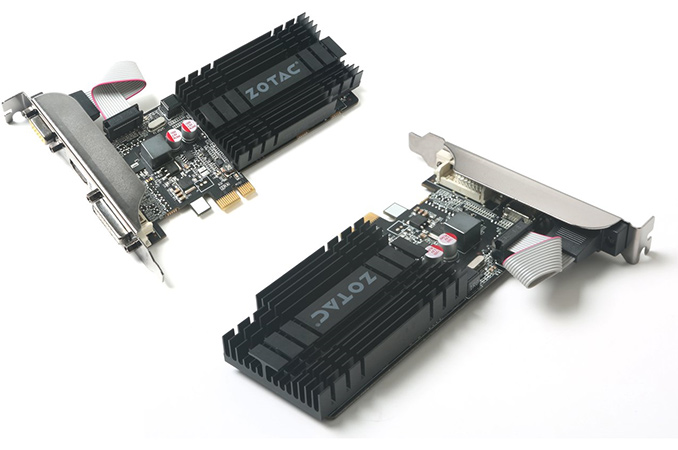
ZOTAC has quietly introduced a new video card which is compatible with virtually every desktop PC released in the recent years. The new GeForce GT 710 graphics card with PCIe 3.0 x1 interface is not going to outperform modern higher-end iGPUs in games, but it will help owners of very low-cost systems, particularly those which may not even have a PCIe x16 slot, to add support for another display, or improve over the performance of completely outdated iGPUs.

The ZOTAC GeForce GT 710 1 GB (ZT-71304-20L) video card is powered by a cut-down version of NVIDIA’s GK208 GPU with 192 CUDA cores, 16 texture units and 8 ROPs. The GPU is based on the Kepler architecture, which supports Direct3D feature level 11_0, OpenGL 4.5 as well as OpenCL 1.2 APIs. The chip is clocked at 954 MHz and has compute performance of around 366 GFLOPS (well below that of modern iGPUs). The card is equipped with 1 GB of DDR3-1600 memory featuring 12.8 GB/s bandwidth.

The card comes in half height half length (HHHL) form-factor and is shipped with two brackets (for low-profile and standard PCs) to maximize compatibility with various computers. The graphics board has minimal (19W) power consumption and does not require active cooling (which means, it is also whisper quiet).

The main selling points of the ZOTAC GT 710 are its PCIe 3.0 x1 interface as well as three display outputs — DVI, HDMI 1.4 and D-Sub. Some entry-level PCs simply do not have PCIe x16 or x8 slots to install a graphics card, but virtually all desktops released in the last ten years have at least one PCIe x1 slot. ZOTAC’s new graphics card promises to be compatible with such systems. If owners of such PCs need to add one or two more display outputs, or just find their iGPUs too slow in Windows 10, they can buy the GeForce GT 710 1 GB PCIe 3.0 x1 graphics adapter. The board supports up to three displays, which should be enough for many workloads.

NVIDIA GPU Specification Comparison
  GT 710 GT 720 GT 630 GT 610
CUDA Cores 192 192 192 48
Texture Units 16 16 16 8
ROPs 8 8 16 4
Core Clock 954MHz 797MHz 875MHz 710MHz
Shader Clock N/A N/A N/A 1620MHz
Memory Clock 1.8GHz DDR3 1.8GHz DDR3/ 5GHz GDDR5 1.8GHz DDR3 1.8GHz DDR3
Memory Bus Width 64-bit 64-bit 64-bit 64-bit
VRAM 1GB or 2GB 1GB or 2GB 1GB or 2GB 1GB
TDP 19W 19W 50W 29W
GPU GK208 GK208 GK107 GF119
Launch Timeframe January, 2016 March, 2014 April, 2012 May, 2012
Launch Price $30 – $50 $49 OEM $49

When it comes to performance in games, it is unlikely that the GeForce GT 710 is fast enough for more or less demanding titles. The product may be faster than iGPUs integrated into entry-level Celeron or Pentium processors, but only in various online games that do not require a lot of GPU horsepower anyway.

As for market perspectives of ZOTAC’s GeForce GT 710 1 GB PCIe 3.0 x1, it should be noted that this is a niche product designed for owners of low-end systems, who need a better GPU or additional display outputs. Typically, people, who use such systems do not upgrade often, hence, ZOTAC’s new video card will hardly become a bestseller. Nonetheless, it will be a unique device for those who really need it.

ZOTAC does not list recommended prices on its web-site. However two stores which sell the device in Europe have it listed €58.30 ($65.8) and €84.7 ($95). This is definitely higher than you’d otherwise expect for a bottom-tier NVIDIA card, though it may very well be that retailers are counting on its unique nature.