News


Windows Adds Support For Bash Scripting

Windows Adds Support For Bash Scripting

With the goal of making more developers use Windows, and to help them move their workflows over to Windows, Microsoft has taken the step to enable Bash scripting natively in Windows 10. This will be a new subsystem, and not an emulation layer, with fu…

Windows Adds Support For Bash Scripting

Windows Adds Support For Bash Scripting

With the goal of making more developers use Windows, and to help them move their workflows over to Windows, Microsoft has taken the step to enable Bash scripting natively in Windows 10. This will be a new subsystem, and not an emulation layer, with fu…

Acer Unveils New Chromebook 14 with Up to 14-Hour Battery Life

Acer Unveils New Chromebook 14 with Up to 14-Hour Battery Life

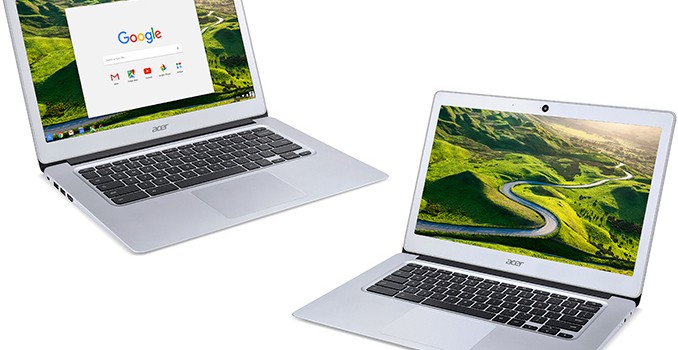
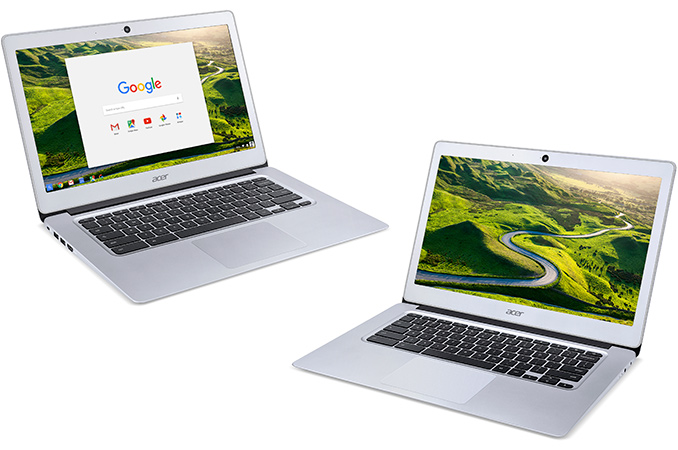
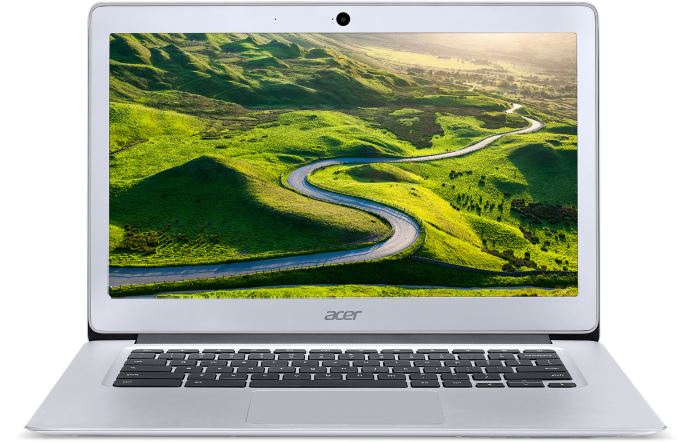
Acer this week introduced its new family of Chromebooks that wed performance with portability. The new laptops feature multi-core x86 microprocessors, 14” displays as well as aluminum chassis. Even in its most advanced configuration, the Chromebook 14 costs only $299. Acer traditionally positions its Chromebooks as solutions for students as well as customers on a budget, who need basic computing and do not want to invest a lot.

Several years ago, personal computers running Google’s Chrome operating system were considered as cheap alternatives to Windows-based PCs, which is why they used affordable components and could not boast solid performance, despite the lightweight OS. Eventually, such PCs became relatively popular and manufacturers started to use more advanced ingredients, such as IPS displays or microprocessors with higher performance. Google itself introduced its Chromebook Pixel laptop in 2013 (and updated it in 2015), targeting premium buyers. The Chromebook Pixel is one the most advanced and powerful Chromebooks ever made thanks to its Core i7 “Broadwell” processor, a display with 3:2 aspect ratio as well as an aluminum body. Google’s Pixel demonstrated to other PC makers that it is possible to build premium Chrome OS-based notebooks and they followed with more advanced Chromebooks. The new Acer Chromebook 14 is not as powerful as the Pixel, but it is clearly a step into its direction with a high-resolution display as well as an all-aluminum chassis.

The Acer Chromebook 14 (CB3-431) features, as the name suggests, a 14” IPS display with 1920×1080 or 1366×768 resolution as well as 170-degree viewing angles and an anti-glare coating. Unlike the Chromebook Pixel, Acer’s new laptops have 16:9 aspect ratio with all of its advantages for video viewing and disadvantages for Internet surfing. The model with higher resolution can work on one battery charge for 12 hours, whereas the Chromebook 14 with 1366×768 resolution boasts with up to 14-hour battery life on a single charge.

The Chromebook 14 laptops are based on Intel Celeron “Braswell” processors with two (Celeron N3060) or four (Celeron N3160/N3150) cores featuring the Airmont micro-architecture and up to 1.60 GHz clock-rate, Intel’s Intel Gen 9 graphics core with 12 execution units as well as up to 6 W TDP. Unlike Google’s Chromebook Pixel as well as Acer’s Chromebook 15, the Chromebook 14 cannot integrate a high-performance CPU featuring Broadwell micro-architecture, but that was certainly a trade-off between the price and portability.

Acer Chromebook 14 Specifications
  Acer Chromebook 14 full HD Acer Chromebook 14 HD
Screen Resolution 1366×768 1920×1080
CPU Dual-core Intel Celeron N3060 or Quad-core Intel Celeron N3150/3160
Graphics Intel HD Graphics 400/405 (Gen 8, 12 execution units)
RAM 2 GB or 4 GB LPDDR3
Storage 16 GB or 32 GB of eMMC storage
Wi-Fi 2×2 MIMO 802.11ac Wi-Fi module
Bluetooth Bluetooth 4.2
USB 2 USB 3.0 ports
HDMI One HDMI output
Other I/O Microphone, stereo speakers, audio jack
Thickness 17 mm / 0.66″
Weight 1.55 kilograms / 3.42 pounds
Price $299 for the launch model

Acer equips its Chromebook 14 laptops with 2 GB or 4 GB of LPDDR3 RAM (which is a good news for battery life), 16 GB or 32 GB of eMMC solid-state storage as well as a dual-band 2×2 MIMO 802.11ac Wi-Fi module with Bluetooth 4.2. The systems also feature a 720p webcam, a 3.5-mm mini jack, a microphone, stereo speakers, two USB 3.0 ports as well as an HDMI output.

The Chromebook 14 from Acer is 17 mm thick and weighs 1.55 kilograms, which is in line with many portable laptops. Acer claims that its fanless cooling system is enough to cool-down Intel’s Celeron CPU with a 6 W TDP, which is why the Chromebook 14 has no fans at all.

Acer did not say much about the price of its Chromebook 14. The launch model will be available next month with a Full HD display, 32 GB storage and 4 GB RAM starting at $299.99 in the U.S. and $399.99 (CAD) in Canada. Other Chromebook 14 models will sport lower amount of storage and RAM as well as a lower-resolution screen, but also a longer battery life. Their prices are unknown, but will clearly be different in different countries.

Acer Unveils New Chromebook 14 with Up to 14-Hour Battery Life

Acer Unveils New Chromebook 14 with Up to 14-Hour Battery Life

Acer this week introduced its new family of Chromebooks that wed performance with portability. The new laptops feature multi-core x86 microprocessors, 14” displays as well as aluminum chassis. Even in its most advanced configuration, the Chromebook 14 costs only $299. Acer traditionally positions its Chromebooks as solutions for students as well as customers on a budget, who need basic computing and do not want to invest a lot.

Several years ago, personal computers running Google’s Chrome operating system were considered as cheap alternatives to Windows-based PCs, which is why they used affordable components and could not boast solid performance, despite the lightweight OS. Eventually, such PCs became relatively popular and manufacturers started to use more advanced ingredients, such as IPS displays or microprocessors with higher performance. Google itself introduced its Chromebook Pixel laptop in 2013 (and updated it in 2015), targeting premium buyers. The Chromebook Pixel is one the most advanced and powerful Chromebooks ever made thanks to its Core i7 “Broadwell” processor, a display with 3:2 aspect ratio as well as an aluminum body. Google’s Pixel demonstrated to other PC makers that it is possible to build premium Chrome OS-based notebooks and they followed with more advanced Chromebooks. The new Acer Chromebook 14 is not as powerful as the Pixel, but it is clearly a step into its direction with a high-resolution display as well as an all-aluminum chassis.

The Acer Chromebook 14 (CB3-431) features, as the name suggests, a 14” IPS display with 1920×1080 or 1366×768 resolution as well as 170-degree viewing angles and an anti-glare coating. Unlike the Chromebook Pixel, Acer’s new laptops have 16:9 aspect ratio with all of its advantages for video viewing and disadvantages for Internet surfing. The model with higher resolution can work on one battery charge for 12 hours, whereas the Chromebook 14 with 1366×768 resolution boasts with up to 14-hour battery life on a single charge.

The Chromebook 14 laptops are based on Intel Celeron “Braswell” processors with two (Celeron N3060) or four (Celeron N3160/N3150) cores featuring the Airmont micro-architecture and up to 1.60 GHz clock-rate, Intel’s Intel Gen 9 graphics core with 12 execution units as well as up to 6 W TDP. Unlike Google’s Chromebook Pixel as well as Acer’s Chromebook 15, the Chromebook 14 cannot integrate a high-performance CPU featuring Broadwell micro-architecture, but that was certainly a trade-off between the price and portability.

Acer Chromebook 14 Specifications
  Acer Chromebook 14 full HD Acer Chromebook 14 HD
Screen Resolution 1366×768 1920×1080
CPU Dual-core Intel Celeron N3060 or Quad-core Intel Celeron N3150/3160
Graphics Intel HD Graphics 400/405 (Gen 8, 12 execution units)
RAM 2 GB or 4 GB LPDDR3
Storage 16 GB or 32 GB of eMMC storage
Wi-Fi 2×2 MIMO 802.11ac Wi-Fi module
Bluetooth Bluetooth 4.2
USB 2 USB 3.0 ports
HDMI One HDMI output
Other I/O Microphone, stereo speakers, audio jack
Thickness 17 mm / 0.66″
Weight 1.55 kilograms / 3.42 pounds
Price $299 for the launch model

Acer equips its Chromebook 14 laptops with 2 GB or 4 GB of LPDDR3 RAM (which is a good news for battery life), 16 GB or 32 GB of eMMC solid-state storage as well as a dual-band 2×2 MIMO 802.11ac Wi-Fi module with Bluetooth 4.2. The systems also feature a 720p webcam, a 3.5-mm mini jack, a microphone, stereo speakers, two USB 3.0 ports as well as an HDMI output.

The Chromebook 14 from Acer is 17 mm thick and weighs 1.55 kilograms, which is in line with many portable laptops. Acer claims that its fanless cooling system is enough to cool-down Intel’s Celeron CPU with a 6 W TDP, which is why the Chromebook 14 has no fans at all.

Acer did not say much about the price of its Chromebook 14. The launch model will be available next month with a Full HD display, 32 GB storage and 4 GB RAM starting at $299.99 in the U.S. and $399.99 (CAD) in Canada. Other Chromebook 14 models will sport lower amount of storage and RAM as well as a lower-resolution screen, but also a longer battery life. Their prices are unknown, but will clearly be different in different countries.

Apple Announces the Safari Technology Preview

Apple Announces the Safari Technology Preview

Today Apple made an interesting announcement for developers regarding Safari. Safari is Apple’s browser across all of their iOS and OS X devices, and the layout engine at its core is WebKit. WebKit was originally started as a project within Apple as a fork of KHTML, a layout engine developed by the KDE project. Today it’s widely employed in many browsers on many platforms, with Google and Opera formerly using it and now utilizing a fork of WebKit called Blink.

Traditionally developers who want to use the latest improvements to WebKit have had to download WebKit nightly builds, which as their name implies, are builds that reflect the latest changes to the WebKit code base and are released on 24 hour intervals. This allows developers to test and develop against new features being added to WebKit, which later make their way to Safari and other WebKit-based browsers as well. Distributing nightly builds for developers is a common practice for large software projects, but in the case of Safari and WebKit it was not ideal in many ways. For one, it essentially made the version of Safari on a computer use the new nightly WebKit back end that was installed, which can lead to annoyances when trying to compare between the existing public release and the nightly build. It also disables features like iCloud integration for tabs, bookmarks, passwords, etc, as the builds are not signed by Apple.
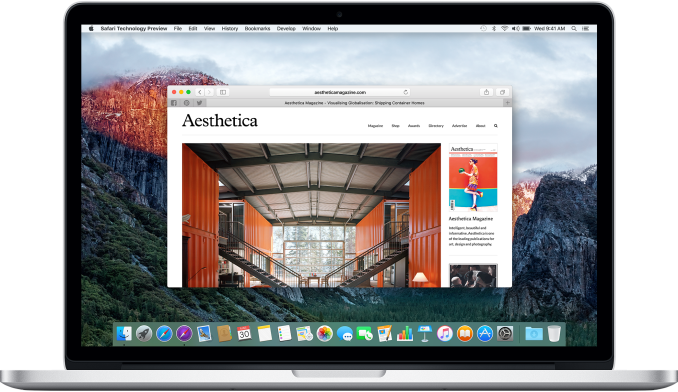
The Safari Technology Preview is Apple’s attempt to address some of these problems, and make it easier for developers to keep track of what changes are being made, and to submit feedback or bug reports based on what they experience. What the preview consists of is an application separate from Safari that uses a more up to date version of WebKit than what the public version of Safari that comes with OS X uses. It’s available from Apple’s developer website, and updates will come every two weeks via the Mac App Store. This makes the list of changes and additions easily accessible with each update, and because the builds are signed by Apple there’s full support for iCloud integration. Having a separate application means that comparisons and regression testing between the current official version of Safari and one with a more up to date version of WebKit can be done easily. 

One important thing to note about the Safari Technology Preview is that, while the app is available from Apple’s developer site, you don’t need to be a registered developer paying the yearly iOS and OS X publishing fee to access it. Since the target audience consists mainly of programmers building websites and web applications, it doesn’t make sense to limit it to developers building native apps for iOS and OS X.

Apple is highlighting some key things that are new in the initial release of the Safari Technology Preview. The first is that it has what they claim to be one of the most complete implementations of ECMAScript 6 (ES6), which in less precise but simpler terms means the latest version of JavaScript, as JavaScript was standardized as ECMAScript and now can be considered an implementation of the standard itself.
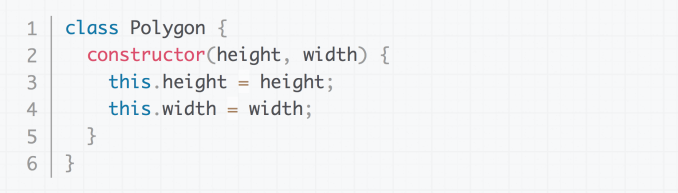
Image source: Mozilla

ES6 comes with some key features for developers, including support for classes as part of the object oriented paradigm, iterators, and many new APIs. I am personally not a web developer, and the fact that JavaScript is just now adopting more explicit class declarations on top of the existing function prototype based declarations comes as quite a surprise to me.

Another key feature of the Safari Technology Preview is the new B3 Just-In-Time (JIT) JavaScript compiler. B3 is the new compiler backend for WebKit’s FTL JIT compiler which was introduced about a year ago with LLVM acting as the backend. At that time there was a great deal of info about the work that went into making LLVM, traditionally a production grade compiler for native applications, usable for compiling JavaScript on the fly within the constraints of something like a smartphone. Since Apple has been a major part of both WebKit and LLVM, using LLVM as the backend to achieve greater optimization of JavaScript code made sense. However, LLVM was architected as a compiler that would be used for optimizing and compiling code on large powerful desktop computers where power usage and compile times were not a large concern, as the code would simply be compiled and shipped to be run. In the context of a mobile device, you’ll be visiting various sites and compiling a great deal of different JavaScript code, and so a different strategy needs to be employed.

This is where B3 comes in. According to Apple, LLVM’s optimizations often are overkill for the task of JavaScript compilation. There are cases where it’s actually faster to just compile some lines of code and run them than to take time to optimize, compile, and then run. In these situations, there are performance gains to be made by moving away from LLVM, as you need to work on minimizing compile time rather than generating the most efficient code possible. On a high level, B3 looks at the JavaScript code that needs to be executed and decides whether it’s actually worth optimizing it or not. For complex code that may be run many times it makes sense to spend the extra time optimizing, but for small groups of simple statements it may be better to just compile it without optimizations. 

Of course, a big question may be why you wouldn’t just apply tweaks to LLVM. Apple says that B3 was designed from the ground up with a focus on quick JavaScript execution, but it wouldn’t be surprising if there are ties to LLVM which already exists to provide a solid foundation.
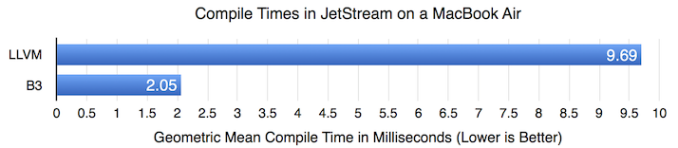
For developers and other interested parties looking for more info on B3 there’s a post on the official WebKit blog about other improvements that have been made. They also highlight some improvements in compile time that have been observed with popular benchmarks, while also demonstrating the fact that performance doesn’t regress from the LLVM backend despite the significant reductions in compile time. Right now B3 isn’t fully ported to ARM64 and that will be necessary before we see it debuting on iOS.

The last two major inclusions in the first release of the Safari Technology Preview are an updated IndexedDB implementation and support for the newest standard of Shadow DOM. The former is a way of storing data on a client device for quick access, and the changes are the result of developer feedback, with Apple claiming that the new implementation is more stable and better compliant with established standards. A simple explanation of Shadow DOM is that it provides a way for developers making websites and web apps to better define the style of widgets and controls while keeping them independent from other styling options that apply to the page.

The Safari Technology Preview is available now from Apple’s developer website. As mentioned before, it only needs to be installed from the developer site, with future updates coming every two weeks via the Mac App Store, with the latest changes to WebKit and Safari in tow.