News


Mushkin Impact 256GB and Atom 128GB USB Flash Drives Capsule Review
Mushkin Impact 256GB and Atom 128GB USB Flash Drives Capsule Review

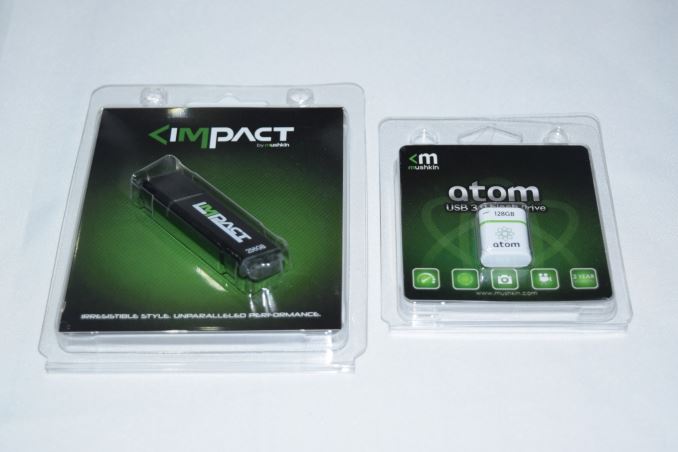
Flash drives are a dime a dozen these days, and most of them carry uninteresting specifications. In particular, flash drives advertising smaller physical footprints have tended to carry disappointing performance numbers. At CES 2016, Mushkin had two USB Flash Drives (UFDs) on display belonging to the ‘small footprint’ club, the Impact 256GB and the Atom 128GB. We have reviewed the Atom 64GB version before. Though we were unimpressed with the Atom’s performance, the form factor was very intriguing. Last month, Mushkin showed that they had doubled the capacity while retaining the same form factor. Along with the Atom 128GB, Mushkin also showed off one of the smallest 256GB UFDs in the market, the Impact 256GB.

Hardware Design and Internals

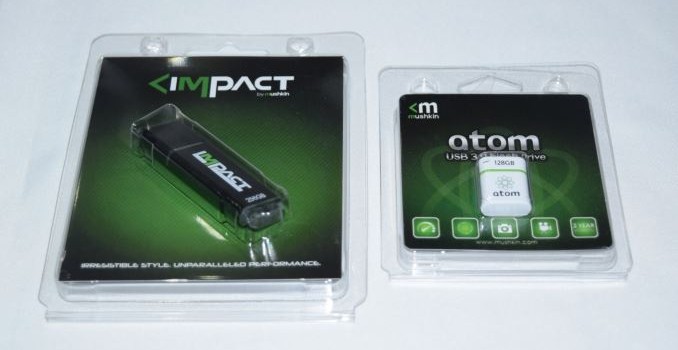
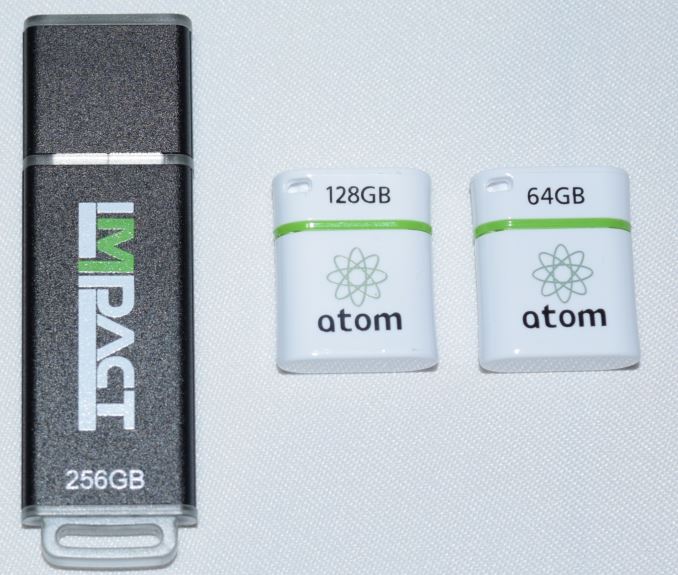
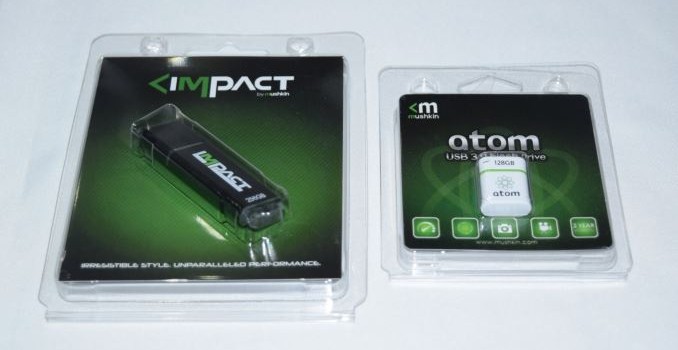
The industrial design of the Atom 128GB is the same as that of the 64GB version. It has a small hole at one end to secure it to a keychain or anything similar. The Impact is small too, and the picture below brings out the relative sizes.
The smalled 256GB UFD that we have reviewed as yet is the Patriot Supersonic Rage 2. The Impact 256GB is of the same length, but has a slightly smaller width. It is highly improbable that the Impact 256GB might end up blocking any USB port adjoining the one it is connected to.
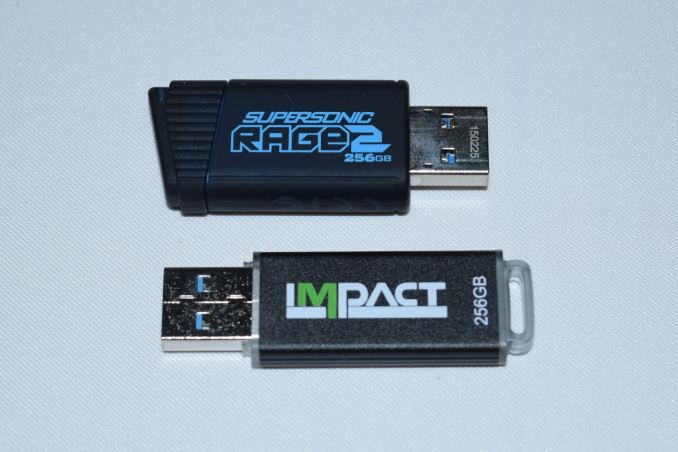
Unlike the Atom’s plastic casing, the Impact also has an aluminum housing, and despite the lightweight nature, feels solid in hand. It also has a plastic tab at one end for attachment purposes.

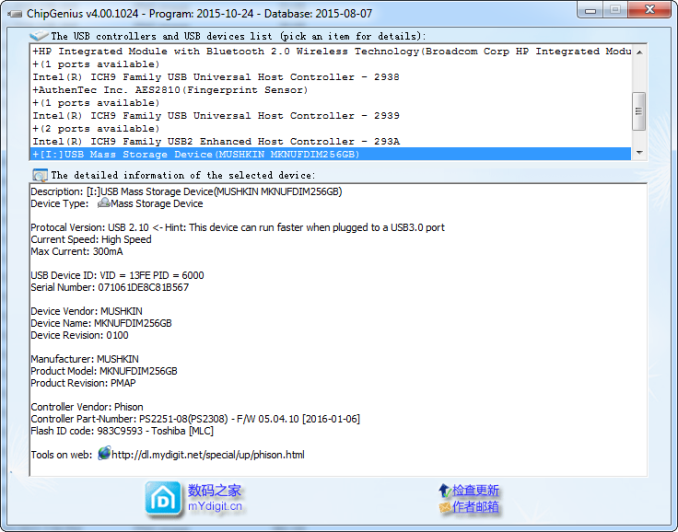
Without opening up the unit, it is possible to identify the controller and flash inside the units.
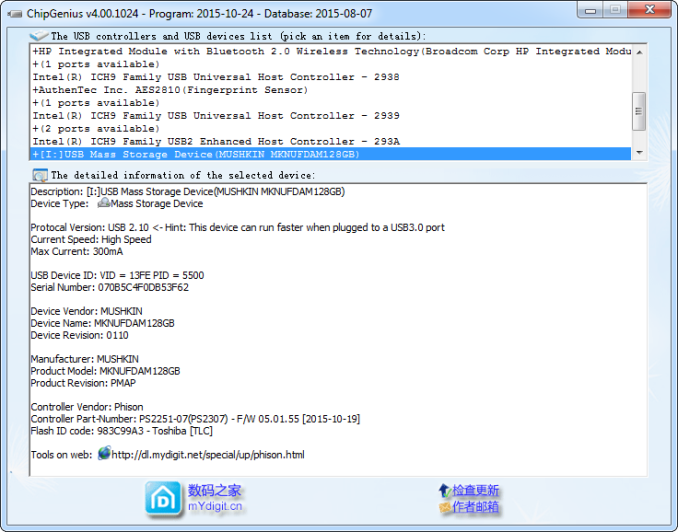
The Atom 128GB has a Phison PS2251-07 single-channel USB 3.0 flash controller and uses Toshiba TLC flash. On the other hand, the Impact 256GB comes with the dual-channel high performance Phison PS2251-08 controller and Toshiba MLC flash.
Testbed Setup and Testing Methodology

Evaluation of DAS units on Windows is done with the testbed outlined in the table below. For devices with a USB 3.0 (via a Type-A interface) connections (such as the Mushkin Impact 256GB and Atom 128GB that we are considering today), we utilize the USB 3.0 port directly hanging off the Z97 PCH.

AnandTech DAS Testbed Configuration
Motherboard Asus Z97-PRO Wi-Fi ac ATX
CPU Intel Core i7-4790
Memory Corsair Vengeance Pro CMY32GX3M4A2133C11
32 GB (4x 8GB)
DDR3-2133 @ 11-11-11-27
OS Drive Seagate 600 Pro 400 GB
SATA Devices Asus BW-16D1HT 16x Blu-ray Write (w/ M-Disc Support)
Add-on Card Asus Thunderbolt EX II
Chassis Corsair Air 540
PSU Corsair AX760i 760 W
OS Windows 10 Pro x64
Thanks to Asus and Corsair for the build components

The full details of the reasoning behind choosing the above build components can be found here. The list of DAS units used for comparison purposes is provided below.

  • Mushkin Impact 256GB
  • Mushkin Atom 128GB
  • Corsair Voyager GTX v2 256GB
  • Mushkin Atom 64GB
  • Mushkin Ventura Ultra 120GB
  • Patriot Supersonic Rage 2 256GB
  • SanDisk Extreme 500 240GB – USB 3.0
  • SanDisk Extreme PRO 128GB
  • VisionTek Pocket SSD 240GB

Synthetic Benchmarks – ATTO and Crystal DiskMark

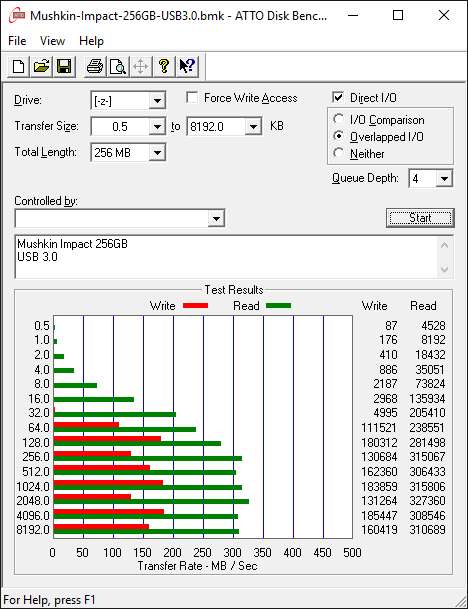
Mushkin claims read and write speeds of 400 MBps and 310 MBps respectively for the Impact 256GB. The corresponding numbers are 180 MBps and 40 MBps for the Atom 128GB. These are unfortunately not hit with our default ATTO benchmark settings. In any case, these access traces are not very common in real-life scenarios.

Mushkin Impact 256GBMushkin Atom 128GBCorsair Voyager GTX v2 256GBMushkin Atom 64GBMushkin Ventura Ultra 120GBPatriot Supersonic Rage 2 256GBSanDisk Extreme 500 240GB – USB 3.0SanDisk Extreme PRO 128GBVisionTek Pocket SSD 240GB
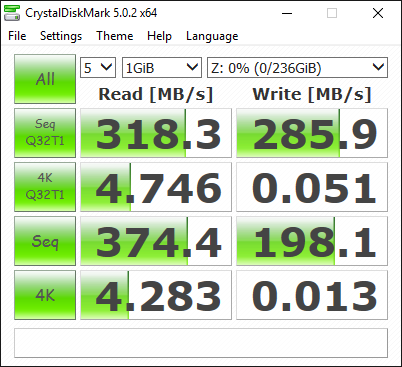
CrystalDiskMark, despite being a canned benchmark, provides a better estimate of the performance range with a selected set of numbers. Here, we can see things closer to Mushkin’s claims – 375 MBps reads and 286 MBps writes for the Impact 256GB, and 191 MBps reads and 26 MBps writes for the Atom 128 GB. The native USB 3.0 flash controllers have always sruggled with very low IOPS for 4K random accesses (writes in particular). We see the Impact 256GB fall to 0.013 MBps for 4K random writes, while the Atom 128GB comes in at 0.071 MBps for that access trace.

Mushkin Impact 256GBMushkin Atom 128GBCorsair Voyager GTX v2 256GBMushkin Atom 64GBMushkin Ventura Ultra 120GBPatriot Supersonic Rage 2 256GBSanDisk Extreme 500 240GB – USB 3.0SanDisk Extreme PRO 128GBVisionTek Pocket SSD 240GB
Benchmarks – robocopy and PCMark 8 Storage Bench

Our testing methodology for DAS units also takes into consideration the usual use-case for such devices. The most common usage scenario is transfer of large amounts of photos and videos to and from the unit. The minor usage scenario is importing files directly off the DAS into a multimedia editing program such as Adobe Photoshop. Since these are not portable SSDs, we will be disregarding the latter use-case.

In order to tackle the first use-case, we created three test folders with the following characteristics:

  • Photos: 15.6 GB collection of 4320 photos (RAW as well as JPEGs) in 61 sub-folders
  • Videos: 16.1 GB collection of 244 videos (MP4 as well as MOVs) in 6 sub-folders
  • BR: 10.7 GB Blu-ray folder structure of the IDT Benchmark Blu-ray (the same that we use in our robocopy tests for NAS systems)
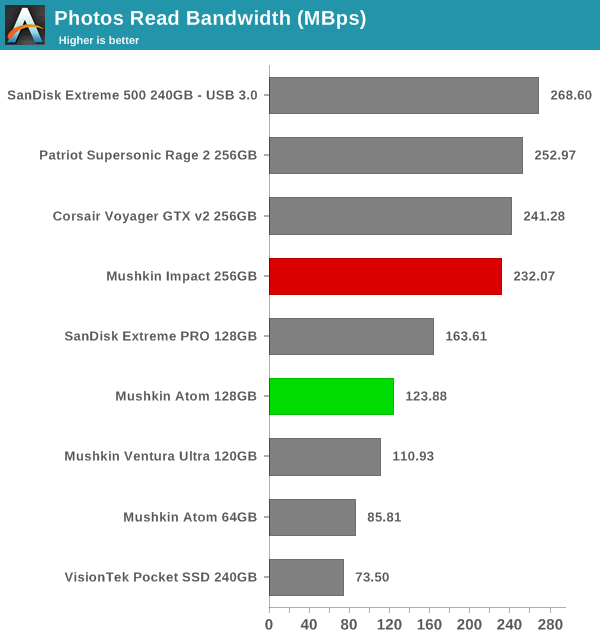
robocopy - Photos Read

robocopy - Photos Write

robocopy - Videos Read

robocopy - Videos Write

robocopy - Blu-ray Folder Read

robocopy - Blu-ray Folder Write

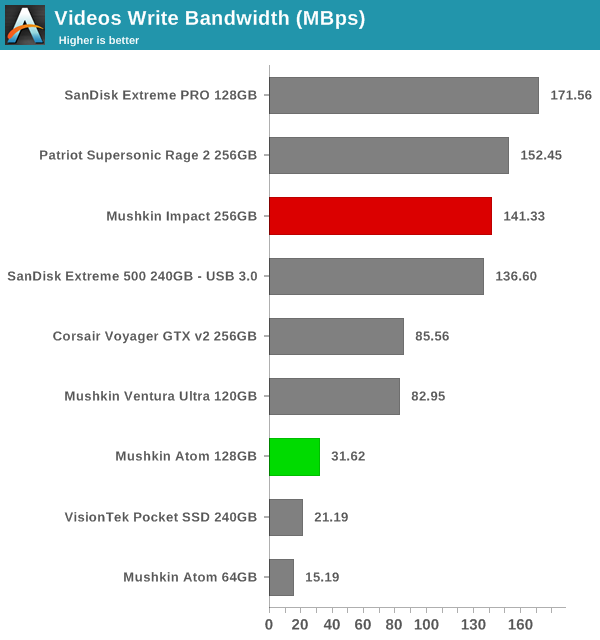
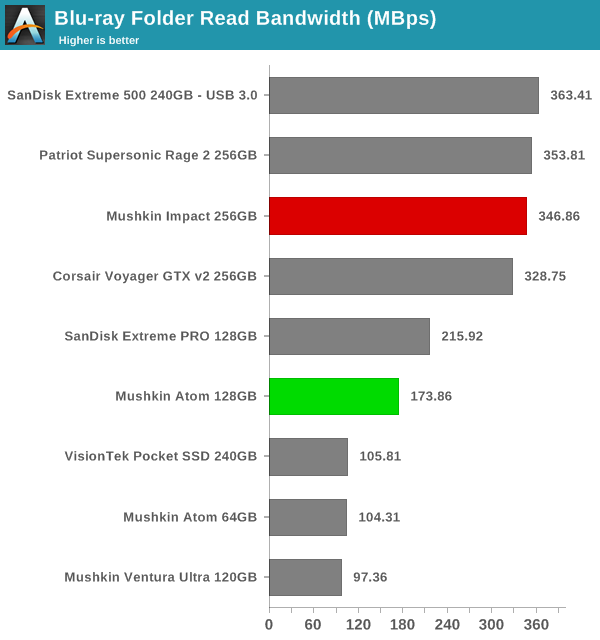
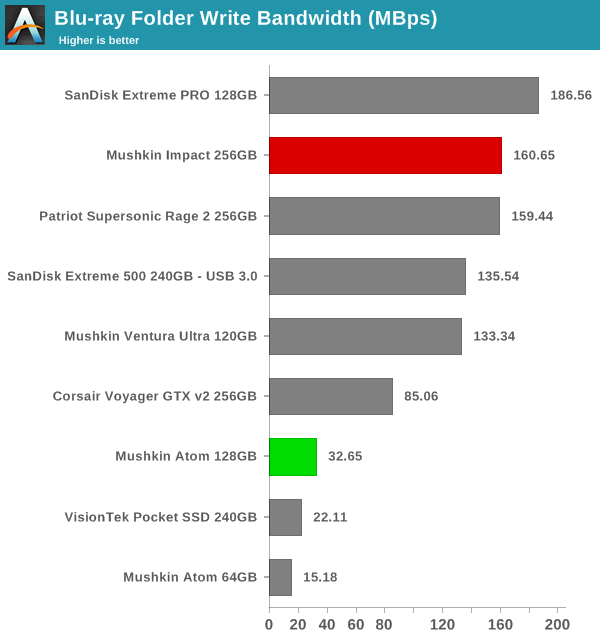
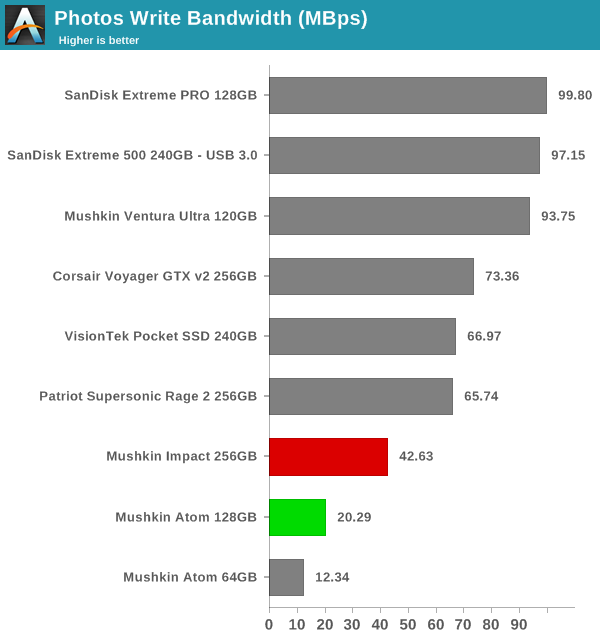
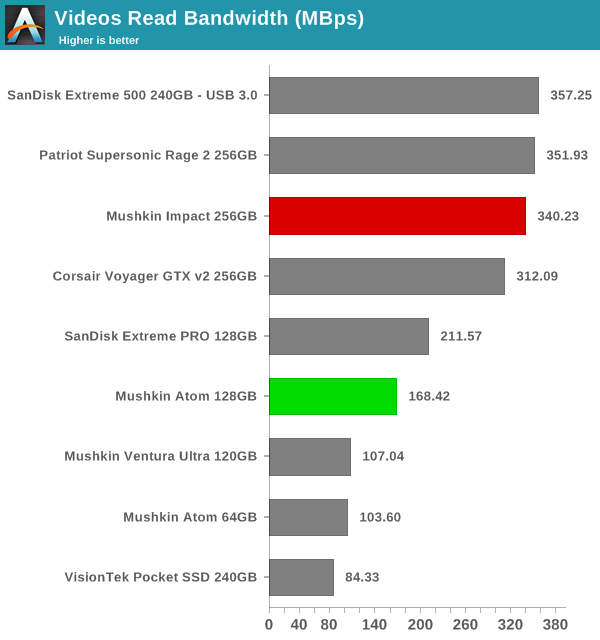
The benchmark numbers show a wide spread – for certain use-cases such as Blu-ray folder writes, the Atom and the Impact have top numbers in their respective capacity classes, but they also come in with disappointing numbers for use-cases such as copying over lots of photographs. Further down, we will see if the pricing can act as a redeeming aspect.

Performance Consistency

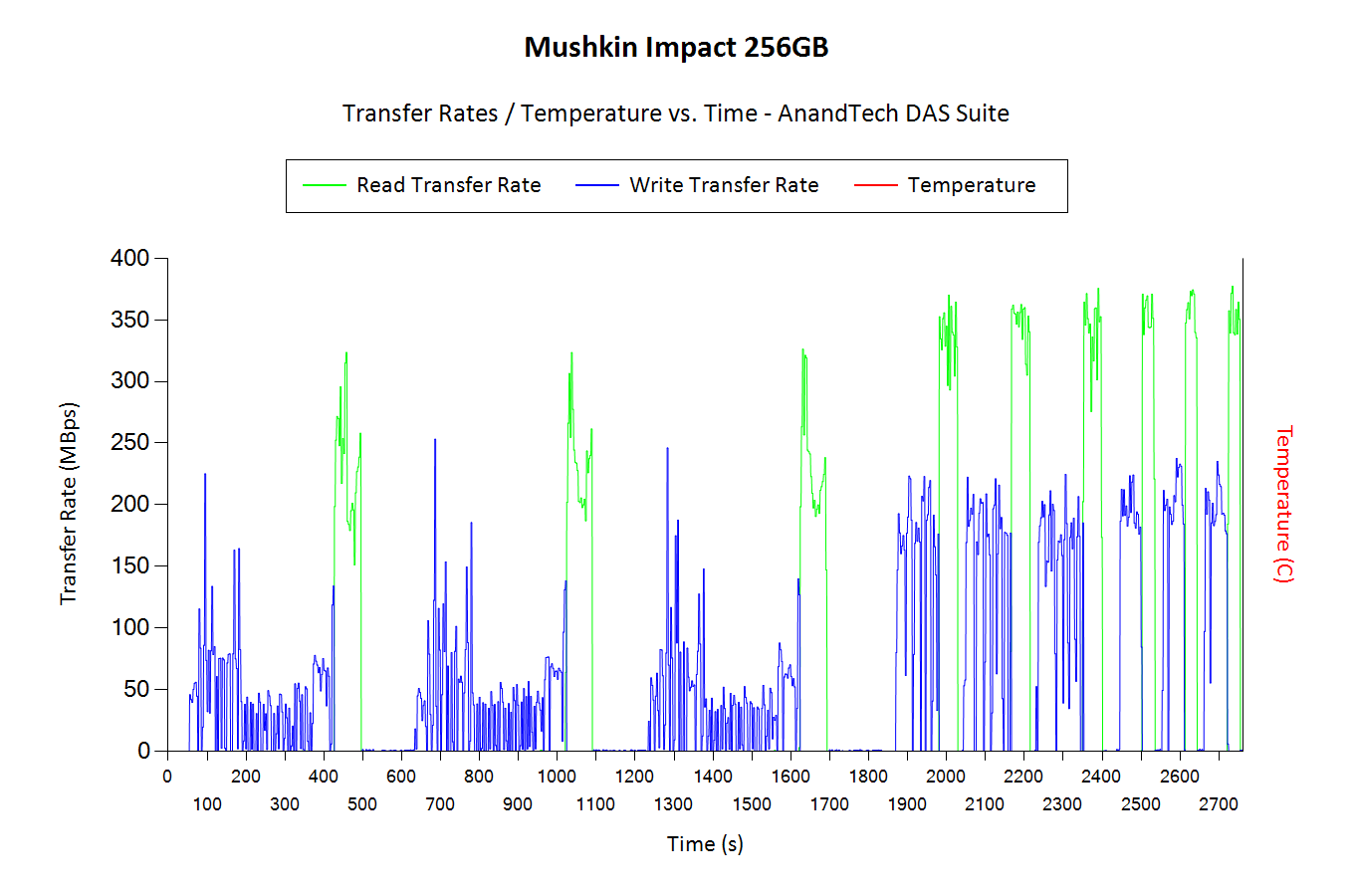
Yet another interesting aspect of these types of units is performance consistency. Aspects that may influence this include thermal throttling and firmware caps on access rates to avoid overheating or other similar scenarios. This aspect is an important one, as the last thing that users want to see when copying over, say, 100 GB of data to the flash drive, is the transfer rate going to USB 2.0 speeds. In order to identify whether the drive under test suffers from this problem, we instrumented our robocopy DAS benchmark suite to record the flash drive’s read and write transfer rates while the robocopy process took place in the background. For supported drives, we also recorded the internal temperature of the drive during the process. Unfortunately, neither the Atom nor the Impact expose the temperature details. The graphs below show the speeds observed during our real-world DAS suite processing. The first three sets of writes and reads correspond to the photos suite. A small gap (for the transfer of the videos suite from the primary drive to the RAM drive) is followed by three sets for the next data set. Another small RAM-drive transfer gap is followed by three sets for the Blu-ray folder.

An important point to note here is that each of the first three blue and green areas correspond to 15.6 GB of writes and reads respectively. Throttling, if any, is apparent within the processing of the photos suite itself. The good thing here is that neither the Impact nor the Atom suffer from thermal throttling.

Mushkin Impact 256GBMushkin Atom 128GBCorsair Voyager GTX v2 256GBMushkin Atom 64GBMushkin Ventura Ultra 120GBPatriot Supersonic Rage 2 256GBSanDisk Extreme 500 240GB – USB 3.0SanDisk Extreme PRO 128GBVisionTek Pocket SSD 240GB

Concluding Remarks

Coming to the business end of the review, the Impact 256GB and Atom 128GB continue Mushkin’s tradition of improving the performance and capacity of their USB 3.0 flash drives every year, while retaining the same physical footprint.

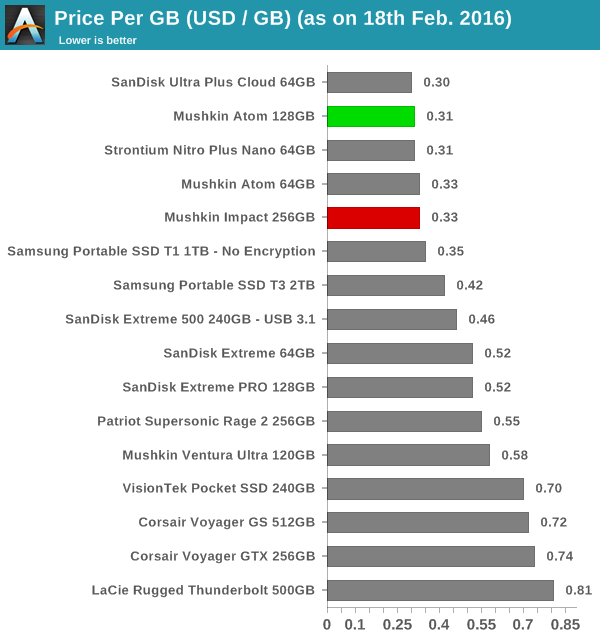
The performance of the drives indicate suitability for write-once read-many scenarios. There are 128GB and 256GB portable SSDs (not in the same form factor, obviously) that have much better overall performance.Can the pricing save the day for Mushkin? We took a look at the online pricing of the various UFDs that we have evaluated so far and compared their cost per GB.

Price per GB

The Impact 256GB (priced at $85) is simply the most economical 256GB flash drive that we have seen so far. Given the $0.33/GB pricing, it is hard to not recommend it provided the use-case is appropriate. The Patriot Supersonic Rage 2 does provide better overall performance, but it comes in at $0.55/GB. At $40, the Atom 128GB is also the cheapest UFD in its capacity class that we have looked at in detail.

Overall, the Mushkin 256GB and Atom 128GB don’t impress with their benchmark numbers. However, the pricing aspect more than makes up for the average performance.

Mushkin Impact 256GB and Atom 128GB USB Flash Drives Capsule Review

Mushkin Impact 256GB and Atom 128GB USB Flash Drives Capsule Review

Flash drives are a dime a dozen these days, and most of them carry uninteresting specifications. In particular, flash drives advertising smaller physical footprints have tended to carry disappointing performance numbers. At CES 2016, Mushkin had two USB Flash Drives (UFDs) on display belonging to the ‘small footprint’ club, the Impact 256GB and the Atom 128GB. We have reviewed the Atom 64GB version before. Though we were unimpressed with the Atom’s performance, the form factor was very intriguing. Last month, Mushkin showed that they had doubled the capacity while retaining the same form factor. Along with the Atom 128GB, Mushkin also showed off one of the smallest 256GB UFDs in the market, the Impact 256GB.

Hardware Design and Internals

The industrial design of the Atom 128GB is the same as that of the 64GB version. It has a small hole at one end to secure it to a keychain or anything similar. The Impact is small too, and the picture below brings out the relative sizes.

The smalled 256GB UFD that we have reviewed as yet is the Patriot Supersonic Rage 2. The Impact 256GB is of the same length, but has a slightly smaller width. It is highly improbable that the Impact 256GB might end up blocking any USB port adjoining the one it is connected to.

Unlike the Atom’s plastic casing, the Impact also has an aluminum housing, and despite the lightweight nature, feels solid in hand. It also has a plastic tab at one end for attachment purposes.

Without opening up the unit, it is possible to identify the controller and flash inside the units.

The Atom 128GB has a Phison PS2251-07 single-channel USB 3.0 flash controller and uses Toshiba TLC flash. On the other hand, the Impact 256GB comes with the dual-channel high performance Phison PS2251-08 controller and Toshiba MLC flash.

Testbed Setup and Testing Methodology

Evaluation of DAS units on Windows is done with the testbed outlined in the table below. For devices with a USB 3.0 (via a Type-A interface) connections (such as the Mushkin Impact 256GB and Atom 128GB that we are considering today), we utilize the USB 3.0 port directly hanging off the Z97 PCH.

AnandTech DAS Testbed Configuration
Motherboard Asus Z97-PRO Wi-Fi ac ATX
CPU Intel Core i7-4790
Memory Corsair Vengeance Pro CMY32GX3M4A2133C11
32 GB (4x 8GB)
DDR3-2133 @ 11-11-11-27
OS Drive Seagate 600 Pro 400 GB
SATA Devices Asus BW-16D1HT 16x Blu-ray Write (w/ M-Disc Support)
Add-on Card Asus Thunderbolt EX II
Chassis Corsair Air 540
PSU Corsair AX760i 760 W
OS Windows 10 Pro x64
Thanks to Asus and Corsair for the build components

The full details of the reasoning behind choosing the above build components can be found here. The list of DAS units used for comparison purposes is provided below.

  • Mushkin Impact 256GB
  • Mushkin Atom 128GB
  • Corsair Voyager GTX v2 256GB
  • Mushkin Atom 64GB
  • Mushkin Ventura Ultra 120GB
  • Patriot Supersonic Rage 2 256GB
  • SanDisk Extreme 500 240GB – USB 3.0
  • SanDisk Extreme PRO 128GB
  • VisionTek Pocket SSD 240GB

Synthetic Benchmarks – ATTO and Crystal DiskMark

Mushkin claims read and write speeds of 400 MBps and 310 MBps respectively for the Impact 256GB. The corresponding numbers are 180 MBps and 40 MBps for the Atom 128GB. These are unfortunately not hit with our default ATTO benchmark settings. In any case, these access traces are not very common in real-life scenarios.

Mushkin Impact 256GBMushkin Atom 128GBCorsair Voyager GTX v2 256GBMushkin Atom 64GBMushkin Ventura Ultra 120GBPatriot Supersonic Rage 2 256GBSanDisk Extreme 500 240GB – USB 3.0SanDisk Extreme PRO 128GBVisionTek Pocket SSD 240GB

CrystalDiskMark, despite being a canned benchmark, provides a better estimate of the performance range with a selected set of numbers. Here, we can see things closer to Mushkin’s claims – 375 MBps reads and 286 MBps writes for the Impact 256GB, and 191 MBps reads and 26 MBps writes for the Atom 128 GB. The native USB 3.0 flash controllers have always sruggled with very low IOPS for 4K random accesses (writes in particular). We see the Impact 256GB fall to 0.013 MBps for 4K random writes, while the Atom 128GB comes in at 0.071 MBps for that access trace.

Mushkin Impact 256GBMushkin Atom 128GBCorsair Voyager GTX v2 256GBMushkin Atom 64GBMushkin Ventura Ultra 120GBPatriot Supersonic Rage 2 256GBSanDisk Extreme 500 240GB – USB 3.0SanDisk Extreme PRO 128GBVisionTek Pocket SSD 240GB

Benchmarks – robocopy and PCMark 8 Storage Bench

Our testing methodology for DAS units also takes into consideration the usual use-case for such devices. The most common usage scenario is transfer of large amounts of photos and videos to and from the unit. The minor usage scenario is importing files directly off the DAS into a multimedia editing program such as Adobe Photoshop. Since these are not portable SSDs, we will be disregarding the latter use-case.

In order to tackle the first use-case, we created three test folders with the following characteristics:

  • Photos: 15.6 GB collection of 4320 photos (RAW as well as JPEGs) in 61 sub-folders
  • Videos: 16.1 GB collection of 244 videos (MP4 as well as MOVs) in 6 sub-folders
  • BR: 10.7 GB Blu-ray folder structure of the IDT Benchmark Blu-ray (the same that we use in our robocopy tests for NAS systems)
robocopy - Photos Read

robocopy - Photos Write

robocopy - Videos Read

robocopy - Videos Write

robocopy - Blu-ray Folder Read

robocopy - Blu-ray Folder Write

The benchmark numbers show a wide spread – for certain use-cases such as Blu-ray folder writes, the Atom and the Impact have top numbers in their respective capacity classes, but they also come in with disappointing numbers for use-cases such as copying over lots of photographs. Further down, we will see if the pricing can act as a redeeming aspect.

Performance Consistency

Yet another interesting aspect of these types of units is performance consistency. Aspects that may influence this include thermal throttling and firmware caps on access rates to avoid overheating or other similar scenarios. This aspect is an important one, as the last thing that users want to see when copying over, say, 100 GB of data to the flash drive, is the transfer rate going to USB 2.0 speeds. In order to identify whether the drive under test suffers from this problem, we instrumented our robocopy DAS benchmark suite to record the flash drive’s read and write transfer rates while the robocopy process took place in the background. For supported drives, we also recorded the internal temperature of the drive during the process. Unfortunately, neither the Atom nor the Impact expose the temperature details. The graphs below show the speeds observed during our real-world DAS suite processing. The first three sets of writes and reads correspond to the photos suite. A small gap (for the transfer of the videos suite from the primary drive to the RAM drive) is followed by three sets for the next data set. Another small RAM-drive transfer gap is followed by three sets for the Blu-ray folder.

An important point to note here is that each of the first three blue and green areas correspond to 15.6 GB of writes and reads respectively. Throttling, if any, is apparent within the processing of the photos suite itself. The good thing here is that neither the Impact nor the Atom suffer from thermal throttling.

Mushkin Impact 256GBMushkin Atom 128GBCorsair Voyager GTX v2 256GBMushkin Atom 64GBMushkin Ventura Ultra 120GBPatriot Supersonic Rage 2 256GBSanDisk Extreme 500 240GB – USB 3.0SanDisk Extreme PRO 128GBVisionTek Pocket SSD 240GB
Concluding Remarks

Coming to the business end of the review, the Impact 256GB and Atom 128GB continue Mushkin’s tradition of improving the performance and capacity of their USB 3.0 flash drives every year, while retaining the same physical footprint.

The performance of the drives indicate suitability for write-once read-many scenarios. There are 128GB and 256GB portable SSDs (not in the same form factor, obviously) that have much better overall performance.Can the pricing save the day for Mushkin? We took a look at the online pricing of the various UFDs that we have evaluated so far and compared their cost per GB.
Price per GB

The Impact 256GB (priced at $85) is simply the most economical 256GB flash drive that we have seen so far. Given the $0.33/GB pricing, it is hard to not recommend it provided the use-case is appropriate. The Patriot Supersonic Rage 2 does provide better overall performance, but it comes in at $0.55/GB. At $40, the Atom 128GB is also the cheapest UFD in its capacity class that we have looked at in detail.

Overall, the Mushkin 256GB and Atom 128GB don’t impress with their benchmark numbers. However, the pricing aspect more than makes up for the average performance.
Sony Unveils New Xperia X Smartphones

Sony Unveils New Xperia X Smartphones

This week at Mobile World Congress 2016, Sony has introduced their new high-end Xperia X series smartphones. The new smartphones feature similar designs across the entire series and all sport 5” displays, but each is based on a different SoC and offers slightly different functionality. The Xperia X smartphones represent the company’s new lineup, but it does not seem that Sony plans to position any of them as their flagship handset just now.

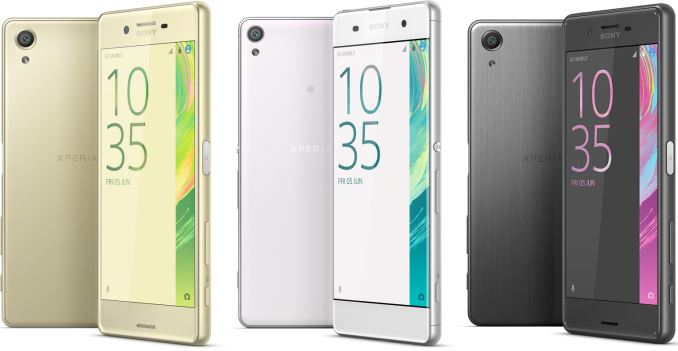
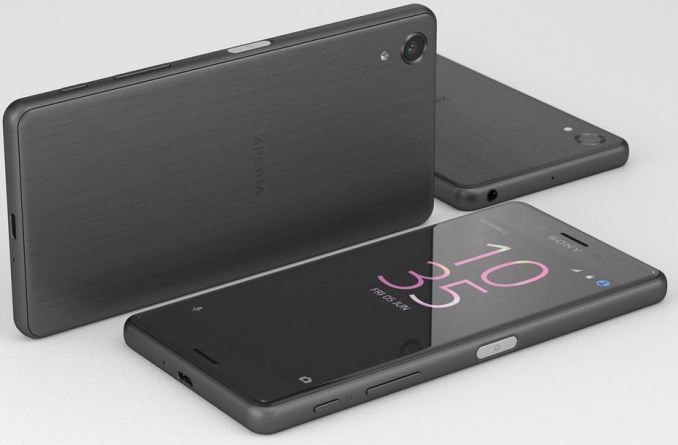
The new Sony Xperia X lineup consists of three models — the Xperia XA, the Xperia X and the Xperia X Performance — which are aimed at the entry-level, mid-range, and (quasi) high-end markets respectively. In keeping with a consistent family, all three smartphones look very similar and have a lot in common from design standpoint, along with sharing some technologies and components, but each phone is built around a unique platform.

  Xperia XA Xperia X Xperia X Performance
SoC MediaTek Helio P10
4x Cortex-A53 @ 1.1GHz
4x Cortex A53 @ 2.0GHz
ARM Mali-T860MP2
QC Snapragon 650
4x Cortex-A53 @ 1.4GHz
2x Cortex-A72 @ 1.8GHz
Adreno 510
QC Snapdragon 820
2x Kryo @ 1.6GHz
2x Kryo @ 2.15GHz
Adreno 530
RAM  2 GB LPDDR3 3 GB LPDDR3 3 GB LPDDR4
Storage 16 GB + microSD 32 GB + microSD 32 GB + microSD
Display 5″ 1280×720 5″ 1920×1080 5″ 1920×1080
Network LTE Cat 4 LTE Cat 6 LTE Cat 9
Dimensions 143.6 x 66.8 x 7.9 (mm) 142.7 x 69.4 x 7.9 (mm) 144.8 x 71.1 x 7.62 (mm)
Weight 137.4 grams 153 grams 164.4 grams
Rear Camera 13 MP, LED flash 23 MP, LED flash
Front Camera 8 MP 13 MP
Battery 2300 mAh 2620 mAh 2700 mAh
OS Google Android 6.0 Marsmallow
Connectivity Wi-Fi, Bluetooth, micro-USB Wi-Fi, Bluetooth 4.2, NFC, micro-USB
Additional Fingerprint reader integrated into Power button
SIM Size nano SIM or dual nano SIM nano SIM nano SIM

Sony Xperia X, Sony Xperia XA and Sony Xperia Performance

Starting things off is the Xperia XA. The XA is an entry-level model based on MediaTek’s Helio P10 (MT6755) system-on-chip with a 5-inch 1280×720 in the display. The device features aluminum frame with plastic inlays. It is arguably the most stylish product in the Xperia X family, but is also the least powerful one: it features a rather low-resolution screen, only 2 GB of RAM and only 16 GB of storage. Sony equipped the Xperia XA model with a 13 MP rear camera and a 8 MP front camera, hence, its imaging capabilities should be rather good, even though it does not support the predictive hybrid autofocus technology found on the other X series phones. Meanwhile the device features 2300 mAh battery, which I’d expect to provide decent battery life, keeping in mind the 720p display and Sony’s smart battery management.

Next up, the Xperia X is the mid-range model of the new lineup. It features an aluminum body, a slightly curved 5” display as well as a fingerprint reader integrated into the Power button. The Sony Xperia X is based on Qualcomm’s Snapdragon 650 SoC and is equipped with 3 GB of LPDDR3 memory as well as 32 GB of NAND flash storage. The smartphone has a 5” full-HD display, a 23 MP rear camera as well as a 13 MP front camera, with the rear camera supporting Sony’s all-new predictive hybrid autofocus technology, which analyzes dynamic scene and attempts to predict motion of the subject to improve quality of focus. The Xperia X is equipped with 2620 mAh battery. Sony has not released pricing information on any of these at the moment, but the combination of a mainstream SoC along with a 5” 1080p display indicates that the Xperia X5 should not be too expensive.

Finally, the Xperia X Performance will be the most powerful model in the family, and will feature Qualcomm’s forthcoming Snapdragon 820 SoC, putting it into the running for one of the fastest Android-based smartphones available this year. Just like the Xperia X, the higher-end version will feature a 5” display with full-HD resolution, a 23 MP rear camera as well as a 13 MP front camera, the former of which supports Sony’s predictive hybrid autofocus technology, and are presumably the same camera modules as used in the Xperia X . The X Performance will also be water-resistant, which will make it slightly larger and heavier than the Xperia X. However, Sony has mentioned that they will only offer the Xperia X Performance Asia, at least initially, so it will not be as widely available as the rest of the X series.

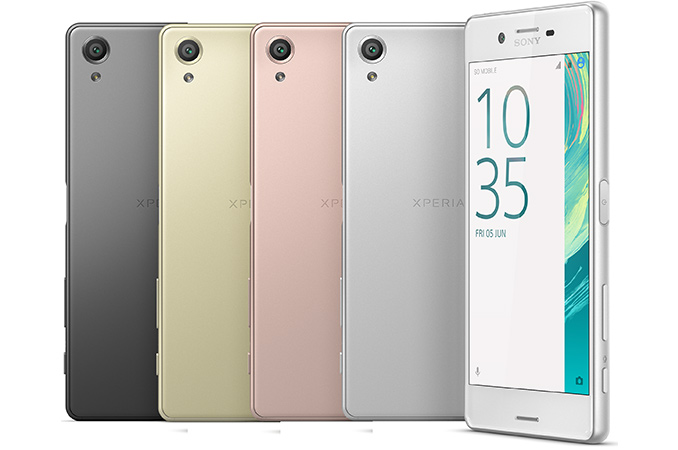
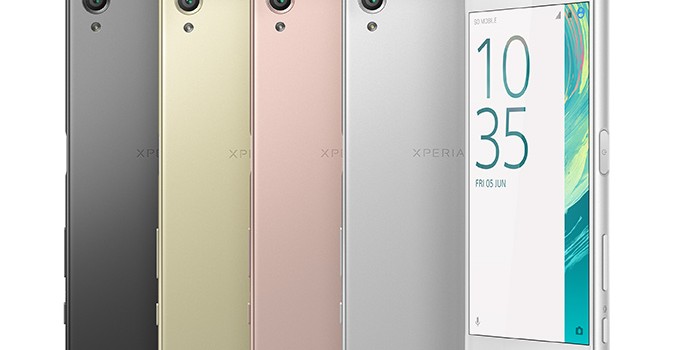
Otherwise from a shared platform standpoint, all Xperia X smartphones feature Qnovo’s adaptive charging technology as well as Sony’s new smart battery management that promises to stretch battery life to two days. Meanwhile, like other phones launching in this timeframe, all three phones will be shipping with Google Android 6.0 Marshmallow operating system. The phones will be available in four colors, including white, graphite black, lime gold and rose gold later this year.

The Xperia X Performance uses Qualcomm’s Snapdragon 820 SoC, the company’s most advanced mobile processor today, and though it’s not meant to be the company’s flagship phone, one could argue it amounts to a second high-end phone for the company. The Xperia X and the Xperia X Performance are also equipped 1/2.3” Exmor RS mobile sensor with 24 mm wide-angle lens that can shoot in low-light condition, which is also used on the Xperia Z5 handsets, another indicator that the new smartphones belong to the high-end of the market. However, unlike the Z5 Premium, the new models do not feature high resolution displays (either QHD or 4K) – something that has been a distinctive feature of all top-of-the-range smartphones in the recent years.

What is a bit strange is that the Xperia X Performance is not set to be available in the U.S. and Europe, at least initially. As a result, Sony’s newest phone (the Xperia X with the Snapdragon 650) offered in these markets will be clearly less advanced than Sony’s Z5-series products, which are based on the Qualcomm Snapdragon 810 processor and are waterproof.  It remains to be seen how the new family of Sony’s smartphones fits in the company’s already dense lineup of handsets. Perhaps, Sony deliberately decided not to offer the Xperia X Performance in the U.S. and Europe so to avoid any possible competition or confusion between its own devices.

Devices will be available in the summer, with prices still to be determined.