News


Huawei Enters The PC Market With The MateBook Convertible Tablet

Huawei Enters The PC Market With The MateBook Convertible Tablet

Move over Microsoft. One of the world’s largest smartphone makers has decided to enter the PC marketplace with the launch of the MateBook 2-in-1 tablet. Well, maybe not, but they have certainly taken a page out of the Microsoft playbook with their first tablet. This is a 12-inch tablet with a 3:2 aspect ratio. If that sounds familiar, that’s because it’s exactly the same aspect ratio and size as the Surface Pro lineup. Just like Lenovo and others, manufacturers are seeing the relative success of the Surface Pro and want their own piece of the action. And that’s great for all of us.

Rather than compete head on with the Surface Pro though, Huawei has gone for a slightly different target. The MateBook is thinner, and lighter than the Surface Pro, and it is designed around the Core m platform, so it is completely fanless. Only the base model Surface Pro can be had with Core m. Other notable internal items are 4 or 8 GB of memory, and 128, 256, or 512 GB of SSD storage. Battery capacity is 33.7 Wh, and Huawei says this gives all day battery life, but we’ll have to see if that’s true. The tablet itself is only 6.9 mm thick and weighs just 640 grams (1.4 lbs). The MateBook also comes in several hundred dollars less than the Surface Pro, with a starting price of $699, and goes up to $1599 with Core m7, 8GB of RAM, and a 512 GB SSD. The display is a 12-inch 2160×1440 LCD.

Convertible Tablets
Model Huawei MateBook Microsoft Surface Pro 4 Lenovo MIIX 700
CPU Intel Core m3-6Y30 (4.5W)
Intel Core m5 (4.5W)
Intel Core m7-6Y75 (4.5W)
Intel Core m3-6Y30 (4.5W)
Intel Core i5-6300U (15W)
Intel Core i7-6650U (15W)
Intel Core m3-6Y30 (4.5W)
Intel Core m5-5Y54 (4.5W)
Intel Core m7-6Y75 (4.5W)
Memory
 
4/8 GB 8/16 GB 4/8 GB
Storage 128, 256, 512 GB SSD 128 GB to 1TB SSD 64, 128, 256 GB SSD
Display 12″ 2160×1440 12.3″ 2736×1824 12″ 2160×1440
Battery 33.7 Wh 39 Wh N/A
Thickness 6.9mm (0.27″) 8.4mm (0.33″) 8.95mm (0.33″)
Mass 640g (1.41lbs) 766-789g (1.69-1.74lbs) 780g (1.72lbs)
Price $699-$1599 $899-$2699 $749-$1099


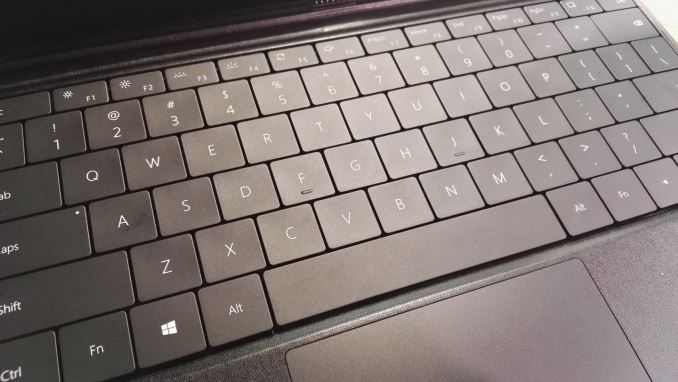
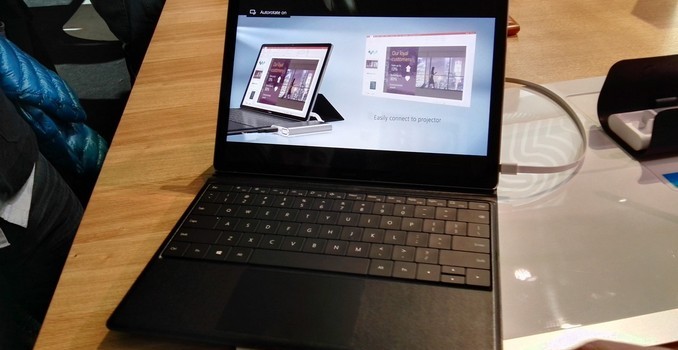
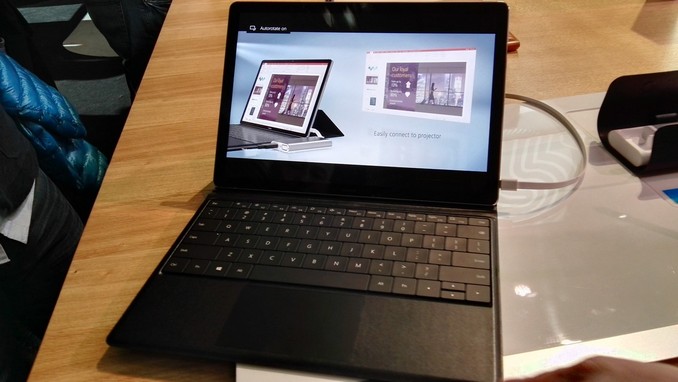
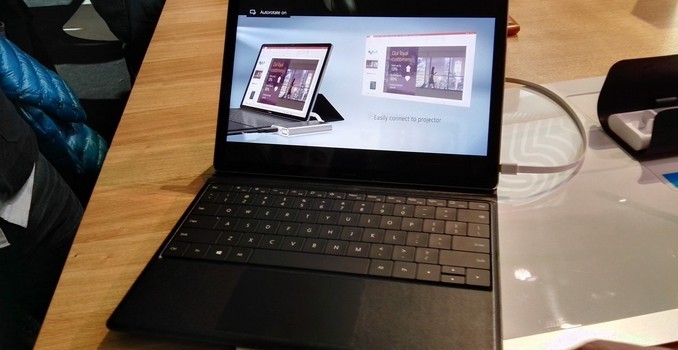
You can’t compete against Surface Pro without accessories, and the MateBook has both an active pen and click on keyboard to transform it into a laptop. The keyboard has backlit keys with 1.5mm of travel, but the actual keys themselves are very much like the Surface Pro 3 keyboard rather than the much improved Surface Pro 4 design. The tablet also lacks a kickstand, and instead the keyboard dock does some clever folding to hold the display up when it’s docked. The keyboard connects with pogo pins, so you don’t have to worry about Bluetooth connectivity for the connection, or batteries in the cover. The cover will sell for $129.
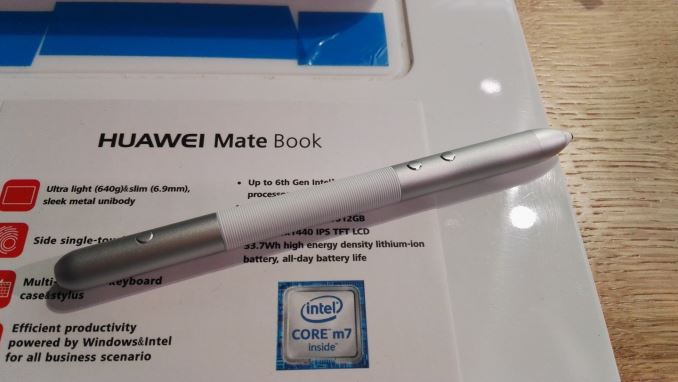
The other accessory is an active pen, and while we don’t know the pen technology at this point, Huawei does say that it has 2048 levels of pressure sensitivity. It also features a laser pointer in the pen for use during presentations. The pen charges over USB, and one hour of charge gives one month of use.

It’s great to see a new entrance into the PC space, and Huawei has designed what looks to be a pretty nice tablet for their first attempt. The Surface Pro is definitely the inspiration for the MateBook, and that’s not a bad thing, but the keyboard has been improved a lot of the latest tablet from Microsoft, and the MateBook type cover appears to mimic the prior generation here. Also the display is a much lower resolution panel than the latest offering from Redmond, but it does match the well received Surface Pro 3 model. I’m very excited to see another entrant here though and hopefully we can get this in for review to see how it stacks up.

Huawei Enters The PC Market With The MateBook Convertible Tablet

Huawei Enters The PC Market With The MateBook Convertible Tablet

Move over Microsoft. One of the world’s largest smartphone makers has decided to enter the PC marketplace with the launch of the MateBook 2-in-1 tablet. Well, maybe not, but they have certainly taken a page out of the Microsoft playbook with their first tablet. This is a 12-inch tablet with a 3:2 aspect ratio. If that sounds familiar, that’s because it’s exactly the same aspect ratio and size as the Surface Pro lineup. Just like Lenovo and others, manufacturers are seeing the relative success of the Surface Pro and want their own piece of the action. And that’s great for all of us.

Rather than compete head on with the Surface Pro though, Huawei has gone for a slightly different target. The MateBook is thinner, and lighter than the Surface Pro, and it is designed around the Core m platform, so it is completely fanless. Only the base model Surface Pro can be had with Core m. Other notable internal items are 4 or 8 GB of memory, and 128, 256, or 512 GB of SSD storage. Battery capacity is 33.7 Wh, and Huawei says this gives all day battery life, but we’ll have to see if that’s true. The tablet itself is only 6.9 mm thick and weighs just 640 grams (1.4 lbs). The MateBook also comes in several hundred dollars less than the Surface Pro, with a starting price of $699, and goes up to $1599 with Core m7, 8GB of RAM, and a 512 GB SSD. The display is a 12-inch 2160×1440 LCD.

Convertible Tablets
Model Huawei MateBook Microsoft Surface Pro 4 Lenovo MIIX 700
CPU Intel Core m3-6Y30 (4.5W)
Intel Core m5 (4.5W)
Intel Core m7-6Y75 (4.5W)
Intel Core m3-6Y30 (4.5W)
Intel Core i5-6300U (15W)
Intel Core i7-6650U (15W)
Intel Core m3-6Y30 (4.5W)
Intel Core m5-5Y54 (4.5W)
Intel Core m7-6Y75 (4.5W)
Memory
 
4/8 GB 8/16 GB 4/8 GB
Storage 128, 256, 512 GB SSD 128 GB to 1TB SSD 64, 128, 256 GB SSD
Display 12″ 2160×1440 12.3″ 2736×1824 12″ 2160×1440
Battery 33.7 Wh 39 Wh N/A
Thickness 6.9mm (0.27″) 8.4mm (0.33″) 8.95mm (0.33″)
Mass 640g (1.41lbs) 766-789g (1.69-1.74lbs) 780g (1.72lbs)
Price $699-$1599 $899-$2699 $749-$1099


You can’t compete against Surface Pro without accessories, and the MateBook has both an active pen and click on keyboard to transform it into a laptop. The keyboard has backlit keys with 1.5mm of travel, but the actual keys themselves are very much like the Surface Pro 3 keyboard rather than the much improved Surface Pro 4 design. The tablet also lacks a kickstand, and instead the keyboard dock does some clever folding to hold the display up when it’s docked. The keyboard connects with pogo pins, so you don’t have to worry about Bluetooth connectivity for the connection, or batteries in the cover. The cover will sell for $129.

The other accessory is an active pen, and while we don’t know the pen technology at this point, Huawei does say that it has 2048 levels of pressure sensitivity. It also features a laser pointer in the pen for use during presentations. The pen charges over USB, and one hour of charge gives one month of use.

It’s great to see a new entrance into the PC space, and Huawei has designed what looks to be a pretty nice tablet for their first attempt. The Surface Pro is definitely the inspiration for the MateBook, and that’s not a bad thing, but the keyboard has been improved a lot of the latest tablet from Microsoft, and the MateBook type cover appears to mimic the prior generation here. Also the display is a much lower resolution panel than the latest offering from Redmond, but it does match the well received Surface Pro 3 model. I’m very excited to see another entrant here though and hopefully we can get this in for review to see how it stacks up.
Huawei Enters The PC Market With The MateBook Convertible Tablet

Huawei Enters The PC Market With The MateBook Convertible Tablet

Move over Microsoft. One of the world’s largest smartphone makers has decided to enter the PC marketplace with the launch of the MateBook 2-in-1 tablet. Well, maybe not, but they have certainly taken a page out of the Microsoft playbook with their first tablet. This is a 12-inch tablet with a 3:2 aspect ratio. If that sounds familiar, that’s because it’s exactly the same aspect ratio and size as the Surface Pro lineup. Just like Lenovo and others, manufacturers are seeing the relative success of the Surface Pro and want their own piece of the action. And that’s great for all of us.

Rather than compete head on with the Surface Pro though, Huawei has gone for a slightly different target. The MateBook is thinner, and lighter than the Surface Pro, and it is designed around the Core m platform, so it is completely fanless. Only the base model Surface Pro can be had with Core m. Other notable internal items are 4 or 8 GB of memory, and 128, 256, or 512 GB of SSD storage. Battery capacity is 33.7 Wh, and Huawei says this gives all day battery life, but we’ll have to see if that’s true. The tablet itself is only 6.9 mm thick and weighs just 640 grams (1.4 lbs). The MateBook also comes in several hundred dollars less than the Surface Pro, with a starting price of $699, and goes up to $1599 with Core m7, 8GB of RAM, and a 512 GB SSD. The display is a 12-inch 2160×1440 LCD.

Convertible Tablets
Model Huawei MateBook Microsoft Surface Pro 4 Lenovo MIIX 700
CPU Intel Core m3-6Y30 (4.5W)
Intel Core m5 (4.5W)
Intel Core m7-6Y75 (4.5W)
Intel Core m3-6Y30 (4.5W)
Intel Core i5-6300U (15W)
Intel Core i7-6650U (15W)
Intel Core m3-6Y30 (4.5W)
Intel Core m5-5Y54 (4.5W)
Intel Core m7-6Y75 (4.5W)
Memory
 
4/8 GB 8/16 GB 4/8 GB
Storage 128, 256, 512 GB SSD 128 GB to 1TB SSD 64, 128, 256 GB SSD
Display 12″ 2160×1440 12.3″ 2736×1824 12″ 2160×1440
Battery 33.7 Wh 39 Wh N/A
Thickness 6.9mm (0.27″) 8.4mm (0.33″) 8.95mm (0.33″)
Mass 640g (1.41lbs) 766-789g (1.69-1.74lbs) 780g (1.72lbs)
Price $699-$1599 $899-$2699 $749-$1099


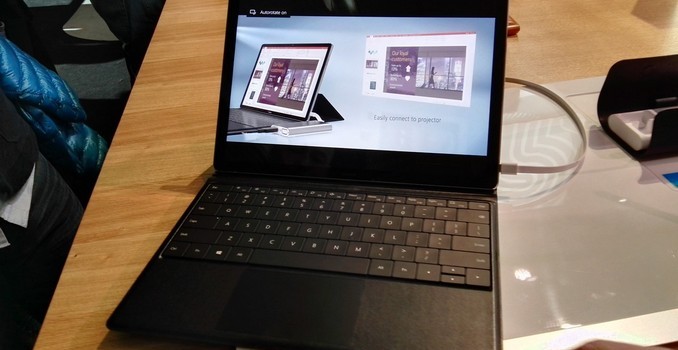
You can’t compete against Surface Pro without accessories, and the MateBook has both an active pen and click on keyboard to transform it into a laptop. The keyboard has backlit keys with 1.5mm of travel, but the actual keys themselves are very much like the Surface Pro 3 keyboard rather than the much improved Surface Pro 4 design. The tablet also lacks a kickstand, and instead the keyboard dock does some clever folding to hold the display up when it’s docked. The keyboard connects with pogo pins, so you don’t have to worry about Bluetooth connectivity for the connection, or batteries in the cover. The cover will sell for $129.

The other accessory is an active pen, and while we don’t know the pen technology at this point, Huawei does say that it has 2048 levels of pressure sensitivity. It also features a laser pointer in the pen for use during presentations. The pen charges over USB, and one hour of charge gives one month of use.

It’s great to see a new entrance into the PC space, and Huawei has designed what looks to be a pretty nice tablet for their first attempt. The Surface Pro is definitely the inspiration for the MateBook, and that’s not a bad thing, but the keyboard has been improved a lot of the latest tablet from Microsoft, and the MateBook type cover appears to mimic the prior generation here. Also the display is a much lower resolution panel than the latest offering from Redmond, but it does match the well received Surface Pro 3 model. I’m very excited to see another entrant here though and hopefully we can get this in for review to see how it stacks up.
Early Exynos 8890 Impressions And Full Specifications

Early Exynos 8890 Impressions And Full Specifications

It’s been an interesting day here in Barcelona as I’ve had the pleasure to get a hands-on with both LG’s new flagship, the G5, as well as Samsung’s new Galaxy S7. While Joshua’s hands-on article was based on the Snapdragon 820 variant of the Galaxy S7 which we’ll be seeing in US and likely Chinese markets, the samples here in Barcelona were European units based on Samung LSI’s own Exynos 8890 processor. Without wasting too much time I quickly took a deeper look into one of the devices on display at the event to be able to find out some of the missing information that we’ve been lacking on the Exynos 8890.
 
High-End SoCs Specifications
SoC Snapdragon 820 Exynos 8890 Exynos 7420
CPU 2x [email protected]

2x [email protected]

4x [email protected]

4x Exynos M1 @
2.60GHz (1-2 core load)
2.29GHz (3-4 core load)

4x [email protected]

4x [email protected]

Memory
Controller
2x 32-bit
LPDDR4 @ 1803MHz

28.8GB/s b/w

2x 32-bit
LPDDR4 @ 1794MHz

28.7GB/s b/w

2x 32-bit
LPDDR4 @ 1555MHz

24.8GB/s b/w

GPU Adreno 530
@ 624MHz
Mali T880MP12
@ 650MHz
Mali T770MP8
@ 770MHz
Mfc.
Process
Samsung
14nm LPP
Samsung
14nm LPP
Samsung
14nm LPE

The Exynos 8890 employs Samsung’s own designed Exynos M1 cores. The micro-architecture at a high level resembles ARM’s big cores, but Samsung seems to have made quite a few changes and improvements when compared to ARM’s designs. While by now I do have a quite good idea of what the Exynos M1 looks like, we’ll be covering the topic more in-depth in a future article once we’ll be able to gain better insight from our own unit for proper benchmarking and power measurements.

On the CPU side we find an 8-core SoC composed of 4x Cortex A53 cores running at up to 1.586GHz coupled with 4x Exynos M1 cores in a big.LITTLE configuration. The most surprising revelation was the fact that the M1 cores reach an extremely high clock of up to 2.6GHz. This represents quite a significant boost over some past rumors which had put expectations 2.3-2.4GHz maximum frequency range. The catch here is that the Galaxy S7’s power management doesn’t allow all four cores to run at this high frequency but rather only enables the maximum clock when there’s at most 2 cores loaded. If there are 3 or more cores under high load, the CPU frequency doesn’t surpass 2288MHz.

On the GPU side we knew that we’d encounter a new ARM Mali T880MP12 – the currently largest Mali implementation available among existing SoCs. Back in November I theorized that Samsung would use the larger core implementation to lower the clocks of the GPU block and thus achieve better power efficiency. Indeed that’s what seems to have happened as the Exynos 8890’s GPU peaks at 650MHz versus the 770MHz frequency for the Exynos 7420. Hopefully this means that the new SoC will be able to maintain its peak performance for longer periods of time.

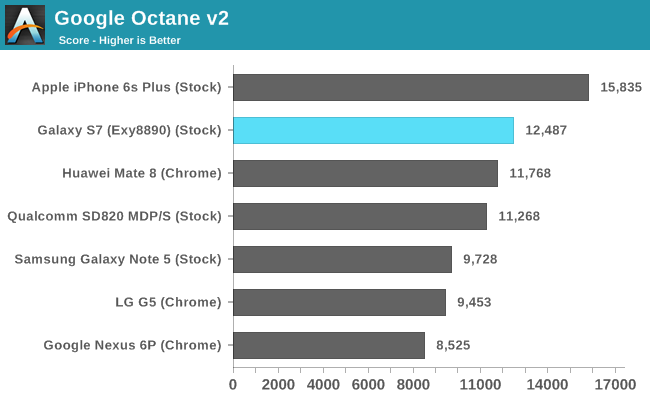
Google Octane v2  (Chrome/Safari/IE)

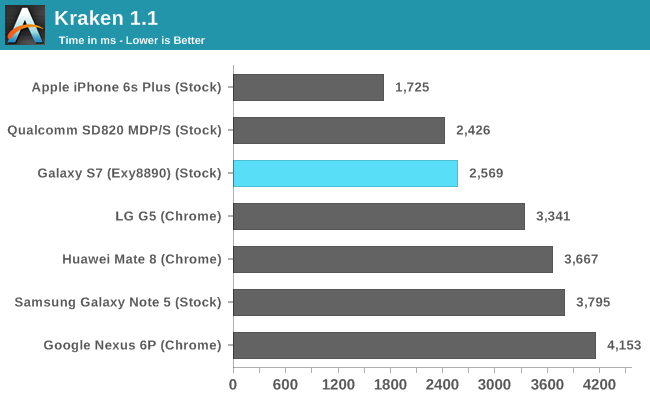
Kraken 1.1 (Chrome/Safari/IE)

While I didn’t have the time to run too many benchmarks, I did manage to run a few of our basic browser tests as well as GFXBench. We haven’t had the opportunity to benchmark the Snapdragon 820 Galaxy S7 yet, therefore I included the score numbers of the MDP/S platform to represent a best-case scenario for the Snapdragon 820 until we can get apples-to-apples scores based on Samsung’s browser. This still mostly due to the fact that Chrome is seemingly not yet optimized to take advantage of Kryo’s new architecture, and as a result scores some rather mediocre numbers, as seen in some preliminary LG G5 numbers included in the graphs above.

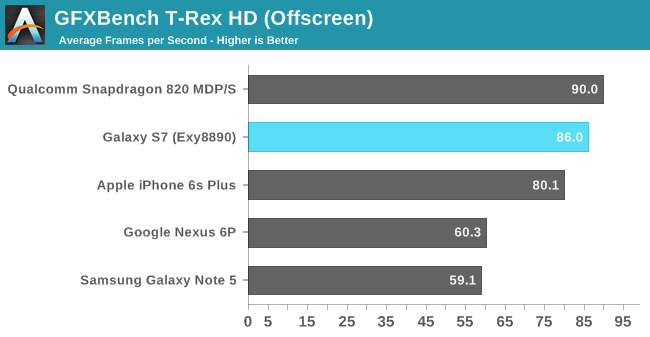
GFXBench T-Rex HD (Offscreen)

GFXBench Manhattan ES 3.0 (Offscreen)

Some quick GPU benchmarks also put the Exynos 8890 slightly behind the Snapdragon 820 in the MDP/S. We will still have to see if actual Snapdragon 820 devices are able to deliver the same performance as the MDP/S platform as there might be some thermal limitations coming into play. Again, we can’t comment too much on the scores before we get to know each device’s long-term performance and if the attained numbers are sustainable for long periods of time.

One observation I made today which was particularly concerning, was that both with the Snapdragon 820 LG G5 as well as the Exynos 8890 Galaxy S7 got considerably warm after running some heavy workloads. The fact that the Galaxy S7 touts having a heat-pipe thermal dissipation system is a quite worrying characteristic of the phone and should in no way be seen as a positive feature as it points to high power draw figures on the part of the SoC.

The first impression is that the performance difference between the Snapdragon 820 and the Exynos 8890 doesn’t seem to be very large, therefore it will be the SoC’s power draws and power efficiencies which will determine if, and which one of both will represent a superior design. Hopefully in the coming weeks and months we’ll be able to get a better understanding of this new generation of SoCs so that we can paint a definitive picture of the current status of the mobile SoC space.