News


CES 2016: GIGABYTE’s Double Length Gaming BRIX

CES 2016: GIGABYTE’s Double Length Gaming BRIX

The BRIX mini-PC line from GIGABYTE is an odd internal mashup within the company whereby the server business unit designs it, but the consumer arm does the marketing and sales. We’ve covered several BRIX units in the past, focusing on new technologies such as Iris Pro as well as the mobile CPU line. The BRIX design is made to offer a very small way of building a base PC, similar to the NUC. If we remember back a couple of years ago, GIGABYTE did a couple of models in red and green, with integrated mobile GPUs from AMD and NVIDIA respectively, aimed at the gaming market. These stalled for various reasons, partly because the mini-PC market isn’t focused at gaming, and the power of the GPUs in play. So fast forward to 2016, and at CES this year GIGABYTE had a different take on the design and was asking for input from booth attendees.

The design is straight forward – an upgraded BRIX on the left, featuring dual DDR slots (could be DDR4 depending on the CPU) and dual M.2/SATA connections with hope on PCIe and NVMe support, and then on the right we get an MXM GPU using the built in heatsink not too dissimilar to one we would see on a laptop. This this configuration we were told that the demo unit was an i3-6100H paired with a GTX 950M, but there is obviously scope here for something both high and low end. The dimensions came in at slightly longer than double a standard BRIX, and obviously it looks like nothing is finalized yet given that GIGABYTE is just testing the waters with this sort of model. One thing I’d worry about is audio quality, especially if they are derived from mobile platforms in a small space. Aside from that, I say bring it on, and even look into professional uses in premium designs.

CES 2016: Deepcool’s Gamer Storm brand Exhibits Water Cooling for a Power Supply

CES 2016: Deepcool’s Gamer Storm brand Exhibits Water Cooling for a Power Supply

Typically the water cooling scene in PC building focuses on two main areas – the processor and the graphics card, with memory or the motherboard being a distant third. The process of water cooling allows heat to be removed by a medium (a liquid) that can absorb heat and move away from the source of heat very quickly – the component thus has more efficient cooling, and this can offer a better overclock or lower temperatures. The element not considered that much is efficiency, as cooler components are also more efficient. This was Deepcool’s play, via their high-end Gamer Storm brand, in their unit on show at CES this year.

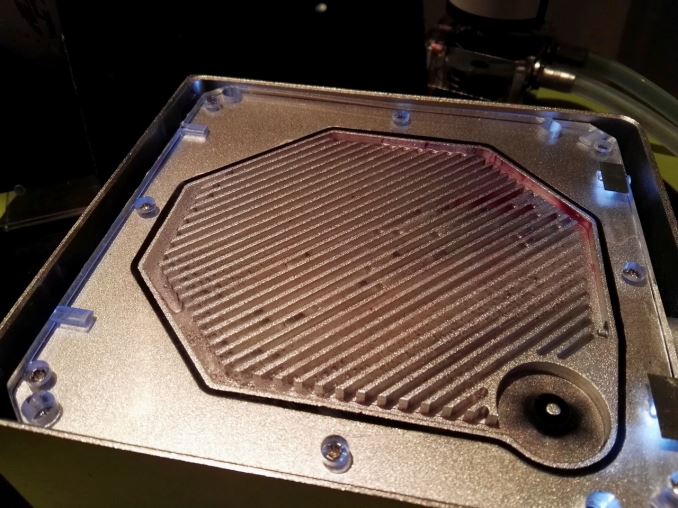
As it stands, this is wholly a prototype and they were asking for input from both media and customers. The aluminium chassis is a sealed unit, with just inside the top plate being a water cooling block connected to the converters in the power supply. This cooling block is connected via pipes to an external pump and reservoir.

As it stands, the design is not particularly ergonomic and is a self-contained loop which arguably could add $70-$100 to the cost of the unit (even without the aluminium chassis). The aluminium water block is neat, and opening it up shows the water moving around, although we weren’t told if the connection to the converters was copper. Because it is a sealed unit, there are no vents, and the only sound would be the pump in the water cooling loop.

As it stands, this is a little more than a novelty, and few people would use a self-contained loop specifically for a power supply – mostly because of space and the fact that users would prefer a CPU/GPU cooling loop first. Typically the power supply is not the loudest item in the system either. I put it to Deepcool that they need a combination air/water model, and the water cooling part of the power supply is a build-your-own with G1/4” threads such that someone building their own custom loop can simply add it into their own. The cooler power supply makes it more efficient, and the fact that it is air/water means that there can be a fan that kicks in if a pump fails or to supplement the extra. There could be a separate water-only model for their modification team.

Personally I liked the look of the water block, but in my opinion the execution of water cooling is best left as an add-in model for custom loops. No doubt if Deepcool continues this design, we might see something a bit more final over the next few months. We were told that the unit on display was rated at 650W with 80PLUS Gold, and that future versions would be around that mark.

Marvell Implements Host Memory Buffer for DRAM-less 88NV1140 SSD Controller

Marvell Implements Host Memory Buffer for DRAM-less 88NV1140 SSD Controller

The first version of the Non-Volatile Memory Express (NVMe) standard was ratified almost five years ago, but its development didn’t stop there. While SSD controller manufacturers have been hard at work implementing NVMe in more and more products, the protocol itself has acquired new features. Most of them are optional and most are intended for enterprise scenarios like virtualization and multi-path I/O, but one feature introduced in the NVMe 1.2 revision has been picked up by a controller that will likely see use in the consumer space.

The Host Memory Buffer (HMB) feature in NVMe 1.2 allows a drive to request exclusive access to a portion of the host system’s RAM for the drive’s private use. This kind of capability has been around forever in the GPU space under names like HyperMemory and TurboCache, where it served a similar purpose: to reduce or eliminate the dedicated RAM that needs to be included on peripheral devices.

Modern high-performance SSD controllers use a significant amount of RAM, and typically we see a ratio of 1GB of RAM for every 1TB of flash. The controllers are usually conservative about using that RAM as a cache for user data (to limit the damage of a sudden power loss) and instead it is used to store the organizational metadata necessary for the controller to keep track of what data is stored where on the flash chips. The goal is that when the drive recieves a read or write request, it can determine which flash memory location needs to be accessed based on a much quicker lookup in the controller’s DRAM, and the drive doesn’t need to update the metadata copy stored on the flash after every single write operation is completed. For fast consistent performance, the data structures are chosen to minimize the amount of computation and number of RAM lookups required at the expense of requiring more RAM.

At the low end of the SSD market, recent controller configurations have chosen instead to cut costs by not including any external DRAM. There are combined savings of die size and pin count for the controller in this configuration, as well as reduced PCB complexity for the drive and eliminating the DRAM chip from the bill of materials, which can add up to a competitive advantage in the product segments where performance is a secondary concern and every cent counts. Silicon Motion’s DRAM-less SM2246XT controller has stolen some market share from their own already cheap SM2246EN, and in the TLC space almost everybody is moving toward DRAM-less options.

The downside is that without ample RAM, it is much harder for SSDs to offer high performance. Even with clever firmware, DRAM-less SSDs can cope surprisingly well with just the on-chip buffers, but they are still at a disadvantage. That’s where the Host Memory Buffer feature comes in. With only two NAND channels on the 88NV1140, it probably can’t saturate the PCIe 3.0 x1 link under even the best circumstances, so there will be bandwidth to spare for other transfers with the host system. PCIe transactions and host DRAM accesses are measured in tens or hundreds of nanoseconds compared to tens of microseconds for reading from flash, so it’s clear that a Host Memory Buffer can be fast enough to be useful for a low-end drive.

The trick then is to figure out how to get the most out of a Host Memory Buffer, while remaining prepared to operate in DRAM-less mode if the host’s NVMe driver doesn’t support HMB or if the host decides it can’t spare the RAM. SSD suppliers are universally tight-lipped about the algorithms used in their firmware and Marvell controllers are usually paired with custom or third-party licensed firmware anyways, so we can only speculate about how a HMB will be used with this new 88NV1140 controller. Furthermore, the requirement of driver support on the host side means this feature will likely be used in embedded platforms long before it finds its way into retail SSDs, and this particular Marvell controller may never show up in a standalone drive. But in a few years time it might be standard for low-end SSDs to borrow a bit of your system’s RAM. This becomes less of a concern as we move through successive platforms having access to more DRAM per module in a standard system.

AMD Releases Crimson 16.1 Hotfix Drivers

AMD Releases Crimson 16.1 Hotfix Drivers

This week AMD has pushed out their first video driver release of the year, Crimson 16.1 Hotfix. Between this latest hotfix and their previous Crimson update, AMD is making a solid showing, as the company has assembled rather sizable quantity of bug fixes for only a month’s work.

Crimson 16.1 Hotfix brings AMD’s drivers to version 15.301.1201, and contains several fixes for multiple games, including Fallout 4, Star Wars Battlefront, and Just Cause 3. Also mentioned in AMD’s release notes are a number of display-related fixes, with some FreeSync issues addressed and several Eyefinity setup/configuration edge case issues taken care of. And though none of us have encountered this issue with prior drivers, AMD notes that frame rate target control support has been tweaked to be more consistent – just be sure to disable V-Sync.

As always, those interested in reading more or installing the updated hotfix drivers for AMD’s desktop, mobile, and integrated GPUs can find them either under the driver update section in Radeon Settings or on AMDs Radeon Software Crimson Edition download page.