News


The OnePlus 2 Review

In early 2014, there was a lot of excitement among Android enthusiasts for an upcoming smartphone called the OnePlus One. The company producing it was a Chinese manufacturer, and they were a new entrant to the smartphone space. OnePlus’s marketing campaign was structured to generate excitement over the prospect of receiving similar specifications to a high end smartphone in a device that was priced substantially lower. Once the device launched, it was clear that OnePlus had delivered on that promise in some respects, but not as much in others. The performance and display quality were superb for a $300-350 device, but parts of the software and the camera processing were clearly lacking.

While the OnePlus One wasn’t perfect, there really aren’t any smartphones that are. For $300-350, it certainly offered users shopping on a budget a lot of power for their money. With many aspects of the phone already being executed well, one would expect that OnePlus’s next phone would serve to iron out the issues and improve on some of the original’s failings. That brings us to 2015, with the OnePlus 2 serving as the new flagship smartphone from OnePlus. Read on for the full review of the OnePlus 2, and find out if it holds up as well as its predecessor.

SanDisk Extreme 500 Portable SSD Capsule Review

SanDisk Extreme 500 Portable SSD Capsule Review

The last few years have seen rapid advancements in flash technology and the rise of USB 3.0 as an ubiquitous high-speed interface on computers. These have led to the appearance of small and affordable direct attached storage units with very high performance for day-to-day data transfer applications. We have already looked at some flash drives with SSD controllers and a USB 3.0 – SATA bridge over the last year.

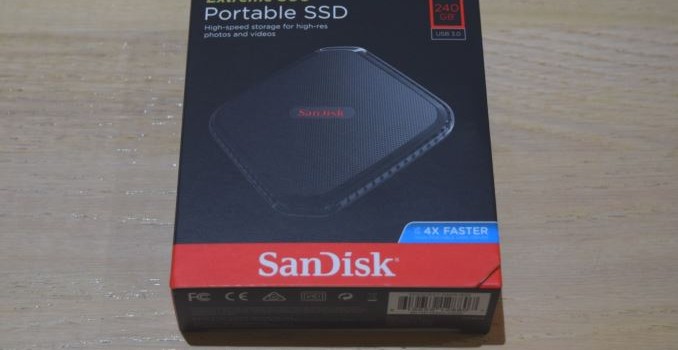
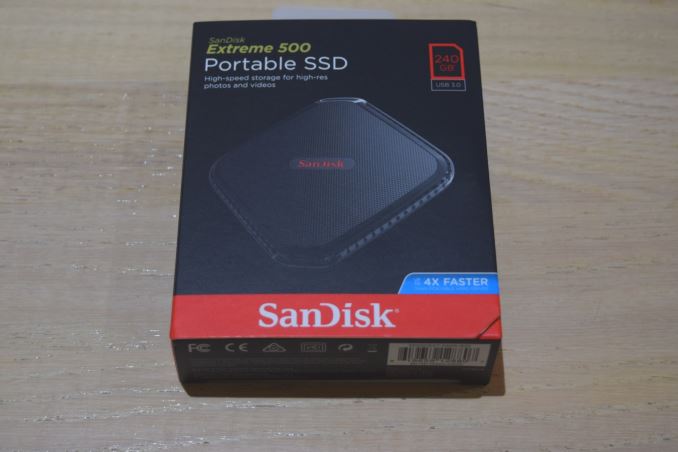
At Computex 2015, SanDisk announced a host of high-speed flash-based direct attached storage units. With the introduction of the Extreme 500, SanDisk became the second Tier 1 vendor to enter the external SSD market. SanDisk provided us with a 240GB Extreme 500 review sample.

Hardware-wise, the Extreme 500 is based on the SanDisk SSD PLUS series. While SanDisk refuses to divulge controller and flash information, we did open up our review sample to get a look at the internal components. SanDisk did indicate that the particular controllers and memory may change over time, but are guaranteed to meet the performance specs.

SATA Controller – Silicon Motion SMI2246XT, Flash – 4x 64GB SanDisk 05448 064G

SATA – USB 3.0 Bridge – ASMedia ASM1153E

The drive doesn’t give up any information via either CrystalDiskInfo or the latest version of ChipGenius. However, SanDisk confirmed that the Extreme 500 does support TRIM and also does garbage collection as well when plugged in. There is no support for explicit over-provisioning, but there really is no advantage to doing it, since the drive already comes over-provisioned (given the 240 GB capacity with 4x64G flash chips).

Testbed Setup and Testing Methodology

Evaluation of DAS units on Windows is done with the testbed outlined in the table below. For devices with USB 3.0 connections (such as the Extreme 500 that we are considering today), we utilize the USB 3.0 port directly hanging off the PCH. However, SanDisk suggested reviewing with a USB 3.1 port, and hence, we also tested with an ASRock USB 3.1/A+C PCIe card attached to the primary PCIe x16 slot of the testbed below.

AnandTech DAS Testbed Configuration
Motherboard Asus Z97-PRO Wi-Fi ac ATX
CPU Intel Core i7-4790
Memory Corsair Vengeance Pro CMY32GX3M4A2133C11
32 GB (4x 8GB)
DDR3-2133 @ 11-11-11-27
OS Drive Seagate 600 Pro 400 GB
Optical Drive Asus BW-16D1HT 16x Blu-ray Write (w/ M-Disc Support)
Add-on Card Asus Thunderbolt EX II
Chassis Corsair Air 540
PSU Corsair AX760i 760 W
OS Windows 8.1 Pro
Thanks to Asus and Corsair for the build components

The full details of the reasoning behind choosing the above build components can be found here. The list of DAS units used for comparison purposes is provided below.

  • SanDisk Extreme 500 240GB – USB 3.1
  • SanDisk Extreme 500 240 GB – USB 3.0
  • Corsair Voyager GTX 256GB
  • Corsair Voyager GTX v2 256GB
  • Patriot Supersonic Rage 2 256GB
  • SanDisk Extreme 500 240GB – USB 3.0
  • VisionTek Pocket SSD 240GB

Synthetic Benchmarks – ATTO and Crystal DiskMark

SanDisk claims read and write speeds of 415 MBps and 340 MBps respectively, and these are backed up by the ATTO benchmarks provided below. Unfortunately, these access traces are not very common in real-life scenarios. Interestingly, we don’t get these numbers with the USB 3.0 port.

SanDisk Extreme 500 240GB – USB 3.1SanDisk Extreme 500 240 GB – USB 3.0Corsair Voyager GTX 256GBCorsair Voyager GTX v2 256GBPatriot Supersonic Rage 2 256GBSanDisk Extreme 500 240GB – USB 3.0VisionTek Pocket SSD 240GB

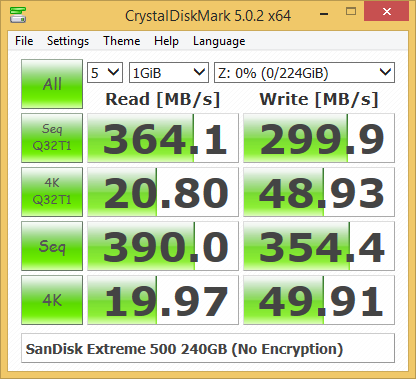
CrystalDiskMark, despite being a canned benchmark, provides a better estimate of the performance range with a selected set of numbers. As evident from the screenshot below, the performance can dip to as low as 20 MBps for 4K accesses. Fortunately, those are not typical access traces for external drives.

SanDisk Extreme 500 240GB – USB 3.1SanDisk Extreme 500 240 GB – USB 3.0Corsair Voyager GTX 256GBCorsair Voyager GTX v2 256GBPatriot Supersonic Rage 2 256GBSanDisk Extreme 500 240GB – USB 3.0VisionTek Pocket SSD 240GB
Benchmarks – robocopy and PCMark 8 Storage Bench

Our testing methodology for DAS units also takes into consideration the usual use-case for such devices. The most common usage scenario is transfer of large amounts of photos and videos to and from the unit. The minor usage scenario is importing files directly off the DAS into a multimedia editing program such as Adobe Photoshop.

In order to tackle the first use-case, we created three test folders with the following characteristics:

  • Photos: 15.6 GB collection of 4320 photos (RAW as well as JPEGs) in 61 sub-folders
  • Videos: 16.1 GB collection of 244 videos (MP4 as well as MOVs) in 6 sub-folders
  • BR: 10.7 GB Blu-ray folder structure of the IDT Benchmark Blu-ray (the same that we use in our robocopy tests for NAS systems)

robocopy - Photos Read

robocopy - Photos Write

robocopy - Videos Read

robocopy - Videos Write

robocopy - Blu-ray Folder Read

robocopy - Blu-ray Folder Write

For the second use-case, we take advantage of PC Mark 8’s storage bench. The storage workload involves games as well as multimedia editing applications. The command line version allows us to cherry-pick storage traces to run on a target drive. We chose the following traces.

  • Adobe Photoshop (Light)
  • Adobe Photoshop (Heavy)
  • Adobe After Effects
  • Adobe Illustrator

Usually, PC Mark 8 reports time to complete the trace, but the detailed log report has the read and write bandwidth figures which we present in our performance graphs. Note that the bandwidth number reported in the results don’t involve idle time compression. Results might appear low, but that is part of the workload characteristic. Note that the same testbed is being used for all DAS units. Therefore, comparing the numbers for each trace should be possible across different DAS units.

robocopy - Photoshop Light Read

robocopy - Photoshop Light Write

robocopy - Photoshop Heavy Read

robocopy - Photoshop Heavy Write

robocopy - After Effects Read

robocopy - After Effects Write

robocopy - Illustrator Read

robocopy - Illustrator Write

Performance Consistency

Yet another interesting aspect of these types of units is performance consistency. Aspects that may influence this include thermal throttling and firmware caps on access rates to avoid overheating or other similar scenarios. This aspect is an important one, as the last thing that users want to see when copying over, say, 100 GB of data to the flash drive, is the transfer rate going to USB 2.0 speeds. In order to identify whether the drive under test suffers from this problem, we instrumented our robocopy DAS benchmark suite to record the flash drive’s read and write transfer rates while the robocopy process took place in the background. For supported drives, we also recorded the internal temperature of the drive during the process. The graphs below show the speeds observed during our real-world DAS suite processing. The first three sets of writes and reads correspond to the photos suite. A small gap (for the transfer of the videos suite from the primary drive to the RAM drive) is followed by three sets for the next data set. Another small RAM-drive transfer gap is followed by three sets for the Blu-ray folder.

An important point to note here is that each of the first three blue and green areas correspond to 15.6 GB of writes and reads respectively. Throttling, if any, is apparent within the processing of the photos suite itself.

SanDisk Extreme 500 240GB – USB 3.1SanDisk Extreme 500 240 GB – USB 3.0Corsair Voyager GTX 256GBCorsair Voyager GTX v2 256GBPatriot Supersonic Rage 2 256GBSanDisk Extreme 500 240GB – USB 3.0VisionTek Pocket SSD 240GB

It can be seen that the Extreme 500 manages to remain under 55 C even under heavy workload conditions. There is no throttling to be seen anywhere. This is not really surprising given the form factor of the unit.

Concluding Remarks

Coming to the business end of the review, the Extreme 500 continues SanDisk’s tradition of improving the performance of their external USB 3.0 flash storage every year. As icing on the cake, we have them officially using a real SSD controller in the form of the Silicon Motion SMI2246XT inside. The performance of the drive leaves us with no doubt that it would be a decent portable OS drive (even though SanDisk doesn’t advertise it for that purpose).

Our major concern with the unit is that it refuses to perform up to expectations with the native USB 3.0 port on the Z97 PCH (at least in our testbed configuration). The dismal write performance with the USB 3.0 port is indeed quite strange. Since the Extreme 500 is a USB 3.0/5G device, it shouldn’t really get a bump out of the higher USB 3.1 Gen 2/10G bandwidth. We believe the issue could be just due to how the Z97 PCH USB 3.0 port negotiates speed with the USB bridge chip. Obviously, the ASM1153E on the Extreme 500 is able to perform well with the ASM1143 USB 3.1 controller on the add-on card.

Minor points of concern include SanDisk indicating that the controllers and flash could change in future production runs and the inability of standard tools to recognize and take actions on the drive based on S.M.A.R.T data.

Price per GB

The 240GB SSD PLUS is available on Amazon for $70 while a UASP USB 3.0 2.5″ drive enclosure can be purchased for less than $15. At the $120 price point, the Extreme 500 does carry a significant premium (even when the bundled encryption software is considered). That said, the portability and industrial design of the Extreme 500 is much better than that of an off-the-shelf enclosure. In terms of performance, the Extreme 500 240GB manages to come out at the top of the pack for most common external drive usage scenarios and exhibits excellent performance consustency. We would like to see SanDisk exploring such high-performance platforms in a flash drive form factor.

SanDisk Extreme 500 Portable SSD Capsule Review

SanDisk Extreme 500 Portable SSD Capsule Review

The last few years have seen rapid advancements in flash technology and the rise of USB 3.0 as an ubiquitous high-speed interface on computers. These have led to the appearance of small and affordable direct attached storage units with very high performance for day-to-day data transfer applications. We have already looked at some flash drives with SSD controllers and a USB 3.0 – SATA bridge over the last year.

At Computex 2015, SanDisk announced a host of high-speed flash-based direct attached storage units. With the introduction of the Extreme 500, SanDisk became the second Tier 1 vendor to enter the external SSD market. SanDisk provided us with a 240GB Extreme 500 review sample.

Hardware-wise, the Extreme 500 is based on the SanDisk SSD PLUS series. While SanDisk refuses to divulge controller and flash information, we did open up our review sample to get a look at the internal components. SanDisk did indicate that the particular controllers and memory may change over time, but are guaranteed to meet the performance specs.

SATA Controller – Silicon Motion SMI2246XT, Flash – 4x 64GB SanDisk 05448 064G

SATA – USB 3.0 Bridge – ASMedia ASM1153E

The drive doesn’t give up any information via either CrystalDiskInfo or the latest version of ChipGenius. However, SanDisk confirmed that the Extreme 500 does support TRIM and also does garbage collection as well when plugged in. There is no support for explicit over-provisioning, but there really is no advantage to doing it, since the drive already comes over-provisioned (given the 240 GB capacity with 4x64G flash chips).

Testbed Setup and Testing Methodology

Evaluation of DAS units on Windows is done with the testbed outlined in the table below. For devices with USB 3.0 connections (such as the Extreme 500 that we are considering today), we utilize the USB 3.0 port directly hanging off the PCH. However, SanDisk suggested reviewing with a USB 3.1 port, and hence, we also tested with an ASRock USB 3.1/A+C PCIe card attached to the primary PCIe x16 slot of the testbed below.

AnandTech DAS Testbed Configuration
Motherboard Asus Z97-PRO Wi-Fi ac ATX
CPU Intel Core i7-4790
Memory Corsair Vengeance Pro CMY32GX3M4A2133C11
32 GB (4x 8GB)
DDR3-2133 @ 11-11-11-27
OS Drive Seagate 600 Pro 400 GB
Optical Drive Asus BW-16D1HT 16x Blu-ray Write (w/ M-Disc Support)
Add-on Card Asus Thunderbolt EX II
Chassis Corsair Air 540
PSU Corsair AX760i 760 W
OS Windows 8.1 Pro
Thanks to Asus and Corsair for the build components

The full details of the reasoning behind choosing the above build components can be found here. The list of DAS units used for comparison purposes is provided below.

  • SanDisk Extreme 500 240GB – USB 3.1
  • SanDisk Extreme 500 240 GB – USB 3.0
  • Corsair Voyager GTX 256GB
  • Corsair Voyager GTX v2 256GB
  • Patriot Supersonic Rage 2 256GB
  • SanDisk Extreme 500 240GB – USB 3.0
  • VisionTek Pocket SSD 240GB

Synthetic Benchmarks – ATTO and Crystal DiskMark

SanDisk claims read and write speeds of 415 MBps and 340 MBps respectively, and these are backed up by the ATTO benchmarks provided below. Unfortunately, these access traces are not very common in real-life scenarios. Interestingly, we don’t get these numbers with the USB 3.0 port.

SanDisk Extreme 500 240GB – USB 3.1SanDisk Extreme 500 240 GB – USB 3.0Corsair Voyager GTX 256GBCorsair Voyager GTX v2 256GBPatriot Supersonic Rage 2 256GBSanDisk Extreme 500 240GB – USB 3.0VisionTek Pocket SSD 240GB

CrystalDiskMark, despite being a canned benchmark, provides a better estimate of the performance range with a selected set of numbers. As evident from the screenshot below, the performance can dip to as low as 20 MBps for 4K accesses. Fortunately, those are not typical access traces for external drives.

SanDisk Extreme 500 240GB – USB 3.1SanDisk Extreme 500 240 GB – USB 3.0Corsair Voyager GTX 256GBCorsair Voyager GTX v2 256GBPatriot Supersonic Rage 2 256GBSanDisk Extreme 500 240GB – USB 3.0VisionTek Pocket SSD 240GB

Benchmarks – robocopy and PCMark 8 Storage Bench

Our testing methodology for DAS units also takes into consideration the usual use-case for such devices. The most common usage scenario is transfer of large amounts of photos and videos to and from the unit. The minor usage scenario is importing files directly off the DAS into a multimedia editing program such as Adobe Photoshop.

In order to tackle the first use-case, we created three test folders with the following characteristics:

  • Photos: 15.6 GB collection of 4320 photos (RAW as well as JPEGs) in 61 sub-folders
  • Videos: 16.1 GB collection of 244 videos (MP4 as well as MOVs) in 6 sub-folders
  • BR: 10.7 GB Blu-ray folder structure of the IDT Benchmark Blu-ray (the same that we use in our robocopy tests for NAS systems)

robocopy - Photos Read

robocopy - Photos Write

robocopy - Videos Read

robocopy - Videos Write

robocopy - Blu-ray Folder Read

robocopy - Blu-ray Folder Write

For the second use-case, we take advantage of PC Mark 8’s storage bench. The storage workload involves games as well as multimedia editing applications. The command line version allows us to cherry-pick storage traces to run on a target drive. We chose the following traces.

  • Adobe Photoshop (Light)
  • Adobe Photoshop (Heavy)
  • Adobe After Effects
  • Adobe Illustrator

Usually, PC Mark 8 reports time to complete the trace, but the detailed log report has the read and write bandwidth figures which we present in our performance graphs. Note that the bandwidth number reported in the results don’t involve idle time compression. Results might appear low, but that is part of the workload characteristic. Note that the same testbed is being used for all DAS units. Therefore, comparing the numbers for each trace should be possible across different DAS units.

robocopy - Photoshop Light Read

robocopy - Photoshop Light Write

robocopy - Photoshop Heavy Read

robocopy - Photoshop Heavy Write

robocopy - After Effects Read

robocopy - After Effects Write

robocopy - Illustrator Read

robocopy - Illustrator Write

Performance Consistency

Yet another interesting aspect of these types of units is performance consistency. Aspects that may influence this include thermal throttling and firmware caps on access rates to avoid overheating or other similar scenarios. This aspect is an important one, as the last thing that users want to see when copying over, say, 100 GB of data to the flash drive, is the transfer rate going to USB 2.0 speeds. In order to identify whether the drive under test suffers from this problem, we instrumented our robocopy DAS benchmark suite to record the flash drive’s read and write transfer rates while the robocopy process took place in the background. For supported drives, we also recorded the internal temperature of the drive during the process. The graphs below show the speeds observed during our real-world DAS suite processing. The first three sets of writes and reads correspond to the photos suite. A small gap (for the transfer of the videos suite from the primary drive to the RAM drive) is followed by three sets for the next data set. Another small RAM-drive transfer gap is followed by three sets for the Blu-ray folder.

An important point to note here is that each of the first three blue and green areas correspond to 15.6 GB of writes and reads respectively. Throttling, if any, is apparent within the processing of the photos suite itself.

SanDisk Extreme 500 240GB – USB 3.1SanDisk Extreme 500 240 GB – USB 3.0Corsair Voyager GTX 256GBCorsair Voyager GTX v2 256GBPatriot Supersonic Rage 2 256GBSanDisk Extreme 500 240GB – USB 3.0VisionTek Pocket SSD 240GB

It can be seen that the Extreme 500 manages to remain under 55 C even under heavy workload conditions. There is no throttling to be seen anywhere. This is not really surprising given the form factor of the unit.

Concluding Remarks

Coming to the business end of the review, the Extreme 500 continues SanDisk’s tradition of improving the performance of their external USB 3.0 flash storage every year. As icing on the cake, we have them officially using a real SSD controller in the form of the Silicon Motion SMI2246XT inside. The performance of the drive leaves us with no doubt that it would be a decent portable OS drive (even though SanDisk doesn’t advertise it for that purpose).

Our major concern with the unit is that it refuses to perform up to expectations with the native USB 3.0 port on the Z97 PCH (at least in our testbed configuration). The dismal write performance with the USB 3.0 port is indeed quite strange. Since the Extreme 500 is a USB 3.0/5G device, it shouldn’t really get a bump out of the higher USB 3.1 Gen 2/10G bandwidth. We believe the issue could be just due to how the Z97 PCH USB 3.0 port negotiates speed with the USB bridge chip. Obviously, the ASM1153E on the Extreme 500 is able to perform well with the ASM1143 USB 3.1 controller on the add-on card.

Minor points of concern include SanDisk indicating that the controllers and flash could change in future production runs and the inability of standard tools to recognize and take actions on the drive based on S.M.A.R.T data.

Price per GB

The 240GB SSD PLUS is available on Amazon for $70 while a UASP USB 3.0 2.5″ drive enclosure can be purchased for less than $15. At the $120 price point, the Extreme 500 does carry a significant premium (even when the bundled encryption software is considered). That said, the portability and industrial design of the Extreme 500 is much better than that of an off-the-shelf enclosure. In terms of performance, the Extreme 500 240GB manages to come out at the top of the pack for most common external drive usage scenarios and exhibits excellent performance consustency. We would like to see SanDisk exploring such high-performance platforms in a flash drive form factor.

BCLK Overclocking Intel’s non-K Skylake Processors: Coming Soon

BCLK Overclocking Intel’s non-K Skylake Processors: Coming Soon

Anyone who has kept tabs on the extreme overclocking community recently would have noticed that the overclocker Dhenzjhen recently took a Core i3-6320 up to 127 MHz on increasing the base clock on his modified SuperMicro C7H170-M motherboard. We have heard that this feature may be coming to other motherboards through a simple BIOS update in the near future.

For the last few generations Intel has locked down its processors in terms of the CPU multiplier such that only a handful of parts allow a full range of overclocking. CPU frequency is determined by its base frequency (or base clock, typically 100 MHz) and multiplier (20x, 32x, 40x and all in-between depending on the part). The base clock has always been ‘open’, however in Sandy Bridge, Ivy Bridge and Haswell it has been linked to other parts of the system, such as the storage or the PCIe, meaning that any overclocking beyond 103-105 MHz led to other issues such as signal degradation or data loss. The Skylake platform changes this – as we noted back in our initial Skylake launch details, the chipset and PCIe now have their own clock domains, meaning that the base frequency only affects the CPU (core, uncore, cache), integrated graphics and DRAM.

Despite this, our best efforts to overclock non-K processors in-house (we have an i5-6500 for review at some point) are limited to a few MHz – the 103/104 MHz boundary has been tough to penetrate if possible at all. This makes what Dhenzjhen posted very interesting, as he was able to get a 27% performance boost (albeit under liquid nitrogen for an overclocking competition). Even with a 10-15% jump for day-to-day use, this allows the array of Pentium and Core i3 processors that are multiplier unlocked to get another 200-300 MHz boost in performance. We can postulate as to the reasons why Intel doesn’t release a Core i3 unlocked model, but if non-K overclocking can be enabled then this at least pushes some of the way there. Supermicro are in the process of shipping me the board in question and an i3 for testing. For clarification, Dhenzjhen is associated with Supermicro – many top overclockers are associated with a technology company in some way to help push the technology forward.


Dhenzjhen’s setup, although liquid nitrogen isn’t needed for 10-20%

After speaking with Supermicro, ASRock knocked on my Skype chat to tell me they can do the same thing, and I received a string of messages and emails saying that they can do it on their motherboards, such as the Z170 Extreme7+ which we reviewed a couple of weeks ago, with nothing more than a simple BIOS update.


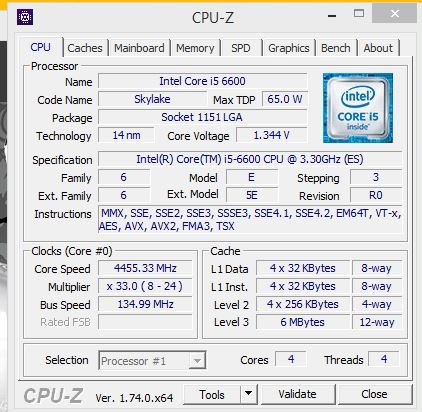
ASRock forwarded me images saying that on their Z170 OC Formula, they can successfully adjust the base clock of the Pentium G4400 by 20+%, the Core i3-6300T by 20% and the i5-6600 by over 30%. I was told that they will be rolling out a BIOS update to a large number of their motherboards after internal validation has been carried out and this should give a slow trickle of BIOS updates over the next week or so.

I should point out specifically that ASRock states that their results (20-30% OC) were all done on air cooling.

I am not being told (yet) as to what is required on the manufacturer side to do this, and I have a small amount of conflicting information also depending on whether this adjustment requires a physical change on top of the firmware adjustment. I suspect something in the chain that shares the clock domain with the CPU is being given an extenal reference clock, which is not part of Intel specifications but some motherboard manufacturers are doing automatically which requires some firmware adjustment. When all the motherboard manufacturers are doing this, then the exact reasons why should make its way out into the open, along with lists of compatible motherboards. Though it is worth noting that any BCLK overclock on this scale will result in the integrated graphics being disabled automatically by Intel’s VGA driver if it is installed – before installation, the integrated graphics can still function I am being told.

Overall, this opens up the gates for interesting $800-like builds based on Pentium or Core i3 processors, and if we get a number of these in we will give our experiences and benchmark results in both stock and overclocked modes. I suspect that for the Pentium side of the equation we will see similar to the overclockable Pentium G3258 that Intel released last year, but the Core i3 angle proves to be interesting.

Additional: Since Dhenzjhen’s initial score, elmor has achieved a 152.8 MHz overclock (again, under extreme conditions for competition) on a Core i3-6300, giving a total frequency of 5.8 GHz using an ASUS Maximux VIII Gene. Given elmor’s ties to ASUS, I suspect that ASUS will also roll out adjustments over time for BCLK non-K overclocking.

Given Supermicro, ASRock and ASUS are doing this (presumably GIGABYTE, MSI and EVGA will follow), I wonder what Intel’s reaction will be to it. Despite most Intel processors being multiplier locked and the different clock domains and Intel’s push towards being ‘for gaming’ and ‘for overclockers’, the locked CPUs quizzically fall on the wrong side of that strategy, but for CPU manufacturers it does encourage users to buy the premium parts. If users can now buy the slightly cheaper Core i3 or Core i5 parts with hopes of a 10-15% overclock, there are many potential scenarios as to how this plays out both for consumers and Intel’s bottom line. There’s also the fact that non-K processors have several features that the overclocking processors do not, such as Trusted Execution / TXT. We have reached out for an official response to the BCLK non-K overclocking methods that the motherboard manufacturers are using. But I have no doubt that system integrators will offer pre-overclocked systems as well. There is also the angle of enterprise to consider, if this opens up the Xeon side. While Xeon and overclocking might not be a good thing for most use cases, in the financial industry and areas where DRAM performance matters, it could be interesting. 

Source: HWBot, ASRock

BCLK Overclocking Intel’s non-K Skylake Processors: Coming Soon

BCLK Overclocking Intel’s non-K Skylake Processors: Coming Soon

Anyone who has kept tabs on the extreme overclocking community recently would have noticed that the overclocker Dhenzjhen recently took a Core i3-6320 up to 127 MHz on increasing the base clock on his modified SuperMicro C7H170-M motherboard. We have heard that this feature may be coming to other motherboards through a simple BIOS update in the near future.

For the last few generations Intel has locked down its processors in terms of the CPU multiplier such that only a handful of parts allow a full range of overclocking. CPU frequency is determined by its base frequency (or base clock, typically 100 MHz) and multiplier (20x, 32x, 40x and all in-between depending on the part). The base clock has always been ‘open’, however in Sandy Bridge, Ivy Bridge and Haswell it has been linked to other parts of the system, such as the storage or the PCIe, meaning that any overclocking beyond 103-105 MHz led to other issues such as signal degradation or data loss. The Skylake platform changes this – as we noted back in our initial Skylake launch details, the chipset and PCIe now have their own clock domains, meaning that the base frequency only affects the CPU (core, uncore, cache), integrated graphics and DRAM.

Despite this, our best efforts to overclock non-K processors in-house (we have an i5-6500 for review at some point) are limited to a few MHz – the 103/104 MHz boundary has been tough to penetrate if possible at all. This makes what Dhenzjhen posted very interesting, as he was able to get a 27% performance boost (albeit under liquid nitrogen for an overclocking competition). Even with a 10-15% jump for day-to-day use, this allows the array of Pentium and Core i3 processors that are multiplier unlocked to get another 200-300 MHz boost in performance. We can postulate as to the reasons why Intel doesn’t release a Core i3 unlocked model, but if non-K overclocking can be enabled then this at least pushes some of the way there. Supermicro are in the process of shipping me the board in question and an i3 for testing. For clarification, Dhenzjhen is associated with Supermicro – many top overclockers are associated with a technology company in some way to help push the technology forward.


Dhenzjhen’s setup, although liquid nitrogen isn’t needed for 10-20%

After speaking with Supermicro, ASRock knocked on my Skype chat to tell me they can do the same thing, and I received a string of messages and emails saying that they can do it on their motherboards, such as the Z170 Extreme7+ which we reviewed a couple of weeks ago, with nothing more than a simple BIOS update.


ASRock forwarded me images saying that on their Z170 OC Formula, they can successfully adjust the base clock of the Pentium G4400 by 20+%, the Core i3-6300T by 20% and the i5-6600 by over 30%. I was told that they will be rolling out a BIOS update to a large number of their motherboards after internal validation has been carried out and this should give a slow trickle of BIOS updates over the next week or so.

I should point out specifically that ASRock states that their results (20-30% OC) were all done on air cooling.

I am not being told (yet) as to what is required on the manufacturer side to do this, and I have a small amount of conflicting information also depending on whether this adjustment requires a physical change on top of the firmware adjustment. I suspect something in the chain that shares the clock domain with the CPU is being given an extenal reference clock, which is not part of Intel specifications but some motherboard manufacturers are doing automatically which requires some firmware adjustment. When all the motherboard manufacturers are doing this, then the exact reasons why should make its way out into the open, along with lists of compatible motherboards. Though it is worth noting that any BCLK overclock on this scale will result in the integrated graphics being disabled automatically by Intel’s VGA driver if it is installed – before installation, the integrated graphics can still function I am being told.

Overall, this opens up the gates for interesting $800-like builds based on Pentium or Core i3 processors, and if we get a number of these in we will give our experiences and benchmark results in both stock and overclocked modes. I suspect that for the Pentium side of the equation we will see similar to the overclockable Pentium G3258 that Intel released last year, but the Core i3 angle proves to be interesting.

Additional: Since Dhenzjhen’s initial score, elmor has achieved a 152.8 MHz overclock (again, under extreme conditions for competition) on a Core i3-6300, giving a total frequency of 5.8 GHz using an ASUS Maximux VIII Gene. Given elmor’s ties to ASUS, I suspect that ASUS will also roll out adjustments over time for BCLK non-K overclocking.

Given Supermicro, ASRock and ASUS are doing this (presumably GIGABYTE, MSI and EVGA will follow), I wonder what Intel’s reaction will be to it. Despite most Intel processors being multiplier locked and the different clock domains and Intel’s push towards being ‘for gaming’ and ‘for overclockers’, the locked CPUs quizzically fall on the wrong side of that strategy, but for CPU manufacturers it does encourage users to buy the premium parts. If users can now buy the slightly cheaper Core i3 or Core i5 parts with hopes of a 10-15% overclock, there are many potential scenarios as to how this plays out both for consumers and Intel’s bottom line. There’s also the fact that non-K processors have several features that the overclocking processors do not, such as Trusted Execution / TXT. We have reached out for an official response to the BCLK non-K overclocking methods that the motherboard manufacturers are using. But I have no doubt that system integrators will offer pre-overclocked systems as well. There is also the angle of enterprise to consider, if this opens up the Xeon side. While Xeon and overclocking might not be a good thing for most use cases, in the financial industry and areas where DRAM performance matters, it could be interesting. 

Source: HWBot, ASRock