News


The Google Pixel C Goes On Sale
The Google Pixel C Goes On Sale

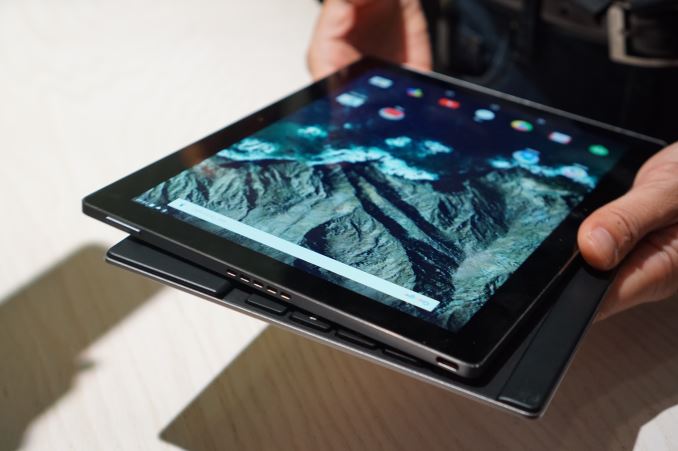
Today Google has made their Pixel C tablet available on their online store. Google announced the Pixel C at an event in September, and at the time the only thing that was known about the launch date is that it would be in time for the holidays. While Google has certainly cut it close by launching it in the second week of December, they have managed to launch the tablet in time for buyers to purchase it as a gift. Below you can view all the relevant specifications of the Pixel C.

  Google Pixel C
SoC NVIDIA Tegra X1 (4x Cortex A57 + 4x Cortex A53)
2 SMM Maxwell GPU
RAM 3 GB LPDDR4
NAND 32/64GB NAND
Display 10.2” 2560×1800 IPS LCD
1500:1 contrast
500 nit brightness
Camera 8MP Rear-facing, 2MP Front-facing
Diameter / Mass 242 x 179 x 7mm, 517 grams
Battery 34.2Wh
OS Android 6 Marshmallow
Other Connectivity 2×2 802.11a/b/g/n/ac + BT 4.1, USB Type-C
Accessories Google Pixel C Keyboard: $149
Price $499/$599

Most of the Pixel C’s core specifications were known at the time of the launch event in September, but today’s launch comes with some additional info such as the battery capacity and amount of RAM. As we already knew, the Pixel C is powered by NVIDIA’s Tegra X1 SoC, which is the first time that it’s showing up in a mobile device. While we have seen Tegra X1 in the NVIDIA SHIELD TV, it’ll be interesting to see how it performs in a more thermally and power constrained scenario.

Paired with the SoC is 3GB of LPDDR4 RAM and either 32GB or 64GB of NAND. As far as connectivity goes you get 2.4/5GHz 2×2 802.11ac WiFi, Bluetooth 4.1, and a USB Type-C connector. Based on what we’ve seen with the Nexus 5X and Nexus 6P this is likely still using the USB2 protocol, but until we review it we can’t make any definitive statements.

One of the most interesting aspects of the Pixel C is its display. It’s a 2560×1800 IPS panel, which has an aspect ratio that is approximately equal to the square root of 2, which happens to be the same ratio used for the A series paper used in most countries around the world. This should make the display well suited to displaying documents that have been digitized and viewing web pages, but not as good for video playback.
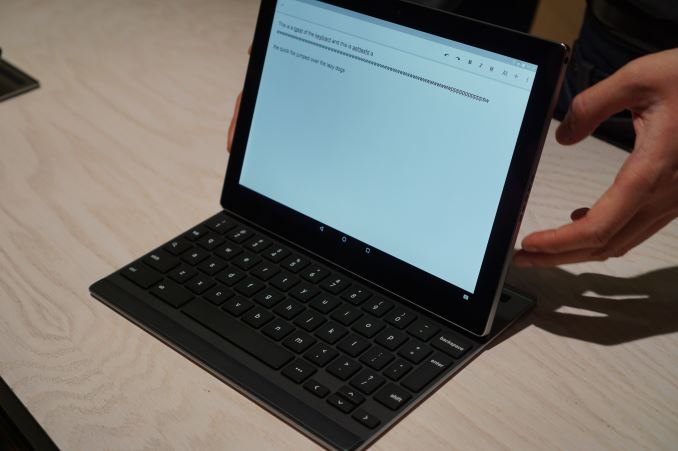
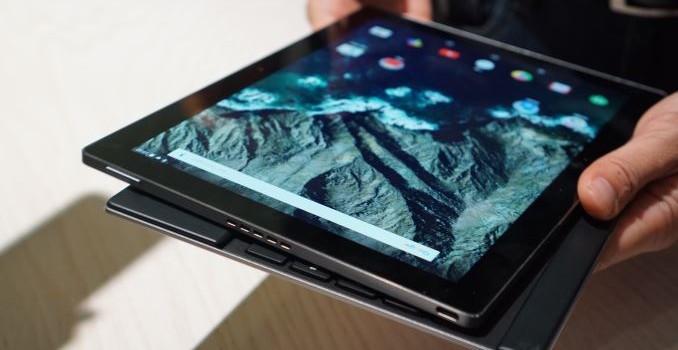
Of course, the big selling point for the Pixel C is the keyboard accessory. Like the Surface Pro 4 and the iPad Pro, the Pixel C is Google’s take on a tablet that targets users who want to be productive. While I didn’t have much time to play with the keyboard at Google’s event, the use of magnets and the ability to set the angle of incline anywhere from 100 to 130 degrees without any sort of kickstand seemed like a very novel hinge implementation, and I’m interested to see how well it works in actual use.

The Pixel C is available now on Google’s online store. Both the 32GB and 64GB models are in stock and ship within a few business days. As noted above, the price for the 32GB model is $499, while the 64GB model is $599. The keyboard accessory adds an additional $149 onto the base price. In Canada it seems that there aren’t any available online yet, and I’ll be checking to see if that status changes in the future.
The Google Pixel C Goes On Sale

The Google Pixel C Goes On Sale

Today Google has made their Pixel C tablet available on their online store. Google announced the Pixel C at an event in September, and at the time the only thing that was known about the launch date is that it would be in time for the holidays. While Google has certainly cut it close by launching it in the second week of December, they have managed to launch the tablet in time for buyers to purchase it as a gift. Below you can view all the relevant specifications of the Pixel C.

  Google Pixel C
SoC NVIDIA Tegra X1 (4x Cortex A57 + 4x Cortex A53)
2 SMM Maxwell GPU
RAM 3 GB LPDDR4
NAND 32/64GB NAND
Display 10.2” 2560×1800 IPS LCD
1500:1 contrast
500 nit brightness
Camera 8MP Rear-facing, 2MP Front-facing
Diameter / Mass 242 x 179 x 7mm, 517 grams
Battery 34.2Wh
OS Android 6 Marshmallow
Other Connectivity 2×2 802.11a/b/g/n/ac + BT 4.1, USB Type-C
Accessories Google Pixel C Keyboard: $149
Price $499/$599

Most of the Pixel C’s core specifications were known at the time of the launch event in September, but today’s launch comes with some additional info such as the battery capacity and amount of RAM. As we already knew, the Pixel C is powered by NVIDIA’s Tegra X1 SoC, which is the first time that it’s showing up in a mobile device. While we have seen Tegra X1 in the NVIDIA SHIELD TV, it’ll be interesting to see how it performs in a more thermally and power constrained scenario.

Paired with the SoC is 3GB of LPDDR4 RAM and either 32GB or 64GB of NAND. As far as connectivity goes you get 2.4/5GHz 2×2 802.11ac WiFi, Bluetooth 4.1, and a USB Type-C connector. Based on what we’ve seen with the Nexus 5X and Nexus 6P this is likely still using the USB2 protocol, but until we review it we can’t make any definitive statements.

One of the most interesting aspects of the Pixel C is its display. It’s a 2560×1800 IPS panel, which has an aspect ratio that is approximately equal to the square root of 2, which happens to be the same ratio used for the A series paper used in most countries around the world. This should make the display well suited to displaying documents that have been digitized and viewing web pages, but not as good for video playback.

Of course, the big selling point for the Pixel C is the keyboard accessory. Like the Surface Pro 4 and the iPad Pro, the Pixel C is Google’s take on a tablet that targets users who want to be productive. While I didn’t have much time to play with the keyboard at Google’s event, the use of magnets and the ability to set the angle of incline anywhere from 100 to 130 degrees without any sort of kickstand seemed like a very novel hinge implementation, and I’m interested to see how well it works in actual use.

The Pixel C is available now on Google’s online store. Both the 32GB and 64GB models are in stock and ship within a few business days. As noted above, the price for the 32GB model is $499, while the 64GB model is $599. The keyboard accessory adds an additional $149 onto the base price. In Canada it seems that there aren’t any available online yet, and I’ll be checking to see if that status changes in the future.
Apple Releases an iPhone Battery Case and a New Lightning Camera Adapter

Apple Releases an iPhone Battery Case and a New Lightning Camera Adapter

In addition to releasing iOS 9.2, Apple has launched two new accessories for their iOS devices today. The first of the two is something I touched on in our iOS 9.2 launch post, which is a new Lightning to SD Card adapter for transferring photos and videos from your camera to your iOS device. Apple has sold this type of adapter since the days of the 30pin connector, but it has always been limited to iPads. The new adapter now supports iPhones running iOS 9.2, and it also includes support for USB 3 transfer speeds on the iPad Pro, which will greatly reduce the time it takes to transfer photos and high bitrate video from your camera to your iPad for any editing you may be doing with it.

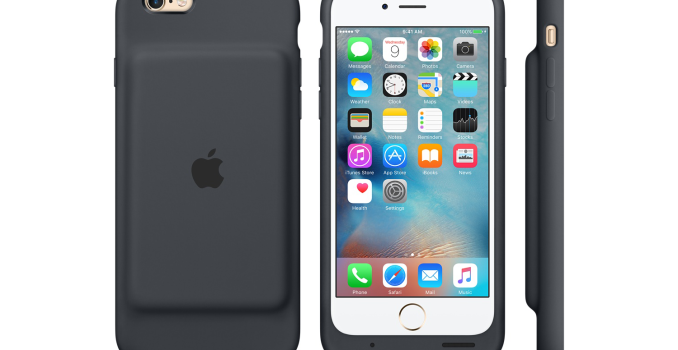
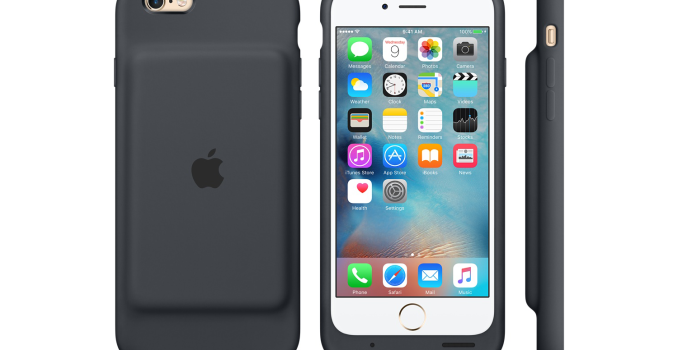
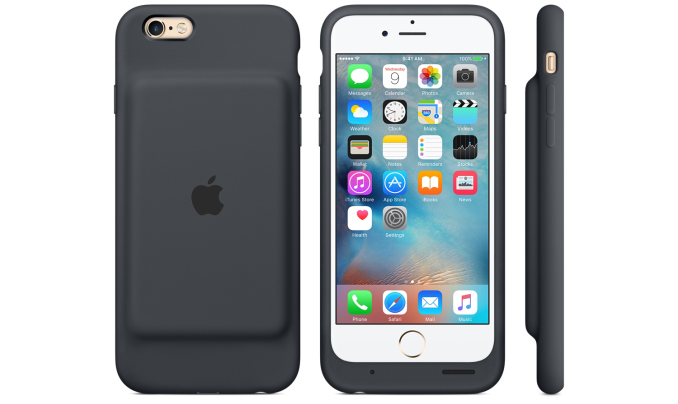
While the new camera adapter is a nice little update, the bigger accessory launch today is the new iPhone 6s Smart Battery Case. From the front, it looks very much like Apple’s existing silicone cases for the iPhones. Once you turn it around you’ll see that the case has quite a large bulge on the back where the battery is stored. The rationale for this design is that it allows you to remove the case by peeling back at the top, without having to make the case out of two separate parts like the other battery cases available on the market. While I understand this line of reasoning, I think the bulge on the back looks quite unsightly.

According to Apple, the new iPhone 6s battery case boosts talk time up to 25hrs of usage, and LTE internet battery life to 18 hours of usage. Due to how it’s designed, the case doesn’t include a battery as large as some competing devices, coming in at 1,877mAh while some third party battery cases include batteries rated as high as 3000mAh. The case does have an LED indicator to let you know whether it’s fully charged, but this indicator is located inside the case to be examined when charging the case alone, and to view its current capacity when you’re using it you’ll have to look at the battery widget in your iPhone’s notification center. Apple has also built external antennas into the case to reduce the signal attenuation caused by the case.

One final thing to note is that the case doensn’t have an open bottom like Apple’s other silicone and leather cases, which means that headphone compatibility is going to be limited to headphones with very little plastic surrounding the 3.5mm connector, such as Apple’s earpods. Users of other corded headphones will need to purchase some sort of adapter.

Apple’s new Smart Battery Case is available now in charcoal black and white, and it sells for $99 in the US and $129 in Canada.

Apple Releases an iPhone Battery Case and a New Lightning Camera Adapter

Apple Releases an iPhone Battery Case and a New Lightning Camera Adapter

In addition to releasing iOS 9.2, Apple has launched two new accessories for their iOS devices today. The first of the two is something I touched on in our iOS 9.2 launch post, which is a new Lightning to SD Card adapter for transferring photos and videos from your camera to your iOS device. Apple has sold this type of adapter since the days of the 30pin connector, but it has always been limited to iPads. The new adapter now supports iPhones running iOS 9.2, and it also includes support for USB 3 transfer speeds on the iPad Pro, which will greatly reduce the time it takes to transfer photos and high bitrate video from your camera to your iPad for any editing you may be doing with it.

While the new camera adapter is a nice little update, the bigger accessory launch today is the new iPhone 6s Smart Battery Case. From the front, it looks very much like Apple’s existing silicone cases for the iPhones. Once you turn it around you’ll see that the case has quite a large bulge on the back where the battery is stored. The rationale for this design is that it allows you to remove the case by peeling back at the top, without having to make the case out of two separate parts like the other battery cases available on the market. While I understand this line of reasoning, I think the bulge on the back looks quite unsightly.

According to Apple, the new iPhone 6s battery case boosts talk time up to 25hrs of usage, and LTE internet battery life to 18 hours of usage. Due to how it’s designed, the case doesn’t include a battery as large as some competing devices, coming in at 1,877mAh while some third party battery cases include batteries rated as high as 3000mAh. The case does have an LED indicator to let you know whether it’s fully charged, but this indicator is located inside the case to be examined when charging the case alone, and to view its current capacity when you’re using it you’ll have to look at the battery widget in your iPhone’s notification center. Apple has also built external antennas into the case to reduce the signal attenuation caused by the case.

One final thing to note is that the case doensn’t have an open bottom like Apple’s other silicone and leather cases, which means that headphone compatibility is going to be limited to headphones with very little plastic surrounding the 3.5mm connector, such as Apple’s earpods. Users of other corded headphones will need to purchase some sort of adapter.

Apple’s new Smart Battery Case is available now in charcoal black and white, and it sells for $99 in the US and $129 in Canada.

Apple Releases iOS 9.2

Apple Releases iOS 9.2

Today Apple released iOS 9.2 to iPads, iPhones, and iPods worldwide. The update is another incremental release, improving on features and removing bugs that are still lingering since the release of iOS 9 earlier this year. This time around, Apple’s change log is fairly substantial, and it looks like there’s a bit more detail on some of the major bugs and stability fixes being made, which are often not highlighted in the list included with the OTA update.

One notable feature addition in the update is support for Mail Drop in the Mail application, which allows you to send attachments that are several gigabytes in size by storing them in iCloud. It’s a bit surprising that Mail Drop has taken so long to make its way over to iOS, but the relatively small size of the files that iOS users would have been attaching in the past may have played a role. With support for recording and editing UHD video on newer devices the feature has become more relevant.

The Music app sees a number of improvements relating to Apple Music as well. You can now download albums or playlists to local storage from your iCloud Music Library by tapping the iCloud button next to their listing in the app. There’s also an indicator to let you know whether tracks are stored locally or being streamed from the cloud. Apple has also improved the display of metadata for classical music, with listings for works, composers, and performers, along with a few additional UI and functionality changes.

Other notable changes include support for 3D Touch in iBooks on the iPhone 6s and 6s Plus, a new Top Stories section in Apple News, and support for Siri in Saudi Arabia and the United Arab Emirates.

As for the bug fixes and improvements, there are a great number of them and I can’t list them all here. Some of the ones that stand out to me are a fix for a bug that would disable alarms when updating iOS, which is something that caused a number of people who rely on their phone alarms to not be woken up when iOS 9.1 was released. They’ve also fixed an issue where the iPad keyboard would randomly trigger the text selection mode, which is something that I’ve encountered myself. Other fixes include layout changes to the calendar app to fix a bug that prevented all seven days of the week from showing up in the week view, 

On the hardware and software side, the update brings one final change which is support for Apple’s new USB Camera Adapter. This product was just released today, and it improves on the older camera adapter by supporting USB 3 transfer speeds on the iPad Pro, and bringing support for iPhones which were previously not supported. The old lightning camera adapter should now also work with the iPhone 5 and up, but it appears that the 30pin version is still limited to iPads, and all versions of the iPod Touch are left off the support list.

iOS 9.2 is rolling out now, and by the time you read this you should be able to download it to your device by visiting the software update section of the iOS settings application. The size of the OTA update on an iPhone 6s is 271MB, while on an iPad Mini 4 it’s 260MB. When updating, you can view the full change log for the update by clicking on the learn more button underneath the update highlights.