News


The AMD A8-7670K APU Review: Aiming for Rocket League

Over the past couple of years, AMD has slowly released their mainstream brand of Kaveri processors. In turn, we have reviewed them, and they consistently aim to provide a midrange integrated gaming option, especially for those on a budget. The recent release of the A8-7670K was perhaps not that exciting, as AMD is filling up their product stack with new parts, taking advantage of an improved manufacturing process and aggressive binning. To that end, we’re taking a different tack with this review. Alongside the regular tests, we also corralled Rocket League (an amazingly simple yet popular take on car football/soccer that sits on the precipice of e-sports glory) into a benchmark aimed at those sub-$600 gaming systems.

ASUS Launches The Chromebit CS10 HDMI Stick

ASUS Launches The Chromebit CS10 HDMI Stick

Earlier this year ASUS launched a pair of Chromebooks, and they also teased another product that would be launching later in the year. It was the Chromebit HDMI stick, and it’s essentially a Chrome OS computer that you plug into the HDMI port on your monitor or television. ASUS thinks the Chromebit will be great for applications like digital signage, but pairing it with a Bluetooth keyboard and mouse allows it to be used as a consumer Chrome OS computer as well. You can check out the Chromebit CS10’s specs below.

  ASUS Chromebit CS10
SoC Rockchip RK3288-C
4 x Cortex A17 + Mali T764
RAM 2 GB LPDDR3
NAND 16GB NAND
Dimensions / Mass 123 x 31 x 17mm, 75g
OS Chrome OS
Other Connectivity 2×2 802.11a/b/g/n/ac + BT 4.0, HDMI 1.4, USB 2.0, DC-in
Price $85

A combination of size and price means we’re not going to be seeing something like an Intel Core i5 in an HDMI stick any time soon. Thankfully, Chrome OS tends to run pretty well even with minimal hardware power. At $85, the Chromebit CS10 comes with 2GB of RAM, 16GB of eMMC NAND, dual-band 802.11ac, and a Rockchip RK3288-C SoC. RK3288-C is a quad core Cortex A17 part paired with a Mali T764 GPU. The same SoC has actually shown up in some of ASUS’s actual Chromebooks as well, so it’s not surprising to see it in the Chromebit.

As with all HDMI sticks, you still need a separate power adapter because HDMI 1.4 can’t supply nearly enough power for even such a smaller computer. Even with that, the Chromebit could still make for an interesting computer of sorts that can be taken anywhere in your pocket.

The ASUS Chromebit CS10 will cost $85, and it comes with a year of 100GB Google Drive space. It’ll begin shipping today.

ASUS Launches The Chromebit CS10 HDMI Stick

ASUS Launches The Chromebit CS10 HDMI Stick

Earlier this year ASUS launched a pair of Chromebooks, and they also teased another product that would be launching later in the year. It was the Chromebit HDMI stick, and it’s essentially a Chrome OS computer that you plug into the HDMI port on your monitor or television. ASUS thinks the Chromebit will be great for applications like digital signage, but pairing it with a Bluetooth keyboard and mouse allows it to be used as a consumer Chrome OS computer as well. You can check out the Chromebit CS10’s specs below.

  ASUS Chromebit CS10
SoC Rockchip RK3288-C
4 x Cortex A17 + Mali T764
RAM 2 GB LPDDR3
NAND 16GB NAND
Dimensions / Mass 123 x 31 x 17mm, 75g
OS Chrome OS
Other Connectivity 2×2 802.11a/b/g/n/ac + BT 4.0, HDMI 1.4, USB 2.0, DC-in
Price $85

A combination of size and price means we’re not going to be seeing something like an Intel Core i5 in an HDMI stick any time soon. Thankfully, Chrome OS tends to run pretty well even with minimal hardware power. At $85, the Chromebit CS10 comes with 2GB of RAM, 16GB of eMMC NAND, dual-band 802.11ac, and a Rockchip RK3288-C SoC. RK3288-C is a quad core Cortex A17 part paired with a Mali T764 GPU. The same SoC has actually shown up in some of ASUS’s actual Chromebooks as well, so it’s not surprising to see it in the Chromebit.

As with all HDMI sticks, you still need a separate power adapter because HDMI 1.4 can’t supply nearly enough power for even such a smaller computer. Even with that, the Chromebit could still make for an interesting computer of sorts that can be taken anywhere in your pocket.

The ASUS Chromebit CS10 will cost $85, and it comes with a year of 100GB Google Drive space. It’ll begin shipping today.

NVIDIA Re-launches the SHIELD Tablet as the SHIELD Tablet K1

NVIDIA Re-launches the SHIELD Tablet as the SHIELD Tablet K1

The life of the NVIDIA SHIELD Tablet has had some ups and downs. Josh reviewed it last year, and at the time he found that NVIDIA’s tech for game streaming offered an interesting value proposition. Unfortunately, NVIDIA was forced to issue a total recall on the tablets due to overheating concerns earlier this year, and while they shipped replacement devices to consumers, the SHIELD Tablet ended up being removed from sale. This was quite unfortunate, and it left a gap in the Android tablet market that I really haven’t seen any vendor fill.

Today NVIDIA is re-introducing the SHIELD Tablet with a new name. It’s now called the SHIELD Tablet K1, something I hope implies we will soon see a SHIELD Tablet X1.
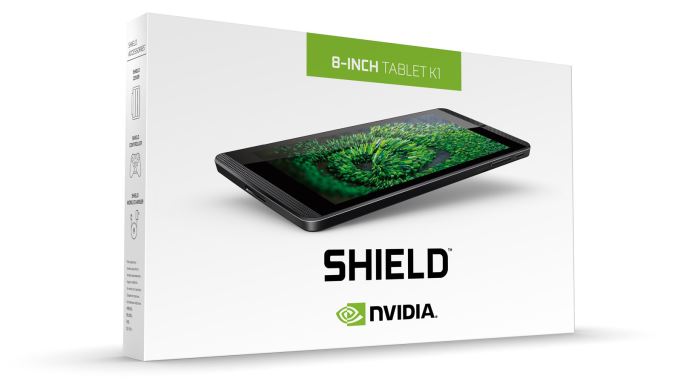
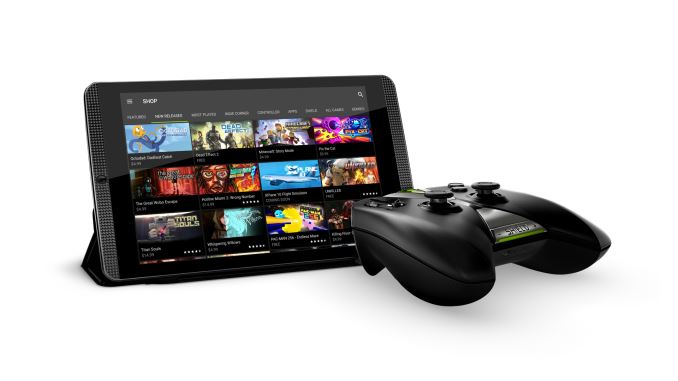
While the name is new, we’re looking at the exact same tablet that launched last year. I’ve put the specs in the chart below as a refresher.

  NVIDIA SHIELD Tablet K1
SoC NVIDIA Tegra K1 (2.2 GHz 4x Cortex A15r3, Kepler 1 SMX GPU)
RAM 2 GB DDR3L-1866
NAND 16GB NAND + microSD
Display 8” 1920×1200 IPS LCD
Camera 5MP rear camera, 1.4 µm pixels, 1/4″ CMOS size. 5MP FFC
Diameter / Mass 221 x 126 x 9.2mm, 390 grams
Battery 5197 mAh, 3.8V chemistry (19.75 Whr)
OS Android 5.1.1 Lollipop
Other Connectivity 2×2 802.11a/b/g/n + BT 4.0, USB2.0, GPS/GLONASS, Mini-HDMI 1.4a
Accessories SHIELD DirectStylus 2 – $19.99
SHIELD Controller – $59.99
SHIELD Tablet K1 Cover – $39.99
Price $199

The NVIDIA SHIELD Tablet K1 still has NVIDIA’s Tegra K1 SoC, with four Cortex A15 cores and the incredibly fast single SMX Kepler GPU. The SoC is paired with 2GB of LPDDR3 RAM and 16GB of NAND, with the original 32GB model being dropped. There’s still microSD expansion for storing media, and with Android Marshmallow expandable storage will lose much of its third class status on Android which will be helpful.

Of course, the biggest change here beyond the fact that the SHIELD Tablet is being put back on sale is its new price. At $199 it’s $100 cheaper than when it first launched, and it makes it one of the only good tablets that you can actually get at that price point with the Nexus 7 having been gone for some time now. NVIDIA’s optional accessories are all available as well, and if you plan to use the gaming features of the SHIELD Tablet K1 I would definitely factor the price of the controller into your cost consideration. In any case, it’s good to see the SHIELD Tablet K1 back on sale, and at $199 I think it’s definitely worth considering if you’re looking for a tablet at that price.

NVIDIA Re-launches the SHIELD Tablet as the SHIELD Tablet K1

NVIDIA Re-launches the SHIELD Tablet as the SHIELD Tablet K1

The life of the NVIDIA SHIELD Tablet has had some ups and downs. Josh reviewed it last year, and at the time he found that NVIDIA’s tech for game streaming offered an interesting value proposition. Unfortunately, NVIDIA was forced to issue a total recall on the tablets due to overheating concerns earlier this year, and while they shipped replacement devices to consumers, the SHIELD Tablet ended up being removed from sale. This was quite unfortunate, and it left a gap in the Android tablet market that I really haven’t seen any vendor fill.

Today NVIDIA is re-introducing the SHIELD Tablet with a new name. It’s now called the SHIELD Tablet K1, something I hope implies we will soon see a SHIELD Tablet X1.

While the name is new, we’re looking at the exact same tablet that launched last year. I’ve put the specs in the chart below as a refresher.

  NVIDIA SHIELD Tablet K1
SoC NVIDIA Tegra K1 (2.2 GHz 4x Cortex A15r3, Kepler 1 SMX GPU)
RAM 2 GB DDR3L-1866
NAND 16GB NAND + microSD
Display 8” 1920×1200 IPS LCD
Camera 5MP rear camera, 1.4 µm pixels, 1/4″ CMOS size. 5MP FFC
Diameter / Mass 221 x 126 x 9.2mm, 390 grams
Battery 5197 mAh, 3.8V chemistry (19.75 Whr)
OS Android 5.1.1 Lollipop
Other Connectivity 2×2 802.11a/b/g/n + BT 4.0, USB2.0, GPS/GLONASS, Mini-HDMI 1.4a
Accessories SHIELD DirectStylus 2 – $19.99
SHIELD Controller – $59.99
SHIELD Tablet K1 Cover – $39.99
Price $199

The NVIDIA SHIELD Tablet K1 still has NVIDIA’s Tegra K1 SoC, with four Cortex A15 cores and the incredibly fast single SMX Kepler GPU. The SoC is paired with 2GB of LPDDR3 RAM and 16GB of NAND, with the original 32GB model being dropped. There’s still microSD expansion for storing media, and with Android Marshmallow expandable storage will lose much of its third class status on Android which will be helpful.

Of course, the biggest change here beyond the fact that the SHIELD Tablet is being put back on sale is its new price. At $199 it’s $100 cheaper than when it first launched, and it makes it one of the only good tablets that you can actually get at that price point with the Nexus 7 having been gone for some time now. NVIDIA’s optional accessories are all available as well, and if you plan to use the gaming features of the SHIELD Tablet K1 I would definitely factor the price of the controller into your cost consideration. In any case, it’s good to see the SHIELD Tablet K1 back on sale, and at $199 I think it’s definitely worth considering if you’re looking for a tablet at that price.