Vik


AT20 Giveaway Day 17: Motorola Keeps You Mobile With Moto Zs

AT20 Giveaway Day 17: Motorola Keeps You Mobile With Moto Zs

Good morning everyone. We’re now on day 17 of our 20 day giveaway celebration of AnandTech’s 20th anniversary, so the end is quickly approaching.

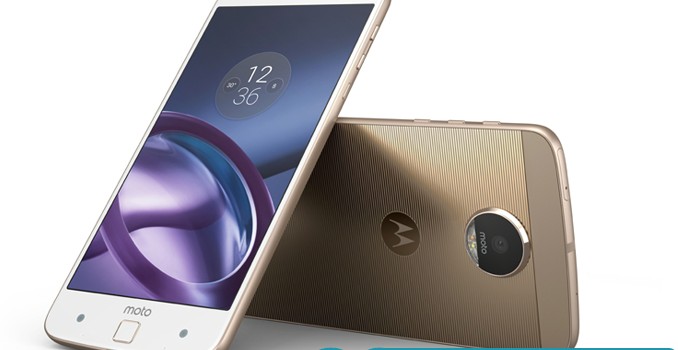
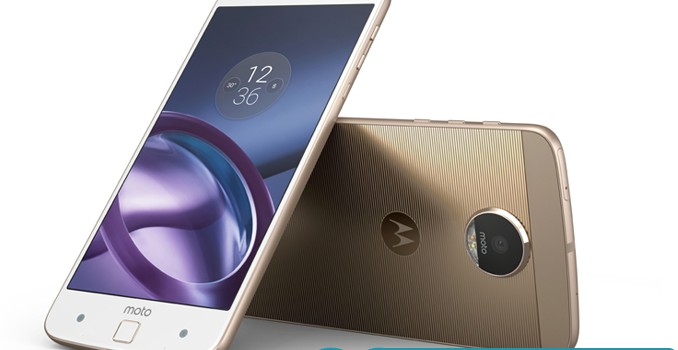
This morning’s prizes come from the mobile masters over at Motorola.  The long-time supplier of smartphones and smartwatches has sent over a trio of their latest Moto Z phones, so if you need an updated phone, this is the giveaway for you. Altogether we have the Moto Z Force (Droid Edition), Moto Z (Droid Edition), and Moto Z Play (Droid Edition) to give away.

  • Moto Z Force (Droid Edition)
  • Moto Z (Droid Edition)
  • Moto Z Play (Droid Edition)

The AnandTech 20th Anniversary Celebration – Motorola Giveaway

Motorola Moto Z Droid Family
  Moto Z Force Droid Moto Z Droid Moto Z Play Droid
SoC Qualcomm Snapdragon 820

2x Kryo @ 2.15GHz
2x Kryo @ 1.59GHz
Adreno 530 @ 624MHz

Qualcomm Snapdragon 820

2x Kryo @ 2.15GHz
2x Kryo @ 1.59GHz
Adreno 530 @ 624MHz

Qualcomm Snapdragon 625

8x Cortex-A53 @ 2.0GHz
Adreno 506 @ 650MHz

RAM 4GB LPDDR4-3188 4GB LPDDR4-3188 3GB LPDDR3-1866
NAND 32GB / 64GB (UFS 2.0)
+ microSD
32GB / 64GB (UFS 2.0)
+ microSD
32GB (eMMC 5.1)
+ microSD
Display 5.5-inch 2560×1440 SAMOLED
Moto ShatterShield
5.5-inch 2560×1440 SAMOLED
Corning Gorilla Glass
5.5-inch 1920×1080 SAMOLED
Corning Gorilla Glass
Dimensions 155.9 x 75.8 x 6.99 mm
163 grams
153.3 x 75.3 x 5.19 mm
136 grams
156.4 x 76.4 x 6.99 mm
165 grams
Modem Qualcomm X12 (Integrated)
2G / 3G / 4G LTE (Category 12/13)
Qualcomm X12 (Integrated)
2G / 3G / 4G LTE (Category 12/13)
Qualcomm X9 (Integrated)
2G / 3G / 4G LTE (Category 7)
SIM Size NanoSIM NanoSIM NanoSIM
Front Camera 5MP, 1/4″ OmniVision OV5693, 1.4µm pixels, f/2.2, Auto HDR, LED flash 5MP, 1/4″ OmniVision OV5693, 1.4µm pixels, f/2.2, Auto HDR, LED flash 5MP, 1/4″ OmniVision OV5693, 1.4µm pixels, f/2.2, Auto HDR, LED flash
Rear Camera 21MP, 1/2.4″ Sony IMX338 Exmor RS, 1.12µm pixels, f/1.8, PDAF + Laser AF, OIS, Auto HDR, dual-color LED flash 13MP, 1/3.06″ Sony IMX214 Exmor RS, 1.12µm pixels, f/1.8, Laser AF, OIS, Auto HDR, dual-color LED flash 16MP, 1/2.4″ OmniVision OV16860, 1.3µm pixels, f/2.0, PDAF + Laser AF, Auto HDR, dual-color LED flash
Battery 3500 mAh
non-removable
2600 mAh
non-removable
3510 mAh
non-removable
Connectivity 802.11a/b/g/n/ac 2×2 MIMO, BT 4.1 LE, NFC, GPS/GNSS, USB Type-C, Moto Mods connector 802.11a/b/g/n/ac 2×2 MIMO, BT 4.1 LE, NFC, GPS/GNSS, USB Type-C, Moto Mods connector 802.11a/b/g/n, BT 4.0 LE, NFC, GPS/GNSS, USB Type-C, Moto Mods connector

Please note that these are all Droid Edition phones, which means they will only work on Verizon’s network.

Moto Z Force (Droid Edition)
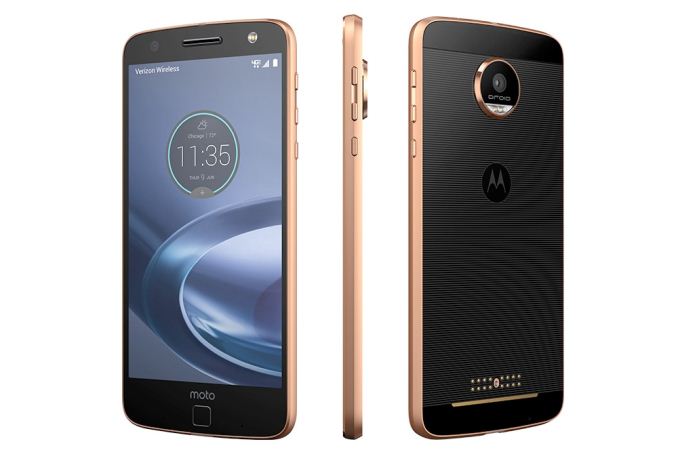
Starting things off, we have Motorola’s current flagship phone, the Moto Z Force. This phone is exclusive to Verizon, and is based around a Qualcomm Snapdragon 820 with all the trimmings, including 4GB of RAM and 32GB of UFS 2.0 NAND. The display is a 5.5-inch 1440p SAMOLED, and, unique to the Force, uses Motorola’s own ShatterShield display cover/reinforcement technology. Rounding out the package is a 21MP rear camera with OIS, and a 3500mAh internal battery.
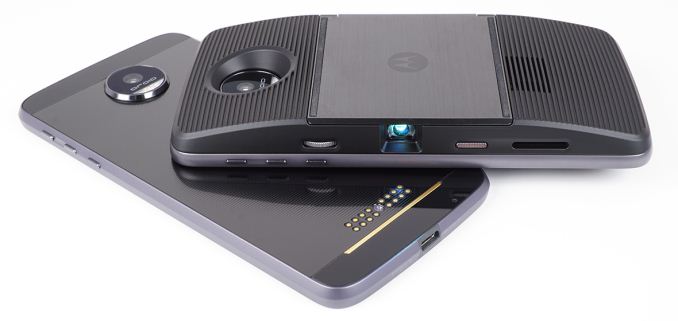
But the truly unique offering for the Moto Z Force – and the entire Moto Z family – is the Moto Mods system, which allows for hot-swapping additional modular pieces on to the back of the phone. Available mods include micro-projectors, a larger speaker, an optical zoom camera, and, of course, battery packs. All of these mods are held in place through a series of magnets, allowing them to be quickly added and removed as necessary.

Moto Z (Droid Edition)
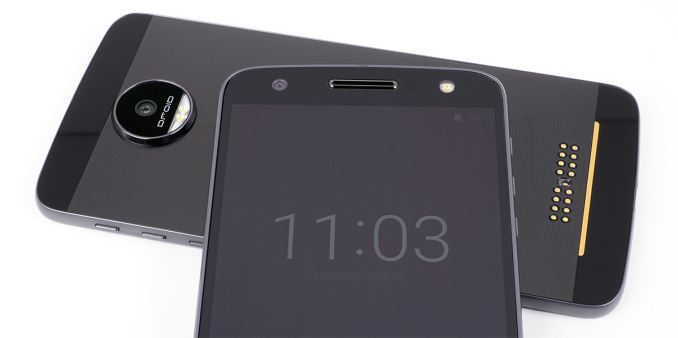
Next up we have the vanilla Moto Z. This phone is quite similar to the Moto Z Force, but makes a couple of small changes to differentiate itself, including quite literally being smaller. Under the hood the phone is powered by a Snapdragon 820 paired with 4GB of RAM and 32GB of UFS 2.0 NAND, and over the hood is a 1440p SAMOLED display covered in Gorilla Glass. However this phone is only 5.19mm thick and 136g heavy, having slimmed down by going with a smaller 2600 mAh battery, while the rear camera is now a 13MP sensor with OIS. And of course, like the Moto Z Force, the regular Moto Z works with Motorola’s Mods as well.

Moto Z Play (Droid Edition)
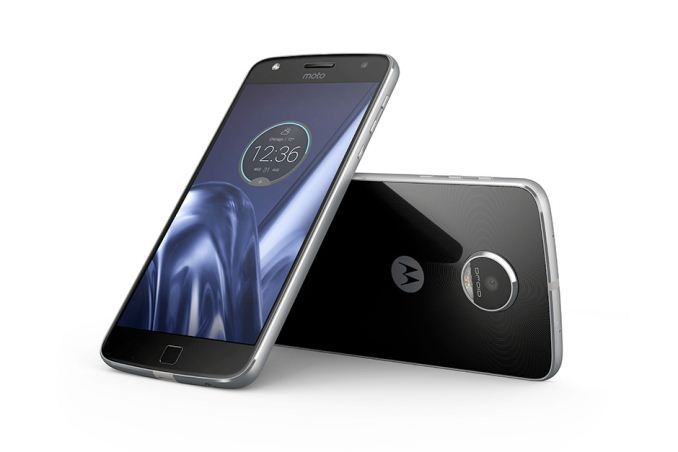
Last we have the entry-level Moto Z phone, the Moto Z Play. Similar in design to its other Moto Z siblings, this phone is based around a Snapdragon 625 SoC, which is paired with 3GB of RAM and 32GB of eMMC NAND. The display is taken down a notch to a 1080p SAMOLED, however the rear camera moves up to a 16MP OmniVision sensor. Rounding out the package is a 3510 mAH battery, which combined with the lower power consumption of a 1080p display and the Snapdragon 625, means that this phone has a rather high capacity battery relative to what it draws at any moment. And as a Moto Z phone, the Play is Moto Mods capable as well.

Finally, as with our other giveaways, today’s giveaway is only open for 48 hours, so be sure to enter soon. However please note that for legal reasons, we’re only able to open these giveaways to residents of the United States.

Good luck to everyone! And be sure to check in this afternoon for our next giveaway.

AT20 Giveaway Day 17: Motorola Keeps You Mobile With Moto Zs

AT20 Giveaway Day 17: Motorola Keeps You Mobile With Moto Zs

Good morning everyone. We’re now on day 17 of our 20 day giveaway celebration of AnandTech’s 20th anniversary, so the end is quickly approaching.

This morning’s prizes come from the mobile masters over at Motorola.  The long-time supplier of smartphones and smartwatches has sent over a trio of their latest Moto Z phones, so if you need an updated phone, this is the giveaway for you. Altogether we have the Moto Z Force (Droid Edition), Moto Z (Droid Edition), and Moto Z Play (Droid Edition) to give away.

  • Moto Z Force (Droid Edition)
  • Moto Z (Droid Edition)
  • Moto Z Play (Droid Edition)

The AnandTech 20th Anniversary Celebration – Motorola Giveaway

Motorola Moto Z Droid Family
  Moto Z Force Droid Moto Z Droid Moto Z Play Droid
SoC Qualcomm Snapdragon 820

2x Kryo @ 2.15GHz
2x Kryo @ 1.59GHz
Adreno 530 @ 624MHz

Qualcomm Snapdragon 820

2x Kryo @ 2.15GHz
2x Kryo @ 1.59GHz
Adreno 530 @ 624MHz

Qualcomm Snapdragon 625

8x Cortex-A53 @ 2.0GHz
Adreno 506 @ 650MHz

RAM 4GB LPDDR4-3188 4GB LPDDR4-3188 3GB LPDDR3-1866
NAND 32GB / 64GB (UFS 2.0)
+ microSD
32GB / 64GB (UFS 2.0)
+ microSD
32GB (eMMC 5.1)
+ microSD
Display 5.5-inch 2560×1440 SAMOLED
Moto ShatterShield
5.5-inch 2560×1440 SAMOLED
Corning Gorilla Glass
5.5-inch 1920×1080 SAMOLED
Corning Gorilla Glass
Dimensions 155.9 x 75.8 x 6.99 mm
163 grams
153.3 x 75.3 x 5.19 mm
136 grams
156.4 x 76.4 x 6.99 mm
165 grams
Modem Qualcomm X12 (Integrated)
2G / 3G / 4G LTE (Category 12/13)
Qualcomm X12 (Integrated)
2G / 3G / 4G LTE (Category 12/13)
Qualcomm X9 (Integrated)
2G / 3G / 4G LTE (Category 7)
SIM Size NanoSIM NanoSIM NanoSIM
Front Camera 5MP, 1/4″ OmniVision OV5693, 1.4µm pixels, f/2.2, Auto HDR, LED flash 5MP, 1/4″ OmniVision OV5693, 1.4µm pixels, f/2.2, Auto HDR, LED flash 5MP, 1/4″ OmniVision OV5693, 1.4µm pixels, f/2.2, Auto HDR, LED flash
Rear Camera 21MP, 1/2.4″ Sony IMX338 Exmor RS, 1.12µm pixels, f/1.8, PDAF + Laser AF, OIS, Auto HDR, dual-color LED flash 13MP, 1/3.06″ Sony IMX214 Exmor RS, 1.12µm pixels, f/1.8, Laser AF, OIS, Auto HDR, dual-color LED flash 16MP, 1/2.4″ OmniVision OV16860, 1.3µm pixels, f/2.0, PDAF + Laser AF, Auto HDR, dual-color LED flash
Battery 3500 mAh
non-removable
2600 mAh
non-removable
3510 mAh
non-removable
Connectivity 802.11a/b/g/n/ac 2×2 MIMO, BT 4.1 LE, NFC, GPS/GNSS, USB Type-C, Moto Mods connector 802.11a/b/g/n/ac 2×2 MIMO, BT 4.1 LE, NFC, GPS/GNSS, USB Type-C, Moto Mods connector 802.11a/b/g/n, BT 4.0 LE, NFC, GPS/GNSS, USB Type-C, Moto Mods connector

Please note that these are all Droid Edition phones, which means they will only work on Verizon’s network.

Moto Z Force (Droid Edition)

Starting things off, we have Motorola’s current flagship phone, the Moto Z Force. This phone is exclusive to Verizon, and is based around a Qualcomm Snapdragon 820 with all the trimmings, including 4GB of RAM and 32GB of UFS 2.0 NAND. The display is a 5.5-inch 1440p SAMOLED, and, unique to the Force, uses Motorola’s own ShatterShield display cover/reinforcement technology. Rounding out the package is a 21MP rear camera with OIS, and a 3500mAh internal battery.

But the truly unique offering for the Moto Z Force – and the entire Moto Z family – is the Moto Mods system, which allows for hot-swapping additional modular pieces on to the back of the phone. Available mods include micro-projectors, a larger speaker, an optical zoom camera, and, of course, battery packs. All of these mods are held in place through a series of magnets, allowing them to be quickly added and removed as necessary.

Moto Z (Droid Edition)

Next up we have the vanilla Moto Z. This phone is quite similar to the Moto Z Force, but makes a couple of small changes to differentiate itself, including quite literally being smaller. Under the hood the phone is powered by a Snapdragon 820 paired with 4GB of RAM and 32GB of UFS 2.0 NAND, and over the hood is a 1440p SAMOLED display covered in Gorilla Glass. However this phone is only 5.19mm thick and 136g heavy, having slimmed down by going with a smaller 2600 mAh battery, while the rear camera is now a 13MP sensor with OIS. And of course, like the Moto Z Force, the regular Moto Z works with Motorola’s Mods as well.

Moto Z Play (Droid Edition)

Last we have the entry-level Moto Z phone, the Moto Z Play. Similar in design to its other Moto Z siblings, this phone is based around a Snapdragon 625 SoC, which is paired with 3GB of RAM and 32GB of eMMC NAND. The display is taken down a notch to a 1080p SAMOLED, however the rear camera moves up to a 16MP OmniVision sensor. Rounding out the package is a 3510 mAH battery, which combined with the lower power consumption of a 1080p display and the Snapdragon 625, means that this phone has a rather high capacity battery relative to what it draws at any moment. And as a Moto Z phone, the Play is Moto Mods capable as well.

Finally, as with our other giveaways, today’s giveaway is only open for 48 hours, so be sure to enter soon. However please note that for legal reasons, we’re only able to open these giveaways to residents of the United States.

Good luck to everyone! And be sure to check in this afternoon for our next giveaway.

Google I/O 2017: Google Assistant Gets Smarter, Google Home Gets Free Calling & More

Google I/O 2017: Google Assistant Gets Smarter, Google Home Gets Free Calling & More

More and more people are using the phrase “Ok Google” to start a conversation to find information or perform actions using the Google Assistant. Launched last fall, the new assistant is already available on over 100 million devices and is rapidly evolving. Today at Google I/O, its creator took the stage to discuss how Google Assistant is expanding its capabilities and reach on smartphones and Google Home.


Google Home

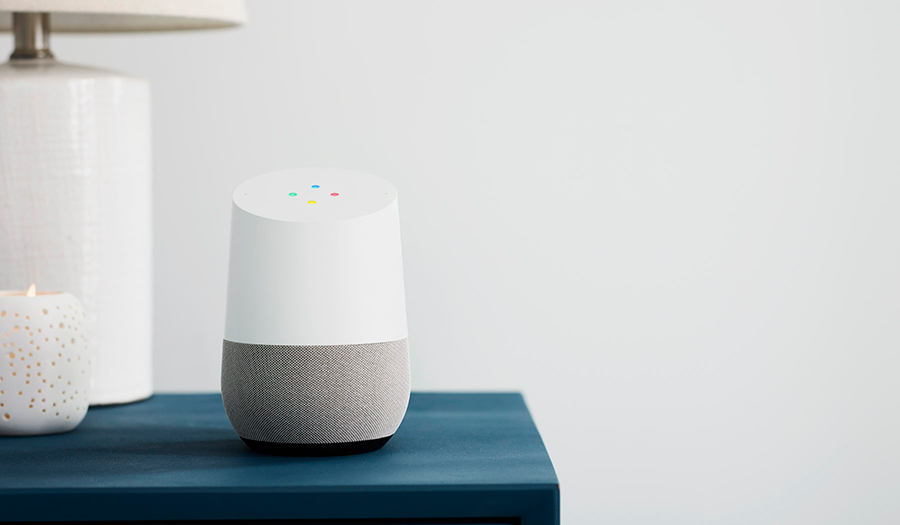
Google Home, a standalone voice activated smart-appliance and speaker, is getting the most attention, with a number of significant improvements on the way. In a few months, Google Home will be able to make hands-free VOIP calls to any phone in the U.S. or Canada for free. There’s no additional setup, apps to install, or reliance on a landline or cell phone; just ask the Assistant to place the call. And with multi-user support (the Assistant recognizes individual voices), it’s smart enough to call your “mom” and not your roommate’s “mom.” Google Home will also provide proactive notifications in the near future. Initially, the Assistant will focus on travel, keeping track of upcoming flights and appointments and then alerting you to flight delays or traffic alerts. For the latter, it will even calculate a new travel time and suggest leaving earlier so you’re not late to your next appointment. Another new feature, this one rolling out today, is the ability to use Assistant on Google Home to create reminders and calendar appointments, which will then appear on your other Android devices.

Google Home is also getting some new media capabilities. In addition to Deezer, Pandora, Soundcloud, and others it will soon support free music streaming from Spotify, and with the addition of Bluetooth, it will be able to play music from a nearby Android or iOS device.

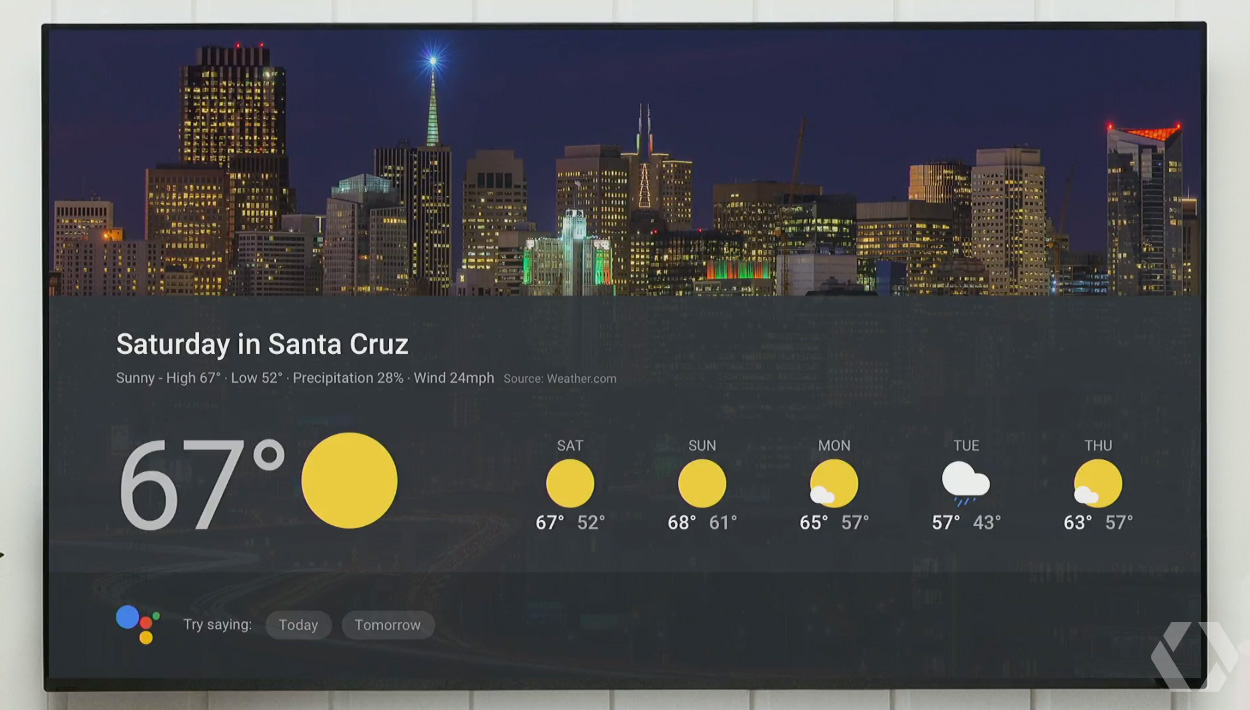
Moving from audio to video, Google Home is adding some new video streaming partners too, including CBS All Access, HBO NOW, and HGTV. Later this year, the Assistant on Google Home will gain the ability to send visual responses to your TV via Chromecast. For example, saying “Ok Google. What’s on my calendar today?” will show your daily schedule on the TV. Of course it will show other common things too such as the weather forecast, and it will integrate with Google’s YouTube TV service. It was not clear during the onstage demo, but I assume Google Home will use visual responses when it senses a Chromecast device and switch back to audio responses when the TV is off.


A visual response from Google Home showing the weather forecast on the TV

The last bit of Google Home news is that the device will be available in Australia, Canada, France, Germany, and Japan later this year.

More people will soon be able to use Google Assistant on Android devices too. First, it’s learning to speak several new languages this summer, including Brazilian Portuguese, French, German, and Japanese, along with Italian, Korean, and Spanish by the end of the year. Google Assistant is also coming to the iPhone in the form of a new app that’s already available on Apple’s App Store. Now iPhone users can use its natural language interface to ask questions, schedule appointments, make phone calls, send texts and emails, play music, and more.


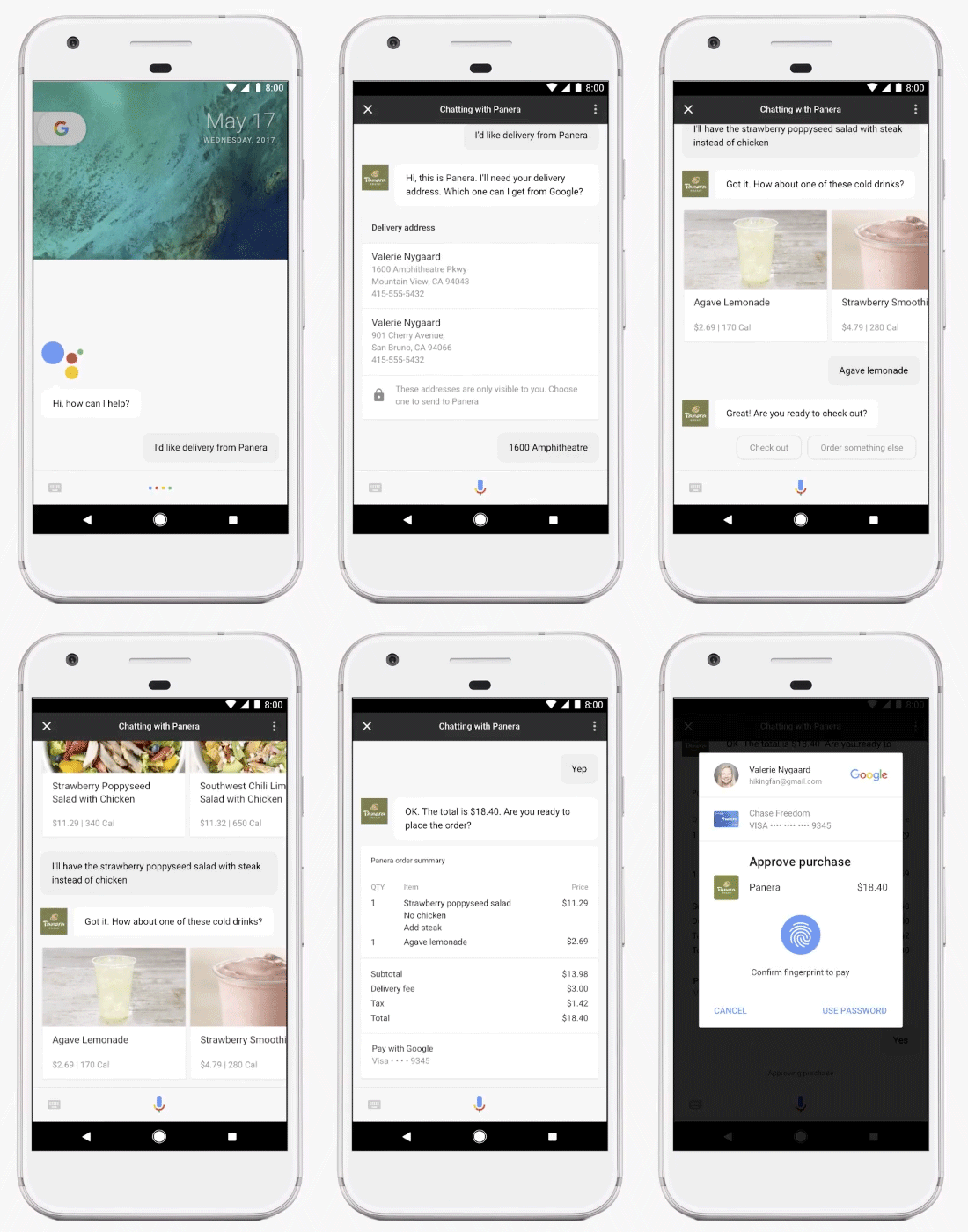
Ordering food using Actions and the new Transactions API

The previously announced Google Assistant SDK will allow third parties to integrate Assistant into even more devices, and by leveraging Actions on Google, developers can integrate the Assistant directly within their apps. There’s also a new Transactions API (currently a developer preview) that will allow developers to offer a “conversational ordering experience” that will help a customer add items to a shopping cart, collect address and billing information, make the purchase or reservation using your fingerprint or other authentication method, and even send order confirmation or shipping updates.

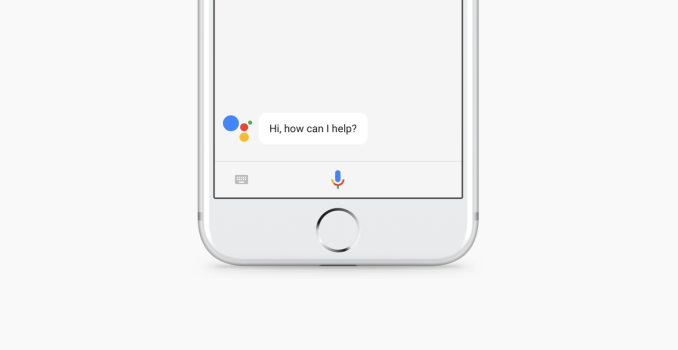
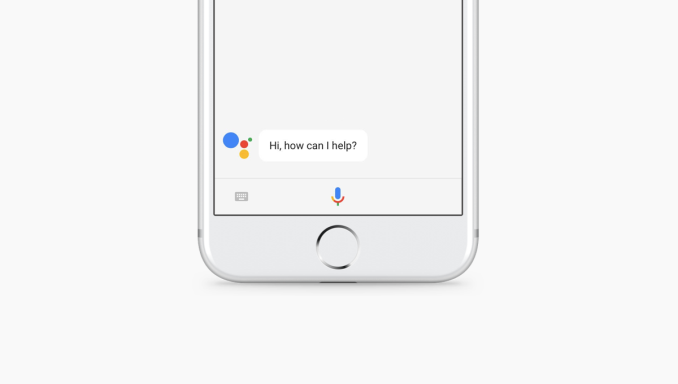
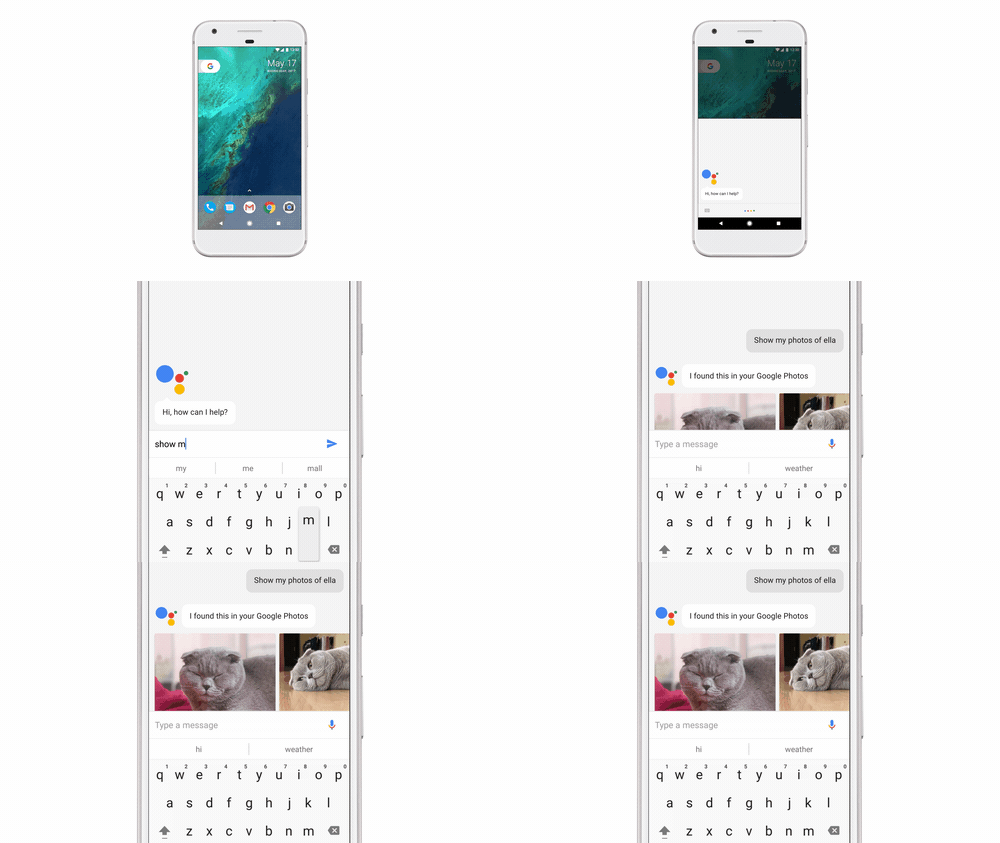
One of the priorities for Google Assistant is making it more conversational; however, there are times in public when you cannot actually speak to your phone, which is why, starting today, you can also type your queries and avoid annoyed or quizzical looks from nearby strangers.


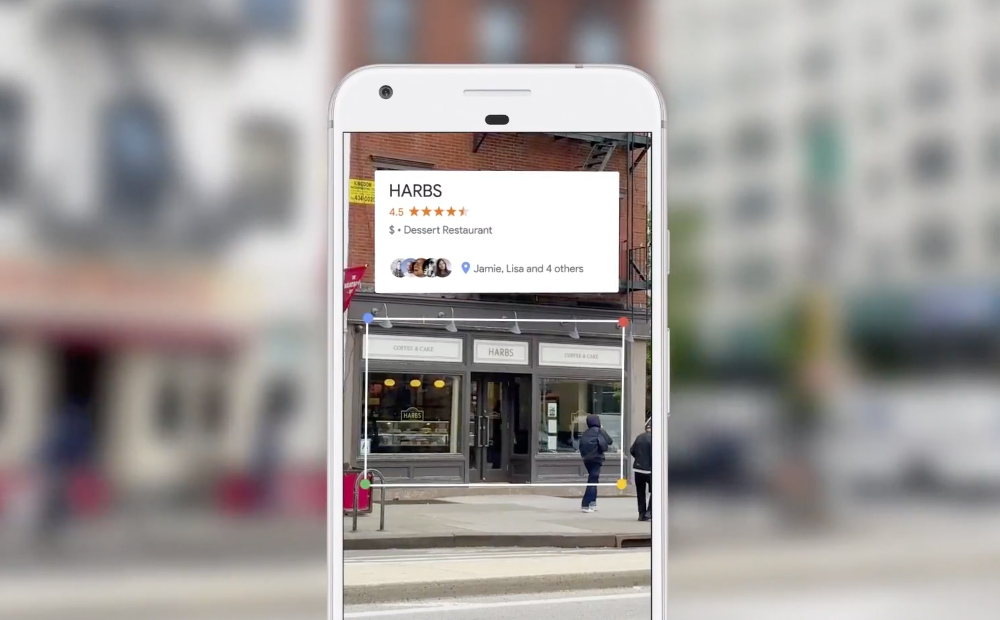
Google Lens: Recognizing the name of a restaurant and providing relevant information

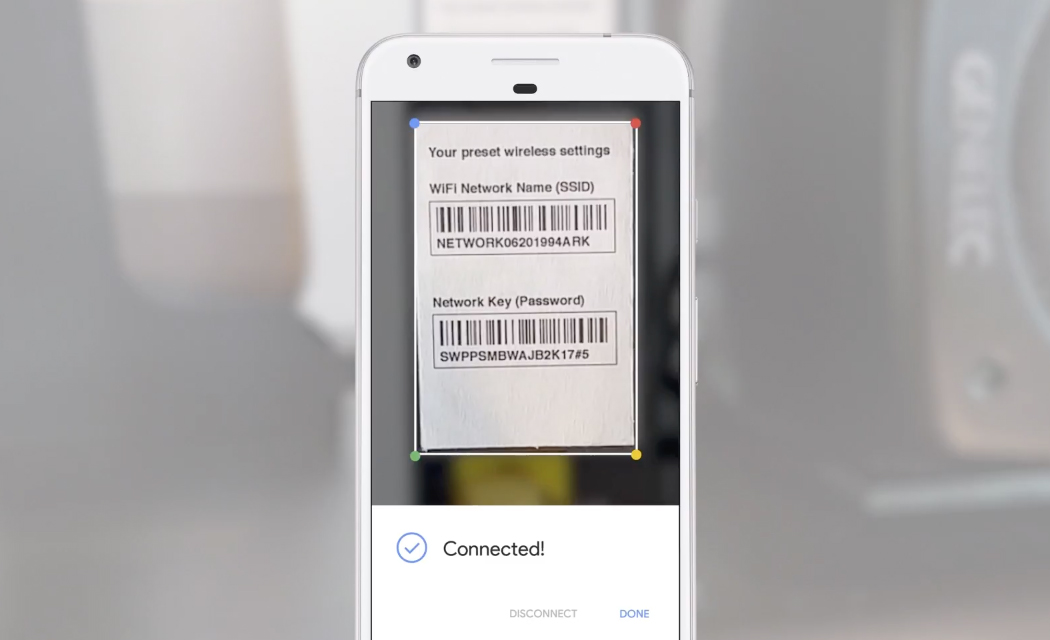
Perhaps the coolest new feature coming to Android devices is Google Lens, a new AR experience that uses computer vision to recognize objects in the environment, allowing you to have a conversation with Assistant about what you see. By tapping the Google Lens icon in the camera, it can perform visual language translation (similar to what Google Translate does); help you scan business cards and create new contacts, and even recognize a sign for an upcoming concert and offer you the ability to buy tickets, add the event to your calendar, or even sample some of the band’s songs.


Google Lens: Using computer vision to read an ID tag and automatically sign in to a Wi-Fi network

New products like Google Assistant and Google Lens make it clear that Google is no longer a search company; it’s an artificial intelligence company that’s focused on integrating speech recognition, language processing, contextual awareness, and computer vision with Google Search and data from other Google services such as Gmail to provide new experiences across more devices using a more natural interface.

Google I/O 2017: Google Assistant Gets Smarter, Google Home Gets Free Calling & More

Google I/O 2017: Google Assistant Gets Smarter, Google Home Gets Free Calling & More

More and more people are using the phrase “Ok Google” to start a conversation to find information or perform actions using the Google Assistant. Launched last fall, the new assistant is already available on over 100 million devices and is rapidly evolving. Today at Google I/O, its creator took the stage to discuss how Google Assistant is expanding its capabilities and reach on smartphones and Google Home.


Google Home

Google Home, a standalone voice activated smart-appliance and speaker, is getting the most attention, with a number of significant improvements on the way. In a few months, Google Home will be able to make hands-free VOIP calls to any phone in the U.S. or Canada for free. There’s no additional setup, apps to install, or reliance on a landline or cell phone; just ask the Assistant to place the call. And with multi-user support (the Assistant recognizes individual voices), it’s smart enough to call your “mom” and not your roommate’s “mom.” Google Home will also provide proactive notifications in the near future. Initially, the Assistant will focus on travel, keeping track of upcoming flights and appointments and then alerting you to flight delays or traffic alerts. For the latter, it will even calculate a new travel time and suggest leaving earlier so you’re not late to your next appointment. Another new feature, this one rolling out today, is the ability to use Assistant on Google Home to create reminders and calendar appointments, which will then appear on your other Android devices.

Google Home is also getting some new media capabilities. In addition to Deezer, Pandora, Soundcloud, and others it will soon support free music streaming from Spotify, and with the addition of Bluetooth, it will be able to play music from a nearby Android or iOS device.

Moving from audio to video, Google Home is adding some new video streaming partners too, including CBS All Access, HBO NOW, and HGTV. Later this year, the Assistant on Google Home will gain the ability to send visual responses to your TV via Chromecast. For example, saying “Ok Google. What’s on my calendar today?” will show your daily schedule on the TV. Of course it will show other common things too such as the weather forecast, and it will integrate with Google’s YouTube TV service. It was not clear during the onstage demo, but I assume Google Home will use visual responses when it senses a Chromecast device and switch back to audio responses when the TV is off.


A visual response from Google Home showing the weather forecast on the TV

The last bit of Google Home news is that the device will be available in Australia, Canada, France, Germany, and Japan later this year.

More people will soon be able to use Google Assistant on Android devices too. First, it’s learning to speak several new languages this summer, including Brazilian Portuguese, French, German, and Japanese, along with Italian, Korean, and Spanish by the end of the year. Google Assistant is also coming to the iPhone in the form of a new app that’s already available on Apple’s App Store. Now iPhone users can use its natural language interface to ask questions, schedule appointments, make phone calls, send texts and emails, play music, and more.


Ordering food using Actions and the new Transactions API

The previously announced Google Assistant SDK will allow third parties to integrate Assistant into even more devices, and by leveraging Actions on Google, developers can integrate the Assistant directly within their apps. There’s also a new Transactions API (currently a developer preview) that will allow developers to offer a “conversational ordering experience” that will help a customer add items to a shopping cart, collect address and billing information, make the purchase or reservation using your fingerprint or other authentication method, and even send order confirmation or shipping updates.

One of the priorities for Google Assistant is making it more conversational; however, there are times in public when you cannot actually speak to your phone, which is why, starting today, you can also type your queries and avoid annoyed or quizzical looks from nearby strangers.


Google Lens: Recognizing the name of a restaurant and providing relevant information

Perhaps the coolest new feature coming to Android devices is Google Lens, a new AR experience that uses computer vision to recognize objects in the environment, allowing you to have a conversation with Assistant about what you see. By tapping the Google Lens icon in the camera, it can perform visual language translation (similar to what Google Translate does); help you scan business cards and create new contacts, and even recognize a sign for an upcoming concert and offer you the ability to buy tickets, add the event to your calendar, or even sample some of the band’s songs.


Google Lens: Using computer vision to read an ID tag and automatically sign in to a Wi-Fi network

New products like Google Assistant and Google Lens make it clear that Google is no longer a search company; it’s an artificial intelligence company that’s focused on integrating speech recognition, language processing, contextual awareness, and computer vision with Google Search and data from other Google services such as Gmail to provide new experiences across more devices using a more natural interface.

Google I/O 2017: Google Assistant Gets Smarter, Google Home Gets Free Calling & More

Google I/O 2017: Google Assistant Gets Smarter, Google Home Gets Free Calling & More

More and more people are using the phrase “Ok Google” to start a conversation to find information or perform actions using the Google Assistant. Launched last fall, the new assistant is already available on over 100 million devices and is rapidly evolving. Today at Google I/O, its creator took the stage to discuss how Google Assistant is expanding its capabilities and reach on smartphones and Google Home.


Google Home

Google Home, a standalone voice activated smart-appliance and speaker, is getting the most attention, with a number of significant improvements on the way. In a few months, Google Home will be able to make hands-free VOIP calls to any phone in the U.S. or Canada for free. There’s no additional setup, apps to install, or reliance on a landline or cell phone; just ask the Assistant to place the call. And with multi-user support (the Assistant recognizes individual voices), it’s smart enough to call your “mom” and not your roommate’s “mom.” Google Home will also provide proactive notifications in the near future. Initially, the Assistant will focus on travel, keeping track of upcoming flights and appointments and then alerting you to flight delays or traffic alerts. For the latter, it will even calculate a new travel time and suggest leaving earlier so you’re not late to your next appointment. Another new feature, this one rolling out today, is the ability to use Assistant on Google Home to create reminders and calendar appointments, which will then appear on your other Android devices.

Google Home is also getting some new media capabilities. In addition to Deezer, Pandora, Soundcloud, and others it will soon support free music streaming from Spotify, and with the addition of Bluetooth, it will be able to play music from a nearby Android or iOS device.

Moving from audio to video, Google Home is adding some new video streaming partners too, including CBS All Access, HBO NOW, and HGTV. Later this year, the Assistant on Google Home will gain the ability to send visual responses to your TV via Chromecast. For example, saying “Ok Google. What’s on my calendar today?” will show your daily schedule on the TV. Of course it will show other common things too such as the weather forecast, and it will integrate with Google’s YouTube TV service. It was not clear during the onstage demo, but I assume Google Home will use visual responses when it senses a Chromecast device and switch back to audio responses when the TV is off.


A visual response from Google Home showing the weather forecast on the TV

The last bit of Google Home news is that the device will be available in Australia, Canada, France, Germany, and Japan later this year.

More people will soon be able to use Google Assistant on Android devices too. First, it’s learning to speak several new languages this summer, including Brazilian Portuguese, French, German, and Japanese, along with Italian, Korean, and Spanish by the end of the year. Google Assistant is also coming to the iPhone in the form of a new app that’s already available on Apple’s App Store. Now iPhone users can use its natural language interface to ask questions, schedule appointments, make phone calls, send texts and emails, play music, and more.


Ordering food using Actions and the new Transactions API

The previously announced Google Assistant SDK will allow third parties to integrate Assistant into even more devices, and by leveraging Actions on Google, developers can integrate the Assistant directly within their apps. There’s also a new Transactions API (currently a developer preview) that will allow developers to offer a “conversational ordering experience” that will help a customer add items to a shopping cart, collect address and billing information, make the purchase or reservation using your fingerprint or other authentication method, and even send order confirmation or shipping updates.

One of the priorities for Google Assistant is making it more conversational; however, there are times in public when you cannot actually speak to your phone, which is why, starting today, you can also type your queries and avoid annoyed or quizzical looks from nearby strangers.


Google Lens: Recognizing the name of a restaurant and providing relevant information

Perhaps the coolest new feature coming to Android devices is Google Lens, a new AR experience that uses computer vision to recognize objects in the environment, allowing you to have a conversation with Assistant about what you see. By tapping the Google Lens icon in the camera, it can perform visual language translation (similar to what Google Translate does); help you scan business cards and create new contacts, and even recognize a sign for an upcoming concert and offer you the ability to buy tickets, add the event to your calendar, or even sample some of the band’s songs.


Google Lens: Using computer vision to read an ID tag and automatically sign in to a Wi-Fi network

New products like Google Assistant and Google Lens make it clear that Google is no longer a search company; it’s an artificial intelligence company that’s focused on integrating speech recognition, language processing, contextual awareness, and computer vision with Google Search and data from other Google services such as Gmail to provide new experiences across more devices using a more natural interface.