Vik


Encryption and Storage Performance in Android 5.0 Lollipop

Encryption and Storage Performance in Android 5.0 Lollipop

As alluded to in our Nexus 6 review, our normal storage performance benchmark was no longer giving valid results as of Android 5.0. While Androbench was not a perfect benchmark by any stretch of the imagination, it was a reasonably accurate test of basic storage performance. However, with the Nexus 5 on Android’s developer preview, we saw anywhere between 2-10x improvement to Androbench’s storage performance results with no real basis in reality. It seems that this is because the way that the benchmark was written relied upon another function for timing, which has changed with Android 5.0.

While we haven’t talked too much about AndEBench, it has a fully functional storage test that we can compare to our Androbench results. While we’re unsure of the 256K sequential and random read results, it seems that the results are equivalent to Androbench on Android 4.4 when a 1.7x scaling factor is applied. However, AndEBench results should be trustworthy as we saw no difference in results when updating devices from 4.4 to 5.0. In addition, the benchmark itself uses low level operations that shouldn’t be affected by updates to Android.

Androbench Results – Valid vs. Faultty
  Nexus 5 Androbench Results on 4.4 KitKat Nexus 5 Androbench Results on 5.0 Lollipop
Random Read 10.06 MB/s 27.70 MB/s
Random Write 0.75 MB/s 13.09 MB/s
Sequential Read 76.29 MB/s 182.78 MB/s
Sequential Write 15.00 MB/s 47.10 MB/s

As you can see, the results show a degree of improvement that is well beyond what could realistically be accomplished with any sort of software optimizations. The results for the random write test are the most notable, with a result that suggests the performance is over 17x faster on Android Lollipop, which could not be the case. This required further investigation, and  it’s one of the reasons why we were hesitant to post any storage benchmarks in the Nexus 6 review.

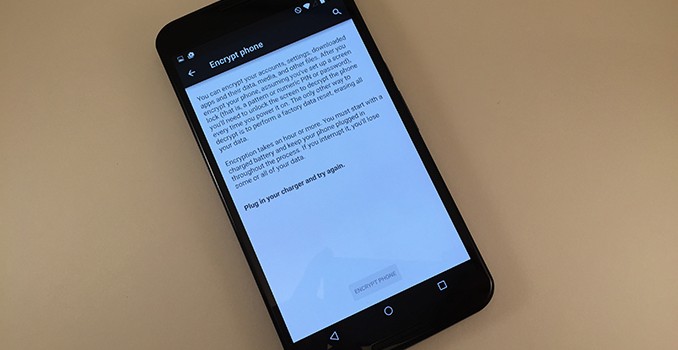
The other factor affecting the results of the benchmarks on the Nexus 6 specifically is Android Lollipop’s Full Disk Encryption (FDE). Android has actually had this ability since Android 3.0 Honeycomb, but Lollipop is the first time it’s being enabled by default on new devices. When FDE is enabled, all writes to disk have the information encrypted before it’s committed, and all reads have the information decrypted before they’re returned to the process. The key to decrypt is protected by the lockscreen password, which means that the data should be safe from anyone who takes possession of your device. However, unlike SSDs, which often have native encryption, eMMC has no such standard. In addition, most SoCs don’t have the type of fixed-function blocks necessary to enable FDE with little to no performance penalty.

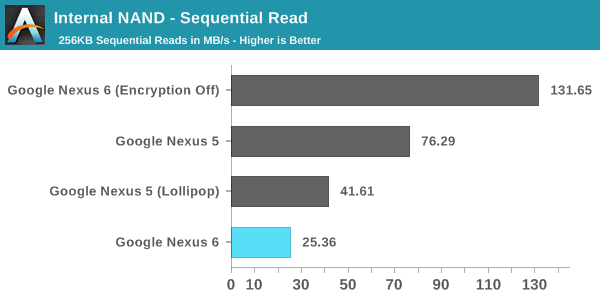
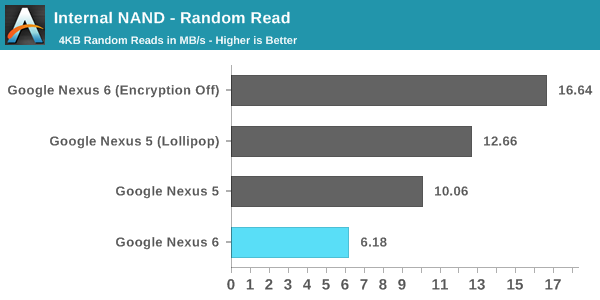
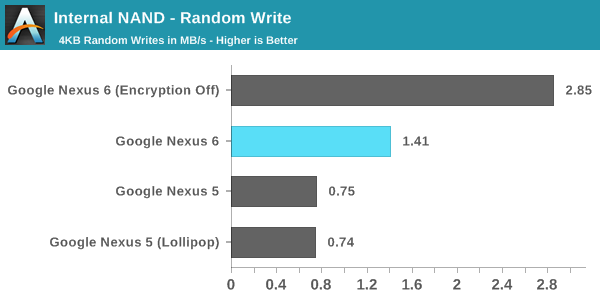
As a result, we’ve observed significant performance penalties caused by the use of FDE on the Nexus 6. Motorola was kind enough to reach out and provide a build with FDE disabled so we could compare performance, and we’ve put the results in the graphs below. For reference, the Nexus 5 (Lollipop) numbers are run using Andebench, while the original values are read out from Androbench on Android 4.4. The Nexus 5 is also running without FDE enabled, as it will not enable itself by default when updating to Lollipop via an OTA update.
Internal NAND - Random Read

Internal NAND - Random Write

Internal NAND - Sequential Read

As you can see, there’s a very significant performance penalty that comes with enabling FDE, with a 62.9% drop in random read performance, a 50.5% drop in random write performance, and a staggering 80.7% drop in sequential read performance. This has serious negative implications for device performance in any situation where applications are reading or writing to disk. Google’s move to enable FDE by default also may not be very helpful with real world security without a change in user behaviour, as much of the security comes from the use of a passcode. This poses a problem, because the users that don’t use a passcode doesn’t really benefit from FDE, but they’re still subject to the penalties.

When the Nexus 6 review was published, I commented that there were performance issues that weren’t present on the Nexus 5 running Android Lollipop. Many users commented that the FDE may have been to blame. Like I mentioned earlier, Motorola provided us with a build of Android with FDE disabled. Unfortunately, I haven’t noticed any improvements to many of the areas where there are significant frame rate issues such as Messenger and Calendar. I speculated in the Nexus 6 review that the performance issues may simply be the result of insufficient GPU performance or memory bandwidth to drive the QHD display. 

To me, the move to enable FDE by default in Lollipop seems like a reactionary move to combat the perception that Android is insecure or more prone to attack than iOS, even if that perception may not actually be accurate. While it’s always good to improve the security of your platform, the current solution results in an unacceptable hit to performance. I hope Google will either reconsider their decision to enable FDE by default, or implement it in a way that doesn’t have as significant of an impact on performance.
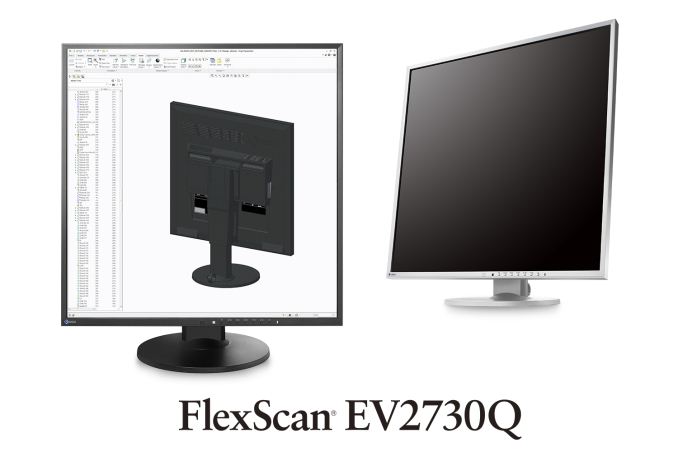
EIZO Announces the IPS 26.5” FlexScan EV2730Q Monitor with 1920x1920 Resolution

EIZO Announces the IPS 26.5” FlexScan EV2730Q Monitor with 1920×1920 Resolution

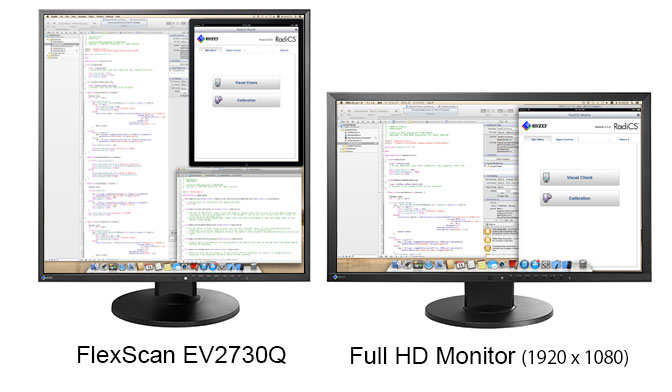
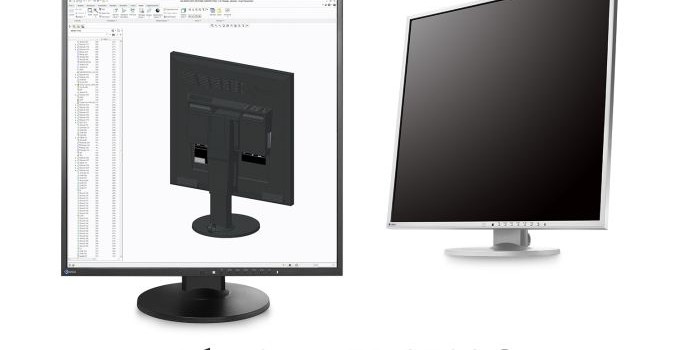
I will be honest, the nearest I think I have come to a square monitor is the 1024×768 panel I use as a tiny second screen on my main computer. When I first saw EIZO’s press release regarding this new 1920×1920 monitor it took me aback, imagining what it might feel like to actually use. The consumer monitor market is expanding to various screen sizes, usually following 16:9, 16:10 or 21:9 for the most part. But after a few minutes, I realized that non-standard monitor sizes are most likely abundant in various industries, such as medical, when they are designed for a specific purpose and quality. So while a 1:1 monitor is something interesting to see in the consumer space, perhaps it might not be so new when considering industrial use scenarios. That all being said, it would be interesting to see this one in the flesh.

1920×1920 means 3.7 megapixels, the same as 2560×1440. This compares to the regular desktop sizes of 1080p (2MP), 1200p (2.3MP), 3200×1800 (5.8MP) and 2160p (8.3MP), which indicates that if this monitor were to be used for gaming, performance would put it directly in the 1440p category. That being said, EIZO is not exactly targeting this monitor for gaming. The more vertical space provided is better suited to writers, coders or CAD who require many items on the screen at once, often side by side. As an editor, I often have an image on one side of my screen while writing my reviews on the other, so I can certainly see this marketing angle.

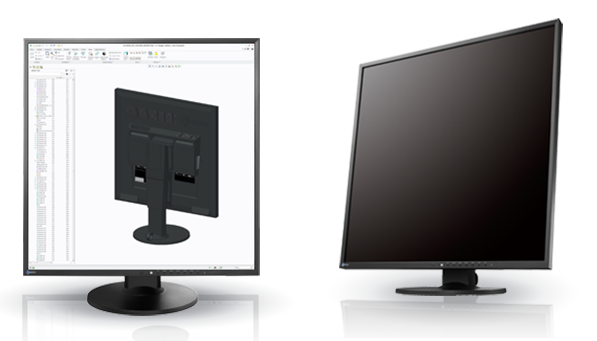
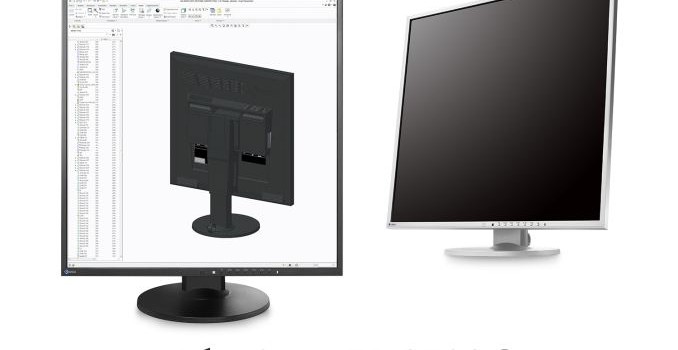
The basic specification list gives the IPS-based EV2730Q as a 16.8 million color display with 178 degree viewing angles, a 300 nit brightness, a 1000:1 contrast ratio and 5ms gray-to-gray response time. Video inputs are via DisplayPort and a dual-link DVI-D, with a maximum refresh rate of 60 Hz. Two 1W speakers are built in, along with a 2-port USB 2.0 hub. 100mm VESA is supported with 344º of swivel and 35º/5º of tilt. Height is also adjustable. 

The button controls are on the front of the panel, and EIZO gives three profiles called sRGB, Movie and Paper along with two user customizable profiles. The Paper profile is designed to reduce the amount of blue in an image to prevent eyestrain while reading or coding against a white background. A feature called Auto Ecoview can detect the ambient light level and adjust the screen’s brightness to reduce eyestrain and power. This can also detect when a user leaves the desk to power down the monitor, with power on when the user returns.

We are contacting EIZO to find what markets the EV2730Q will be sold in as well as the prices. EIZO has announced that the monitor will be available from Q1 in 2015, but this will vary by country. With any luck, it will be on display at CES.

Source: EIZO via TFTCentral

EIZO Announces the IPS 26.5” FlexScan EV2730Q Monitor with 1920x1920 Resolution

EIZO Announces the IPS 26.5” FlexScan EV2730Q Monitor with 1920×1920 Resolution

I will be honest, the nearest I think I have come to a square monitor is the 1024×768 panel I use as a tiny second screen on my main computer. When I first saw EIZO’s press release regarding this new 1920×1920 monitor it took me aback, imagining what it might feel like to actually use. The consumer monitor market is expanding to various screen sizes, usually following 16:9, 16:10 or 21:9 for the most part. But after a few minutes, I realized that non-standard monitor sizes are most likely abundant in various industries, such as medical, when they are designed for a specific purpose and quality. So while a 1:1 monitor is something interesting to see in the consumer space, perhaps it might not be so new when considering industrial use scenarios. That all being said, it would be interesting to see this one in the flesh.

1920×1920 means 3.7 megapixels, the same as 2560×1440. This compares to the regular desktop sizes of 1080p (2MP), 1200p (2.3MP), 3200×1800 (5.8MP) and 2160p (8.3MP), which indicates that if this monitor were to be used for gaming, performance would put it directly in the 1440p category. That being said, EIZO is not exactly targeting this monitor for gaming. The more vertical space provided is better suited to writers, coders or CAD who require many items on the screen at once, often side by side. As an editor, I often have an image on one side of my screen while writing my reviews on the other, so I can certainly see this marketing angle.

The basic specification list gives the IPS-based EV2730Q as a 16.8 million color display with 178 degree viewing angles, a 300 nit brightness, a 1000:1 contrast ratio and 5ms gray-to-gray response time. Video inputs are via DisplayPort and a dual-link DVI-D, with a maximum refresh rate of 60 Hz. Two 1W speakers are built in, along with a 2-port USB 2.0 hub. 100mm VESA is supported with 344º of swivel and 35º/5º of tilt. Height is also adjustable. 

The button controls are on the front of the panel, and EIZO gives three profiles called sRGB, Movie and Paper along with two user customizable profiles. The Paper profile is designed to reduce the amount of blue in an image to prevent eyestrain while reading or coding against a white background. A feature called Auto Ecoview can detect the ambient light level and adjust the screen’s brightness to reduce eyestrain and power. This can also detect when a user leaves the desk to power down the monitor, with power on when the user returns.

We are contacting EIZO to find what markets the EV2730Q will be sold in as well as the prices. EIZO has announced that the monitor will be available from Q1 in 2015, but this will vary by country. With any luck, it will be on display at CES.

Source: EIZO via TFTCentral

The OnePlus One Review

The OnePlus One has been one of the most hyped smartphones of 2014. There’s really not much else to be said, as OnePlus’ marketing has been quite noticeable amongst Android enthusiasts. The OnePlus One seems to come from nowhere, although there is a noticeable resemblance to the Oppo Find 7A which is produced in the same factory. The OnePlus One is said to be a flagship killer, as its high-end specs come with a mid-range price. The 16GB version starts at 299 USD and the 64GB version starts at 349 USD. With a 5.5″ 1080p display, Snapdragon 801 SoC, and plenty of other bits and pieces to go around, the specs are certainly enough to make it into a flagship phone. Of course, the real question is whether it really is. After all, while specs provide the foundation, what makes a phone bad, good, or great has to do with the entire phone, not just the spec sheet. To find out how it does in our testing, read on for the full review.

The OnePlus One Review

The OnePlus One has been one of the most hyped smartphones of 2014. There’s really not much else to be said, as OnePlus’ marketing has been quite noticeable amongst Android enthusiasts. The OnePlus One seems to come from nowhere, although there is a noticeable resemblance to the Oppo Find 7A which is produced in the same factory. The OnePlus One is said to be a flagship killer, as its high-end specs come with a mid-range price. The 16GB version starts at 299 USD and the 64GB version starts at 349 USD. With a 5.5″ 1080p display, Snapdragon 801 SoC, and plenty of other bits and pieces to go around, the specs are certainly enough to make it into a flagship phone. Of course, the real question is whether it really is. After all, while specs provide the foundation, what makes a phone bad, good, or great has to do with the entire phone, not just the spec sheet. To find out how it does in our testing, read on for the full review.