Vik


Microsoft Announces Windows 10 S: RT Redux

Microsoft Announces Windows 10 S: RT Redux

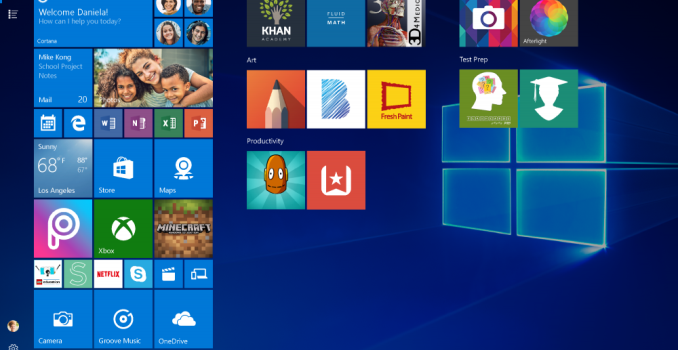
Alongside the new Surface Laptop announced today in NYC, Microsoft also unveiled their next play with Windows 10. Windows 10 S launches as a fresh take on an old idea. The old idea was “What happens when you lock Windows to only using Store boug…

Microsoft Announces The Surface Laptop

Microsoft Announces The Surface Laptop

In tech years, Surface has been around forever, but in actual Earth years, it’s been less than five years since Microsoft first put their toes into the PC hardware pool. The Surface lineup has always been about offering something unique on the computing landscape, with the Surface RT offering the first kickstand on a notebook, and the Surface Book offered a detachable GPU base. The quality of the products has improved very quickly over the last five years too, and with the Surface Studio, Microsoft is now offering one the best displays available to anyone in any device, and Surface Pro 4 is easily one of the best devices in its category (which it created).
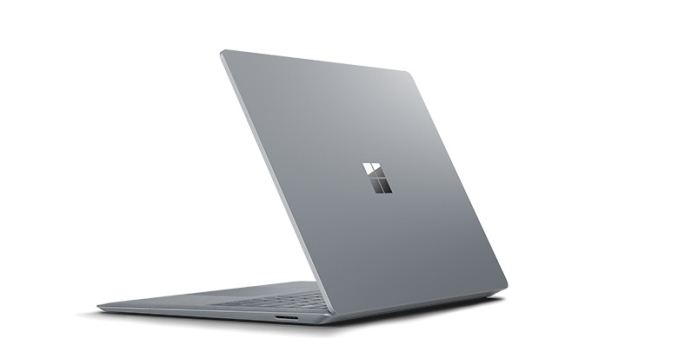
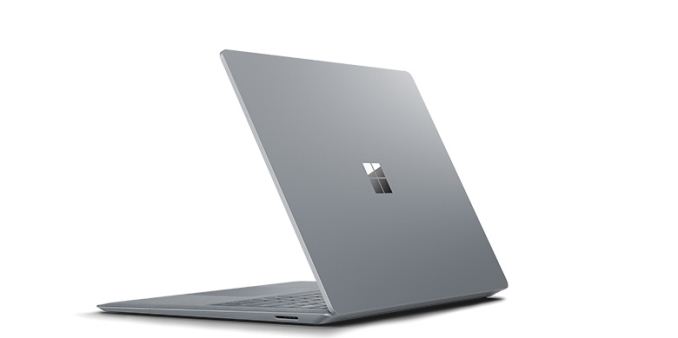
But today they’ve taken a different turn. Today Microsoft is announcing the Surface Laptop. There’s no kickstand, no detachable display, no ability to fold it into a drafting table. There’s no fancy trick at all with the Surface Laptop. Microsoft just decided to finally build the one product that people were hoping they would build, and if it’s executed like most of their products, it should be a pretty strong offering compared to the competition. Although we were unable to attend the launch event in NYC today, let’s dig into what we do know about this to see how close they’ve come to the mark. With most of their products, they have tried to introduce a new category of computing, but with the Surface Laptop, there is an already large group of Ultrabooks to compete against.

Microsoft Surface Laptop
Processor Intel Core i5-7200U
2C/4T 2.5-3.1 GHz 15W TDP
Intel Core i7-7660U
2C/4T 2.5-4.0 GHz 64MB eDRAM 15W TDP
Memory 4 GB, 8 GB, 16 GB Dual-Channel LPDDR3-1866
Graphics Intel Core i5-7200U
Intel HD 620 (24 EUs, 300-1000 MHz)
Intel Core i7-7660U
Intel Iris Plus Graphics 640 (48 EUs, 64 MB eDRAM, 300-1100 MHz)
Display 13.5″ 2256×1504 3:2 PixelSense
Touch and Pen support
100% sRGB color, individually calibrated panels
Storage 128 GB, 256 GB, 512 GB, 1 TB PCIe NVMe
Networking Marvell AVASTAR Wireless-AC (802.11ac, 2×2:2, 866Mpbs Max, 2.4 and 5GHz)
Bluetooth 4.0
Audio OmniSonic stereo speakers with Dolby Audio Premium
Dolby Audio
Battery 45Wh
44W A/C Adapter with 5 Watt USB port
Right Side Surface Connect Port (charging and docking)
Left Side USB 3.0 Full Size
mini DisplayPort
Headset Jack
Dimensions 308.02 x 223.2 x 9.93-14.47 mm (12.1 x 8.8 x 0.39-0.57 inches)
Weight 1.25 kg (2.76 lbs)
Cameras Front: 720p with Windows Hello support
Pricing 128 GB Intel Core i5 with 4GB of RAM: $999
256 GB Intel Core i5 with 8GB of RAM: $1299
256 GB Intel Core i7 with 8GB of RAM: $1599
512 GB Intel Core i7 with 16GB of RAM: $2199

Starting with the display seems to be a great jump-off point, since Microsoft, more than any other OEM, has been pushing displays as a focal point, and it is again in the Surface Laptop. It features a 13.5-inch PixelSense display, in the now common aspect ratio for Surface of 3:2. Microsoft touts its devices as productivity machines, and the 3:2 aspect ratio helps a lot there. For those with good memories, the Surface Laptop’s display is the same size as the Surface Book, but it is not the same display. The display density is lower than both the Surface Pro 4 and Surface Book, which both feature 267 pixels per inch. Likely in an effort to lower costs, and increase battery life, Microsoft has chosen a 2256 x 1504 resolution for the Surface Laptop, which works out to 3.4 million pixels, and 201 pixels per inch. As with all Surface devices, the display supports 10-point multitouch, and it can be used with a Surface Pen. Microsoft also claims 100% sRGB coverage, with individually calibrated displays. They lead the industry here, and are one of the only PC makers that offer calibrated displays across all their devices now, with perhaps the exception of Apple. Despite the lowered resolution, the excellent aspect ratio and color calibration should still make this a solid display for day to day use.
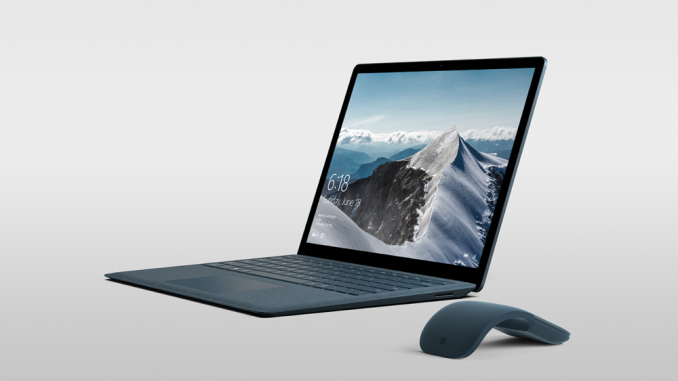
Powering the Surface Laptop is an Intel Kaby Lake processor, with either the Core i5-7200U, or the Core i7-7660U. The Core i5 is along the same lines as what everyone is offering in an i5, but the Core i7 is a nice step up, featuring Intel’s Iris Plus Graphics 640. This is a handful of a name, this is the GT3e version of Intel’s latest integrated GPU, featuring twice the execution units of the normal HD 620, and it features 64 MB of eDRAM as well, so the overall processor should be faster for most tasks. It’s nice to see the Iris Plus available, as it is in the Surface Pro 4 i7 as well.

Memory starts at a mere 4 GB for the base model, but there will be 8 GB and 16 GB models as well. The Surface Laptop is leveraging LPDDR3 memory, so 16 GB will be the maximum. Storage is 128/256/512/1024 GB SSDs, as you’d expect in an Ultrabook.
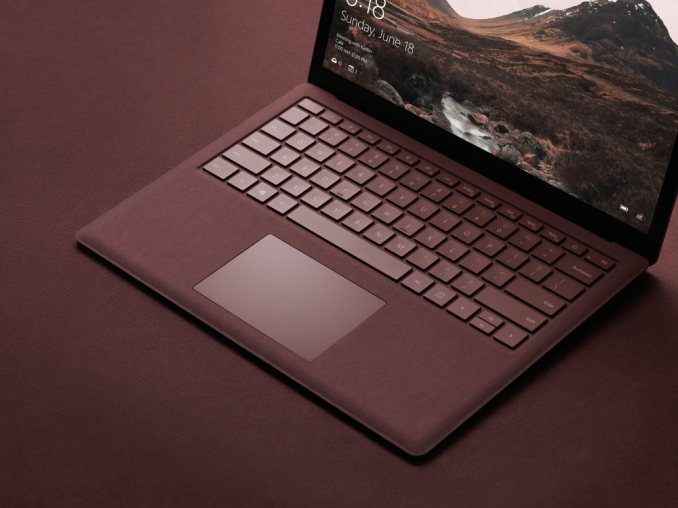
One of the more interesting aspects of the Surface Laptop is the keyboard and trackpad. The trackpad is the same trackpad as the Surface Book, which is probably the best trackpad in the PC space right now, so that’s a good thing, and the Surface Book keyboard is also excellent, so expectations for the Surface Laptop are that it will match the Surface Book in these regards, however Microsoft has chosen to outfit the Surface Laptop with an Alcantara keyboard deck. This is a synthetic fabric, and they’ve used it before in a special edition version of the Surface Pro keyboard, as well as the Surface Ergonomic keyboard. Although it’s fabric, it is coated in a anti-spill coating, so liquids should bead off of it if it does get wet. It does have a great feel to it, assuming it’s similar to the other Surface products, so this should be a nice addition.

Like most Surface devices, it features a Windows Hello IR camera, allowing for facial recognition login, along with a 720p web cam. It would have been nice to see a 1080p camera here, but it should be adequate. The Surface Laptop also features a TPM 2.0 chip which should make it suitable for the enterprise. Microsoft is also showing off “OmniSonic” stereo speakers with Dolby Audio Premium, so in theory the sound quality should be ok, but with laptops the bar is always pretty low.

The one real omission on the Surface Laptop is in expandability. It features the SurfaceConnect port, for charging, just like the Surface Pro 4 and Surface Book, and Microsoft does sell a dock for this too. There is also a full-sized USB 3.0 port, and a mini DisplayPort. The one major omission is USB-C, which seems to be the port that Microsoft refuses to support. USB-C was around when they launched the Surface 3 back in April 2015, but they chose to charge it over micro USB, to its detriment. When they launched the Skylake powered Surface Pro 4 and Surface Book, USB-C and Thunderbolt 3 were available, but somewhat niche. In May 2017 though, USB-C should be on everything. The amazing thing is that they used the space for USB-C to offer a mini DisplayPort, when USB-C could do DisplayPort over its alternate modes. I have no problem with them keeping the SurfaceConnect port, but not offering USB-C at all, let alone Thunderbolt 3, seems like a missed opportunity. I agree the full sized USB 3.0 port is likely what most people would need right now, but a small bit of futureproofing with USB-C would not have killed them.

So that’s the hardware out of the way. Microsoft has been using Surface devices to push their software since Surface was first announced with Windows 8, and that hasn’t changed with the Surface Laptop. It will feature a new Windows version called Windows 10 S. We’ll get into Windows 10 S in another piece, but the basics are that it’s a version of Windows 10 which will only work with apps in the Windows Store. Sound familiar? Of course it does, since Windows RT had the same restriction. The difference between then and now is significant though. When Windows RT launched, the Store was an empty wasteland, and Microsoft never got the developer buy-in that they had hoped for. With Windows 10, the major difference is that Microsoft offers a Desktop bridge, allowing companies to bring their Win32 apps to the store relatively unmodified. So despite not being able to run apps from outside the Windows Store, you will still have access to Microsoft Office, and apps like Adobe Photoshop Elements. In many ways, the Store versions of these apps are superior to the legacy implementations, with much easier install and uninstall, and a more robust security model. But for those that need to install apps from outside the Windows Store, Windows 10 S can be unlocked to Windows 10 Pro, and on the Surface Laptop, that unlock will be free for the first year.
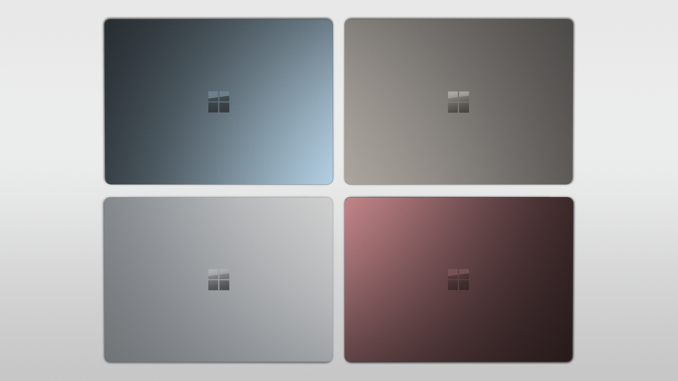
The new Surface Laptop is going to be available in four colors in the USA, with Platinum, Burgundy, Cobalt Blue, and Graphite Gold. Outside the USA, only one color will be offered initially, but the others should follow soon.

And then there is the price. Microsoft is being fairly competitive with the pricing, with the Surface Laptop starting at $999 USD for the base 4 GB / 128 GB / i5 model. That’s a strong starting price for a premium Ultrabook, although the RAM limitations will make it unappealing to many. For $1299, the i5 model bumps up to 8 GB of RAM and a 256 GB SSD, which is more in the sweet spot. The i7 model with Intel’s Iris Plus graphics starts at $1599 with the same 8 GB RAM and 256 GB SSD, and jumps to $2199 for the 16 GB / 512 GB model. Although the prices are high, the price comparisons to the competition are not that far off, meaning Microsoft likely didn’t make any friends with their OEMs today.

The new Surface Laptop is available for pre-order now, with shipments starting in June.

Microsoft Announces The Surface Laptop

Microsoft Announces The Surface Laptop

In tech years, Surface has been around forever, but in actual Earth years, it’s been less than five years since Microsoft first put their toes into the PC hardware pool. The Surface lineup has always been about offering something unique on the computing landscape, with the Surface RT offering the first kickstand on a notebook, and the Surface Book offered a detachable GPU base. The quality of the products has improved very quickly over the last five years too, and with the Surface Studio, Microsoft is now offering one the best displays available to anyone in any device, and Surface Pro 4 is easily one of the best devices in its category (which it created).

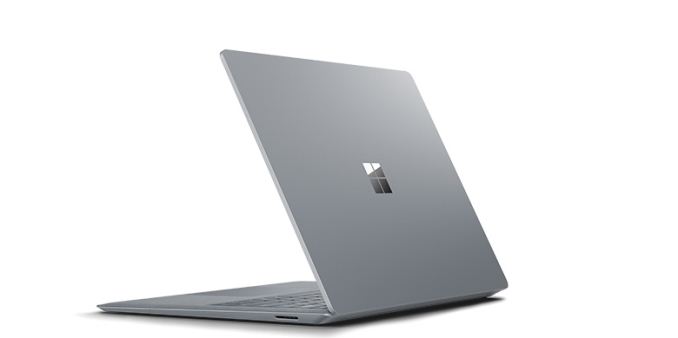
But today they’ve taken a different turn. Today Microsoft is announcing the Surface Laptop. There’s no kickstand, no detachable display, no ability to fold it into a drafting table. There’s no fancy trick at all with the Surface Laptop. Microsoft just decided to finally build the one product that people were hoping they would build, and if it’s executed like most of their products, it should be a pretty strong offering compared to the competition. Although we were unable to attend the launch event in NYC today, let’s dig into what we do know about this to see how close they’ve come to the mark. With most of their products, they have tried to introduce a new category of computing, but with the Surface Laptop, there is an already large group of Ultrabooks to compete against.

Microsoft Surface Laptop
Processor Intel Core i5-7200U
2C/4T 2.5-3.1 GHz 15W TDP
Intel Core i7-7660U
2C/4T 2.5-4.0 GHz 64MB eDRAM 15W TDP
Memory 4 GB, 8 GB, 16 GB Dual-Channel LPDDR3-1866
Graphics Intel Core i5-7200U
Intel HD 620 (24 EUs, 300-1000 MHz)
Intel Core i7-7660U
Intel Iris Plus Graphics 640 (48 EUs, 64 MB eDRAM, 300-1100 MHz)
Display 13.5″ 2256×1504 3:2 PixelSense
Touch and Pen support
100% sRGB color, individually calibrated panels
Storage 128 GB, 256 GB, 512 GB, 1 TB PCIe NVMe
Networking Marvell AVASTAR Wireless-AC (802.11ac, 2×2:2, 866Mpbs Max, 2.4 and 5GHz)
Bluetooth 4.0
Audio OmniSonic stereo speakers with Dolby Audio Premium
Dolby Audio
Battery 45Wh
44W A/C Adapter with 5 Watt USB port
Right Side Surface Connect Port (charging and docking)
Left Side USB 3.0 Full Size
mini DisplayPort
Headset Jack
Dimensions 308.02 x 223.2 x 9.93-14.47 mm (12.1 x 8.8 x 0.39-0.57 inches)
Weight 1.25 kg (2.76 lbs)
Cameras Front: 720p with Windows Hello support
Pricing 128 GB Intel Core i5 with 4GB of RAM: $999
256 GB Intel Core i5 with 8GB of RAM: $1299
256 GB Intel Core i7 with 8GB of RAM: $1599
512 GB Intel Core i7 with 16GB of RAM: $2199

Starting with the display seems to be a great jump-off point, since Microsoft, more than any other OEM, has been pushing displays as a focal point, and it is again in the Surface Laptop. It features a 13.5-inch PixelSense display, in the now common aspect ratio for Surface of 3:2. Microsoft touts its devices as productivity machines, and the 3:2 aspect ratio helps a lot there. For those with good memories, the Surface Laptop’s display is the same size as the Surface Book, but it is not the same display. The display density is lower than both the Surface Pro 4 and Surface Book, which both feature 267 pixels per inch. Likely in an effort to lower costs, and increase battery life, Microsoft has chosen a 2256 x 1504 resolution for the Surface Laptop, which works out to 3.4 million pixels, and 201 pixels per inch. As with all Surface devices, the display supports 10-point multitouch, and it can be used with a Surface Pen. Microsoft also claims 100% sRGB coverage, with individually calibrated displays. They lead the industry here, and are one of the only PC makers that offer calibrated displays across all their devices now, with perhaps the exception of Apple. Despite the lowered resolution, the excellent aspect ratio and color calibration should still make this a solid display for day to day use.

Powering the Surface Laptop is an Intel Kaby Lake processor, with either the Core i5-7200U, or the Core i7-7660U. The Core i5 is along the same lines as what everyone is offering in an i5, but the Core i7 is a nice step up, featuring Intel’s Iris Plus Graphics 640. This is a handful of a name, this is the GT3e version of Intel’s latest integrated GPU, featuring twice the execution units of the normal HD 620, and it features 64 MB of eDRAM as well, so the overall processor should be faster for most tasks. It’s nice to see the Iris Plus available, as it is in the Surface Pro 4 i7 as well.

Memory starts at a mere 4 GB for the base model, but there will be 8 GB and 16 GB models as well. The Surface Laptop is leveraging LPDDR3 memory, so 16 GB will be the maximum. Storage is 128/256/512/1024 GB SSDs, as you’d expect in an Ultrabook.

One of the more interesting aspects of the Surface Laptop is the keyboard and trackpad. The trackpad is the same trackpad as the Surface Book, which is probably the best trackpad in the PC space right now, so that’s a good thing, and the Surface Book keyboard is also excellent, so expectations for the Surface Laptop are that it will match the Surface Book in these regards, however Microsoft has chosen to outfit the Surface Laptop with an Alcantara keyboard deck. This is a synthetic fabric, and they’ve used it before in a special edition version of the Surface Pro keyboard, as well as the Surface Ergonomic keyboard. Although it’s fabric, it is coated in a anti-spill coating, so liquids should bead off of it if it does get wet. It does have a great feel to it, assuming it’s similar to the other Surface products, so this should be a nice addition.

Like most Surface devices, it features a Windows Hello IR camera, allowing for facial recognition login, along with a 720p web cam. It would have been nice to see a 1080p camera here, but it should be adequate. The Surface Laptop also features a TPM 2.0 chip which should make it suitable for the enterprise. Microsoft is also showing off “OmniSonic” stereo speakers with Dolby Audio Premium, so in theory the sound quality should be ok, but with laptops the bar is always pretty low.

The one real omission on the Surface Laptop is in expandability. It features the SurfaceConnect port, for charging, just like the Surface Pro 4 and Surface Book, and Microsoft does sell a dock for this too. There is also a full-sized USB 3.0 port, and a mini DisplayPort. The one major omission is USB-C, which seems to be the port that Microsoft refuses to support. USB-C was around when they launched the Surface 3 back in April 2015, but they chose to charge it over micro USB, to its detriment. When they launched the Skylake powered Surface Pro 4 and Surface Book, USB-C and Thunderbolt 3 were available, but somewhat niche. In May 2017 though, USB-C should be on everything. The amazing thing is that they used the space for USB-C to offer a mini DisplayPort, when USB-C could do DisplayPort over its alternate modes. I have no problem with them keeping the SurfaceConnect port, but not offering USB-C at all, let alone Thunderbolt 3, seems like a missed opportunity. I agree the full sized USB 3.0 port is likely what most people would need right now, but a small bit of futureproofing with USB-C would not have killed them.

So that’s the hardware out of the way. Microsoft has been using Surface devices to push their software since Surface was first announced with Windows 8, and that hasn’t changed with the Surface Laptop. It will feature a new Windows version called Windows 10 S. We’ll get into Windows 10 S in another piece, but the basics are that it’s a version of Windows 10 which will only work with apps in the Windows Store. Sound familiar? Of course it does, since Windows RT had the same restriction. The difference between then and now is significant though. When Windows RT launched, the Store was an empty wasteland, and Microsoft never got the developer buy-in that they had hoped for. With Windows 10, the major difference is that Microsoft offers a Desktop bridge, allowing companies to bring their Win32 apps to the store relatively unmodified. So despite not being able to run apps from outside the Windows Store, you will still have access to Microsoft Office, and apps like Adobe Photoshop Elements. In many ways, the Store versions of these apps are superior to the legacy implementations, with much easier install and uninstall, and a more robust security model. But for those that need to install apps from outside the Windows Store, Windows 10 S can be unlocked to Windows 10 Pro, and on the Surface Laptop, that unlock will be free for the first year.

The new Surface Laptop is going to be available in four colors in the USA, with Platinum, Burgundy, Cobalt Blue, and Graphite Gold. Outside the USA, only one color will be offered initially, but the others should follow soon.

And then there is the price. Microsoft is being fairly competitive with the pricing, with the Surface Laptop starting at $999 USD for the base 4 GB / 128 GB / i5 model. That’s a strong starting price for a premium Ultrabook, although the RAM limitations will make it unappealing to many. For $1299, the i5 model bumps up to 8 GB of RAM and a 256 GB SSD, which is more in the sweet spot. The i7 model with Intel’s Iris Plus graphics starts at $1599 with the same 8 GB RAM and 256 GB SSD, and jumps to $2199 for the 16 GB / 512 GB model. Although the prices are high, the price comparisons to the competition are not that far off, meaning Microsoft likely didn’t make any friends with their OEMs today.

The new Surface Laptop is available for pre-order now, with shipments starting in June.
Acer Launches TravelMate Spin B1: Apollo Lake Convertible with Windows 10 S for $299

Acer Launches TravelMate Spin B1: Apollo Lake Convertible with Windows 10 S for $299

Acer on Tuesday launched its new low-cost PC, the TravelMate Spin B1. The new entry-level mobile computer comes in a convertible form-factor and is powered by Microsoft’s newly-announced Windows 10 S operating system. The device is aimed at students and will rival various Chromebooks from both Acer itself as well as other suppliers.

The Acer TravelMate Spin B1 (B118) is based on Intel’s Apollo Lake platform featuring the Celeron N3450 SoC (four Goldmont cores clocked at 1.1 – 2.2 GHz, 2 MB cache, 6 W TDP, Intel HD Graphics 500 with 12 EUs) as well as Microsoft’s new Windows 10 S, which is a feature-limited edition designed primarily for the education market. Windows 10 S has a faster boot process and supports general features of the operating system (including the Cortana assistant), but can only run applications obtained from the Microsoft Store and has some additional limitations. The main purpose of the Windows 10 S is to enable Microsoft to better compete against Google’s Chrome OS-based laptops.

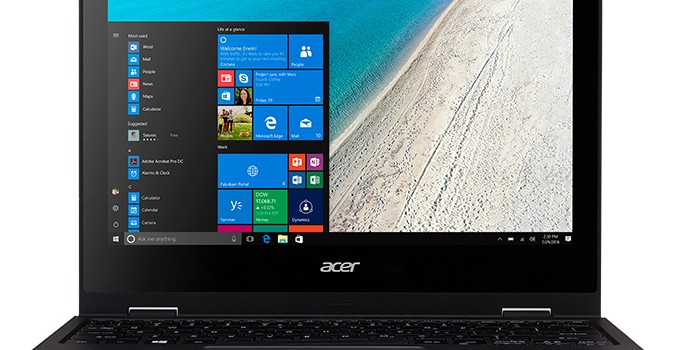
One of the key selling points of the TravelMate Spin B1 (apart from the OS) is its 11.6” IPS display with a 1920×1080 resolution, which additionally features 10-point multitouch and has a 360-degree hinge supporting notebook, tablet, display and tent modes. The capabilities of the display look rather advanced for an entry-level PC, and as a further kicker, Acer supplies the computer with an active stylus that supports the Windows Ink technology.

As for the other specifications, they seem to be in-line with other entry-level laptops available today. The TravelMate Spin B1 is equipped with 4 GB of DDR3L memory, 64 GB of eMMC storage, a dual-band 802.11ac 2×2 MIMO Wi-Fi, Bluetooth 4.0, a GbE port, USB ports, a webcam, an SD card reader, a touchpad, a spill-resistant keyboard, and so on.

Acer TravelMate Spin B1
  B118
Display 11.6″ IPS panel with 1920×1080 resolution
CPU Celeron N3450 (four Goldmont cores clocked at 1.1 – 2.2 GHz, 2 MB cache, 6 W TDP, iGPU)
Graphics Intel HD Graphics 500 with 12 EUs
RAM 4 GB of DDR3L
Storage 64 GB eMMC
Wi-Fi Intel Wireless-AC 2×2 802.11ac Wi-Fi
Bluetooth Bluetooth 4.0
Ethernet GbE controller
USB 1 × USB 3.0 Type-A
1 × USB 2.0 Type-A
Display Outputs 1 × HDMI
Keyboard Chiclet spill-resistant keyboard
Other I/O Microphone, stereo speakers, audio jacks, webcam, SD card reader
Dimensions Width: 291 mm/11.5″
Depth: 211 mm/8.3″
Thickness: 23.4 mm/0.9″
Weight 1.5 kilograms
Battery 4-cell battery, 13 hours battery life
Price $299.99

The entry level system from Acer is 0.9” (23.4 mm) thick, it is made of plastic and weighs around 3.3 lb (1.5 kg), which is comparable to competing Chromebooks designed for education market.

The Acer TravelMate Spin B1 is available now from select retailers starting at $299.99 in the U.S. In the coming weeks and month, Acer plans to start sales of the product in other countries, but actual prices and configurations will differ there.

Related Reading:

Acer Launches TravelMate Spin B1: Apollo Lake Convertible with Windows 10 S for $299

Acer Launches TravelMate Spin B1: Apollo Lake Convertible with Windows 10 S for $299

Acer on Tuesday launched its new low-cost PC, the TravelMate Spin B1. The new entry-level mobile computer comes in a convertible form-factor and is powered by Microsoft’s newly-announced Windows 10 S operating system. The device is aimed at students and will rival various Chromebooks from both Acer itself as well as other suppliers.

The Acer TravelMate Spin B1 (B118) is based on Intel’s Apollo Lake platform featuring the Celeron N3450 SoC (four Goldmont cores clocked at 1.1 – 2.2 GHz, 2 MB cache, 6 W TDP, Intel HD Graphics 500 with 12 EUs) as well as Microsoft’s new Windows 10 S, which is a feature-limited edition designed primarily for the education market. Windows 10 S has a faster boot process and supports general features of the operating system (including the Cortana assistant), but can only run applications obtained from the Microsoft Store and has some additional limitations. The main purpose of the Windows 10 S is to enable Microsoft to better compete against Google’s Chrome OS-based laptops.

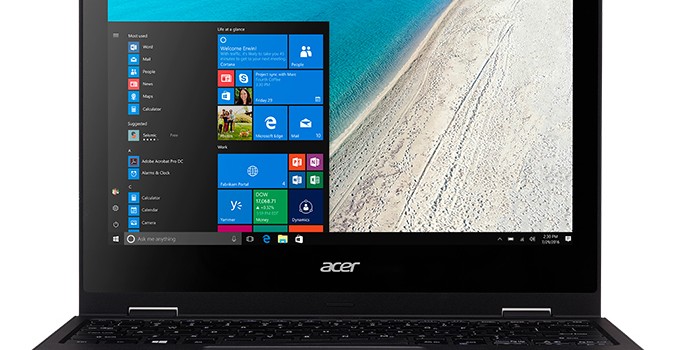
One of the key selling points of the TravelMate Spin B1 (apart from the OS) is its 11.6” IPS display with a 1920×1080 resolution, which additionally features 10-point multitouch and has a 360-degree hinge supporting notebook, tablet, display and tent modes. The capabilities of the display look rather advanced for an entry-level PC, and as a further kicker, Acer supplies the computer with an active stylus that supports the Windows Ink technology.

As for the other specifications, they seem to be in-line with other entry-level laptops available today. The TravelMate Spin B1 is equipped with 4 GB of DDR3L memory, 64 GB of eMMC storage, a dual-band 802.11ac 2×2 MIMO Wi-Fi, Bluetooth 4.0, a GbE port, USB ports, a webcam, an SD card reader, a touchpad, a spill-resistant keyboard, and so on.

Acer TravelMate Spin B1
  B118
Display 11.6″ IPS panel with 1920×1080 resolution
CPU Celeron N3450 (four Goldmont cores clocked at 1.1 – 2.2 GHz, 2 MB cache, 6 W TDP, iGPU)
Graphics Intel HD Graphics 500 with 12 EUs
RAM 4 GB of DDR3L
Storage 64 GB eMMC
Wi-Fi Intel Wireless-AC 2×2 802.11ac Wi-Fi
Bluetooth Bluetooth 4.0
Ethernet GbE controller
USB 1 × USB 3.0 Type-A
1 × USB 2.0 Type-A
Display Outputs 1 × HDMI
Keyboard Chiclet spill-resistant keyboard
Other I/O Microphone, stereo speakers, audio jacks, webcam, SD card reader
Dimensions Width: 291 mm/11.5″
Depth: 211 mm/8.3″
Thickness: 23.4 mm/0.9″
Weight 1.5 kilograms
Battery 4-cell battery, 13 hours battery life
Price $299.99

The entry level system from Acer is 0.9” (23.4 mm) thick, it is made of plastic and weighs around 3.3 lb (1.5 kg), which is comparable to competing Chromebooks designed for education market.

The Acer TravelMate Spin B1 is available now from select retailers starting at $299.99 in the U.S. In the coming weeks and month, Acer plans to start sales of the product in other countries, but actual prices and configurations will differ there.

Related Reading: