Vik


AMD Acquires 60 GHz Wireless IP and Staff from Nitero

AMD Acquires 60 GHz Wireless IP and Staff from Nitero

AMD on Tuesday announced that it had acquired millimeter wave radio-related intellectual property and key engineers from Nitero. Nitero specialized in radio technology for the 60 GHz range, which is expected to be the basis of a number of short range wireless standards.

AMD indicated that they purchased Nitero in order to focus on developing the necessary technology to wirelessly connect AR and VR headsets to host PCs, thus improving AR/VR experience. Though more broadly speaking, Nitero’s low-latency 60 GHz wireless interface in general can be used in various ways to connect different devices, and owning such an IP may be important for AMD’s patent portfolio.

Current-generation VR headsets connect to PCs using HDMI interface, which is very convenient, but which naturally reduces freedom of movements and sometimes adds certain complications. Since VR headsets are just head-mounted displays with audio, usage of HDMI is just natural because the interface has enough bandwidth for high-resolution high-framerate graphics and because the software stack is already here — OSes, drivers, applications “understand” what HDMI is. Moreover, with 10.2 Gbps raw throughput (8.1 Gbps with 8b/10b overhead removed), the HDMI 1.4 provides enough bandwidth for 2160×1200 at 90 Hz resolution offered by the HTC Vive and the Oculus Rift.

Meanwhile cables sometimes negatively affect VR/AR experiences and even usage models. A number of companies (DisplayLink, TPCast, Nitero etc.) have been trying to use the millimeter wave radio technology to build wireless VR headsets and some of them even demonstrated their devices at MWC 2017 earlier this year. It is not completely clear whether the 60 GHz radio used by the three aforementioned companies is compliant with the WiGig (802.11ad) specification, but Nitero is known for its WiGig chips for mobiles.
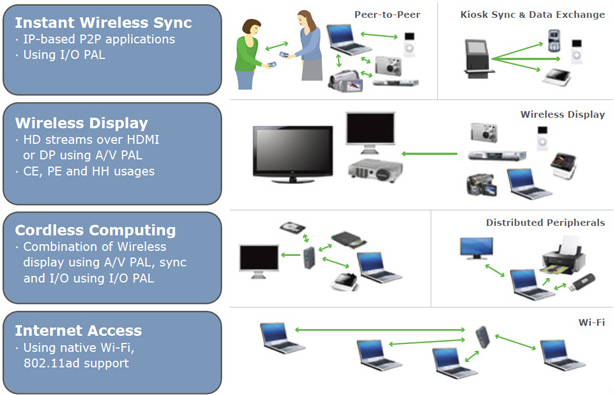
At present, WiGig is used for wireless docking stations and provides ~7 Gbps of bandwidth, which is enough for transmission of documents or files, but is barely enough even for current-gen VR headsets (not to mention input lag). Nonetheless, it is important to start from something and it appears that AMD is betting on Nitero’s technologies. Just to add perspective, the WirelessHD 1.1 standard designed by Silicon Image supports up to 28 Gbps data transmission rate — that is comparable to DP 1.4 and is enough for 4Kp120 with compression (or 8Kp60), so 60 GHz radios can scale very well.

AMD said that Nitero had created a phased-array beamforming millimeter wave chip that can enable “multi-gigabit transmit performance with low latency” for VR headsets without line-of-sight requirements associated with some other implementations of millimeter wave radio technologies, which suits wearables very well. AMD is not disclosing exactly what they intend to do with the IP beyond further developing it for VR/AR, so it’s not clear at this time whether they intend develop their own products from it. AMD could further develop the IP and then license it out for partners to build the final products, or design the chips themselves and sell that to partners as part of a reference kit. There’s also the possibility of integrating the IP into their other products, though the extreme short range nature of 60 GHz wireless does pose some unique challenges to applications that aren’t line-of-sight.

So far, wireless display technologies (apart from Miracast) have not really taken off due to various reasons. But since so many companies are working on such technologies based on 60 GHz radio, the prospects of its millimeter wave radio IP here may be considerably more promising for AMD if it manages to popularize the standard first among developers of VR headsets and then among makers of displays.

Putting our speculations aside, the only thing that AMD shares now is that the Nitero acquisition is a long-term investment that could enable the company to create more immersive computing experiences.

Related Reading:

AMD Acquires 60 GHz Wireless IP and Staff from Nitero

AMD Acquires 60 GHz Wireless IP and Staff from Nitero

AMD on Tuesday announced that it had acquired millimeter wave radio-related intellectual property and key engineers from Nitero. Nitero specialized in radio technology for the 60 GHz range, which is expected to be the basis of a number of short range wireless standards.

AMD indicated that they purchased Nitero in order to focus on developing the necessary technology to wirelessly connect AR and VR headsets to host PCs, thus improving AR/VR experience. Though more broadly speaking, Nitero’s low-latency 60 GHz wireless interface in general can be used in various ways to connect different devices, and owning such an IP may be important for AMD’s patent portfolio.

Current-generation VR headsets connect to PCs using HDMI interface, which is very convenient, but which naturally reduces freedom of movements and sometimes adds certain complications. Since VR headsets are just head-mounted displays with audio, usage of HDMI is just natural because the interface has enough bandwidth for high-resolution high-framerate graphics and because the software stack is already here — OSes, drivers, applications “understand” what HDMI is. Moreover, with 10.2 Gbps raw throughput (8.1 Gbps with 8b/10b overhead removed), the HDMI 1.4 provides enough bandwidth for 2160×1200 at 90 Hz resolution offered by the HTC Vive and the Oculus Rift.

Meanwhile cables sometimes negatively affect VR/AR experiences and even usage models. A number of companies (DisplayLink, TPCast, Nitero etc.) have been trying to use the millimeter wave radio technology to build wireless VR headsets and some of them even demonstrated their devices at MWC 2017 earlier this year. It is not completely clear whether the 60 GHz radio used by the three aforementioned companies is compliant with the WiGig (802.11ad) specification, but Nitero is known for its WiGig chips for mobiles.

At present, WiGig is used for wireless docking stations and provides ~7 Gbps of bandwidth, which is enough for transmission of documents or files, but is barely enough even for current-gen VR headsets (not to mention input lag). Nonetheless, it is important to start from something and it appears that AMD is betting on Nitero’s technologies. Just to add perspective, the WirelessHD 1.1 standard designed by Silicon Image supports up to 28 Gbps data transmission rate — that is comparable to DP 1.4 and is enough for 4Kp120 with compression (or 8Kp60), so 60 GHz radios can scale very well.

AMD said that Nitero had created a phased-array beamforming millimeter wave chip that can enable “multi-gigabit transmit performance with low latency” for VR headsets without line-of-sight requirements associated with some other implementations of millimeter wave radio technologies, which suits wearables very well. AMD is not disclosing exactly what they intend to do with the IP beyond further developing it for VR/AR, so it’s not clear at this time whether they intend develop their own products from it. AMD could further develop the IP and then license it out for partners to build the final products, or design the chips themselves and sell that to partners as part of a reference kit. There’s also the possibility of integrating the IP into their other products, though the extreme short range nature of 60 GHz wireless does pose some unique challenges to applications that aren’t line-of-sight.

So far, wireless display technologies (apart from Miracast) have not really taken off due to various reasons. But since so many companies are working on such technologies based on 60 GHz radio, the prospects of its millimeter wave radio IP here may be considerably more promising for AMD if it manages to popularize the standard first among developers of VR headsets and then among makers of displays.

Putting our speculations aside, the only thing that AMD shares now is that the Nitero acquisition is a long-term investment that could enable the company to create more immersive computing experiences.

Related Reading:

AMD Acquires 60 GHz Wireless IP and Staff from Nitero

AMD Acquires 60 GHz Wireless IP and Staff from Nitero

AMD on Tuesday announced that it had acquired millimeter wave radio-related intellectual property and key engineers from Nitero. Nitero specialized in radio technology for the 60 GHz range, which is expected to be the basis of a number of short range wireless standards.

AMD indicated that they purchased Nitero in order to focus on developing the necessary technology to wirelessly connect AR and VR headsets to host PCs, thus improving AR/VR experience. Though more broadly speaking, Nitero’s low-latency 60 GHz wireless interface in general can be used in various ways to connect different devices, and owning such an IP may be important for AMD’s patent portfolio.

Current-generation VR headsets connect to PCs using HDMI interface, which is very convenient, but which naturally reduces freedom of movements and sometimes adds certain complications. Since VR headsets are just head-mounted displays with audio, usage of HDMI is just natural because the interface has enough bandwidth for high-resolution high-framerate graphics and because the software stack is already here — OSes, drivers, applications “understand” what HDMI is. Moreover, with 10.2 Gbps raw throughput (8.1 Gbps with 8b/10b overhead removed), the HDMI 1.4 provides enough bandwidth for 2160×1200 at 90 Hz resolution offered by the HTC Vive and the Oculus Rift.

Meanwhile cables sometimes negatively affect VR/AR experiences and even usage models. A number of companies (DisplayLink, TPCast, Nitero etc.) have been trying to use the millimeter wave radio technology to build wireless VR headsets and some of them even demonstrated their devices at MWC 2017 earlier this year. It is not completely clear whether the 60 GHz radio used by the three aforementioned companies is compliant with the WiGig (802.11ad) specification, but Nitero is known for its WiGig chips for mobiles.

At present, WiGig is used for wireless docking stations and provides ~7 Gbps of bandwidth, which is enough for transmission of documents or files, but is barely enough even for current-gen VR headsets (not to mention input lag). Nonetheless, it is important to start from something and it appears that AMD is betting on Nitero’s technologies. Just to add perspective, the WirelessHD 1.1 standard designed by Silicon Image supports up to 28 Gbps data transmission rate — that is comparable to DP 1.4 and is enough for 4Kp120 with compression (or 8Kp60), so 60 GHz radios can scale very well.

AMD said that Nitero had created a phased-array beamforming millimeter wave chip that can enable “multi-gigabit transmit performance with low latency” for VR headsets without line-of-sight requirements associated with some other implementations of millimeter wave radio technologies, which suits wearables very well. AMD is not disclosing exactly what they intend to do with the IP beyond further developing it for VR/AR, so it’s not clear at this time whether they intend develop their own products from it. AMD could further develop the IP and then license it out for partners to build the final products, or design the chips themselves and sell that to partners as part of a reference kit. There’s also the possibility of integrating the IP into their other products, though the extreme short range nature of 60 GHz wireless does pose some unique challenges to applications that aren’t line-of-sight.

So far, wireless display technologies (apart from Miracast) have not really taken off due to various reasons. But since so many companies are working on such technologies based on 60 GHz radio, the prospects of its millimeter wave radio IP here may be considerably more promising for AMD if it manages to popularize the standard first among developers of VR headsets and then among makers of displays.

Putting our speculations aside, the only thing that AMD shares now is that the Nitero acquisition is a long-term investment that could enable the company to create more immersive computing experiences.

Related Reading:

Display Report: Huawei P10 and P10 Plus

Display Report: Huawei P10 and P10 Plus

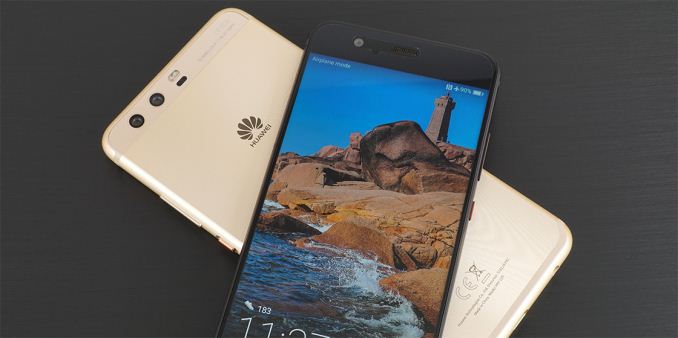
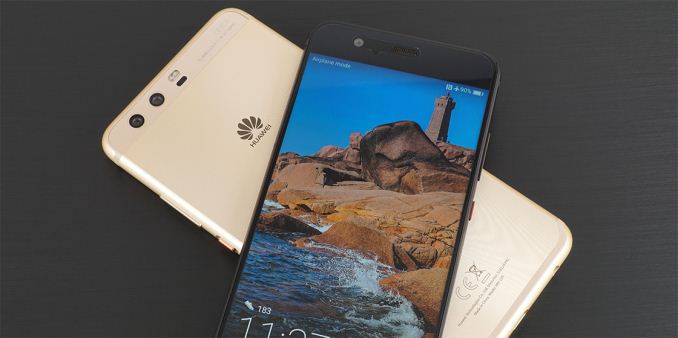
Huawei recently added the P10 and P10 Plus to its lineup, which focus on fashion and photography like other P-series phones. The Huawei P10 has a 5.1-inch IPS LCD panel with a typical 1920×1080 resolution (431ppi) and a 16:9 aspect ratio. The P10 Plus, as its name implies, is an upscaled version of the P10, with a larger 5.5-inch IPS LCD panel. It also bumps resolution to 2560×1440 (534ppi), which is not really necessary for an IPS panel at this size. Both panels are covered with Gorilla Glass 5 and come with a plastic screen protector pre-applied. Some people may appreciate the extra protection included out of the box, but the cheap protector does not allow your finger to slide smoothly across the screen and gets gunked up with skin oil very quickly. The glass underneath does not appear to have an oleophobic coating either, which is an odd omission for a flagship phone.

A well-calibrated, quality display would be a nice compliment to the dual rear cameras on both phones, allowing you to view the captured photos accurately. Previous Huawei phones have suffered from poor calibration, however, so we’ll take some measurements to see if there’s any improvement with the new P10s. As always, we use an X-Rite i1Pro 2 spectrophotometer for color measurements and an i1Display Pro colorimeter for luminance measurements, profiling it with SpectraCal’s CalMAN software.

Display - Max Brightness

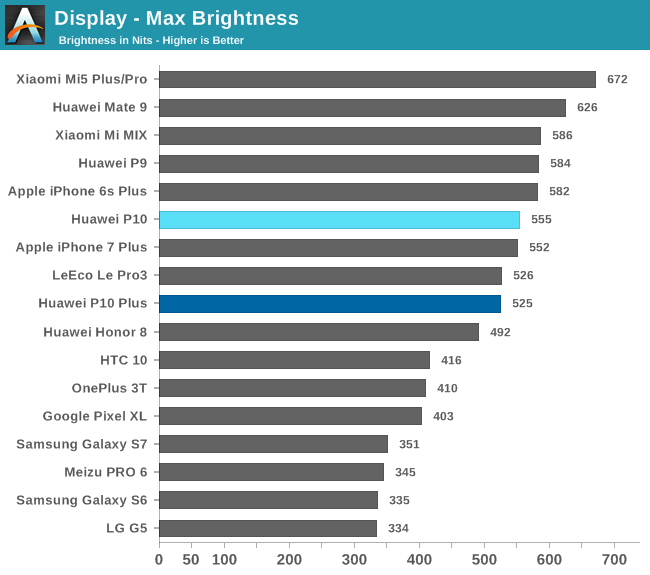
Both the P10 and P10 Plus exceed 500 nits at peak brightness, a little shy of the 600+ nits a few phones can achieve, including Huawei’s Mate 9, and a little less than last year’s P9. It’s not clear if the P10’s backlight is using 20 LEDs like the P9 or if it has gone back to using 16 LEDs, which is more common for a 5-inch class display.

The values in the chart above were measured by setting the brightness manually. Many phones, especially those with OLED displays, can temporarily boost brightness to increase visibility in extreme cases such as direct sunlight when using the auto-brightness mode. The iPhone 7 and 7 Plus, for example, hit 706 and 618 nits, respectively, and Samsung’s Galaxy S7 hits 532 nits using this boost mode. The P10s do not have this auto-brightness boost feature; however, their peak brightness is still sufficient for outdoor use. At the other extreme, brightness drops all the way down to 2-3 nits at the minimum setting, making the P10s easy to use in a completely dark room.

Display - Black Levels

Display - Contrast Ratio

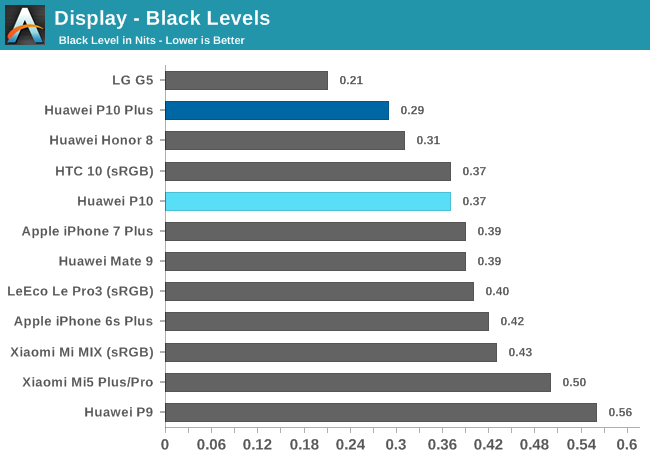
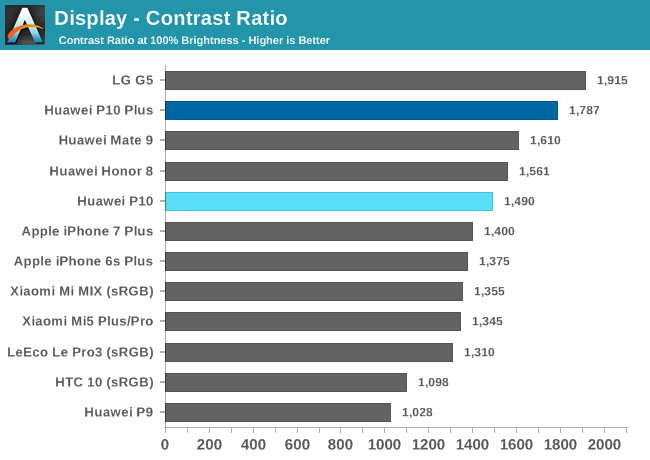
Black level and contrast ratio are measured at the panel’s maximum brightness. Because black level increases with brightness, the numbers in the chart above are not directly comparable; however, after accounting for this effect, black levels for the iPhone 6s Plus, iPhone 7 Plus, Mi MIX, and both P10s are comparable, so the P10 displays are likely using photo-aligned crystals to improve black level and contrast ratio.

The phones with OLED panels are not shown in these charts because they are able to achieve a black level of zero and a mathematically infinite contrast ratio by being able to completely turn off individual pixels.

Display - White Point

Display - Grayscale Accuracy

P10:                        

P10 Plus:                 


SpectraCal CalMAN

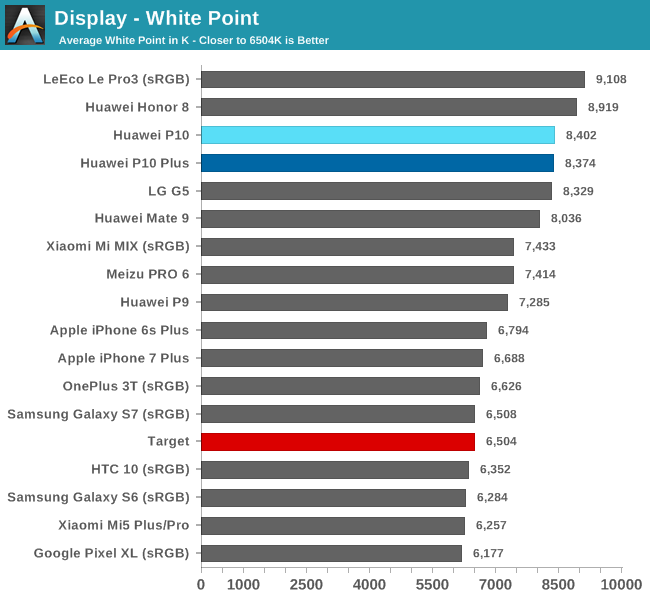
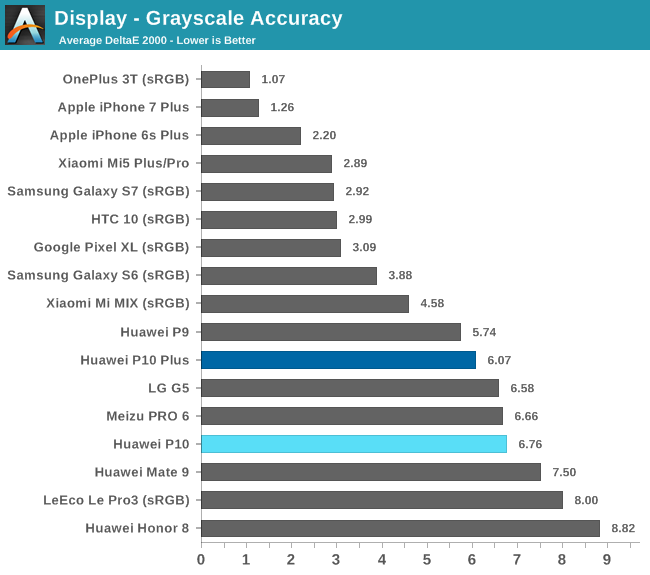
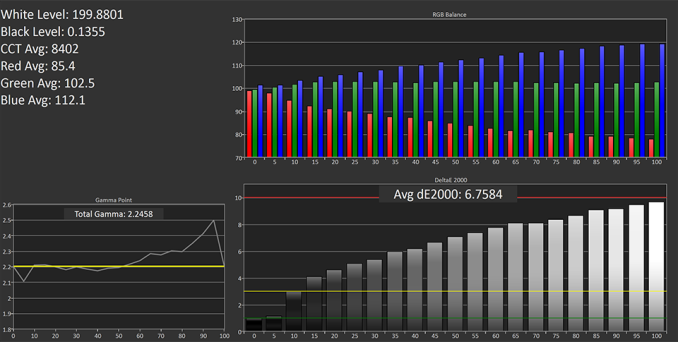
Huawei is notorious for calibrating its displays to an overly cool white point, and the P10s are no exception. With an average white point of about 8,400K when using the “Default” setting, a little higher than both the P9 and Mate 9, the P10s show an obvious blue tint when looking at a white screen. The imbalance between the blue and red primaries leads to poor grayscale accuracy. Average ΔE2000 grayscale error is greater than 6 with peak error reaching 8-10 at higher luminance values.

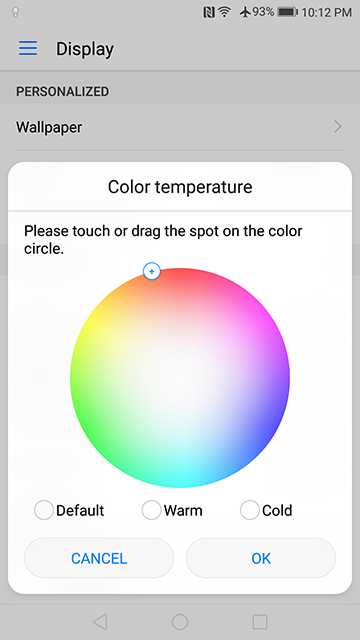
Like other Huawei phones, the P10s allow you to adjust the white point by selecting predefined “Cold” or “Warm” color temperature modes. You can also set a custom white point target by dragging a finger around a color wheel. The Cold setting shifts the average white point to about 9,000K, giving the screen an even darker blue tint. The Warm setting still shows a deficit in red, giving it an average white point of 7,400K, still well above the D65 target value, shifting the screen’s tint from blue to aqua.


The “Custom” white point setting for both the P10 and P10 Plus

Using the P10’s color wheel, I was able to adjust the RGB balance, giving a small boost to the red primary while pulling green closer to the ideal value. In the “Custom” graphs above, you can see how this reduces grayscale error over the full luminance range. Despite these improvements, I was not able to get average CCT below about 7,600K, so the screen still has a blue tint.

The P10s use adaptive display technology that adjusts both the backlight intensity and gamma based on the content being displayed and the ambient light conditions. This technology aims to reduce power consumption and improve the display’s visibility, especially when using the phone outdoors.

Display - Saturation Accuracy


SpectraCal CalMAN

P10:                            

P10 Plus:                     

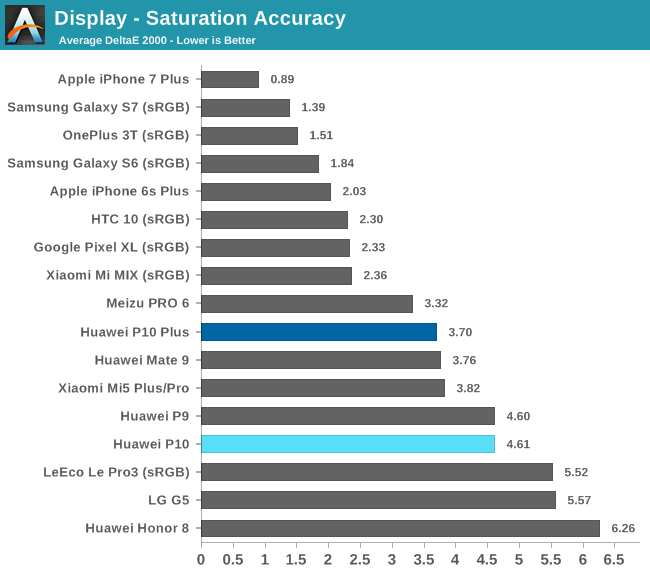
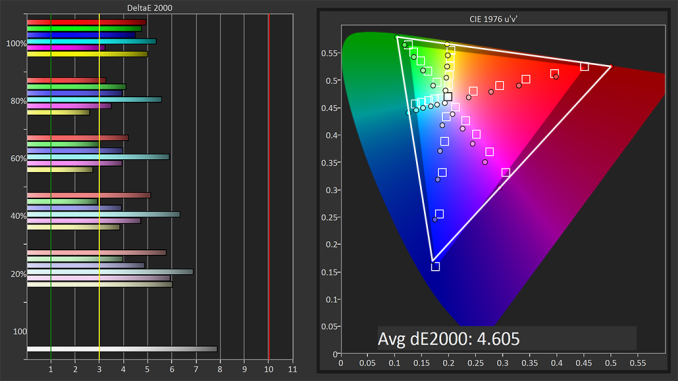
Both P10s use wide color gamut displays that nearly cover the entire DCI-P3 color space, only falling short of the blue target value. This leads to oversaturated colors when viewing content that targets the sRGB color space (shown by the inner triangle in the graphs above) because of Android’s lack of color management. The Default and Cold settings exhibit the greatest saturation error, especially for color shades beyond the 50% saturation level. There’s also a significant shift in hue towards blue because of the cool white point. The Warm and custom settings achieve a better RGB balance, significantly reducing both hue shift and saturation error to more acceptable levels, at least out to about the 60% mark. The P10s do not have an sRGB mode, so people that prefer accurate rather than vibrant colors are out of luck.

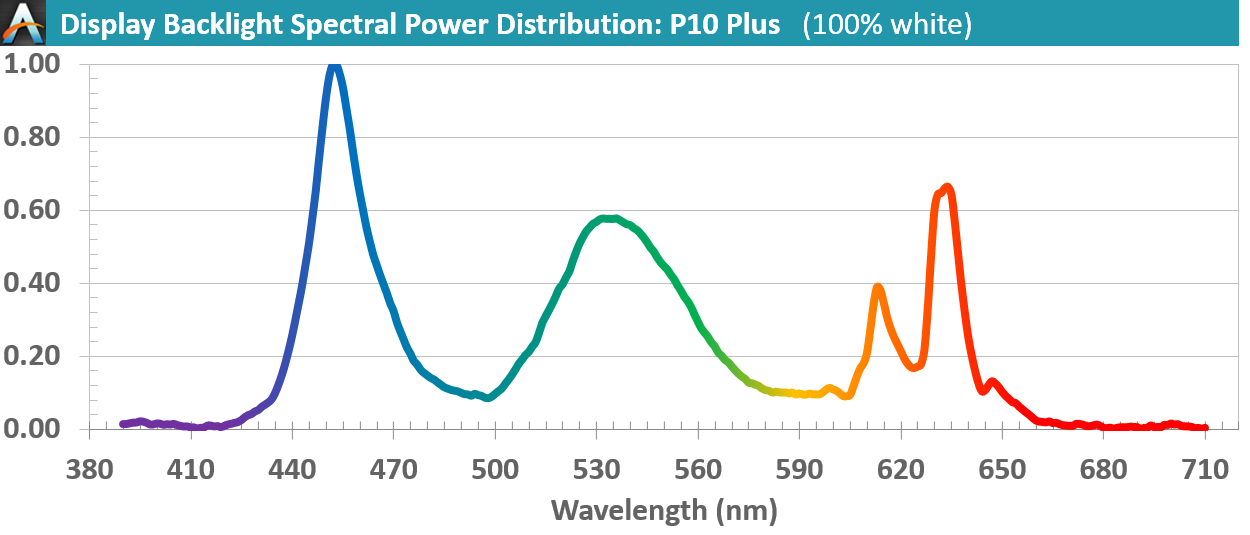
Measuring the spectral power distribution (SPD) of the P10 Plus’ backlight with a spectrometer shows how it and the smaller P10 cover a wider color gamut. Typical sRGB panels use blue LEDs, resulting in a sharp peak around 450nm. These are coated with a yellow photoreactive phosphor that creates smaller, broader peaks in the green and orange portions of the spectrum. The backlights used in the P10s still use blue LEDs, which is evident from the same sharp peak at 450nm, but the sharper peak output in the green and red portions of the spectrum are the result of using red and green phosphors instead of a single yellow phosphor.

Display - GretagMacbeth ColorChecker Accuracy

P10:                        

P10 Plus:                 


SpectraCal CalMAN

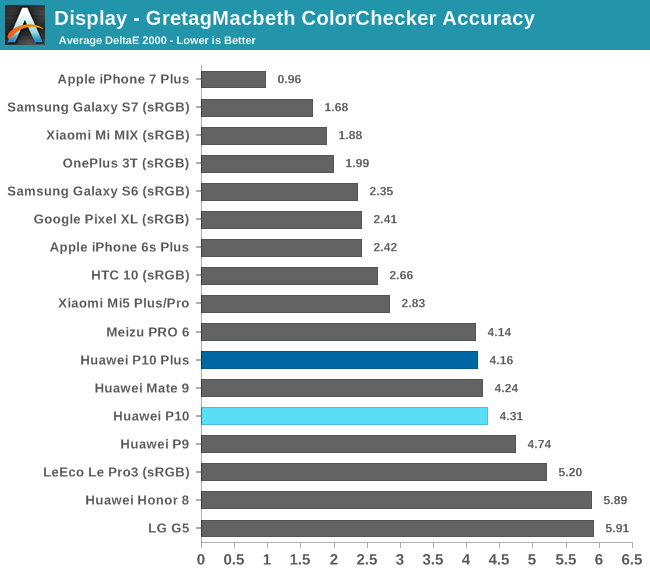
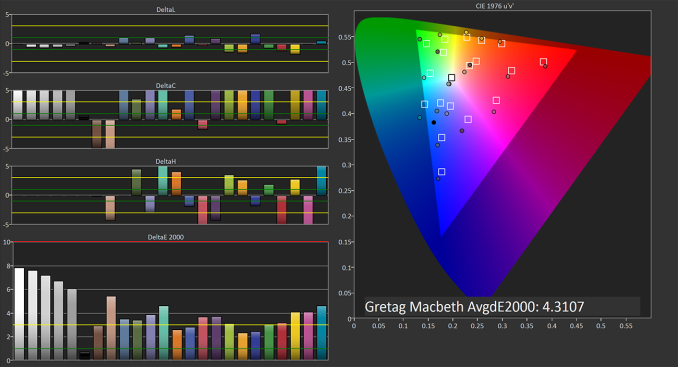
Using the P10’s Default setting provides similar color accuracy to the Mate 9 and is a little better than the P9, both at their Default settings. For the colors tested, ΔE2000 error hovers around the critical threshold of 3, above which color error is easily noticeable. Most of the error results from the wide gamut panel and oversaturated colors, but the cool white point also produces significant hue shift. The Warm and customized settings produce better results by reducing the error from hue shift.

Our P10 and P10 Plus did not show any backlight bleed or issues with luminance uniformity. Viewing angles are also very good, avoiding the noticeable white, red-tinted glow that affects the Mate 9 even at shallow viewing angles. The P10s have some IPS glow, but it’s very minor when viewing the screen normally in portrait or landscape mode, only becoming noticeable when looking across the screen diagonally, which is not something you would normally do. There are not any significant issues when viewing the displays through polarized sunglasses either, with only a very slight reduction in brightness in landscape mode.

Display performance for the P10 and P10 Plus is similar to other recent Huawei phones. The wide gamut panels are bright enough to view outside and produce vibrant, but not particularly accurate, colors. They also share the same overly cool white point, which gives the screens a noticeable blue tint. Using the Warm setting, or adjusting the white point manually, improves both grayscale and color accuracy, but accuracy remains elusive even when using the manual option because of poor calibration. The viewing angle improvements are certainly a step in the right direction, but the P10s cannot match the display quality of other flagship phones.

Display Report: Huawei P10 and P10 Plus

Display Report: Huawei P10 and P10 Plus

Huawei recently added the P10 and P10 Plus to its lineup, which focus on fashion and photography like other P-series phones. The Huawei P10 has a 5.1-inch IPS LCD panel with a typical 1920×1080 resolution (431ppi) and a 16:9 aspect ratio. The P10 Plus, as its name implies, is an upscaled version of the P10, with a larger 5.5-inch IPS LCD panel. It also bumps resolution to 2560×1440 (534ppi), which is not really necessary for an IPS panel at this size. Both panels are covered with Gorilla Glass 5 and come with a plastic screen protector pre-applied. Some people may appreciate the extra protection included out of the box, but the cheap protector does not allow your finger to slide smoothly across the screen and gets gunked up with skin oil very quickly. The glass underneath does not appear to have an oleophobic coating either, which is an odd omission for a flagship phone.

A well-calibrated, quality display would be a nice compliment to the dual rear cameras on both phones, allowing you to view the captured photos accurately. Previous Huawei phones have suffered from poor calibration, however, so we’ll take some measurements to see if there’s any improvement with the new P10s. As always, we use an X-Rite i1Pro 2 spectrophotometer for color measurements and an i1Display Pro colorimeter for luminance measurements, profiling it with SpectraCal’s CalMAN software.

Display - Max Brightness

Both the P10 and P10 Plus exceed 500 nits at peak brightness, a little shy of the 600+ nits a few phones can achieve, including Huawei’s Mate 9, and a little less than last year’s P9. It’s not clear if the P10’s backlight is using 20 LEDs like the P9 or if it has gone back to using 16 LEDs, which is more common for a 5-inch class display.

The values in the chart above were measured by setting the brightness manually. Many phones, especially those with OLED displays, can temporarily boost brightness to increase visibility in extreme cases such as direct sunlight when using the auto-brightness mode. The iPhone 7 and 7 Plus, for example, hit 706 and 618 nits, respectively, and Samsung’s Galaxy S7 hits 532 nits using this boost mode. The P10s do not have this auto-brightness boost feature; however, their peak brightness is still sufficient for outdoor use. At the other extreme, brightness drops all the way down to 2-3 nits at the minimum setting, making the P10s easy to use in a completely dark room.

Display - Black Levels

Display - Contrast Ratio

Black level and contrast ratio are measured at the panel’s maximum brightness. Because black level increases with brightness, the numbers in the chart above are not directly comparable; however, after accounting for this effect, black levels for the iPhone 6s Plus, iPhone 7 Plus, Mi MIX, and both P10s are comparable, so the P10 displays are likely using photo-aligned crystals to improve black level and contrast ratio.

The phones with OLED panels are not shown in these charts because they are able to achieve a black level of zero and a mathematically infinite contrast ratio by being able to completely turn off individual pixels.

Display - White Point

Display - Grayscale Accuracy

P10:                        

P10 Plus:                 


SpectraCal CalMAN

Huawei is notorious for calibrating its displays to an overly cool white point, and the P10s are no exception. With an average white point of about 8,400K when using the “Default” setting, a little higher than both the P9 and Mate 9, the P10s show an obvious blue tint when looking at a white screen. The imbalance between the blue and red primaries leads to poor grayscale accuracy. Average ΔE2000 grayscale error is greater than 6 with peak error reaching 8-10 at higher luminance values.

Like other Huawei phones, the P10s allow you to adjust the white point by selecting predefined “Cold” or “Warm” color temperature modes. You can also set a custom white point target by dragging a finger around a color wheel. The Cold setting shifts the average white point to about 9,000K, giving the screen an even darker blue tint. The Warm setting still shows a deficit in red, giving it an average white point of 7,400K, still well above the D65 target value, shifting the screen’s tint from blue to aqua.


The “Custom” white point setting for both the P10 and P10 Plus

Using the P10’s color wheel, I was able to adjust the RGB balance, giving a small boost to the red primary while pulling green closer to the ideal value. In the “Custom” graphs above, you can see how this reduces grayscale error over the full luminance range. Despite these improvements, I was not able to get average CCT below about 7,600K, so the screen still has a blue tint.

The P10s use adaptive display technology that adjusts both the backlight intensity and gamma based on the content being displayed and the ambient light conditions. This technology aims to reduce power consumption and improve the display’s visibility, especially when using the phone outdoors.

Display - Saturation Accuracy


SpectraCal CalMAN

P10:                            

P10 Plus:                     

Both P10s use wide color gamut displays that nearly cover the entire DCI-P3 color space, only falling short of the blue target value. This leads to oversaturated colors when viewing content that targets the sRGB color space (shown by the inner triangle in the graphs above) because of Android’s lack of color management. The Default and Cold settings exhibit the greatest saturation error, especially for color shades beyond the 50% saturation level. There’s also a significant shift in hue towards blue because of the cool white point. The Warm and custom settings achieve a better RGB balance, significantly reducing both hue shift and saturation error to more acceptable levels, at least out to about the 60% mark. The P10s do not have an sRGB mode, so people that prefer accurate rather than vibrant colors are out of luck.

Measuring the spectral power distribution (SPD) of the P10 Plus’ backlight with a spectrometer shows how it and the smaller P10 cover a wider color gamut. Typical sRGB panels use blue LEDs, resulting in a sharp peak around 450nm. These are coated with a yellow photoreactive phosphor that creates smaller, broader peaks in the green and orange portions of the spectrum. The backlights used in the P10s still use blue LEDs, which is evident from the same sharp peak at 450nm, but the sharper peak output in the green and red portions of the spectrum are the result of using red and green phosphors instead of a single yellow phosphor.

Display - GretagMacbeth ColorChecker Accuracy

P10:                        

P10 Plus:                 


SpectraCal CalMAN

Using the P10’s Default setting provides similar color accuracy to the Mate 9 and is a little better than the P9, both at their Default settings. For the colors tested, ΔE2000 error hovers around the critical threshold of 3, above which color error is easily noticeable. Most of the error results from the wide gamut panel and oversaturated colors, but the cool white point also produces significant hue shift. The Warm and customized settings produce better results by reducing the error from hue shift.

Our P10 and P10 Plus did not show any backlight bleed or issues with luminance uniformity. Viewing angles are also very good, avoiding the noticeable white, red-tinted glow that affects the Mate 9 even at shallow viewing angles. The P10s have some IPS glow, but it’s very minor when viewing the screen normally in portrait or landscape mode, only becoming noticeable when looking across the screen diagonally, which is not something you would normally do. There are not any significant issues when viewing the displays through polarized sunglasses either, with only a very slight reduction in brightness in landscape mode.

Display performance for the P10 and P10 Plus is similar to other recent Huawei phones. The wide gamut panels are bright enough to view outside and produce vibrant, but not particularly accurate, colors. They also share the same overly cool white point, which gives the screens a noticeable blue tint. Using the Warm setting, or adjusting the white point manually, improves both grayscale and color accuracy, but accuracy remains elusive even when using the manual option because of poor calibration. The viewing angle improvements are certainly a step in the right direction, but the P10s cannot match the display quality of other flagship phones.