Vik


Capsule Review: Logitech MK850 Performance Wireless Keyboard and Mouse Combo
Capsule Review: Logitech MK850 Performance Wireless Keyboard and Mouse Combo

We have been reviewing Logitech’s multi-device wireless input peripherals for a few years now. The Logitech K480 was launched in 2014, and the Logitech K780 and M720 keyboard and mouse were launched last year. The K780 and M720 Triathlon were separate products. The success of these input peripherals has prompted Logitech to introduce the MK850 Performance combo – a full-length multi-device wireless keyboard along with the wireless M720 Triathlon mouse. The combo is made more powerful by the DuoLink feature – using the keyboard to alter the functionality of the mouse buttons and gestures.

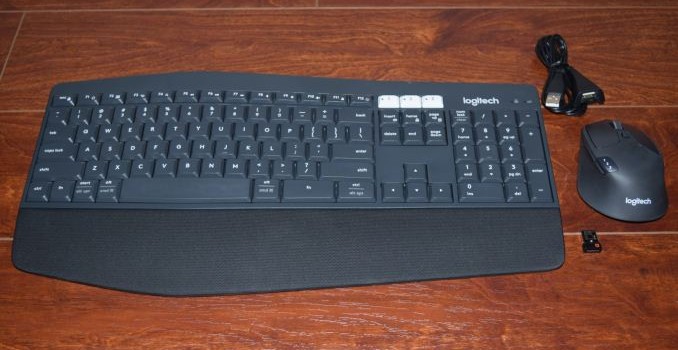
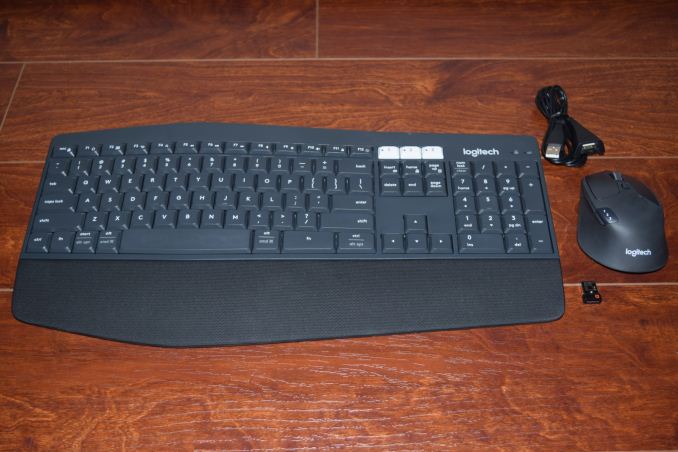
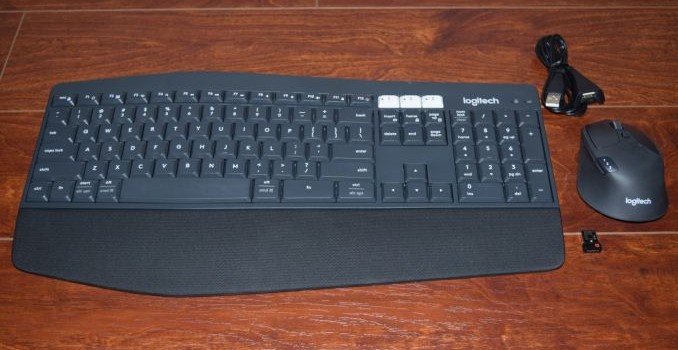
The Logitech MK850 Performance combo comes with a single Unifying USB receiver. Logitech also bundles a USB extender for use-cases where the placement of the spare USB port in the PC might result in spotty wireless performance. The combo can be paired with up to three different host devices and easily switch between them. The hosts can be Android, iOS, Mac or Windows devices, and the keys in the keyboard get automatically re-mapped depending on the host OS. Both the mouse and the keyboard have explicit on/off buttons in order to conserve battery life. The keyboard needs 2xAAA batteries, while the mouse needs a single AA battery. Logitech claims battery life of two years for the mouse and three years for the keyboard.

We had talked about how the K780 keyboard addressed the shortcomings of the K480 keyboard. The keyboard component of the MK850 adds a number of interesting features.

  • Ergonomic contour with a raised profile in the middle, suitable for extended duration usage
  • Full-sized keyboard (101 keys) with explicit number pad and full-sized arrow keys.
  • Cushioned palm rest along the lower side of the keyboard for comfortable extended duration usage
  • Availability of multiple tilt angles for the keyboard (0, 4, or 8 degrees)
  • Better typing experience compared to the K480 and K780
  • Ability to use the Fn key to enhance the combo mouse functionality

Users of the K480 and K780 have appreciated the ability to use the cradle to keep their smartphones in an accessible location while using their computers. The MK850’s keyboard, however, doesn’t have a cradle for mobile devices.

Hardware-wise, the mouse component of the MK850 is the M720 Triathlon (the sticker on the back of the mouse even has the M720 Triathlon label). The mouse is also the component in the package with a compartment to store the Unifying receiver. As part of the MK850 combo, the differences boil down to the DuoLink feature controlled by the Logitech Options software.

The Logitech Options Software

The Unifying receiver bundled with the package is obviously configured to keep both devices active simultaneously. Installing the Logitech Options software presents both devices along with the battery levels and connection method (Unifying receiver or Bluetooth) at a single glance.

The options available for the mouse (standalone) are an exact replica of what we saw in the M720 Triathlon review. Out of the 8 buttons in the mouse, two (the one behind the scrollwheel that controls the rate at which it moves, and the one that switches the host device to which the mouse is paired) can’t be remapped. Everything else can be configured using the Options software.

The left and right buttons can be swapped. The pointer speed can be finely adjusted and the scrollwheel direction can also be swapped. The mouse also has a gesture button below the three raised buttons on the left side. The scrollwheel can be swayed right or left for horizontal scrolling (on mobile devices, that acts similar to swiping right or left on the touchscreen). Along with the device change button, we also have the Forward and Back buttons on the left. The scrollwheel can itself act as a middle mouse button. All of these can be mapped to one of a variety of Windows actions.

Activating the Options software when the K850 Performance keyboard as well as the M720 Triathlon mouse are connected provides users with the ability to configure the DuoLink features. The option panels associated with the mouse have a ‘Default’ and a ‘Fn’ mode, with the latter configuration intended for activation by pressing the Fn key on the keyboard along with the relevant mouse event.

The K850 Performance’s options include the ability to keep the keyboard always in the Windows layout and the option to use the F1-F12 keys as standard function keys (without using the Fn. key qualifier). The configurable keys include the Home button, F1 through F4, F11, and F12. They can be mapped to a variety of Windows functions / programs such as closing windows, Cortana, Calculator etc.

Concluding Remarks

The MK850 Performance wireless keyboard and mouse combo is an important addition to the set of multi-device I/O peripherals from Logitech. They work as advertised, and there is really not much to complain about, except for the lack of a cradle in the keyboard. As mentioned earlier, the K850 Performance keyboard is a huge improvement over the K480 and K780. Evaluation of keyboards and mice targeted towards day-to-day / casual usage is an inherently subjective exercise. In the table below, we compare the specifications of the MK850 Performance combo with some of the other keyboard / mice combos that we have evaluated with a similar approach before. Some subjective scores have also been provided.

Keyboard Bench
Aspect Logitech MK850 Performance Logitech K780 and M720 TriathlonLogitech K830Perixx PERIBOARD-716Logitech TK820Perixx PERIBOARD-706 PLUSLogitech K480Adesso WKB-4000BBLogitech K400IOGEAR GKM561RSIIG JK-WR0412-S1SIIG JK-WR0312-S1Adesso WKB-3000UAdesso WKB-4400UBAdesso WKB-4000UBAdesso WKB-1200Logitech MK850 Performance
Device Type Keyboard + Optical Mouse (2-button with scrollwheel / middle button and gesture support) Keyboard + Optical Mouse (2-button with scrollwheel / middle button and gesture support)
Dimensions (Keyboard) 16.93″ x 8.27″ x 0.98″
(Mouse) 2.91″ x 4.53″ x 1.77″
(Keyboard) 14.96″ x 6.22″ x (0.87″ to 0.32″)
(Mouse) 2.91″ x 4.53″ x 1.77″
Weight (Keyboard) 1.62 lbs / 733 g
(Mouse) 0.3125 lbs / 135 g
(Keyboard) 1.93 lbs / 875 g
(Mouse) 0.3125 lbs / 135 g
Power Source (Keyboard) 2x AAA
(Mouse) 1x AA
(Keyboard) 2x AAA
(Mouse) 1x AA
Communication 2.4 GHz RF and Bluetooth 4.0 2.4 GHz RF and Bluetooth 4.0
Power Saver Explicit On/Off Switches on both Keyboard and Mouse Explicit On/Off Switches on both Keyboard and Mouse
Keys Count 101 (with multiplexed Internet and multimedia hot keys) + 3 (for device switching) 96 (with multiplexed Internet and multimedia hot keys)
Touchpad Dimensions (Diagonal) N/A N/A
USB Receiver Storage Compartment Yes on Mouse Yes on both Keyboard and Mouse
Backlight No No
Keyboard Layout 9.5/10 8/10
Ergonomics (Keyboard) 9.5/10
(Mouse)10/10
(Keyboard) 7/10
(Mouse)10/10
Build Quality (Keyboard) 9/10
(Mouse) 9/10
(Keyboard) 9/10
(Mouse) 9/10
MSRP (USD) $99.99 (Keyboard) $79.99
(Mouse) $69.99
Warranty 1 year 1 year

While it is difficult to find scope for improvement in the M720 Triathlon, the K850 Performance keyboard’s appeal can be enhanced by the addition of a cradle to the design, as well as making the palm rest detachable. As a combo, the whole is more than the sum of parts, thanks to the DuoLink features.

The MK850 Performance combo is priced at $99.99. Given that the M720 Triathlon mouse had a MSRP of $70 at launch, the pricing of the MK850 Performance combo seems pretty reasonable. Logitech has primarily focused on the niche mobile device input peripheral market with their multi-device Bluetooth / wireless models. The design of the K850 Performance keyboard makes it suitable for heavy office use. This will help Logitech address a wider market with the MK850 Performance wireless keyboard and mouse combo.

Capsule Review: Logitech MK850 Performance Wireless Keyboard and Mouse Combo

Capsule Review: Logitech MK850 Performance Wireless Keyboard and Mouse Combo

We have been reviewing Logitech’s multi-device wireless input peripherals for a few years now. The Logitech K480 was launched in 2014, and the Logitech K780 and M720 keyboard and mouse were launched last year. The K780 and M720 Triathlon were separate products. The success of these input peripherals has prompted Logitech to introduce the MK850 Performance combo – a full-length multi-device wireless keyboard along with the wireless M720 Triathlon mouse. The combo is made more powerful by the DuoLink feature – using the keyboard to alter the functionality of the mouse buttons and gestures.

The Logitech MK850 Performance combo comes with a single Unifying USB receiver. Logitech also bundles a USB extender for use-cases where the placement of the spare USB port in the PC might result in spotty wireless performance. The combo can be paired with up to three different host devices and easily switch between them. The hosts can be Android, iOS, Mac or Windows devices, and the keys in the keyboard get automatically re-mapped depending on the host OS. Both the mouse and the keyboard have explicit on/off buttons in order to conserve battery life. The keyboard needs 2xAAA batteries, while the mouse needs a single AA battery. Logitech claims battery life of two years for the mouse and three years for the keyboard.

We had talked about how the K780 keyboard addressed the shortcomings of the K480 keyboard. The keyboard component of the MK850 adds a number of interesting features.

  • Ergonomic contour with a raised profile in the middle, suitable for extended duration usage
  • Full-sized keyboard (101 keys) with explicit number pad and full-sized arrow keys.
  • Cushioned palm rest along the lower side of the keyboard for comfortable extended duration usage
  • Availability of multiple tilt angles for the keyboard (0, 4, or 8 degrees)
  • Better typing experience compared to the K480 and K780
  • Ability to use the Fn key to enhance the combo mouse functionality

Users of the K480 and K780 have appreciated the ability to use the cradle to keep their smartphones in an accessible location while using their computers. The MK850’s keyboard, however, doesn’t have a cradle for mobile devices.

Hardware-wise, the mouse component of the MK850 is the M720 Triathlon (the sticker on the back of the mouse even has the M720 Triathlon label). The mouse is also the component in the package with a compartment to store the Unifying receiver. As part of the MK850 combo, the differences boil down to the DuoLink feature controlled by the Logitech Options software.

The Logitech Options Software

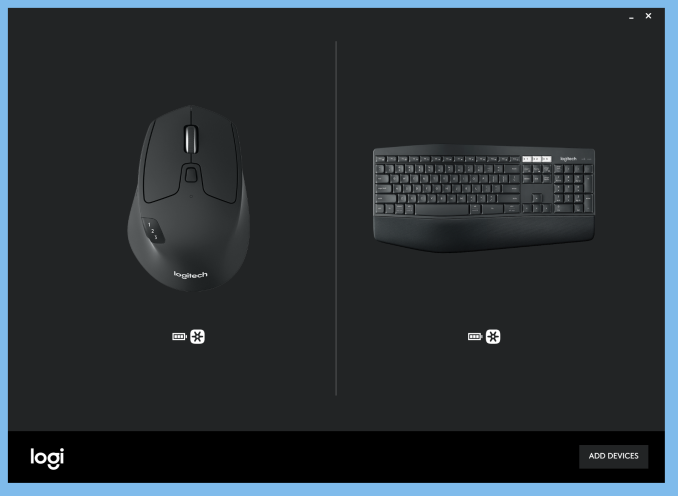
The Unifying receiver bundled with the package is obviously configured to keep both devices active simultaneously. Installing the Logitech Options software presents both devices along with the battery levels and connection method (Unifying receiver or Bluetooth) at a single glance.
The options available for the mouse (standalone) are an exact replica of what we saw in the M720 Triathlon review. Out of the 8 buttons in the mouse, two (the one behind the scrollwheel that controls the rate at which it moves, and the one that switches the host device to which the mouse is paired) can’t be remapped. Everything else can be configured using the Options software.

The left and right buttons can be swapped. The pointer speed can be finely adjusted and the scrollwheel direction can also be swapped. The mouse also has a gesture button below the three raised buttons on the left side. The scrollwheel can be swayed right or left for horizontal scrolling (on mobile devices, that acts similar to swiping right or left on the touchscreen). Along with the device change button, we also have the Forward and Back buttons on the left. The scrollwheel can itself act as a middle mouse button. All of these can be mapped to one of a variety of Windows actions.
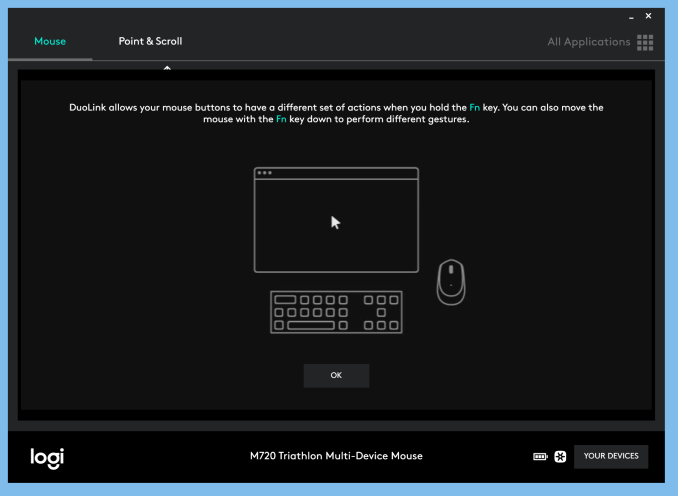
Activating the Options software when the K850 Performance keyboard as well as the M720 Triathlon mouse are connected provides users with the ability to configure the DuoLink features. The option panels associated with the mouse have a ‘Default’ and a ‘Fn’ mode, with the latter configuration intended for activation by pressing the Fn key on the keyboard along with the relevant mouse event.

The K850 Performance’s options include the ability to keep the keyboard always in the Windows layout and the option to use the F1-F12 keys as standard function keys (without using the Fn. key qualifier). The configurable keys include the Home button, F1 through F4, F11, and F12. They can be mapped to a variety of Windows functions / programs such as closing windows, Cortana, Calculator etc.

Concluding Remarks

The MK850 Performance wireless keyboard and mouse combo is an important addition to the set of multi-device I/O peripherals from Logitech. They work as advertised, and there is really not much to complain about, except for the lack of a cradle in the keyboard. As mentioned earlier, the K850 Performance keyboard is a huge improvement over the K480 and K780. Evaluation of keyboards and mice targeted towards day-to-day / casual usage is an inherently subjective exercise. In the table below, we compare the specifications of the MK850 Performance combo with some of the other keyboard / mice combos that we have evaluated with a similar approach before. Some subjective scores have also been provided.

Keyboard Bench
Aspect Logitech MK850 Performance Logitech K780 and M720 TriathlonLogitech K830Perixx PERIBOARD-716Logitech TK820Perixx PERIBOARD-706 PLUSLogitech K480Adesso WKB-4000BBLogitech K400IOGEAR GKM561RSIIG JK-WR0412-S1SIIG JK-WR0312-S1Adesso WKB-3000UAdesso WKB-4400UBAdesso WKB-4000UBAdesso WKB-1200Logitech MK850 Performance
Device Type Keyboard + Optical Mouse (2-button with scrollwheel / middle button and gesture support) Keyboard + Optical Mouse (2-button with scrollwheel / middle button and gesture support)
Dimensions (Keyboard) 16.93″ x 8.27″ x 0.98″
(Mouse) 2.91″ x 4.53″ x 1.77″
(Keyboard) 14.96″ x 6.22″ x (0.87″ to 0.32″)
(Mouse) 2.91″ x 4.53″ x 1.77″
Weight (Keyboard) 1.62 lbs / 733 g
(Mouse) 0.3125 lbs / 135 g
(Keyboard) 1.93 lbs / 875 g
(Mouse) 0.3125 lbs / 135 g
Power Source (Keyboard) 2x AAA
(Mouse) 1x AA
(Keyboard) 2x AAA
(Mouse) 1x AA
Communication 2.4 GHz RF and Bluetooth 4.0 2.4 GHz RF and Bluetooth 4.0
Power Saver Explicit On/Off Switches on both Keyboard and Mouse Explicit On/Off Switches on both Keyboard and Mouse
Keys Count 101 (with multiplexed Internet and multimedia hot keys) + 3 (for device switching) 96 (with multiplexed Internet and multimedia hot keys)
Touchpad Dimensions (Diagonal) N/A N/A
USB Receiver Storage Compartment Yes on Mouse Yes on both Keyboard and Mouse
Backlight No No
Keyboard Layout 9.5/10 8/10
Ergonomics (Keyboard) 9.5/10
(Mouse)10/10
(Keyboard) 7/10
(Mouse)10/10
Build Quality (Keyboard) 9/10
(Mouse) 9/10
(Keyboard) 9/10
(Mouse) 9/10
MSRP (USD) $99.99 (Keyboard) $79.99
(Mouse) $69.99
Warranty 1 year 1 year

While it is difficult to find scope for improvement in the M720 Triathlon, the K850 Performance keyboard’s appeal can be enhanced by the addition of a cradle to the design, as well as making the palm rest detachable. As a combo, the whole is more than the sum of parts, thanks to the DuoLink features.

The MK850 Performance combo is priced at $99.99. Given that the M720 Triathlon mouse had a MSRP of $70 at launch, the pricing of the MK850 Performance combo seems pretty reasonable. Logitech has primarily focused on the niche mobile device input peripheral market with their multi-device Bluetooth / wireless models. The design of the K850 Performance keyboard makes it suitable for heavy office use. This will help Logitech address a wider market with the MK850 Performance wireless keyboard and mouse combo.

Apple Announces 2017 iPad 9.7-Inch: Entry Level iPad now at $329

Apple Announces 2017 iPad 9.7-Inch: Entry Level iPad now at $329

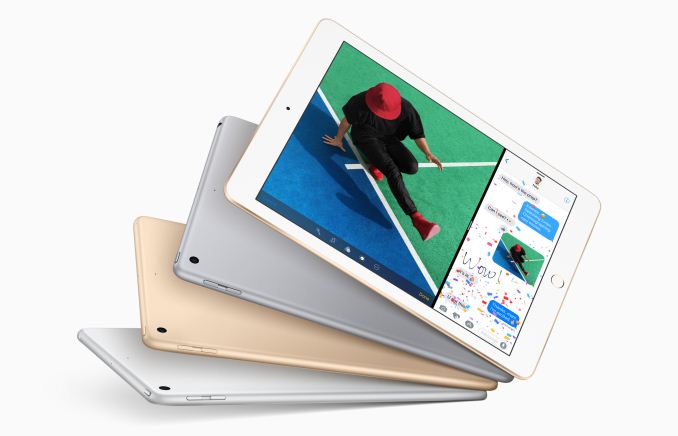
With the spring finally upon us, Apple this morning is going about some spring cleaning of the iPad family. The iPad Air 2 and the iPad Mini 2 have been discontinued, making way for a new entry-level iPad: the simply named iPad 9.7-Inch. This latest iPad is a bit of an unusual twist on the usual Apple fare; it’s not really a successor to the iPad Air 2, and from a features perspective it’s essentially a kitbash of a few different Apple products. None the less, at $329 it’s also the lowest Apple has ever priced a 9.7” iPad, as retailer sales aside, Apple hasn’t offered this size below $399 before. As a result the new 9.7” iPad is likely to make an impact, even in the softening market for tablets.

Apple 9.7-Inch iPad Family


Apple iPad 9.7″ (2017) Apple iPad Air 2
(Discontinued)
Apple iPad Pro 9.7″
SoC Apple A9
2 x Apple Twister @ 1.85GHz?
Apple A8X
3 x Apple Typhoon @ 1.5GHz
Apple A9X
2 x Apple Twister @ ~2.2GHz
GPU PowerVR GT7600 PowerVR 8 Cluster Series6XT PowerVR 12 Cluster Series7XT
RAM 2GB LPDDR4? 2GB LPDDR3 2GB LPDDR4
NAND 32 / 128 GB 16 / 64 / 128 GB WiFi: 32 / 128 / 256 GB
WiFi + Cellular:
32 / 128 / 256 GB
Display 9.7″ 2048×1536 IPS LCD
Gamut sRGB DCI-P3
Size and Mass 240 x 169.5 x 7.5mm
469g WiFi, 478g LTE
240 x 169.5 x 6.1mm
437g WiFi, 444g LTE
Camera 8MP Rear-facing
f/2.4, 1.1 micron
12MP Rear-facing
f/2.2, 1.22 micron
1.2MP Front-facing f/2.2 5MP Front-facing f/2.2
Battery 32.4 Wh 27.3 Wh 27.5 Wh
Launch OS iOS 10 iOS 8 iOS 9
Cellular Category 4 LTE + GPS/GNSS in Cellular SKU
Other Connectivity 2×2 802.11a/b/g/n/ac + BT 4.2, Apple Lightning, Headphone Jack 2×2 802.11a/b/g/n/ac + BT 4.2, Apple Lightning, Headphone Jack,
Smart Connector on iPad Pro
SIM Optional NanoSIM
Launch Price 32GB: $329
128GB: $429

16GB: $499

32 GB: $599
128 GB: $749
256 GB: $899

From a high-level perspective, the iPad 9.7” (2017) is an interesting kitbash between the iPhone 6s, the iPad Air 2, and the iPad Air 1. It’s obvious that Apple was aiming to make a more budget-friendly iPad from the start, so you won’t find any new, cutting edge technology in here. Rather everything is essentially cobbled together from the aforementioned Apple products. This, consequently, is also why the 2017 iPad is not a true successor to the iPad Air 2, as it makes some necessary compromises to hit the $329 price tag.

The shell itself is taken from the iPad Air 1, offering the same dimensions and weight as Apple’s 2013 flagship tablet. This means that at 7.5mm, the new iPad is actually thicker than the iPad Air 2 by 1.4mm (~23%), though as we’ll see, Apple appears to be putting some of the additional volume to good use. Apple also seems to have lifted the display assembly from the iPad Air 1; while all of the modern Retina 9.7” iPads have offered a 2048×1536 IPS display, this one in particular lacks the fully laminated display that was introduced in the iPad Air 2 and is part of the reason that the aforementioned tablet was made thinner.

Meanwhile inside the tablet itself, Apple has lifted the bulk of the guts from the iPhone 6s. At the heart of the new iPad is an Apple A9 SoC, which incorporates a pair of Apple’s “Cyclone” CPU cores and a 6 cluster PowerVR Series7XT GPU. Based on Apple’s performance estimates, it looks like this is clocked at or very near the 1.85GHz clockspeed of the iPhone 6s, so burst performance should be very close to the iPhone’s. Meanwhile Apple hasn’t confirmed the memory capacity, but since the A9 is a PoP design (and all other 9.7” iPads have 2GB of RAM), 2GB is almost certain for the new iPad as well.

Finally, from the iPad Air 2 comes the tablet’s camera modules. The rear camera is an 8 Megapixel f/2.4 camera that we’ve seen in the iPad Air 2 and a number of other Apple tablets, while the front camera is Apple’s similarly common 1.2MP f/2.2 camera. Apple doesn’t publish the exact sensor configuration, but I would be surprised if this wasn’t lifted wholesale from Apple’s existing camera module stockpile.

Getting back to size for a moment, the 2017 iPad 9.7” will also have the highest capacity battery of a 9.7” iPad in the last few years. Along with the iPad Air 1 shell, Apple has also brought back that tablet’s 32.4 Watt-hour battery, giving it a 19% battery capacity boost over the iPad Air 2. Coupled with the use of a smartphone SoC, and I’m very curious to see what real-world battery life is at. While Apple officially advertises the iPad as having the same 10 hour (Wi-Fi) battery life as the other iPads, there’s definitely some room to pick up another hour or two of runtime. Though ultimately it’s going to be the display that’s the deciding factor, as it’s already the biggest power consumer on an iPad.

Apple will be offering the 2017 iPad 9.7” in two capacities, 32GB and 128GB, with the latter capacity carrying a $100 premium. Somewhat surprisingly, the company is also offering a version of the tablet with a cellular modem despite the budget-focused nature of the tablet. Unfortunately Apple is still charging a $130 premium for this functionality, which feels especially steep given the tablet’s low base price.

Finally, Apple will begin taking pre-orders for the tablet this Friday the 24th. The tablet is set to ship to next week to both pre-order customers and retail stores.

Overall it will be interesting to see how Apple’s new entry-level iPad does in the market. The company’s tablet business continues to chug along, but sales as well off from their heyday as tablet replacement cycles are closer to laptops than phones. At the same time the iPad 2 was one of Apple’s most popular tablets due to its relatively low price for its size, so Apple may be looking to recapture some of that energy. Though it’s interesting to note that in this process, Apple has actually increased the price of an entry-level iPad some; whereas the discontinued iPad Mini 2 was $269, the new iPad bumps that up by $70.

Speaking of which, the new iPad does put the remaining iPad Mini 4 configurations in a bit of an odd spot. The tiniest tablet actually did get an update of its own: the $399 32GB model was discontinued, and the sole 128GB model has been dropped to $399 in its place. Despite the price shuffle though, it is an older design and remains the only iPad not using an A9-generation processor. While Apple’s spring cleaning makes it clear which tablet Apple wants to be their entry-level iPad, the Mini remains as the odd man out in this new lineup.

Apple Announces 2017 iPad 9.7-Inch: Entry Level iPad now at $329

Apple Announces 2017 iPad 9.7-Inch: Entry Level iPad now at $329

With the spring finally upon us, Apple this morning is going about some spring cleaning of the iPad family. The iPad Air 2 and the iPad Mini 2 have been discontinued, making way for a new entry-level iPad: the simply named iPad 9.7-Inch. This latest iPad is a bit of an unusual twist on the usual Apple fare; it’s not really a successor to the iPad Air 2, and from a features perspective it’s essentially a kitbash of a few different Apple products. None the less, at $329 it’s also the lowest Apple has ever priced a 9.7” iPad, as retailer sales aside, Apple hasn’t offered this size below $399 before. As a result the new 9.7” iPad is likely to make an impact, even in the softening market for tablets.

Apple 9.7-Inch iPad Family


Apple iPad 9.7″ (2017) Apple iPad Air 2
(Discontinued)
Apple iPad Pro 9.7″
SoC Apple A9
2 x Apple Twister @ 1.85GHz?
Apple A8X
3 x Apple Typhoon @ 1.5GHz
Apple A9X
2 x Apple Twister @ ~2.2GHz
GPU PowerVR GT7600 PowerVR 8 Cluster Series6XT PowerVR 12 Cluster Series7XT
RAM 2GB LPDDR4? 2GB LPDDR3 2GB LPDDR4
NAND 32 / 128 GB 16 / 64 / 128 GB WiFi: 32 / 128 / 256 GB
WiFi + Cellular:
32 / 128 / 256 GB
Display 9.7″ 2048×1536 IPS LCD
Gamut sRGB DCI-P3
Size and Mass 240 x 169.5 x 7.5mm
469g WiFi, 478g LTE
240 x 169.5 x 6.1mm
437g WiFi, 444g LTE
Camera 8MP Rear-facing
f/2.4, 1.1 micron
12MP Rear-facing
f/2.2, 1.22 micron
1.2MP Front-facing f/2.2 5MP Front-facing f/2.2
Battery 32.4 Wh 27.3 Wh 27.5 Wh
Launch OS iOS 10 iOS 8 iOS 9
Cellular Category 4 LTE + GPS/GNSS in Cellular SKU
Other Connectivity 2×2 802.11a/b/g/n/ac + BT 4.2, Apple Lightning, Headphone Jack 2×2 802.11a/b/g/n/ac + BT 4.2, Apple Lightning, Headphone Jack,
Smart Connector on iPad Pro
SIM Optional NanoSIM
Launch Price 32GB: $329
128GB: $429

16GB: $499

32 GB: $599
128 GB: $749
256 GB: $899

From a high-level perspective, the iPad 9.7” (2017) is an interesting kitbash between the iPhone 6s, the iPad Air 2, and the iPad Air 1. It’s obvious that Apple was aiming to make a more budget-friendly iPad from the start, so you won’t find any new, cutting edge technology in here. Rather everything is essentially cobbled together from the aforementioned Apple products. This, consequently, is also why the 2017 iPad is not a true successor to the iPad Air 2, as it makes some necessary compromises to hit the $329 price tag.

The shell itself is taken from the iPad Air 1, offering the same dimensions and weight as Apple’s 2013 flagship tablet. This means that at 7.5mm, the new iPad is actually thicker than the iPad Air 2 by 1.4mm (~23%), though as we’ll see, Apple appears to be putting some of the additional volume to good use. Apple also seems to have lifted the display assembly from the iPad Air 1; while all of the modern Retina 9.7” iPads have offered a 2048×1536 IPS display, this one in particular lacks the fully laminated display that was introduced in the iPad Air 2 and is part of the reason that the aforementioned tablet was made thinner.

Meanwhile inside the tablet itself, Apple has lifted the bulk of the guts from the iPhone 6s. At the heart of the new iPad is an Apple A9 SoC, which incorporates a pair of Apple’s “Cyclone” CPU cores and a 6 cluster PowerVR Series7XT GPU. Based on Apple’s performance estimates, it looks like this is clocked at or very near the 1.85GHz clockspeed of the iPhone 6s, so burst performance should be very close to the iPhone’s. Meanwhile Apple hasn’t confirmed the memory capacity, but since the A9 is a PoP design (and all other 9.7” iPads have 2GB of RAM), 2GB is almost certain for the new iPad as well.

Finally, from the iPad Air 2 comes the tablet’s camera modules. The rear camera is an 8 Megapixel f/2.4 camera that we’ve seen in the iPad Air 2 and a number of other Apple tablets, while the front camera is Apple’s similarly common 1.2MP f/2.2 camera. Apple doesn’t publish the exact sensor configuration, but I would be surprised if this wasn’t lifted wholesale from Apple’s existing camera module stockpile.

Getting back to size for a moment, the 2017 iPad 9.7” will also have the highest capacity battery of a 9.7” iPad in the last few years. Along with the iPad Air 1 shell, Apple has also brought back that tablet’s 32.4 Watt-hour battery, giving it a 19% battery capacity boost over the iPad Air 2. Coupled with the use of a smartphone SoC, and I’m very curious to see what real-world battery life is at. While Apple officially advertises the iPad as having the same 10 hour (Wi-Fi) battery life as the other iPads, there’s definitely some room to pick up another hour or two of runtime. Though ultimately it’s going to be the display that’s the deciding factor, as it’s already the biggest power consumer on an iPad.

Apple will be offering the 2017 iPad 9.7” in two capacities, 32GB and 128GB, with the latter capacity carrying a $100 premium. Somewhat surprisingly, the company is also offering a version of the tablet with a cellular modem despite the budget-focused nature of the tablet. Unfortunately Apple is still charging a $130 premium for this functionality, which feels especially steep given the tablet’s low base price.

Finally, Apple will begin taking pre-orders for the tablet this Friday the 24th. The tablet is set to ship to next week to both pre-order customers and retail stores.

Overall it will be interesting to see how Apple’s new entry-level iPad does in the market. The company’s tablet business continues to chug along, but sales as well off from their heyday as tablet replacement cycles are closer to laptops than phones. At the same time the iPad 2 was one of Apple’s most popular tablets due to its relatively low price for its size, so Apple may be looking to recapture some of that energy. Though it’s interesting to note that in this process, Apple has actually increased the price of an entry-level iPad some; whereas the discontinued iPad Mini 2 was $269, the new iPad bumps that up by $70.

Speaking of which, the new iPad does put the remaining iPad Mini 4 configurations in a bit of an odd spot. The tiniest tablet actually did get an update of its own: the $399 32GB model was discontinued, and the sole 128GB model has been dropped to $399 in its place. Despite the price shuffle though, it is an older design and remains the only iPad not using an A9-generation processor. While Apple’s spring cleaning makes it clear which tablet Apple wants to be their entry-level iPad, the Mini remains as the odd man out in this new lineup.

Apple Announces 2017 iPad 9.7-Inch: Entry Level iPad now at $329

Apple Announces 2017 iPad 9.7-Inch: Entry Level iPad now at $329

With the spring finally upon us, Apple this morning is going about some spring cleaning of the iPad family. The iPad Air 2 and the iPad Mini 2 have been discontinued, making way for a new entry-level iPad: the simply named iPad 9.7-Inch. This latest iPad is a bit of an unusual twist on the usual Apple fare; it’s not really a successor to the iPad Air 2, and from a features perspective it’s essentially a kitbash of a few different Apple products. None the less, at $329 it’s also the lowest Apple has ever priced a 9.7” iPad, as retailer sales aside, Apple hasn’t offered this size below $399 before. As a result the new 9.7” iPad is likely to make an impact, even in the softening market for tablets.

Apple 9.7-Inch iPad Family


Apple iPad 9.7″ (2017) Apple iPad Air 2
(Discontinued)
Apple iPad Pro 9.7″
SoC Apple A9
2 x Apple Twister @ 1.85GHz?
Apple A8X
3 x Apple Typhoon @ 1.5GHz
Apple A9X
2 x Apple Twister @ ~2.2GHz
GPU PowerVR GT7600 PowerVR 8 Cluster Series6XT PowerVR 12 Cluster Series7XT
RAM 2GB LPDDR4? 2GB LPDDR3 2GB LPDDR4
NAND 32 / 128 GB 16 / 64 / 128 GB WiFi: 32 / 128 / 256 GB
WiFi + Cellular:
32 / 128 / 256 GB
Display 9.7″ 2048×1536 IPS LCD
Gamut sRGB DCI-P3
Size and Mass 240 x 169.5 x 7.5mm
469g WiFi, 478g LTE
240 x 169.5 x 6.1mm
437g WiFi, 444g LTE
Camera 8MP Rear-facing
f/2.4, 1.1 micron
12MP Rear-facing
f/2.2, 1.22 micron
1.2MP Front-facing f/2.2 5MP Front-facing f/2.2
Battery 32.4 Wh 27.3 Wh 27.5 Wh
Launch OS iOS 10 iOS 8 iOS 9
Cellular Category 4 LTE + GPS/GNSS in Cellular SKU
Other Connectivity 2×2 802.11a/b/g/n/ac + BT 4.2, Apple Lightning, Headphone Jack 2×2 802.11a/b/g/n/ac + BT 4.2, Apple Lightning, Headphone Jack,
Smart Connector on iPad Pro
SIM Optional NanoSIM
Launch Price 32GB: $329
128GB: $429

16GB: $499

32 GB: $599
128 GB: $749
256 GB: $899

From a high-level perspective, the iPad 9.7” (2017) is an interesting kitbash between the iPhone 6s, the iPad Air 2, and the iPad Air 1. It’s obvious that Apple was aiming to make a more budget-friendly iPad from the start, so you won’t find any new, cutting edge technology in here. Rather everything is essentially cobbled together from the aforementioned Apple products. This, consequently, is also why the 2017 iPad is not a true successor to the iPad Air 2, as it makes some necessary compromises to hit the $329 price tag.

The shell itself is taken from the iPad Air 1, offering the same dimensions and weight as Apple’s 2013 flagship tablet. This means that at 7.5mm, the new iPad is actually thicker than the iPad Air 2 by 1.4mm (~23%), though as we’ll see, Apple appears to be putting some of the additional volume to good use. Apple also seems to have lifted the display assembly from the iPad Air 1; while all of the modern Retina 9.7” iPads have offered a 2048×1536 IPS display, this one in particular lacks the fully laminated display that was introduced in the iPad Air 2 and is part of the reason that the aforementioned tablet was made thinner.

Meanwhile inside the tablet itself, Apple has lifted the bulk of the guts from the iPhone 6s. At the heart of the new iPad is an Apple A9 SoC, which incorporates a pair of Apple’s “Cyclone” CPU cores and a 6 cluster PowerVR Series7XT GPU. Based on Apple’s performance estimates, it looks like this is clocked at or very near the 1.85GHz clockspeed of the iPhone 6s, so burst performance should be very close to the iPhone’s. Meanwhile Apple hasn’t confirmed the memory capacity, but since the A9 is a PoP design (and all other 9.7” iPads have 2GB of RAM), 2GB is almost certain for the new iPad as well.

Finally, from the iPad Air 2 comes the tablet’s camera modules. The rear camera is an 8 Megapixel f/2.4 camera that we’ve seen in the iPad Air 2 and a number of other Apple tablets, while the front camera is Apple’s similarly common 1.2MP f/2.2 camera. Apple doesn’t publish the exact sensor configuration, but I would be surprised if this wasn’t lifted wholesale from Apple’s existing camera module stockpile.

Getting back to size for a moment, the 2017 iPad 9.7” will also have the highest capacity battery of a 9.7” iPad in the last few years. Along with the iPad Air 1 shell, Apple has also brought back that tablet’s 32.4 Watt-hour battery, giving it a 19% battery capacity boost over the iPad Air 2. Coupled with the use of a smartphone SoC, and I’m very curious to see what real-world battery life is at. While Apple officially advertises the iPad as having the same 10 hour (Wi-Fi) battery life as the other iPads, there’s definitely some room to pick up another hour or two of runtime. Though ultimately it’s going to be the display that’s the deciding factor, as it’s already the biggest power consumer on an iPad.

Apple will be offering the 2017 iPad 9.7” in two capacities, 32GB and 128GB, with the latter capacity carrying a $100 premium. Somewhat surprisingly, the company is also offering a version of the tablet with a cellular modem despite the budget-focused nature of the tablet. Unfortunately Apple is still charging a $130 premium for this functionality, which feels especially steep given the tablet’s low base price.

Finally, Apple will begin taking pre-orders for the tablet this Friday the 24th. The tablet is set to ship to next week to both pre-order customers and retail stores.

Overall it will be interesting to see how Apple’s new entry-level iPad does in the market. The company’s tablet business continues to chug along, but sales as well off from their heyday as tablet replacement cycles are closer to laptops than phones. At the same time the iPad 2 was one of Apple’s most popular tablets due to its relatively low price for its size, so Apple may be looking to recapture some of that energy. Though it’s interesting to note that in this process, Apple has actually increased the price of an entry-level iPad some; whereas the discontinued iPad Mini 2 was $269, the new iPad bumps that up by $70.

Speaking of which, the new iPad does put the remaining iPad Mini 4 configurations in a bit of an odd spot. The tiniest tablet actually did get an update of its own: the $399 32GB model was discontinued, and the sole 128GB model has been dropped to $399 in its place. Despite the price shuffle though, it is an older design and remains the only iPad not using an A9-generation processor. While Apple’s spring cleaning makes it clear which tablet Apple wants to be their entry-level iPad, the Mini remains as the odd man out in this new lineup.