Vik


ZOTAC Launches GeForce GTX 1070 Mini for Mini-ITX PCs
ZOTAC Launches GeForce GTX 1070 Mini for Mini-ITX PCs

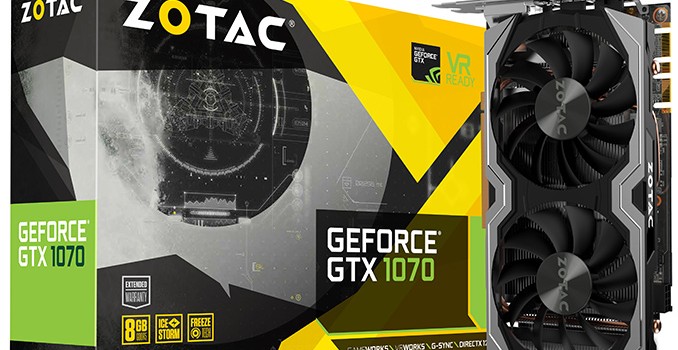
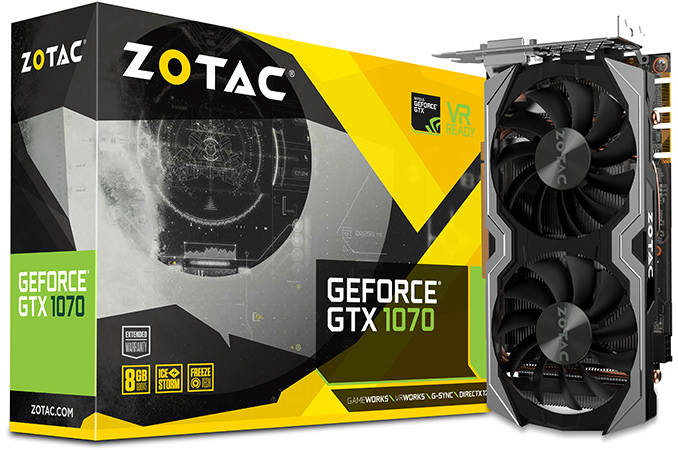
ZOTAC has added a small form-factor video card based on NVIDIA’s GeForce GTX 1070 GPU to its lineup of products. The graphics adapter is designed for Mini-ITX PCs and will be the second product of such kind on the market after GIGABYTE’s GeForce GTX 1070 Mini-ITX released earlier this year.

From performance and connectivity point of view, ZOTAC’s GeForce GTX 1070 Mini (ZT-P10700G-10M) card resembles larger designs by other companies: the GP104 GPU (with 1920 stream processors, 120 texture units and 64 raster operations pipes) operates at 1518/1708 MHz (base/boost), 8 GB of GDDR5 memory function at 8 Gbps data rate and deliver 256 GB/s of bandwidth. Meanwhile the card is equipped with three DisplayPort 1.4 connectors, an HDMI 2.0b port as well as one dual-link DVI port, which is exactly what NVIDIA’s reference cards offer.

Despite the small size, the ZOTAC GeForce GTX 1070 Mini is equipped with a rather sophisticated cooling system (not exactly surprising because we are talking about a 150 W TDP here) featuring a copper base, two thick heat pipes, a relatively large aluminum radiator with thin fins as well as two 90-mm fans. The cooling system requires more space than coolers on other Mini-ITX graphics cards, but most of such builds have some extra space inside. The card requires one 8-pin auxiliary PCIe power connector to function, just like all the other GeForce GTX 1070 graphics adapters around.

ZOTAC does not disclose a lot of details regarding its Mini-ITX graphics cards and things like VRM design of the board remain unknown. NVIDIA’s reference GeForce GTX 1070 comes with a 4+1 phase VRM, but GIGABYTE’s GeForce GTX 1070 Mini-ITX actually has a 5+1 phase VRM design (more VRMs has various positive and negative effects and doesn’t specify the quality of such components in a number alone).

GeForce GTX 1070 for Mini-ITX PCs Specification Comparison
  ZOTAC GeForce GTX 1070 Mini GIGABYTE GeForce GTX 1070 Mini ITX OC (OC Mode) GIGABYTE GeForce GTX 1070 Mini ITX (Gaming Mode) GTX 1070
Founders Edition
Core Clock 1518 MHz 1556 MHz 1531 MHz 1506 MHz
Boost Clock 1708 MHz 1746 MHz 1721 MHz 1683 MHz
Memory Clock 8 Gbps GDDR5
VRAM 8GB
TDP 150 W
Launch Date December 2016 July 2016 6/10/2016
Launch Price $395 ? $449

When it comes to price, the ZOTAC GeForce GTX 1070 Mini costs $395 at Amazon and Newegg, which is a bit more expensive than NVIDIA’s reference GTX 1070 graphics adapters, but is still more affordable than the GTX 1070 Founders Edition.

Related Reading:

G.Skill Announces Trident Z RGB Illumination to DDR4

G.Skill Announces Trident Z RGB Illumination to DDR4

G.Skill this week has announced a new addition to its Trident Z family of high-performance DDR4 memory modules aimed at modders. The new Trident Z RGB will feature software-controllable RGB LEDs on top of the modules. The DIMMs will require no additio…

G.Skill Announces Trident Z RGB Illumination to DDR4

G.Skill Announces Trident Z RGB Illumination to DDR4

G.Skill this week has announced a new addition to its Trident Z family of high-performance DDR4 memory modules aimed at modders. The new Trident Z RGB will feature software-controllable RGB LEDs on top of the modules. The DIMMs will require no additio…

AMD Releases Radeon Software Crimson ReLive Edition 16.12.2 Update

AMD Releases Radeon Software Crimson ReLive Edition 16.12.2 Update

We are not even two weeks out from the release of AMD’s Radeon Software Crimson ReLive Edition and we have been given an update. The 16.12.2 update brings the driver version to 16.50.2001, and there is no game specific support bundled in with this update. Though we do have a hefty list of fixes, most of which apply directly to ReLive features.

First up we have a fix in for a specific bug. When using AMD FreeSync technology with a borderless fullscreen application, and playing dynamic content such as a video or another application, performance issues were possible. AMD also notes in the known issues that a small number of apps may still experience this issue. I say it’s at least safe to say they are working on the issue.

Most of the remaining fixes fall cleanly under ReLive related issues and problems. Radeon ReLive may have failed to install on some system configurations. Instant Replay may have failed to enable itself after being turned off due to content protection conflicts. There are also some fixed translations errors for both Radeon Settings and Radeon ReLive. Audio recorded by Radeon ReLive may have sometimes played back in slow motion. Radeon ReLive also may have had issues recording or issues toggling the Overlay/Toolbar when Frame Rate Target Control (FRTC) is enabled, if issues remain the workaround noted is to disable FRTC while using Radeon ReLive. Additionally, mouse cursor movement may stutter in recorded video when there is little movement other than the cursor itself. In AMD Multi GPU configurations the second GPU was exiting the low power state while Radeon ReLive was enabled. There were also problems taking screenshots of secondary displays with Radeon ReLive.

In an oddly specific outline for a bug, DOTA 2 may have experienced game corruption while task switching while recording with Radeon ReLive in AMD Multi GPU configurations. Slightly less specific to that other MOBA, Radeon ReLive’s Overlay will not launch or record when running League of Legends in administrator mode and borderless fullscreen.

Moving back to other issues outside of ReLive, Radeon Settings was not loading upon system boot. There was also flashing and graphics corruption found when running Battlefield 1 with Multi GPU on the RX400 series cards. Chromium may have failed to use hybrid decode for VP9 content, and though I’m not sure how this ties to a GPU drivers there appears to be a fix for long ping times with some Wi-Fi adapters.

I also find it interesting that in the release notes under known issues we have ReLive issues separated out into another list. I don’t know whether this is a sign of diligence, showing that they are tracking and staying on top of many issues, or if someone decided that the list of issues was getting too big and needed to be split. Either way, AMD is obviously continuing their trend to update often and provide a decent to sizable number of fixes with every update. Last year felt like a sharp increase in the effort put into these updates and there is still no sign of them slowing down. There are no game specific optimizations in this update. I assume they were all hands on deck, to keep up with all issues uncovered after the big update two weeks ago.

As always, those interested in reading more or installing the updated hotfix drivers for AMD’s desktop, mobile, and integrated GPUs can find them either under the driver update section in Radeon Settings or on AMDs Radeon Software Crimson ReLive Edition download page.


AMD Releases Radeon Software Crimson ReLive Edition 16.12.2 Update

AMD Releases Radeon Software Crimson ReLive Edition 16.12.2 Update

We are not even two weeks out from the release of AMD’s Radeon Software Crimson ReLive Edition and we have been given an update. The 16.12.2 update brings the driver version to 16.50.2001, and there is no game specific support bundled in with this update. Though we do have a hefty list of fixes, most of which apply directly to ReLive features.

First up we have a fix in for a specific bug. When using AMD FreeSync technology with a borderless fullscreen application, and playing dynamic content such as a video or another application, performance issues were possible. AMD also notes in the known issues that a small number of apps may still experience this issue. I say it’s at least safe to say they are working on the issue.

Most of the remaining fixes fall cleanly under ReLive related issues and problems. Radeon ReLive may have failed to install on some system configurations. Instant Replay may have failed to enable itself after being turned off due to content protection conflicts. There are also some fixed translations errors for both Radeon Settings and Radeon ReLive. Audio recorded by Radeon ReLive may have sometimes played back in slow motion. Radeon ReLive also may have had issues recording or issues toggling the Overlay/Toolbar when Frame Rate Target Control (FRTC) is enabled, if issues remain the workaround noted is to disable FRTC while using Radeon ReLive. Additionally, mouse cursor movement may stutter in recorded video when there is little movement other than the cursor itself. In AMD Multi GPU configurations the second GPU was exiting the low power state while Radeon ReLive was enabled. There were also problems taking screenshots of secondary displays with Radeon ReLive.

In an oddly specific outline for a bug, DOTA 2 may have experienced game corruption while task switching while recording with Radeon ReLive in AMD Multi GPU configurations. Slightly less specific to that other MOBA, Radeon ReLive’s Overlay will not launch or record when running League of Legends in administrator mode and borderless fullscreen.

Moving back to other issues outside of ReLive, Radeon Settings was not loading upon system boot. There was also flashing and graphics corruption found when running Battlefield 1 with Multi GPU on the RX400 series cards. Chromium may have failed to use hybrid decode for VP9 content, and though I’m not sure how this ties to a GPU drivers there appears to be a fix for long ping times with some Wi-Fi adapters.

I also find it interesting that in the release notes under known issues we have ReLive issues separated out into another list. I don’t know whether this is a sign of diligence, showing that they are tracking and staying on top of many issues, or if someone decided that the list of issues was getting too big and needed to be split. Either way, AMD is obviously continuing their trend to update often and provide a decent to sizable number of fixes with every update. Last year felt like a sharp increase in the effort put into these updates and there is still no sign of them slowing down. There are no game specific optimizations in this update. I assume they were all hands on deck, to keep up with all issues uncovered after the big update two weeks ago.

As always, those interested in reading more or installing the updated hotfix drivers for AMD’s desktop, mobile, and integrated GPUs can find them either under the driver update section in Radeon Settings or on AMDs Radeon Software Crimson ReLive Edition download page.