Vik


SK Hynix Updates Lineup: 8 GB LPDDR4 DRAM Packages for Mobile Devices

SK Hynix Updates Lineup: 8 GB LPDDR4 DRAM Packages for Mobile Devices

SK Hynix has quietly added its new 8 GB LPDDR4 package to the family of mobile DRAM offerings. The new package paves the way for single-package smartphones and tablets with 8 GB of memory and is based on the company’s yet unannounced 16 Gb LPDDR4 ICs (integrated circuits).

The 8 GB (64 Gb) LPDDR4 package stacks four 16 Gb DRAM parts that feature a 3733 MT/s transfer rate and provide up to 29.8 GB/s of bandwidth when connected to an application processor using a 64-bit memory bus. The 8 GB DRAM package from SK Hynix comes in a standard 15 mm × 15 mm 366-ball or 376-ball form-factor which is compatible with mainstream mobile devices. The 366-ball FBGA package can be PoP stacked with a mobile SoC or a UFS NAND storage device and is available to customers of the company now. The 376-ball FBGA will be available in Q1 2017.

SK Hynix uses its 21 nm manufacturing technology to produce the 16 Gb LPDDR4 memory devices. By contrast, Samsung, which also recently added an 8 GB LPDDR4 package to its own product lineup, uses its ’10 nm-class’ fabrication process to make 16 Gb ICs. Thinner process technology has allowed Samsung to increase interface data rate of its 8 GB LPDDR4 package to 4266 MT/s (14% higher compared to data-rate of SK Hynix’s offering).

SK Hynix 8 GB LPDDR4 DRAM Packages
  H9HKNNNFBUMUBR-NMH H9HKNNNFBMMUDR-NMH
DRAM IC Capacity 16 Gb
Number of DRAM ICs 4
Data Rate 3733 MT/s
Bus Width x64
Bandwidth 29.8 GB/s
Package FBGA-366 15 mm × 15 mm FBGA-376 15 mm × 15 mm
Voltages 1.8V / 1.1V / 1.1V 1.8V / 1.1V / 0.6V
Process Technology 21 nm
Availability Q4 2016 Q1 2017

The 8 GB LPDDR4-3733 package from SK Hynix features industry-standard LPDDR4 voltages, but neither the company’s website nor the product catalog reveals the expected power consumption. Since the company keeps using its 21 nm fabrication process for its 16 Gb LPDDR4 ICs, the DRAM devices will likely consume more power than their 12 Gb predecessors. Of course, SK Hynix may have refined the design of its LPDDR4 circuits to optimize their power consumption, which will be particularly important in mobile categories.

SK Hynix did not make any formal announcements covering the new 8 GB LPDDR4-3733 packages, which may be an indicator that it has not delivered any commercial batches of the product yet. Nonetheless, the addition of the 8 GB LPDDR4 stacks to the company’s product catalog means that they are production ready and it is reasonable to expect at least select devices to use them in 2017.

Related Reading:

ASUS ROG XG Station 2 eGFX Enclosure with Thunderbolt 3 Launched

ASUS ROG XG Station 2 eGFX Enclosure with Thunderbolt 3 Launched

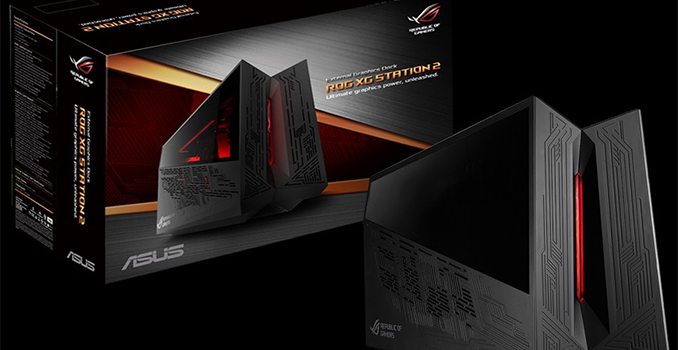
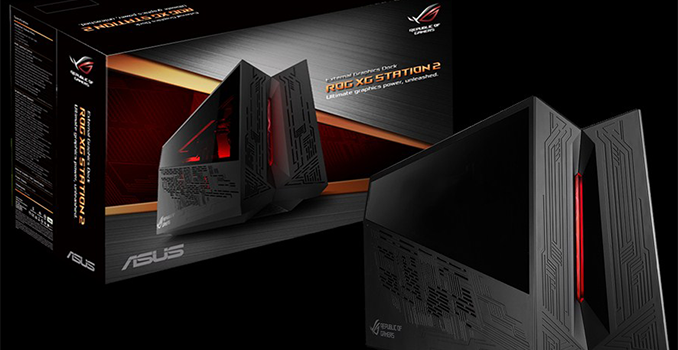
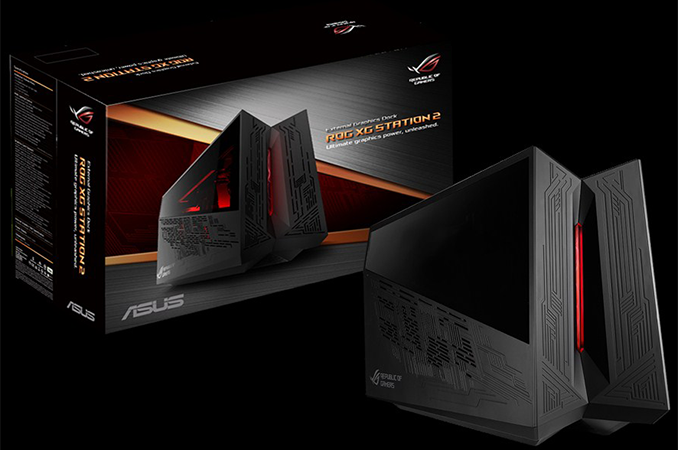
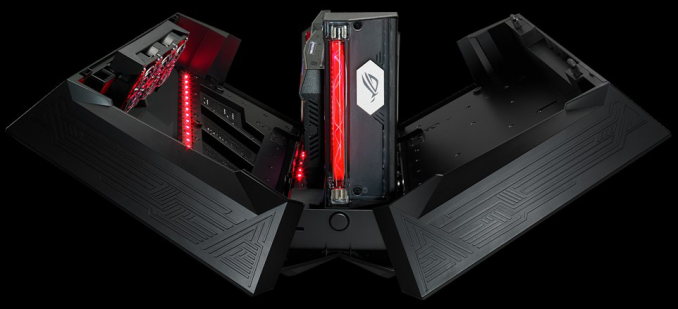
ASUS last week finally launched theROG XG Station 2 external GPU chassis, to enable Thunderbolt 3 systems to implement discrete graphics. The eGFX enclosure from ASUS integrates a 600 W PSU to ensure compatibility with power-hungry graphics adapters, and can house not only a video card but also an additional 2.5” storage device and bundles in extra USB 3.0 ports. The design of the external GPU box features signature ‘Republic of Gamers’ elements with red LEDs and Mayan-style patterning.

ASUS was among the pioneers of external graphics adapters in 2007 when it first showcased its XG Station with an integrated NVIDIA GeForce 8600 GT GPU. The dock used the Express Card interface, was not upgradeable, was only compatible with select ASUS laptops and its performance was not enough for then-popular games like Crysis (which is partly why it never took off). The company did not bury the idea of external graphics for laptops completely, and at CES 2014 the company showcased its XG Station 2 with a Thunderbolt 2 interface co-developed with SilverStone. The chassis was upgradeable and could house a variety of graphics cards, but the entire platform itself had numerous limitations when it came to bandwidth, hot-plugging, driver support and some others which is why that product was not even released. In January this year, ASUS demonstrated yet another XG Station 2, this time with a proprietary physical interface that used two USB Type-C cables (albeit with 32 Gb/s maximum bandwidth) and was to be compatible with select ASUS laptops. Around that time Intel had managed to finalize its eGFX over Thunderbolt 3 specification with some external help from AMD (see XConnect), whereas Razer showcased their compatible solution up and running (and later commercialized it). The Thunderbolt 3 graphics appeared to be so robust that ASUS decided to drop its proprietary external graphics interface and go with TB3 instead. At Computex in June, the company showcased its XG Station 2 with a Thunderbolt 3 interface, which will finally hit the market in 2017, a decade after the original XG Station (and in the third iteration of its own).
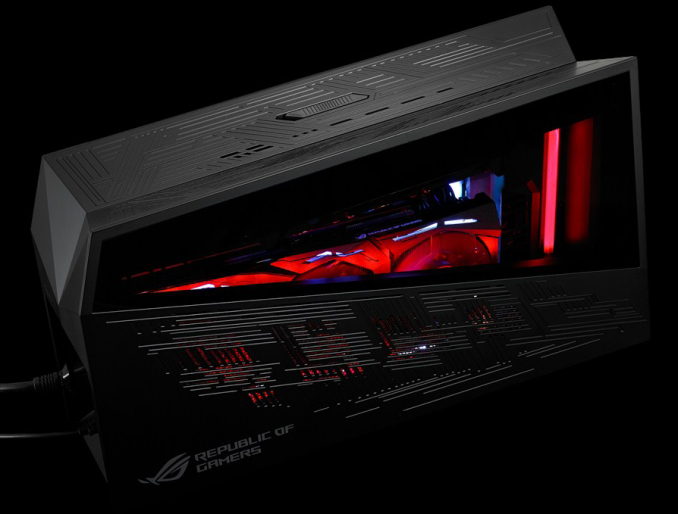
The ASUS ROG XG Station 2 looks exactly like the one demonstrated at Computex: the Mayan patterns serve like the openings to ensure proper cooling and the enclosure is equipped with multiple red LEDs controlled using the ROG AURA technology. The eGFX chassis from ASUS can accommodate a qualified double-wide PCIe x16 video card that is up to 12.2”/310 mm long. Due to TB3 bandwidth limitations, as with all TB3 eGFX enclosures, the GPUs are limited to PCIe 3.0 x4 bandwidth. The company does not specify the exact height of graphics adapters that the XG Station 2 can host, but for demonstrations it has used its ROG Strix boards with enlarged PCBs, hence it is safe to assume that there is plenty of vertical space inside the enclosure. To ensure that graphics cards receive enough power, ASUS integrated a 600 W PSU into the XG Station 2, a more powerful unit than in any other contemporary eGFX chassis. The enclosure has three 80-mm fans to pump up cool air into the box to guarantee proper cooling and enhance GPU overclocking potential for those who need it.

ASUS ROG XG Station 2 eGFX Chassis Specifications
Max Video Card Size Double-Wide, 12.2″ Long
(312 × 170 × 44 mm)
Max Video Card Power 500 W (?)
Connectivity 1 × Thunderbolt 3 (~40 Gbps via active cable)
Chassis Size 6.22 × 17.95 × 10.94 inches
(158 × 456 × 278 mm)
Internal PSU 600 W 80 Plus Gold
System Requirements Thunderbolt 3 eGFX Certified PC
Thunderbolt 3 w/Active Cable (included)
Windows 10
Compatible ASUS PCs ROG G701VI
ROG GL502VM
ROG GL702VM

Transformer T303UA
Transformer T305CA

Official List

Compatible Graphics Cads AMD Radeon RX-series and later
NVIDIA GeForce GTX 10-series and later
Shipping Date Early 2017
Price Not cheap at all

The ROG XG Station 2 is not just an eGFX enclosure, but also rather an expansion dock for laptops that adds Gigabit Ethernet, four USB 3.0 ports as well as one 2.5” bay for a SATA hard drive or an SSD. It is noteworthy that the four USB ports are not involved in the TB3 connection and do not use PCIe bandwidth, but have to be connected using a USB 3.0 Type-B cable (which means that the XGS2 needs three cables: TB3, USB and power). From connectivity and expandability standpoint, the ASUS ROG XG Station 2 is on par with PowerColor’s Devil Box, but leaves the competitor behind it when it comes to the wattage of internal PSU.
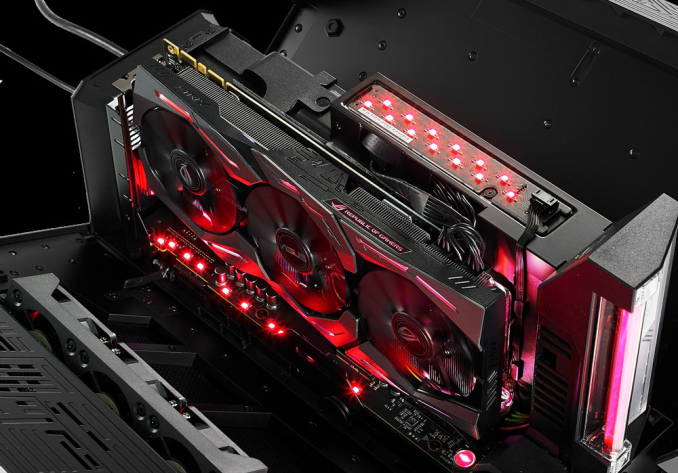
When it comes to compatibility, the ASUS ROG XG Station 2 should work with all systems that feature Thunderbolt 3 and support of eGFX through BIOS and TB3 firmware. ASUS lists its computers that can work with its external GPU enclosure on its website, but also lists systems from other makers. Nonetheless, it should not be a problem for the ROG XG Station 2 to work with appropriate non-ASUS PCs (e.g., with Razer’s Blade Stealth) with TB3 and appropriate BIOS/FW.

Comparison of Thunderbolt 3 eGFX Chassis
    ASUS ROG XG Station 2 AKiTiO
Node
BizonTech
BizonBox 3
PowerColor
Devil Box
Razer
Core
Chassis Dimensions Length 45.6 cm
17.95 in
42.8 cm
16.85 in
36 cm
14.17 in
40 cm
15.748 in
34 cm
13.38 in
Height 27.8 cm
10.94 in
22.7 cm
8.94 in
20.5 cm
8.07 in
24.2 cm
9.52 in
21.84 cm
8.6 in
Width 15.8 cm
6.22 in
14.5 cm
5.71 in
8 cm
3.5 in
17.2 cm
6.77 in
10.5 cm
4.13 in
Max Dimension of Compatible Graphics Card Length 31.2 cm
12.2 in
Height
(PCB+Cables)
over 14 cm
over 5.51″
17 cm
6.7 in
over 14 cm
over 5.51″
14 cm
5.51 in
15.2 cm
5.98 in
Width 4.4 cm
1.73 in
5
1.96 in
4.4 cm
1.73 in
Maximum GPU Power 500 W (?) 300 W (?) 375 W
PSU Wattage 600 W 400 W 200W/400W 500 W
Form-Factor internal proprietary SFX external internal proprietary
Cooling Fans (mm) 3 × 80 120 2 × 60 unknown 3 × 80
Connectivity Thunderbolt 1 × TB3 1 × TB3 2 × TB3 1 × TB3
Ethernet 1 × GbE 1 × GbE
USB 4 × USB 3.0
1 × USB-B
4 × USB 3.0
SATA 1×SATA 6Gb/s 1×SATA 6Gb/s
DisplayPort 1 × DP 1.2
Availability 1/2017 12/2016 10/2016 4/2016
Price $? $299 $649 $379 $499

ASUS plans to start sales of the ROG XG Station 2 in early 2017. The company yet has to disclose the final pricing, but given all the advantages that the product has, we expect it will cost more than an average eGFX box.
Related Reading:


ASUS ROG XG Station 2 eGFX Enclosure with Thunderbolt 3 Launched

ASUS ROG XG Station 2 eGFX Enclosure with Thunderbolt 3 Launched

ASUS last week finally launched theROG XG Station 2 external GPU chassis, to enable Thunderbolt 3 systems to implement discrete graphics. The eGFX enclosure from ASUS integrates a 600 W PSU to ensure compatibility with power-hungry graphics adapters, and can house not only a video card but also an additional 2.5” storage device and bundles in extra USB 3.0 ports. The design of the external GPU box features signature ‘Republic of Gamers’ elements with red LEDs and Mayan-style patterning.

ASUS was among the pioneers of external graphics adapters in 2007 when it first showcased its XG Station with an integrated NVIDIA GeForce 8600 GT GPU. The dock used the Express Card interface, was not upgradeable, was only compatible with select ASUS laptops and its performance was not enough for then-popular games like Crysis (which is partly why it never took off). The company did not bury the idea of external graphics for laptops completely, and at CES 2014 the company showcased its XG Station 2 with a Thunderbolt 2 interface co-developed with SilverStone. The chassis was upgradeable and could house a variety of graphics cards, but the entire platform itself had numerous limitations when it came to bandwidth, hot-plugging, driver support and some others which is why that product was not even released. In January this year, ASUS demonstrated yet another XG Station 2, this time with a proprietary physical interface that used two USB Type-C cables (albeit with 32 Gb/s maximum bandwidth) and was to be compatible with select ASUS laptops. Around that time Intel had managed to finalize its eGFX over Thunderbolt 3 specification with some external help from AMD (see XConnect), whereas Razer showcased their compatible solution up and running (and later commercialized it). The Thunderbolt 3 graphics appeared to be so robust that ASUS decided to drop its proprietary external graphics interface and go with TB3 instead. At Computex in June, the company showcased its XG Station 2 with a Thunderbolt 3 interface, which will finally hit the market in 2017, a decade after the original XG Station (and in the third iteration of its own).

The ASUS ROG XG Station 2 looks exactly like the one demonstrated at Computex: the Mayan patterns serve like the openings to ensure proper cooling and the enclosure is equipped with multiple red LEDs controlled using the ROG AURA technology. The eGFX chassis from ASUS can accommodate a qualified double-wide PCIe x16 video card that is up to 12.2”/310 mm long. Due to TB3 bandwidth limitations, as with all TB3 eGFX enclosures, the GPUs are limited to PCIe 3.0 x4 bandwidth. The company does not specify the exact height of graphics adapters that the XG Station 2 can host, but for demonstrations it has used its ROG Strix boards with enlarged PCBs, hence it is safe to assume that there is plenty of vertical space inside the enclosure. To ensure that graphics cards receive enough power, ASUS integrated a 600 W PSU into the XG Station 2, a more powerful unit than in any other contemporary eGFX chassis. The enclosure has three 80-mm fans to pump up cool air into the box to guarantee proper cooling and enhance GPU overclocking potential for those who need it.

ASUS ROG XG Station 2 eGFX Chassis Specifications
Max Video Card Size Double-Wide, 12.2″ Long
(312 × 170 × 44 mm)
Max Video Card Power 500 W (?)
Connectivity 1 × Thunderbolt 3 (~40 Gbps via active cable)
Chassis Size 6.22 × 17.95 × 10.94 inches
(158 × 456 × 278 mm)
Internal PSU 600 W 80 Plus Gold
System Requirements Thunderbolt 3 eGFX Certified PC
Thunderbolt 3 w/Active Cable (included)
Windows 10
Compatible ASUS PCs ROG G701VI
ROG GL502VM
ROG GL702VM

Transformer T303UA
Transformer T305CA

Official List

Compatible Graphics Cads AMD Radeon RX-series and later
NVIDIA GeForce GTX 10-series and later
Shipping Date Early 2017
Price Not cheap at all

The ROG XG Station 2 is not just an eGFX enclosure, but also rather an expansion dock for laptops that adds Gigabit Ethernet, four USB 3.0 ports as well as one 2.5” bay for a SATA hard drive or an SSD. It is noteworthy that the four USB ports are not involved in the TB3 connection and do not use PCIe bandwidth, but have to be connected using a USB 3.0 Type-B cable (which means that the XGS2 needs three cables: TB3, USB and power). From connectivity and expandability standpoint, the ASUS ROG XG Station 2 is on par with PowerColor’s Devil Box, but leaves the competitor behind it when it comes to the wattage of internal PSU.

When it comes to compatibility, the ASUS ROG XG Station 2 should work with all systems that feature Thunderbolt 3 and support of eGFX through BIOS and TB3 firmware. ASUS lists its computers that can work with its external GPU enclosure on its website, but also lists systems from other makers. Nonetheless, it should not be a problem for the ROG XG Station 2 to work with appropriate non-ASUS PCs (e.g., with Razer’s Blade Stealth) with TB3 and appropriate BIOS/FW.

Comparison of Thunderbolt 3 eGFX Chassis
    ASUS ROG XG Station 2 AKiTiO
Node
BizonTech
BizonBox 3
PowerColor
Devil Box
Razer
Core
Chassis Dimensions Length 45.6 cm
17.95 in
42.8 cm
16.85 in
36 cm
14.17 in
40 cm
15.748 in
34 cm
13.38 in
Height 27.8 cm
10.94 in
22.7 cm
8.94 in
20.5 cm
8.07 in
24.2 cm
9.52 in
21.84 cm
8.6 in
Width 15.8 cm
6.22 in
14.5 cm
5.71 in
8 cm
3.5 in
17.2 cm
6.77 in
10.5 cm
4.13 in
Max Dimension of Compatible Graphics Card Length 31.2 cm
12.2 in
Height
(PCB+Cables)
over 14 cm
over 5.51″
17 cm
6.7 in
over 14 cm
over 5.51″
14 cm
5.51 in
15.2 cm
5.98 in
Width 4.4 cm
1.73 in
5
1.96 in
4.4 cm
1.73 in
Maximum GPU Power 500 W (?) 300 W (?) 375 W
PSU Wattage 600 W 400 W 200W/400W 500 W
Form-Factor internal proprietary SFX external internal proprietary
Cooling Fans (mm) 3 × 80 120 2 × 60 unknown 3 × 80
Connectivity Thunderbolt 1 × TB3 1 × TB3 2 × TB3 1 × TB3
Ethernet 1 × GbE 1 × GbE
USB 4 × USB 3.0
1 × USB-B
4 × USB 3.0
SATA 1×SATA 6Gb/s 1×SATA 6Gb/s
DisplayPort 1 × DP 1.2
Availability 1/2017 12/2016 10/2016 4/2016
Price $? $299 $649 $379 $499

ASUS plans to start sales of the ROG XG Station 2 in early 2017. The company yet has to disclose the final pricing, but given all the advantages that the product has, we expect it will cost more than an average eGFX box.

Related Reading:

The Apple Watch Series 2 Review: Building Towards Maturity

Back in the first half of 2015 Apple released the first version of the Apple Watch. The Apple Watch was a long-rumored product, often referred to as the iWatch before its release. At the time, it represented the best attempt that I had seen to provide a compelling smartwatch experience, but it was clearly a first generation product with many flaws. It was not unlike the iPhone 2G or the iPad 1 in that regard, and for all the things it did well, there were other parts of the experience that really didn’t deliver. While this shouldn’t have been unexpected given the nature of first generation products, when a device is surrounded by so much hype for so many years, expectations can begin to run wild. On top of that, certain aspects like application performance were not up to the standards that are expected of a shipping product. In our review of the original Apple Watch we concluded that it was a good first attempt, but obviously flawed, and that ordinary consumers should wait for future iterations.

The launch of Apple Watch Series 2 comes two years after the original announcement of the Apple Watch. Even when you consider the six month gap between the first Apple Watch’s announcement and launch, this still represents a longer time between versions than the yearly cadence that we’ve come to expect for many other products. Having a product in the market for one and a half years is a good span of time to observe how users are making use of it, what features they are and aren’t using, and what parts of the experience create friction. For a first generation product this kind of information is essential to make the necessary improvements in future iterations, as taking the product in the wrong direction could doom its future prospects entirely. Read on to see what changes Apple has made, and whether they make Apple Watch Series 2 a product that is truly ready for consumers.

The Apple Watch Series 2 Review: Building Towards Maturity

Back in the first half of 2015 Apple released the first version of the Apple Watch. The Apple Watch was a long-rumored product, often referred to as the iWatch before its release. At the time, it represented the best attempt that I had seen to provide a compelling smartwatch experience, but it was clearly a first generation product with many flaws. It was not unlike the iPhone 2G or the iPad 1 in that regard, and for all the things it did well, there were other parts of the experience that really didn’t deliver. While this shouldn’t have been unexpected given the nature of first generation products, when a device is surrounded by so much hype for so many years, expectations can begin to run wild. On top of that, certain aspects like application performance were not up to the standards that are expected of a shipping product. In our review of the original Apple Watch we concluded that it was a good first attempt, but obviously flawed, and that ordinary consumers should wait for future iterations.

The launch of Apple Watch Series 2 comes two years after the original announcement of the Apple Watch. Even when you consider the six month gap between the first Apple Watch’s announcement and launch, this still represents a longer time between versions than the yearly cadence that we’ve come to expect for many other products. Having a product in the market for one and a half years is a good span of time to observe how users are making use of it, what features they are and aren’t using, and what parts of the experience create friction. For a first generation product this kind of information is essential to make the necessary improvements in future iterations, as taking the product in the wrong direction could doom its future prospects entirely. Read on to see what changes Apple has made, and whether they make Apple Watch Series 2 a product that is truly ready for consumers.