Vik


Alienware Refreshes The Alienware 15 And 17 Gaming Notebooks At PAX

Alienware Refreshes The Alienware 15 And 17 Gaming Notebooks At PAX

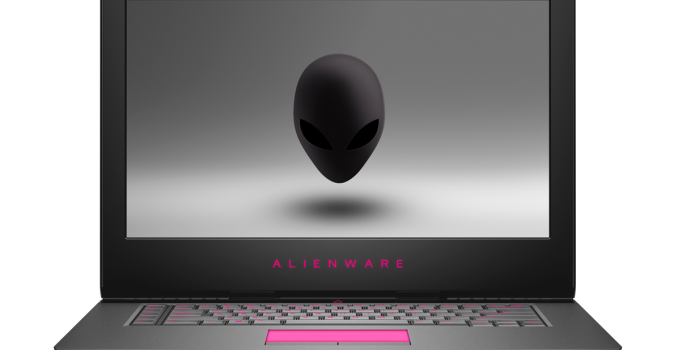
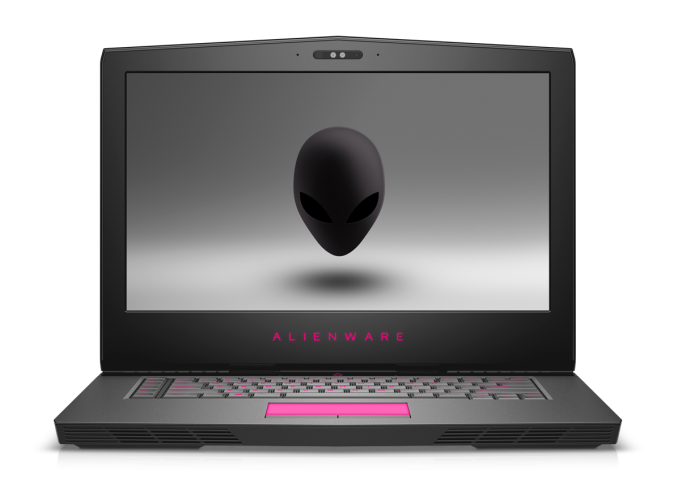
Today Dell’s gaming brand is announcing updates to their larger form factor gaming notebooks. The Alienware 15 and 17 are launching with a new design featuring a thinner chassis and updated internals, which will significantly improve performance.

Alienware is calling the 15 and 17 VR-Ready, and to get there they’ve turned to NVIDIA’s Pascal lineup of mobile graphics cards with the GTX 1080 on the 17 and GTX 1070 on the 15, or AMD ‘s RX 470 8GB model. Since Kaby Lake has only just launched with the dual-core Y and U series, Alienware is still leveraging Intel’s 6th generation Core with quad-core i7 available.

Alienware 15

The design has changed as well. Alienware has moved to a new hinge-forward arrangement, which puts the display hinge closer to the user. This gives additional room at the rear of the laptop for components and cooling, allowing Alienware to shave 25% of the thickness off of the previous generation model. They aren’t the only manufacturer to do this, and it seems to work well on other gaming laptops. The chassis is designed with anodized aluminum, magnesium alloy, and steel reinforcements. Alienware even pointed out they put a steel plate behind the keyboard to protect the laptop if you have a bad game and end up smashing it, although I’d still not recommend testing this.

The keyboard has become a focal point with this generation, and Alienware has moved to newer switches which offer an impressive 2.2 mm of key travel. In addition, Alienware now joins the N-Key rollover club which means the keyboard can handle ten key presses simultaneously. For those that are into RGB lighting, Alienware does offer its lighting system, but it does not feature per-key RGB lighting.

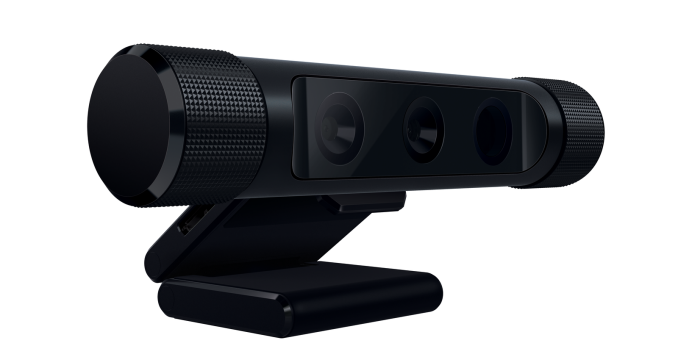
Another new feature is Tobi eye tracking built-in to the laptop. This has been available on other gaming laptops already, but for those unfamiliar, Tobi technology uses cameras to track eye movement. This can then be leveraged to allow partial or full control of some functions with just your eyes, which sounds a bit crazy, but in titles that support it there could be some nice benefits such as the ability to auto-hide the HUD in a FPS unless you are looking at it, but the most interesting thing Alienware mentioned in the briefing is that they have software which will track your eye movement, and then when you are killed in a game, you can then replay the kill and find out where your eyes were at the time, and perhaps use this to improve your gaming performance over time. If it sounds silly, just remember that eSports are a big thing, with real money available, so players will likely be interested in this. Another excellent side benefit of the Tobi system is that it is Windows Hello capable, so you can log in with just the camera.

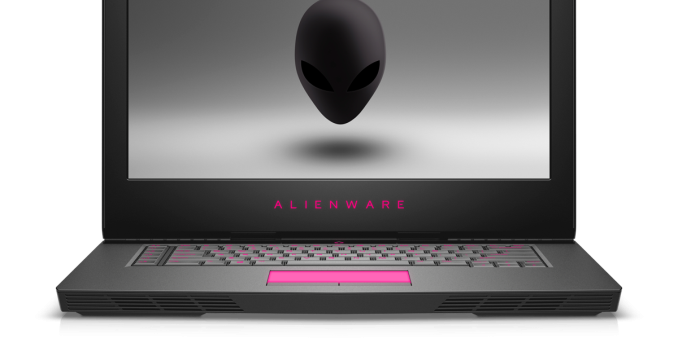
Alienware 17

The displays are 1920×1080 IPS panels, and the 15-inch model will be available with a 120 Hz G-SYNC display as an option, as well as a UHD IGZO offering, which is likely similar to the one Dell implements on the XPS lineup. Battery options are a 68 Wh and optional 99 Wh battery, which is pretty much the maximum you can put in a laptop. I wouldn’t expect great battery life, but with the new Pascal chips we could be surprised.

Both models will continue to work with the Alienware Graphics Amplifier as well. I asked them if they were going to move to Thunderbolt 3 for this, but they said they get more bandwidth out of the proprietary connector and are not looking to change at this time.

Both models will be available this month at Dell.com. Prices have not been announced yet.

Source: Alienware

 

Alienware Refreshes The Alienware 15 And 17 Gaming Notebooks At PAX

Alienware Refreshes The Alienware 15 And 17 Gaming Notebooks At PAX

Today Dell’s gaming brand is announcing updates to their larger form factor gaming notebooks. The Alienware 15 and 17 are launching with a new design featuring a thinner chassis and updated internals, which will significantly improve performance.

Alienware is calling the 15 and 17 VR-Ready, and to get there they’ve turned to NVIDIA’s Pascal lineup of mobile graphics cards with the GTX 1080 on the 17 and GTX 1070 on the 15, or AMD ‘s RX 470 8GB model. Since Kaby Lake has only just launched with the dual-core Y and U series, Alienware is still leveraging Intel’s 6th generation Core with quad-core i7 available.

Alienware 15

The design has changed as well. Alienware has moved to a new hinge-forward arrangement, which puts the display hinge closer to the user. This gives additional room at the rear of the laptop for components and cooling, allowing Alienware to shave 25% of the thickness off of the previous generation model. They aren’t the only manufacturer to do this, and it seems to work well on other gaming laptops. The chassis is designed with anodized aluminum, magnesium alloy, and steel reinforcements. Alienware even pointed out they put a steel plate behind the keyboard to protect the laptop if you have a bad game and end up smashing it, although I’d still not recommend testing this.

The keyboard has become a focal point with this generation, and Alienware has moved to newer switches which offer an impressive 2.2 mm of key travel. In addition, Alienware now joins the N-Key rollover club which means the keyboard can handle ten key presses simultaneously. For those that are into RGB lighting, Alienware does offer its lighting system, but it does not feature per-key RGB lighting.

Another new feature is Tobi eye tracking built-in to the laptop. This has been available on other gaming laptops already, but for those unfamiliar, Tobi technology uses cameras to track eye movement. This can then be leveraged to allow partial or full control of some functions with just your eyes, which sounds a bit crazy, but in titles that support it there could be some nice benefits such as the ability to auto-hide the HUD in a FPS unless you are looking at it, but the most interesting thing Alienware mentioned in the briefing is that they have software which will track your eye movement, and then when you are killed in a game, you can then replay the kill and find out where your eyes were at the time, and perhaps use this to improve your gaming performance over time. If it sounds silly, just remember that eSports are a big thing, with real money available, so players will likely be interested in this. Another excellent side benefit of the Tobi system is that it is Windows Hello capable, so you can log in with just the camera.

Alienware 17

The displays are 1920×1080 IPS panels, and the 15-inch model will be available with a 120 Hz G-SYNC display as an option, as well as a UHD IGZO offering, which is likely similar to the one Dell implements on the XPS lineup. Battery options are a 68 Wh and optional 99 Wh battery, which is pretty much the maximum you can put in a laptop. I wouldn’t expect great battery life, but with the new Pascal chips we could be surprised.

Both models will continue to work with the Alienware Graphics Amplifier as well. I asked them if they were going to move to Thunderbolt 3 for this, but they said they get more bandwidth out of the proprietary connector and are not looking to change at this time.

Both models will be available this month at Dell.com. Prices have not been announced yet.

Source: Alienware
 

Lenovo’s Yoga Book Convertible Scraps Physical Keyboard in Favor of Touch-Sensitive Surface

Lenovo’s Yoga Book Convertible Scraps Physical Keyboard in Favor of Touch-Sensitive Surface

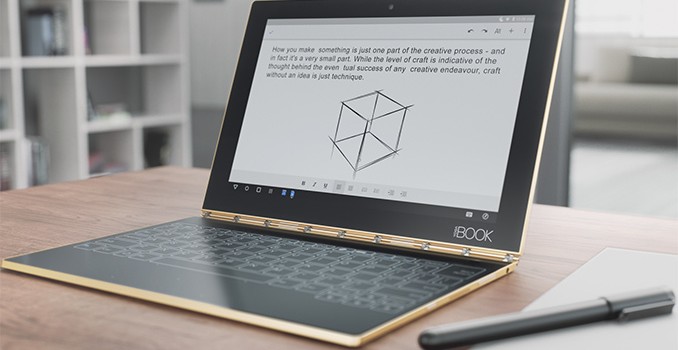
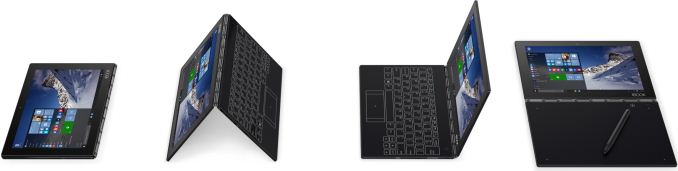
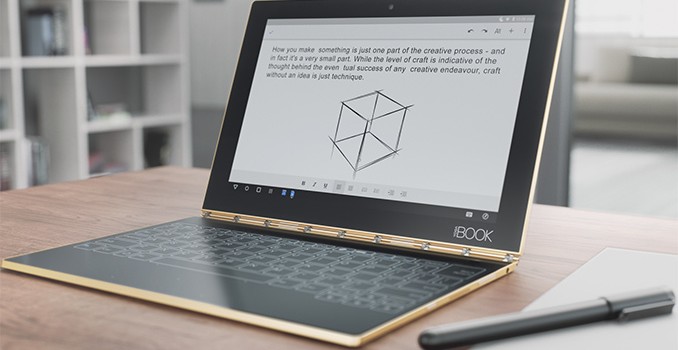
At IFA trade show in Berlin, Lenovo announced its latest addition to the Yoga product line, the Yoga Book convertible laptop that replaces physical keyboard with a large touchpad, which can act as a keyboard and a drawing board. The Yoga Book will be one of the thinnest and lightest convertibles on the market and will be available with Google Android and Microsoft Windows OSes.

From hardware point of view, the Lenovo Yoga Book is an ultra-thin convertible featuring a 10.1” capacitive touch IPS display (1920×1200 resolution) that is based on the Intel Atom x5-8550 which is Intel’s Cherry Trail SoC with four cores running at up to 2.4 GHz, 2 MB cache, and 12 EU Gen 8 integrated graphics. The device is equipped with 4 GB of LPDDR3, 64 GB of NAND flash storage (a microSD card is also present), 802.11 ac Wi-Fi as well as LTE connectivity and so on. The Yoga Book system is just 9.6 mm thick and weighs only 690 grams since it is made of magnesium aluminum alloy. However, specifications and dimensions are not the key highlights of the novelty.

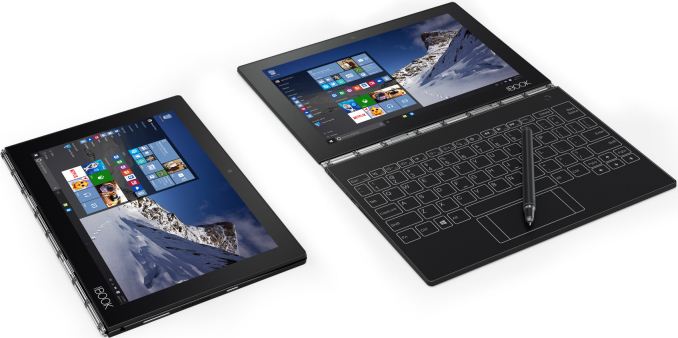
The Yoga Book convertible is one of the first products of this kind to scrap a physical keyboard in favor of a large 10.1” touchpad covered with a special anti-glare matte glass and featuring backlighting that turns on when the keyboard is needed. The surface, which Lenovo calls the Halo Keyboard, supports a haptic touch feedback technology to emulate physical keyboard and thus reduce the amount of typos that usually occurs when typing on tablets. To further speed up typing, Lenovo developed a special app that learns its user’s typing habits and tries to predict the words that are typed. The surface is essentially a large digitizer featuring Wacom technologies, it is possible to place a piece of paper on it, draw something, or write a note, and get it digitized automatically. To do so, you’ll need Lenovo’s dual-use active electrostatics (ES) stylus with Wacom Feel tech that supports 2048 levels of pressure sensitivity and can also write/draw on regular paper (special refills are needed).

Lenovo Yoga Book Specifications
  Yoga Book with Windows 10 Yoga Book with Android 6.0
Processor Intel Atom x5-Z8550
(Quad-core, up to 2.4 GHz, 2 MB cache)
Memory 4 GB LPDDR3
Graphics Intel HD Graphics
Display 10.1″ IPS
1920×1200 resolution
Storage 64 GB
Networking 802.11ac
2G/3G/4G (optional)
SIM Nano SIM card
Audio Dolby Audio Premium
Headset jack
Battery Li-ion Polymer
8500 mAh
13 hours battery life
Sensors Vibrator
G-Sensor
Ambient Light Sensor
Hall Sensor
GPS
Buttons/Ports USB, HDMI
microSD card reader
 
Back Side Hinge with 360° Rotation
Air Vents Integral to Hinge
Dimensions 10.1″ × 6.72″ × 0.38″
256.6 × 170.8 × 9.6 mm
Weight ~1.52 lbs (0.69 kg)
Webcam 2 MP front fixed-focus front webcam
8 MP front auto-focus rear cam
Extras Lenovo’s software for Halo Keyboard Lenovo’s software for Halo Keyboard
Lenovo’s enhancements for Android 6.0
Colors Carbon Black Gold
Gunmetal
Pricing Starting from $549 Starting from $499

The replacement of a physical keyboard with touch-sensitive surface allowed Lenovo to make its Yoga Book thinner than other convertibles with flip around hinges. At the same time, this opens up doors to new usage models for the device, at least for those, who use a stylus.

The manufacturer intends to offer several versions of its ultra-thin convertible. The Yoga Book in gold or gunmetal finishes with Google Android 6.0 OS will be available starting at $499. The carbon black Yoga Book Windows 10 will be priced starting at $549, whereas convertibles with Windows 10 Pro will be slightly more expensive. All versions are expected to hit the market in October.

Lenovo’s Yoga Book Convertible Scraps Physical Keyboard in Favor of Touch-Sensitive Surface

Lenovo’s Yoga Book Convertible Scraps Physical Keyboard in Favor of Touch-Sensitive Surface

At IFA trade show in Berlin, Lenovo announced its latest addition to the Yoga product line, the Yoga Book convertible laptop that replaces physical keyboard with a large touchpad, which can act as a keyboard and a drawing board. The Yoga Book will be one of the thinnest and lightest convertibles on the market and will be available with Google Android and Microsoft Windows OSes.

From hardware point of view, the Lenovo Yoga Book is an ultra-thin convertible featuring a 10.1” capacitive touch IPS display (1920×1200 resolution) that is based on the Intel Atom x5-8550 which is Intel’s Cherry Trail SoC with four cores running at up to 2.4 GHz, 2 MB cache, and 12 EU Gen 8 integrated graphics. The device is equipped with 4 GB of LPDDR3, 64 GB of NAND flash storage (a microSD card is also present), 802.11 ac Wi-Fi as well as LTE connectivity and so on. The Yoga Book system is just 9.6 mm thick and weighs only 690 grams since it is made of magnesium aluminum alloy. However, specifications and dimensions are not the key highlights of the novelty.

The Yoga Book convertible is one of the first products of this kind to scrap a physical keyboard in favor of a large 10.1” touchpad covered with a special anti-glare matte glass and featuring backlighting that turns on when the keyboard is needed. The surface, which Lenovo calls the Halo Keyboard, supports a haptic touch feedback technology to emulate physical keyboard and thus reduce the amount of typos that usually occurs when typing on tablets. To further speed up typing, Lenovo developed a special app that learns its user’s typing habits and tries to predict the words that are typed. The surface is essentially a large digitizer featuring Wacom technologies, it is possible to place a piece of paper on it, draw something, or write a note, and get it digitized automatically. To do so, you’ll need Lenovo’s dual-use active electrostatics (ES) stylus with Wacom Feel tech that supports 2048 levels of pressure sensitivity and can also write/draw on regular paper (special refills are needed).

Lenovo Yoga Book Specifications
  Yoga Book with Windows 10 Yoga Book with Android 6.0
Processor Intel Atom x5-Z8550
(Quad-core, up to 2.4 GHz, 2 MB cache)
Memory 4 GB LPDDR3
Graphics Intel HD Graphics
Display 10.1″ IPS
1920×1200 resolution
Storage 64 GB
Networking 802.11ac
2G/3G/4G (optional)
SIM Nano SIM card
Audio Dolby Audio Premium
Headset jack
Battery Li-ion Polymer
8500 mAh
13 hours battery life
Sensors Vibrator
G-Sensor
Ambient Light Sensor
Hall Sensor
GPS
Buttons/Ports USB, HDMI
microSD card reader
 
Back Side Hinge with 360° Rotation
Air Vents Integral to Hinge
Dimensions 10.1″ × 6.72″ × 0.38″
256.6 × 170.8 × 9.6 mm
Weight ~1.52 lbs (0.69 kg)
Webcam 2 MP front fixed-focus front webcam
8 MP front auto-focus rear cam
Extras Lenovo’s software for Halo Keyboard Lenovo’s software for Halo Keyboard
Lenovo’s enhancements for Android 6.0
Colors Carbon Black Gold
Gunmetal
Pricing Starting from $549 Starting from $499

The replacement of a physical keyboard with touch-sensitive surface allowed Lenovo to make its Yoga Book thinner than other convertibles with flip around hinges. At the same time, this opens up doors to new usage models for the device, at least for those, who use a stylus.

The manufacturer intends to offer several versions of its ultra-thin convertible. The Yoga Book in gold or gunmetal finishes with Google Android 6.0 OS will be available starting at $499. The carbon black Yoga Book Windows 10 will be priced starting at $549, whereas convertibles with Windows 10 Pro will be slightly more expensive. All versions are expected to hit the market in October.