Vik


Intel's Skull Canyon NUC is Official: $650, Shipping In May

Intel’s Skull Canyon NUC is Official: $650, Shipping In May

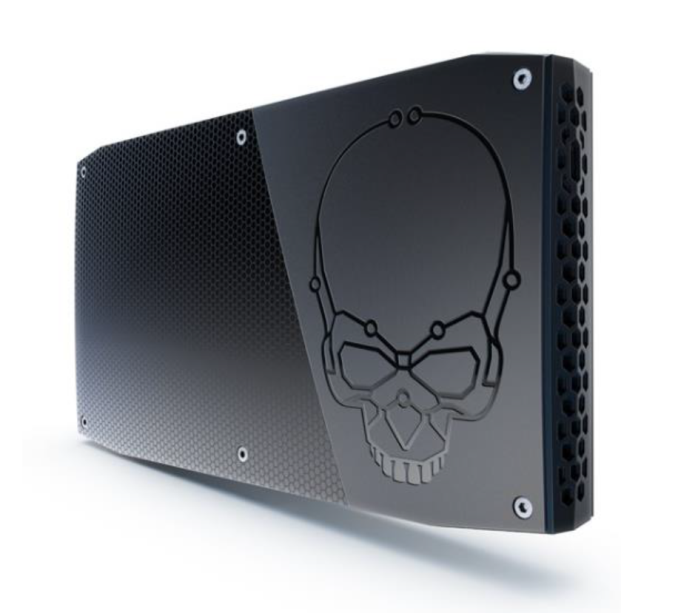
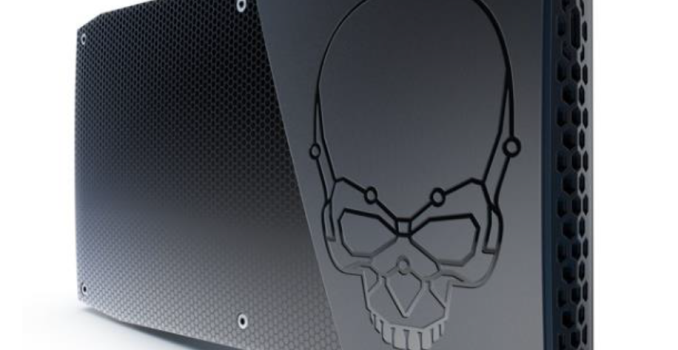
Back in January, Intel had provided us with information about the Skull Canyon NUC based on a Skylake H-Series CPU(with Iris Pro Graphics). Today, at GDC 2016, Intel made the specifications official. Pricing and availability information was also provided.

The key aspect that was not revealed before was the dimensions. The Skull Canyon NUC (NUC6i7KYK) will come in at 216mm x 116mm x 23mm, with the volume coming in at just 0.69L. For comparison, the Skylake NUC6i5SYK (non-2.5″ drive version) comes in at 115mm x 111mm x 32mm (0.41L), while NUC6i5SYH (2.5″ drive bay-enabled) one is 115mm x 111mm x 48mm (0.61L). The rest of the specifications are outlined in the table below:

Intel NUC6i7KYK (Skull Canyon) Specifications
Processor Intel Core i7-6770HQ
Skylake, 4C/8T, 2.6 GHz (Turbo to 3.5 GHz), 14nm, 6MB L2, 45W TDP
Memory 2x DDR4 SO-DIMM (2133+ MHz)
Graphics Intel Iris Pro Graphics 580 (Skylake-H GT4+4e with 128MB eDRAM)
Disk Drive(s) Dual M.2 (SATA3 / PCIe 3.0 x4 NVMe / AHCI SSDs)
Networking Intel Dual Band Wireless-AC 8260 (2×2 802.11ac – 867 Mbps + Bluetooth 4.2)
Intel I-219V Gigabit Ethernet
Audio 3.5mm Audio Jack (Headphone / Microphone)
Capable of 5.1/7.1 digital output with HD audio bitstreaming (HDMI)
Miscellaneous I/O Ports 1x Thunderbolt 3 / USB 3.1 Gen 2 Type-C
4x USB 3.0 (incl. one charging port)
1x SDXC (UHS-I)
1x HDMI 2.0, 1x mini-DP 1.2
Consumer Infrared Sensor
Operating System Barebones
Pricing $650 (Barebones)
$999 (Typical build with 16GB DDR4, 256GB SSD and Windows 10)
Fact Sheet Intel NUC6i7KYK GDC Fact Sheet (PDF)

Note that the HDMI 2.0 output is enabled by an external LSPcon (not Alpine Ridge). So, we will definitely have 4Kp60 output with HDCP 2.2 support over the HDMI port, making it suitable as a future-proof HTPC platform. From a gaming perspective, the availability of Thunderbolt 3 enables users to add an external graphics dock like the recently announced Razer Core eGFX module. Note that any external GPU will be able to talk to the CPU only over a PCIe 3.0 x4 link (which should be plenty in almost all cases).

The Skull Canyon NUC will be available to pre-order on Newegg next month, with shipping in May 2016.

Razer Core Thunderbolt 3 eGFX Chassis: $499/$399, AMD & NVIDIA, Shipping In April

Razer Core Thunderbolt 3 eGFX Chassis: $499/$399, AMD & NVIDIA, Shipping In April

Back at CES 2016, Razer announced their Core Thunderbolt 3 external graphics (eGFX) chassis. Built around the new Thunderbolt 3 standard and its long-awaited official support for external video cards, the Razer Core is the first eGFX chassis to hit the market. We got a bit more information about it with last week’s AMD XConnect announcement, and now today at GDC Razer is releasing the full details on functionality, compatibility, and availability.

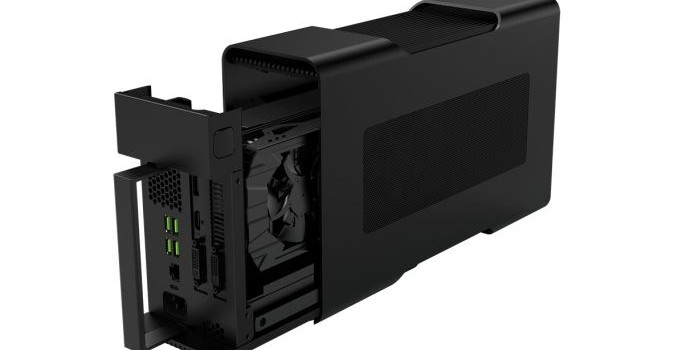
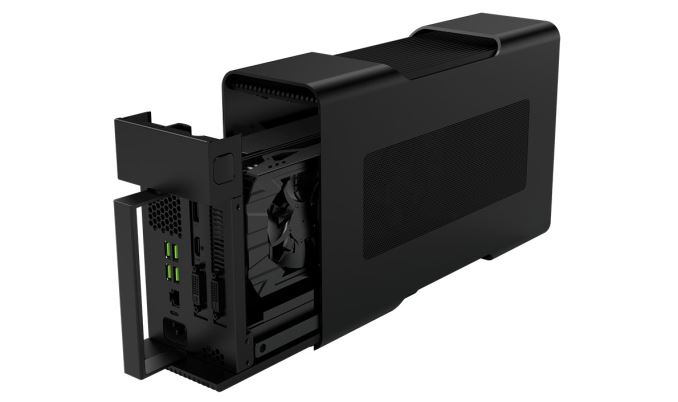
Jumping right into things, the Razer Core is what can be considered a full size eGFX chassis. The unit is large enough to accommodate a double-wide video card up to 12.2 inches long, which covers almost every video card on the market. The only notable exceptions here are cards that use external radiators (e.g. Radeon R9 Fury X) and the small number of ultra-high-end triple-wide card designs such as some of MSI’s Lightning cards. The toolless design is able to handle both open air and blower type video card coolers, however given its smaller size relative to a full PC case, I think it’s going to be worth looking into just how well open air cards do.

Razer Core Thunderbolt 3 eGFX Chassis Specifications
Max Video Card Size Double-Wide, 12.2″ Long
(310 x 152 x 44mm)
Max Video Card Power 375W
Connectivity 4x USB 3.0
1x Gigabit Ethernet
Laptop Charging via Thunderbolt 3
Chassis Size 4.13 x 13.9 x 8.66 inches
(105 x 353 x 220mm)
Internal PSU 500W
System Requirements Thunderbolt 3 eGFX Certified PC
Thundebolt 3 w/Active Cable
Windows 10
Shipping Date April 2016
Price $499 ($399 w/Razer laptop)

The chassis itself measures 4.13” x 13.9” x 8.66” and contains an internal 500W PSU, with Razer rating it to drive up to a 375W video card. At 10.89lbs it is technically portable, though clearly not ideal for the task given its handle-less design. Rather Razer intends this to be a fixed docking station for laptop users, as demonstrated both by the additional ports made available on the Core – 4x USB 3.0 Type-A and a gigabit Ethernet port – and by the fact that it’s capable of charging laptops over its Thunderbolt 3 connection.

The Core is the first of what we expect will be several TB3 eGFX chassis. As we briefly mentioned in our AMD XConnect overview, the Core is essentially the pathfinder product for the TB3 eGFX standard, with Intel, AMD, and Razer working together to put together the first devices and validate them. Consequently the Core is so far only validated to work with two laptops – Razer’s Blade Stealth and new 2016 Blade – however it should work with any future laptops that are also eGFX certified.

As for video card compatibility, while the Core was initially developed with Intel and AMD, Razer has confirmed that the chassis does support both AMD and NVIDIA video cards. The full compatibility list is posted below, but for AMD cards it’s essentially all of their latest generation (290 series and newer) video cards. Meanwhile on the NVIDIA side all of the company’s Maxwell 1 and Maxwell 2 cards are supported, starting with the GTX 750 Ti. Though given the price of the Core, it goes without saying that the expectation is that it will be paired up with high-end video cards as opposed to lower-end models.

Razer Core Video Card Compatibility List
AMD NVIDIA
Radeon R9 Fury GeForce GTX Titan X
Radeon R9 Nano GeForce GTX 980 Ti
Radeon R9 300 Series GeForce GTX 980
Radeon R9 290X GeForce GTX 970
Radeon R9 290 GeForce GTX 960
Radeon R9 280 GeForce GTX 950
  GeForce GTX 750 Ti

While the Core supports both AMD and NVIDIA cards, how well each brand is supported is looking a bit hazy. As part of the eGFX development cycle, AMD’s drivers are fully capable of and validated for eGFX plug ‘n play operation, allowing Windows to gracefully handle losing the external GPU with both planned and accidental disconnects. In the case of an accidental disconnect, Windows will stay up, while applications using the GPU may crash. However NVIDIA’s drivers have not yet been validated for plug ‘n play operation, and it sounds like at this moment NVIDIA is still hammering out the final bugs. That said, NVIDIA has committed to having drivers ready by the time the Core ships in April, so we’ll have to see where things stand next month.

Finally, let’s talk about availability and pricing. Razer will begin taking pre-orders for the Core tonight through their website, with the chassis set to ship in April. As for pricing, the first eGFX chassis on the market will not come cheap: Razer is setting the base price on the chassis at $499, and after the cost of a high-end video card to put in the Core, we’re looking at a total price tag of $1000 or more. However Razer is offering a $100 discount on the Core if it’s purchased alongside a Razer Blade or Blade Stealth laptop – bearing in mind that these are the only two laptops eGFX certified at this time in the first place – which brings the effective cost down to $399. Razer also notes that this offer is also retroactive for customers whom already purchased a Blade Stealth earlier this year, as the ultrabook and the Core were announced together at CES and the company doesn’t want to penalize early buyers who were intending to grab the Core anyhow.


Gallery: Razer Core

Razer Core Thunderbolt 3 eGFX Chassis: $499/$399, AMD & NVIDIA, Shipping In April

Razer Core Thunderbolt 3 eGFX Chassis: $499/$399, AMD & NVIDIA, Shipping In April

Back at CES 2016, Razer announced their Core Thunderbolt 3 external graphics (eGFX) chassis. Built around the new Thunderbolt 3 standard and its long-awaited official support for external video cards, the Razer Core is the first eGFX chassis to hit the market. We got a bit more information about it with last week’s AMD XConnect announcement, and now today at GDC Razer is releasing the full details on functionality, compatibility, and availability.

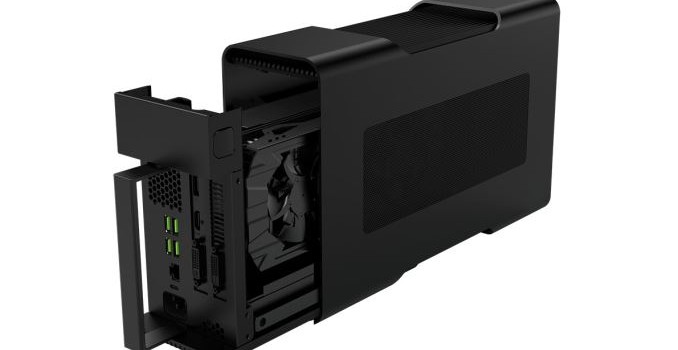
Jumping right into things, the Razer Core is what can be considered a full size eGFX chassis. The unit is large enough to accommodate a double-wide video card up to 12.2 inches long, which covers almost every video card on the market. The only notable exceptions here are cards that use external radiators (e.g. Radeon R9 Fury X) and the small number of ultra-high-end triple-wide card designs such as some of MSI’s Lightning cards. The toolless design is able to handle both open air and blower type video card coolers, however given its smaller size relative to a full PC case, I think it’s going to be worth looking into just how well open air cards do.

Razer Core Thunderbolt 3 eGFX Chassis Specifications
Max Video Card Size Double-Wide, 12.2″ Long
(310 x 152 x 44mm)
Max Video Card Power 375W
Connectivity 4x USB 3.0
1x Gigabit Ethernet
Laptop Charging via Thunderbolt 3
Chassis Size 4.13 x 13.9 x 8.66 inches
(105 x 353 x 220mm)
Internal PSU 500W
System Requirements Thunderbolt 3 eGFX Certified PC
Thundebolt 3 w/Active Cable
Windows 10
Shipping Date April 2016
Price $499 ($399 w/Razer laptop)

The chassis itself measures 4.13” x 13.9” x 8.66” and contains an internal 500W PSU, with Razer rating it to drive up to a 375W video card. At 10.89lbs it is technically portable, though clearly not ideal for the task given its handle-less design. Rather Razer intends this to be a fixed docking station for laptop users, as demonstrated both by the additional ports made available on the Core – 4x USB 3.0 Type-A and a gigabit Ethernet port – and by the fact that it’s capable of charging laptops over its Thunderbolt 3 connection.

The Core is the first of what we expect will be several TB3 eGFX chassis. As we briefly mentioned in our AMD XConnect overview, the Core is essentially the pathfinder product for the TB3 eGFX standard, with Intel, AMD, and Razer working together to put together the first devices and validate them. Consequently the Core is so far only validated to work with two laptops – Razer’s Blade Stealth and new 2016 Blade – however it should work with any future laptops that are also eGFX certified.

As for video card compatibility, while the Core was initially developed with Intel and AMD, Razer has confirmed that the chassis does support both AMD and NVIDIA video cards. The full compatibility list is posted below, but for AMD cards it’s essentially all of their latest generation (290 series and newer) video cards. Meanwhile on the NVIDIA side all of the company’s Maxwell 1 and Maxwell 2 cards are supported, starting with the GTX 750 Ti. Though given the price of the Core, it goes without saying that the expectation is that it will be paired up with high-end video cards as opposed to lower-end models.

Razer Core Video Card Compatibility List
AMD NVIDIA
Radeon R9 Fury GeForce GTX Titan X
Radeon R9 Nano GeForce GTX 980 Ti
Radeon R9 300 Series GeForce GTX 980
Radeon R9 290X GeForce GTX 970
Radeon R9 290 GeForce GTX 960
Radeon R9 280 GeForce GTX 950
  GeForce GTX 750 Ti

While the Core supports both AMD and NVIDIA cards, how well each brand is supported is looking a bit hazy. As part of the eGFX development cycle, AMD’s drivers are fully capable of and validated for eGFX plug ‘n play operation, allowing Windows to gracefully handle losing the external GPU with both planned and accidental disconnects. In the case of an accidental disconnect, Windows will stay up, while applications using the GPU may crash. However NVIDIA’s drivers have not yet been validated for plug ‘n play operation, and it sounds like at this moment NVIDIA is still hammering out the final bugs. That said, NVIDIA has committed to having drivers ready by the time the Core ships in April, so we’ll have to see where things stand next month.

Finally, let’s talk about availability and pricing. Razer will begin taking pre-orders for the Core tonight through their website, with the chassis set to ship in April. As for pricing, the first eGFX chassis on the market will not come cheap: Razer is setting the base price on the chassis at $499, and after the cost of a high-end video card to put in the Core, we’re looking at a total price tag of $1000 or more. However Razer is offering a $100 discount on the Core if it’s purchased alongside a Razer Blade or Blade Stealth laptop – bearing in mind that these are the only two laptops eGFX certified at this time in the first place – which brings the effective cost down to $399. Razer also notes that this offer is also retroactive for customers whom already purchased a Blade Stealth earlier this year, as the ultrabook and the Core were announced together at CES and the company doesn’t want to penalize early buyers who were intending to grab the Core anyhow.
Gallery: Razer Core

GDC 2016: Imagination Demonstrates PowerVR Vulkan SDK & PowerVR Ray Tracing

GDC 2016: Imagination Demonstrates PowerVR Vulkan SDK & PowerVR Ray Tracing

Among the many companies showing off their latest development wares at GDC this week is Imagination. As opposed to their new GPU IP launches over the past couple of months – PowerVR Series7XT Plus and Series8XE – the focus for GDC is showing developers what they can do with their shipping hardware, and what new tools are ready for developers to use for the task.

First off, following the recent release of the low-level Vulkan API 1.0 specification, Imagination has integrated support for the API into version 4.1 of their PowerVR Graphics SDK. As is the case with PC vendors, for mobile vendors Vulkan is a chance to shift towards a less CPU demanding and multi-threading friendly model for draw call submission, which is all the more important given the high prevalence of 4+ core CPUs on Android devices. To that end the company is also showing off its newest Vulkan tech demo, Sunset Vista, which uses Vulkan for both graphics and compute purposes, combining various graphical effects with a compute shader-driven foliage simulation.

Meanwhile the company’s ray tracing team is continuing to show off the potential of their PowerVR Wizard technology now that the company has a working in-silicon implementation of the GR6500 ray tracing hardware. Imagination’s latest ray tracing tech demo in turn demonstrates ray tracing implemented over OpenGL ES using Imagination’s proprietary extensions. As with past demos the company is keen to show off hybrid rendering with classes of effects that are difficult or inefficient to implement via rasterization (i.e. regular GPUs) including specular reflections and efficient percentage closer soft shadows.

Finally, along these lines, the company is also announcing a new collaboration with engine developer Unity this week. In 2014 the two announced that they were working together to implement real-time lightmap previews into the Unity editor. Now in 2016 that collaboration is taking a step forward; Unity and Imagination will be building a full-fledged software ray traced lightmap editor, with the goal of further improving the speed and quality at which lightmaps can be developed in real time. As this is a software implementation it isn’t something Wizard GPUs can accelerate at this time, but it’s easy to see how if everything were to go well for Wizard, Imagination and Unity could try to make that jump.

GDC 2016: Imagination Demonstrates PowerVR Vulkan SDK & PowerVR Ray Tracing

GDC 2016: Imagination Demonstrates PowerVR Vulkan SDK & PowerVR Ray Tracing

Among the many companies showing off their latest development wares at GDC this week is Imagination. As opposed to their new GPU IP launches over the past couple of months – PowerVR Series7XT Plus and Series8XE – the focus for GDC is showing developers what they can do with their shipping hardware, and what new tools are ready for developers to use for the task.

First off, following the recent release of the low-level Vulkan API 1.0 specification, Imagination has integrated support for the API into version 4.1 of their PowerVR Graphics SDK. As is the case with PC vendors, for mobile vendors Vulkan is a chance to shift towards a less CPU demanding and multi-threading friendly model for draw call submission, which is all the more important given the high prevalence of 4+ core CPUs on Android devices. To that end the company is also showing off its newest Vulkan tech demo, Sunset Vista, which uses Vulkan for both graphics and compute purposes, combining various graphical effects with a compute shader-driven foliage simulation.

Meanwhile the company’s ray tracing team is continuing to show off the potential of their PowerVR Wizard technology now that the company has a working in-silicon implementation of the GR6500 ray tracing hardware. Imagination’s latest ray tracing tech demo in turn demonstrates ray tracing implemented over OpenGL ES using Imagination’s proprietary extensions. As with past demos the company is keen to show off hybrid rendering with classes of effects that are difficult or inefficient to implement via rasterization (i.e. regular GPUs) including specular reflections and efficient percentage closer soft shadows.

Finally, along these lines, the company is also announcing a new collaboration with engine developer Unity this week. In 2014 the two announced that they were working together to implement real-time lightmap previews into the Unity editor. Now in 2016 that collaboration is taking a step forward; Unity and Imagination will be building a full-fledged software ray traced lightmap editor, with the goal of further improving the speed and quality at which lightmaps can be developed in real time. As this is a software implementation it isn’t something Wizard GPUs can accelerate at this time, but it’s easy to see how if everything were to go well for Wizard, Imagination and Unity could try to make that jump.