Vik


The Truth About SSD Data Retention
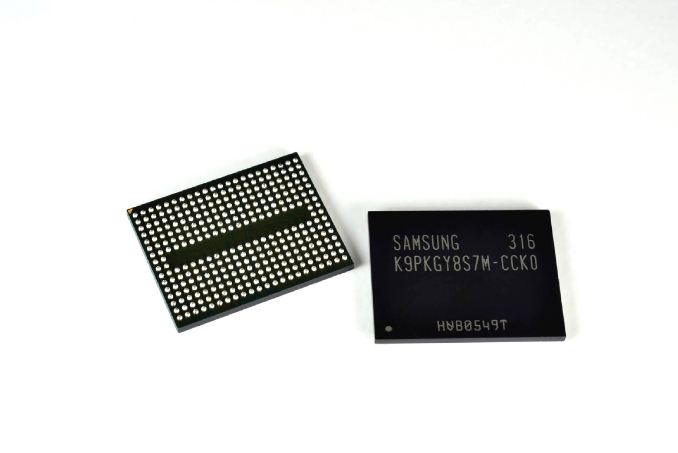
The Truth About SSD Data Retention

In the past week, quite a few media outlets have posted articles claiming that SSDs will lose data in a matter of days if left unpowered. While there is some (read: very, very little) truth to that, it has created a lot of chatter and confusion in forums and even I have received a few questions about the validity of the claims, so rather than responding to individual emails/tweets from people who want to know more, I thought I would explain the matter in depth to everyone at once. 

First of all, the presentation everyone is talking about can be found here. Unlike some sites reported, it’s not a presentation from Seagate — it’s an official JEDEC presentation from Alvin Cox, the Chairman of JC-64.8 subcommittee (i.e. SSD committee) at the time, meaning that it’s supposed to act as an objective source of information for all SSD vendors. It is, however, correct that Mr. Cox works as a Senior Staff Engineer at Seagate, but that is irrelevant because the whole purpose of JEDEC is to bring manufacturers together to develop open standards. The committee members and chairmen are all working for some company and currently the JC-64.8 subcommittee is lead by Frank Chu from HGST.

Before we go into the actual data retention topic, let’s outline the situation by focusing on the conditions that must be met when the manufacturer is determining the endurance rating for an SSD. First off, the drive must maintain its capacity, meaning that it cannot retire so many blocks that the user capacity would decrease. Secondly, the drive must meet the required UBER (number of data errors per number of bits read) spec as well as be within the functional failure requirement. Finally, the drive must retain data without power for a set amount of time to meet the JEDEC spec. Note that all these must be conditions must be met when the maximum number of data has been written i.e. if a drive is rated at 100TB, it must meet these specs after 100TB of writes.
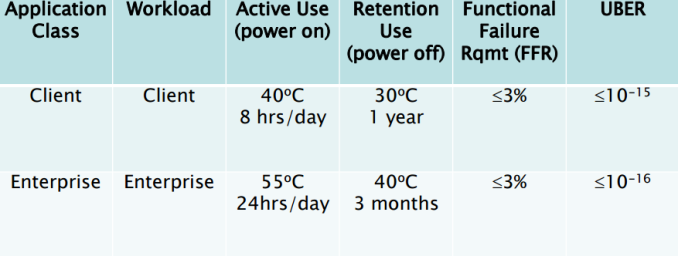
The table above summarizes the requirements for both client and enterprise SSDs. As we can see, the data retention requirement for a client SSD is one-year at 30°C, which is above typical room temperature. The retention does depend on the temperature, so let’s take a closer look of how the retention scales with temperature.
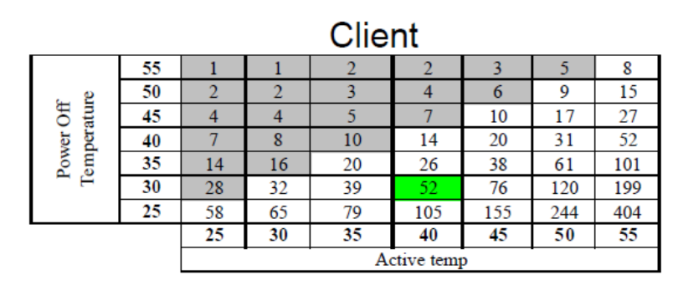
EDIT: Note that the data in the table above is based on material sent by Intel, not Seagate.

At 40°C active and 30°C power off temperature, a client SSD is set to retain data for 52 weeks i.e. one year. As the table shows, the data retention is proportional to active temperature and inversely proportional to power off temperature, meaning that a higher power off temperature will result in decreased retention. In a worst case scenario where the active temperature is only 25-30°C and power off is 55°C, the data retention can be as short as one week, which is what many sites have touted with their “data loss in matter of days” claims. Yes, it can technically happen, but not in typical client environment.

In reality power off temperature of 55°C is not realistic at all for a client user because the drive will most likely be stored somewhere in the house (closet, basement, garage etc.) in room temperature, which tends to be below 30°C. Active temperature, on the other hand, is usually at least 40°C because the drive and other components in the system generate heat that puts the temperature over room temperature.
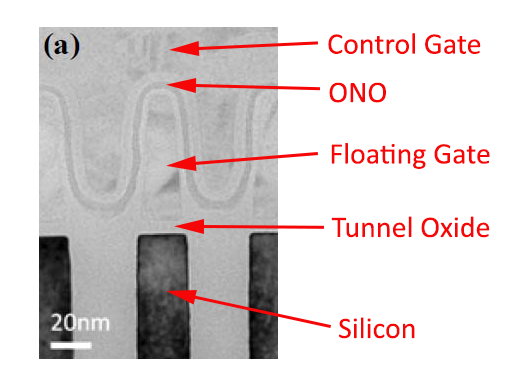
As always, there is a technical explanation to the data retention scaling. The conductivity of a semiconductor scales with temperature, which is bad news for NAND because when it’s unpowered the electrons are not supposed to move as that would change the charge of the cell. In other words, as the temperature increases, the electrons escape the floating gate faster that ultimately changes the voltage state of the cell and renders data unreadable (i.e. the drive no longer retains data). 

For active use the temperature has the opposite effect. Because higher temperature makes the silicon more conductive, the flow of current is higher during program/erase operation and causes less stress on the tunnel oxide, improving the endurance of the cell because endurance is practically limited by tunnel oxide’s ability to hold the electrons inside the floating gate.

All in all, there is absolutely zero reason to worry about SSD data retention in typical client environment. Remember that the figures presented here are for a drive that has already passed its endurance rating, so for new drives the data retention is considerably higher, typically over ten years for MLC NAND based SSDs. If you buy a drive today and stash it away, the drive itself will become totally obsolete quicker than it will lose its data. Besides, given the cost of SSDs, it’s not cost efficient to use them for cold storage anyway, so if you’re looking to archive data I would recommend going with hard drives for cost reasons alone.
NVIDIA’s GRID Game Streaming Service Rolls Out 1080p60 Support

NVIDIA’s GRID Game Streaming Service Rolls Out 1080p60 Support

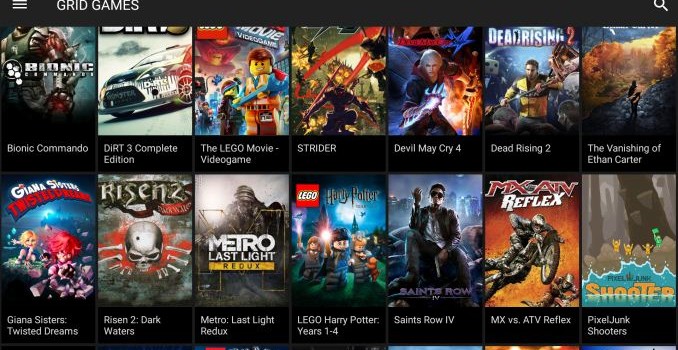
Word comes from NVIDIA this afternoon that they are rolling out a beta update to their GRID game streaming service. Starting today, the service is adding 1080p60 streaming to its existing 720p60 streaming option, with the option initially going out to members of the SHIELD HUB beta group.

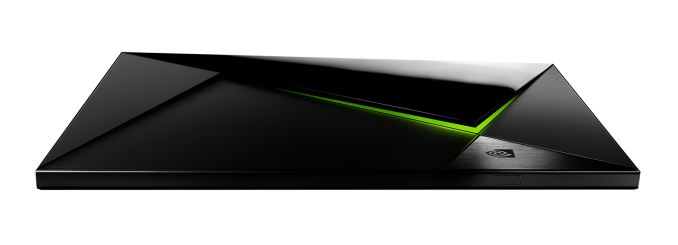
Today’s announcement from NVIDIA comes as the company is ramping up for the launch of the SHIELD Android TV and its accompanying commercial GRID service. The new SHIELD console is scheduled to ship this month, meanwhile the commercialization of the GRID service is expected to take place in June, with the current free GRID service for existing SHIELD portable/tablet users listed as running through June 30th. Given NVIDIA’s ambitions to begin charging for the service, it was only a matter of time until the company began offering the service, especially as the SHIELD Android TV will be hooked up to much larger screens where the limits of 720p would be more easily noticed.

In any case, from a technical perspective NVIDIA has long had the tools necessary to support 1080p streaming – NVIDIA’s video cards already support 1080p60 streaming to SHIELD devices via GameStream – so the big news here is that NVIDIA has finally flipped the switch with their servers and clients. Though given the fact that 1080p is 2.25x as many pixels as 720p, I’m curious whether part of this process has involved NVIDIA adding some faster GRID K520 cards (GK104) to their server clusters, as the lower-end GRID K340 cards (GK107) don’t offer quite the throughput or VRAM one traditionally needs for 1080p at 60fps.

But the truly difficult part of this rollout is on the bandwidth side. With SHIELD 720p streaming already requiring 5-10Mbps of bandwidth and NVIDIA opting for quality over efficiency on the 1080p service, the client bandwidth requirements for the 1080p service are enormous. 1080p GRID will require a 30Mbps connection, with NVIDIA recommending users have a 50Mbps connection to keep from any other network devices compromising the game stream. To put this in perspective, no video streaming service hits 30Mbps, and in fact Blu-Ray itself tops out at 48Mbps for audio + video. NVIDIA in turn needs to run at a fairly high bitrate to make up for the fact that they have to all of this encoding in real-time with low latency (as opposed to highly optimized offline encoding), hence the significant bandwidth requirement. Meanwhile 50Mbps+ service in North America is still fairly rare – these requirements all but limit it to cable and fiber customers – so at least for now only a limited number of people will have the means to take advantage of the higher resolution.

NVIDIA GRID System Requirements
  720p60 1080p60
Minimum Bandwidth 10Mbps 30Mbps
Recommended Bandwidth N/A 50Mbps
Device Any SHIELD, Native Or Console Mode Any SHIELD, Console Mode Only (no 1080p60 to Tablet’s screen)

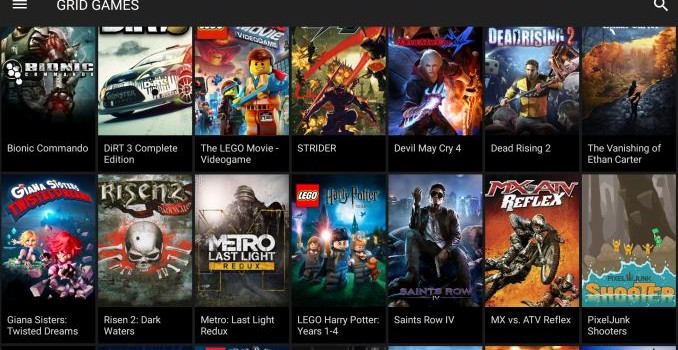
As for the games that support 1080p streaming, most, but not all GRID games support it at this time. NVIDIA’s announcement says that 35 games support 1080p, with this being out of a library of more than 50 games. Meanwhile I’m curious just what kind of graphics settings NVIDIA is using for some of these games. With NVIDIA’s top GRID card being the equivalent of an underclocked GTX 680, older games shouldn’t be an issue, but more cutting edge games almost certainly require tradeoffs to maintain framerates near 60fps. So I don’t imagine NVIDIA is able to run every last game with all of their settings turned up to maximum.

Finally, NVIDIA’s press release also notes that the company has brought additional datacenters online, again presumably in anticipation of the commercial service launch. A Southwest US datacenter is now available, and a datacenter in Central Europe is said to be available later this month. This brings NVIDIA’s total datacenter count up to six: USA Northwest, USA Southwest, USA East Coast, Northern Europe, Central Europe, and Asia Pacific.

NVIDIA’s GRID Game Streaming Service Rolls Out 1080p60 Support

NVIDIA’s GRID Game Streaming Service Rolls Out 1080p60 Support

Word comes from NVIDIA this afternoon that they are rolling out a beta update to their GRID game streaming service. Starting today, the service is adding 1080p60 streaming to its existing 720p60 streaming option, with the option initially going out to members of the SHIELD HUB beta group.

Today’s announcement from NVIDIA comes as the company is ramping up for the launch of the SHIELD Android TV and its accompanying commercial GRID service. The new SHIELD console is scheduled to ship this month, meanwhile the commercialization of the GRID service is expected to take place in June, with the current free GRID service for existing SHIELD portable/tablet users listed as running through June 30th. Given NVIDIA’s ambitions to begin charging for the service, it was only a matter of time until the company began offering the service, especially as the SHIELD Android TV will be hooked up to much larger screens where the limits of 720p would be more easily noticed.

In any case, from a technical perspective NVIDIA has long had the tools necessary to support 1080p streaming – NVIDIA’s video cards already support 1080p60 streaming to SHIELD devices via GameStream – so the big news here is that NVIDIA has finally flipped the switch with their servers and clients. Though given the fact that 1080p is 2.25x as many pixels as 720p, I’m curious whether part of this process has involved NVIDIA adding some faster GRID K520 cards (GK104) to their server clusters, as the lower-end GRID K340 cards (GK107) don’t offer quite the throughput or VRAM one traditionally needs for 1080p at 60fps.

But the truly difficult part of this rollout is on the bandwidth side. With SHIELD 720p streaming already requiring 5-10Mbps of bandwidth and NVIDIA opting for quality over efficiency on the 1080p service, the client bandwidth requirements for the 1080p service are enormous. 1080p GRID will require a 30Mbps connection, with NVIDIA recommending users have a 50Mbps connection to keep from any other network devices compromising the game stream. To put this in perspective, no video streaming service hits 30Mbps, and in fact Blu-Ray itself tops out at 48Mbps for audio + video. NVIDIA in turn needs to run at a fairly high bitrate to make up for the fact that they have to all of this encoding in real-time with low latency (as opposed to highly optimized offline encoding), hence the significant bandwidth requirement. Meanwhile 50Mbps+ service in North America is still fairly rare – these requirements all but limit it to cable and fiber customers – so at least for now only a limited number of people will have the means to take advantage of the higher resolution.

NVIDIA GRID System Requirements
  720p60 1080p60
Minimum Bandwidth 10Mbps 30Mbps
Recommended Bandwidth N/A 50Mbps
Device Any SHIELD, Native Or Console Mode Any SHIELD, Console Mode Only (no 1080p60 to Tablet’s screen)

As for the games that support 1080p streaming, most, but not all GRID games support it at this time. NVIDIA’s announcement says that 35 games support 1080p, with this being out of a library of more than 50 games. Meanwhile I’m curious just what kind of graphics settings NVIDIA is using for some of these games. With NVIDIA’s top GRID card being the equivalent of an underclocked GTX 680, older games shouldn’t be an issue, but more cutting edge games almost certainly require tradeoffs to maintain framerates near 60fps. So I don’t imagine NVIDIA is able to run every last game with all of their settings turned up to maximum.

Finally, NVIDIA’s press release also notes that the company has brought additional datacenters online, again presumably in anticipation of the commercial service launch. A Southwest US datacenter is now available, and a datacenter in Central Europe is said to be available later this month. This brings NVIDIA’s total datacenter count up to six: USA Northwest, USA Southwest, USA East Coast, Northern Europe, Central Europe, and Asia Pacific.

Avago Announces PLX PEX9700 Series PCIe Switches: Focusing on Data Center and Racks

Avago Announces PLX PEX9700 Series PCIe Switches: Focusing on Data Center and Racks

One of the benefits of PCIe switches is that they are designed to be essentially transparent. In the consumer space, I would wager that 99% of the users do not even know if their system has one, let alone what it does or how it uses it. In most instances, PCIe switches help balance multiple PCIe configurations when a CPU and chipset supports multiple devices. More advanced situations might include multiplexing out PCIe lanes into multiple ports, allowing more devices to be used and expanding the limitations of the design. For example, the PEX8608 found in the ASRock C2750D4I which splits one PCIe x4 into four PCIe x1 lanes, allowing for four controllers as end points rather than just the one. Or back in 2012 we did a deep dive on the PLX8747 which splits 8 or 16 PCIe lanes into 32, through the use of a FIFO buffer and a mux, to allow for x8/x8/x8/x8 PCIe arrangements – the 8747 is still in use today in products like the ASRock X99 Extreme11 which uses two or the X99 WS-E/10G which has one.

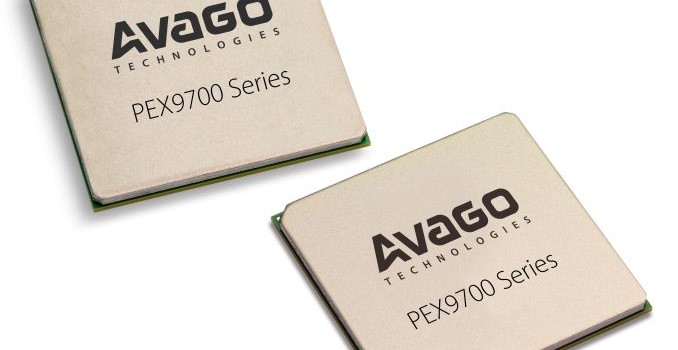
Today’s announcement is from Avago, the company that purchased PLX back in June 2014, for a new range of PCIe switches focused on the data center and racks called the PEX9700 series. Part of the iterative improvements in PCIe switches should ultimately be latency and bandwidth, but there are several other features worth noting which from the outside might not be considered, such as the creation of a switching fabric.

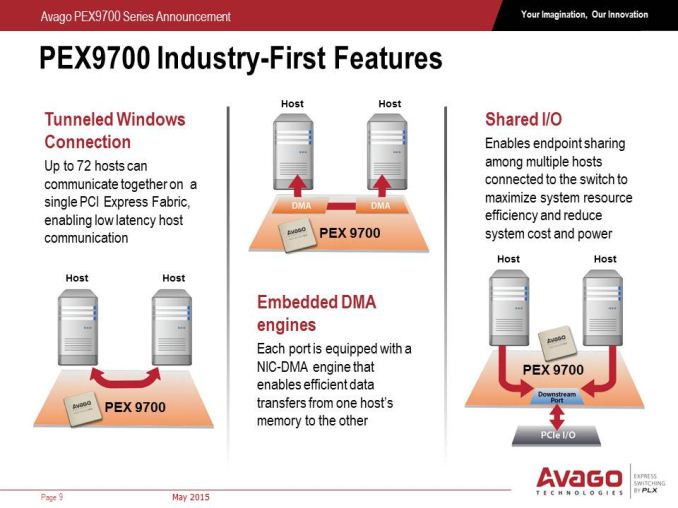
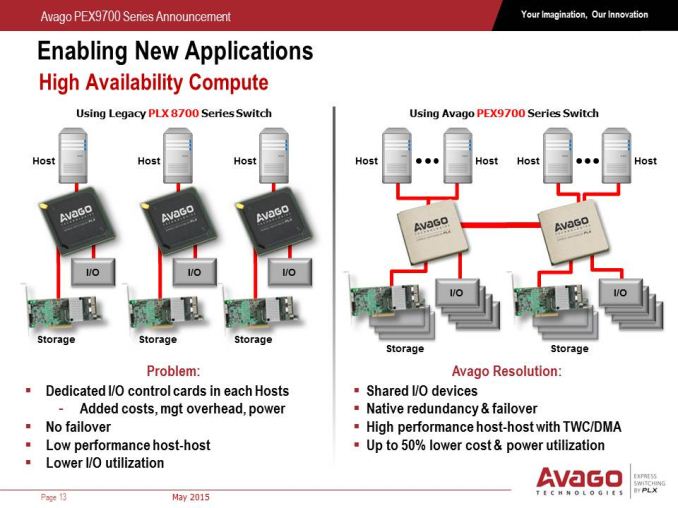
Typically the PCIe switches we encounter in the consumer space use one upstream host to several downstream ports, and each port can have a series of PCIe lanes as bandwidth (so 4 ports can total 16 lanes, etc). This means there is one CPU host by which the PCIe switch can send the work from the downstream ports. The PLX9700 series is designed to communicate with several hosts at once, up to 24 at a time, allowing direct PCIe to PCIe communication, direct memory copy from one host to another, or shared downstream ports. Typically PCIe is a host-to-device topology, however the PEX9700 line allows multiple hosts to come together with an embedded DMA engine on each port to probe host memory for efficient transfer.

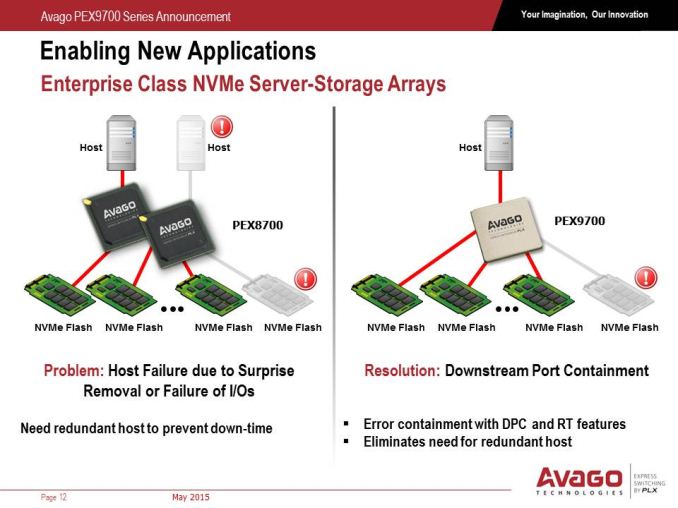
Unlike the previous PCIe switches from PLX, the new series also allows for downstream port isolation or containment, meaning that if one device downstream fails, the switch can isolate the data pathway and disable it until it is replaced. This can also be done manually as the PEX9700 series will also come with a management port which Avago states will use software modules for different control applications.

In the datacenter and within rack infrastructure, redundancy is a key feature to consider. As the PEX9700 switches allow host-to-host communication, it also allows control from multiple hosts, allowing one host to take over in the event of failure. The switches can also agglomerate and talk to each other, allowing for multiple execution routes especially with shared IO devices or in multiple socket systems for GPGPU use. Each switch will also have a level of hot-plugging and redundancy, allowing disabled devices to be removed, replaced and restarted. When it comes to IO, read requests mid-flow are fed back to the host as information on failed attempts, allowing instant reattempts when a replacement device is placed back into the system.

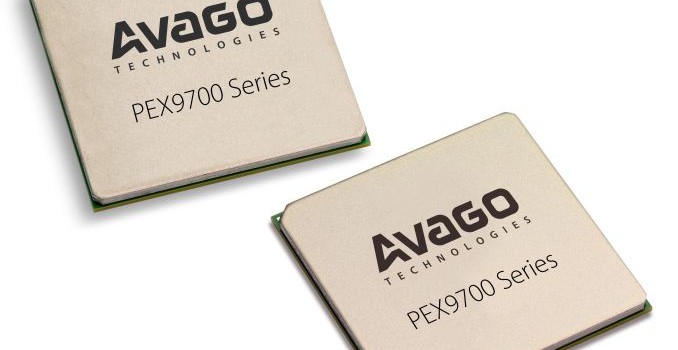
Avago is stating that the 9700 series will have seven products ranging from 5 to 24 ports (plus one for a management port) from 12 to 97 lanes. This also includes hot plug capability, tunneled connections, clock isolation and as mentioned before, downstream port isolation. These models are currently in full scale production, as per today’s announcement, using TSMC’s 40nm process. In a briefing call today with Akber Kazmi, the Senior Product Line Manager for the PEX9700 series, he stated that validation of the designs took the best part of eight months, but that relevant tier one customers already have their hands on the silicon to develop their platforms.

For a lot of home users, this doesn’t mean that much. We might see one of these switches in a future consumer motherboard focused on dual-socket GPGPU, but the heart of these features lies in the ability to have multiple nodes access data quickly within a specific framework without having to invest in expensive technologies such as Infiniband. Avago is stating a 150ns latency per hop, with bandwidth limited ultimately by the upstream data path – the PCIe switch ultimately moves the bandwidth around to where it is most needed depending on downstream demand. The PEX9700 switches also allow for direct daisy chaining or as a cascading architecture through a backplane, reducing costs of big switches and allowing for a peak bandwidth between two switches of a full PCIe 3.0 x16 interface, allowing scaling up to 128 Gbps (minus overhead).

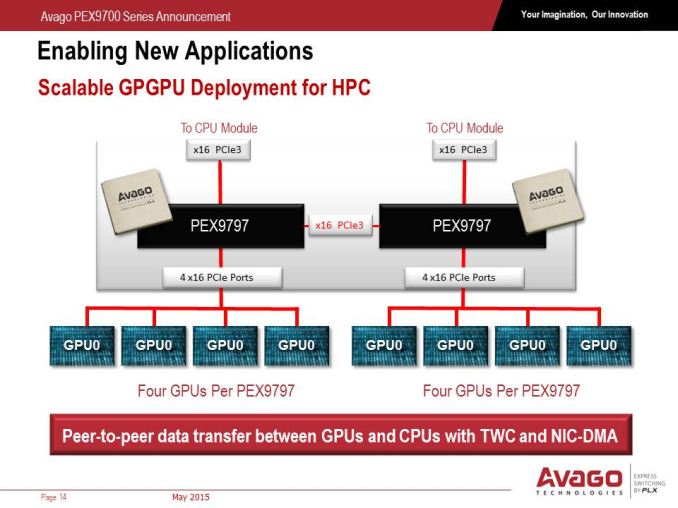
Personally, the GPGPU situation interests me a lot. When we have a dual socket system with each socket feeding multiple GPUs, with one PEX9700 switch per CPU (in this case, PEX9797) but interconnected, it allows GPUs on one socket to talk to GPUs on the other without having to go all the way back up to the CPU and across the QPI bus, which saves both latency and bandwidth, and each of the PCIe switches can be controlled.

The PEX9700 series of switches bucks the status quo of requiring translation layers such as NICs or Infiniband for host-to-host-to-device communication and all inbetween, which is what Avago is hoping the product stack will accomplish. The main factors that Avago see the benefit include latency (fewer translation layers for communication), cost (scales up to 128 Gbps minus overhead), power (one PEX9700 chip has a 3W-25W power rating) and energy cost savings on top of that. On paper at least, the capabilities of the new range could potentially be disruptive. Hopefully we’ll get to see one in the flesh at Computex from Avago’s partners, and we’ll update you when we do.

Source: Avago

Avago Announces PLX PEX9700 Series PCIe Switches: Focusing on Data Center and Racks

Avago Announces PLX PEX9700 Series PCIe Switches: Focusing on Data Center and Racks

One of the benefits of PCIe switches is that they are designed to be essentially transparent. In the consumer space, I would wager that 99% of the users do not even know if their system has one, let alone what it does or how it uses it. In most instances, PCIe switches help balance multiple PCIe configurations when a CPU and chipset supports multiple devices. More advanced situations might include multiplexing out PCIe lanes into multiple ports, allowing more devices to be used and expanding the limitations of the design. For example, the PEX8608 found in the ASRock C2750D4I which splits one PCIe x4 into four PCIe x1 lanes, allowing for four controllers as end points rather than just the one. Or back in 2012 we did a deep dive on the PLX8747 which splits 8 or 16 PCIe lanes into 32, through the use of a FIFO buffer and a mux, to allow for x8/x8/x8/x8 PCIe arrangements – the 8747 is still in use today in products like the ASRock X99 Extreme11 which uses two or the X99 WS-E/10G which has one.

Today’s announcement is from Avago, the company that purchased PLX back in June 2014, for a new range of PCIe switches focused on the data center and racks called the PEX9700 series. Part of the iterative improvements in PCIe switches should ultimately be latency and bandwidth, but there are several other features worth noting which from the outside might not be considered, such as the creation of a switching fabric.

Typically the PCIe switches we encounter in the consumer space use one upstream host to several downstream ports, and each port can have a series of PCIe lanes as bandwidth (so 4 ports can total 16 lanes, etc). This means there is one CPU host by which the PCIe switch can send the work from the downstream ports. The PLX9700 series is designed to communicate with several hosts at once, up to 24 at a time, allowing direct PCIe to PCIe communication, direct memory copy from one host to another, or shared downstream ports. Typically PCIe is a host-to-device topology, however the PEX9700 line allows multiple hosts to come together with an embedded DMA engine on each port to probe host memory for efficient transfer.

Unlike the previous PCIe switches from PLX, the new series also allows for downstream port isolation or containment, meaning that if one device downstream fails, the switch can isolate the data pathway and disable it until it is replaced. This can also be done manually as the PEX9700 series will also come with a management port which Avago states will use software modules for different control applications.

In the datacenter and within rack infrastructure, redundancy is a key feature to consider. As the PEX9700 switches allow host-to-host communication, it also allows control from multiple hosts, allowing one host to take over in the event of failure. The switches can also agglomerate and talk to each other, allowing for multiple execution routes especially with shared IO devices or in multiple socket systems for GPGPU use. Each switch will also have a level of hot-plugging and redundancy, allowing disabled devices to be removed, replaced and restarted. When it comes to IO, read requests mid-flow are fed back to the host as information on failed attempts, allowing instant reattempts when a replacement device is placed back into the system.

Avago is stating that the 9700 series will have seven products ranging from 5 to 24 ports (plus one for a management port) from 12 to 97 lanes. This also includes hot plug capability, tunneled connections, clock isolation and as mentioned before, downstream port isolation. These models are currently in full scale production, as per today’s announcement, using TSMC’s 40nm process. In a briefing call today with Akber Kazmi, the Senior Product Line Manager for the PEX9700 series, he stated that validation of the designs took the best part of eight months, but that relevant tier one customers already have their hands on the silicon to develop their platforms.

For a lot of home users, this doesn’t mean that much. We might see one of these switches in a future consumer motherboard focused on dual-socket GPGPU, but the heart of these features lies in the ability to have multiple nodes access data quickly within a specific framework without having to invest in expensive technologies such as Infiniband. Avago is stating a 150ns latency per hop, with bandwidth limited ultimately by the upstream data path – the PCIe switch ultimately moves the bandwidth around to where it is most needed depending on downstream demand. The PEX9700 switches also allow for direct daisy chaining or as a cascading architecture through a backplane, reducing costs of big switches and allowing for a peak bandwidth between two switches of a full PCIe 3.0 x16 interface, allowing scaling up to 128 Gbps (minus overhead).

Personally, the GPGPU situation interests me a lot. When we have a dual socket system with each socket feeding multiple GPUs, with one PEX9700 switch per CPU (in this case, PEX9797) but interconnected, it allows GPUs on one socket to talk to GPUs on the other without having to go all the way back up to the CPU and across the QPI bus, which saves both latency and bandwidth, and each of the PCIe switches can be controlled.

The PEX9700 series of switches bucks the status quo of requiring translation layers such as NICs or Infiniband for host-to-host-to-device communication and all inbetween, which is what Avago is hoping the product stack will accomplish. The main factors that Avago see the benefit include latency (fewer translation layers for communication), cost (scales up to 128 Gbps minus overhead), power (one PEX9700 chip has a 3W-25W power rating) and energy cost savings on top of that. On paper at least, the capabilities of the new range could potentially be disruptive. Hopefully we’ll get to see one in the flesh at Computex from Avago’s partners, and we’ll update you when we do.

Source: Avago