AMD Dives Deep On Asynchronous Shading

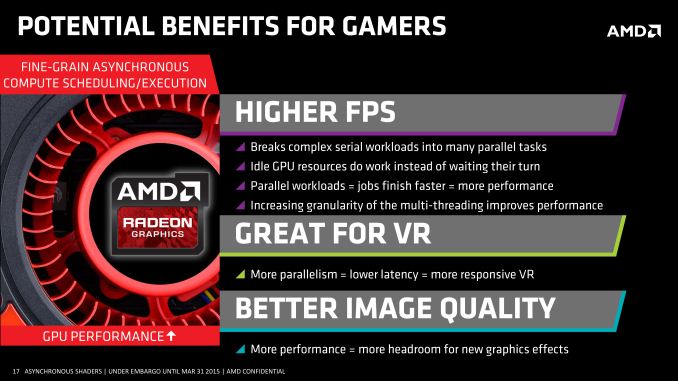
Earlier this month at GDC, AMD introduced their VR technology toolkit, LiquidVR. LiquidVR offers game developers a collection of useful tools and technologies for adding high performance VR to games, including features to make better utilization of multiple GPUs, features to reduce display chain latency, and finally features to reduce rendering latency. Key among the latter features set is support for asynchronous shaders, which is the ability to execute certain shader operations concurrently with other rendering operations, rather than in a traditional serial fashion.
It’s this last item that ended up kicking up a surprisingly deep conversation between myself, AMD’s “Chief Gaming Scientist” Richard Huddy, and other members of AMD’s GDC staff. AMD was keen to show off the performance potential of async shaders, but in the process we reached the realization that to this point AMD hasn’t talked very much about their async execution abilities within the GCN architecture, particularly within a graphics context as opposed to a compute context. While the idea of async shaders is pretty simple – executing shaders concurrently (and yet not in sync with) other operations – it’s a bit less obvious just what the real-world benefits are why this matters. After all, aren’t GPUs already executing a massive number of threads?
With that in mind AMD agreed it was something that needed further consideration, and after a couple of weeks they got back to us (and the rest of the tech press) with further details of their async shader implementation. What AMD came back to us with isn’t necessarily more detail on the hardware itself, but it was a better understanding of how AMD’s execution resources are used in a graphics context, why recent API developments matter, and ultimately why asynchronous shading/computing is only now being tapped in PC games.
Why Asynchronous Shading Wasn’t Accessible Before
AMD has offered multiple Asynchronous Compute Engines (ACEs) since the very first GCN part in 2011, the Tahiti-powered Radeon HD 7970. However prior to now the technical focus on the ACEs was for pure compute workloads, which true to their name allow GCN GPUs to execute compute tasks from multiple queues. It wasn’t until very recently that the ACEs became important for graphical (or rather mixed graphics + compute) workloads.
Why? Well the short answer is that in another stake in the heart of DirectX 11, DirectX 11 wasn’t well suited for asynchronous shading. The same heavily abstracted, driver & OS controlled rendering path that gave DX11 its relatively high CPU overhead and poor multi-core command buffer submission also enforced very stringent processing requirements. DX11 was a serial API through and through, both for command buffer execution and as it turned out shader execution.
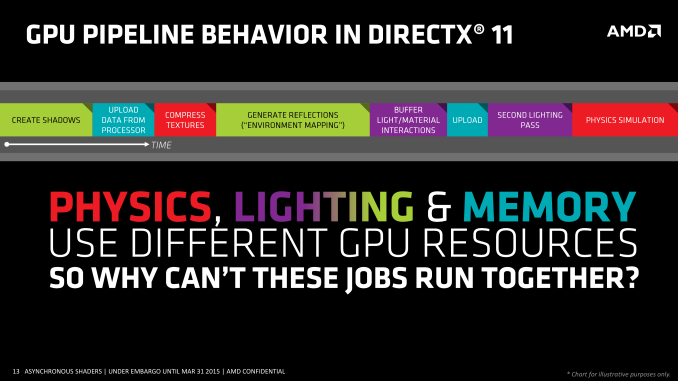
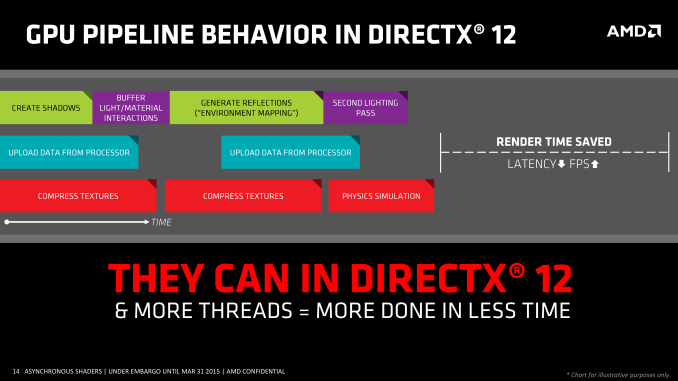
As one might expect when we’re poking holes into DirectX 11, the asynchronous shader issues of the API are being addressed in Mantle, DirectX 12, and other low-level APIs. Along with making it much easier to submit work from multiple threads over multiple cores, all of these APIs are also making significant changes in how work is executed. With the ability to accept work from multiple threads, work can now be more readily executed in parallel and asynchronously, enabling asynchronous shading for the first time.
There is also one exception to the DX11 rule that we’ll get to in depth a bit later, but in short that exception is custom middleware like LiquidVR. Even in a DX11 context LiquidVR can leverage some (but not all) of the async shading functionality of GCN GPUs to do things like warping asynchronously, as it technically sits between DX11 and the GPU. This in turn is why async shading is so important to AMD’s VR plans, as all of their GCN GPUs are capable of this and it can be exposed in the current DX11 ecosystem.
Executing Async: Hardware & Software
Of course to pull this off you need hardware that can support executing work from multiple queues, and this is something that AMD invested in early. GCN 1.0 and GCN 1.1 Bonaire included 1 graphics command processor and 2 ACEs, while GCN 1.1 Hawaii and GCN 1.2 Tonga (so far) include 1 graphics command processor and 8 ACEs. Meanwhile the GCN-powered Xbox One and Playstation 4 take their own twists, each packing different configurations of graphics command processors and ACEs.
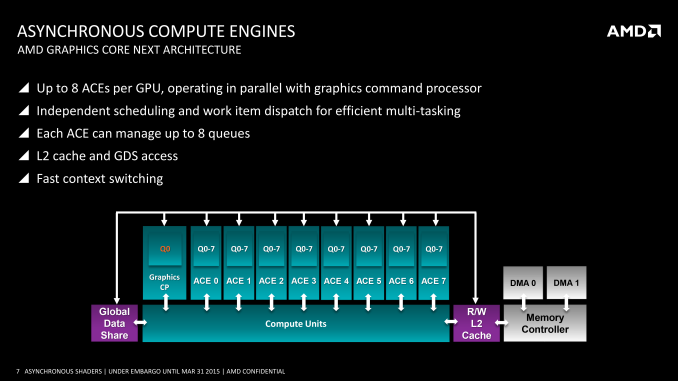
From a feature perspective it’s important to note that the ACEs and graphics command processors are different from each other in a small but important way. Only the graphics command processors have access to the full GPU – not just the shaders, but the fixed function units like the geometry units and ROPs – while the ACEs only get shader access. Ostensibly the ACEs are for compute tasks and the command processor is for graphics tasks, however with compute shaders blurring the line between graphics and compute, the ACEs can be used to execute compute shaders as well now that software exists to make use of it.
On a side note, part of the reason for AMD’s presentation is to explain their architectural advantages over NVIDIA, so we checked with NVIDIA on queues. Fermi/Kepler/Maxwell 1 can only use a single graphics queue or their complement of compute queues, but not both at once – early implementations of HyperQ cannot be used in conjunction with graphics. Meanwhile Maxwell 2 has 32 queues, composed of 1 graphics queue and 31 compute queues (or 32 compute queues total in pure compute mode). So pre-Maxwell 2 GPUs have to either execute in serial or pre-empt to move tasks ahead of each other, which would indeed give AMD an advantage..
| GPU Queue Engine Support | ||||
| Graphics/Mixed Mode | Pure Compute Mode | |||
| AMD GCN 1.2 (285) | 1 Graphics + 8 Compute | 8 Compute | ||
| AMD GCN 1.1 (290 Series) | 1 Graphics + 8 Compute | 8 Compute | ||
| AMD GCN 1.1 (260 Series) | 1 Graphics + 2 Compute | 2 Compute | ||
| AMD GCN 1.0 (7000/200 Series) | 1 Graphics + 2 Compute | 2 Compute | ||
| NVIDIA Maxwell 2 (900 Series) | 1 Graphics + 31 Compute | 32 Compute | ||
| NVIDIA Maxwell 1 (750 Series) | 1 Graphics | 32 Compute | ||
| NVIDIA Kepler GK110 (780/Titan) | 1 Graphics | 32 Compute | ||
| NVIDIA Kepler GK10x (600/700 Series) | 1 Graphics | 1 Compute | ||
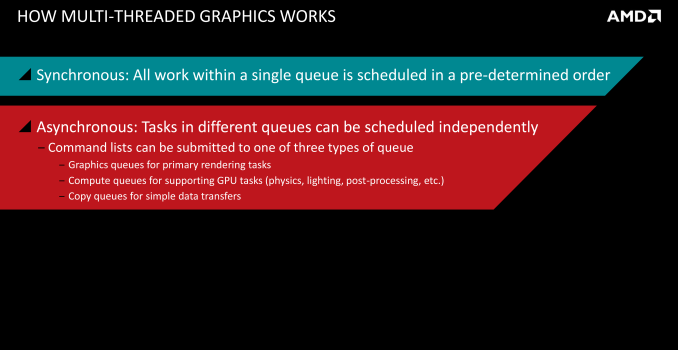
Moving on, coupled with a DMA copy engine (common to all GCN designs), GCN can potentially execute work from several queues at once. In an ideal case for graphics workloads this would mean that the graphics queue is working on jobs that require its full hardware access capabilities, while the copy queue handles data management, and finally one-to-several compute queues are fed compute shaders. What each of those task precisely is depends on the game developer, but examples of graphics and compute tasks include shadowing and MSAA on the former, and ambient occlusion, second-order physics, and color grading on the latter.
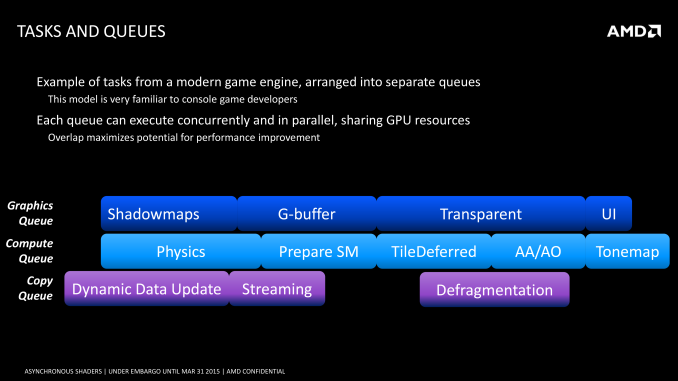
As a consequence of having multiple queues to feed the GPU, it is possible for the GPU to work on multiple tasks at once. Doing this seems counter-intuitive at first – GPUs already work on multiple threads, and graphics rendering is itself embarrassingly parallel, allowing it to be easily broken down into multiple threads in the first place. However at a lower level GPUs only achieve their famous high throughput performance in exchange for high latency; lots of work can get done, but relatively speaking any one thread may take a while to reach completion. For this reason the efficient scheduling of threads within a GPU requires an emphasis on latency hiding, to organize threads such that different threads are interleaved to hide the impact of the GPU’s latency.
Latency hiding in turn can become easier with multiple work queues. The additional queues give you additional pools of threads to pick from, and if the GPU is presented with a situation where it absolutely can’t hide latency from the graphics queue and must stall, the compute queues could be used to fill that execution bubble. Similarly, if there flat-out aren’t enough threads from the graphics queue to fill out the GPU, then this presents another opportunistic scenario to execute threads from a compute task to keep the GPU better occupied. Compared to a purely serial system this also helps to mitigate some of the overhead that comes from context switching.
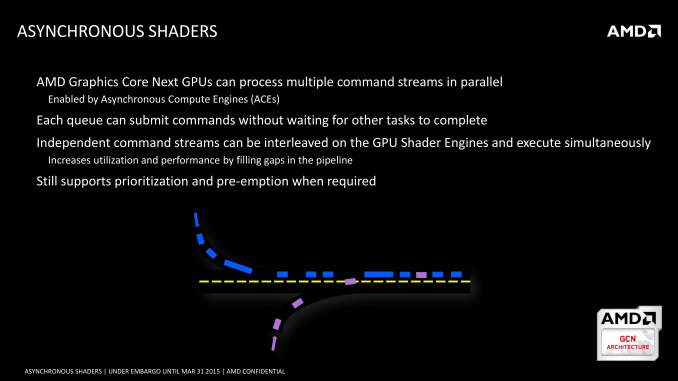
Ultimately the presence of the ACEs and the layout of GCN allows these tasks to be done in an asynchronous manner, ties into the concept of async shaders and what differentiates this from synchronous parallel execution. So long as the task can be done asynchronously, then GCN’s scheduler can grab threads as necessary from the additional queues and load them up to improve performance. Meanwhile, although the number of ACEs can impact how well async shading is able to improve performance by better filling the GPU, AMD readily admits that 8 ACEs is likely overkill for graphics purposes; even a fewer number of queues (e.g. 1+2 in earlier GCN hardware) is useful for this task, and the biggest advantage is simply in having multiple queues in the first place.
The Performance Impact of Asynchronous Shaders
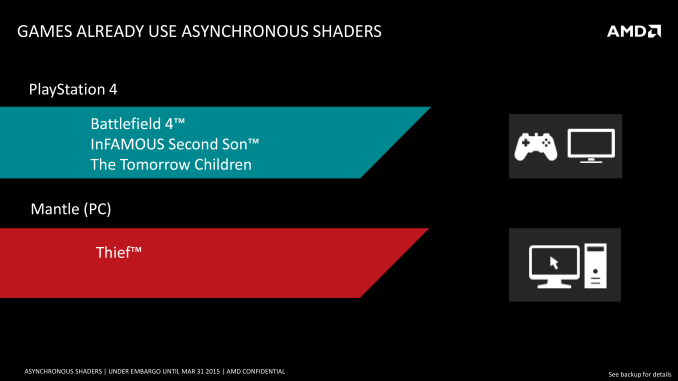
Execution theory aside, what is the actual performance impact of asynchronous shaders? This is a bit harder of a question to answer at this time, though mostly because there’s virtually nothing on the PC capable of using async shaders due to the aforementioned API limitations. Thief, via its Mantle renderer, is the only PC game currently using async shaders, while on the PS4 and its homogenous platform there are a few more titles making using of the tech.
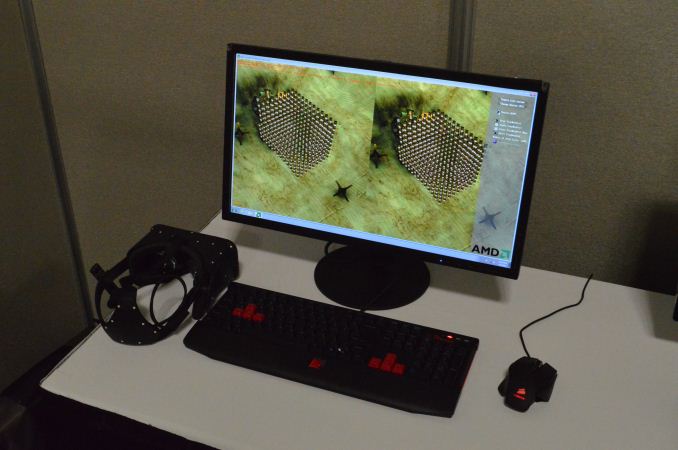
AMD for their part does have an internal demo showcasing the benefits of async shaders, utilizing a post-process blurring effect with and without async shaders, and the performance differences can be quite high. However it’s a synthetic demo, and like all synthetic demos the performance gains represent something of a best-case scenario for the technology. So AMD’s 46% performance improvement, though quite large, is not something we’d expect to see in any game.
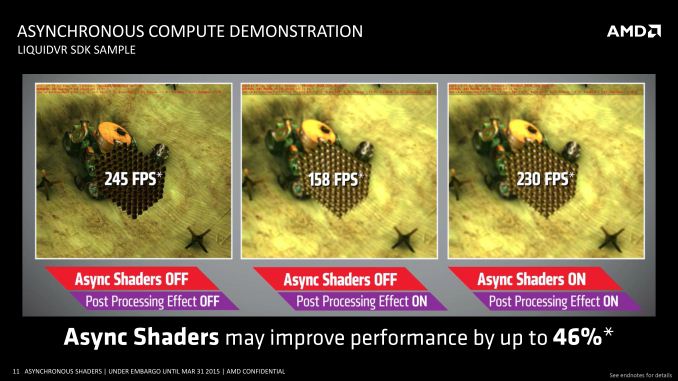
That said, VR (and by extension, LiquidVR) presents an interesting and more straightforward case for the technology, which is why both NVIDIA and AMD have been pursuing it. Asynchronous execution of time warping and other post-processing effects will on average reduce latency (filling those rendering bubbles), with time warping itself reducing perceived latency by altering the image at the last possible second, while the async execution reduces the total amount of time a frame is in the GPU being rendered. The actual latency impact will again not be anywhere near the 46% performance improvement in AMD’s sample, but in the case of VR every millisecond counts.
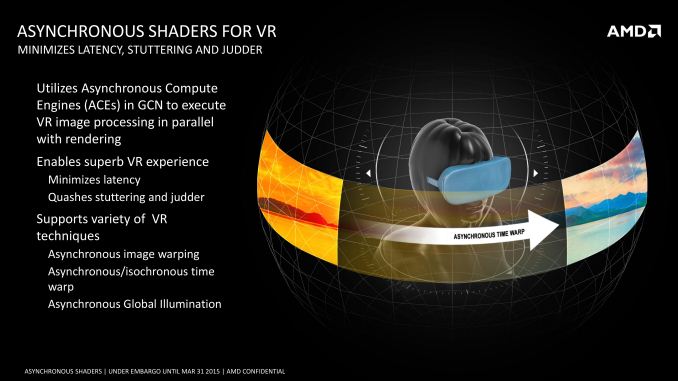
Of course to really measure this we will need games that can use async shaders and VR hardware – both of which are in short supply right now – but the potential benefits are clear. And if AMD has their way, both VR and regular developers will be taking much greater advantage of the capabilities of asynchronous shading.