News


More Intel Core M Coming Q4

More Intel Core M Coming Q4

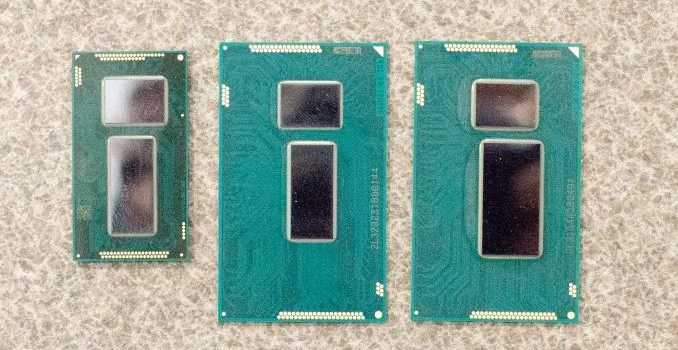
Since Computex, there has been a lot of talk around Intel’s Broadwell-Y / Core-M CPU line. In August Intel treated us to a breakdown of the 14nm process and the Broadwell architecture including all the improvements therein, followed by a more succinct breakdown of the CPUs we should expect. These initial CPUs should be properly available to the public in Q4 in devices such as the Lenovo Yoga 3 Pro using the Core M-5Y70.

The news this week revolves around more Core M CPUs being pushed through the system. This is most likely as a result of Intel binning the CPUs in sufficient quantities to satisfy customers. The specifications are available at ark.intel.com, but the Core M line now stands at seven different SKUs:

Intel Core M Specifications
  5Y71
(New)
5Y70 5Y51
(New)
​5Y31
(New)
5Y10c
(New)
5Y10a 5Y10
Cores / Threads 2 / 4 2 / 4 2 / 4 2 / 4 2 / 4 2 / 4 2 / 4
Base Frequency / MHz 1200 1100 1100 900 800 800 800
Turbo Frequency / MHz 2900 2600 2600 2400 2000 2000 2000
Processor Graphics HD 5300 HD 5300 HD 5300 HD 5300 HD
5300
HD
5300
HD 5300
IGP Base Frequency / MHz 300 100 300 300 300 100 100
IGP Turbo Frequency / MHz 900 850 900 850 800 800 800
L3 Cache 4 MB 4 MB 4 MB 4 MB 4 MB 4 MB 4 MB
TDP 4.5 W 4.5 W 4.5 W 4.5 W 4.5 W 4.5 W 4.5 W
LPDDR3/DDR3L 
Support
1600 MHz 1600 MHz 1600 MHz 1600 MHz 1600 MHz 1600 MHz 1600 MHz
Intel vPro Yes Yes No No No No No
Intel TXT Yes Yes No No No No No
Intel VT-d/VT-x Yes Yes Yes Yes Yes Yes Yes
Intel AES-NI Yes Yes Yes Yes Yes Yes Yes

The new high end model is the 5Y71, offering a 2.9 GHz frequency mode and vPro features. The 5Y51 has slightly better specifications than the higher numbered 5Y70, but loses vPro compatibility. Both the 5Y31 and 5Y51  fill in the large gap between the 5Y10a and 5Y70 in the initial launch. All four new processors all have an improved base GPU frequency, up to 300 MHz, and are slated to work at a cTDP Up of 6W or cTDP Down of 3.5W, depending on the customer’s needs.

All new CPUs are slated for a Q4 launch, which would mean that they might become available for end users in products on the shelf sometime in Q1 2015.

Source: CPU-World

Google Updates Gmail With Material Design and Support for IMAP and Exchange

Google Updates Gmail With Material Design and Support for IMAP and Exchange

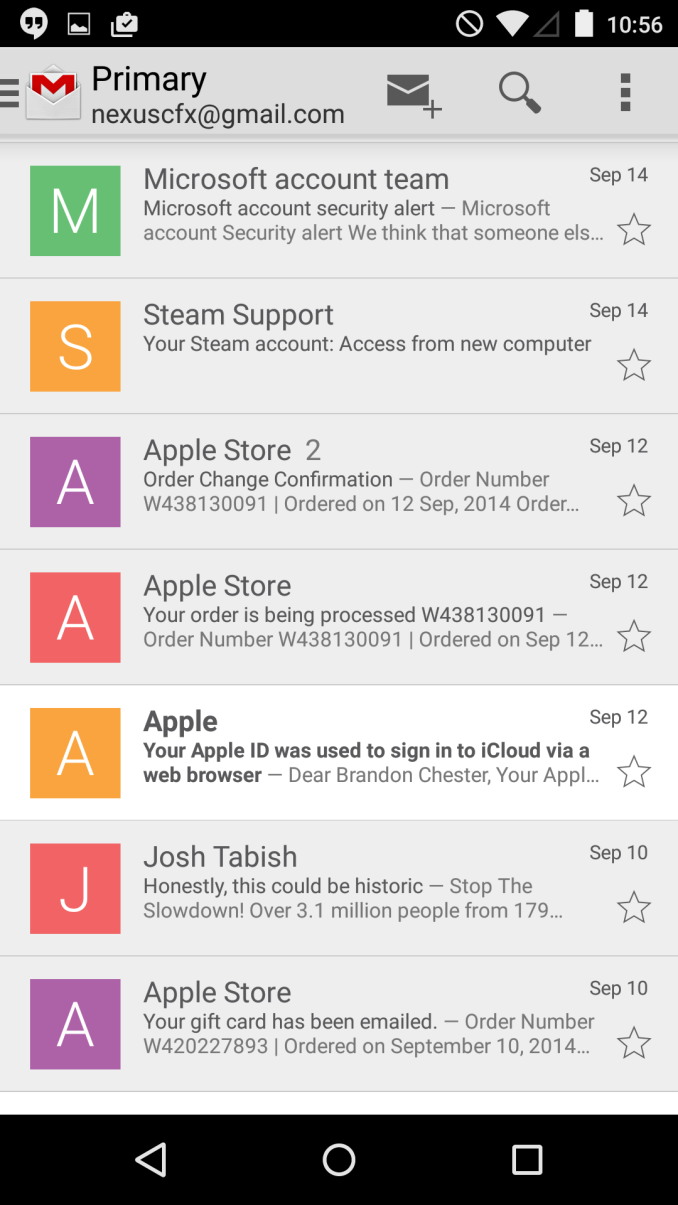
Google’s applications like Gmail, Camera, and Chrome are likely applications that came on your Android phone when you first purchased it. But unlike iOS where Apple has to ship an entire operating system update to update an application, Google’s apps for Android can be updated right from Google Play. Google has been steadily updating their applications to take advantage of their new “Material Design” design principles that were shown off at Google I/O. With Android 5.0 Lollipop on the horizon, Google has to get the remaining applications up to date, and the latest application to recieve the new visual style is Gmail with its major update to version 5.0.

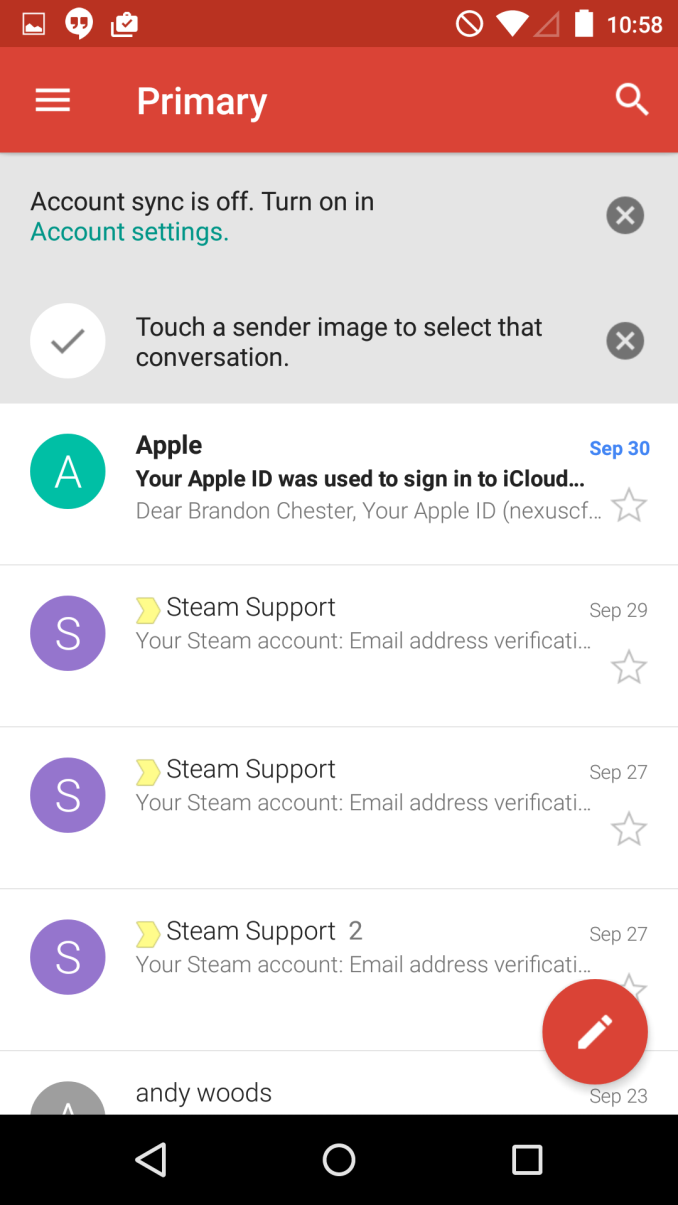
As you can see above, there’s a lot of changes that come with the new Material Design interface. The most striking change is the the removal of the grey that was prevalent throughout the application. In the previous version, the color of an email preview changed to grey to indicate that the email had been read, while unread messages remained white. In the new design, the change between bolded or unbolded preview text indicates whether a message has been read. I personally find this to be much more aesthetically pleasing.

The header and status bar are now a nice moderately saturated red color that doesn’t feel gaudy but brings more color into the interface. The circular button for composing a new email at the bottom also uses this red color. On the topic of circles, Google has begun to use circular contact photos throughout their applications, although in my case they just display the sender’s first initial. If I had put in the effort to assign contact photos the new circles would display them where the squares previously did. 

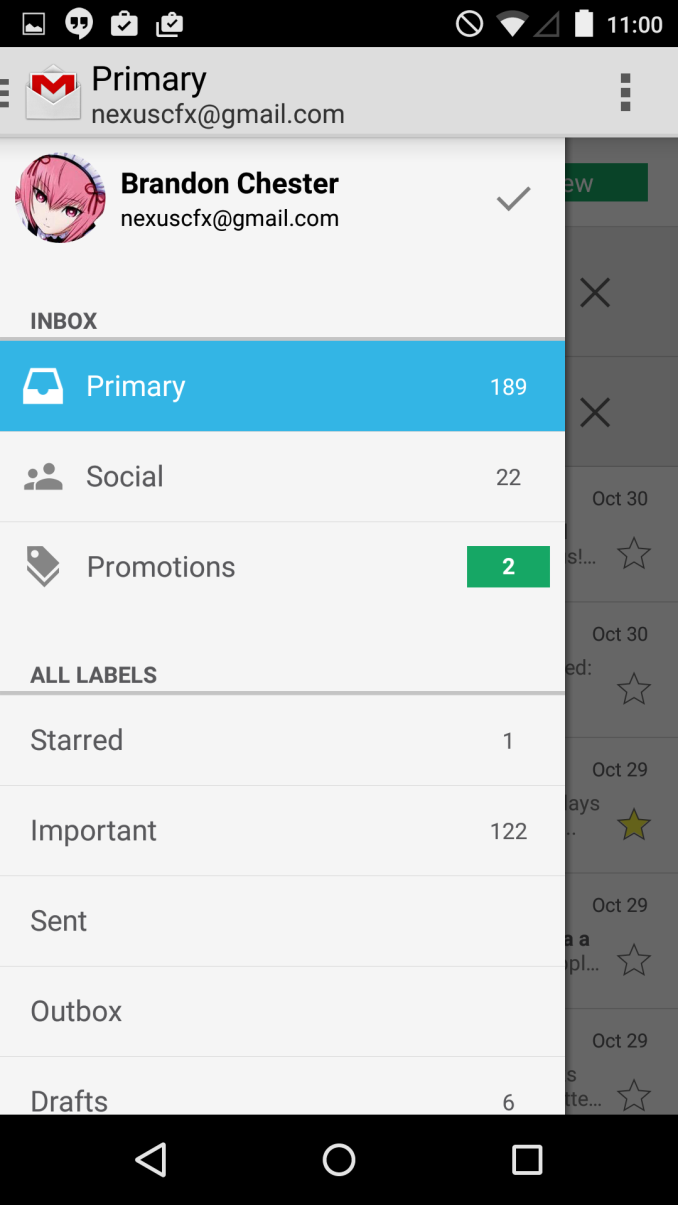
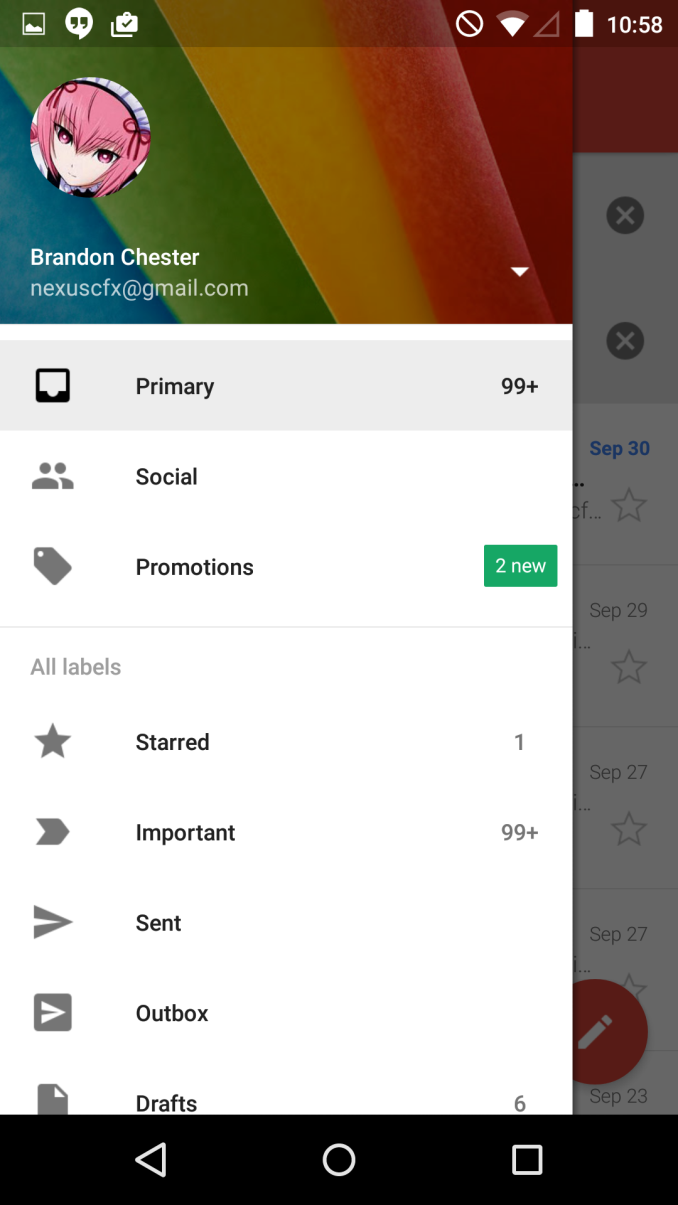
Google has also redesigned the navigation drawer that houses your different inbox labels, and settings. The grey has been changed to white, and the top displays your cover photo from Google+ which seems to be a message from Google that you’re supposed to change it from the default rainbow thing. 

The sliding drawer is a topic of debate right now because many applications implement it incorrectly, including many that are made by Google like the Hangouts application. Google’s official guidelines state that the drawer is to slide in overtop of every other part of the interface except for the status bar. The new Gmail application implements this correctly, and I’m hopeful that every other Google application will be updated to adopt the proper design before Android Lollipop ships. It’s very difficult to get developers to follow design guidelines when you don’t set a good example with your own first party applications, and the navigation drawer in Hangouts has multiple issues with its design when compared to Google’s guidelines. 

The last big change in the application is the support for adding email accounts from other providers like Yahoo, iCloud Mail, Outlook, etc. Any email account that supports IMAP/POP or Exchange can be added. This is a great feature as it eliminates the need to have to add every non-Google email account to the standard Email application which isn’t given as much attention as Google’s own Gmail app.

Google Updates Gmail With Material Design and Support for IMAP and Exchange

Google Updates Gmail With Material Design and Support for IMAP and Exchange

Google’s applications like Gmail, Camera, and Chrome are likely applications that came on your Android phone when you first purchased it. But unlike iOS where Apple has to ship an entire operating system update to update an application, Google’s apps for Android can be updated right from Google Play. Google has been steadily updating their applications to take advantage of their new “Material Design” design principles that were shown off at Google I/O. With Android 5.0 Lollipop on the horizon, Google has to get the remaining applications up to date, and the latest application to recieve the new visual style is Gmail with its major update to version 5.0.

As you can see above, there’s a lot of changes that come with the new Material Design interface. The most striking change is the the removal of the grey that was prevalent throughout the application. In the previous version, the color of an email preview changed to grey to indicate that the email had been read, while unread messages remained white. In the new design, the change between bolded or unbolded preview text indicates whether a message has been read. I personally find this to be much more aesthetically pleasing.

The header and status bar are now a nice moderately saturated red color that doesn’t feel gaudy but brings more color into the interface. The circular button for composing a new email at the bottom also uses this red color. On the topic of circles, Google has begun to use circular contact photos throughout their applications, although in my case they just display the sender’s first initial. If I had put in the effort to assign contact photos the new circles would display them where the squares previously did. 

Google has also redesigned the navigation drawer that houses your different inbox labels, and settings. The grey has been changed to white, and the top displays your cover photo from Google+ which seems to be a message from Google that you’re supposed to change it from the default rainbow thing. 

The sliding drawer is a topic of debate right now because many applications implement it incorrectly, including many that are made by Google like the Hangouts application. Google’s official guidelines state that the drawer is to slide in overtop of every other part of the interface except for the status bar. The new Gmail application implements this correctly, and I’m hopeful that every other Google application will be updated to adopt the proper design before Android Lollipop ships. It’s very difficult to get developers to follow design guidelines when you don’t set a good example with your own first party applications, and the navigation drawer in Hangouts has multiple issues with its design when compared to Google’s guidelines. 

The last big change in the application is the support for adding email accounts from other providers like Yahoo, iCloud Mail, Outlook, etc. Any email account that supports IMAP/POP or Exchange can be added. This is a great feature as it eliminates the need to have to add every non-Google email account to the standard Email application which isn’t given as much attention as Google’s own Gmail app.

MSI GT80 Titan: A Beastly Notebook with a Cherry MX Keyboard

MSI GT80 Titan: A Beastly Notebook with a Cherry MX Keyboard

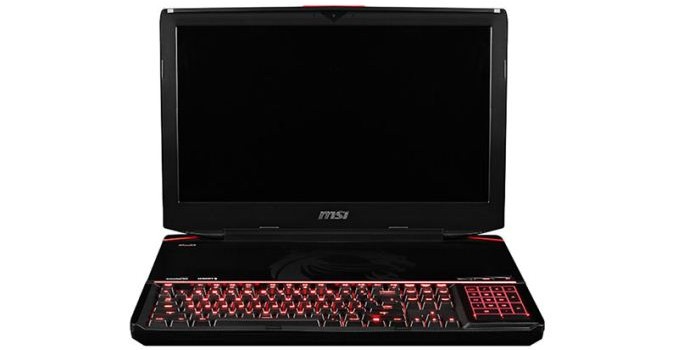
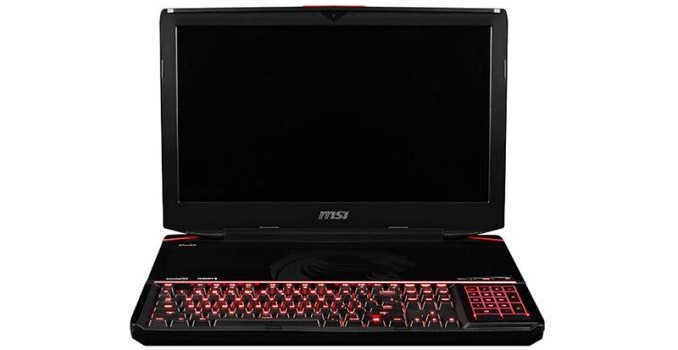
Yesterday MSI announced their latest notebook addition, the GT80 Titan. I’m a bit unsure what to think of the notebook, but it’s obviously unique in that it offers a SteelSeries keyboard with Cherry MX Brown switches. It also has a tweaked keyboard/palm rest area, somewhat reminiscent of the Acer R7 in that the keyboard is at the front…only now you have to throw in shades of Razer’s Switchblade touchpad/UI as there’s apparently a configurable touchpad/screen on the right of the keyboard.

I get the idea of doing a notebook with a mechanical keyboard, though obviously that will result in a thicker chassis. I’m not so sure about shifting the keyboard forward and turning the 10-key into a touchpad and getting rid of the palm rest. For actual gaming, most users will still use a dedicated mouse, but I for one like having a place to rest my palms when gaming (or just staring at the screen trying to think of what to type next), and with a notebook that will likely be a couple inches thick that’s a bit of a problem.

As far as the remaining specifications go, MSI is not officially announcing the supported CPUs or GPUs, and the GT80 Titan isn’t actually available for purchase yet. My bet is the GT80 Titan will support at least the GTX 980M, and given it’s an 18-inch chassis it could very well include support for SLI 980M. Given the name, it’s also possible the GT80 will support desktop components (e.g. GTX Titan GPUs), but that’s less likely; a desktop CPU on the other hand is certainly a possibility. Hopefully the screen and other elements can keep pace with the high-end mechanical keyboard. You can follow MSI from the GT80 Titan’s page to receive updates if you’re interested in hearing more.

MSI GT80 Titan: A Beastly Notebook with a Cherry MX Keyboard

MSI GT80 Titan: A Beastly Notebook with a Cherry MX Keyboard

Yesterday MSI announced their latest notebook addition, the GT80 Titan. I’m a bit unsure what to think of the notebook, but it’s obviously unique in that it offers a SteelSeries keyboard with Cherry MX Brown switches. It also has a tweaked keyboard/palm rest area, somewhat reminiscent of the Acer R7 in that the keyboard is at the front…only now you have to throw in shades of Razer’s Switchblade touchpad/UI as there’s apparently a configurable touchpad/screen on the right of the keyboard.

I get the idea of doing a notebook with a mechanical keyboard, though obviously that will result in a thicker chassis. I’m not so sure about shifting the keyboard forward and turning the 10-key into a touchpad and getting rid of the palm rest. For actual gaming, most users will still use a dedicated mouse, but I for one like having a place to rest my palms when gaming (or just staring at the screen trying to think of what to type next), and with a notebook that will likely be a couple inches thick that’s a bit of a problem.

As far as the remaining specifications go, MSI is not officially announcing the supported CPUs or GPUs, and the GT80 Titan isn’t actually available for purchase yet. My bet is the GT80 Titan will support at least the GTX 980M, and given it’s an 18-inch chassis it could very well include support for SLI 980M. Given the name, it’s also possible the GT80 will support desktop components (e.g. GTX Titan GPUs), but that’s less likely; a desktop CPU on the other hand is certainly a possibility. Hopefully the screen and other elements can keep pace with the high-end mechanical keyboard. You can follow MSI from the GT80 Titan’s page to receive updates if you’re interested in hearing more.