Hot Chips: Google TPU Performance Analysis Live Blog (3pm PT, 10pm UTC)
Another Hot Chips talk, now talking Google TPU.

Another Hot Chips talk, now talking Google TPU.

On Monday, HTC announced a permanent Vive price reduction to $599, bringing the VR headset down from its original $799 launch price. The now-$599 standard HTC Vive kit includes the headset itself, two wireless controllers, two base stations, link box,…
Today at Hot Chips we have a lot of interesting talks going on. First up is a talk on Intel’s latest 14nm FPGA solution: Stratix 10 implementing HBM using Intel’s latest EMIB (embedded multi-die interconnect bridge) technology that may migrate over to enterprise CPUs over the next few years.
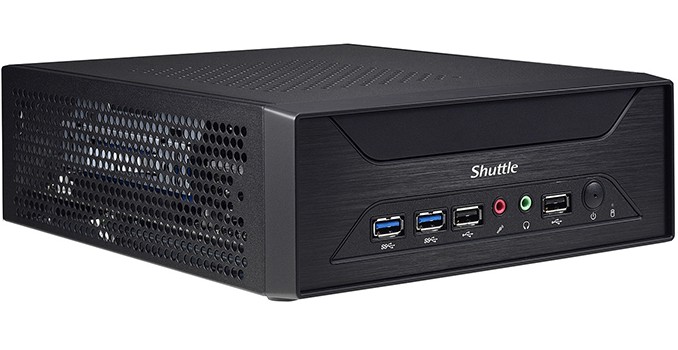
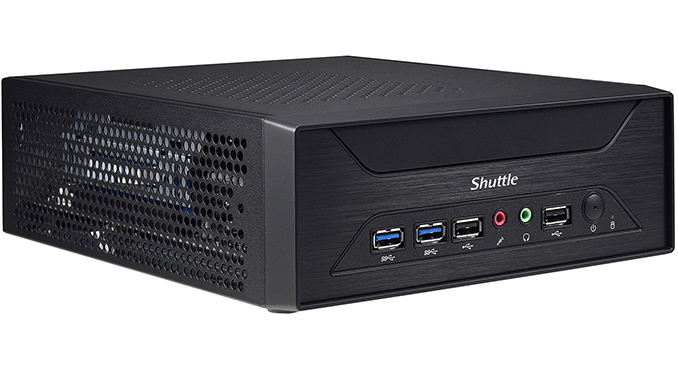
Shuttle has announced a new small form-factor barebones PC aimed at entry-level gamers as well as those who need a SFF multi-monitor setup, such as graphics professionals, traders, digital signage, control room applications, and so on. The XH110G has a volume of only three liters, but can accommodate a variety of graphics cards, assuming that they do not consume excessive amounts of power and use single-slot cooling systems, because the chassis is only 78.5 mm thick.
The Shuttle XH110G is based on Intel’s H110 PCH and supports all contemporary desktop LGA1151 CPUs that Intel has to offer with up to 65 W TDP (no Xeons, no ECC memory, etc.). Therefore, the fastest processor the XH110G supports is the Core i7-7700, but given the form-factor, it is more likely that owners of the system will choose something like the Core i7-7700T with a 35 W thermal envelope. To cool down its CPU, the XH110G uses a notebook-like ICE cooling system featuring two heat pipes that take away thermal energy from the chip and transfer it to a fairly large radiator located on the right side of the chassis. The radiator is cooled down using two 60-mm fans. Typically, small high-pressure fans have very high RPMs and are noisy. Shuttle does not disclose many details about its fans, but says that the XH110G supports five fan modes for one of the fans: a PWM-controlled smart fan mode along with pre-set ultra-low, low, mid and full speed modes. Meanwhile, the second fan either rotates at a constant speed of around 1300 RPM (based on a screenshot from the BIOS manual – see the gallery below for details) or works at the speed of the first one. For extra ventilation, the XH110G chassis has many holes to ensure sufficient cooling for all components.
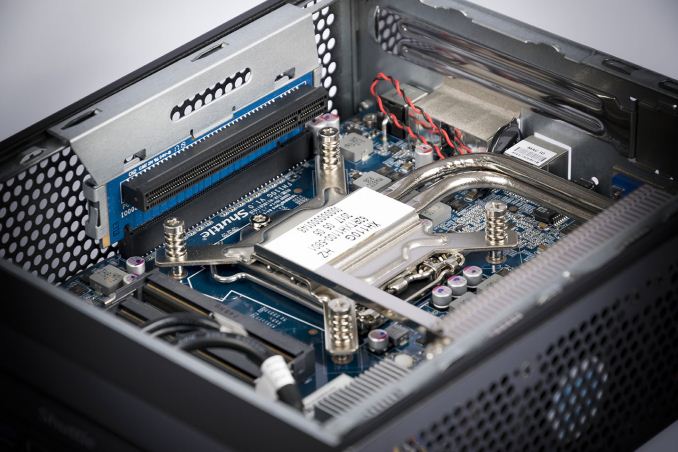
When it comes to DRAM and storage, everything looks pretty standard for a modern SFF PC: the XH110G has two SO-DIMM slots supporting up to 32 GB of DDR4-2400 memory, a 2.5” bay for an HDD or SSD located under the motherboard in a special bay, as well as one M.2 slot (PCIe and SATA) located on the motherboard near the fans to ensure proper cooling. Those, who would like to expand storage capacity of the XH110G further can install a USB flash drive into an external USB 2.0 port. Shuttle does not set maximum capacities for SSDs and HDDs supported by the new SFF PC, but since the thickness of the internal USB drive cannot exceed 11.5 mm, it looks like only 7-mm 2.5” storage devices are supported, which means up to 2 TB for contemporary HDDs. Keep in mind that the Intel 110 PCH has 6 PCIe 2.0 lanes, and therefore even if a PCIe 3.0 x4 SSD is used, its maximum throughput will be around 2 GB/s. This may not be a problem for entry-level systems that do not use high-end SSDs, but an advanced solid-state drive will not be a good fit for the XH110G.
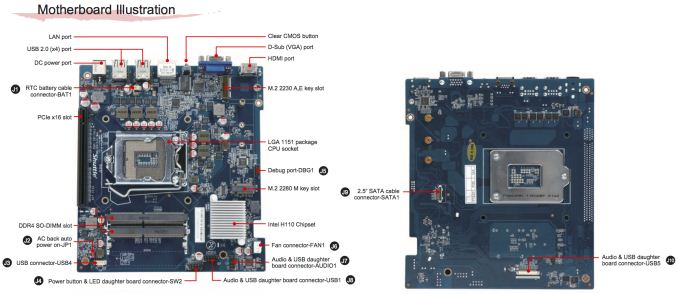
Discrete graphics support is clearly a key selling point of the Shuttle XH110G. When it comes to integrated graphics outputs, the system itself has a D-Sub and an HDMI connector, which means that those who want to run two modern monitors will have to get a discrete video card. The graphics board should be installed horizontally above the CPU using a special riser card which has all pins needed for x16 operation. The card should use a single-slot cooler and its maximum length should be no longer than 208.5 mm. Shuttle officially lists AMD’s FirePro W600 and W2100, NVIDIA’s Quadro K2000 and M2000 as well as Matrox’s C680 (this one is particularly important as it can drive six displays) graphics adapters as supported, but the system can handle a great variety of graphics cards. Keep in mind though that the XH110G is powered by a 180 W external PSU and therefore maximum power consumption of a video card should not exceed around 100 W, even with a 35 W CPU. At present, the most powerful graphics adapters that can be installed into the XH110G system are the AMD Radeon RX 460 and NVIDIA’s GeForce GTX 1050 Ti.
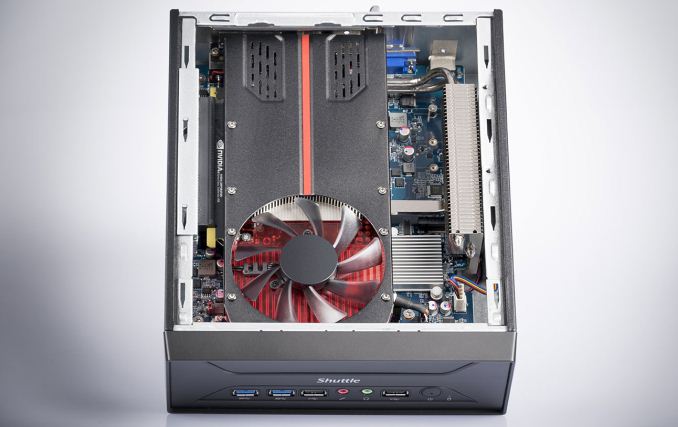
As far as connectivity is concerned, the Shuttle XH110G looks rather basic. The system has two USB 3.0 ports on the front, and six USB 2.0 ports in total, a Gigabit Ethernet connector, driven by Intel’s i211 controller, and two 3.5-mm audio jacks. In a bid to get Wi-Fi and Bluetooth, one should buy a separate M.2-2230 WLN-M card from Shuttle (802.11ac, up to 500 Gbps, BT). In addition, the internal USB 2.0 header can be used to plug in a USB accessory, and Shuttle suggests a TV tuner or a 4G/LTE modem.
Rather moderate I/O features of the XH110G are conditioned by the company’s choice of chipset and its intention to keep the price and costs down.
| Shuttle XH110G Specifcations | ||
| Model | SYS-SH-XH110G | |
| CPU | Skylake or Kaby Lake CPU with 35 W or 65 W TDP Up to Intel Core i7-7700 |
|
| dGPU | Single-slot graphics card up to 208.5 mm in length and a sub-100W TDP Up to AMD Radeon RX460 or NVIDIA GeForce GTX 1050 Ti |
|
| DRAM | Two DDR4 SO-DIMM slots Up to 32 GB of DDR4-2400 in dual-channel mode |
|
| Motherboard | Custom | |
| Storage | SSD | M.2-2280 (PCIe 2.0 x4 or SATA) |
| HDD | 2.5″/7mm/9.5 mm SATA 6 Gbps | |
| Wireless | Optional WLN-M 802.11ac Wi-Fi + Bluetooth module | |
| Ethernet | 1 GbE port (Intel i211) | |
| USB | 2×USB 3.0 Type-A 6×USB 2.0 Type-A 1×USB 2.0 internal |
|
| Display Outputs | 1×D-Sub 1×HDMI |
|
| Audio | 2×3.5mm audio jacks (ALC662 controller) | |
| Card Reader | – | |
| PSU | External 180 W PSU | |
| Warranty | Typical, varies by country | |
| Dimensions | Length: 250 mm Width: 200 mm Height: 78.5 mm |
|
| MSRP in Europe | €231 ($319) | |
When it comes to price, the company has succeeded in keeping it low. Shuttle’s XH110G is now available from specialist retailers in Europe for €231 ($319), which is a price of a Mini-ITX case, an Intel B250-based motherboard with integrated 802.11ac Wi-Fi and a circa-400 W PSU. Shuttle’s system looks to be more compact than typical Mini-ITX builds and can be mounted to a display using a VESA mounting mechanism. However, it has a number of peculiarities when it comes to SSD performance, connectivity and support of graphics cards that may not be welcomed by enthusiasts.


Related Reading:
Sources of information and images: TechPowerUp, Shuttle.


In time for back-to-school season, ASUS has announced its new ultra-low-cost PC (ULCPC aka netbook) aimed at students and consumers with a tight budget. The VivoBook W202NA rugged laptop is powered by Intel’s Apollo Lake platform, has an 11.6” display, weighs around 1.2 kilograms (2.65 lb) and has a 38 Wh battery that is quoted for up to 11 hours. The machine will be available with Windows 10 Home and Windows 10 S operating systems, both will cost less than $300.

The ASUS VivoBook W202-series laptop will exist in three different versions based on Microsoft’s Windows 10 S, Windows 10 Home and Windows 10 Pro operating systems, featuring different hardware and aimed at slightly different end-users. The Windows 10 S/10 Home notebooks are based on Intel’s dual-core Celeron N3350 SoC, are equipped with 4 GB of DRAM and are targeted at children, students and consumers. By contrast, the Windows 10 Pro-based ASUS W202 uses Intel’s quad-core Pentium N4200, has up to 8 GB of memory, up to 128 GB of eMMC storage and is designed for more demanding consumers (do not expect this SKU to be available in all regions).
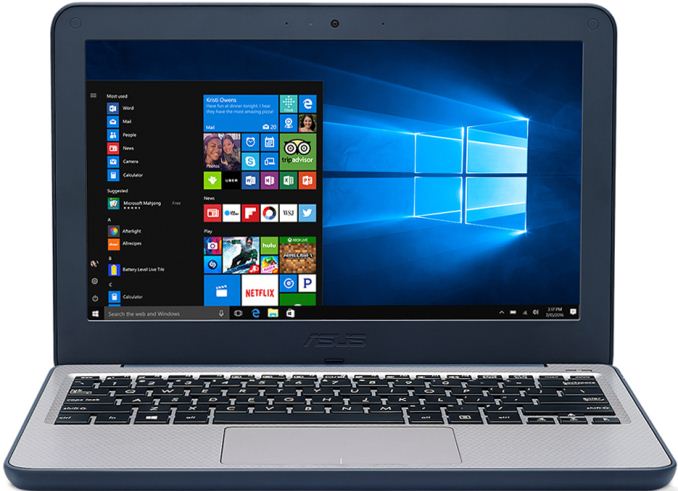
Other specifications of the ASUS VivoBook W202 notebook seem to be comparable to other entry-level contemporary PCs: it features an 11.6” display with a 1366×768 resolution, an anti-glare coating and a 180-degree hinge. As for connectivity, the laptop has a 802.11ac Wi-Fi with Bluetooth 4.1 module, two USB 3.0 Type-A ports, an HDMI output, a VGA webcam, a microSDXC card reader, a TRRS audio connector, a microphone array, two 2W speakers and so on.
| ASUS W202NA ULCPC Specifications | ||||
| Windows 10 S W202NA-YS02 |
Windows 10 Home W202NA-DH02 |
Windows 10 Pro – |
||
| Display | 11.6″ panel with 1366×768 resolution and anti-glare coating | |||
| CPU | Celeron N3350 2C/2T 1.1 – 2.4 GHz 2 MB cache 6 W TDP |
Intel Pentium N4200 4C/4T 1.1 – 2.5 GHz 2MB 6 W TDP |
||
| Graphics | Intel HD Graphics 500 with 12 EUs | Intel HD Graphics 505 with 12 EUs | ||
| RAM | 4 GB | 4 or 8 GB | ||
| Storage | 64 GB eMMC | 64 or 128 GB eMMC | ||
| Wi-Fi | Intel Wireless-AC 2×2 802.11ac Wi-Fi | |||
| Bluetooth | Bluetooth 4.1 | |||
| Ethernet | – | |||
| USB | 2 × USB 3.0 Type-A | |||
| Display Outputs | 1 × HDMI | |||
| Keyboard | Chiclet spill-resistant keyboard | |||
| Other I/O | Microphone, stereo speakers, TRRS audio jack, 0.3 MP webcam, microSDXC card reader | |||
| Dimensions | Width: 294 mm/11.57″ Depth: 200 mm/7.87″ Thickness: 22.6 mm/0.89″ |
|||
| Weight | 1.2 kilograms / 2. 65 pounds | |||
| Battery | 2-cell 38 Wh battery, 11 hours battery life | |||
| Price | $279.99 | $299.99 | unknown | |
One of the key selling features of the ASUS VivoBook W202 is its ruggedized design. The laptop has rubber-lined edges and corners to protect internals against bumps and knocks. In addition, the notebook features an anti-spill keyboard. According to ASUS, the VivoBook W202 has survived a drop test from a height of 119 cm (3.9 feet) as well as passed extreme twist force and high-pressure test.

The ASUS VivoBook W202NA-YS02 convertible laptop featuring Windows 10 S is available immediately in North America for $279. The ASUS VivoBook W202NA-DH02 powered by Windows 10 Home will ship next month for $299. The Pentium- and Windows 10 Pro-based VivoBook W202 system will naturally cost slightly more, but such systems may not be available in all regions.
Related Reading: