News


Coffee Lake Not Supported by Intel’s 200-Series Motherboards
Coffee Lake Not Supported by Intel’s 200-Series Motherboards

In a stunning bit of Twitter, a tweet from one of the leading motherboard manufacturers has stated that Coffee Lake, Intel’s 8th Generation Core processors, will not be supported on the current generation of 200-series motherboards.

No,Coffee Lake CPU is not compatibilble with 200 series motherboards.

— July 31, 2017

Information like this is usually kept under wraps until an Intel reveal, but it seems to have been mindlessly posted to Twitter on July 31st, an account that last tweeted on April 11th before this tweet occurred. This tweet has since been deleted.

At this point, due to the similar microarchitecture to Kaby Lake being used in Coffee Lake, most of the technology press were under the impression that the Coffee Lake processors would be compatible with LGA1151 socket motherboards, namely the 100-series and 200-series. With the above tweet essentially confirming that Coffee Lake will not be supported, it means that either the new CPUs will not be LGA1151, or that the motherboards will lock-out the processors by firmware, or the CPUs and sockets will use a different notching system to ensure the wrong processor cannot be put in the wrong board. It does mean however that 200-series users hoping to upgrade to a Coffee Lake processor (which early reports are suggesting might be up to six cores, but this has not been announced) will not be able to.

There are many potential reasons for the change if the socket is still LGA1151. The obvious one would be product segmentation on Intel’s part, which would stick in the craw for a number of the user base. The second one that it might actually be a physical requirement for the processor – if previously unused pins are required for power and/or control for different elements of the DVFS in the chip. This would depend on new features on the chip, which could extend to different power management, different graphics, or different IP blocks that require separate pin-out connections. Intel might also be using a different power system for voltage regulators, which might not be compatible with current 200-series motherboards.

At this point, nothing has been made official. The fact that this was stated on Twitter so far from any launch date that we know of is an interesting development.

*The name of the manufacturer has been removed by request after this news was published.

Related Reading

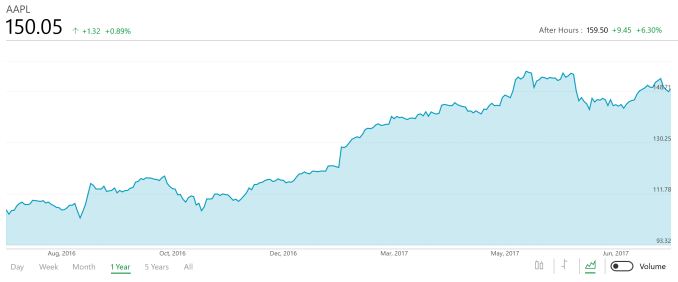
Apple Announces Q3 FY 2017 Results

Apple Announces Q3 FY 2017 Results

This afternoon, Apple announced their earnings for the third quarter of their 2017 fiscal year. Revenue grew 7% year-over-year to $45.408 billion USD for the three months ending July 1, 2017, with a gross margin of 38.5%. Operating income was $10.77 billion for the quarter, up 6.6% from a year ago. Net income was $11.31 billion, up 11.8% as well. This resulted in earnings per share of $1.67, up from $1.42 a year ago.

Apple Q3 2017 Financial Results (GAAP)
  Q3’2017 Q2’2017 Q3’2016
Revenue (in Billions USD) $45.408 $52.896 $42.358
Gross Margin (in Billions USD) $17.488 $20.591 $16.106
Operating Income (in Billions USD) $10.768 $14.097 $10.105
Net Income (in Billions USD) $8.717 $11.029 $7.796
Margins 38.5% 38.9% 38.0%
Earnings per Share (in USD) $1.67 $2.10 $1.42

Apple has been the iPhone company for pretty much a decade now, and at time, Apple has been somewhat dependant on the iPhone for most of its earnings. That’s the case again this quarter, but Apple as a company is much more diversified now than even a year or two ago when iPhone revenues could account for over 70% of their earnings. This quarter, iPhone brought in $24.85 billion in revenue, which works out to 54.7% of Apple’s revenue. iPhone revenue was up 3% year-over-year, with unit sales of 41.026 million phones, up 2% from a year ago.

Services has quickly jumped from being an afterthought at the company, to now being their number two source of revenue, surpassing both the Mac and the iPad. Services revenue jumped 22%, to $7.27 billion. The iPhone ecosystem is a strong draw for many Apple customers, clearly.

Mac sales were only up 1% year-over-year, which is a bit surprising since they hadn’t yet launched their new laptops a year ago, but revenue was up 7% to $5.59 billion, so revenue-per-device is up nicely. Apple sold 4.29 million Macs in the last three months.

iPad has been the one sore spot for Apple for several years now, with slowing sales, but earlier this year, Apple announced a new, lower cost, entry level iPad. This strategy has paid off, at least for the interim, with iPad sales up 15% in terms of units sold. Apple sold 11.42 million iPads last quarter, compared to just 9.95 million a year ago. Revenue was only up 1% though, thanks to the lower cost of these entry level devices.

Apple Q3 2017 Device Sales (thousands)
  Q3’2017 Q2’2017 Q3’2016 Seq Change Year/Year Change
iPhone 41,026 50,763 40,399 -19% +2%
iPad 11.424 8,922 9,950 +28% +15%
Mac 4,292 4,199 4,252 +2% +1%

Other Products, which includes Beats, Apple TV, Apple Watch, and accessories, also had a very strong quarter, with revenue up 23% year-over-year to $2.73 billion. Apple doesn’t break down individual sales inside of Other Products though, but Apple did say Apple Watch sales were up 50% in the quarter. Up from what, we’re not sure, but obviously a big jump regardless.

For the fourth quarter of fiscal year 2017, Apple is expecting revenue between $49 and $52 billion, with a gross margin between 37.5 and 38 percent.

Source: Apple Investor Relations

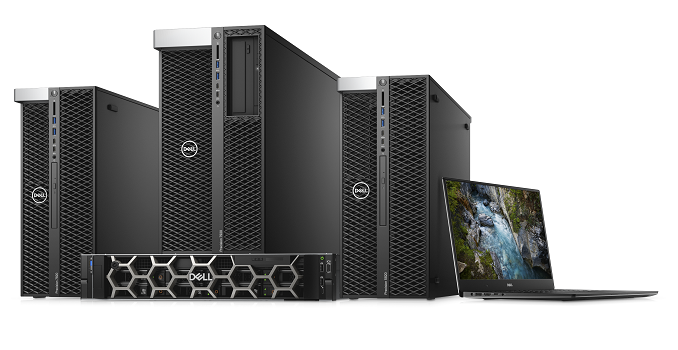
Dell Announces Updated Precision Workstation Lineup at SIGGRAPH: Refreshed Towers, Racks, and Laptop

Dell Announces Updated Precision Workstation Lineup at SIGGRAPH: Refreshed Towers, Racks, and Laptop

This year, Dell is celebrating the 20th anniversary of their Precision Workstations. The first Precision workstation, the Workstation 400, was released in 1997 and consisted of a 128MB graphics card, with a total cost at the time of around $12K. The tale is told that sales were slow out of the gate for Dell, with the company selling only 700 units in the first quarter. By the end of the second quarter, Dell sold 7000 units and Precision workstation lineups were well on their way. 

Fast forward to today where the workloads have increased massively  and 128MB of VRAM is a rounding error  and workstation hardware manufacturers like Dell are continuing to improve their production designs to keep up with user demands. Part of Dell’s goals with their latest iteration of their Precision hardware is to become a trusted partner for Data Center solutions, and in turn entice commercial clients to move away from renting hardware and back towards buying it up front. With many small to medium size businesses that are farming out their hardware to services such as Amazon Web Services or Microsoft Azure, there are pieces of the pie to be taken back.  

Precision Towers and Rack

For the first time in 5 years, Dell has updated both their tower and rack chassis workstations. Dell claims the Precision Tower and Rack workstations are, “…first to market with leading technology to handle complex, creative workloads, including development and deployment of artificial intelligence and machine learning technologies.”The front of both class devices has changed the look of the front grill with the 2U 7920 looking a lot different. On the rack mount, where there used to be a simple bar going across it, has been replaced with a large hexagonal cover instead. The workstations receive more of an update with a diamond pattern on the front as well as a bezel down the middle where the peripheral attachments can be inserted. 

On the hardware side, the new lineup consists of 5820, 7820, and 7920 Towers as well as a 2U 7920 rack. All incorporate the latest Skylake-X processors, and according to Dell, are designed with flexibility in mind. One of the unique features on the new lineup is bringing PCIe to the front of the chassis where custom devices, such as large removable storage, can be used without entering the chassis. This includes SATA, SAS, PCIe M.2/U.2 NVMe SSDs.

The new towers hold up to 1.5 TB of 2666 MHz RDIMM memory in 4 or 6 channel configurations, with LRDIMMs supporting up to 3 TB on specific CPUs in the 7920. The smaller siblings in the 5820 and 7820 hold up to 256GB and 384GB respectively. CPU support, like RAM, will vary a bit by model. All of these systems support Skylake-X Xeons and are based on the C261 chipset. The 5820 supports up to a 10 core Xeon, while the larger towers and rack mount servers support up to 28 core Xeons.

On the graphics side of the house, Dell uses both NVIDIA and AMD professional graphics cards, with the 7920 and 7820 towers supporting up to 900W of graphics power when using up to 3 double width GPUs. Available NVIDIA cards go up to the Quadro GP100 series cards and other Pascal based cards, while for AMD, customers can get up to AMD’s newly announced Radeon Pro WX9100. The workstations will also support the upcoming Radeon Pro SSG due out in fall. All of this horsepower, both from the CPUs and GPUs can be used for creation and deploying cognitive technologies among many other use cases Dell is targeting with their workstations.

The towers and rack workstations will be available starting October 3rd, 2017. 

Precision 5520 Laptop: 20th Anniversary Edition

Meanwhile, Dell has also announced an update to their Precision 5520 laptop, which they’re calling the Anniversary Edition. The refreshed 5520 is targeting the prosumer market, separating itself from the XPS lineup by using Xeon CPUs and professional graphics. More specifically, the limited edition Anniversary version has several aesthetic changes. The chassis comes in a new color that is dark gray, almost black, which they call, Abyss. The shell is made of anodized aluminum with a brushed finish and anti-fingerprint coating. Outside of the updated chassis appearance, it also comes with a unique Dell 20th-anniversary wallpaper and a special badge commemorating the occasion located on the bottom of the device. 


Specifications for the 5520 Anniversary Edition were not shared, though Dell did mention there will be two high-end configuration options.  Pricing on the limited run Precision 5520 20th-Anniversary Edition comes in at $2179. Availability is today, August 1st. More details can be found at the Dell.com Precision Anniversary website

Dell Canvas

Last but not least, this morning Dell is also announcing that their long-awaited Canvas display & input system is now shipping. Essentially a large format touch tablet to maximize drawing space, the Canvas is Dell’s take on Microsoft’s Surface Studio, using a combination of a large surface, digital pen, totems object manipulation and interaction. However unlike the Surface Studio, the Canvas is not a stand-alone PC; rather it’s just an input system and a display. Users still need to connect it to an existing PC to actually use it.

The star of the show is Dell’s choice of panel, which is a QHD (2560 x1400) IPS display. Otherwise the Canvas supports over 90 pieces of software including Adobe, Autodesk, Solidworks, etc. Availability starts August 1st with the device priced at $1799. This includes the QHD screen/tablet, pen, and the dial totem (the smaller knob totem is optional). 

Gallery: Dell Canvas

More information on the Precision Performance Towers, Racks, the limited run Anniversary Edition 5520 laptop, and Dell Canvas can be found at the Dell website. 

Related Reading:

HP Expands Commercial VR Strategy: Z VR Backpack and Immersion Centers

HP Expands Commercial VR Strategy: Z VR Backpack and Immersion Centers

At SIGGRAPH this week, HP has lifted the lid on parts of their Commercial VR strategy, announcing three major aspects of their implementation.  In talking with HP, they are confident there is an opportunity in that commercial VR space.

The Z VR Backpack for Commercial

HP’s new commercial VR strategy will have three major points:

The first is to deliver the best and most immersive VR and compute experience. Second is to have an end to end solution. Last is to learn and invest with their partners while keeping an eye on mixed reality. These points, according to HP, translate into optimizing their investment and cut costs for commercial customers. Out of those points come three announcements.

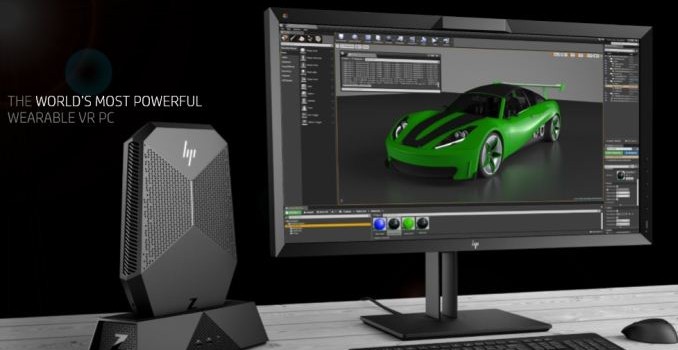
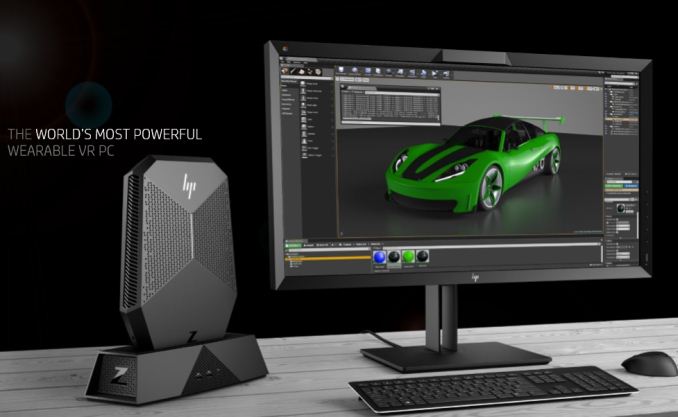
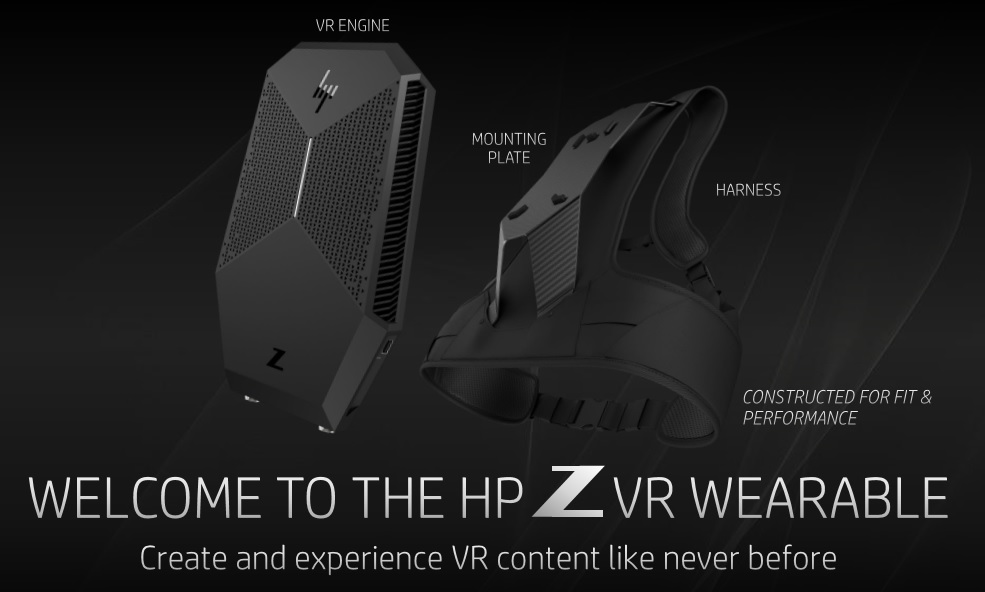
The first announcement is the Z VR Backpack. This is a wearable and untethered VR PC, similar to ones we’ve seen from ZOTAC and MSI, albeit aimed at the commercial space. One use case for such an item can be in training situations, such as military training, first responders. For this type of training, it can be too dangerous or potentially cost prohibitive to do live. Similarly, HP state that in the health care space, training for doctors and nurses can be held in a virtual environment saving time and money, and even help with patient care and pain management. 


Gallery: Z VR Backpack

The Z VR Backpack uses an i7-7820HQ and a NVIDIA Quadro P5200 GPU, with a 16GB frame buffer. HP states this is the most powerful wearable VR PC, as well as lightweight and manageable (important to IT administrators). The Z VR Backpack weighs in at just under 10 lbs with both a completely untethered VR solution and a docking ability.

Battery life in, “a rich VR experience” (as HP puts it) is about an hour, while less stressful applications can last up to 1.5 hours. As with other mobile VR solutions, HP uses a dual battery system that is hot-swappable to prevent interruption of the VR experience. The docking solution is designed to allow the device to transition back and forth between a content design desktop to a wearable VR PC. 

HP Z VR Backpack Specifications
Form Factor Backpack when worn
Compact PC when docked
OS Windows 10 Pro 64
CPU Intel Core i7-7820HQ: 4C/8T, 2.9GHz, vPro
Intel HD Graphics 630
Chipset Intel QM175
DRAM 2 SODIMM / up to 32 GB DDR4-2400 non-ECC
Storage 256 GB up to 1 TB
Discrete GPU NVIDIA Quadro P5200 16 GB
Miracast for wireless external displays
Audio RealTek ALC3866-CG
Integrated DTS Headphone:X
Networking Realtek RTL8153B Gigabit Port
Intel AC 8265 802.11a/b/g/n/ac (2×2)
Expansion slots 1 M.2 PCIe 3.0 x1 (for WLAN/BT only)
Ports and Conectors Top 1 x VR Power Port
2 x USB 3.0 (5 Gbps)
1 x HDMI 2.0
1 x mDP 1.3
1 x TB3 Type-C
1 x audio jack
Bottom External Battery Port
Dock Connector
Right 2 x USB 3.0 (5 Gbps)
Left DC-In
Software HP Performance Advisor
HP Remote Graphics Software 7.1,
HP Client Security Software
HP Velocity
HP Client Management Software Suite
Power 330W
Dimensions 13.11 x 9.29 x 2.39 in, 10.25 lbs
33.3 x 23.6 x 6.09 cm, 4.65 kg
Warranty 1-year (1-1-1) limited warranty
1 year of parts, labor and on-site repair

Pricing on the Z VR Backpack is $3299 with availability towards the end of September. HP brought the Z VR Backpack to SIGGRAPH this year and will be demonstrating military demonstrations, automotive, showroom, and other use cases.

The HP Immersion Center

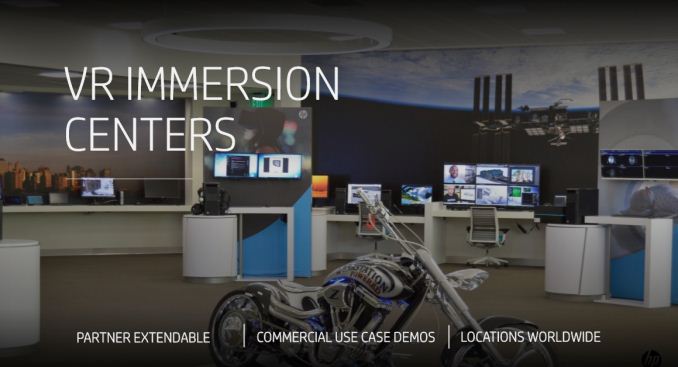
The second announcement, us that HP is creating ‘Immersion Centers’, places for potential commercial clientele to come in and test the commercial lineup. Part of the reason potential VR clients are apprehensive about getting in the space are partly rooted in a fear, such as how to get started, and so businesses understandably wanted to experience what it can do before a significant investment on piloting a program begins. This announcement is HP’s answer to their customers.

There will be 13 immersion centers that will have the full HP commercial portfolio on site, from the HTC Vive Business Edition, Z Workstations, mobile workstations and VR commercial desktops, and the Z VR Backpack. They will be located throughout the world with 4 in the Americas, 4 in Asia/Pacific, and 5 in Europe. These 13 sites will all be live by the end of September with the first already starting July 27th.

The Vive Business Edition and Mars Collaboration

The final announcement is HP partnering with HTC and bringing out the Vive Business Edition. The hardware itself is the same, although the software stack changes with stand alone enterprise software as well as a 1-year commercial license. 

Along with the big push in the commercial space, HP has put out a VR program called HP Mars Home Planet. It is a free to participate environment, where users can collaborate in a VR space to imagine and design a colony on Mars for housing 1 million humans. Members can use Autodesk software to create 3D models of buildings and cities. The world uses terrain from the Mars 2030 game, which uses real map data from NASA research of a potential landing area on Mars. As the program continues, users can download the files and experience what the cooperative effort has developed.

Related Reading:

AMD Announces Radeon Pro Software for Vega: Crimson ReLive Edition Vega Pro

AMD Announces Radeon Pro Software for Vega: Crimson ReLive Edition Vega Pro

Update (7/31/17): The original version of this article incorrectly stated that AMD had released this software update. Radeon Pro Software Crimson ReLive Edition for Vega-based Radeon Professional Graphics is not available for download today, and will be published when Vega-based professional products are released. At this time, this includes the $2199 MSRP Radeon Pro WX 9100 and $6999 MSRP Radeon Pro SSG (Vega), both of which are slated for September 13.

Following up last week’s launch of Radeon Software Crimson ReLive Edition 17.7.2, AMD today is announcing Radeon Pro Software Crimson ReLive Edition for Vega-based Radeon Professional Graphics, earlier known as version 17.8. With the official unveiling of Vega-based products yesterday, this edition of Radeon Pro Software brings support to the Radeon Pro WX 9100, Radeon Pro SSG (Vega), and Radeon Vega Frontier Edition.

Related Reading

Radeon Pro: Crimson ReLive Edition for Vega

ReLive Edition for Vega Pro comes with support for 8K and High Dynamic Range (HDR) displays, something that was included in this past Thursday’s release of Radeon Pro Software Enterprise Driver 17.Q3 for non-Vega Radeon Pro products. Likewise, ReLive enhancements from 17.7.2 will also be present in the Vega Radeon Pro software.

This version also comes with bug fixes and enhanced features for the Radeon ProRender plugins/add-ins such as Autodesk 3DS Max, Autodesk Maya, Solidworks, and Blender. Additionally, AMD notes that Radeon ProRender will be integrated into the upcoming R19 release of MAXON Cinema 4D. 

Security-wise, the Pro WX9100, the new Vega SSG, and Vega Frontier Edition have AMD Secure Processors, a feature recently seen in EPYC and Ryzen Pro CPUs. This hardware root of trust operates during both boot time and shutdown, and works in conjunction with Radeon Pro Software and Microsoft Device Guard.

The rest of ReLive Edition for Vega Pro builds on Radeon Pro Software Crimson ReLive Edition 17.6, which was Radeon Vega Frontier Edition’s inaugural driver. This includes full functionality of Radeon Pro Software “Driver Options,” where the user can ‘swap’ between Radeon Pro Software and select Radeon Software versions without a reboot. Previously in ReLive Edition 17.6, swapping was limited to switching UIs.

ReLive Edition for Vega Pro allows the user to actually load two Radeon Software gaming drivers in addition to the installed professional driver. This will enable the use of gaming software features (except WattMan for adjusting GPU frequency). The swap functionality is intended for both game development workflows and just plain convenient gaming. AMD has clarified that this feature is only available for Vega-based professional products at the moment.

These drivers can be found at the AMD workstation graphics driver download page once Vega-based Radeon Pro cards are available.