News


Lian Li Launches PC-T70 Test Bench

Lian Li Launches PC-T70 Test Bench

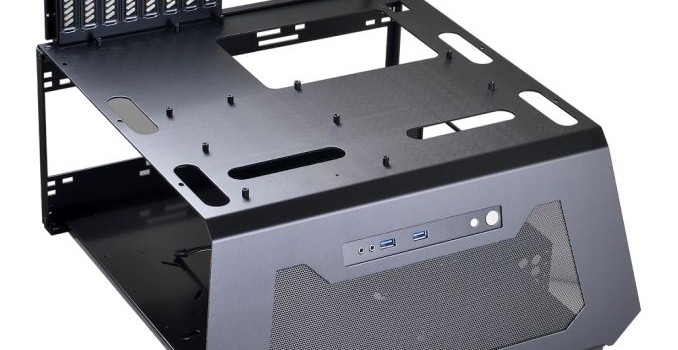
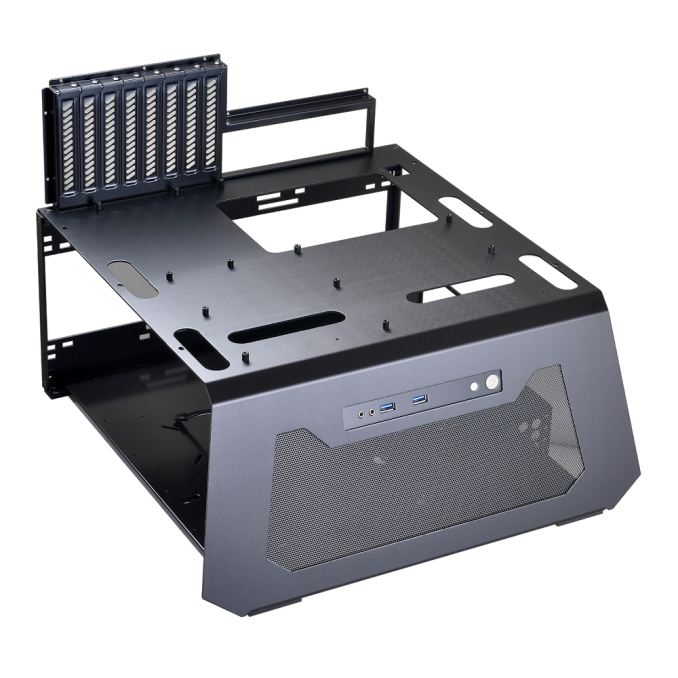
Lian Li has been one of the few large case manufacturers to consistently offer test benches over the years, and they have now launched their newest model, the PC-T70. First unveiled at CES 2017, this new test bench was developed with feedback from PC hardware reviewers and it has been designed with an eye towards easy access and simple hardware swapping. There is also an optional accessory kit that encloses the test bench with an acrylic cover, which simulates a closed-air environment and allows for testing conditions that more closely match a regular closed case. For those who would rather have the whole kit from the start, Lian Li will also be offering the PC-T70FX, which comes with the acrylic cover and side panels included.

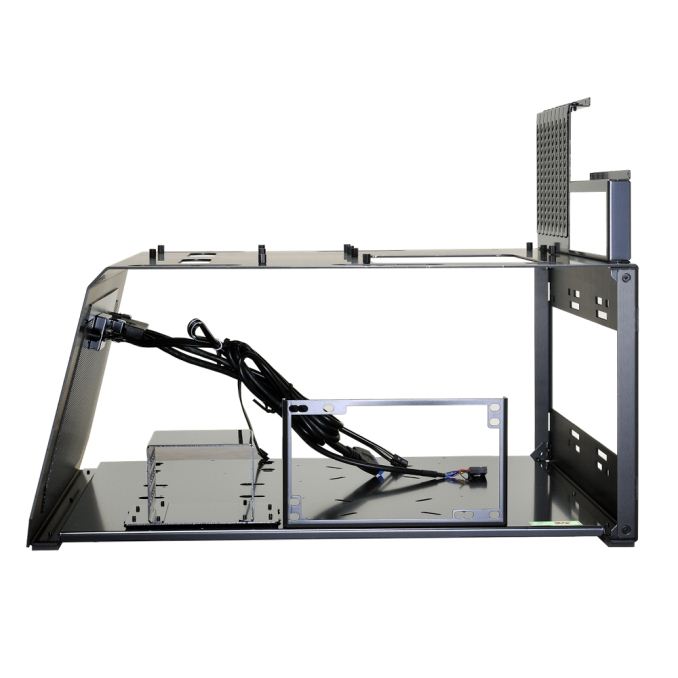
Starting off with the fundamentals, the PC-T70 is manufactured from both aluminium and steel and it is available in both black and white. It can handle motherboards ranging from Micro-ATX to E-ATX, and it has eight expansion slots that support cards up to 330mm in length, though longer cards should be fine as well if you don’t install the acrylic cover. There is one small and six large pass-through ports that are used to cleanly route cables to the lower half. The bottom chamber can handle one ATX power supply up to 330mm in length, and it is also where you can install your choice of either five 2.5” and one 3.5” storage drives or one 2.5” and two 3.5” storage drives. There is also mounting space for some liquid cooling hardware, namely an up to 360mm radiator, a reservoir, and a pump. The front of the test bench features a small I/O area consisting of a 3.5mm audio input, a 3.5mm audio output, two USB 3.0 ports, and both power and reset buttons.

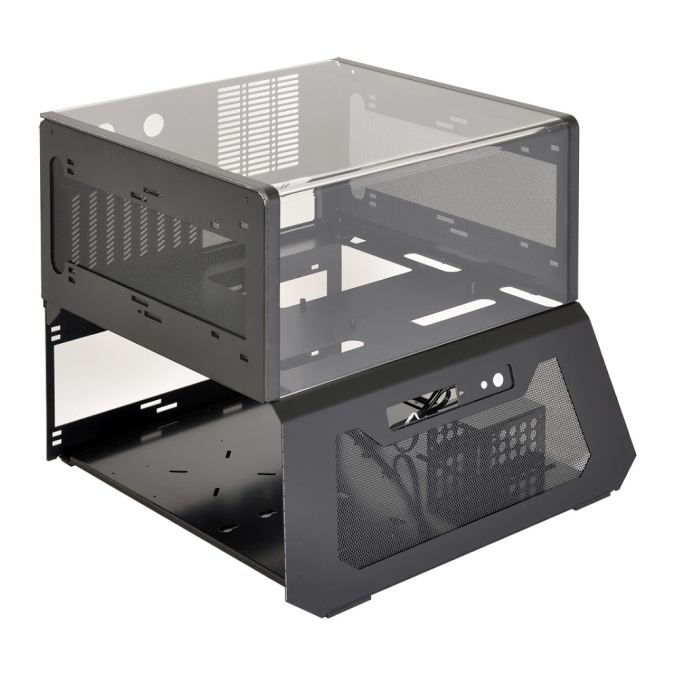
If you have more advanced cooling needs, or if you’re a reviewer that wants to be able to simulate a closed-air case environment, the T70-1 option kit is an accessory ​that is going to be of great interest:

As mentioned above, the optional T70-1 upgrade kit encloses the test bench with an acrylic cover and side panels that serve as radiator mounts. The idea is that by enclosing the motherboard and other heat-generating components, reviewers will be able to simulate closed-air case environments that are more representative of the insides of regular PC cases. This should ensure more accurate testing of both thermals and acoustics. It should be mentioned that with the cover installed, CPU cooler height is reduced from an effectively unlimited height down to 180mm. Magnetic strips help secure the cover and keep it closed during transport.

Also helping to secure the cover are the panels that enclose the side and back of the test bench. The aluminium side panels feature large cutouts with removable dust filters, and that is because each side panel can hold two 120-140mm fans or a single 240-280mm radiator. The rear panel has mounting holes for one additional 120mm or 140mm fan.

The PC-T70FX model, which includes the T70-1 option kit, is available right now at Newegg.com for $180 USD. It is unclear if the solo PC-T70 will be available for sale in the future, though we suspect that it will because it has its own product page on Lian Li’s website.

Related Reading

MSI Announces the Z270 GODLIKE GAMING Motherboard

MSI Announces the Z270 GODLIKE GAMING Motherboard

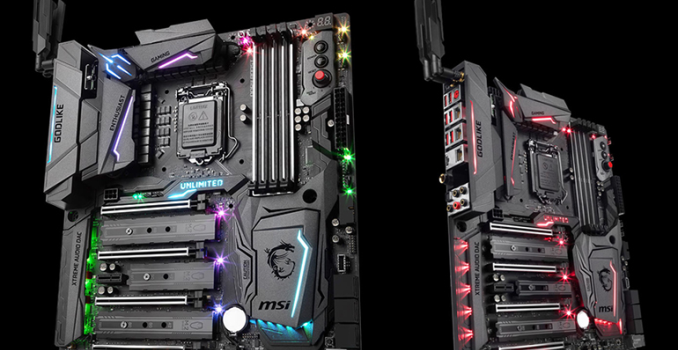
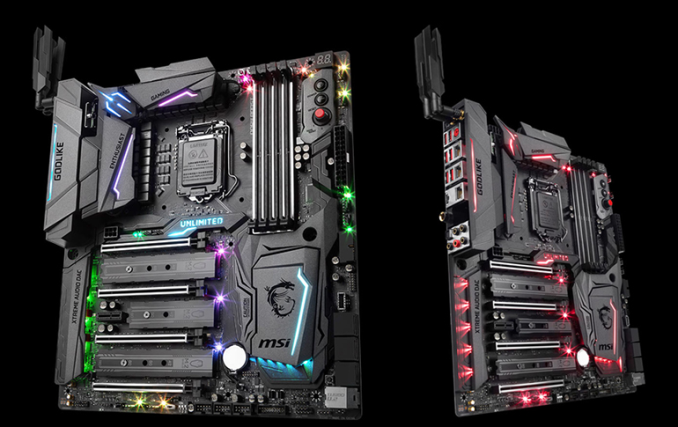
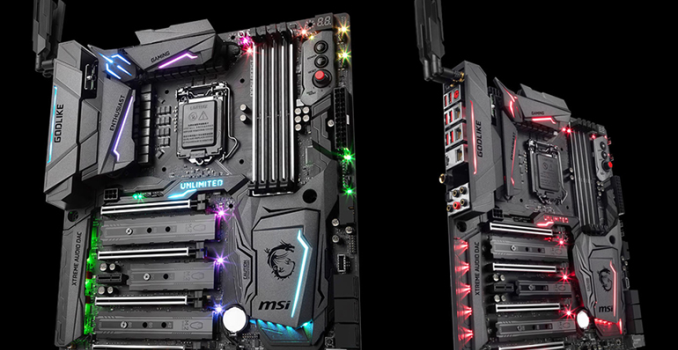
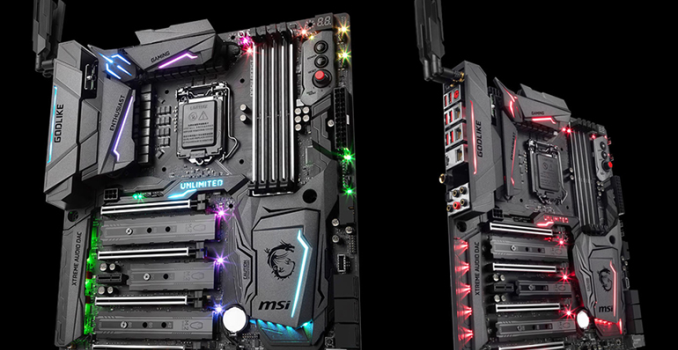
MSI has been teasing this new motherboard for a number of weeks, and today they have finally announced the Z270 GODLIKE GAMING. This subtly named model is the new flagship Intel Z270-based motherboard in MSI’s Gaming series, and thus displaces the well-reviewed Z270 Gaming M7.

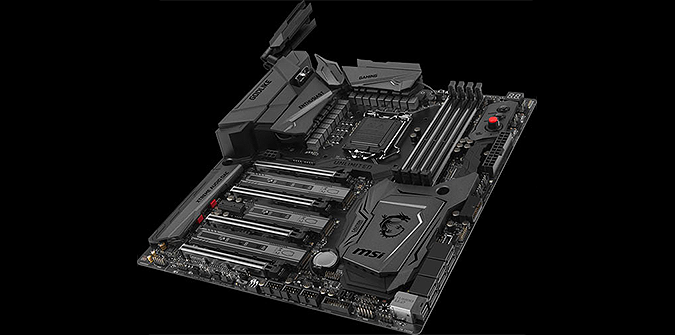
Though now officially unveiled, MSI did not provide an extensive specifications breakdown for this new model. However, certain elements can be deduced just by looking at the motherboard itself. First and foremost, given its unusually large width, this is clearly an Extended ATX form factor model. This is most evident if you look at the amount of PCB space between the DDR4 memory slots and the edge of the motherboard. In that top-right corner you will also notice a debug LED, power and reset buttons, and the familiar MSI Game Boost Knob.

The Z270 GODLIKE appears to have good storage connectivity, with one U.2 port, six SATA 6Gb/s ports, one USB 3.1 Gen2 header, two USB 3.0 headers, and three USB 2.0 headers. The triple M.2 slots with M.2 Shields are obviously one of the defining features of this new model. There are four steel-reinforced mechanical PCIe x16 slots, as well as a single PCIe x1 slot. The onboard audio duties are handled by the new AUDIO BOOST 4 XTREME implementation, which features fully isolated audio circuitry, an ESS DAC, and two audio CODECs that will allow gamers the option of using headphones and speakers at the same time.

As you would expect on a gaming motherboard released in 2017, MSI’s Mystic Light RGB LED lightning feature has clearly found its way to the Z270 GODLIKE GAMING. There are fifteen RGB LEDs spread throughout the motherboard, all of which can be independently controlled, along with a 4-pin header that can power an LED light strip. Thanks to the Mystic Light Sync integration, the included Phanteks Rainbow Strip can be made to match the colors and effects of the onboard RGB LEDs. This same sync concept applies to any future Mystic Light Sync compatible products.

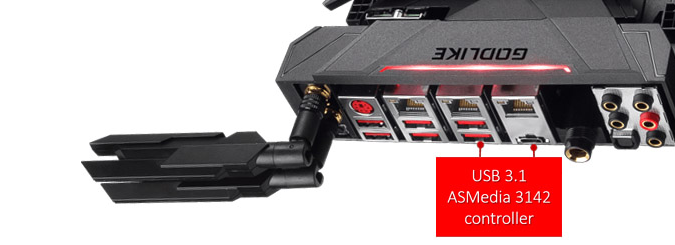
One interesting development is that the Z270 GODLIKE Gaming is going to be first motherboard to utilize the brand new ASMedia ASM3142 USB 3.1 Gen2 host controller. While we don’t know much about the new controller, it is the clear successor to the ASM2142, which was the first USB 3.1 Gen2 controller connected with two PCIe 3.0 lanes and thus capable of handling up to 16Gb/s. ASMedia claims that the new ASM3142 controller will not only improve performance, but consume at least 50% less power than previous USB controllers. The performance claims are interesting, since the ASM2142 already had a pretty solid performance advantage over the Intel Alpine Ridge controllers. 

Another industry first – and apparently an exclusive feature – is the inclusion of Rivet’s new Killer xTend technology. By combining the network capabilities of three Killer E2500 LAN controllers and an onboard Killer Wireless-AC 1535 WiFi module, Killer xTend essentially turns the motherboard into both a network switch and a Wi-Fi extender. How these network expansion capabilities work for a wired setup is that one of the three ethernet ports act as a WAN port – in other words the internet input – while the other two act as conventional LAN ports to which you can connect other PCs or even gaming consoles. The Wi-Fi module can be used to wirelessly connect the primary gaming PC to the internet, or as a 867Mbps wireless link to the other PCs/connected devices when using a wired internet connection, or it can even handle both wireless connections when acting as a Wi-Fi range extender. This removes the need to purchase additional networking hardware, simplifies configuration, and of course prioritizes traffic to the Killer-powered gaming PC over that of other connected devices.

We have no word with regard to pricing or availability, but we definitely expect additional information at Computex 2017.

MSI Announces the Z270 GODLIKE GAMING Motherboard

MSI Announces the Z270 GODLIKE GAMING Motherboard

MSI has been teasing this new motherboard for a number of weeks, and today they have finally announced the Z270 GODLIKE GAMING. This subtly named model is the new flagship Intel Z270-based motherboard in MSI’s Gaming series, and thus displaces the well-reviewed Z270 Gaming M7.

Though now officially unveiled, MSI did not provide an extensive specifications breakdown for this new model. However, certain elements can be deduced just by looking at the motherboard itself. First and foremost, given its unusually large width, this is clearly an Extended ATX form factor model. This is most evident if you look at the amount of PCB space between the DDR4 memory slots and the edge of the motherboard. In that top-right corner you will also notice a debug LED, power and reset buttons, and the familiar MSI Game Boost Knob.

The Z270 GODLIKE appears to have good storage connectivity, with one U.2 port, six SATA 6Gb/s ports, one USB 3.1 Gen2 header, two USB 3.0 headers, and three USB 2.0 headers. The triple M.2 slots with M.2 Shields are obviously one of the defining features of this new model. There are four steel-reinforced mechanical PCIe x16 slots, as well as a single PCIe x1 slot. The onboard audio duties are handled by the new AUDIO BOOST 4 XTREME implementation, which features fully isolated audio circuitry, an ESS DAC, and two audio CODECs that will allow gamers the option of using headphones and speakers at the same time.

As you would expect on a gaming motherboard released in 2017, MSI’s Mystic Light RGB LED lightning feature has clearly found its way to the Z270 GODLIKE GAMING. There are fifteen RGB LEDs spread throughout the motherboard, all of which can be independently controlled, along with a 4-pin header that can power an LED light strip. Thanks to the Mystic Light Sync integration, the included Phanteks Rainbow Strip can be made to match the colors and effects of the onboard RGB LEDs. This same sync concept applies to any future Mystic Light Sync compatible products.

One interesting development is that the Z270 GODLIKE Gaming is going to be first motherboard to utilize the brand new ASMedia ASM3142 USB 3.1 Gen2 host controller. While we don’t know much about the new controller, it is the clear successor to the ASM2142, which was the first USB 3.1 Gen2 controller connected with two PCIe 3.0 lanes and thus capable of handling up to 16Gb/s. ASMedia claims that the new ASM3142 controller will not only improve performance, but consume at least 50% less power than previous USB controllers. The performance claims are interesting, since the ASM2142 already had a pretty solid performance advantage over the Intel Alpine Ridge controllers. 

Another industry first – and apparently an exclusive feature – is the inclusion of Rivet’s new Killer xTend technology. By combining the network capabilities of three Killer E2500 LAN controllers and an onboard Killer Wireless-AC 1535 WiFi module, Killer xTend essentially turns the motherboard into both a network switch and a Wi-Fi extender. How these network expansion capabilities work for a wired setup is that one of the three ethernet ports act as a WAN port – in other words the internet input – while the other two act as conventional LAN ports to which you can connect other PCs or even gaming consoles. The Wi-Fi module can be used to wirelessly connect the primary gaming PC to the internet, or as a 867Mbps wireless link to the other PCs/connected devices when using a wired internet connection, or it can even handle both wireless connections when acting as a Wi-Fi range extender. This removes the need to purchase additional networking hardware, simplifies configuration, and of course prioritizes traffic to the Killer-powered gaming PC over that of other connected devices.

We have no word with regard to pricing or availability, but we definitely expect additional information at Computex 2017.

MSI Announces the Z270 GODLIKE GAMING Motherboard

MSI Announces the Z270 GODLIKE GAMING Motherboard

MSI has been teasing this new motherboard for a number of weeks, and today they have finally announced the Z270 GODLIKE GAMING. This subtly named model is the new flagship Intel Z270-based motherboard in MSI’s Gaming series, and thus displaces the well-reviewed Z270 Gaming M7.

Though now officially unveiled, MSI did not provide an extensive specifications breakdown for this new model. However, certain elements can be deduced just by looking at the motherboard itself. First and foremost, given its unusually large width, this is clearly an Extended ATX form factor model. This is most evident if you look at the amount of PCB space between the DDR4 memory slots and the edge of the motherboard. In that top-right corner you will also notice a debug LED, power and reset buttons, and the familiar MSI Game Boost Knob.

The Z270 GODLIKE appears to have good storage connectivity, with one U.2 port, six SATA 6Gb/s ports, one USB 3.1 Gen2 header, two USB 3.0 headers, and three USB 2.0 headers. The triple M.2 slots with M.2 Shields are obviously one of the defining features of this new model. There are four steel-reinforced mechanical PCIe x16 slots, as well as a single PCIe x1 slot. The onboard audio duties are handled by the new AUDIO BOOST 4 XTREME implementation, which features fully isolated audio circuitry, an ESS DAC, and two audio CODECs that will allow gamers the option of using headphones and speakers at the same time.

As you would expect on a gaming motherboard released in 2017, MSI’s Mystic Light RGB LED lightning feature has clearly found its way to the Z270 GODLIKE GAMING. There are fifteen RGB LEDs spread throughout the motherboard, all of which can be independently controlled, along with a 4-pin header that can power an LED light strip. Thanks to the Mystic Light Sync integration, the included Phanteks Rainbow Strip can be made to match the colors and effects of the onboard RGB LEDs. This same sync concept applies to any future Mystic Light Sync compatible products.

One interesting development is that the Z270 GODLIKE Gaming is going to be first motherboard to utilize the brand new ASMedia ASM3142 USB 3.1 Gen2 host controller. While we don’t know much about the new controller, it is the clear successor to the ASM2142, which was the first USB 3.1 Gen2 controller connected with two PCIe 3.0 lanes and thus capable of handling up to 16Gb/s. ASMedia claims that the new ASM3142 controller will not only improve performance, but consume at least 50% less power than previous USB controllers. The performance claims are interesting, since the ASM2142 already had a pretty solid performance advantage over the Intel Alpine Ridge controllers. 

Another industry first – and apparently an exclusive feature – is the inclusion of Rivet’s new Killer xTend technology. By combining the network capabilities of three Killer E2500 LAN controllers and an onboard Killer Wireless-AC 1535 WiFi module, Killer xTend essentially turns the motherboard into both a network switch and a Wi-Fi extender. How these network expansion capabilities work for a wired setup is that one of the three ethernet ports act as a WAN port – in other words the internet input – while the other two act as conventional LAN ports to which you can connect other PCs or even gaming consoles. The Wi-Fi module can be used to wirelessly connect the primary gaming PC to the internet, or as a 867Mbps wireless link to the other PCs/connected devices when using a wired internet connection, or it can even handle both wireless connections when acting as a Wi-Fi range extender. This removes the need to purchase additional networking hardware, simplifies configuration, and of course prioritizes traffic to the Killer-powered gaming PC over that of other connected devices.

We have no word with regard to pricing or availability, but we definitely expect additional information at Computex 2017.

NVMe 1.3 Specification Published With New Features For Client And Enterprise SSDs

NVMe 1.3 Specification Published With New Features For Client And Enterprise SSDs

The first major update to the NVMe storage interface specification in almost two and a half years has been published, standardizing many new features and helping set the course for the SSD market. Version 1.2 of the NVMe specification was ratified in November 2014 and since then there have been numerous corrections and clarifications but the only significant new feature added were the enterprise-oriented NVMe over Fabrics and NVMe Management Interface specifications. The NVMe 1.3 specification ratified last month and published earlier this month brings many new features for both client and server use cases. As with previous updates to the standard, most of the new features are optional but will probably see widespread adoption in their relevant market segments over the next few years. Several of the new NVMe features are based on existing features of other storage interfaces and protocol such as eMMC and ATA. Here are some of the most interesting new features:

Device Self Tests

Much like the SMART self-test capabilities found on ATA drives, NVMe now defines an optional interface for the host system to instruct the drive to perform a self test. The details of what is tested are left up to the drive vendor, but drives should implement both short (no more than two minutes) and extended self tests that may include reading and writing to all or part of the storage media but must preserve user data and the drive must remain operational during the test (either by performing the test in the background or by pausing the test to service other IO requests). For the extended test, drives must offer an estimate of how long the test will take and provide a progress indicator during the test.

Boot Partitions

Borrowing a feature from eMMC, NVMe 1.3 introduces support for boot partitions that can be accessed using a minimal subset of the NVMe protocol, without requiring the host to allocate and configure the admin or command queues. Boot Partitions are intended to reduce or eliminate the need for the host system to include another storage device such as a SPI flash to store the boot firmware (such as a UEFI implementation). Drives implementing the Boot Partition feature will include a pair of boot partitions to allow for safe firmware updates that write to the secondary partition and verify the data before swapping which partition is active.

The boot partition feature is unlikely to be useful or ever implemented on user-upgradable drives, but it provides an opportunity for cost savings in embedded systems like smartphones and tablets, which are increasingly turning to NVMe BGA SSDs for high-performance storage. The boot partitions can also be made tamper resistant using the Replay Protected Memory Block feature that was introduced in NVMe 1.2.  

Sanitize

The new optional Sanitize feature set is another import from other storage standards; it is already available for SATA and SAS drives. The Sanitize command is an alternative to existing secure erase capabilities that makes stronger guarantees about data security by ensuring that user data is not only removed from the drive’s media but from all of its caches, and the Controller Memory Buffer (if supported) is also wiped. The Sanitize command also lets the host be more explicit in specifying how the data is destroyed: through block erase operations, overwriting, or destroying the encryption key. (Drives may not support all three methods.) Current NVMe SSDs offer secure erase functionality through the Format NVM command, which exists primarily to support switching the block format from eg. 512 byte sectors to 4kB sectors, but can also optionally perform a secure erase in the process. While the Format NVM command’s scope can be restricted to a particular namespace attached to the NVMe controller, the Sanitize command is always global and wipes the entire drive (save for boot partitions and the replay protected memory block, if implemented).

Virtualization

Previous versions of the NVMe specification allowed for controllers to support virtualization through Single Root I/O Virtualization (SR-IOV) but left the implementation details unspecified. Version 1.3 introduces a standard virtualization feature set that defines how SR-IOV capabilities can be configured and used. NVMe SSDs supporting the new virtualization enhancements will expose a primary controller as a SR-IOV physical function and one or more secondary controllers as SR-IOV virtual functions that can be assigned to virtual machines. (Strictly speaking, drives could implement the NVMe virtualization enhancements without supporting SR-IOV, but this is unlikely to happen.) The SSDs will have a pool of flexible resources (completion queues, submission queues and MSI-X interrupt vectors) that can be allocated to the drive’s primary or secondary controllers.
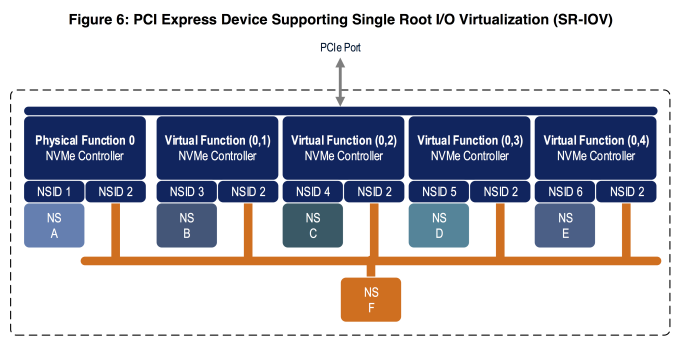
The NVMe virtualization enhancements greatly expand the usefulness of the existing NVMe namespace management features. So far, drives supporting multiple namespaces have been quite rare so the namespace features have mostly applied to multipath and NVMe over Fabrics use cases. Now, a single drive can use multiple namespaces to partition its storage among several virtual controllers assigned to different VMs, with the potential for namespaces to be exclusive or shared among VMs, all without requiring any changes to the NVMe drivers in the guest operating systems and without requiring the hypervisor to implement its own volume management layer.

Namespace Optimal IO Boundary

NVMe allows SSDs to support multiple sector sizes through the Format NVM command. Most SSDs default to 512-byte logical blocks but also support 4kB logical blocks, often with better performance. However, for flash-based SSDs, neither common sector size reflects the real page or block sizes of the underlying flash memory. Nobody is particularly interested in switching to the 16kB or larger sector sizes that would be necessary to match page sizes of modern 3D NAND flash, but there is potential for better performance if operating systems align I/O to the real page size. NVMe 1.3 introduces a Namespace Optimal IO Boundary field that provides exactly this performance hint to the host system, expressed as a multiple of the sector size (eg. 512B or 4kB).

Directives and Streams

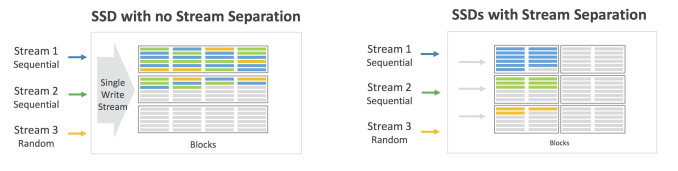
The new feature that may prove to have the biggest long-term impact is NVMe’s Directives support, a generic framework for the controller and host system to exchange extra metadata in the headers of ordinary NVMe commands. For now, the only type of directive supported for ordinary IO commands is the Streams directive. Defined only for write commands, the streams directive allows the host to tag operations as related, such as originating from the same process or virtual machine. This serves as a hint to the controller about how to store that data on a physical level. For example, if multiple streams are actively writing simultaneously, the controller would probably want to write data from each stream contiguously rather than interleave writes from multiple streams into writes to the same physical page erase block. This can lead to more consistent write performance for multithreaded workloads, better prefetching for reads, and lower write amplification.
Non-Operational Power State Permissive Mode

NVMe power management is far more flexible than what SATA drives support. NVMe drives can declare several different power states including multiple operational and non-operational idle states. The drive can provide the host with information about the maximum power draw in each state, the latency to enter and leave each state, and the relative performance of the various operational power states. For drives supporting the optional Autonomous Power State Transitions feature (APST) introduced in NVMe 1.1, the host system can in turn provide the drive with rules about how long it should wait before descending to the next lower power state. NVMe 1.3 provides two significant enhancements to power management. The first is a very simple but crucial switch controlling whether a drive in an idle state may exceed the idle power limits to perform background processing like garbage collection. Battery-powered devices seeking to maximize standby time would likely want to disable this permissive mode. Systems that are not operating under strict power limits and are merely trying to minimize unnecessary power use without prohibiting garbage collection would likely want to enable permissive mode rather than leave the drive in a low-power operational state.

Host Controlled Thermal Management

The second major addition to the NVMe power management feature set is Host Controlled Thermal Management. Until now, the temperatures at which NVMe SSDs engage thermal throttling have been entirely model-specific and are not exposed to the host system. The new host controlled thermal management feature allows the host system to specify two temperature thresholds at which the drive should perform light and heavy throttling to reduce the drive’s temperature. Most of the details of thermal throttling are still left up to the vendor, including how the drive’s various temperature sensors are combined to form the Composite Temperature that the thresholds apply to, and the hysteresis of the throttling (how far below the threshold the temperature must fall before throttling ceases). Drives will continue to include their own built-in temperature limits to prevent damage, but now compact machines like smartphones, tablets and ultrabooks can prevent their SSD from raising other components to undesirable temperatures.