News


G.Skill Announces Trident Z RGB Illumination to DDR4

G.Skill Announces Trident Z RGB Illumination to DDR4

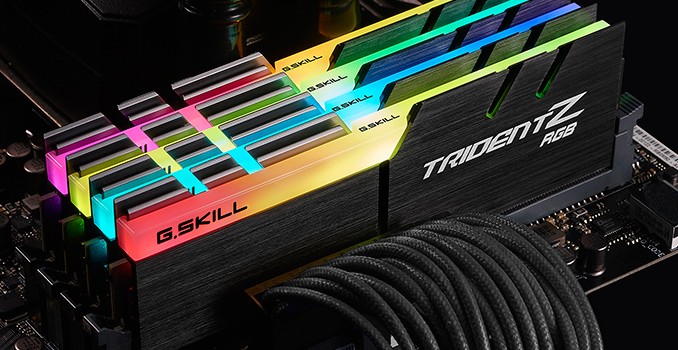
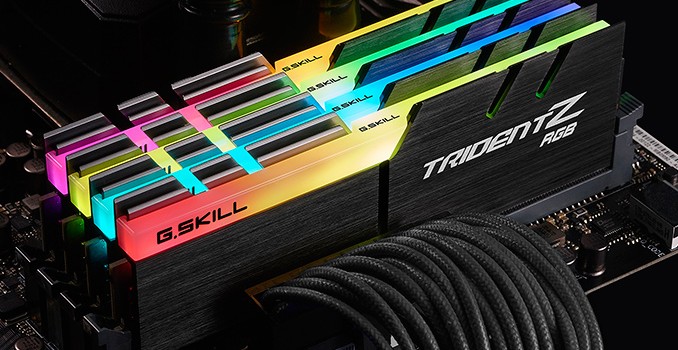
G.Skill this week has announced a new addition to its Trident Z family of high-performance DDR4 memory modules aimed at modders. The new Trident Z RGB will feature software-controllable RGB LEDs on top of the modules. The DIMMs will require no additio…

G.Skill Announces Trident Z RGB Illumination to DDR4

G.Skill Announces Trident Z RGB Illumination to DDR4

G.Skill this week has announced a new addition to its Trident Z family of high-performance DDR4 memory modules aimed at modders. The new Trident Z RGB will feature software-controllable RGB LEDs on top of the modules. The DIMMs will require no additio…

AMD Releases Radeon Software Crimson ReLive Edition 16.12.2 Update

AMD Releases Radeon Software Crimson ReLive Edition 16.12.2 Update

We are not even two weeks out from the release of AMD’s Radeon Software Crimson ReLive Edition and we have been given an update. The 16.12.2 update brings the driver version to 16.50.2001, and there is no game specific support bundled in with this update. Though we do have a hefty list of fixes, most of which apply directly to ReLive features.

First up we have a fix in for a specific bug. When using AMD FreeSync technology with a borderless fullscreen application, and playing dynamic content such as a video or another application, performance issues were possible. AMD also notes in the known issues that a small number of apps may still experience this issue. I say it’s at least safe to say they are working on the issue.

Most of the remaining fixes fall cleanly under ReLive related issues and problems. Radeon ReLive may have failed to install on some system configurations. Instant Replay may have failed to enable itself after being turned off due to content protection conflicts. There are also some fixed translations errors for both Radeon Settings and Radeon ReLive. Audio recorded by Radeon ReLive may have sometimes played back in slow motion. Radeon ReLive also may have had issues recording or issues toggling the Overlay/Toolbar when Frame Rate Target Control (FRTC) is enabled, if issues remain the workaround noted is to disable FRTC while using Radeon ReLive. Additionally, mouse cursor movement may stutter in recorded video when there is little movement other than the cursor itself. In AMD Multi GPU configurations the second GPU was exiting the low power state while Radeon ReLive was enabled. There were also problems taking screenshots of secondary displays with Radeon ReLive.

In an oddly specific outline for a bug, DOTA 2 may have experienced game corruption while task switching while recording with Radeon ReLive in AMD Multi GPU configurations. Slightly less specific to that other MOBA, Radeon ReLive’s Overlay will not launch or record when running League of Legends in administrator mode and borderless fullscreen.

Moving back to other issues outside of ReLive, Radeon Settings was not loading upon system boot. There was also flashing and graphics corruption found when running Battlefield 1 with Multi GPU on the RX400 series cards. Chromium may have failed to use hybrid decode for VP9 content, and though I’m not sure how this ties to a GPU drivers there appears to be a fix for long ping times with some Wi-Fi adapters.

I also find it interesting that in the release notes under known issues we have ReLive issues separated out into another list. I don’t know whether this is a sign of diligence, showing that they are tracking and staying on top of many issues, or if someone decided that the list of issues was getting too big and needed to be split. Either way, AMD is obviously continuing their trend to update often and provide a decent to sizable number of fixes with every update. Last year felt like a sharp increase in the effort put into these updates and there is still no sign of them slowing down. There are no game specific optimizations in this update. I assume they were all hands on deck, to keep up with all issues uncovered after the big update two weeks ago.

As always, those interested in reading more or installing the updated hotfix drivers for AMD’s desktop, mobile, and integrated GPUs can find them either under the driver update section in Radeon Settings or on AMDs Radeon Software Crimson ReLive Edition download page.



AMD Releases Radeon Software Crimson ReLive Edition 16.12.2 Update

AMD Releases Radeon Software Crimson ReLive Edition 16.12.2 Update

We are not even two weeks out from the release of AMD’s Radeon Software Crimson ReLive Edition and we have been given an update. The 16.12.2 update brings the driver version to 16.50.2001, and there is no game specific support bundled in with this update. Though we do have a hefty list of fixes, most of which apply directly to ReLive features.

First up we have a fix in for a specific bug. When using AMD FreeSync technology with a borderless fullscreen application, and playing dynamic content such as a video or another application, performance issues were possible. AMD also notes in the known issues that a small number of apps may still experience this issue. I say it’s at least safe to say they are working on the issue.

Most of the remaining fixes fall cleanly under ReLive related issues and problems. Radeon ReLive may have failed to install on some system configurations. Instant Replay may have failed to enable itself after being turned off due to content protection conflicts. There are also some fixed translations errors for both Radeon Settings and Radeon ReLive. Audio recorded by Radeon ReLive may have sometimes played back in slow motion. Radeon ReLive also may have had issues recording or issues toggling the Overlay/Toolbar when Frame Rate Target Control (FRTC) is enabled, if issues remain the workaround noted is to disable FRTC while using Radeon ReLive. Additionally, mouse cursor movement may stutter in recorded video when there is little movement other than the cursor itself. In AMD Multi GPU configurations the second GPU was exiting the low power state while Radeon ReLive was enabled. There were also problems taking screenshots of secondary displays with Radeon ReLive.

In an oddly specific outline for a bug, DOTA 2 may have experienced game corruption while task switching while recording with Radeon ReLive in AMD Multi GPU configurations. Slightly less specific to that other MOBA, Radeon ReLive’s Overlay will not launch or record when running League of Legends in administrator mode and borderless fullscreen.

Moving back to other issues outside of ReLive, Radeon Settings was not loading upon system boot. There was also flashing and graphics corruption found when running Battlefield 1 with Multi GPU on the RX400 series cards. Chromium may have failed to use hybrid decode for VP9 content, and though I’m not sure how this ties to a GPU drivers there appears to be a fix for long ping times with some Wi-Fi adapters.

I also find it interesting that in the release notes under known issues we have ReLive issues separated out into another list. I don’t know whether this is a sign of diligence, showing that they are tracking and staying on top of many issues, or if someone decided that the list of issues was getting too big and needed to be split. Either way, AMD is obviously continuing their trend to update often and provide a decent to sizable number of fixes with every update. Last year felt like a sharp increase in the effort put into these updates and there is still no sign of them slowing down. There are no game specific optimizations in this update. I assume they were all hands on deck, to keep up with all issues uncovered after the big update two weeks ago.

As always, those interested in reading more or installing the updated hotfix drivers for AMD’s desktop, mobile, and integrated GPUs can find them either under the driver update section in Radeon Settings or on AMDs Radeon Software Crimson ReLive Edition download page.


GALAX Shows Off Single-Slot GeForce GTX 1070 Graphics Card

GALAX Shows Off Single-Slot GeForce GTX 1070 Graphics Card

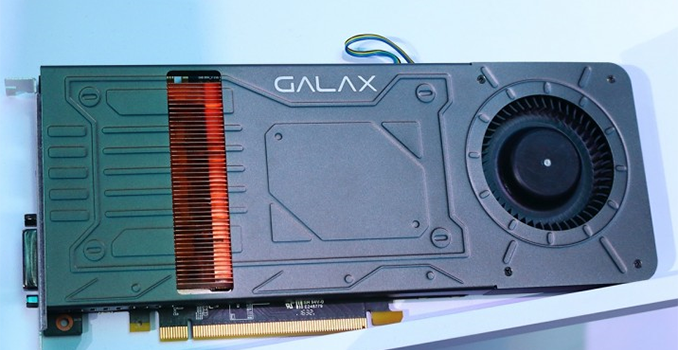
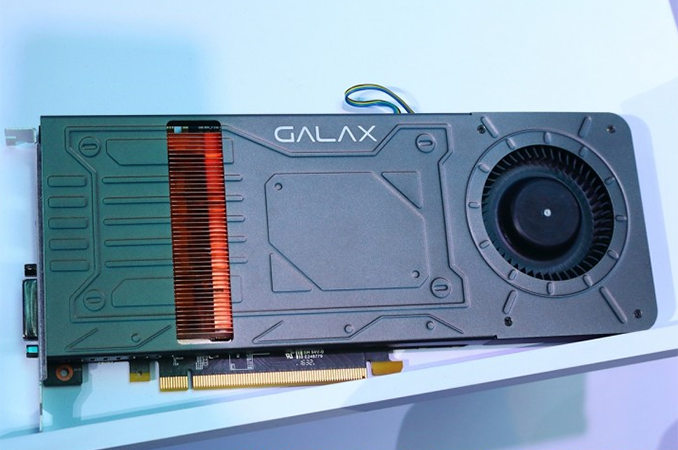
GALAX has developed a GeForce GTX 1070 graphics card with an ultra-slim one slot wide cooling system. The industry’s first single-slot GeForce GTX 1070 is understood to be released in China in early 2017, but it is unknown whether the video card will ever make it outside of the country.

Single-slot gaming graphics adapters for high-performance cards are not a common occurrence, especially as most AIB partners now run dual slot for anything 75W for over. After developers of GPUs for years have developed dual-slot designs for their coolers, the vast majority of motherboards have enough space to install at least one single slot graphics card. Nonetheless, there are systems equipped with extra add-in-boards (audio, SSD, additional SATA or Thunderbolt 3 controllers, etc.) that require slim single-slot components as there is simply not enough space inside. Meanwhile, it is not easy to find high-performance single-slot graphics cards: even some low-profile boards feature doublewide radiators. Companies like AMD and NVIDIA release professional graphics cards with slim coolers (e.g., Quadro M4000, Radeon Pro WX7100 and so on), but such products are not intended for general consumers because of high prices and some other peculiarities. By contrast, the forthcoming GeForce GTX 1070 from GALAX is a high-end consumer product with a single-slot cooling system.

The upcoming GALAX GeForce GTX 1070 uses a copper radiator with very thin fins and a metallic cover. Copper quickly absorbs heat, which is why it is used to make small form-factor coolers (including those for servers). Meanwhile, to maximize cooling potential of the whole system, GALAX uses a blower-type fan that generates very high air pressure by rotating at a very high speed. Such fans inevitably generate a lot of noise, but that is a tradeoff between dimensions and performance. Copper heatsinks are typically heavy too, as well as pricier than regular GPU heatsinks.

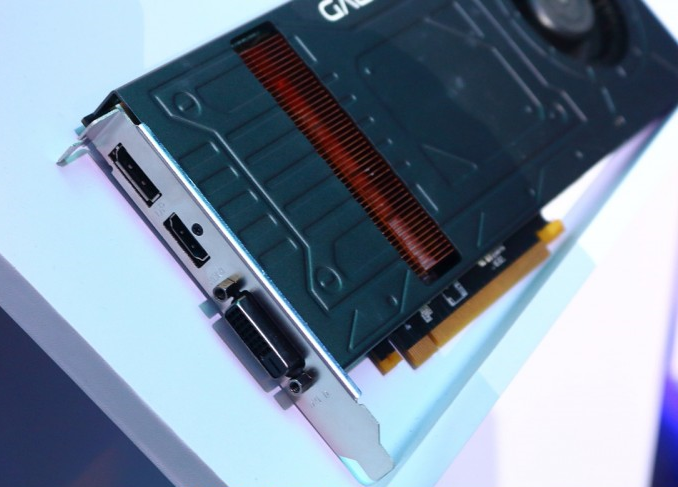
So far, GALAX has only demonstrated the graphics card at an event in China (and clearly labelled it GTX 1070 for anyone wondering) and has not revealed its frequencies or other peculiarities. Since NVIDIA’s partners are not allowed to downclock GPUs, it is highly likely that the card will run at reference 1506/1683 MHz (base/boost) clock rates. As for connectivity, the board has three connectors: a DVI, a DisplayPort 1.2 and HDMI 2.0.

GALAX belongs to Palit Microsystems, one of the world’s largest makers of video cards. From time to time Palit’s brands release unique NVIDIA-based graphics adapters that have features not available on competing solutions. Usually, such AIBs are only sold in China, but at times they make it to the U.S. and Europe under various trademarks.

Related Reading: