News


AMD Announces Radeon R9 Nano; mini-ITX Card Shipping September 10th
AMD Announces Radeon R9 Nano; mini-ITX Card Shipping September 10th

Back in June at AMD’s R9 Fury X/Fiji GPU launch event, the company unveiled that there would be four products based on Fiji. Fury X and Fury – which have since launched – and then two additional products, the R9 Nano and a yet-to-be-named dual-GPU card. Uncharacteristicly for AMD, the R9 Nano was unveiled some time before it would ship in order to demonstrate some of the size benefits of the Fiji GPU and its HBM, with the card initially receiving a tentative launch date of “summer”.

Now with August coming to a close, AMD is formally announcing the R9 Nano ahead of its full launch next month. The card, which will be AMD’s take on a premium, specialty product for the mini-ITX market, will be hitting retailer shelves on September 10th for $649.

AMD GPU Specification Comparison
  AMD Radeon R9 Fury X AMD Radeon R9 Fury AMD Radeon R9 Nano AMD Radeon R9 390X
Stream Processors 4096 3584 4096 2816
Texture Units 256 224 256 176
ROPs 64 64 64 64
Boost Clock 1050MHz 1000MHz 1000MHz 1050MHz
Memory Clock 1Gbps HBM 1Gbps HBM 1Gbps HBM 6Gbps GDDR5
Memory Bus Width 4096-bit 4096-bit 4096-bit 512-bit
VRAM 4GB 4GB 4GB 8GB
FP64 1/16 1/16 1/16 1/8
TrueAudio Y Y Y Y
Transistor Count 8.9B 8.9B 8.9B 6.2B
Typical Board Power 275W 275W 175W 275W
Manufacturing Process TSMC 28nm TSMC 28nm TSMC 28nm TSMC 28nm
Architecture GCN 1.2 GCN 1.2 GCN 1.2 GCN 1.1
GPU Fiji Fiji Fiji Hawaii
Launch Date 06/24/15 07/14/15 09/10/15 06/18/15
Launch Price $649 $549 $649 $429

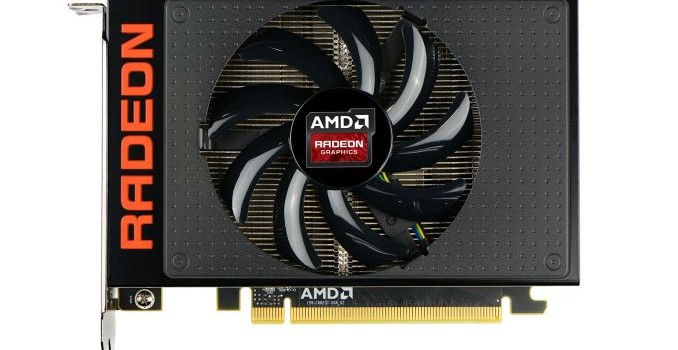
Diving right into the design and specs, the R9 Nano is designed to be a showcase piece for the space savings that HBM technology offers. With Fiji’s 4GB of VRAM confined to a quartet of small, stacked packages near the GPU die, the overall space occupied by the complete GPU package is quite small, just over 1000mm2. Similar to what we saw with the R9 Fury X, the lack of large GDDR5 memory chips allows AMD to build a smaller board overall, and R9 Nano is to be the logical extension of what R9 Fury X started, bringing Fiji down to a mini-ITX sized video card.

In order to achieve this AMD has turned to a combination of chip binning and power reductions to make a Fiji card viable as the desired size. The Fiji GPUs going into the R9 Nano will be AMD’s best Fiji chips (from a power standpoint), which are fully enabled Fiji chips that have been binned specifically for their low power usage. Going hand in hand with that, AMD has designed the supporting power delivery circuitry for the R9 Nano for just 175W, allowing the company to further cut down on the amount of space required for the card.

The end result is that from a specification standpoint the R9 Nano should be an impressive, tiny terror. Since it’s a full Fiji GPU the R9 Nano doesn’t take an immediate hit to its performance relative to the R9 Fury X, featuring the same 4096 stream processors and 4096-bit ultra-wide HBM memory bus. The only real differences between R9 Fury X and R9 Nano are the clockspeed and the TDP/power targets. The R9 Nano will ship with a boost clock of 1000MHz versus R9 Fury X’s 1050MHz boost clock, and the TDP is 175W versus 275W.

The resulting performance difference in turn will come down to power limits. While R9 Nano has a 1000MHz boost clock, even with AMD’s binning 175W is a relatively harsh power limit for such a powerful GPU, and consequently the R9 Fury X the R9 Nano is expected to power throttle under normal circumstances. AMD tells us that the typical gaming clock will be around the 900MHz range, with the precise value depending on the power requirements of the workload being run. As to why AMD is shipping the card at 1000MHz even when they don’t expect it to be able to sustain the clockspeed under most games, AMD tells us that the higher boost clock essentially ensures that the R9 Nano is only ever power limited, and isn’t unnecessarily held back in light workloads where it could support higher clockspeeds.
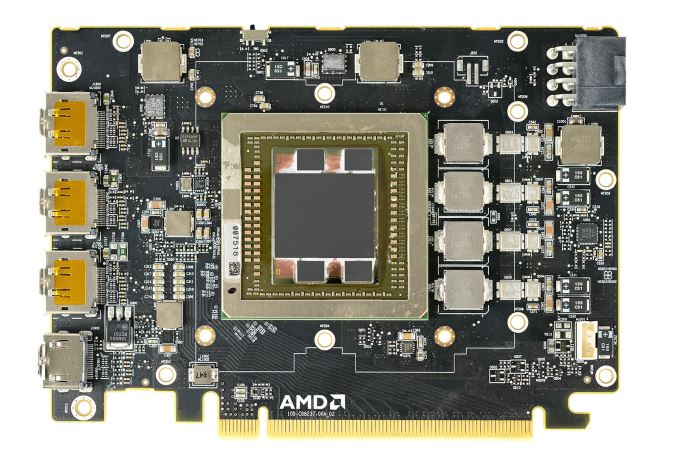
Moving on, the physical board itself measures just 6” long, allowing the complete card to fit within the full width of a mini-ITX motherboard. Power delivery is handled by a single 8-pin PCIe power socket, which is becoming increasingly common, replacing the 2x 6-pin setup for 150W-225W cards. In order to get the length of the board down AMD has moved some of the power delivery circuitry to the back of the card; the front of the card still contains the inductors and heat-sensitive MOSFETs, while a number of capacitors are on the rear of the card (and is why you won’t find a backplate).

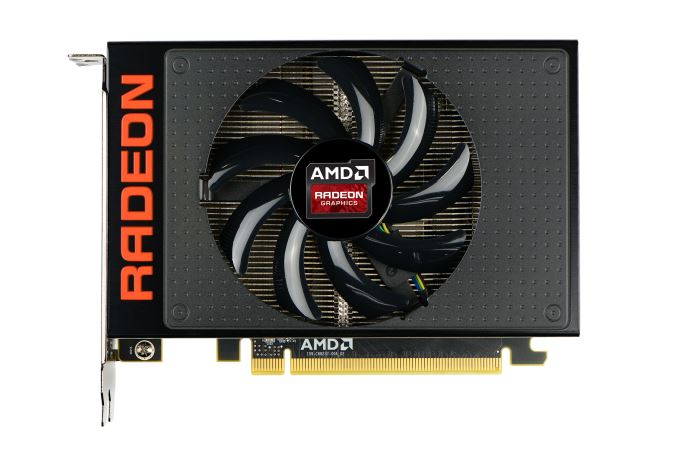
Responsibility for cooling the card falls to the R9 Nano’s new open air cooler, an aggressive design that has been specifically tailored to allow the card to effectively dissipate 175W of heat in such a small space. The overall design is best described as a combination open-air and half-blower hybrid; the design is technically open-air, however with only a single fan AMD has been able to align the heatsink fins horizontally and then place the fan in the center of the heatsink. The end result is that roughly half of the heat produced by the card is vented outside of the case, similar to a full blower, while the other half of the heat is vented back into the case. This reduces (though doesn’t eliminate) the amount of hot air being recycled by the card.

Drilling down, we find that the R9 Nano’s heatsink assembly is actually composed of two separate pieces. The primary heatsink is a combination vapor chamber and heatpipe design. A copper vapor chamber serves to draw heat away from the Fiji GPU and HBM stacks, and then heatpipes are used to better distribute heat to the rest of the heatsink. Meanwhile a small secondary heatsink with its own heatpipe is mounted towards the rear of the card and is solely responsible for cooling the MOSFETs.

The use of a vapor chamber in the R9 Nano makes a lot of sense given the fact that vapor chambers are traditionally the most efficient heatsink base type, however the R9 Nano is also unique in that we typically don’t see vapor chambers and heatpipes used together. Other designs such as the high-end GeForce series use a single large vapor chamber across the entire heatsink base, so among reference cards at least the R9 Nano stands alone in this respect, and it will be interesting to see what cooling performance is like.

That said, AMD is rather confident in their design and tells us that the R9 Nano should never thermally throttle; the card’s thermal throttle point is 85C, meanwhile the card is designed to operate at around 75C, 10C below the throttling point. Similarly, AMD is promising that R9 Nano will also be a quiet card, though as this is far more relative we’ll have to see how it does in testing.

From a marketing standpoint, AMD will be spending a fair bit of time comparing the R9 Nano to the reference R9 290X, AMD’s former flagship Hawaii card. The reference R9 290 cards were something of a low point for AMD in terms of cooling efficiency and noise, so they are eager to present the R9 Nano as an example of how they have learned from their earlier mistakes. Going up against what is admittedly a low bar, AMD is telling us that the R9 Nano is 30% faster than the R9 290X, draws 30% less power than the R9 290X, and is much, much quieter than their former flagship. Thanks in large part to the combination of Fiji’s architectural improvements and AMD’s aggressive binning, the R9 Nano should offer around 2x the energy efficiency of the R9 290X, and of course it will be a much smaller card as well.

Otherwise against AMD’s Fury lineup, the performance of the R9 Nano will potentially be rather close. If AMD’s 900MHz average clockspeed figure proves to be correct, then the R9 Nano would deliver around 85% of the R9 Fury X’s performance, or around 92% of the R9 Fury’s. This would make it slower than either of the existing Fiji cards, but somewhere near (and likely ahead of) the R9 390X.

More importantly for AMD though, the R9 Nano should easily be the most powerful mini-ITX card on the market. The other major mini-ITX cards are based on smaller, less powerful video cards such as the Radeon R9 280 (Tonga) and GeForce GTX 970 (GM204), both of which a 900MHz Fiji will easily clear. By how much is going to depend on a few factors, including the actual average gaming clockspeeds and the games in question, but overall in the mini-ITX space there’s every reason to expect that R9 Nano will stand at the top.
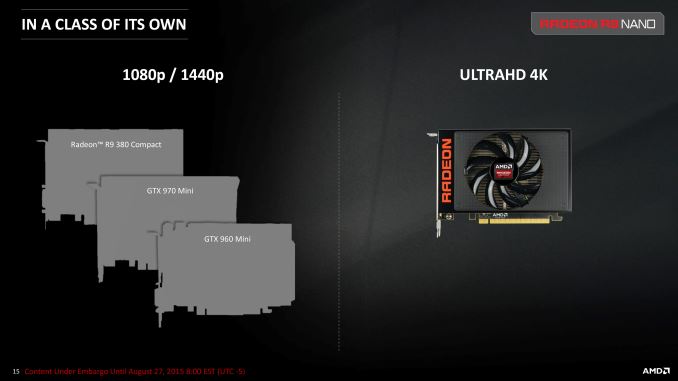
Which brings us to the final aspect of the R9 Nano, which is pricing and positioning. For the R9 Nano AMD is going to positioning the card as a luxury product, similar to NVIDIA’s Titan series, which is to say that it will offer unparalleled performance for the segment of the market it’s designed for – in this case mini-ITX – but it will also fetch a higher price as a result. In the case of the R9 Nano, this means $650.

From a silicon lottery standpoint R9 Nano will feature AMD’s best Fiji chips, and the vapor chamber cooler, though not quite as intricate as R9 Fury X’s CLLC, is still an advanced cooler with a higher cost to go with it. As a result it’s unsurprising that AMD is seeking to charge a premium for the product, both to cover the higher costs and to take advantage of their expected performance lead within the mini-ITX market. Practically speaking the mini-ITX market is a small one relative to the larger gaming PC market (pun intended), and while there is some overlap with the power efficient gaming PC market, it’s hard to say just how much overlap there is. Regardless, AMD’s pricing and messaging make it clear that the R9 Fury series is intended to be AMD’s top performance cards and price/performance kingpins, while R9 Nano is a specialty card for a smaller market that’s currently underserved.

Of course there’s also going to be the question of how many cards AMD can even supply. Binning means that only a fraction of Fiji chips will ever make the cut, so R9 Nano is never going to be a high volume part along the lines of the R9 Fury series. What remains to be seen then is how much of a market exists for $650 mini-ITX cards, and then if AMD can supply enough cards for that market. Though given AMD’s unique situation, I don’t doubt that they’ll be able to sell a number of these cards.

On that note, we’re hearing that the overall Fiji supply situation is looking up. R9 Fury series cards have been in short supply in the US since the June/July launches, with card supplies improving just within the last couple of weeks. For the R9 Nano launch AMD has been stockpiling cards for the initial rush of sales, and beyond that we’ll have to see what becomes of the supply situation.

Finally, once the supply situation does improve AMD tells us that we may see some custom R9 Nano cards come later in Q4 of this year. AMD has been very vague on this point, but from what they’re telling us they’re going to be letting partners take a shot at developing Nano designs of their own. So while the launch on September 10th and for the next couple of months after that will be pure reference, we may see some custom designs by the end of the year.

And with that we end for now. Please be sure to check back in on September 10th for our full review of the smallest member of AMD’s Fiji family.

Summer 2015 GPU Pricing Comparison
AMD Price NVIDIA
Radeon R9 Fury X
Radeon R9 Nano
$649 GeForce GTX 980 Ti
Radeon R9 Fury $549  
  $499 GeForce GTX 980
Radeon R9 390X $429  
Radeon R9 390 $329 GeForce GTX 970
Obi Worldphone Launches The Worldphone SF1 and SJ1.5

Obi Worldphone Launches The Worldphone SF1 and SJ1.5

Today Obi Worldphone, the smartphone company co-founded by former CEO of Apple and former president of Pepsi John Sculley, launched two new smartphones targeted at emerging markets. The first of the new phones has two SKUs, which allows the devices to target three different price points in the low-end and mid-range sections of the smartphone market. You can check out the specifications of both new smartphones in the chart below.

  Worldphone SF1 Worldphone SJ1.5
SoC Qualcomm Snapdragon 615
1.5GHz 4x Cortex A53
1.11GHz 4x Cortex A53
MediaTek MT6580
1.3GHz 4x Cortex A7
RAM 2/3GB LPDDR3 1GB
NAND 16/32GB NAND + microSD 16GB NAND + microSD
Display 5” 1080p IPS 5” 720p IPS
Network 2G / 3G / 4G LTE (MDM9x25 Cat4) 2G / 3G HSPA
Dimensions 146 x 74 x 8mm, 147g 146 x 73 x 7.95mm, 131g
Camera 13MP Rear Facing (IMX214) F/2.0, 1.12 micron 1/3.06″ sensor 8MP Rear Facing (OV8865) F/2.2, 1.4 micron 1/3.2″ sensor
5MP Front Facing 5MP Front Facing
Battery 3000 mAh (11.4 Wh) 3000 mAh (11.4 Wh)
OS Android 5.0.2 Android 5.1
Connectivity 5 GHz 2×2 802.11a/b/g/n +
BT 4.0,
USB2.0, GPS/GNSS
2.4 GHz 802.11b/g/n +
BT 4.0,
USB2.0, GPS/GNSS
SIM Dual SIM (Micro + Nano) Dual MicroSIM
Launch Price $199 (2GB/16GB)
$249 (3GB/32GB)
$129

As you can see, the Worldphone SJ1.5 targets the low end of the smartphone market, while the SF1 is a mid-range device. I personally think the SJ1.5 might have trouble competing with Motorola’s Moto E in regions where there is LTE coverage, but it does offer a larger, higher resolution display, as well as a very large battery and dual-SIM slot support which is very important for customers in emerging markets. Unsurprisingly, the SJ1.5 has a polycarbonate chassis, although the specifications for it indicate that it uses a magnesium-titanium alloy inside for support.

In my opinion, the more interesting of these two devices is the Worldphone SF1. The SF1’s chassis is made of reinforced fiberglass, and despite its 11.4Wh battery is only 8mm thick. In many ways, it reminds me of the OnePlus One in how it offers some high quality specifications at a low price. For $199 you get 2GB of RAM, 16GB of NAND, a 1080p display, Sony’s IMX214 camera sensor, and Qualcomm’s Snapdragon 615 SoC. Moving up to $249 gets you an additional gigabyte of RAM, and doubles your storage to 32GB. At least on paper, the Worldphone SF1 appears to give you more for your money than a phone like the Moto G, and it could have a significant impact when it launches in the EMIEA region in the near future.

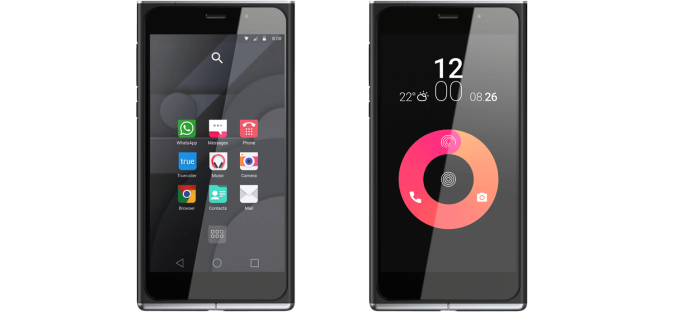
The design of both the SF1 and the SJ1.5 reminds me a lot of the older Nokia Lumia smartphones like the Lumia 800, although there are a number of differences that give them a distinct appearance. I’m actually interested in trying one of these new devices to see how they feel in the hand and whether they live up to the expectations created by their specifications on paper. Obi Worldphone’s listed specifications do have some oddities, such as the Worldphone SF1 launching with Android 5.0.2 while the SJ1.5 launches with Android 5.1. It’s not clear if there are some errors or if the devices really will ship with two different versions of Android at launch.

Both the Worldphone SF1 and Worldphone SJ1.5 will be launching in the near future at both online and physical retailers in countries including but not limited to Vietnam, India, Tukey, Pakistan, South Africa, Nigeria, Thailand, and the United Arab Emirates. The Worldphone SF1 is priced at $199 and $249 USD depending on the model you purchase, while the Worldphone SJ1.5 will be $129.

Obi Worldphone via Engadget

Intel's Skylake GPU - Analyzing the Media Capabilities

Intel’s Skylake GPU – Analyzing the Media Capabilities

At IDF in San Francisco last week, Intel provided us with lots of insights into Skylake, the microarchitecture behind the 6th generation Core series processors. Skylake marks the introduction of the Gen9 Intel HD Graphics technology. In advance of our full Skylake architecture analysis (coming soon), I wanted to get a head start and explain the media side (including Quick Sync and the image processing pipeline) of Skylake in a separate piece.

Media Capabilities and Quick Sync in Intel HD Graphics – A Brief History

Quick Sync has evolved through the last five years, starting with limited hardware acceleration and usage of the programmable EU array in Sandy Bridge. The second generation engine in Ivy Bridge moved to a hybrid hardware / software solution with rate control, motion estimation and intra estimation as well as mode decision happening in the programmable EU array. Usage of the EU array enabled tuning of the algorithms. Motion compensation, intra prediction, forward quantization and entropy coding were done in hardware in the MFX (multi-format codec engine). Haswell added JPEG / MJPEG decode to the MFX, a dedicated VQE (video quality engine) for low power video processing and a faster media sampler.

Around the time Broadwell was introduced, we had the major transitions taking place in the video codec front – HEVC adoption was picking up, and VP8 / VP9 was also gaining support. In order to tackle these aspects and build on consumer feedback, Intel made major updates to the media block / Quick Sync engine late last year.

Broadwell was also the first microarchitecture to support two BSDs (bit stream decoder) in the GT3 variants. Each BSD allows a set of commands to decode one video stream.

Broadwell’s updates (when compared to Haswell) are summarized in the slide below.

The detailed discussion of Broadwell’s media capabilities above is relevant to the improvements made in Skylake.

Skylake’s Gen9 Graphics

The Gen9 graphics engine comes in multiple sizes for different power budgets. There are three main variants, GT2, GT3/GT3e and GT4e. In the slide below, the important aspect to note is that the media processing hardware (Media FF – Media Fixed Function) resides in the ‘Unslice’. While the GT2 comes with the minimum possible Media FF logic, the GT3 and GT3e come with additional hardware capabilities. This strategy is similar to what was adopted in Broadwell.

The Unslice can operate at a different voltage and frequency compared to the Slices. This is especially important for video decoding / processing where the Media FF can run at higher clocks for better performance while ensuring minimal power consumption. From the viewpoint of tools such as GPU-Z and HWiNFO, it will be interesting to see if real-time statistics on voltage and clocks can be gathered for both the Unslice and the Slices. For additional power saving, power gating can be used at the Slices level or the EU group level.

Amongst the media improvements made in Skylake, we have:

  • An additional fixed function video encoder in the Quick Sync engine
  • Additional codec support (both decode and encode): HEVC, VP8, MJPEG
  • RAW imaging capabilities

Quick Sync in Skylake

Intel classifies the Quick Sync modes in Broadwell and previous generations as ‘PG-Mode’ (Processor Graphics). It is optimized for faster than real-time encoding and flexibility. The new mode, ‘FF-Mode’ (Fixed Function) is optimized for real-time H.264 encoding, with focus on lowering the latency and reducing the power consumption. Except for programmable rate control, all other aspects of the encoding algorithm are handled in the MFX itself. Since rate control is in the hands of the application software, it is possible to do a 2-pass adaptive mode even with the FF hardware.

The new mode could possibly enable better user-experience with features such as Wi-Di, screen recording etc.. Note that Skylake offers developers the flexibility to use either the PG mode or the FF mode in their applications. PG mode still retains the TUx (Target Usage level) discussed in one of the above slides.

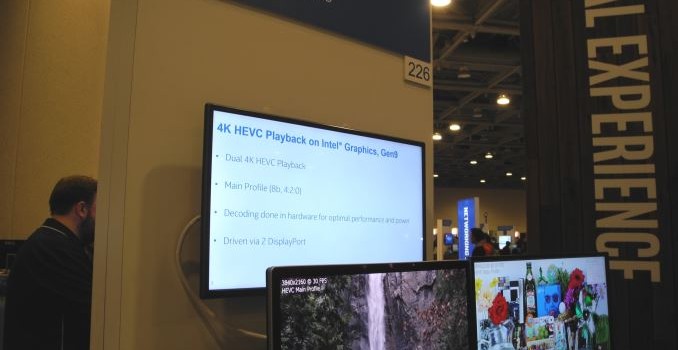
Skylake’s MFX engine adds HEVC Main profile decode support (4Kp60 at up to 240 Mbps). Main10 decoding can be done with GPU acceleration. The Quick Sync PG Mode supports HEVC encoding (again, Main profile only, with support for up to 4Kp60 streams).

The DXVA Checker screenshot (taken on a i7-6700K, a part with Intel HD Graphics 530 / GT2) for Skylake with driver version 10.18.15.4248 is produced below. HEVC_VLD_Main10 has a DXVA profile, but it is done partially in the GPU (as specified in the slide above). VP8 DXVA profile doesn’t seem to be activated yet. There are new DXVA profiles (enabled) for the SVC (scalable video coding) extension to H.264.

Video Post Processing & Miscellaneous Aspects

Additional improvements include a scalar and format converter (SFC) that can work with MFX and VQE (without using the EUs or the media sampler). This enables power-efficient rotation and color space conversion during media playback.

Yet another power-saving trick introduced in Skylake is the media memory bandwidth compression. The compression is lossless and managed at the driver level.

Skylake’s VQE also brings about new features with RAW image processing support (16-bit image pipeline), spatial denoising and local adaptive contrast enhancement (LACE). Power efficiency is also improved, with claims of the VQE consuming less than 50mW during operation.

The new fixed function hardware in the performance-sensitive stages enables even low power mobile Skylake parts to support 4Kp60 RAW video processing. LACE support is not available for 4K resolution on the Y-series Skylake parts, though.

Display Capabilities

In terms of display support, Skylake can drive up to three simultaneous displays. The supported resolutions are provided in the table below. At IDF, Intel was showing off the Skylake platform driving three 4K monitors simultaneously.

One of the disappointing aspects is the absence of a native HDMI 2.0 port with HDCP 2.2 support. Intel’s solution is to add a LSPCon (Level Shifter – Protocol Converter) in the DP 1.2 path. Various solutions such as the MegaChips MCDP28 family of products exist for this purpose. According to one of leaked Intel slides from earlier this year, the Alpine Ridge Thunderbolt 3 controller can also act as a LSPCon and provide a HDMI 2.0 output. At IDF, Intel indicated that we could see Alpine Ridge supporting HDMI 2.0 towards the end of the year (something corroborated unofficially by a few motherboard manufacturers)

The display sub-system also provides hardware support for Multi-plane Overlay (MPO) that allows alpha blending of multiple layers. This saves power by selective disabling of un-needed planes. Usage applications include certain video playback scenarios and HUD (heads-up display) gaming. The table below lists out the updated support for MPO as one moves from Broadwell to Skylake. The NV12 feature is particularly interesting from a media playback perspective – it is a video format that avoids conversion as video data moves between the decoder, post processing and the display blocks. With Skylake, post-decoded NV12 content can also be provided directly to a MPO display plane, and there is no need for the video post processor to do a NV12 to RGB conversion.

Intel indicated that the new Skylake MPO feature could save as much as 1.1W when playing back 1080p24 video on a 1440p panel – which is a substantial amount when mobile devices are considered. Power savings are also achieved by altering the core display clock based on the display configuration, number of displays and the resolution of each display.

Systems utilizing eDP with Windows 8.1 or later can also take advantage of hardware support for reducing refresh rate based on video content frame rate (for example, 24 fps video streams can be played after reducing the panel refresh rate to 48 Hz – eliminating 3:2 pull-down issues while also providing power savings). Obviously, the panel and TCON should support this.

Additional power saving can also be achieved on supported panels using Panel Self Refresh Media Buffer Optimization (PSR MBO). It is an Intel-developed optimization on top of the Panel Self Refresh feature of eDP 1.3.

Concluding Remarks

The media-related changes in Skylake’s Gen9 GPU are best summarized by the slide below.

Skylake brings a lot of benefits to content creators – particularly in terms of improvements to Quick Sync and additional image processing options (including real-time 4Kp60 RAW import). However, it is a mixed bag for HTPC users. While the additional video post processing options (such as LACE for adaptive contrast enhancement) can improve quality of video playback, and the increase in graphics prowess can possibly translate to better madVR capabilities, two glaring aspects prove to be dampeners. The first one is the absence of full hardware acceleration for HEVC Main10 decode. Netflix has opted to go with HEVC Main10 for its 4K streams. When Netflix finally enables 4K streaming on PCs, Skylake, unfortunately is not going to be as power efficient a platform as it could have been. The second is the absence of a native HDMI 2.0 / HDCP 2.2 video output. Even though a LSPCon solution is suggested by Intel, it undoubtedly increases the system cost. Sinks supporting this standard have become quite affordable. For less than $600, one can get a 4K Hisense TV with HDMI 2.0 / HDCP 2.2 capability. Unfortunately, Skylake is not going to deliver the most cost-effective platform to utilize the full capabilities of such a display.

Exploring Intel’s Omni-Path Network Fabric

Exploring Intel’s Omni-Path Network Fabric

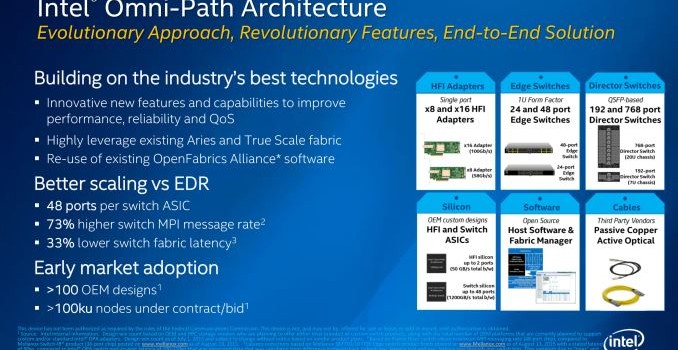
For several months now we have been talking about Intel’s Omni-Path network fabric, the company’s next-generation 100Gbps netwoking fabric technology. Typically Omni-Path has come up alongside discussions of Intel’s forthcoming …