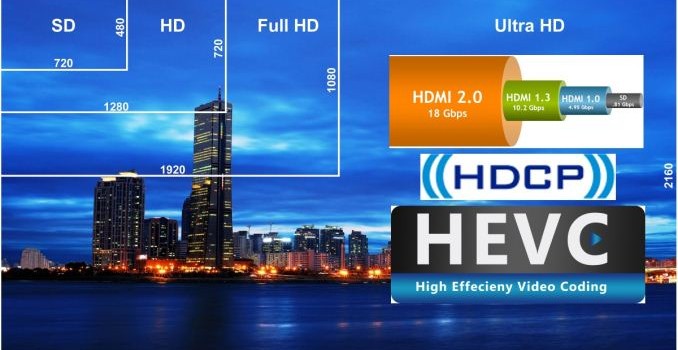
Future-proofing HTPCs for the 4K Era: HDMI, HDCP and HEVC
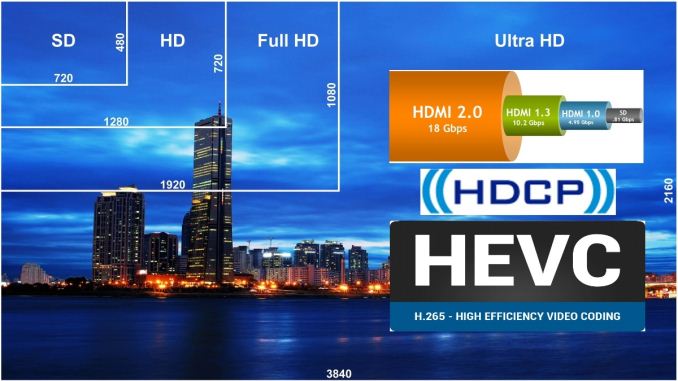
4K (Ultra High Definition / UHD) has matured far more rapidly compared to the transition from standard definition to HD (720p) / FHD (1080p). This can be attributed to the rise in popularity of displays with high pixel density as well as support for recording 4K media in smartphones and action cameras on the consumer side. However, movies and broadcast media continue to be the drivers for 4K televisions. Cinemal 4K is 4096×2304, while true 4K is 4096×2160. Ultra HD / UHD / QFHD all refer to a resolution of 3840×2160. Despite the differences, ‘4K’ has become entrenched in the minds of the consumers as a reference to UHD. Hence, we will be using them interchangeably in the rest of this piece.
Currently, most TV manufacturers promote UHD TVs by offering an inbuilt 4K-capable Netflix app to supply ‘premium’ UHD content. The industry believes it is necessary to protect such content from unauthorized access in the playback process. In addition, pushing 4K content via the web makes it important to use a modern video codec to push down the bandwidth requirements. Given these aspects, what do consumers need to keep in mind while upgrading their HTPC equipment for the 4K era?
Display Link and Content Protection
DisplayPort outputs on PCs and GPUs have been 4K-capable for more than a couple of generations now, but televisions have only used HDMI. In the case of the SD to HD / FHD transition, HDMI 1.3 (arguably, the first HDMI version to gain widespread acceptance) was able to carry 1080p60 signals with 24-bit sRGB or YCbCr. However, from the display link perspective, the transition to 4K has been quite confusing.
4K output over HDMI began to appear on PCs with the AMD Radeon 7000 / NVIDIA 600 GPUs and the Intel Haswell platforms. These were compatible with HDMI 1.4 – capable of carrying 4Kp24 signals at 24 bpp (bits per pixel) without any chroma sub-sampling. Explaining chroma sub-sampling is beyond the scope of this article, but readers can think of it as a way of cutting down video information that the human eye is less sensitive to.
HDMI 2.0a
HDMI 2.0, which was released in late 2013, brought in support for 4Kp60 video. However, the standard allowed for transmitting the video with chroma downsampled (i.e, 4:2:0 instead of the 4:4:4 24 bpp RGB / YCbCr mandated in the earlier HDMI versions). The result was that even non-HDMI 2.0 cards were able to drive 4Kp60 video. Given that 4:2:0 might not necessarily be supported by HDMI 1.4 display sinks, it is not guaranteed that all 4K TVs are compatible with that format.
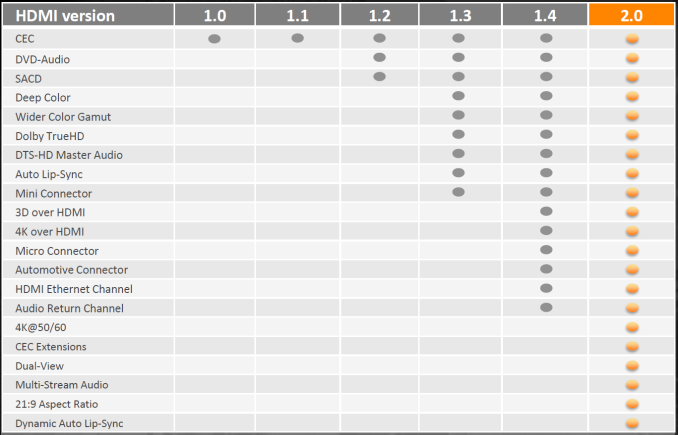
Evolution of HDMI Features
True 4Kp60 support comes with HDMI 2.0, but the number of products with HDMI 2.0 sources can be counted with a single hand right now. A few NVIDIA GPUs based on the second-generation Maxwell family (GM206 and GM204) come with HDMI 2.0 ports.
On the sink side, we have seen models from many vendors claiming HDMI 2.0 support. Some come with just one or two HDMI 2.0 ports, with the rest being HDMI 1.4. In other cases where all ports are HDMI 2.0, each of them support only a subset of the optional features. For example, not all ports might support ARC (audio return channel) or the content protection schemes necessary for playing ‘premium’ 4K content from an external source.
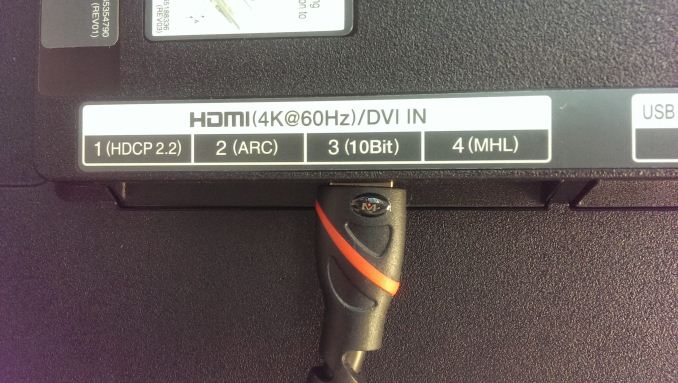
HDMI Inputs Panel in a HDMI 2.0 Television (2014 Model)
HDMI 1.3 and later versions brought in support for 10-, 12- and even 16b pixel components (i.e, deep color, with 30-bit, 36-bit and 48-bit xvYCC, sRGB, or YCbCr, compared to 24-bit sRGB or YCbCr in previous HDMI versions). Higher bit-depths are useful for professional photo and video editing applications, but they never really mattered in the 1080p era for the average consumer. Things are going to be different with 4K, as we will see further down in this piece. Again, even though HDMI 2.0 does support 10b pixel components for 4Kp60 signals, it is not mandatory. Not all 4Kp60-capable HDMI ports on a television might be compatible with sources that output such 4Kp60 content.
HDMI 2.0a was ratified yesterday, and brings in support for high dynamic range (HDR). UHD Blu-ray is expected to have support for 4Kp60 videos, 10-bit encodes, HDR and BT.2020 color gamut. Hence, it has become necessary to ensure that the HDMI link is able to support all these aspects – a prime reason for adding HDR capabilities to the HDMI 2.0 specifications. Fortunately, these static EDID extensions for HDR support can be added via firmware updates – no new hardware might be necessary for consumers with HDMI 2.0 equipment already in place.
HDCP 2.2
High-bandwidth Digital Content Protection (HDCP) has been used (most commonly, over HDMI links) to protect the path between the player and display from unauthorized access. Unfortunately, the version of HDCP used to protect HD content was compromised quite some time back. Content owners decided that 4K content would require an updated protection mechanism, and this prompted the creation of HDCP 2.2. This requires updated hardware support, and things are made quite messy for consumers since HDMI 2.0 sources and sinks (commonly associated with 4K) are not required to support HDCP 2.2. Early 4K adopters (even those with HDMI 2.0 capabilities) will probably need to upgrade their hardware again, as HDCP 2.2 can’t be enabled via firmware updates.
UHD Netflix-capable smart TVs don’t need to worry about HDCP 2.2 for playback of 4K Netflix titles. Consumers just need to remember that whenever ‘premium’ 4K content travels across a HDMI link, both the source and sink must support HDCP 2.2. Otherwise, the source will automatically downgrade the transmission to 1080p (assuming that an earlier HDCP version is available on the sink side). If an AV receiver is present in the display chain, it needs to support HDCP 2.2 also.
Key Takeaway: Consumers need to remember that not all HDMI 2.0 implementations are equal. The following checklist should be useful while researching GPU / motherboard / AVR / TV / projector purchases.
- HDMI 2.0a
- HDCP 2.2
- 4Kp60 4:2:0 at all component resolutions
- 4Kp60 4:2:2 at 12b and 4:4:4 at 8b component resolutions
- Audio Return Channel (ARC)
HDMI 2.0 has plenty of other awesome features (such as 32 audio channels), but the above are the key aspects that, in our opinion, will affect the experience of the average consumer.
HEVC – The Video Codec for the 4K Era
The move from SD to HD / FHD brought along worries about bandwidth required to store files / deliver content. H.264 evolved as the video codec of choice to replace MPEG-2. That said, even now, we see cable providers and some Blu-rays using MPEG-2 for HD content. In a similar manner, the transition from FHD to 4K has been facilitated by the next-generation video codec, H.265 (more commonly known as HEVC – High-Efficiency Video Coding). Just as MPEG-2 continues to be used for HD, we will see a lot of 4K content being created and delivered using H.264. However, for future-proofing purposes, the playback component in a HTPC setup definitely needs to be capable of supporting HEVC decode.
Despite having multiple profiles, almost all consumer content encoded in H.264 initially was compliant with the official Blu-ray specifications (L4.1). However, as H.264 (and the popular open-source x264 encoder implementation) matured and action cameras began to make 1080p60 content more common, existing hardware decoders had their deficiencies exposed. 10-bit encodes also began to gain popularity in the anime space. Such encoding aspects are not supported for hardware accelerated decode even now. Carrying forward such a scenario with HEVC (where the decoding engine has to deal with four times the number of pixels at similar frame rates) would be quite frustrating for users. Thankfully, HEVC decoding profiles have been formulated to avoid this type of situation. The first two to be ratified (Main and Main10 4:2:0 – self-explanatory) encompass a variety of resolutions and bit-rates important for the consumer video distribution (both physical and OTT) market. Recently ratified profiles have range extensions [ PDF ] that target other markets such as video editing and professional camera capture. For consumer HTPC purposes, support for Main and Main10 4:2:0 will be more than enough.
HEVC in HTPCs
Given the absence of a Blu-ray standard for HEVC right now, support for decoding has been tackled via a hybrid approach. Both Intel and NVIDIA have working hybrid HEVC decoders in the field right now. These solutions accelerate some aspects of the decoding process using the GPU. However, in the case where the internal pipeline supports only 8b pixel components, 10b encodes are not supported for hybrid decode. The following table summarizes the current state of HEVC decoding in various HTPC platforms. Configurations not explicitly listed in the table below will need to resort to pure software decoding.
| HEVC Decode Acceleration Support in Contemporary HTPC Platforms | ||
| Platform | HEVC Main (8b) | HEVC Main10 4:2:0 (10b) |
| Intel HD Graphics 4400 / 4600 / 5000 | Hybrid | Not Available |
| Intel Iris Graphics 5100 | Hybrid | Not Available |
| Intel Iris Pro Graphics 5200 | Hybrid | Not Available |
| Intel HD Graphics 5300 (Core M) | Not Available | Not Available |
| Intel HD Graphics 5500 / 6000 | Hybrid | Hybrid |
| Intel Iris Graphics 6100 | Hybrid | Hybrid |
| NVIDIA Kepler GK104 / GK106 / GK107 / GK208 | Hybrid | Not Available |
| NVIDIA Maxwell GM107 / GM108 / GM200 / GM204 | Hybrid | Not Available |
| NVIDIA Maxwell GM206 (GTX 960) | Hardware | Hardware |
Note that the above table only lists the vendor claims, as exposed in the drivers. The matter of software to take advantage of these features is a completely different aspect. LAV Filters (integrated in the recent versions of MPC-HC and also available as a standalone DirectShow filter set) is one of the cutting-edge softwares taking advantage of these driver features. It is a bit difficult for the casual reader to get an idea of the current status from all the posts in the linked thread. The summary is that driver support for HEVC decoding exists, but is not very reliable (often breaking with updates).
HEVC Decoding in Practice – An Example
LAV Filters 0.64 was taken out for a test drive using the Intel NUC5i7RYH (with Iris Graphics 6100). As per Intel’s claims, we have hybrid acceleration for both HEVC Main and Main10 4:2:0 profiles. This is also brought out in the DXVAChecker Decoder Devices list.
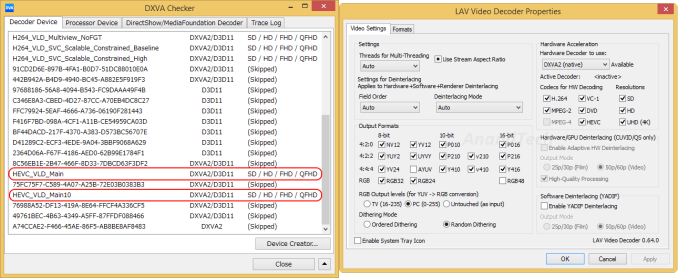
A few sample test files (4Kp24 8b, 4Kp30 10b, 4Kp60 8b and 4Kp60 10b) were played back using MPC-HC x64 and the 64-bit version of LAV Video Decoder. The gallery below shows our findings.


In general, we found the hybrid acceleration to be fine for 4Kp24 8b encodes. 4Kp60 streams, when subject to DXVAChecker’s Decoder benchmark, came in around 45 – 55 fps, while the Playback benchmark at native size pulled that down to the 25 – 35 fps mark. 10b encodes, despite being supported in the drivers, played back with a black screen (indicating either the driver being at fault, or LAV Filters needing some updates for Intel GPUs).
In summary, our experiments suggest that 4Kp60 HEVC decoding with hybrid acceleration might not be a great idea for Intel GPUs at least. However, movies should be fine given that they are almost always at 24 fps. That said, it would be best if consumers allow software / drivers to mature and wait for full hardware acceleration to become available in low-power HTPC platforms.
Key Takeaway: Ensure that any playback component you add to your home theater setup has hardware acceleration for decoding
(a) 4Kp60 HEVC Main profile
(b) 4Kp60 HEVC Main10 4:2:0 profile
Final Words
Unless one is interested in frequently updating components, it would be prudent to keep the two highlighted takeaways in mind while building a future-proof 4K home theater. Obviously, ‘future-proof’ is a dangerous term, particularly where technology is involved. There is already talk of 8K broadcast content. However, it is likely that 4K / HDMI 2.0 / HEVC will remain the key market drivers over the next 5 – 7 years.
Consumers hoping to find a set of components satisfying all the key criteria above right now will need to exercise patience. On the TV and AVR side, we still don’t have models supporting HDMI 2.0a as well as HDCP 2.2 specifications on all their HDMI ports. On the playback side, there is no low-power GPU sporting a HDMI 2.0a output while also having full hardware acceleration for decoding of the important HEVC profiles.
In our HTPC reviews, we do not plan to extensively benchmark HEVC decoding until we are able to create a setup fulfilling the key criteria above. We will be adopting a wait and watch approach while the 4K HTPC ecosystem stabilizes. Our advice to consumers will be to do the same.