News


MSI Unveils the X99A Workstation Motherboard
MSI Unveils the X99A Workstation Motherboard

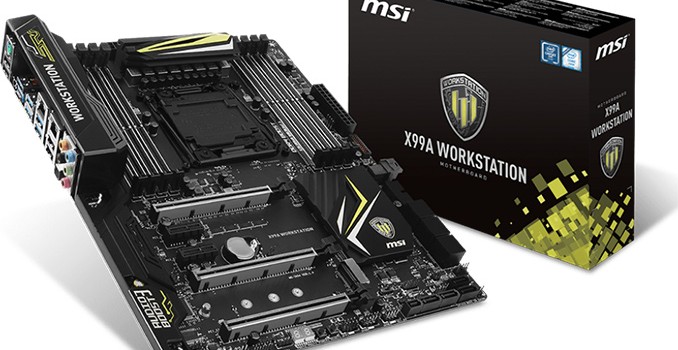
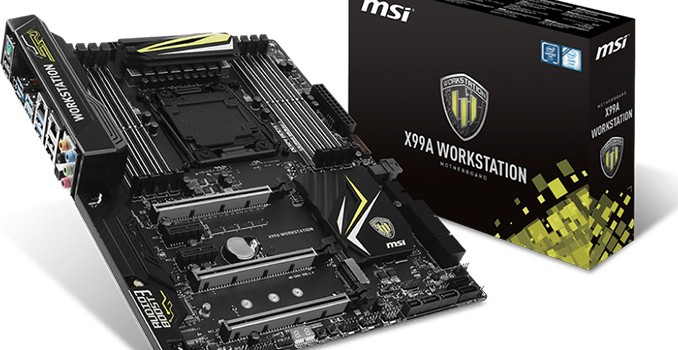
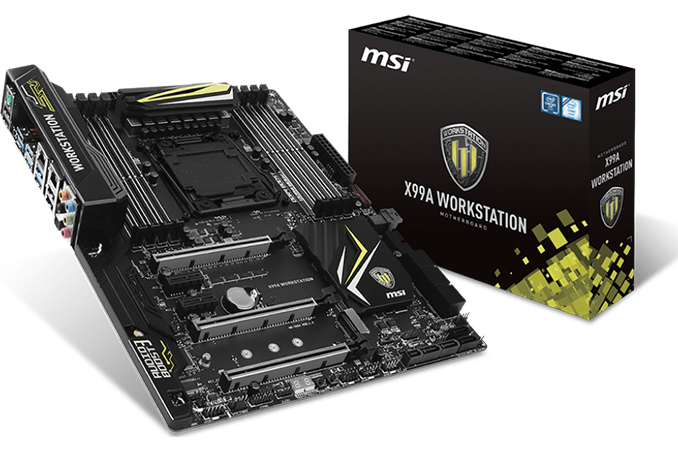
Last week MSI introduced its new X99A Workstation motherboard, part of the X99 refresh we’ve seen over the past couple of months following the launch of the Broadwell-E processor line. Despite the name ‘workstation’, this board is based on the consumer-grade Intel X99 PCH rather than the server oriented parts, and as a result it supports overclocking. Part of the ‘Workstation’ feature set means that it has qualified support for NVIDIA Quadro PCIe cards, compatibility with ECC memory, and a U.2 connector for storage. The manufacturer claims that the mainboard uses special components that can improve the endurance of the board, although the warranty is still listed as three years.

Typically, workstation-class motherboards for Intel Xeon E5 v3/v4 processors in LGA2011-3 packaging are based on the Intel C612 PCH, which has the same I/O features as the desktop-class Intel X99, but also supports a number of additional capabilities, which are important for business environments, such as vPro, RSTe, SVT and so on (you can read more about Intel’s 612 chipset here). When it comes to professional workstation vendors that supply machines to large corporations, those technologies make a lot of sense and are generally welcome. However, for prosumers and for many professionals working in small/medium businesses, these options might not be required, which is why a lot of motherboard manufacturers offer Intel X99-based workstation-class mainboards that fully support overclocking but continue to have numerous workstation features (such as support for ECC, when Xeon CPUs are installed). This is the focus of the X99A Workstation.

The MSI X99A Workstation (7A54) motherboard features one LGA2011-3 slot for Intel Core i7 as well as Intel Xeon E5 processors, though it is interesting to note that the maker does not list Intel Xeon SKUs in its qualified vendor list. Along with the eight-phase power delivery (which uses solid-state chokes), the mainboard carries eight DDR4 memory slots that not only support non-ECC/unbuffered memory modules with XMP 2.0 (and up to DDR4-3333 supported in OC modes), but also RDIMMs with ECC with applicable CPUs.

For add-in cards, the motherboard has three PCIe 3.0 x16 slots (which can work in x16, x16/x16, x8/x16/x8 modes with CPUs featuring 40 PCIe lanes) as well as two PCIe 2.0 x1 slots from the chipset.
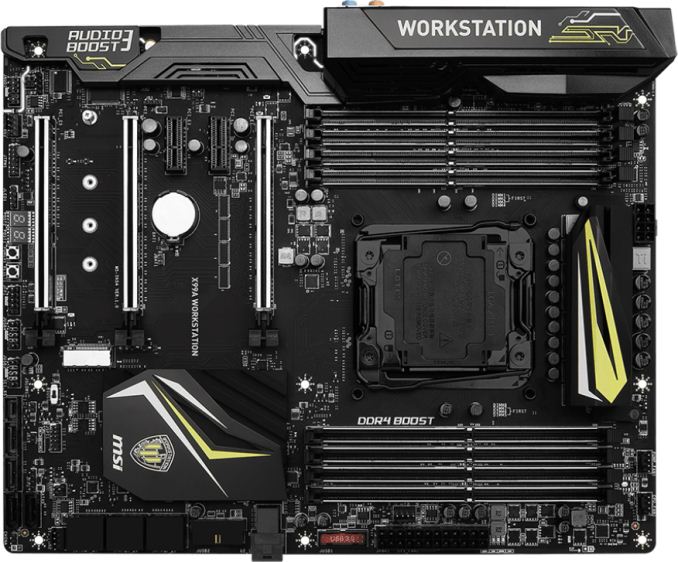
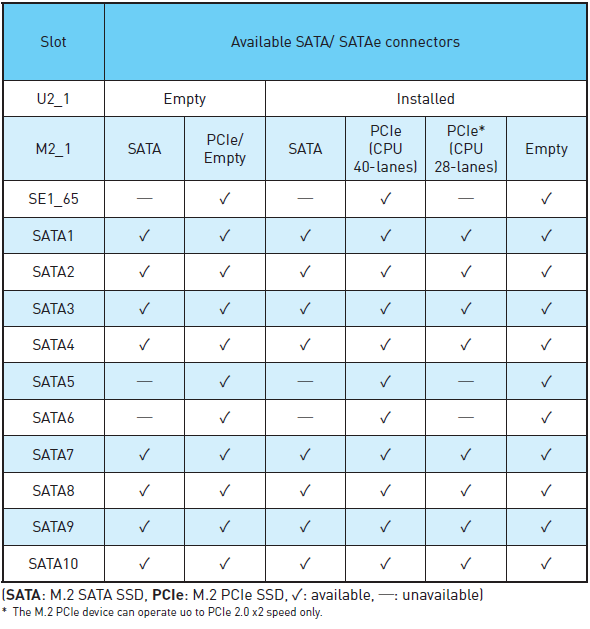
When it comes to storage-related capabilities, the MSI X99A Workstation comes with one M.2-22110 slot, one U.2 port running in PCIe 3.0 x4 mode, and a SATAe port (unavailable when M.2 and U.2 are used). For traditional HDDs/SSDs/ODDs, the motherboard offers 10 SATA 6 Gb/s ports (including two ports from SATAe). So, in total the motherboard can support up to 12 storage devices.
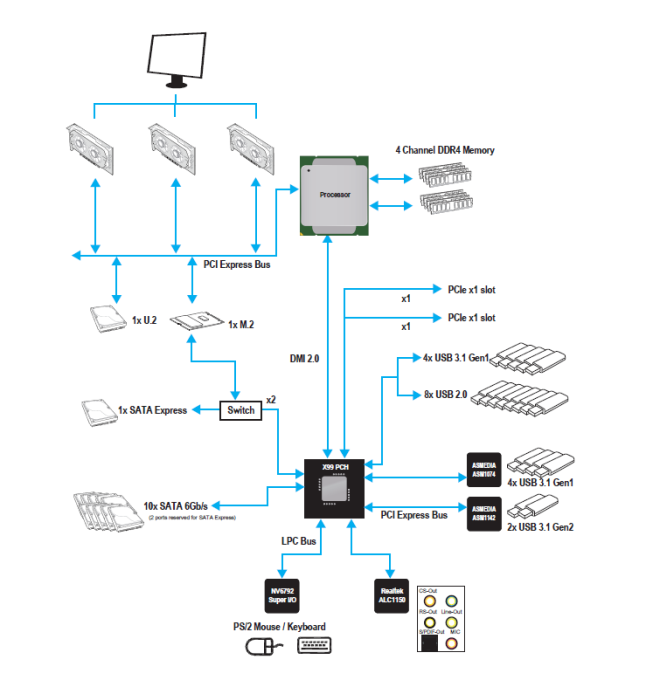
The chipset diagram shows what is in play, and the M.2 configuration is a little odd given that 2 lanes come from the PCH and another two from the CPU despite standard CPU bifurcation stops at x4. In this instance I would have suggested that MSI merely considers the M.2 a CPU device with x4, given that the system would support it, but because Intel has 28-lane CPUs for the platform this can cause differences in bandwidth available. MSI shared the storage support matrix to help users looking into the X99A Workstation:
For audio and networking, the MSI X99A Workstation uses the Realtek ALC1150 solution (with PCB separation and filter caps) with 7.1-channel analog as well as S/PDIF outputs. For networking, the motherboard has an Intel I218LM and an Intel I210AT Gigabit LAN controllers, with teaming support listed. The mainboard also features ASMedia’s ASM1142 controller to enable one USB 3.1 Type-C (10 Gbps) and one USB 3.1 Type-A (10 Gbps) connectors on the rear panel. In addition, the motherboard supports eight USB 3.1 Type-A (5 Gbps) and eight USB 2.0 ports.

The MSI X99A Workstation should be available shortly, but pricing has not yet been decided. 


MSI Unveils the X99A Workstation Motherboard

MSI Unveils the X99A Workstation Motherboard

Last week MSI introduced its new X99A Workstation motherboard, part of the X99 refresh we’ve seen over the past couple of months following the launch of the Broadwell-E processor line. Despite the name ‘workstation’, this board is based on the consumer-grade Intel X99 PCH rather than the server oriented parts, and as a result it supports overclocking. Part of the ‘Workstation’ feature set means that it has qualified support for NVIDIA Quadro PCIe cards, compatibility with ECC memory, and a U.2 connector for storage. The manufacturer claims that the mainboard uses special components that can improve the endurance of the board, although the warranty is still listed as three years.

Typically, workstation-class motherboards for Intel Xeon E5 v3/v4 processors in LGA2011-3 packaging are based on the Intel C612 PCH, which has the same I/O features as the desktop-class Intel X99, but also supports a number of additional capabilities, which are important for business environments, such as vPro, RSTe, SVT and so on (you can read more about Intel’s 612 chipset here). When it comes to professional workstation vendors that supply machines to large corporations, those technologies make a lot of sense and are generally welcome. However, for prosumers and for many professionals working in small/medium businesses, these options might not be required, which is why a lot of motherboard manufacturers offer Intel X99-based workstation-class mainboards that fully support overclocking but continue to have numerous workstation features (such as support for ECC, when Xeon CPUs are installed). This is the focus of the X99A Workstation.

The MSI X99A Workstation (7A54) motherboard features one LGA2011-3 slot for Intel Core i7 as well as Intel Xeon E5 processors, though it is interesting to note that the maker does not list Intel Xeon SKUs in its qualified vendor list. Along with the eight-phase power delivery (which uses solid-state chokes), the mainboard carries eight DDR4 memory slots that not only support non-ECC/unbuffered memory modules with XMP 2.0 (and up to DDR4-3333 supported in OC modes), but also RDIMMs with ECC with applicable CPUs.

For add-in cards, the motherboard has three PCIe 3.0 x16 slots (which can work in x16, x16/x16, x8/x16/x8 modes with CPUs featuring 40 PCIe lanes) as well as two PCIe 2.0 x1 slots from the chipset.

When it comes to storage-related capabilities, the MSI X99A Workstation comes with one M.2-22110 slot, one U.2 port running in PCIe 3.0 x4 mode, and a SATAe port (unavailable when M.2 and U.2 are used). For traditional HDDs/SSDs/ODDs, the motherboard offers 10 SATA 6 Gb/s ports (including two ports from SATAe). So, in total the motherboard can support up to 12 storage devices.

The chipset diagram shows what is in play, and the M.2 configuration is a little odd given that 2 lanes come from the PCH and another two from the CPU despite standard CPU bifurcation stops at x4. In this instance I would have suggested that MSI merely considers the M.2 a CPU device with x4, given that the system would support it, but because Intel has 28-lane CPUs for the platform this can cause differences in bandwidth available. MSI shared the storage support matrix to help users looking into the X99A Workstation:

For audio and networking, the MSI X99A Workstation uses the Realtek ALC1150 solution (with PCB separation and filter caps) with 7.1-channel analog as well as S/PDIF outputs. For networking, the motherboard has an Intel I218LM and an Intel I210AT Gigabit LAN controllers, with teaming support listed. The mainboard also features ASMedia’s ASM1142 controller to enable one USB 3.1 Type-C (10 Gbps) and one USB 3.1 Type-A (10 Gbps) connectors on the rear panel. In addition, the motherboard supports eight USB 3.1 Type-A (5 Gbps) and eight USB 2.0 ports.

The MSI X99A Workstation should be available shortly, but pricing has not yet been decided. 


Hot Chips 2016: NVIDIA Pascal GP100 Die Shot Released

Hot Chips 2016: NVIDIA Pascal GP100 Die Shot Released

The first day of conference sessions wrapped up earlier this evening at the annual Hot Chips symposium. One of the computing industry’s lower-key events, the IEEE conference for high performance chips is not a venue for product announcements, but instead a more focused conference for tech companies and their engineers to let their hair down a bit and present some deeper technical workings of their products. Even these aren’t full product briefings – since they’re often for future products – but it’s a good venue to dive a little deeper and learn a little bit more about the technologies and decisions that have gone into putting these chips together.

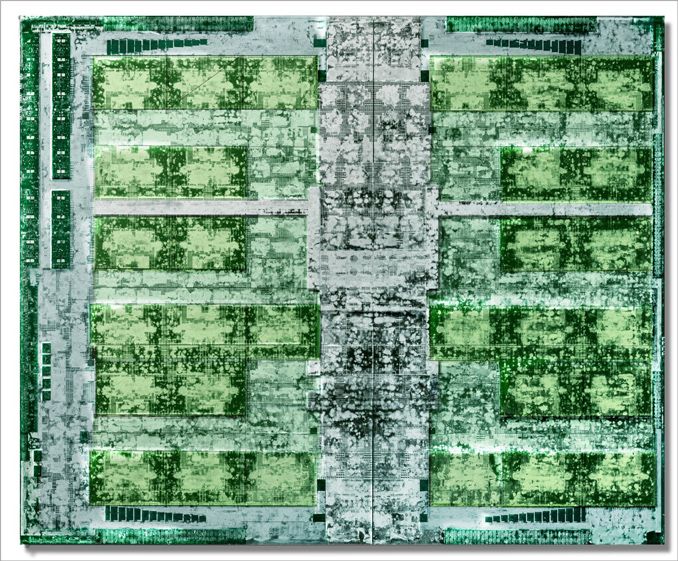
Over the next two days we’ll be covering the highlights of several presentations, but I wanted to start this year’s coverage off with some nerdy pictures. I am of course referring to die shots, as NVIDIA has released the first die shot of their behemoth 610mm2 GP100 die as part of a presentation on Pascal and NVLink 1.0. Die shots have been relatively rare in the GPU industry in recent years, particularly those for the highest-end GPUs with the most features.

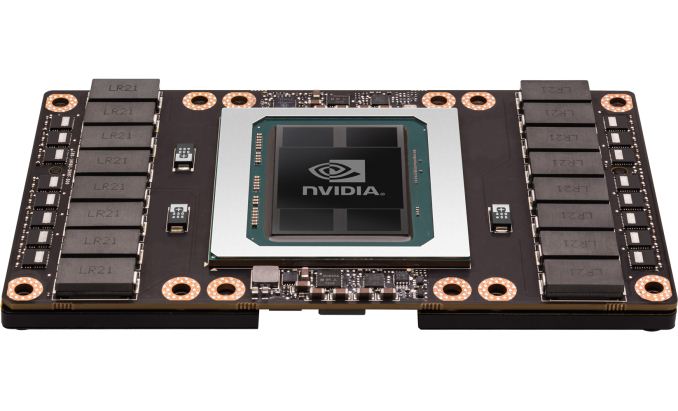
GP100 is particularly interesting because it’s the first NVIDIA part featuring HBM and NVLink, two interfaces which (at least for NVIDIA) premiered on GP100. The die shot itself is not significantly enhanced (and I’m not going to spoil a good die shot here), but even with just basic coloring you can make out features such as the thread scheduler and other uncore features in the center, along of course with the SMs. GP100, as a reminder, has 60 in all, organized into 30 TPCs, the latter of which is what you’re probably counting right now.

Top and bottom of this picture appear to be the HBM2 interfaces. Despite the width of GP100’s 4096-bit HBM2 bus, the space consumed by HBM2 appears to be relatively small on the admittedly large GPU, which is one of the benefits of HBM as it allows for very tight routing and simpler GPU-side logic. Going HBM didn’t just get NVIDIA more memory bandwidth, but I fully expect it also got them a meaningful increase in die area that they could dedicate to GPU logic.

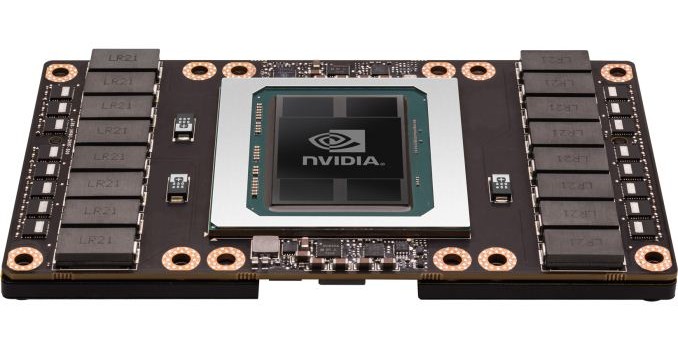
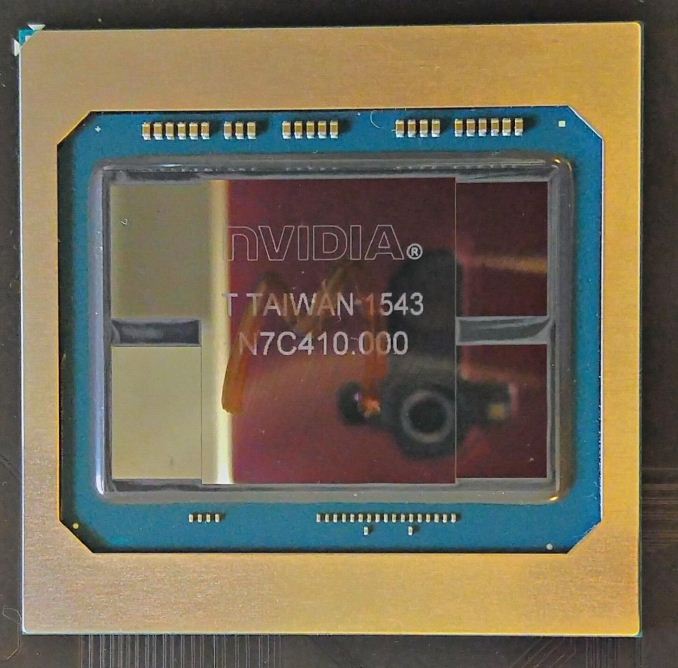
Meanwhile the presentation also gives us our best shot to date of a full (and presumably production) GP100 package. Note the tight spacing between the HBM2 stacks and the GPU die; NVIDIA did not waste any space here, as the memory stacks have been placed as close as they can be. Both the memory and GPU sit on top of the silicon interposer, itself not much larger than the hardware it sits on. Due to the large size of GP100, every millimeter ends up mattering here, as the resulting interposer has to be quite large even with this dense packing. This also does a great job illustrating just how much larger HBM2 stacks are than HBM1 stacks, as they now are a considerable fraction of the die size of GP100 itself, as opposed to the smaller HBM1 stacks used on AMD’s Fury X last year.

The big question, of course, is when this technology will trickle down into cheaper, consumer-level boards. Right now HBM2 is still quite expensive, while GDDR5X has allowed NVIDIA to cover much of their bandwidth needs on consumer parts with the cheaper memory technology. However as we’ll see in the Hot Chips memory presentation, Samsung and Xilinx have some ideas on how to handle that…