News


Vivaldi Web Browser Launches With Version 1.0: Built For Power Users Of The Web

Vivaldi Web Browser Launches With Version 1.0: Built For Power Users Of The Web

Today, Vivaldi has gone from a beta project to a production web browser with the official launch of version 1.0. After more than a year in public development, the team led by Opera Software co-founder Jon Stephenson von Tetzchner is ready to release their take on the modern browser with this first release. They are calling it a new browser for the web’s most demanding users, and they are trying to build an approach that focuses on the tasks that people want to do on the web.

The company has looked at the approaches by the other major browser makers, and seen a move towards simplification of their interfaces. With Vivaldi, the team wants to bring back features that have been dropped over the years, as well as create new functionality that doesn’t exist today, or perhaps needs extensions added to the browser to work. I use Microsoft Edge and Google Chrome as my two primary browsers, and both of them have been lacking for me in different ways, so I took the final release version of Vivaldi for a brief spin.
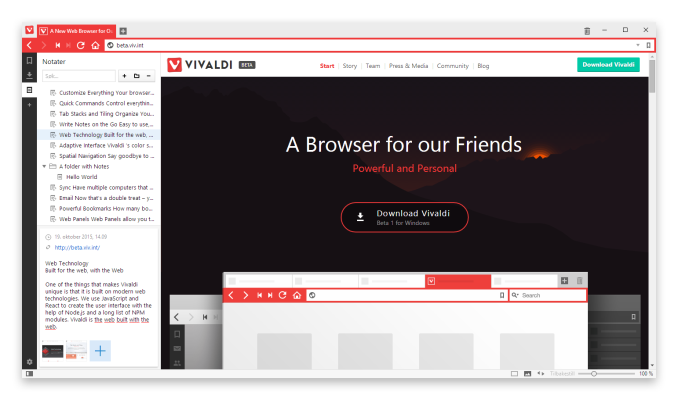
Vivaldi is built on the Blink layout engine, which is part of the Chromium project and the layout engine used by Google’s Chrome browser. But Vivaldi adds a lot of functionality right out of the gate, with a wide range of features consolidated into the basic install, and with the ability to customize the browser to your own liking as one of the key goals of the project.

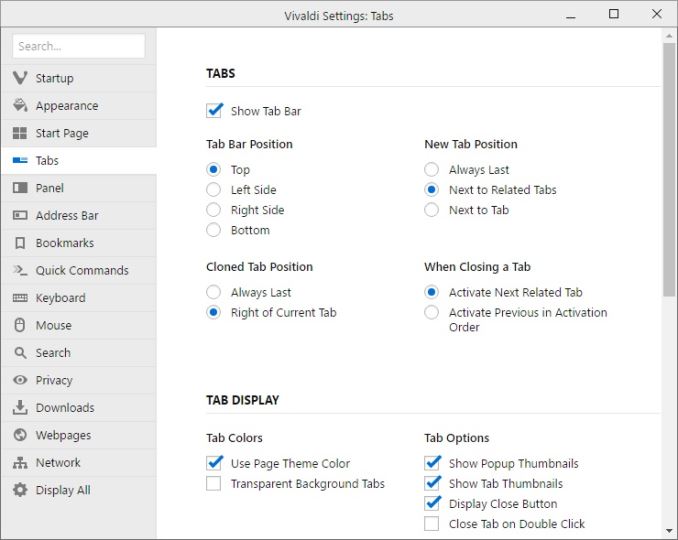
The customizability is apparent from the first install. Right away the install asks several questions about tab layout, looks, and more, before diving into the web itself. Once up and running, you can go into the settings and configure a huge array of options, including changing the tab locations, startup, appearance, and privacy. There are literally too many settings to go through here, but the end result is quite a bit of choice for the end user, and that’s a good thing.
Vivaldi also has some great features for managing the web and customizing your workflow. It includes Tab Stacks, and you can set that up by just dragging a tab onto another one, and then you can access each stacked tab with keyboard shortcuts or by clicking the top of the stack. It also has Tab Stack Tiling, allowing you to display multiple pages at the same time, with multiple tab stacks. You can also set websites up as Web Panels, giving you a smaller slice of the website pinned to the side. This works great for things like Twitter, and lets you monitor it while having another page up in the main area. Mobile responsive sites will also nicely collapse into these web panels.

Vivaldi also features the ability to save web sessions, and you can then open the entire session at once to get back to work quickly. If you need to jot something down quickly, it features built-in notes as well. Navigation can be done quickly with a fast forward and rewind function, with fast forward taking you to the next logical page of the site you are on, and rewind takes you back to the first page you browsed to if you’ve gone to several pages on a site.
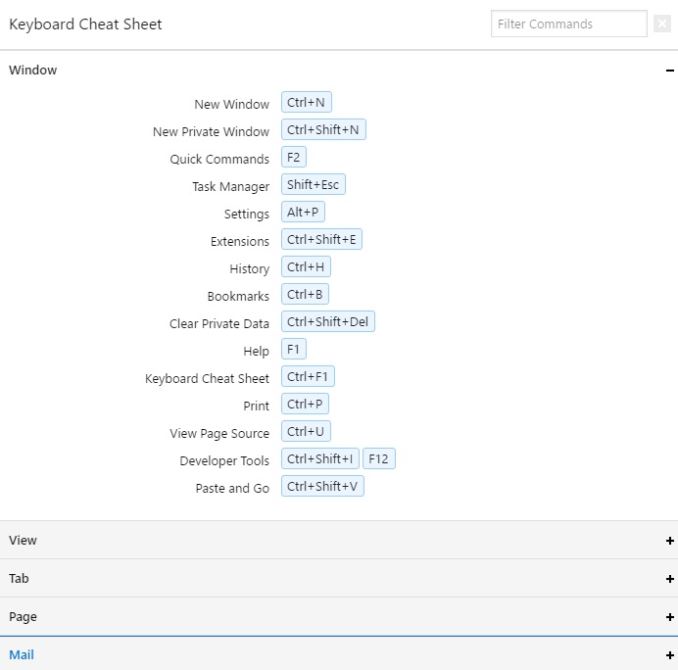
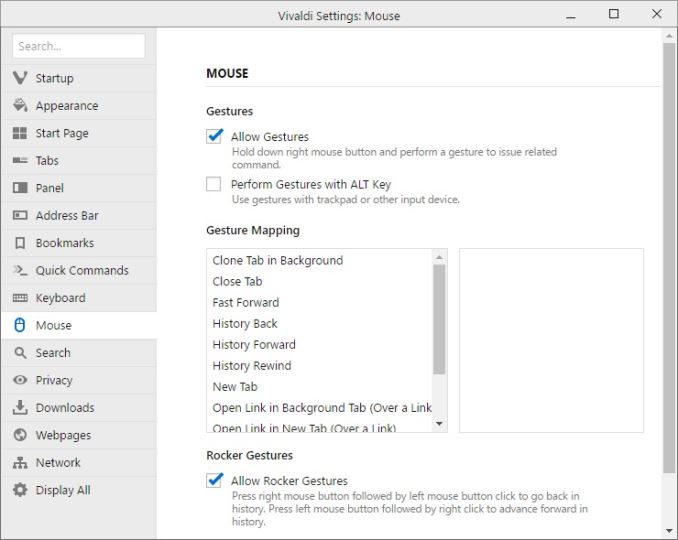
Since this browser is built for the power user, it also features a large list of keyboard shortcuts to keep your hands ready for typing, and in addition it also supports a pretty big list of mouse gestures, which can be accessed by holding the right mouse button. For example, you can go back and forward with just a mouse gesture by holding the right mouse and gesturing left or right. For those with a trackpad, you can optionally enable holding the Alt key to enable the same features on a trackpad.
The user interface for Vivaldi is built around the same web technologies that it renders, such as HTML 5, node.js, and more. The interface can do nifty things like automatically change colors based on the page you are on.

One of the nicest little features I’ve already noticed is that Vivaldi will show you the size of a web page in the address bar as it loads, giving you a nice little glimpse at just how much data you are pulling in on a single page.

I’ve tested Vivaldi on a high DPI display, and both the installer and browser itself seems to adapt very well to higher resolution displays, at least on Windows. It wasn’t always the case earlier in the preview stages for the browser, so the team has done some nice work to get this sorted out.
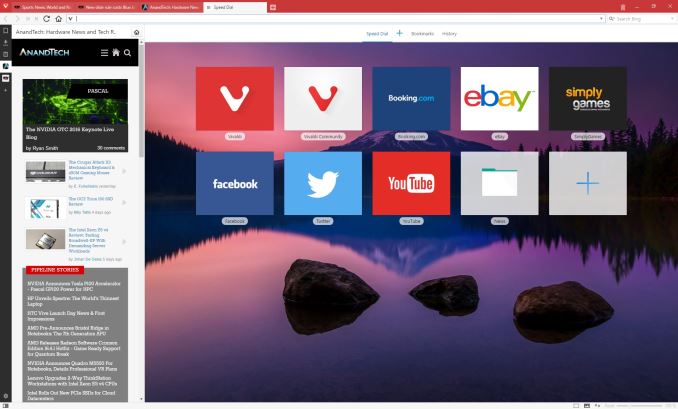
I’m not sure if the world is ready for yet another web browser, but the Vivaldi product seems to pack in a pretty impressive set of features, along with a nice looking interface with plenty of customizability. As someone who has been somewhat disappointed in the browsers I’ve been using, Vivaldi is going to get some screen time on my PCs and we’ll see how it handles day to day use. Being based on Blink should be a good start for things like page layout and performance, but with more functionality built in than you get out of the box on Chrome.

If you want to give Vivaldi a spin, check it out here:
https://vivaldi.com/


NVIDIA Announces Tesla P100 Accelerator - Pascal GP100 Power for HPC

NVIDIA Announces Tesla P100 Accelerator – Pascal GP100 Power for HPC

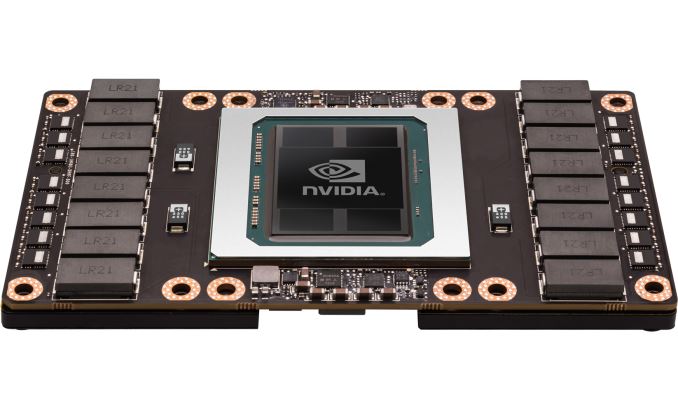
Today at their 2016 GPU Technology Conference, NVIDIA announced the first of their Pascal architecture powered Tesla cards, the Tesla P100. The P100 is the first major update to the Tesla HPC family since the launch of the first Kepler cards in late 2012, and represents a very sizable performance increase for the Tesla family thanks to the combination of the smaller 16nm manufacturing process and the Pascal architecture.

NVIDIA Tesla Family Specification Comparison
  Tesla P100 Tesla K80 Tesla K40 Tesla M40
Stream Processors 3584 2 x 2496 2880 3072
Core Clock 1328MHz 562MHz 745MHz 948MHz
Boost Clock(s) 1480MHz 875MHz 810MHz, 875MHz 1114MHz
Memory Clock 1.4Gbps HBM2 5GHz GDDR5 6GHz GDDR5 6GHz GDDR5
Memory Bus Width 4096-bit 2 x 384-bit 384-bit 384-bit
Memory Bandwidth 720GB/sec 2 x 240GB/sec 288GB/sec 288GB/sec
VRAM 16GB 2 x 12GB 12GB 12GB
Half Precision 21.2 TFLOPS 8.74 TFLOPS 4.29 TFLOPS 6.8 TFLOPS
Single Precision 10.6 TFLOPS 8.74 TFLOPS 4.29 TFLOPS 6.8 TFLOPS
Double Precision 5.3 TFLOPS
(1/2 rate)
2.91 TFLOPS
(1/3 rate)
1.43 TFLOPS
(1/3 rate)
213 GFLOPS
(1/32 rate)
GPU GP100
(610mm2)
GK210 GK110B GM200
Transistor Count 15.3B 2 x 7.1B(?) 7.1B 8B
TDP 300W 300W 235W 250W
Cooling N/A Passive Active/Passive Passive
Manufacturing Process TSMC 16nm FinFET TSMC 28nm TSMC 28nm TSMC 28nm
Architecture Pascal Kepler Kepler Maxwell 2

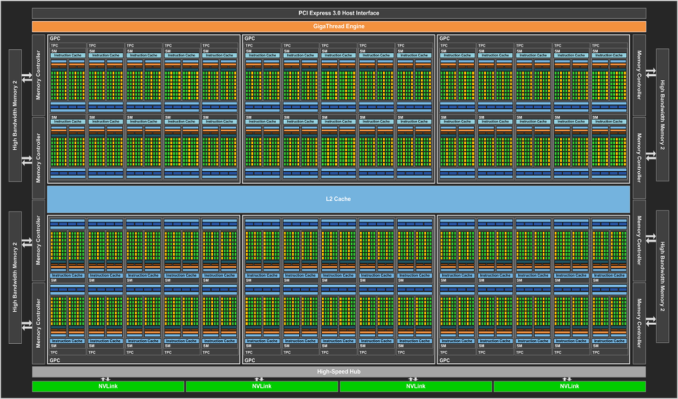
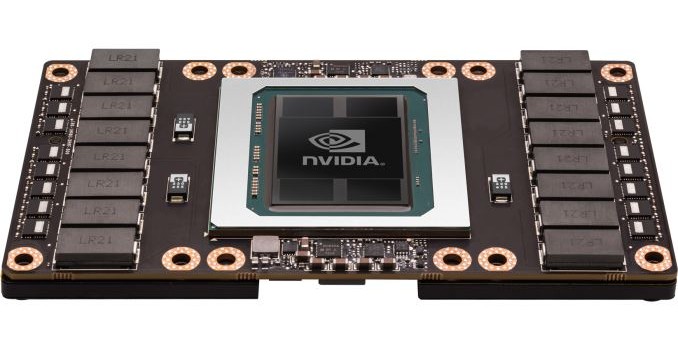
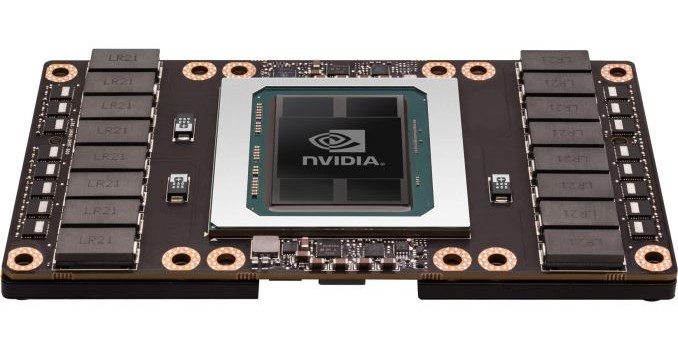
Powering the Tesla P100 is a partially disabled version of NVIDIA’s new GP100 GPU, with 56 of 60 SMs enabled. GP100 is a whale of a GPU, measuring 610mm2 in die size on TSMC’s 16nm FinFET process and composed of 15.3B transistors. It is remarkable in and of itself that NVIDIA and TSMC are in volume production of such a large 16nm die at this time, as everything else we’ve seen with a confirmed size is at best one-quarter of this size. GP100 is being produced on TSMC’s Chip-On-Wafer-On-Substrate technology, with this line apparently being used for putting the GPU and HBM2 DRAM stacks on the same interposer.

We’ll dive into the full Pascal architecture (as implemented by GP100) at a later time, but it’s worth noting that Pascal here is 64 FP32 CUDA cores per SM, versus 128 on Maxwell. Each of those SMs also contains 32 FP64 CUDA cores – giving us the 1/2 rate for FP64 – and new to the Pascal architecture is the ability to pack 2 FP16 operations inside a single FP32 CUDA core under the right circumstances. With a boost clock of 1.48GHz, altogether Tesla P100 will offer 10.6 TFLOPS of FP32 performance or 5.3 TFLOPS of FP64 performance, more than doubling and tripling Tesla K40’s rated throughput on these metrics respectively. NVIDIA has been happy to crow about the performance of Tesla P100, and for good reason, as this stands to be a very powerful processor.

Paired with the GP100 GPU on Tesla P100 is 16GB of HBM2 VRAM, laid out in 4 stacks for a 4096-bit memory bus. NVIDIA quotes P100 as offering 720GB/sec of memory bandwidth, which works out to a memory clock of 1.4Gbps. As we’ve seen with other HBM products, this marks a significant increase in memory bandwidth, more than doubling NVIDIA’s last generation of cards.

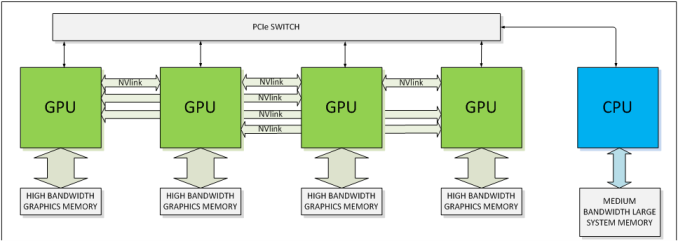
In their announcement, NVIDIA also confirmed that Tesla P100 will support NVLink, with 4 NVLink controllers. Previously announced, NVLink will allow GPUs to connect to either each other or to supporting CPUs (OpenPOWER), offering a higher bandwidth cache coherent link than what PCIe 3 offers. This link will be important for NVIDIA for a number of reasons, as their scalability and unified memory plans are built around its functionality.

Speaking of functionality, Tesla P100 and the underlying GP100 GPU is a full-featured HPC GPU. It supports all of the HPC-centric functionality that the Tesla K20/40/80 embodied, including ECC memory protection for the register file, caches, and HBM2 DRAM. Coupled with the very high FP64 rate, and it’s clear that this is the successor of the GK110/GK210 GPU.

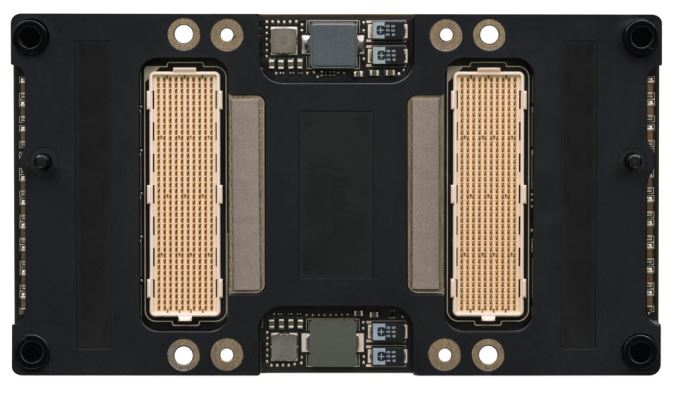
NVIDIA’s pictures also confirm that this is using their new mezzanine connector, with flat boards no longer on perpendicular cards. This is a very HPC-centric design (I’d expect to see plenty of PCIe cards in time as well), but again was previously announced and is well suited for the market NVIDIA is going after, where these cards will be installed in a manner very similar to LGA CPUs. The P100 is rated for a TDP of 300W, so the cooling requirements are a bit higher than last-generation cards, most of which were in the 230W-250W range.

Finally, in its initial implementation NVIDIA is focusing on customers that need extreme scaling capabilities, and I wouldn’t be too surprised if this was in part due to the margins of that market and how these initial cards will be in demand. NVLink of course plays a big part here, with NVIDIA able to go up to 8-way configurations thanks to it.

NVIDIA Announces Tesla P100 Accelerator - Pascal GP100 Power for HPC

NVIDIA Announces Tesla P100 Accelerator – Pascal GP100 Power for HPC

Today at their 2016 GPU Technology Conference, NVIDIA announced the first of their Pascal architecture powered Tesla cards, the Tesla P100. The P100 is the first major update to the Tesla HPC family since the launch of the first Kepler cards in late 2012, and represents a very sizable performance increase for the Tesla family thanks to the combination of the smaller 16nm manufacturing process and the Pascal architecture.

NVIDIA Tesla Family Specification Comparison
  Tesla P100 Tesla K80 Tesla K40 Tesla M40
Stream Processors 3584 2 x 2496 2880 3072
Core Clock 1328MHz 562MHz 745MHz 948MHz
Boost Clock(s) 1480MHz 875MHz 810MHz, 875MHz 1114MHz
Memory Clock 1.4Gbps HBM2 5GHz GDDR5 6GHz GDDR5 6GHz GDDR5
Memory Bus Width 4096-bit 2 x 384-bit 384-bit 384-bit
Memory Bandwidth 720GB/sec 2 x 240GB/sec 288GB/sec 288GB/sec
VRAM 16GB 2 x 12GB 12GB 12GB
Half Precision 21.2 TFLOPS 8.74 TFLOPS 4.29 TFLOPS 6.8 TFLOPS
Single Precision 10.6 TFLOPS 8.74 TFLOPS 4.29 TFLOPS 6.8 TFLOPS
Double Precision 5.3 TFLOPS
(1/2 rate)
2.91 TFLOPS
(1/3 rate)
1.43 TFLOPS
(1/3 rate)
213 GFLOPS
(1/32 rate)
GPU GP100
(610mm2)
GK210 GK110B GM200
Transistor Count 15.3B 2 x 7.1B(?) 7.1B 8B
TDP 300W 300W 235W 250W
Cooling N/A Passive Active/Passive Passive
Manufacturing Process TSMC 16nm FinFET TSMC 28nm TSMC 28nm TSMC 28nm
Architecture Pascal Kepler Kepler Maxwell 2

Powering the Tesla P100 is a partially disabled version of NVIDIA’s new GP100 GPU, with 56 of 60 SMs enabled. GP100 is a whale of a GPU, measuring 610mm2 in die size on TSMC’s 16nm FinFET process and composed of 15.3B transistors. It is remarkable in and of itself that NVIDIA and TSMC are in volume production of such a large 16nm die at this time, as everything else we’ve seen with a confirmed size is at best one-quarter of this size. GP100 is being produced on TSMC’s Chip-On-Wafer-On-Substrate technology, with this line apparently being used for putting the GPU and HBM2 DRAM stacks on the same interposer.

We’ll dive into the full Pascal architecture (as implemented by GP100) at a later time, but it’s worth noting that Pascal here is 64 FP32 CUDA cores per SM, versus 128 on Maxwell. Each of those SMs also contains 32 FP64 CUDA cores – giving us the 1/2 rate for FP64 – and new to the Pascal architecture is the ability to pack 2 FP16 operations inside a single FP32 CUDA core under the right circumstances. With a boost clock of 1.48GHz, altogether Tesla P100 will offer 10.6 TFLOPS of FP32 performance or 5.3 TFLOPS of FP64 performance, more than doubling and tripling Tesla K40’s rated throughput on these metrics respectively. NVIDIA has been happy to crow about the performance of Tesla P100, and for good reason, as this stands to be a very powerful processor.

Paired with the GP100 GPU on Tesla P100 is 16GB of HBM2 VRAM, laid out in 4 stacks for a 4096-bit memory bus. NVIDIA quotes P100 as offering 720GB/sec of memory bandwidth, which works out to a memory clock of 1.4Gbps. As we’ve seen with other HBM products, this marks a significant increase in memory bandwidth, more than doubling NVIDIA’s last generation of cards.

In their announcement, NVIDIA also confirmed that Tesla P100 will support NVLink, with 4 NVLink controllers. Previously announced, NVLink will allow GPUs to connect to either each other or to supporting CPUs (OpenPOWER), offering a higher bandwidth cache coherent link than what PCIe 3 offers. This link will be important for NVIDIA for a number of reasons, as their scalability and unified memory plans are built around its functionality.

Speaking of functionality, Tesla P100 and the underlying GP100 GPU is a full-featured HPC GPU. It supports all of the HPC-centric functionality that the Tesla K20/40/80 embodied, including ECC memory protection for the register file, caches, and HBM2 DRAM. Coupled with the very high FP64 rate, and it’s clear that this is the successor of the GK110/GK210 GPU.

NVIDIA’s pictures also confirm that this is using their new mezzanine connector, with flat boards no longer on perpendicular cards. This is a very HPC-centric design (I’d expect to see plenty of PCIe cards in time as well), but again was previously announced and is well suited for the market NVIDIA is going after, where these cards will be installed in a manner very similar to LGA CPUs. The P100 is rated for a TDP of 300W, so the cooling requirements are a bit higher than last-generation cards, most of which were in the 230W-250W range.

Finally, in its initial implementation NVIDIA is focusing on customers that need extreme scaling capabilities, and I wouldn’t be too surprised if this was in part due to the margins of that market and how these initial cards will be in demand. NVLink of course plays a big part here, with NVIDIA able to go up to 8-way configurations thanks to it.

HP Unveils Spectre: The World’s Thinnest Laptop

HP Unveils Spectre: The World’s Thinnest Laptop

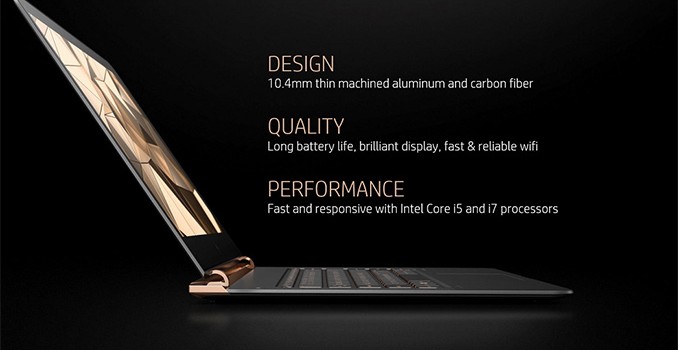
HP has announced its new Spectre laptop – the world’s thinnest 13.3” notebook. Despite its miniature size, the Spectre uses Intel’s Core i5/i7 microprocessor, a PCIe-based SSD, a full-size keyboard as well as an advanced audio system developed by Bang & Olufsen. To build its new notebook, HP had to use a number of innovative technologies, although to make the system so small and thin it had to sacrifice upgradeability and serviceability. On top of it all, the HP Spectre comes across as very price competitive.

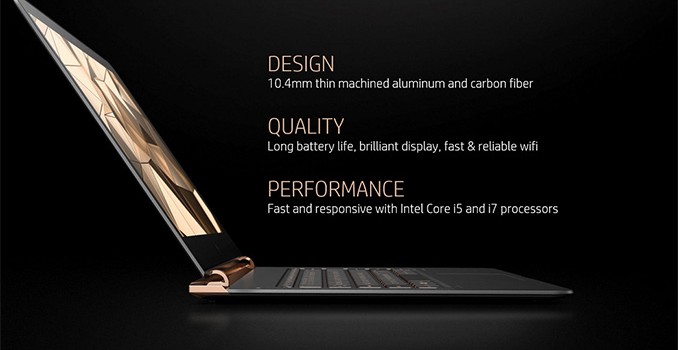
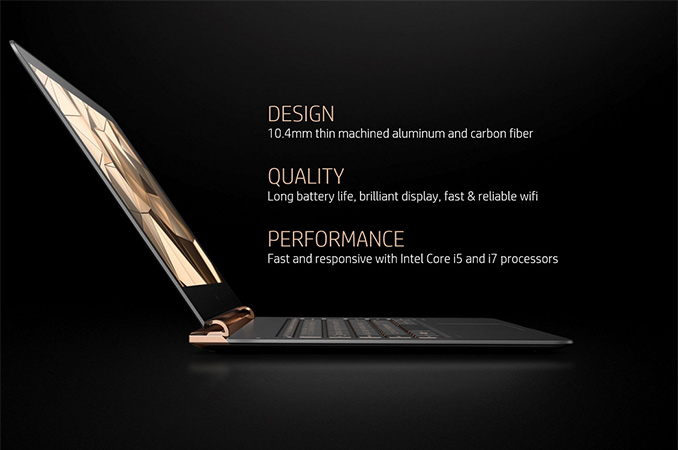
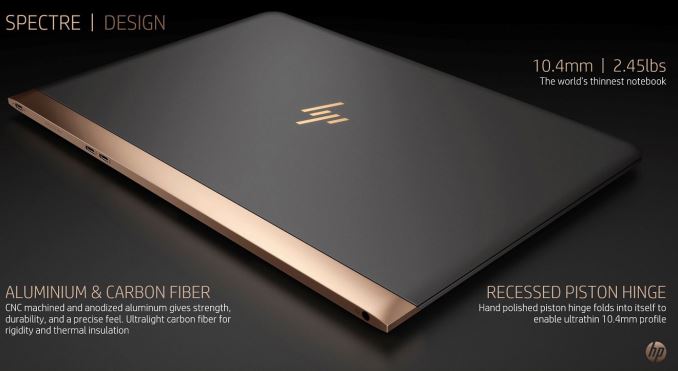
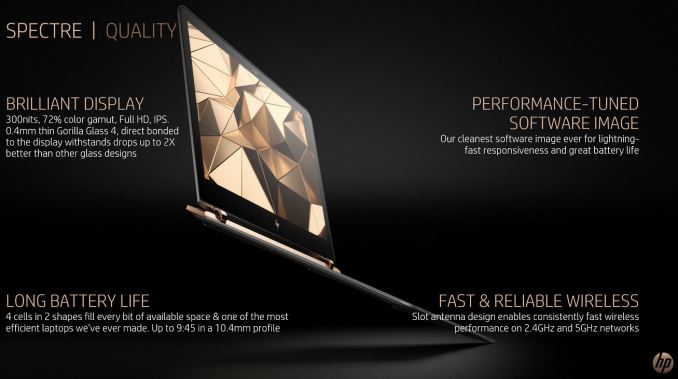
The HP Spectre is just 10.4 mm thick and weighs 1.10 kilograms (2.45 lbs). To build it, HP had to use CNC-machined anodized aluminum and combine it with carbon fiber, a custom display panel with Gorilla Glass 4 as well as special recessed piston hinges. To maximize battery life (which is officially listed at 9 hours 30 minutes), HP had to use two types of batteries of different shapes inside its Spectre laptop, giving four cells in total. As part of a premium line, it comes in black and gold finish as well as with a different varient of HP’s logo, emphasizing the position of the system.

The HP Spectre laptop is based on the Core i5-6200U (two cores with Hyper-Threading, 3 MB L3 cache, Intel HD Graphics 520) or the Core i7-6500U (two cores with Hyper-Threading, 4 MB L3 cache, Intel HD Graphics 520), but the manufacturer does not disclose exact clock-rates of the CPUs. HP notes that the microprocessors may not necessarily work at their default frequencies all the time, but indicates that the chips are still considerably faster than the Core M processors used inside the Apple MacBook. These could either be the full fat 15W parts, or the models could be in cTDP down mode.

Comparison of Ultra-Thin Notebooks
  HP Spectre Apple MacBook (2015) ASUS UX305UA
Screen Resolution 1920×1080 2304×1440 1920×1080
3200×1800
CPU Intel Core i5-6200U
Intel Core i7-6500U
Intel Core M 1.1 GHz
Intel Core M 1.2 GHz
Intel Core M 1.3 GHz
Intel Core i3-6100U
Intel Core i5-6200U
Intel Core i7-6500U
Graphics Intel HD Graphics 520
(24 execution units)
Intel HD Graphics 5300 (24 EUs) Intel HD Graphics 520
(24 execution units)
RAM 8 GB (LPDDR3?) 8 GB LPDDR3 4 GB LPDDR3
8 GB LPDDR3
Storage 256 GB SSD
512 GB SSD
256 GB SSD
512 GB SSD
128 GB SSD
256 GB SSD
512 GB SSD
Wi-Fi Wi-Fi 802.11ac Wi-Fi 802.11ac Wi-Fi
USB 3.1 3 × Type-C
3.0 × Type-C 2 × Type-A
2.0 1 × Type-A
Thunderbolt 2 × Thunderbolt 3
HDMI micro-HDMI
Other I/O Microphone, stereo speakers, audio jack
Thickness 10.4 mm up to 13.1 mm 16 mm
Weight 1.10 kilograms 0.92 kilograms 1.30 kilograms
Price 256GB:
$1170 (Core i5)
$1250 (Core i7)
256GB:
$1300 (1.1 GHz)
$1600 (1.3 GHz)
$750 – $1200

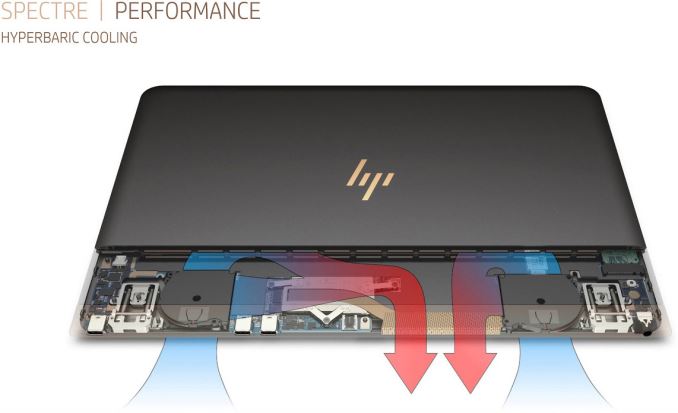
To cool-down the CPUs, HP uses its so-called ‘hyperbaric cooling technology’, which features two ultra-thin fans, a heat-pipe as well as a special copper radiator. The fans intake cool air from the outside and create significant air pressure inside the chassis to blow away hot air. The company does not disclose how loud such cooling system is, but implies that noise levels created by the Spectre should be comfortable.

The Spectre is equipped with 8 GB of memory (we believe LPDDR3) that is soldered to the motherboard, which means that it cannot be upgraded. The notebook is also equipped with a standard 256 GB or 512 GB SSD, but HP does not release performance figures or which model this is. The company also says that since the design of its laptop is “sealed”, it is impossible to upgrade the storage drive at home, suggesting a soldered down version of an M.2 drive. Keeping in mind that it is impossible to add storage to the majority of tablets and 2-in-1 hybrid PCs, it is not surprising that HP chose to limit upgrade capabilities of its Spectre notebook. When creating Spectre, HP focused mostly on making an extremely thin design, but not to offer capabilities for further modernization.

Due to thin design and relatively limited battery capacity of the HP Spectre, the manufacturer did not have much choice when it comes to display panels. HP uses a 13.3” full-HD (1920×1080) IPS panel with 300 nits brightness, which covers 72% NTSC. According to HP, the panel provides the right balance between resolution, power consumption, the brightness, and the price. Nevertheless, the most important feature of the panel is its thinness. The whole display assembly is just 2 mm thick.

The HP Spectre also comes with three USB type-C ports, two of which support Thunderbolt 3. These will be powered by Intel’s Alpine Ridge controller, though HP has not disclosed how many are in use (either one controller for both ports, or two controllers for one each). The TB3-enabled ports can be used to connect external displays as well as Thunderbolt 3 peripherals. It is noteworthy that since HP does not talk about connecting things like external graphics adapters to its Spectre notebooks, this feature may not be enabled right now.

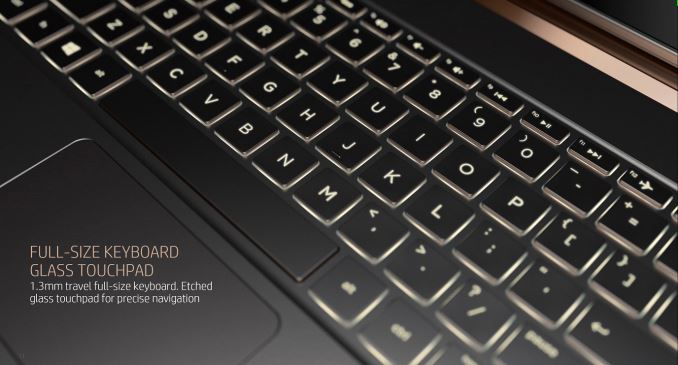
The notebook is also equipped with a keyboard that has 1.3 mm travel as well as a trackpad with full-travel etched glass. HP compares it Spectre to Apple’s MacBook and claims that the keyboard, as well as the touchpad of the MacBook, are less comfortable to use than those on the HP machine, something that needs to be verified by independent reviews.

Communication capabilities of the HP Spectre include a Wi-Fi and Bluetooth module that supports 2.4 GHz and 5 GHz networks.  The module supports only one “slot” antenna, therefore, its performance may be lower when compared to other modern notebooks, another thing that HP may have had to sacrifice for portability. HP also does not specify if the Wi-Fi is 802.11ac or 802.11n only.

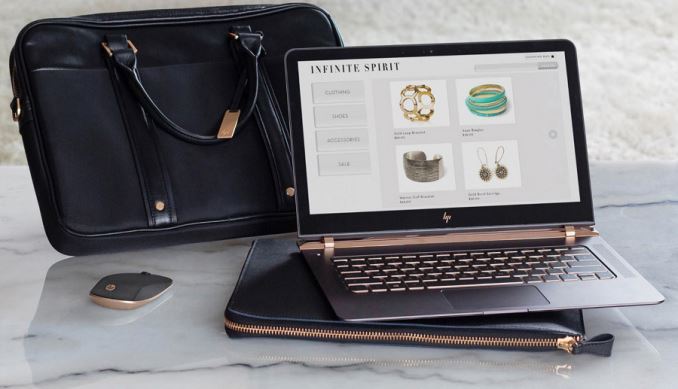
This month HP will begin to sell its Spectre laptop at hp.com as well as at Best Buy in the U.S. The Spectre based on the Intel Core i5-6200U and equipped with 8 GB of RAM and 256 GB SSD will cost $1169.99, whereas the model featuring the Intel Core i7-6500U, 8 GB of memory and a 256 GB SSD will be priced at $1249.99. There is no word on the cost of the 512GB models as of yet, although we expect another $100-$150 on top of that. In May, the manufacturer plans to start selling its thinnest laptop in other countries, but it does not reveal the list of countries or recommended prices. In the US, HP will also offer limited edition systems co-developed with famous designers combining a golden finish and Swarovski crystals. In addition, the company will also sell accessories (a Bluetooth mouse, a carry bag and a leather sleeve) that match the design of the Spectre notebook.

HP Unveils Spectre: The World’s Thinnest Laptop

HP Unveils Spectre: The World’s Thinnest Laptop

HP has announced its new Spectre laptop – the world’s thinnest 13.3” notebook. Despite its miniature size, the Spectre uses Intel’s Core i5/i7 microprocessor, a PCIe-based SSD, a full-size keyboard as well as an advanced audio system developed by Bang & Olufsen. To build its new notebook, HP had to use a number of innovative technologies, although to make the system so small and thin it had to sacrifice upgradeability and serviceability. On top of it all, the HP Spectre comes across as very price competitive.

The HP Spectre is just 10.4 mm thick and weighs 1.10 kilograms (2.45 lbs). To build it, HP had to use CNC-machined anodized aluminum and combine it with carbon fiber, a custom display panel with Gorilla Glass 4 as well as special recessed piston hinges. To maximize battery life (which is officially listed at 9 hours 30 minutes), HP had to use two types of batteries of different shapes inside its Spectre laptop, giving four cells in total. As part of a premium line, it comes in black and gold finish as well as with a different varient of HP’s logo, emphasizing the position of the system.

The HP Spectre laptop is based on the Core i5-6200U (two cores with Hyper-Threading, 3 MB L3 cache, Intel HD Graphics 520) or the Core i7-6500U (two cores with Hyper-Threading, 4 MB L3 cache, Intel HD Graphics 520), but the manufacturer does not disclose exact clock-rates of the CPUs. HP notes that the microprocessors may not necessarily work at their default frequencies all the time, but indicates that the chips are still considerably faster than the Core M processors used inside the Apple MacBook. These could either be the full fat 15W parts, or the models could be in cTDP down mode.

Comparison of Ultra-Thin Notebooks
  HP Spectre Apple MacBook (2015) ASUS UX305UA
Screen Resolution 1920×1080 2304×1440 1920×1080
3200×1800
CPU Intel Core i5-6200U
Intel Core i7-6500U
Intel Core M 1.1 GHz
Intel Core M 1.2 GHz
Intel Core M 1.3 GHz
Intel Core i3-6100U
Intel Core i5-6200U
Intel Core i7-6500U
Graphics Intel HD Graphics 520
(24 execution units)
Intel HD Graphics 5300 (24 EUs) Intel HD Graphics 520
(24 execution units)
RAM 8 GB (LPDDR3?) 8 GB LPDDR3 4 GB LPDDR3
8 GB LPDDR3
Storage 256 GB SSD
512 GB SSD
256 GB SSD
512 GB SSD
128 GB SSD
256 GB SSD
512 GB SSD
Wi-Fi Wi-Fi 802.11ac Wi-Fi 802.11ac Wi-Fi
USB 3.1 3 × Type-C
3.0 × Type-C 2 × Type-A
2.0 1 × Type-A
Thunderbolt 2 × Thunderbolt 3
HDMI micro-HDMI
Other I/O Microphone, stereo speakers, audio jack
Thickness 10.4 mm up to 13.1 mm 16 mm
Weight 1.10 kilograms 0.92 kilograms 1.30 kilograms
Price 256GB:
$1170 (Core i5)
$1250 (Core i7)
256GB:
$1300 (1.1 GHz)
$1600 (1.3 GHz)
$750 – $1200

To cool-down the CPUs, HP uses its so-called ‘hyperbaric cooling technology’, which features two ultra-thin fans, a heat-pipe as well as a special copper radiator. The fans intake cool air from the outside and create significant air pressure inside the chassis to blow away hot air. The company does not disclose how loud such cooling system is, but implies that noise levels created by the Spectre should be comfortable.

The Spectre is equipped with 8 GB of memory (we believe LPDDR3) that is soldered to the motherboard, which means that it cannot be upgraded. The notebook is also equipped with a standard 256 GB or 512 GB SSD, but HP does not release performance figures or which model this is. The company also says that since the design of its laptop is “sealed”, it is impossible to upgrade the storage drive at home, suggesting a soldered down version of an M.2 drive. Keeping in mind that it is impossible to add storage to the majority of tablets and 2-in-1 hybrid PCs, it is not surprising that HP chose to limit upgrade capabilities of its Spectre notebook. When creating Spectre, HP focused mostly on making an extremely thin design, but not to offer capabilities for further modernization.

Due to thin design and relatively limited battery capacity of the HP Spectre, the manufacturer did not have much choice when it comes to display panels. HP uses a 13.3” full-HD (1920×1080) IPS panel with 300 nits brightness, which covers 72% NTSC. According to HP, the panel provides the right balance between resolution, power consumption, the brightness, and the price. Nevertheless, the most important feature of the panel is its thinness. The whole display assembly is just 2 mm thick.

The HP Spectre also comes with three USB type-C ports, two of which support Thunderbolt 3. These will be powered by Intel’s Alpine Ridge controller, though HP has not disclosed how many are in use (either one controller for both ports, or two controllers for one each). The TB3-enabled ports can be used to connect external displays as well as Thunderbolt 3 peripherals. It is noteworthy that since HP does not talk about connecting things like external graphics adapters to its Spectre notebooks, this feature may not be enabled right now.

The notebook is also equipped with a keyboard that has 1.3 mm travel as well as a trackpad with full-travel etched glass. HP compares it Spectre to Apple’s MacBook and claims that the keyboard, as well as the touchpad of the MacBook, are less comfortable to use than those on the HP machine, something that needs to be verified by independent reviews.

Communication capabilities of the HP Spectre include a Wi-Fi and Bluetooth module that supports 2.4 GHz and 5 GHz networks.  The module supports only one “slot” antenna, therefore, its performance may be lower when compared to other modern notebooks, another thing that HP may have had to sacrifice for portability. HP also does not specify if the Wi-Fi is 802.11ac or 802.11n only.

This month HP will begin to sell its Spectre laptop at hp.com as well as at Best Buy in the U.S. The Spectre based on the Intel Core i5-6200U and equipped with 8 GB of RAM and 256 GB SSD will cost $1169.99, whereas the model featuring the Intel Core i7-6500U, 8 GB of memory and a 256 GB SSD will be priced at $1249.99. There is no word on the cost of the 512GB models as of yet, although we expect another $100-$150 on top of that. In May, the manufacturer plans to start selling its thinnest laptop in other countries, but it does not reveal the list of countries or recommended prices. In the US, HP will also offer limited edition systems co-developed with famous designers combining a golden finish and Swarovski crystals. In addition, the company will also sell accessories (a Bluetooth mouse, a carry bag and a leather sleeve) that match the design of the Spectre notebook.