News


SanDisk Ultra +Cloud 64GB + 64GB Flash Drive Review

USB flash drives (UFDs) are a dime a dozen in the current market. In order to stand out in the crowd, manufacturers have adopted a two-pronged approach. While one category is devoted to drives that provide maximum possible capacity in a minimal footprint, the other category aims at delivering the maximum possible performance at a reasonable cost. Usually, UFDs are worth a capsule review, since there is really not much to talk about other than performance / endurance and price. However, SanDisk has opted to go with a third strategy for one of their UFD product lines – bundling a 3-year cloud storage subscription along with a commodity USB 3.0 flash drive. Priced at $30, SanDisk’s Ultra +Cloud 64GB (local) + 64GB (cloud) seems like a no-brainer purchase. This review will analyze various aspects of the cloud storage component and also go into the performance of the flash drive itself.

SanDisk Ultra +Cloud 64GB + 64GB Flash Drive Review

USB flash drives (UFDs) are a dime a dozen in the current market. In order to stand out in the crowd, manufacturers have adopted a two-pronged approach. While one category is devoted to drives that provide maximum possible capacity in a minimal footprint, the other category aims at delivering the maximum possible performance at a reasonable cost. Usually, UFDs are worth a capsule review, since there is really not much to talk about other than performance / endurance and price. However, SanDisk has opted to go with a third strategy for one of their UFD product lines – bundling a 3-year cloud storage subscription along with a commodity USB 3.0 flash drive. Priced at $30, SanDisk’s Ultra +Cloud 64GB (local) + 64GB (cloud) seems like a no-brainer purchase. This review will analyze various aspects of the cloud storage component and also go into the performance of the flash drive itself.

Microsoft Patches Surface Book And Surface Pro 4 Sleep Issue

Microsoft Patches Surface Book And Surface Pro 4 Sleep Issue

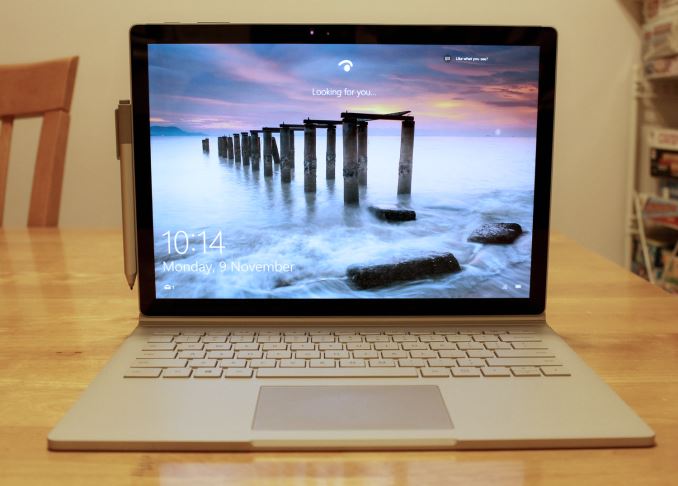
When I reviewed the Surface Book, there were a lot of bugs with the software. Some of them have been pretty minor, and Microsoft has been updating the firmware and drivers on it since before it was launched. Most of the issues have been sorted out, but there was still one issue which seemed to be elusive to the teams at Intel and Microsoft. The Surface Book would not always sleep, or, I should say, when it went to sleep it would actually use much more energy than when it was being used. Often times I would close the lid on the Surface Book and after a minute or two I’d hear the fans kick in, and the device would get very hot to the touch. This was an even bigger issue if you closed it and put it in a bag, since the bag would just trap all that heat.

This bug was so severe that I could not recommend the Surface Book at the time of the review. Apparently this bug can also strike the Surface Pro 4, but the two review units that I had never suffered from the same sleep bug issue as the Surface Book.

Today there is good news, or at least the chance of good news. Microsoft has released a firmware update which directly tackles the sleep issue. Normally firmware updates get released with little fanfare, but head of Microsoft’s hardware division, Panos Panay, has written a blog post letting everyone know that there is a firmware update. It’s not too often that the head of a division steps up and writes release notes, so clearly he felt that this issue was a big enough one to make a statement, and to be clear it is that big of an issue.

Whether or not this fixes the issue will remain to be seen, but I’m updating the Surface Book at the moment and will report back in time, but hopefully this solves it. As I said in the review, the Surface Book is solid hardware that was let down by software, and assuming this update does fix the major issue with the latest Surface models, it will be much easier to recommend it to others.

Here is everything listed in the release notes for today’s update:

  • System Hardware Update – 2/17/2016
  • Microsoft driver update for Surface UEFI
  • Microsoft driver update for Surface Management Engine
  • Microsoft driver update for Surface System Aggregator Firmware


  • Surface Management Engine update (v11.0.0.1202) improves system stability.
  • Surface System Aggregator Firmware update (v88.1081.257.0) improves accuracy of battery status and battery life during sleep.
  • Surface UEFI update (v104.1085.768.0) improves battery life and improves stability during power state transition changes into and out of sleep states.
  • Intel® Precise Touch Device driver update (v1.1.0.226) improves stability during power state transition changes into and out of sleep states.
  • Intel® HD Graphics 520 driver update (v20.19.15.4364) improves display stability, system stability and battery life.
  • Intel® Display Audio driver update (v8.20.0.745) supports compatibility with the updated graphics driver.
  • Realtek High Definition Audio(SST) driver update (v6.0.1.7734) improves system stability.
  • Intel® Smart Sound Technology (Intel® SST) Audio Controller driver update (v8.20.0.877) improves system stability.
  • Intel® Smart Sound Technology (Intel® SST) OED driver update (v8.20.0.877) improves system stability.
  • Intel® Management Engine Interface driver update (v11.0.0.1176) improves system stability.
  • Intel® Serial IO GPIO Host Controller driver update (v30.63.1603.5) improves auto rotation reliability when tablet mode is turned off.
  • Intel® Serial IO I2C Host Controller driver update (v30.63.1603.5) improves auto rotation reliability when tablet mode is turned off.
  • Surface Book Base Firmware driver update (v1.2.0.0) improves battery life during sleep.

If anyone owns the Surface Book or Surface Pro 4, I would highly recommend installing this. According to Microsoft the update is being rolled out right now, so if you don’t see it in your region just check back soon.

Source: Microsoft Devices Blog

Microsoft Patches Surface Book And Surface Pro 4 Sleep Issue

Microsoft Patches Surface Book And Surface Pro 4 Sleep Issue

When I reviewed the Surface Book, there were a lot of bugs with the software. Some of them have been pretty minor, and Microsoft has been updating the firmware and drivers on it since before it was launched. Most of the issues have been sorted out, but there was still one issue which seemed to be elusive to the teams at Intel and Microsoft. The Surface Book would not always sleep, or, I should say, when it went to sleep it would actually use much more energy than when it was being used. Often times I would close the lid on the Surface Book and after a minute or two I’d hear the fans kick in, and the device would get very hot to the touch. This was an even bigger issue if you closed it and put it in a bag, since the bag would just trap all that heat.

This bug was so severe that I could not recommend the Surface Book at the time of the review. Apparently this bug can also strike the Surface Pro 4, but the two review units that I had never suffered from the same sleep bug issue as the Surface Book.

Today there is good news, or at least the chance of good news. Microsoft has released a firmware update which directly tackles the sleep issue. Normally firmware updates get released with little fanfare, but head of Microsoft’s hardware division, Panos Panay, has written a blog post letting everyone know that there is a firmware update. It’s not too often that the head of a division steps up and writes release notes, so clearly he felt that this issue was a big enough one to make a statement, and to be clear it is that big of an issue.

Whether or not this fixes the issue will remain to be seen, but I’m updating the Surface Book at the moment and will report back in time, but hopefully this solves it. As I said in the review, the Surface Book is solid hardware that was let down by software, and assuming this update does fix the major issue with the latest Surface models, it will be much easier to recommend it to others.

Here is everything listed in the release notes for today’s update:

  • System Hardware Update – 2/17/2016
  • Microsoft driver update for Surface UEFI
  • Microsoft driver update for Surface Management Engine
  • Microsoft driver update for Surface System Aggregator Firmware


  • Surface Management Engine update (v11.0.0.1202) improves system stability.
  • Surface System Aggregator Firmware update (v88.1081.257.0) improves accuracy of battery status and battery life during sleep.
  • Surface UEFI update (v104.1085.768.0) improves battery life and improves stability during power state transition changes into and out of sleep states.
  • Intel® Precise Touch Device driver update (v1.1.0.226) improves stability during power state transition changes into and out of sleep states.
  • Intel® HD Graphics 520 driver update (v20.19.15.4364) improves display stability, system stability and battery life.
  • Intel® Display Audio driver update (v8.20.0.745) supports compatibility with the updated graphics driver.
  • Realtek High Definition Audio(SST) driver update (v6.0.1.7734) improves system stability.
  • Intel® Smart Sound Technology (Intel® SST) Audio Controller driver update (v8.20.0.877) improves system stability.
  • Intel® Smart Sound Technology (Intel® SST) OED driver update (v8.20.0.877) improves system stability.
  • Intel® Management Engine Interface driver update (v11.0.0.1176) improves system stability.
  • Intel® Serial IO GPIO Host Controller driver update (v30.63.1603.5) improves auto rotation reliability when tablet mode is turned off.
  • Intel® Serial IO I2C Host Controller driver update (v30.63.1603.5) improves auto rotation reliability when tablet mode is turned off.
  • Surface Book Base Firmware driver update (v1.2.0.0) improves battery life during sleep.

If anyone owns the Surface Book or Surface Pro 4, I would highly recommend installing this. According to Microsoft the update is being rolled out right now, so if you don’t see it in your region just check back soon.

Source: Microsoft Devices Blog

ARM Announces New Cortex-R8 Real-Time Processor

ARM Announces New Cortex-R8 Real-Time Processor

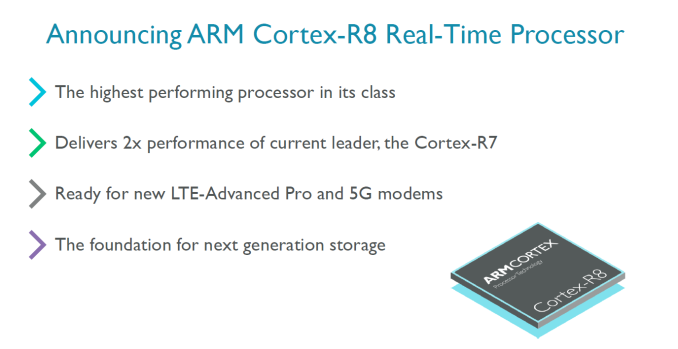
ARM’s Cortex-R range of processor IP is something we haven’t talked about too much in the past, yet it’s a crucial part of ARM’s business and is integrated in a lot of devices. ARM divides its CPU offerings into three categories – At the high-end performance end we find the Cortex-A profile of application processors which most of us should be familiar with as cores such as the Cortex A53 and Cortex A72 are ubiquitous in today’s smartphone media coverage and get the most attention. The low-end should also be pretty familiar as the Cortex-M microcontrollers are found in virtually any conceivable gadget out there and also has seen increased exposure in the mobile segment due to their usage as the brain inside of both discrete as well as SoC-integrated sensor-hubs. 
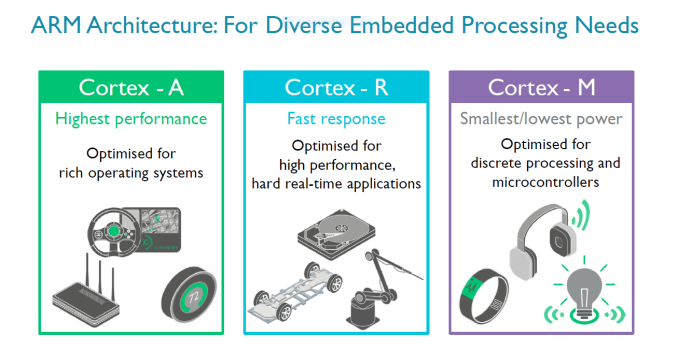
The Cortex-R profile of real-time processors on the other hand has seen relatively small coverage due to the fact that its use-cases are more specialized. Today with the announcement of the new Cortex-R8 we’ll be covering one well-established segment as well as an increasingly growing application of the real-time processors from ARM.
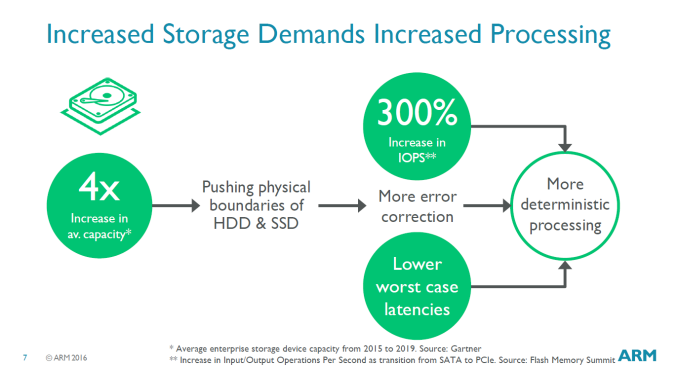
In storage devices such as disk drive microcontrollers the Cortex R processors are well established as such systems require response-times in the microsecond range. These systems use increasingly complex algorithms for things such as error correction and the control software. SSDs in particular require increasingly higher performance controllers as data-rates increase with each generation. ARM discloses that currently all major hard-drive and SSD manufacturers use controllers based on Cortex R processors, which is least to say an interesting market position.
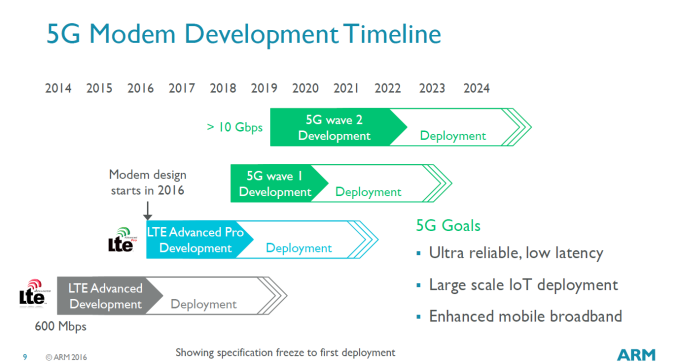
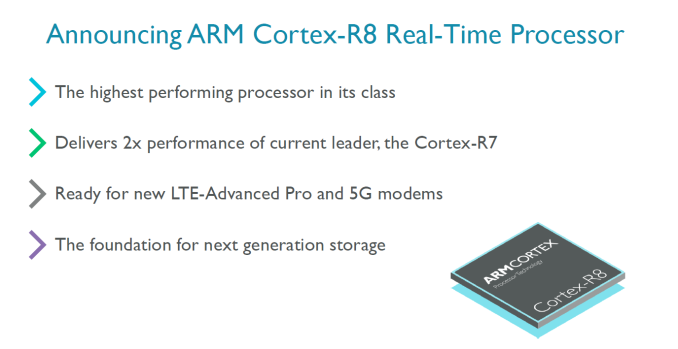
Today’s announcement of the Cortex R8 was particularly centred on the use of R-profile processors in the modem space with a focus on the increasing performance requirements required to run future cellular standards such as LTE Advanced Pro and 5G. Here the processors are used for scheduling the data-flows through the signal processing for reception and transmission and as well run the protocol stack’s software tasks. These are so-called hard real-time tasks in which the processor must respond to events in the communication channel with a microsecond granularity. New standards such as 5G will vastly increase the transmission speeds to gigabits with complex carrier frequency and MIMO configurations which will also increase the feature-set requirements and workloads for the modem processors.

ARM also discloses that modem designers are looking more and more to modems that manage Layer-1 scheduling activities to be done by software on the processor to provide more flexibility among different standards, something which requires a lot of investment and R&D to do in hardware.
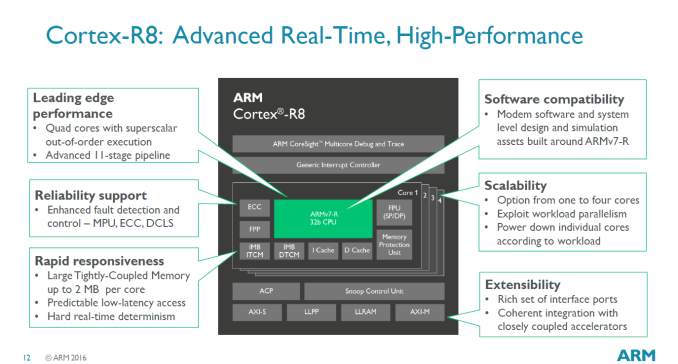
The Cortex-R8 is similar in architecture to the R7 – we still see usage of an 11-stage OoO (Out-of-Order) execution pipeline and clocks of up to 1.5GHz on a 28nm HPM process. The differences are found in the configuration options: The new core can now be deployed as a quad-core, versus the limited dual-core configuration of the R7, doubling the theoretical processing power over its predecesssor. The cores can also be run asymetrically and also each have their own power-plane, meaning they can be turned off for power savings and increased battery life. While concrete performance figures were a bit scarce, ARM talks about an example quad-core configuration on a 28nm or 16nm FinFET process being able to reach up to 15000 Dhrystone MIPS at 1.5GHz frequency.

Cortex-R processors are able to employ a low-latency on-CPU memory called Tightly-Coupled Memory (TCM) which is able to be used as a predictable and guaranteed memory subsystem that is able to service interrupts as quickly as possible with code and data, avoiding longer and less deterministic latency cycles when fetching data out of the cache memory system. The Cortex R8 now is able to significantly increase the size of the TCM and now provides up to 2MB (1MB instruction, 1MB data, up from 128KB instruction/data on the R7) of TCM per core for a maximum of 8MB for a quad-core configuration.

ARM disclosed one of the licensees being Huawei:

“The ARM architecture is the trusted standard for real-time high-performance processing in modems,” said Daniel Diao, deputy general manager, Turing Processor Business Unit, Huawei. “As a leader in cellular technology, Huawei is already working on 5G solutions and we welcome the significant performance uplift the Cortex-R8 will deliver. We expect it to be widely deployed in any device where low latency and high performance communication is a critical success factor.” 

Among other licensees we’ll also definitely see vendors such as Samsung who also currently deploy Cortex-R inside of their modems, such as the Shannon 333 found in last year’s Galaxy devices.