Vik


CORSAIR ONE Gaming PC Released
CORSAIR ONE Gaming PC Released

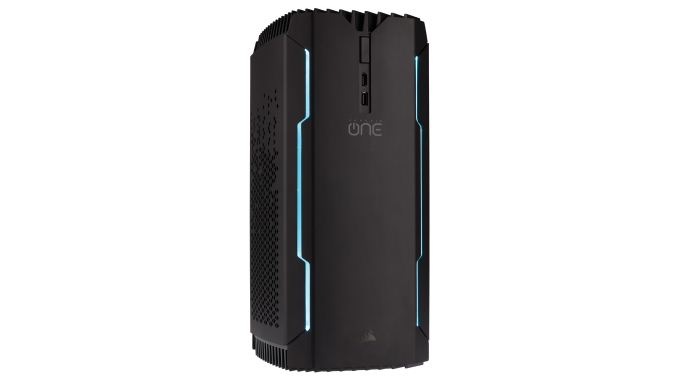
First announced in February, the new Corsair ONE pre-built gaming PC is now shipping. The Corsair ONE is the first ready-to-run system from the manufacturer that has mostly been known for their PC components and peripherals. Selling and supporting entire systems is a new venture for Corsair, but the design and capabilities of the Corsair ONE are a good fit for the company’s product lineup.

The Corsair ONE uses a custom case form factor that is a shallow-depth mini tower, but all of the major components inside use standard PC form factors: mini-ITX motherboard, SFX power supply, 2.5″ SSDs and supporting graphics cards up to 11″ long with two or three slot cooling solutions. Naturally, many of those components are either existing Corsair parts or special editions made for the Corsair ONE. The total volume of the case is around 12L and the exterior is mostly black aluminum.

The system’s cooling is provided by a single ML140 exhaust fan at the top and intake is through the side panels. The right side intake is occupied by the radiator for the CPU’s closed-loop water cooler. The left side intake vent opens directly onto the air-cooled graphics card in the base model, while the top Corsair ONE includes a second water cooler for the GPU. Neither radiator has any fans of their own, as the exhaust fan at the top of the case provides most of the air flow. The power supply uses semi-passive cooling with its own fan, and the system as a whole emits around 20dB at idle.

Gallery: CORSAIR ONE

In order to allow the graphics card to be positioned behind the motherboard and facing its own air intake, the Corsair ONE chassis provides the necessary cables to route the PCIe lanes to the graphics card, and pass-through video connections to ports on the back and one HDMI port on the front that is intended for VR displays. The power supply is mounted in the top of the right side of the case and also makes use of a short pass-through cable to the plug on the back of the machine. Because both side panels are used as air intakes, the Corsair ONE can only operate in vertical orientation cannot be operated with either side directly against any obstructing surface.

The top vent and fan are removable without tools, but the two side panels with the radiators must be unscrewed at the top and are hinged at the bottom. While Corsair cases are usually quite easy to work in, further disassembly of the Corsair ONE gets tricky as usability has been sacrificed to save space.

Corsair ONE PC Specifications
Model Corsair ONE Corsair ONE PRO Corsair ONE PRO (web store only)
CPU i7 7700 i7 7700K
GPU air-cooled GeForce GTX 1070 water-cooled GeForce GTX 1080
DRAM 16GB DDR4 2400
Motherboard mini-ITX, Z270 chipset
Storage 240GB SSD + 1TB HDD 480GB SSD + 2TB HDD 960GB SSD
PSU custom edition of Corsair SF600: SFX, 80+ Gold with semi-passive cooling
Warranty 2 years
MSRP $1799 $2299 $2399

The base model Corsair ONE comes standard with an Intel Core i7 7700 processor in a Z270 motherboard with 16GB of DDR4-2400 RAM. The base graphics card is an air-cooled NVIDIA GeForce GTX 1070. The Corsair ONE PRO model upgrades to a Core i7 7700K processor and a MSI GEFORCE GTX 1080 AERO 8G OC with Corsair’s custom water cooler. Storage is either a combination of a SATA SSD and a 2.5″ hard drive or a single larger SATA SSD.

Stylistically, the Corsair ONE is less ostentatious than many gamer-oriented products. The front face of the case includes aqua blue accent lighting that can be controlled or entirely disabled through Corsair Link software, but it’s single-color rather than full RGB lighting. Even with the lighting off the Corsair ONE doesn’t easily blend in with typical office or living room furnishings, but the relatively small size and all-black color scheme make it fairly unobtrusive.

The software pre-installed on the Corsair ONE is minimal: Windows 10 Home with all the necessary drivers, Corsair’s CUE customization tool, and installers for popular game digital distribution platforms including Steam, Origin, Uplay and GoG Galaxy.

Corsair will be selling the Corsair ONE PC through major electronics retailers as well as directly through their online store. Support will be be handled in-house by Corsair’s expanded support department that now includes specialists for the Corsair ONE. The system comes with a two-year warranty and aftermarket upgrades performed by the consumer will void that warranty, but Corsair will also be partnering with retailers to provide in-warranty aftermarket upgrades.
The Qualcomm Snapdragon 835 Performance Preview

Qualcomm’s Snapdragon 835 gets a CPU transplant, an updated GPU, a 1Gbps LTE modem, and other updates. We were able to see the new SoC in action and collect some preliminary performance data during a brief testing session at Qualcomm’s headquarters in San Diego. How does it compare to Snapdragon 820 and the Kirin 960?

The Qualcomm Snapdragon 835 Performance Preview

Qualcomm’s Snapdragon 835 gets a CPU transplant, an updated GPU, a 1Gbps LTE modem, and other updates. We were able to see the new SoC in action and collect some preliminary performance data during a brief testing session at Qualcomm’s headquarters in San Diego. How does it compare to Snapdragon 820 and the Kirin 960?

The Qualcomm Snapdragon 835 Performance Preview

Qualcomm’s Snapdragon 835 gets a CPU transplant, an updated GPU, a 1Gbps LTE modem, and other updates. We were able to see the new SoC in action and collect some preliminary performance data during a brief testing session at Qualcomm’s headquarters in San Diego. How does it compare to Snapdragon 820 and the Kirin 960?

Capsule Review: Logitech MK850 Performance Wireless Keyboard and Mouse Combo

Capsule Review: Logitech MK850 Performance Wireless Keyboard and Mouse Combo

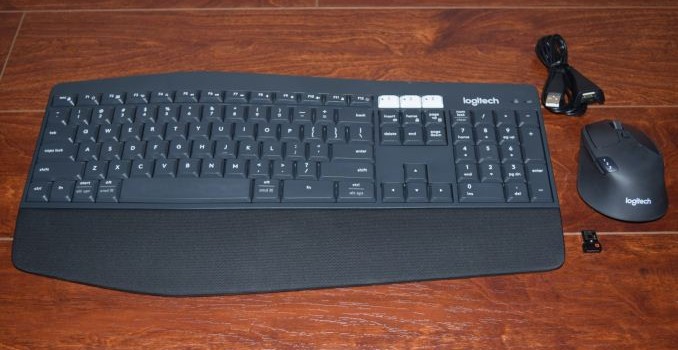
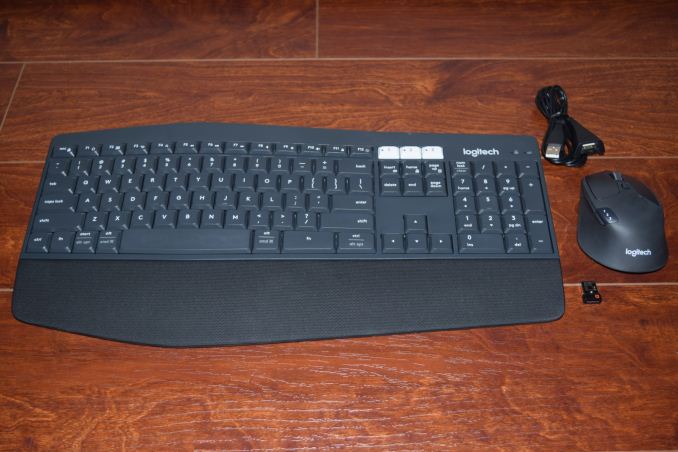
We have been reviewing Logitech’s multi-device wireless input peripherals for a few years now. The Logitech K480 was launched in 2014, and the Logitech K780 and M720 keyboard and mouse were launched last year. The K780 and M720 Triathlon were separate products. The success of these input peripherals has prompted Logitech to introduce the MK850 Performance combo – a full-length multi-device wireless keyboard along with the wireless M720 Triathlon mouse. The combo is made more powerful by the DuoLink feature – using the keyboard to alter the functionality of the mouse buttons and gestures.

The Logitech MK850 Performance combo comes with a single Unifying USB receiver. Logitech also bundles a USB extender for use-cases where the placement of the spare USB port in the PC might result in spotty wireless performance. The combo can be paired with up to three different host devices and easily switch between them. The hosts can be Android, iOS, Mac or Windows devices, and the keys in the keyboard get automatically re-mapped depending on the host OS. Both the mouse and the keyboard have explicit on/off buttons in order to conserve battery life. The keyboard needs 2xAAA batteries, while the mouse needs a single AA battery. Logitech claims battery life of two years for the mouse and three years for the keyboard.

We had talked about how the K780 keyboard addressed the shortcomings of the K480 keyboard. The keyboard component of the MK850 adds a number of interesting features.

  • Ergonomic contour with a raised profile in the middle, suitable for extended duration usage
  • Full-sized keyboard (101 keys) with explicit number pad and full-sized arrow keys.
  • Cushioned palm rest along the lower side of the keyboard for comfortable extended duration usage
  • Availability of multiple tilt angles for the keyboard (0, 4, or 8 degrees)
  • Better typing experience compared to the K480 and K780
  • Ability to use the Fn key to enhance the combo mouse functionality

Users of the K480 and K780 have appreciated the ability to use the cradle to keep their smartphones in an accessible location while using their computers. The MK850’s keyboard, however, doesn’t have a cradle for mobile devices.

Hardware-wise, the mouse component of the MK850 is the M720 Triathlon (the sticker on the back of the mouse even has the M720 Triathlon label). The mouse is also the component in the package with a compartment to store the Unifying receiver. As part of the MK850 combo, the differences boil down to the DuoLink feature controlled by the Logitech Options software.

The Logitech Options Software

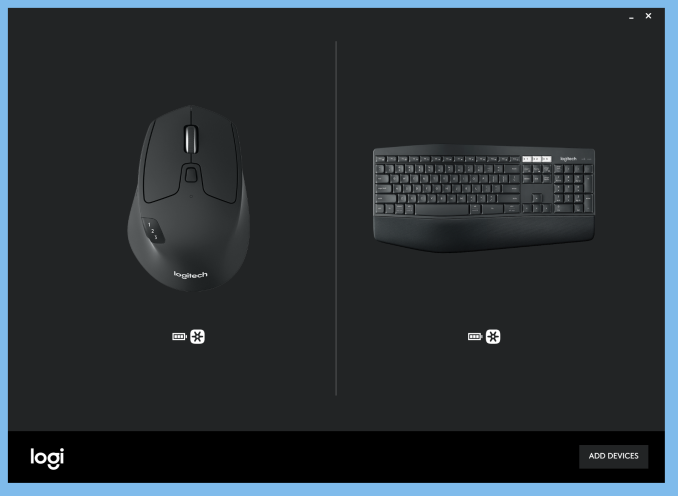
The Unifying receiver bundled with the package is obviously configured to keep both devices active simultaneously. Installing the Logitech Options software presents both devices along with the battery levels and connection method (Unifying receiver or Bluetooth) at a single glance.

The options available for the mouse (standalone) are an exact replica of what we saw in the M720 Triathlon review. Out of the 8 buttons in the mouse, two (the one behind the scrollwheel that controls the rate at which it moves, and the one that switches the host device to which the mouse is paired) can’t be remapped. Everything else can be configured using the Options software.

The left and right buttons can be swapped. The pointer speed can be finely adjusted and the scrollwheel direction can also be swapped. The mouse also has a gesture button below the three raised buttons on the left side. The scrollwheel can be swayed right or left for horizontal scrolling (on mobile devices, that acts similar to swiping right or left on the touchscreen). Along with the device change button, we also have the Forward and Back buttons on the left. The scrollwheel can itself act as a middle mouse button. All of these can be mapped to one of a variety of Windows actions.

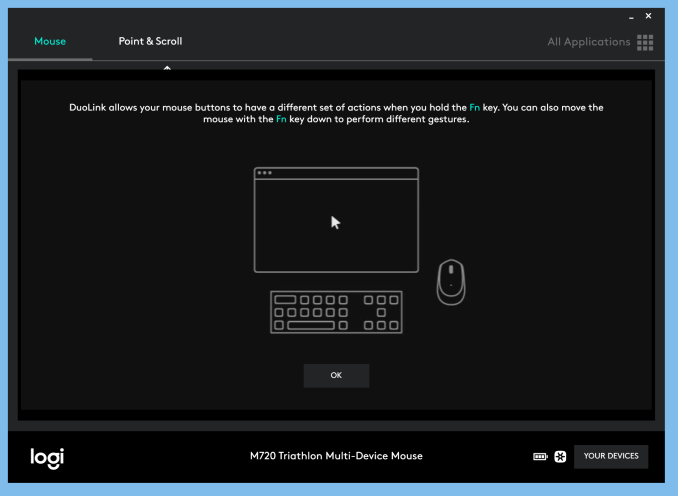
Activating the Options software when the K850 Performance keyboard as well as the M720 Triathlon mouse are connected provides users with the ability to configure the DuoLink features. The option panels associated with the mouse have a ‘Default’ and a ‘Fn’ mode, with the latter configuration intended for activation by pressing the Fn key on the keyboard along with the relevant mouse event.

The K850 Performance’s options include the ability to keep the keyboard always in the Windows layout and the option to use the F1-F12 keys as standard function keys (without using the Fn. key qualifier). The configurable keys include the Home button, F1 through F4, F11, and F12. They can be mapped to a variety of Windows functions / programs such as closing windows, Cortana, Calculator etc.

Concluding Remarks

The MK850 Performance wireless keyboard and mouse combo is an important addition to the set of multi-device I/O peripherals from Logitech. They work as advertised, and there is really not much to complain about, except for the lack of a cradle in the keyboard. As mentioned earlier, the K850 Performance keyboard is a huge improvement over the K480 and K780. Evaluation of keyboards and mice targeted towards day-to-day / casual usage is an inherently subjective exercise. In the table below, we compare the specifications of the MK850 Performance combo with some of the other keyboard / mice combos that we have evaluated with a similar approach before. Some subjective scores have also been provided.

Keyboard Bench
Aspect Logitech MK850 Performance Logitech K780 and M720 TriathlonLogitech K830Perixx PERIBOARD-716Logitech TK820Perixx PERIBOARD-706 PLUSLogitech K480Adesso WKB-4000BBLogitech K400IOGEAR GKM561RSIIG JK-WR0412-S1SIIG JK-WR0312-S1Adesso WKB-3000UAdesso WKB-4400UBAdesso WKB-4000UBAdesso WKB-1200Logitech MK850 Performance
Device Type Keyboard + Optical Mouse (2-button with scrollwheel / middle button and gesture support) Keyboard + Optical Mouse (2-button with scrollwheel / middle button and gesture support)
Dimensions (Keyboard) 16.93″ x 8.27″ x 0.98″
(Mouse) 2.91″ x 4.53″ x 1.77″
(Keyboard) 14.96″ x 6.22″ x (0.87″ to 0.32″)
(Mouse) 2.91″ x 4.53″ x 1.77″
Weight (Keyboard) 1.62 lbs / 733 g
(Mouse) 0.3125 lbs / 135 g
(Keyboard) 1.93 lbs / 875 g
(Mouse) 0.3125 lbs / 135 g
Power Source (Keyboard) 2x AAA
(Mouse) 1x AA
(Keyboard) 2x AAA
(Mouse) 1x AA
Communication 2.4 GHz RF and Bluetooth 4.0 2.4 GHz RF and Bluetooth 4.0
Power Saver Explicit On/Off Switches on both Keyboard and Mouse Explicit On/Off Switches on both Keyboard and Mouse
Keys Count 101 (with multiplexed Internet and multimedia hot keys) + 3 (for device switching) 96 (with multiplexed Internet and multimedia hot keys)
Touchpad Dimensions (Diagonal) N/A N/A
USB Receiver Storage Compartment Yes on Mouse Yes on both Keyboard and Mouse
Backlight No No
Keyboard Layout 9.5/10 8/10
Ergonomics (Keyboard) 9.5/10
(Mouse)10/10
(Keyboard) 7/10
(Mouse)10/10
Build Quality (Keyboard) 9/10
(Mouse) 9/10
(Keyboard) 9/10
(Mouse) 9/10
MSRP (USD) $99.99 (Keyboard) $79.99
(Mouse) $69.99
Warranty 1 year 1 year

While it is difficult to find scope for improvement in the M720 Triathlon, the K850 Performance keyboard’s appeal can be enhanced by the addition of a cradle to the design, as well as making the palm rest detachable. As a combo, the whole is more than the sum of parts, thanks to the DuoLink features.

The MK850 Performance combo is priced at $99.99. Given that the M720 Triathlon mouse had a MSRP of $70 at launch, the pricing of the MK850 Performance combo seems pretty reasonable. Logitech has primarily focused on the niche mobile device input peripheral market with their multi-device Bluetooth / wireless models. The design of the K850 Performance keyboard makes it suitable for heavy office use. This will help Logitech address a wider market with the MK850 Performance wireless keyboard and mouse combo.