Vik


Victory Lap: Team AnandTech Beats Tom’s Hardware in Folding Race

Victory Lap: Team AnandTech Beats Tom’s Hardware in Folding Race

At the start of this month we kicked off a week-long competition with our frenemies over at Tom’s Hardware. Striving to see which technology website was superior, our respective distributed computing teams held a race in the popular Folding @ Home project to amass the largest number of points over a one-week period. And now that the race week has come to a close, the final results are in.

Folding@Home Race Results
Team Points
Team AnandTech 296,180,869
Tom’s Hardware 212,467,005

As of end of the race, Team AnandTech has amassed 296 million points, besting Tom’s Hardware by nearly 40%. And while it took a day or so for both teams to get up to speed, as it turns out it was never even close.


Daily Production Chart (Image Courtesy Team AnandTech user Petrusbroder)

Anyhow, as the race has come to a close, I wanted to take a victory lap to celebrate Team AnandTech’s inevitable win over Tom’s Hardware, and to thank the many readers and forum denizens who chipped in to help the team win the race. All told, Team AnandTech’s production nearly tripled for this race, beating expectations on both sides of the aisle and putting the team ahead of Tom’s both for this race and now in overall standings as well. With dozens of participants – and more hiding in the woodwork – there are too many people to name, but thank you to everyone who participated.

The same sentiment goes to the team over at Tom’s Hardware as well. Although their leadership under my counterpart, Fritz Nelson, turned out to be lacking – he badly underestimated what Team AnandTech could do – the members of both teams worked hard for this. After all, a race is only as good as the competition. So I suspect this won’t be our last race, as we’ll need to do this again in the future to once again satisfy the feud for at least a little bit.

Finally, I want to quickly thank the Purch community team for setting this up, and for providing the funds for the $2,500 donation to Child’s Play. As the winners of this race, Purch will be making that donation in the name of Team AnandTech, making for a fitting end to this race, as someone deserving will benefit from the carnage that has been wrought.

Victory Lap: Team AnandTech Beats Tom’s Hardware in Folding Race

Victory Lap: Team AnandTech Beats Tom’s Hardware in Folding Race

At the start of this month we kicked off a week-long competition with our frenemies over at Tom’s Hardware. Striving to see which technology website was superior, our respective distributed computing teams held a race in the popular Folding @ Home project to amass the largest number of points over a one-week period. And now that the race week has come to a close, the final results are in.

Folding@Home Race Results
Team Points
Team AnandTech 296,180,869
Tom’s Hardware 212,467,005

As of end of the race, Team AnandTech has amassed 296 million points, besting Tom’s Hardware by nearly 40%. And while it took a day or so for both teams to get up to speed, as it turns out it was never even close.


Daily Production Chart (Image Courtesy Team AnandTech user Petrusbroder)

Anyhow, as the race has come to a close, I wanted to take a victory lap to celebrate Team AnandTech’s inevitable win over Tom’s Hardware, and to thank the many readers and forum denizens who chipped in to help the team win the race. All told, Team AnandTech’s production nearly tripled for this race, beating expectations on both sides of the aisle and putting the team ahead of Tom’s both for this race and now in overall standings as well. With dozens of participants – and more hiding in the woodwork – there are too many people to name, but thank you to everyone who participated.

The same sentiment goes to the team over at Tom’s Hardware as well. Although their leadership under my counterpart, Fritz Nelson, turned out to be lacking – he badly underestimated what Team AnandTech could do – the members of both teams worked hard for this. After all, a race is only as good as the competition. So I suspect this won’t be our last race, as we’ll need to do this again in the future to once again satisfy the feud for at least a little bit.

Finally, I want to quickly thank the Purch community team for setting this up, and for providing the funds for the $2,500 donation to Child’s Play. As the winners of this race, Purch will be making that donation in the name of Team AnandTech, making for a fitting end to this race, as someone deserving will benefit from the carnage that has been wrought.

Axtremex Micro SSD Gen2 mSATA - USB 3.1 Gen 2 Storage Bridge Review

Axtremex Micro SSD Gen2 mSATA – USB 3.1 Gen 2 Storage Bridge Review

Storage bridges come in many varieties within the internal and external market segments. On the external side, they usually have one or more downstream SATA ports. The most popular uplink port is some sort of USB connection. Within the USB storage bridge market, device vendors have multiple opportunities to tune their product design for specific use-cases. USB 3.1 Gen 2 has enabled bus-powered external storage bridges that can bring out the full performance of the SATA device used at the downstream end.

Today’s review will take a look at the Axtremex Micro SSD Gen2 DIY edition. The device is a sleek mSATA SSD enclosure with a USB 3.1 Gen 2 Type-C interface. Axtremex sells multiple variants – both in terms of color and capacity. Models with the SSD included have a Samsung 850 EVO mSATA SSD inside them. Our review is from a storage bridge viewpoint, and we took up the DIY diskless option. The device is currently available on Amazon UK for GBP 50. Axtremex does ship to North America when ordered direct from their site (GBP 41.66 + shipping). We will address the value proposition aspect in the final section, but, before that, let us take a look at the package contents and the PCB itself.

The Axtremex Micro SSD Gen 2 case is made of a zinc alloy and feels more solid in hand compared to aluminum / plastic enclosures. The package also includes a pouch with two compartments (one inside the other). One can be used for the main unit, while the other can be used for storing the cables. This ensures that the drawback associated with a non-integrated cable is addressed and the possibility of misplacing the cable is minimized. Two cables (Type-C to Type-A and Type-C to Type-C) are included to enable connecting to a wide variety of host systems. They are relatively short when compared to other storage bridges that we have evaluated before – However, thanks the compact size of the unit, it feels more like a USB flash drive with an extension cable. 
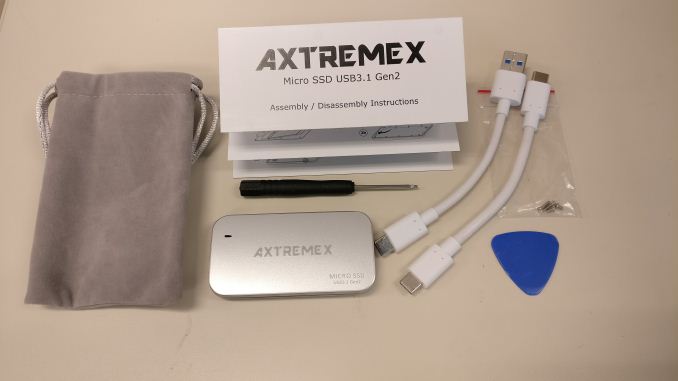
Other than the main components, we have the necessary hardware for the DIY install and a guide for assembly / disassembly. Two pairs of Torx screws as well as a Torx screwdriver are included. One pair is used to secure the mSATA SSD internally, while the other pair ensures that the two parts of the case and the mSATA SSD are all connected together. A plastic triangle opening tool is also present to help pry apart the two side of the case (since the case includes small tabs inside that prevent the two parts from just falling apart after the screws are removed). The gallery below shows more pictures of the case as well as the package contents.

The PCB itself shows that the device is powered by the ASMedia ASM1351 SATA III to USB 3.1 Gen 2 bridge chip. The ASMedia ASM1542 handles the Type-C switching duties. This internal configuration is the same as that of the StarTech.com S251BU31C3CB 2.5″ drive enclosure we reviewed back in September 2016. (except for the obvious fact that we are looking at a mSATA downstream port instead of a full-fledged SATA one).

Consumers need to keep the following aspects in mind for external storage devices / enclosures with a USB interface:

  • Support for UASP (USB-attached SCSI protocol) for better performance (reduced protocol overhead and support for SATA Native Command Queueing (NCQ))
  • Support for TRIM to ensure SSDs in the external enclosure can operate optimally in the long run
  • Support for S.M.A.R.T passthrough to enable monitoring of the internal SATA device by the host OS

The table below presents the detailed specifications and miscellaneous aspects of the units and how they compare.

Comparative Storage Bridges Configurations
Aspect Axtremex Micro SSD Gen2Inateck FE2010StarTech.com S251BU31C3CBCRU ToughTech Duo CInateck UA1001Satechi B01FWT2N3K Inateck FE2010StarTech.com S251BU31C3CBCRU ToughTech Duo CInateck UA1001Satechi B01FWT2N3KAxtremex Micro SSD Gen2
Downstream Port 1x SATA III (mSATA) 1x SATA III
Upstream Port USB 3.1 Gen 2 Type-C USB 3.0 Micro-B
Bridge Chip ASMedia ASM1351 JMicron JMS578
Power Bus Powered Bus Powered
     
Use Case mSATA SSD Enclosure
DIY high-performance, compact, and sturdy portable SSD with a USB flash drive-like form-factor
Tool-free 2.5″ HDD/SSD Enclosure (up to 9.5 mm height)
     
Physical Dimensions 73 mm x 38 mm x 9.5 mm 130 mm x 82 mm x 14 mm
Weight (diskless) 60 grams (with Type-C to Type-C cable) 87 grams (with cable)
Cable 12.7 cm USB 3.1 Gen 2 Type-C to Type-C
11.4 cm USB 3.1 Gen 2 Type-C to Type-A
30 cm USB 3.0 Micro-B to USB 3.0 Type-A
     
S.M.A.R.T Passthrough Yes Yes
UASP Support Yes Yes
TRIM Passthrough Yes Yes
     
Price GBP 50 USD 15
Review Link Axtremex Micro SSD Gen2 Review Inateck FE2010 Review

Our evaluation routine for storage bridges borrows heavily from the testing methodology for direct-attached storage devices. The testbed hardware is reused. CrystalDiskMark is used for a quick overview, as it helps determine availability of UASP support and provides some performance numbers under ideal scenarios. Real-world performance testing is done with our custom test suite involving robocopy bencharks and PCMark 8’s storage bench. The Crucial MX200 has usually been used for our storage bridge tests. However, we were unable to source the mSATA version of the same. Therefore, a Samsung 840 EVO mSATA 1TB SSD was used for the performance benchmarks below. Note that a direct comparison with other configurations using the Crucial MX200 is not quite fair, but, given similar SSDs, we should expect the performance of the Axtremex Micro SSD Gen2 to be similar to the StarTech.com S251BU31C3CB mentioned earlier.

Performance Benchmarks

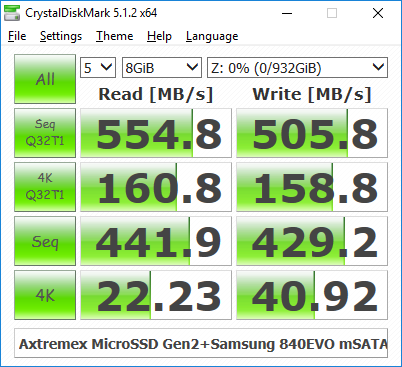
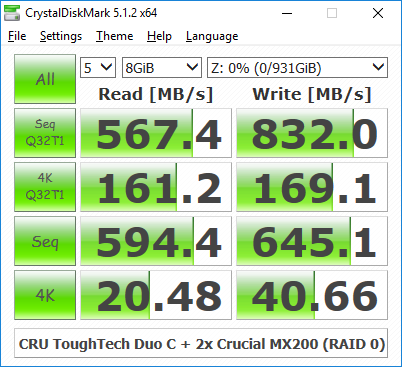
CrystalDiskMark uses four different access traces for reads and writes over a configurable region size. Two of the traces are sequential accesses, while two are 4K rando accesses. Internally, CrystalDiskMark uses the Microsoft DiskSpd storage testing tool. The ‘Seq Q32T1’ sequential traces use 128K block size with a queue depth of 32 from a single thread, while the ‘4K Q32T1’ ones do random 4K accesses with the same queue and thread configurations. The plain ‘Seq’ traces use a 1MiB block size. The plain ‘4K’ ones are similar to the ‘4K Q32T1’ except that only a single queue and single thread are used.

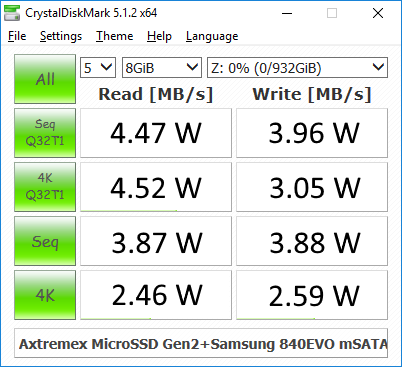
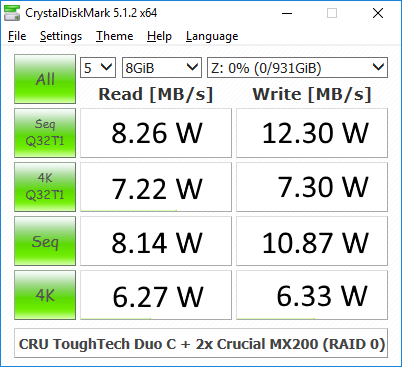
Comparing the ‘4K Q32T1’ and ‘4K’ numbers can quickly tell us whether the storage device supports NCQ (native command queuing) / UASP (USB-attached SCSI protocol). If the numbers for the two access traces are in the same ballpark, NCQ / UASP is not supported. This assumes that the host port / drivers on the PC support UASP. We can see that the Axtremex Micro SSD Gen2 supports NCQ / UASP.

Storage Bridge Benchmarks – CrystalDiskMark
Axtremex Micro SSD Gen2CRU ToughTech Duo C – RAID 0Satechi B01FWT2N3KCRU ToughTech Duo C – RAID 1Inateck FE2010Inateck UA1001StarTech.com S251BU31C3CB CRU ToughTech Duo C – RAID 0Satechi B01FWT2N3KCRU ToughTech Duo C – RAID 1Inateck FE2010Inateck UA1001StarTech.com S251BU31C3CBAxtremex Micro SSD Gen2

Moving on to the real-world benchmarks, we first look at the results from our custom robocopy test. In this test, we transfer three folders with the following characteristics.

  • Photos: 15.6 GB collection of 4320 photos (RAW as well as JPEGs) in 61 sub-folders
  • Videos: 16.1 GB collection of 244 videos (MP4 as well as MOVs) in 6 sub-folders
  • BR: 10.7 GB Blu-ray folder structure of the IDT Benchmark Blu-ray (the same that we use in our robocopy tests for NAS systems)

The test starts off with the Photos folder in a RAM drive in the testbed. robocopy is used with default arguments to mirror it onto the storage drive under test. The content on the RAM drive is then deleted. robocopy is again used to transfer the content, but, from the storage drive under test to the RAM drive. The first segment gives the write speed, while the second one gives the read speed for the storage device. The segments end with the purge of the contents from the storage device. This process is repeated thrice and the average of all the runs is recorded as the performance number. The same procedure is adopted for the Videos and the BR folders. Readers interested in looking at all the graphs in one shot can choose the ‘Expand All’ option in the dropdown menu.

);Photos ReadPhotos WriteVideos ReadVideos WriteBlu-ray Folder ReadBlu-ray Folder WriteExpand All
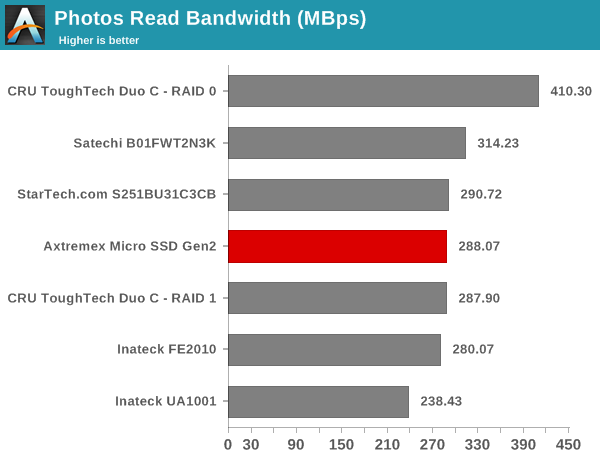
Photos Read

High-performance external storage devices can also be used for editing multimedia files directly off the unit. They can also be used as OS-to-go boot drives. Evaluation of this aspect is done using PCMark 8’s storage bench. The storage workload involves games as well as multimedia editing applications. The command line version allows us to cherry-pick storage traces to run on a target drive. We chose the following traces.

  • Adobe Photoshop (Light)
  • Adobe Photoshop (Heavy)
  • Adobe After Effects
  • Adobe Illustrator

Usually, PC Mark 8 reports time to complete the trace, but the detailed log report has the read and write bandwidth figures which we present in our performance tables. Note that the bandwidth number reported in the results don’t involve idle time compression. Results might appear low, but that is part of the workload characteristic. Note that the same CPU is being used for all configurations. Therefore, comparing the numbers for each trace should be possible across different DAS units. Readers interested in looking at all the graphs in one shot can choose the ‘Expand All’ option in the dropdown menu.

);Adobe Photoshop Light ReadAdobe Photoshop Heavy ReadAdobe After Effects ReadAdobe Illustrator ReadAdobe Photoshop Light WriteAdobe Photoshop Heavy WriteAdobe After Effects WriteAdobe Illustrator WriteExpand All
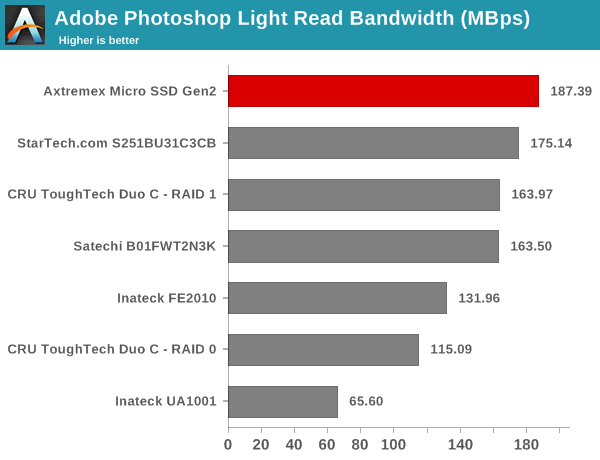
Adobe Photoshop Light Read

Thermal Aspects and Power Consumption

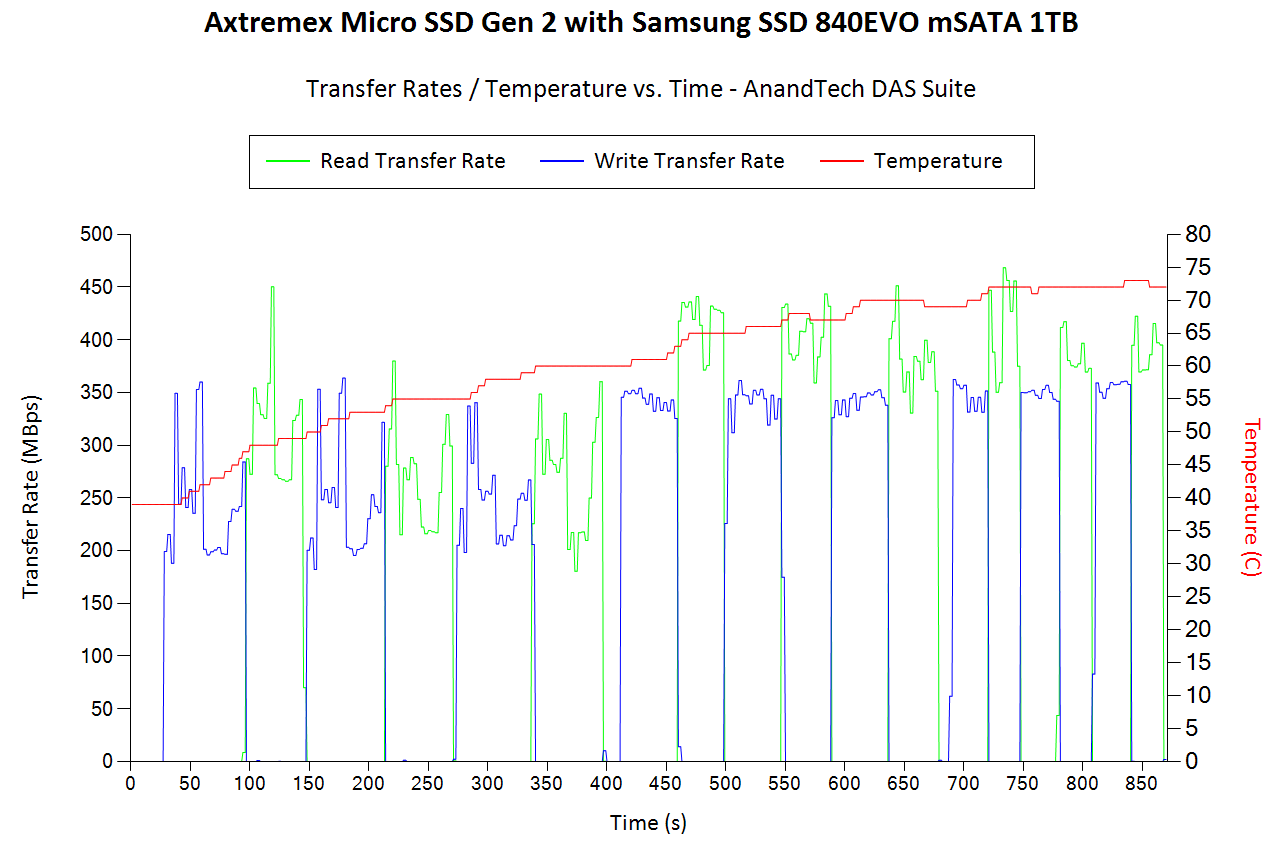
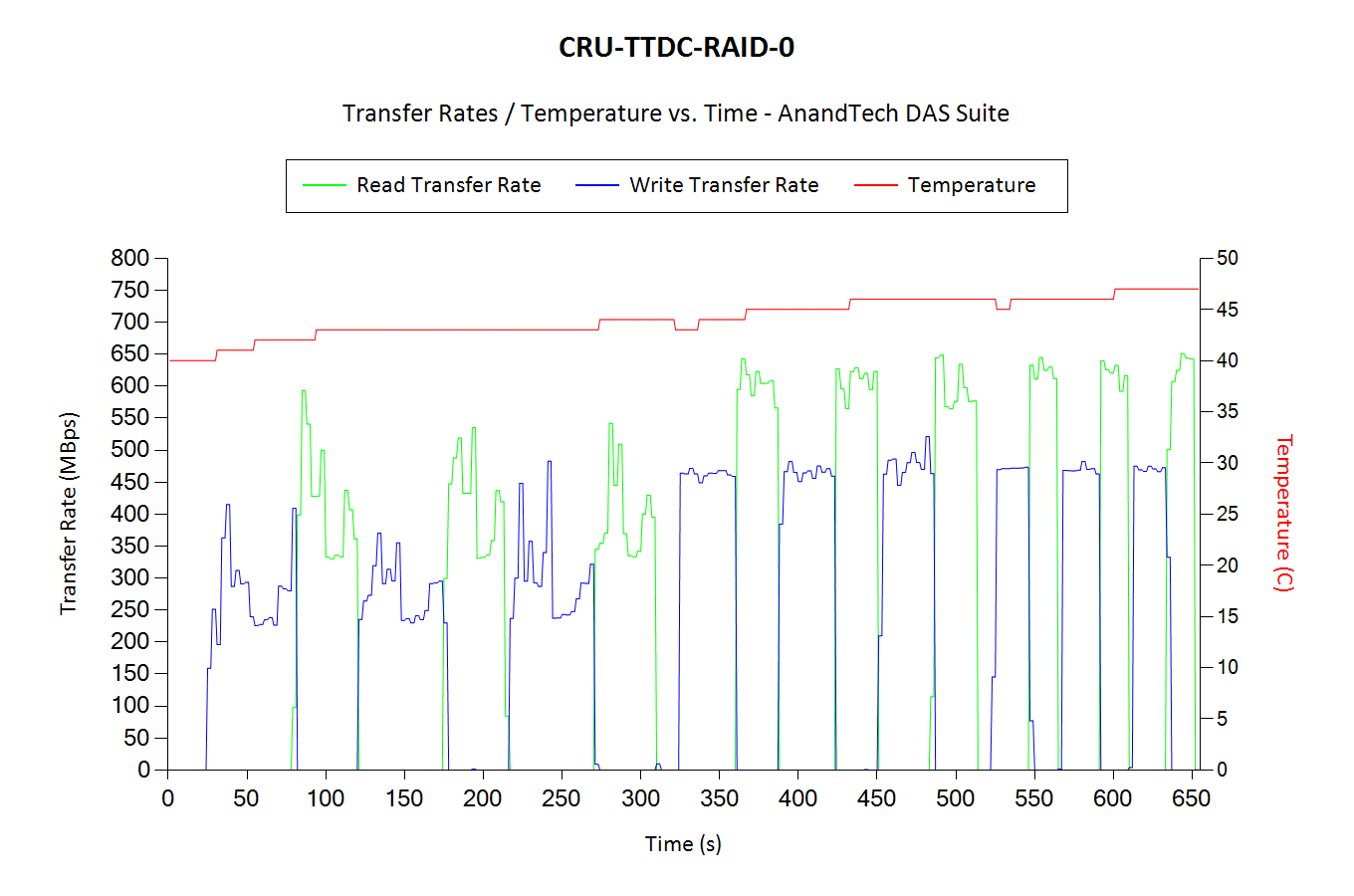
The thermal design of external storage enclosures has now come into focus, as high-speed SSDs and interfaces such as USB 3.1 Gen 2 can easily drive up temperatures. This aspect is an important one, as the last thing that users want to see when copying over, say, 100 GB of data to the drive inside the enclosure, is the transfer rate going to USB 2.0 speeds. In order to identify the effectiveness with which the enclosure can take away heat from the internal drive, we instrumented our robocopy DAS benchmark suite to record various parameters while the robocopy process took place in the background. Internal temperatures can only be gathered for enclosures that support S.M.A.R.T passthrough. Readers can click on the graphs below to view the full-sized version.

Storage Enclosure Thermal Characteristics
Axtremex Micro SSD Gen2CRU ToughTech Duo C – RAID 0Satechi B01FWT2N3KCRU ToughTech Duo C – RAID 1Inateck FE2010Inateck UA1001StarTech.com S251BU31C3CB CRU ToughTech Duo C – RAID 0Satechi B01FWT2N3KCRU ToughTech Duo C – RAID 1Inateck FE2010Inateck UA1001StarTech.com S251BU31C3CBAxtremex Micro SSD Gen2

We see that the temperature of the 840 EVO mSATA SSD reaches as high as 73C. Even though the temperature graphs of the other bridges are not comparable (they use the 2.5″ Crucial MX200 which has a completely different form factor and thermal design internally), it shows the need for end users to pay attention to the thermal design (depending on the SSD used).

It is challenging to isolate the power consumption of the storage bridge alone while treating the unit as a black box. Based on our test setup, we can only present power consumption numbers with the mSATA SSD installed. We use the CrystalDiskMark 5.1.2 traces with a region size of 8GB and the number of repetitions set to 5 for the workload. Plugable’s USBC-TKEY power delivery sniffer was placed between the host PC and the storage bridge to record the power consumption. The average power consumption for each access trace was recorded. The pictures below present the numbers in a compact manner.

Power Consumption – CrystalDiskMark
Axtremex Micro SSD Gen2CRU ToughTech Duo C – RAID 0Satechi B01FWT2N3KCRU ToughTech Duo C – RAID 1Inateck FE2010Inateck UA1001StarTech.com S251BU31C3CB CRU ToughTech Duo C – RAID 0Satechi B01FWT2N3KCRU ToughTech Duo C – RAID 1Inateck FE2010Inateck UA1001StarTech.com S251BU31C3CBAxtremex Micro SSD Gen2

The power numbers for the bridge configurations using the Crucial MX200 are presented just for reference, and not for comparison purposes

TRIM Support

Storage bridges that support UASP fully can translate the SCSI UNMAP command to TRIM commands for SSDs connected to the downstream port. Checking for TRIM support has been a bit tricky so far. CyberShadow’s trimcheck is a quick tool to get the status of TRIM support. However, it presents a couple of challenges: it sometimes returns INDETERMINATE after processing, and, in case TRIM comes back as NOT WORKING or not kicked in yet, it is not clear whether the blame lies with the OS / file system or the storage controller / bridge chip or the SSD itself. In order to get a clear idea, our TRIM check routine adopts the following strategy:

  • Format the SSD in NTFS
  • Load the trimcheck program into it and execute
  • Use the PowerShell command Optimize-Volume -DriveLetter Z -ReTrim -Verbose (assuming that the drive connected to the storage bridge is mounted with the drive letter Z)
  • Re-execute trimcheck to determine status report

Conclusions can be made based on the results from the last two steps.
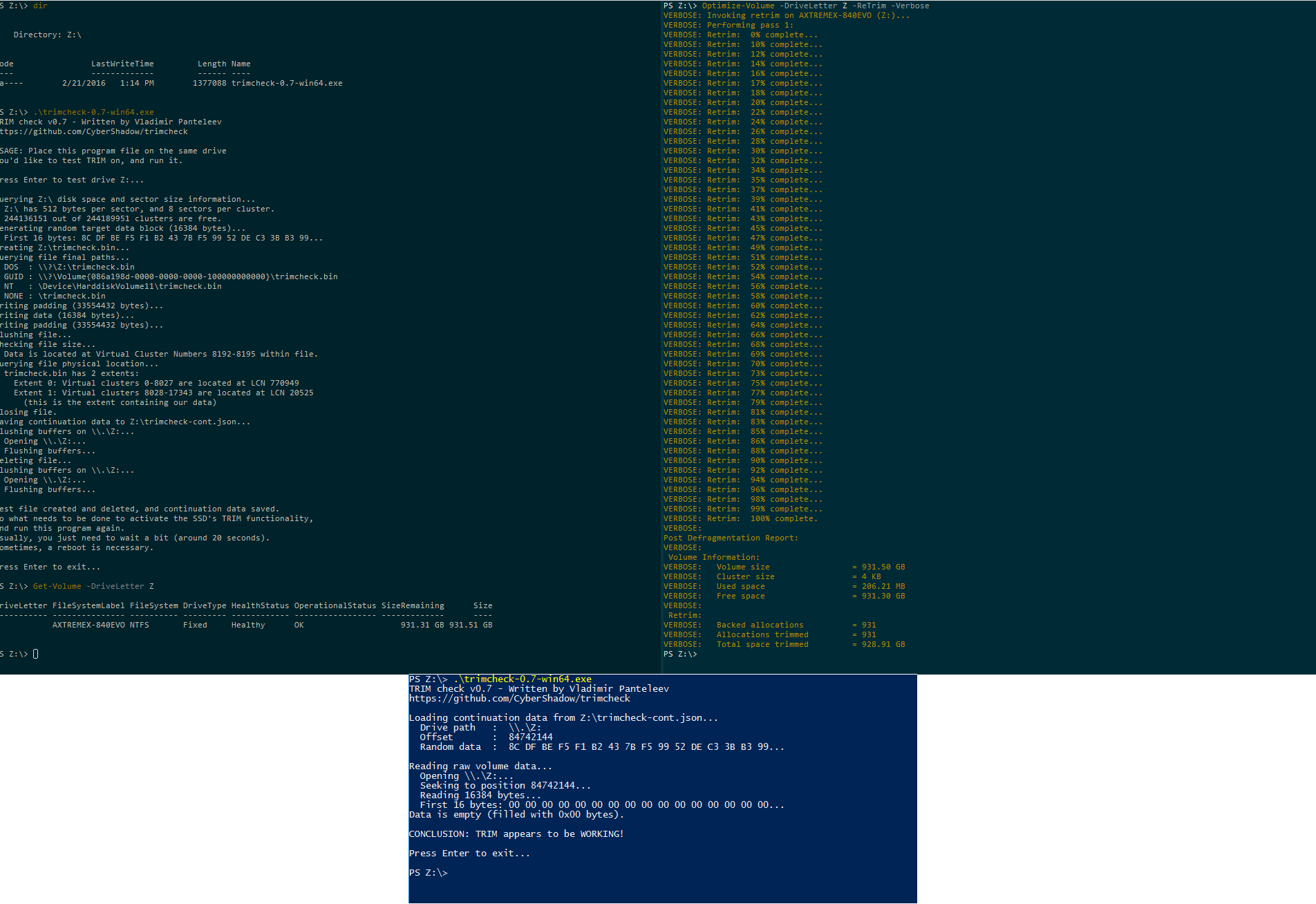
We find that the Axtremex Micro SSD Gen2 is able to successfully pass on the TRIM command to the internal SSD.

Concluding Remarks

Our evaluation of the Axtremex Micro SSD Gen2 has backed up all of their marketing claims. The unit is solid in hand, and the bridge configuration / firmware successfully handles all the necessary differentiating features such as UASP support, TRIM support and S.M.A.R.T passthrough. Praise aside, there are two aspects that need further detailing – the thermal performance of the enclosure, and, the value proposition.

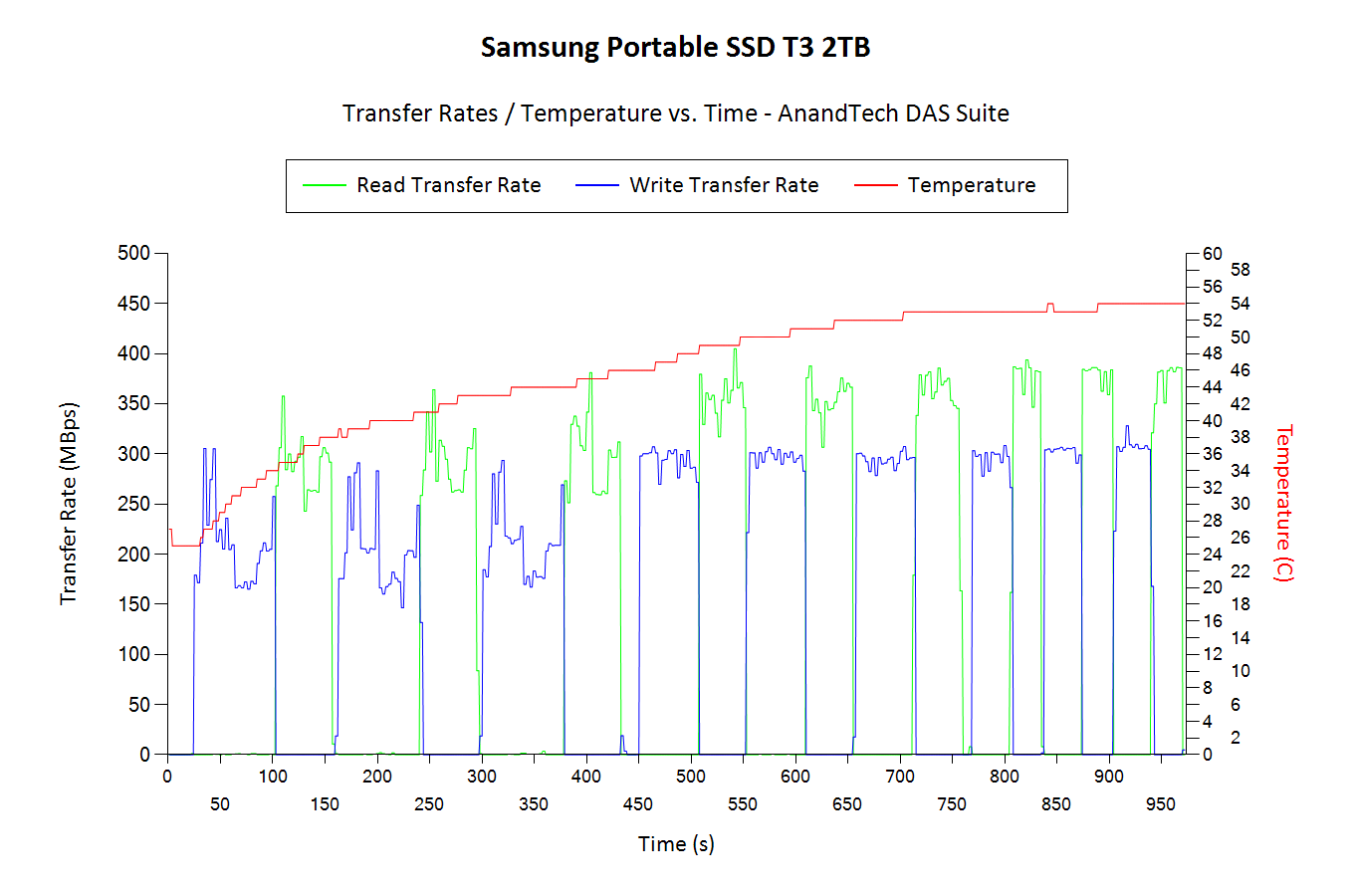
In our heavy stress test (transferring around 250 GB of data to the 840 EVO 1TB mSATA SSD), the temperature of the internal drive reached as high as 73 C. Since direct-attached storage use-cases may involve lots of big data transfers, we think it would be better for Axtremex to provide some sort of thermal protection on the inner side of the enclosure to take away the heat from the mSATA drive. For comparison, the Samsung T3 Portable SSD (with a similar form factor) in the same test only reached 54 C. This is possibly due to the thermal protection that one can see in the teardown gallery here. However, the previous generation Samsung T1 Portable SSD reached 75 C for the same workload due to the absence of any sort of thermal protection in that design. Samsung had to address that issue when going from the T1 to the T3 (though the newer SSD might have also helped a bit in keeping things cooler in the latter). We brought this to the attention of Axtremex, and they indicated that customers will need to add a thermal pad to the mSATA SSD for extreme use-cases. The Arctic Thermal Pad was suggested as a possible candidate. The plan is to eventually include the thermal pad in the kit itself, though Axtremex has not yet decided on whether that would drive up the price of the kit.

The device is currently available on Amazon UK for GBP 50. Consumers in North America can get hold of this premium storage bridge for GBP 41.66 with shipping costs additional. If a premium design and a Type-C interface are not essential, US consumers can get a similar bridge configuration from StarTech for $32. From the perspective of a US consumer, the Axtremex can end up costing as much as double that of the StarTech enclosure given the payment in foreign currency and shipping costs. What, then, is the value proposition of the storage bridge for people outside the UK? Axtremex claims that their housing is designed in a smaller factor and is made with Zinc material with metallic type colors that can prove attractive to the people appreciative of Apple’s design aesthetics. They also have a video to bring out the rugged and durable nature of the enclosure. This obviously carries a premium compared to aluminum or plastic enclosures with staid designs. For the extra cost, Axtremex also bundles two types of cables, and the Type-C port as well as the cable can slightly drive up the cost compared to a Micro-B interface. Axtremex has also added extras such as a pouch bag and a screwdriver. Given that individual use-cases may vary, it is for the consumer to decide whether these additional features are worth the premium.


Axtremex Micro SSD Gen2 mSATA - USB 3.1 Gen 2 Storage Bridge Review

Axtremex Micro SSD Gen2 mSATA – USB 3.1 Gen 2 Storage Bridge Review

Storage bridges come in many varieties within the internal and external market segments. On the external side, they usually have one or more downstream SATA ports. The most popular uplink port is some sort of USB connection. Within the USB storage bridge market, device vendors have multiple opportunities to tune their product design for specific use-cases. USB 3.1 Gen 2 has enabled bus-powered external storage bridges that can bring out the full performance of the SATA device used at the downstream end.

Today’s review will take a look at the Axtremex Micro SSD Gen2 DIY edition. The device is a sleek mSATA SSD enclosure with a USB 3.1 Gen 2 Type-C interface. Axtremex sells multiple variants – both in terms of color and capacity. Models with the SSD included have a Samsung 850 EVO mSATA SSD inside them. Our review is from a storage bridge viewpoint, and we took up the DIY diskless option. The device is currently available on Amazon UK for GBP 50. Axtremex does ship to North America when ordered direct from their site (GBP 41.66 + shipping). We will address the value proposition aspect in the final section, but, before that, let us take a look at the package contents and the PCB itself.

The Axtremex Micro SSD Gen 2 case is made of a zinc alloy and feels more solid in hand compared to aluminum / plastic enclosures. The package also includes a pouch with two compartments (one inside the other). One can be used for the main unit, while the other can be used for storing the cables. This ensures that the drawback associated with a non-integrated cable is addressed and the possibility of misplacing the cable is minimized. Two cables (Type-C to Type-A and Type-C to Type-C) are included to enable connecting to a wide variety of host systems. They are relatively short when compared to other storage bridges that we have evaluated before – However, thanks the compact size of the unit, it feels more like a USB flash drive with an extension cable. 

Other than the main components, we have the necessary hardware for the DIY install and a guide for assembly / disassembly. Two pairs of Torx screws as well as a Torx screwdriver are included. One pair is used to secure the mSATA SSD internally, while the other pair ensures that the two parts of the case and the mSATA SSD are all connected together. A plastic triangle opening tool is also present to help pry apart the two side of the case (since the case includes small tabs inside that prevent the two parts from just falling apart after the screws are removed). The gallery below shows more pictures of the case as well as the package contents.

The PCB itself shows that the device is powered by the ASMedia ASM1351 SATA III to USB 3.1 Gen 2 bridge chip. The ASMedia ASM1542 handles the Type-C switching duties. This internal configuration is the same as that of the StarTech.com S251BU31C3CB 2.5″ drive enclosure we reviewed back in September 2016. (except for the obvious fact that we are looking at a mSATA downstream port instead of a full-fledged SATA one).

Consumers need to keep the following aspects in mind for external storage devices / enclosures with a USB interface:

  • Support for UASP (USB-attached SCSI protocol) for better performance (reduced protocol overhead and support for SATA Native Command Queueing (NCQ))
  • Support for TRIM to ensure SSDs in the external enclosure can operate optimally in the long run
  • Support for S.M.A.R.T passthrough to enable monitoring of the internal SATA device by the host OS

The table below presents the detailed specifications and miscellaneous aspects of the units and how they compare.

Comparative Storage Bridges Configurations
Aspect Axtremex Micro SSD Gen2Inateck FE2010StarTech.com S251BU31C3CBCRU ToughTech Duo CInateck UA1001Satechi B01FWT2N3K Inateck FE2010StarTech.com S251BU31C3CBCRU ToughTech Duo CInateck UA1001Satechi B01FWT2N3KAxtremex Micro SSD Gen2
Downstream Port 1x SATA III (mSATA) 1x SATA III
Upstream Port USB 3.1 Gen 2 Type-C USB 3.0 Micro-B
Bridge Chip ASMedia ASM1351 JMicron JMS578
Power Bus Powered Bus Powered
     
Use Case mSATA SSD Enclosure
DIY high-performance, compact, and sturdy portable SSD with a USB flash drive-like form-factor
Tool-free 2.5″ HDD/SSD Enclosure (up to 9.5 mm height)
     
Physical Dimensions 73 mm x 38 mm x 9.5 mm 130 mm x 82 mm x 14 mm
Weight (diskless) 60 grams (with Type-C to Type-C cable) 87 grams (with cable)
Cable 12.7 cm USB 3.1 Gen 2 Type-C to Type-C
11.4 cm USB 3.1 Gen 2 Type-C to Type-A
30 cm USB 3.0 Micro-B to USB 3.0 Type-A
     
S.M.A.R.T Passthrough Yes Yes
UASP Support Yes Yes
TRIM Passthrough Yes Yes
     
Price GBP 50 USD 15
Review Link Axtremex Micro SSD Gen2 Review Inateck FE2010 Review

Our evaluation routine for storage bridges borrows heavily from the testing methodology for direct-attached storage devices. The testbed hardware is reused. CrystalDiskMark is used for a quick overview, as it helps determine availability of UASP support and provides some performance numbers under ideal scenarios. Real-world performance testing is done with our custom test suite involving robocopy bencharks and PCMark 8’s storage bench. The Crucial MX200 has usually been used for our storage bridge tests. However, we were unable to source the mSATA version of the same. Therefore, a Samsung 840 EVO mSATA 1TB SSD was used for the performance benchmarks below. Note that a direct comparison with other configurations using the Crucial MX200 is not quite fair, but, given similar SSDs, we should expect the performance of the Axtremex Micro SSD Gen2 to be similar to the StarTech.com S251BU31C3CB mentioned earlier.

Performance Benchmarks

CrystalDiskMark uses four different access traces for reads and writes over a configurable region size. Two of the traces are sequential accesses, while two are 4K rando accesses. Internally, CrystalDiskMark uses the Microsoft DiskSpd storage testing tool. The ‘Seq Q32T1’ sequential traces use 128K block size with a queue depth of 32 from a single thread, while the ‘4K Q32T1’ ones do random 4K accesses with the same queue and thread configurations. The plain ‘Seq’ traces use a 1MiB block size. The plain ‘4K’ ones are similar to the ‘4K Q32T1’ except that only a single queue and single thread are used.

Comparing the ‘4K Q32T1’ and ‘4K’ numbers can quickly tell us whether the storage device supports NCQ (native command queuing) / UASP (USB-attached SCSI protocol). If the numbers for the two access traces are in the same ballpark, NCQ / UASP is not supported. This assumes that the host port / drivers on the PC support UASP. We can see that the Axtremex Micro SSD Gen2 supports NCQ / UASP.

Storage Bridge Benchmarks – CrystalDiskMark
Axtremex Micro SSD Gen2CRU ToughTech Duo C – RAID 0Satechi B01FWT2N3KCRU ToughTech Duo C – RAID 1Inateck FE2010Inateck UA1001StarTech.com S251BU31C3CB CRU ToughTech Duo C – RAID 0Satechi B01FWT2N3KCRU ToughTech Duo C – RAID 1Inateck FE2010Inateck UA1001StarTech.com S251BU31C3CBAxtremex Micro SSD Gen2

Moving on to the real-world benchmarks, we first look at the results from our custom robocopy test. In this test, we transfer three folders with the following characteristics.

  • Photos: 15.6 GB collection of 4320 photos (RAW as well as JPEGs) in 61 sub-folders
  • Videos: 16.1 GB collection of 244 videos (MP4 as well as MOVs) in 6 sub-folders
  • BR: 10.7 GB Blu-ray folder structure of the IDT Benchmark Blu-ray (the same that we use in our robocopy tests for NAS systems)

The test starts off with the Photos folder in a RAM drive in the testbed. robocopy is used with default arguments to mirror it onto the storage drive under test. The content on the RAM drive is then deleted. robocopy is again used to transfer the content, but, from the storage drive under test to the RAM drive. The first segment gives the write speed, while the second one gives the read speed for the storage device. The segments end with the purge of the contents from the storage device. This process is repeated thrice and the average of all the runs is recorded as the performance number. The same procedure is adopted for the Videos and the BR folders. Readers interested in looking at all the graphs in one shot can choose the ‘Expand All’ option in the dropdown menu.

);Photos ReadPhotos WriteVideos ReadVideos WriteBlu-ray Folder ReadBlu-ray Folder WriteExpand All

Photos Read

High-performance external storage devices can also be used for editing multimedia files directly off the unit. They can also be used as OS-to-go boot drives. Evaluation of this aspect is done using PCMark 8’s storage bench. The storage workload involves games as well as multimedia editing applications. The command line version allows us to cherry-pick storage traces to run on a target drive. We chose the following traces.

  • Adobe Photoshop (Light)
  • Adobe Photoshop (Heavy)
  • Adobe After Effects
  • Adobe Illustrator

Usually, PC Mark 8 reports time to complete the trace, but the detailed log report has the read and write bandwidth figures which we present in our performance tables. Note that the bandwidth number reported in the results don’t involve idle time compression. Results might appear low, but that is part of the workload characteristic. Note that the same CPU is being used for all configurations. Therefore, comparing the numbers for each trace should be possible across different DAS units. Readers interested in looking at all the graphs in one shot can choose the ‘Expand All’ option in the dropdown menu.

);Adobe Photoshop Light ReadAdobe Photoshop Heavy ReadAdobe After Effects ReadAdobe Illustrator ReadAdobe Photoshop Light WriteAdobe Photoshop Heavy WriteAdobe After Effects WriteAdobe Illustrator WriteExpand All

Adobe Photoshop Light Read

Thermal Aspects and Power Consumption

The thermal design of external storage enclosures has now come into focus, as high-speed SSDs and interfaces such as USB 3.1 Gen 2 can easily drive up temperatures. This aspect is an important one, as the last thing that users want to see when copying over, say, 100 GB of data to the drive inside the enclosure, is the transfer rate going to USB 2.0 speeds. In order to identify the effectiveness with which the enclosure can take away heat from the internal drive, we instrumented our robocopy DAS benchmark suite to record various parameters while the robocopy process took place in the background. Internal temperatures can only be gathered for enclosures that support S.M.A.R.T passthrough. Readers can click on the graphs below to view the full-sized version.

Storage Enclosure Thermal Characteristics
Axtremex Micro SSD Gen2CRU ToughTech Duo C – RAID 0Satechi B01FWT2N3KCRU ToughTech Duo C – RAID 1Inateck FE2010Inateck UA1001StarTech.com S251BU31C3CB CRU ToughTech Duo C – RAID 0Satechi B01FWT2N3KCRU ToughTech Duo C – RAID 1Inateck FE2010Inateck UA1001StarTech.com S251BU31C3CBAxtremex Micro SSD Gen2

We see that the temperature of the 840 EVO mSATA SSD reaches as high as 73C. Even though the temperature graphs of the other bridges are not comparable (they use the 2.5″ Crucial MX200 which has a completely different form factor and thermal design internally), it shows the need for end users to pay attention to the thermal design (depending on the SSD used).

It is challenging to isolate the power consumption of the storage bridge alone while treating the unit as a black box. Based on our test setup, we can only present power consumption numbers with the mSATA SSD installed. We use the CrystalDiskMark 5.1.2 traces with a region size of 8GB and the number of repetitions set to 5 for the workload. Plugable’s USBC-TKEY power delivery sniffer was placed between the host PC and the storage bridge to record the power consumption. The average power consumption for each access trace was recorded. The pictures below present the numbers in a compact manner.

Power Consumption – CrystalDiskMark
Axtremex Micro SSD Gen2CRU ToughTech Duo C – RAID 0Satechi B01FWT2N3KCRU ToughTech Duo C – RAID 1Inateck FE2010Inateck UA1001StarTech.com S251BU31C3CB CRU ToughTech Duo C – RAID 0Satechi B01FWT2N3KCRU ToughTech Duo C – RAID 1Inateck FE2010Inateck UA1001StarTech.com S251BU31C3CBAxtremex Micro SSD Gen2

The power numbers for the bridge configurations using the Crucial MX200 are presented just for reference, and not for comparison purposes

TRIM Support

Storage bridges that support UASP fully can translate the SCSI UNMAP command to TRIM commands for SSDs connected to the downstream port. Checking for TRIM support has been a bit tricky so far. CyberShadow’s trimcheck is a quick tool to get the status of TRIM support. However, it presents a couple of challenges: it sometimes returns INDETERMINATE after processing, and, in case TRIM comes back as NOT WORKING or not kicked in yet, it is not clear whether the blame lies with the OS / file system or the storage controller / bridge chip or the SSD itself. In order to get a clear idea, our TRIM check routine adopts the following strategy:

  • Format the SSD in NTFS
  • Load the trimcheck program into it and execute
  • Use the PowerShell command Optimize-Volume -DriveLetter Z -ReTrim -Verbose (assuming that the drive connected to the storage bridge is mounted with the drive letter Z)
  • Re-execute trimcheck to determine status report

Conclusions can be made based on the results from the last two steps.

We find that the Axtremex Micro SSD Gen2 is able to successfully pass on the TRIM command to the internal SSD.

Concluding Remarks

Our evaluation of the Axtremex Micro SSD Gen2 has backed up all of their marketing claims. The unit is solid in hand, and the bridge configuration / firmware successfully handles all the necessary differentiating features such as UASP support, TRIM support and S.M.A.R.T passthrough. Praise aside, there are two aspects that need further detailing – the thermal performance of the enclosure, and, the value proposition.

In our heavy stress test (transferring around 250 GB of data to the 840 EVO 1TB mSATA SSD), the temperature of the internal drive reached as high as 73 C. Since direct-attached storage use-cases may involve lots of big data transfers, we think it would be better for Axtremex to provide some sort of thermal protection on the inner side of the enclosure to take away the heat from the mSATA drive. For comparison, the Samsung T3 Portable SSD (with a similar form factor) in the same test only reached 54 C. This is possibly due to the thermal protection that one can see in the teardown gallery here. However, the previous generation Samsung T1 Portable SSD reached 75 C for the same workload due to the absence of any sort of thermal protection in that design. Samsung had to address that issue when going from the T1 to the T3 (though the newer SSD might have also helped a bit in keeping things cooler in the latter). We brought this to the attention of Axtremex, and they indicated that customers will need to add a thermal pad to the mSATA SSD for extreme use-cases. The Arctic Thermal Pad was suggested as a possible candidate. The plan is to eventually include the thermal pad in the kit itself, though Axtremex has not yet decided on whether that would drive up the price of the kit.

The device is currently available on Amazon UK for GBP 50. Consumers in North America can get hold of this premium storage bridge for GBP 41.66 with shipping costs additional. If a premium design and a Type-C interface are not essential, US consumers can get a similar bridge configuration from StarTech for $32. From the perspective of a US consumer, the Axtremex can end up costing as much as double that of the StarTech enclosure given the payment in foreign currency and shipping costs. What, then, is the value proposition of the storage bridge for people outside the UK? Axtremex claims that their housing is designed in a smaller factor and is made with Zinc material with metallic type colors that can prove attractive to the people appreciative of Apple’s design aesthetics. They also have a video to bring out the rugged and durable nature of the enclosure. This obviously carries a premium compared to aluminum or plastic enclosures with staid designs. For the extra cost, Axtremex also bundles two types of cables, and the Type-C port as well as the cable can slightly drive up the cost compared to a Micro-B interface. Axtremex has also added extras such as a pouch bag and a screwdriver. Given that individual use-cases may vary, it is for the consumer to decide whether these additional features are worth the premium.

Launch of Intel’s Apollo Lake NUCs Gets Closer as Intel Lists Them on Web Site

Launch of Intel’s Apollo Lake NUCs Gets Closer as Intel Lists Them on Web Site

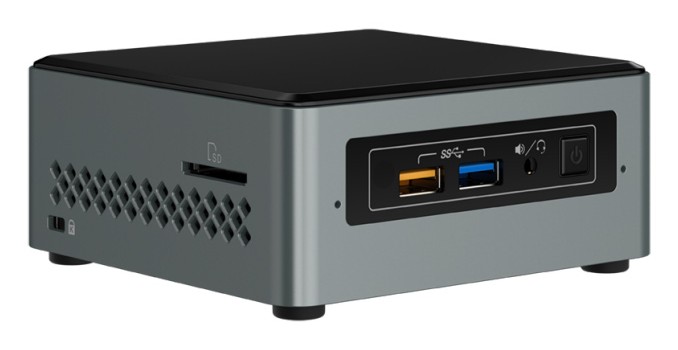
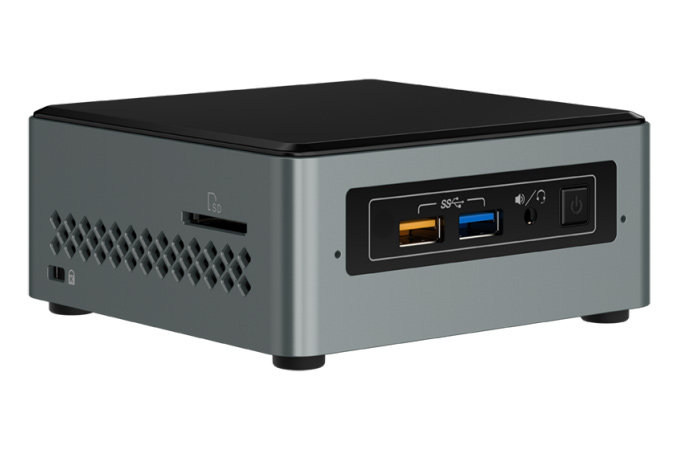
Intel has quietly published detailed specifications of miniature NUC systems based on the Apollo Lake platform on its web site. As revealed earlier this year, Intel offers two systems that can be used for both everyday computing as well as for media playback in the living room. The publication of details indicates that Intel either has started to ship the systems to customers or intends to begin their shipments in a short while.

Intel’s family of NUCs based on the Apollo Lake platform, codenamed Arches Canyon, consists of two systems: the NUC6CAYS and the NUC6CAYH. Both systems use the Intel Celeron J3455 processor (four Goldmont cores clocked at 1.5/2.3 GHz, 2 MB cache, dual-channel DRAM controller, HD Graphics 500, 10W TDP) that feature Intel’s ninth-generation graphics architecture (Gen9) as well as improved media playback engine with hardware-accelerated playback of 4K video encoded using HEVC and VP9 codecs.

The Intel NUC6CAYS is a fully populated PC that works out of the box and comes with 2 GB of DDR3L-1866 memory, 32 GB eMMC storage (from SanDisk, SK Hynix or Kingston), a wireless keyboard as well as pre-installed Windows 10 Home x64 OS. By contrast, the Intel NUC6CAYH comes as barebones, requiring DRAM and storage to work. Other than that, both Arches Canyon systems are exactly the same: they support up to 8 GB of DDR3L memory, one 2.5”/9.5 mm SSD/HDD, a 1×1 wireless module supporting IEEE 802.11ac Wi-Fi and Bluetooth 4.2, a HDMI 2.0 display output, four USB 3.0 Type-A ports (one supports charging), an SDXC card reader, a TRRS mini-jack for audio and so on. One of the noteworthy features is that the entry-level NUCs have a D-Sub connector on the back to allow connectivity with cheap displays and other applications that use this header. Typically a legacy port is done at a request of one of their large customers, and/or the company intends to sell the new NUCs in developing countries.

Intel Arches Canyon NUC PCs
  NUC6CAYS NUC6CAYH
CPU Intel Celeron J3455
4C/4T Goldmont
1.5 – 2.3 GHz
2MB cache
10 W TDP
Graphics HD Graphics 500
12 EUs
250 – 750 MHz
PCH Integrated into CPU
Memory 2 GB DDR3L-1866 pre-installed
Two SO-DIMM slots,
up to 8 GB of DDR3L-1866

Two SO-DIMM slots,
up to 8 GB of DDR3L-1866
On-Board Storage Capacity 32 GB None
Type eMMC 5.1/5.0
Model SanDisk SDINADF4-32G-H (5.1)
Kingston EMMC32G-M525-A53 (5.1)
SK Hynix H26M64103EMR (5.0)
2.5″ bay One 2.5″/9.5 mm bay, SATA3
M.2 Slot None
Wi-Fi/BT Intel Wireless-AC 316x (802.11ac 1×1 + BT 4.2)
M.2-2230 card with WiDi support
Ethernet Intel Gigabit Ethernet controller
Display Outputs D-Sub (implemented using the ITE IT6516BFN DisplayPort to VGA bridge)
HDMI 2.0 (implemented using the MegaChips MCDP2800-BCT DisplayPort 1.2a to HDMI 2.0 LSPCON)
Audio 3.5 mm TRRS audio jack
TOSLINK
7.1 channel audio output via HDMI
IR Consumer Infrared (CIR) sensor on the front panel
USB 4 USB 3.0 Type-A (5 Gbps), one with charging
Other I/O SDXC card reader with UHS-I support
Dimensions 115 × 111 × 51 mm
PSU External, 65 W
OS Pre-installed Microsoft Windows 10 Home x64 with Intel Remote Keyboard Compatible with Windows 7/8.1/10
Detailed Specifications PDF

Given the rich multimedia capabilities of Intel’s latest Apollo Lake SoCs, HDMI 2.0 connectivity as well as compatibility with 2.5” storage devices, the Arches Canyon NUCs could serve quite well as 4K-capable HTPCs. Still, keep in mind that the systems only support HDCP 1.4/1.2 and PAVP 2.0 and thus will not playback Ultra HD Blu-rays even if equipped with an appropriate external drive.

At press time, the Intel NUC6CAYS and the Intel NUC6CAYH SFF PCs were not available for sale anywhere. Official MSRPs for the systems are unknown, but one of the online stores known for taking pre-orders on unreleased items lists the NUC6CAYS for $225 and the NUC6CAYH for $158. The prices are relatively high for these kind of PCs, so we expect the actual MSRPs to be lower.

Related Reading: