_575px.jpg)
Try this one on for size: a compact 60% keyboard with mechanical switches, with a fully customizable layout. Officially launched this past Wednesday and available as a group buy for the next two weeks, that’s exactly what you get with the Massdrop Infinity keyboard. There are only a couple potential drawbacks: there are no key labels by default, and this is truly a compact keyboard so there are only 63 keys in total, so you’re basically going to have to set up some additional layers to access things like cursor keys, document navigation, etc. Oh, and if you’re not a touch typist, this this will probably drive you insane – though on the other hand, if you’re trying to become a touch typist, this might be the keyboard to push you over the edge!
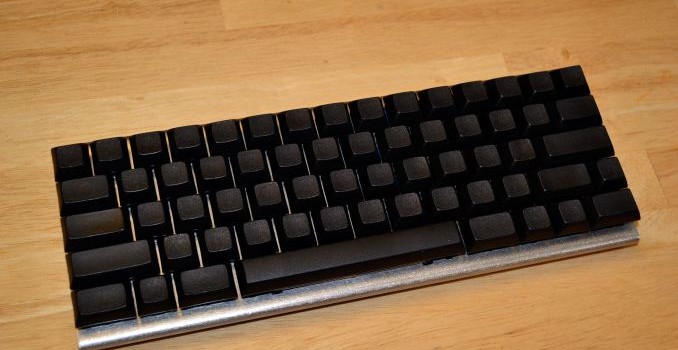
Massdrop shipped me a prototype for some initial impressions. At first blush, I wasn’t sure what to think – no labels, no backlighting, and even the chassis is a bit barebones. Still, even without customizing the keyboard layout there’s something sort of cool about having a blank slate to work with. The dimensions are basically what you get if you take the main portion of a standard keyboard…and then stop there and don’t add anything extra. Function keys, 10-key, document navigation keys, and dedicated macro keys are nowhere to be found. Instead, what you get is a space saving keyboard that looks a little different from your usual input device.
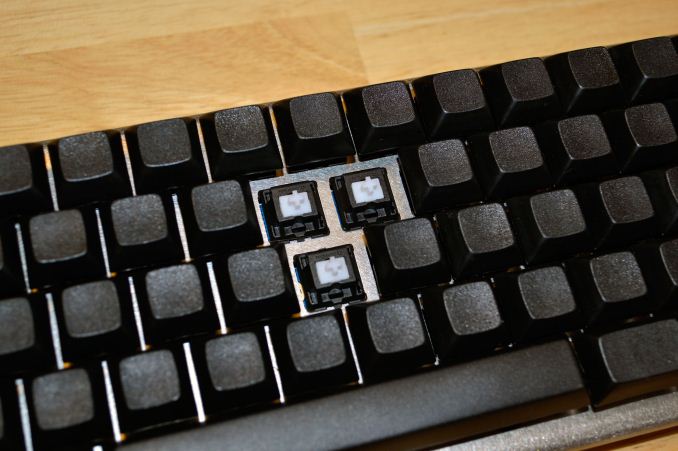
Part of the cool factor of the Infinity is that it allows you to customize many options. It supports both Cherry MX switches as well as the new “better than Cherry MX” Matias switches with Alps stems. I can’t say whether they’re actually better or not, but Matias are available in “clicky” and “quiet” options (basically Blue or Brown equivalents), while Cherry MX options consist of Blue, Brown, Red, Black, or Clear. You can also choose from various keycaps that are compatible with Cherry MX or Matias switches, but these are an extra $35 (Cherry MX) or $45 (Matias) – note that the Matias switches are $10 less than the Cherry MX switches, so basically the price is the same if you include keycaps. The keycaps are blank PBT plastic with a DSA Profile from Signature Plastics, if you’re curious. For some it might seem odd for a keyboard to not include keycaps by default, but if you’re enough of a keyboard enthusiast to be considering the Infinity, there’s a good chance you already have some keycaps available.
Before you commit to buy the Infinity, let’s be clear: there’s some assembly required. It would be cool if Massdrop offered a pre-assembled option (for people like me that just don’t care to do the soldering on their end). Then again, if it tacked on $50 I’m not sure many would be interested. Anyway, the assembly instructions let you know what’s required, and if you’re handy with a soldering iron you should be fine. Once the keyboard is assembled, you need to load a keyboard layout into the microcontroller. As a preview sample, my unit came pre-programmed with a slightly modified QWERTY layout, but the online configurator allows you to do just about anything you might imagine (up until the point where you run out of memory on the keyboard). The final software that allows reprogramming isn’t actually available yet, but it should be ready well before anyone who joins the drop actually receives their keyboard.
All of the customizability in the world won’t do much good if the keyboard doesn’t work well, and this is where things start to get highly subjective. I’ve used plenty of keyboards over the years; some have been good, others have been okay, and only a few have been truly terrible – and the bad ones were all laptop keyboards, if you’re wondering. After my forays into ergonomic mechanical keyboards last year, one thing that I came to realize is that it’s possible to adapt to a different keyboard layout over time, at least if you’re willing to put in the effort. The default layout on the Infinity is basically standard QWERTY, so in that regard there’s not a lot to learn for a touch typist.
The bigger issue I have is that I do use document navigation keys and the cursor keys all the time, so having them move from dedicated keys to combination keystrokes is not something I really want or need. I’d much rather have a slightly larger keyboard rather than deal with extra layers (key combinations) to access these keys. I also use function keys regularly, and Acer’s S7 Ultrabook as an example didn’t please me when it removed the row of function keys and turned them into Fn key combinations. Given these changes and my typical use patterns, I don’t think the current design of the Infinity is something I would really enjoy using long-term, even if it is somewhat novel at first.
Outside of the missing keys, the typing experience on the Infinity is pretty much what you’d expect from any Cherry MX mechanical keyboard. The sample I received came with Cherry MX Clear (which on their own look pretty White, but there’s a difference) switches, and as someone that has used MX Brown switches in the past I actually thought it was using Browns at first; the difference between the two options is very slight. Anyway, the action is smooth and precise, and I have no problem typing on it in general – this entire article in fact was written using the Infinity, and other than the first minute or so figuring out where a few keys are located I’ve had no real problems.
The keycaps are an interesting choice as well, as they’re far more textured than most keycaps that I’ve used. They have a feeling of robustness and durability, and if that’s what you like then they won’t disappoint. The default keycaps are blank, however, so even as a touch typist I find that I occasionally have my fingers in the wrong spot and it takes a second to adjust – I would like to have a little bump on the F and J keys to help me out, but then that’s always an option if you order your own keycaps.
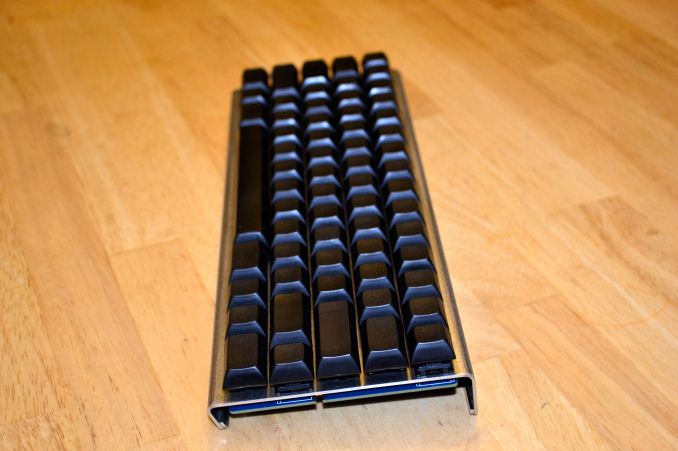
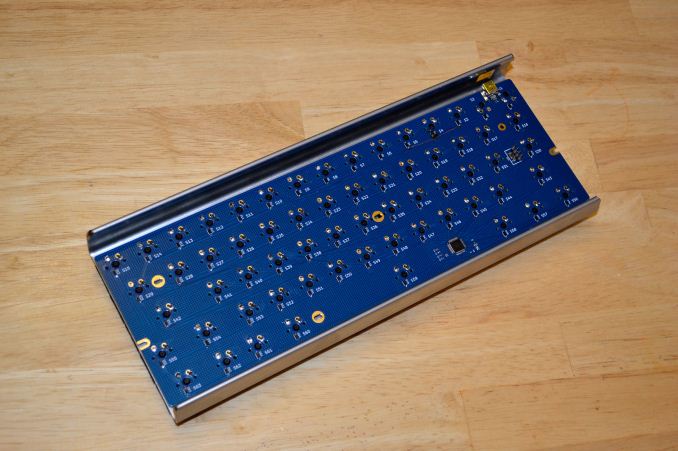
The design of the keyboard chassis is also a bit unusual. The PCB with the soldering pins from the mechanical switches is fully exposed on the bottom, while the main frame consists of a sturdy piece of bent metal (some form of steel it appears). It’s definitely unique, and it didn’t get in the way of my typing, but it’s not something everyone will immediately love. The metal frame also gives the Infinity a decent amount of heft, which I don’t mind but it might be a bit heavy if you’re looking for a keyboard to carry around in a briefcase (and again the exposed PCB on the bottom could be a concern).
There’s one final hurdle to overcome, and that’s the price. Massdrop works on a group buy principle, so they require a certain number of people to join a “drop” – if the minimum isn’t met, no one pays and the drop is canceled. In this case, the minimum number of people needed to have the Infinity ship has already been achieved (i.e. more than 25 people), and at present 74 people have committed to buy if 100+ people join the drop. At 100 or more committed buyers, the price will be $100; that’s a steep price for a keyboard and as noted above it doesn’t even include everything you need; you also need the keycaps ($35-$45 extra) if you don’t have some, and shipping in the continental US is another $11.39, so basically we’re looking at $145 for this customizable 60% keyboard.
That might seem like far too high a price, but we’re dealing with a relatively low volume part, and even looking around online it doesn’t look like there are many options that are significantly less expensive. The Ducky Mini generally costs $130 or so, though it does include backlighting (with dual color blue/red LEDs) and it comes fully assembled – it also comes with either Cherry MX Blue or Red switches. The KBC Poker 2 Mini comes with Cherry MX Blue, Black, Red, or Brown switches, but it costs $180 to $200 (or more). Then there’s the Happy Hacking Keyboard Professional, with electrostatic capacitive switches, which can cost $260 or more. In comparison to such options, other than the Ducky Mini the Massdrop Infinity looks rather affordable – and if you’re interested in the Ducky Mini, I would be remiss in not pointing out the Massdrop where you can get the Ducky Mini for $110 (currently five days remain).
Ultimately, I guess it comes down to how much you want a mini (aka “60%”) keyboard in the first place. I’d be much happier personally with something like the CODE Keyboard that adds dedicated function keys and document navigation keys for around the same price (there’s another drop for that), but more importantly I don’t have any particular need for a compact keyboard in the first place so there are numerous full size mechanical keyboards priced around $100 that suit me just fine. It’s sort of interesting to me that input from hundreds of “keyboard enthusiasts” went into the design of the Infinity, and yet at the end of the day it can still be a very polarizing device. I’m sure there are people who love the end result, and I’m equally sure there are going to be others that shrug and wonder, “Why bother?” If you’re in the market, though, the potential to pick up the Infinity and design your own layout is certainly worth considering.


_thumb.jpg)
_thumb.jpg)
_thumb.jpg)
_thumb.jpg)
_thumb.jpg)
_thumb.jpg)
