News


Understanding the 9.7" iPad Pro's Display: How DCI-P3 & True Tone Work

Understanding the 9.7″ iPad Pro’s Display: How DCI-P3 & True Tone Work
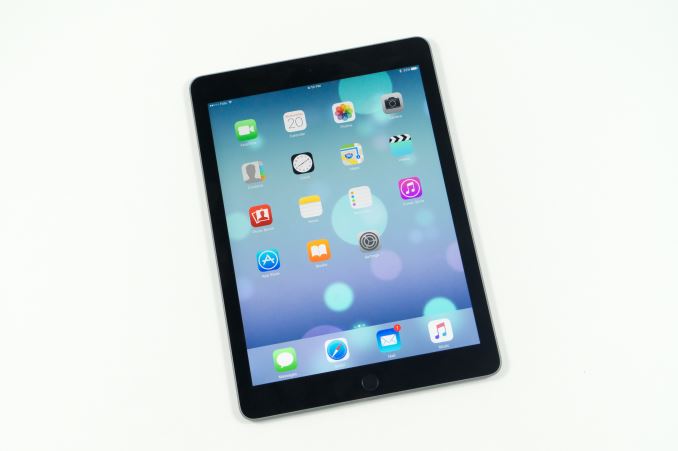
Earlier this month Apple launched a smaller version of the iPad Pro. At 9.7″ it essentially takes the place of the iPad Air 2 as Apple’s flagship standard sized tablet. While many observers expected it to simply be a smaller version of the larger iPad Pro, the launch event brought a number of surprises which made it clear that this new iPad was not simply a miniaturization of the larger model. While I plan to go over all of the specifics in our full review, I did want to address some confusion I’ve seen regarding one of the key new aspects of the 9.7″ iPad Pro, which is its display.

DCI-P3 Gamut Support

Like Apple’s newest version of their iMac with 5K Retina display, the new iPad Pro boasts support for the DCI-P3 color gamut. The DCI-P3 standard has been used for theatrical projection for quite some time now, and Apple’s marketing specifies that the displays have a 25% greater color saturation than the sRGB displays on previous iPads. Of course, with larger color gamuts comes a need for color management, and it’s worth noting that Apple only makes mention of color saturation in their marketing. The topic of adherence to the full DCI-P3 standard is something I’ll be covering more in the full review as well, but at this time there are some important details that are already known.
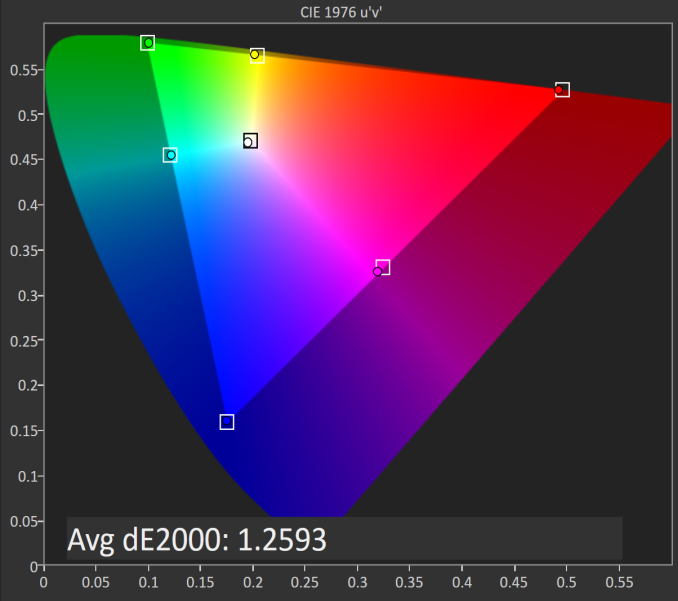

iPad Pro 9.7″ Display Saturation Accuracy (DCI-P3)

As you can see in the image above, the 9.7″ iPad Pro has no trouble covering the DCI-P3 color gamut. With an average DeltaE of 1.2593, the errors in 100% saturations are basically imperceptible, and in truth the greatest contribution to the error is actually the white point which is still slightly blue shifted in the display’s standard mode like most Apple devices are. 

With a larger color gamut, my biggest question was how Apple was handing color management. A simple explanation of color management is that it’s the process through which a device should transform the original colors of a piece of content into a display’s target color space. Effective color management is critical for dealing with content that doesn’t match a display’s color space, in this case of course ensuring sRGB content is rendered correctly on a DCI-P3 display.

In the mobile world we’ve seen a number of problems crop up due to lacking color management, such as the natural oversaturation that exists on essentially all shipping AMOLED displays when they’re not running in a manufacturer-provided sRGB mode. Given that iOS has had absolutely no form of color management, I was curious as to how Apple planned to target the issue. OS X is by far the best color managed OS in the desktop world, and with iOS and OS X sharing many common parts it seemed natural that Apple would bring the color management from OS X to iOS. Sure enough, that’s exactly what they did.
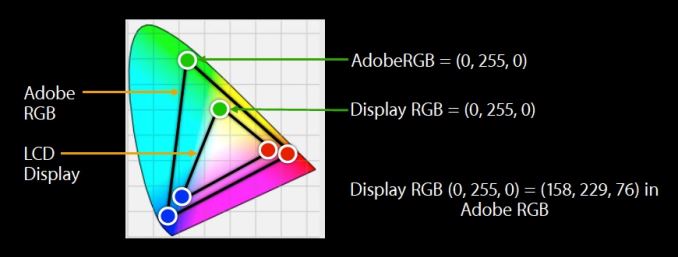
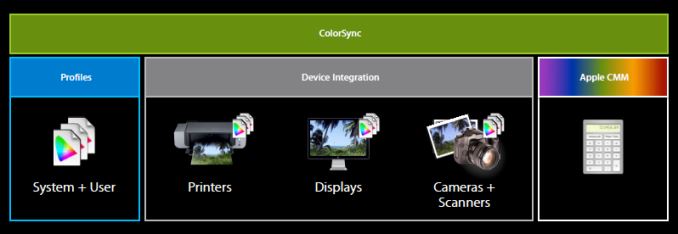
Since around the time of iOS 8 Apple has been improving color management support in their APIs for iOS. With 9.3 iOS essentially has full support for ColorSync in the same way that OS X does. ColorSync has been Apple’s system for color management for many years now, and it works very well in applications that are built on top of Apple’s frameworks like Quartz, Core Animation, and the entirety of AppKit. It just so happens that basically every iOS application is built on these frameworks, and so the task of building system-wide color management in to iOS was seemingly not a difficult one.

Color management appears to be working quite fine across the entire system and within all apps. The interesting thing is, the sign that color management works is the fact that for almost all content there is absolutely no difference between the new iPad Pro and the iPad Air 2. This is expected, as almost all content on the device will target the sRGB gamut, and so if color management is working it should be mapped into the larger DCI-P3 gamut without issue. 

Apple’s own applications interpret untagged content as sRGB, and also properly understand tagged images and videos and display them correctly. Safari also renders CSS colors correctly, which is something that can’t be said for any other browser that I’m aware of. The same is true of all third party apps that I’ve tried, including Dropbox, Google Drive, AVPlayerHD, Animuplyr, among many others. While I had worried that iOS’s lack of color management prior to 9.3 would lead to many problems with accurate images on the 9.7″ iPad Pro, Apple has handled the situation better than I ever expected.

The 9.7″ iPad Pro’s display does have one oddity, which is its gamma. It still targets a power 2.2 gamma rather than the power 2.6 gamma defined for the DCI-P3 color space. While this may seem odd, I believe on iOS it’s simply a carry over from OS X. Apple’s newest iMac with Retina display uses the same gamma target, and in that case I believe it is used to preserve proper greyscale rendering in applications that may not play nice with ColorSync. While this isn’t really a problem on iOS, it allows better consistency between all of Apple’s devices using the wider DCI-P3 gamut.

Using a different gamma function may seem like a problem for the rendition of future DCI-P3 content, but in practice it actually won’t be an issue. Apple separates the actual DCI-P3 standard from their target which they call Display P3. This means that if content on the device does actually target the DCI-P3 gamut with a power 2.6 gamma ColorSync can simply perform a transform to render it correctly on the display. While it’s a bit of a cliché, it does seem that Apple has made the task of color management simply “just work” in most respects for both developers and users.

True Tone

In addition to adopting a significantly wider color gamut, the 9.7″ iPad Pro’s display has been branded as a True Tone display by Apple. Apple originally used this branding for the flashes on their iPhone cameras from the iPhone 5s onward, as they used a combination of light from two LEDs to produce a more natural white light relative to the surroundings than a single LED flash would be able to. The iPad Pro’s True Tone display follows a similar principle by adjusting the white point of the display depending on the ambient surroundings. I’ve done a few tests to see the extent to which True Tone changes the appearance of the display, and I think the data will help clear up some misconceptions regarding this feature.

To take a look at the True Tone display from a more academic standpoint, I’ve decided to measure the 9.7″ iPad Pro in three situations. The first is with True Tone disabled entirely, and so this corresponds to the display’s native calibration. The second is with True Tone enabled, and the iPad Pro placed in a controlled area where the only surrounding light was provided by 3000K bulbs. This was to test True Tone in an environment where the ambient light is of a warmer temperature, much like you’d get when in sunlight or in a room lit by incandescent or sodium lamps. The last test was similar to the second one, but with the light being provided by 5000K LED bulbs to see how far True Tone shifts the white point when the lighting is close to the levels that the standard calibration already targets.

True Tone Disabled
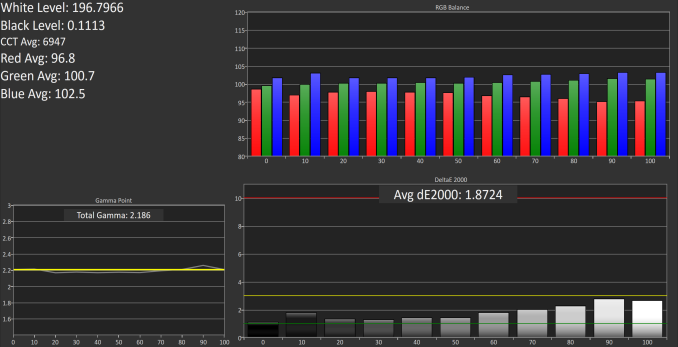
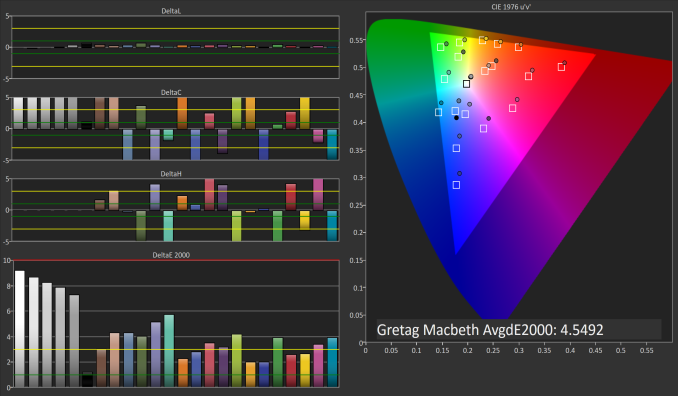
Because the overall accuracy isn’t really the focus here I’ve just done an eleven point greyscale measurement, and so I wouldn’t read too much into how straight the gamma is based on this test. It’s also worth noting that I’ve done these with the sRGB gamut as a target, which is for a reason that will become clear soon. What we can see is that the iPad Pro is quite accurate in its default mode, although the white is still more blue shifted than the 6504K target we desire. Rendition of color mixtures is excellent, and it’s clear that color management is working because they’re rendering correctly within the sRGB gamut.

True Tone With 3000K Lamps

As I expected, color accuracy drops significantly when using True Tone in warm ambient lighting. I’ve seen a number of claims that True Tone is able to somehow maintain color accuracy while shifting the greyscale and white point, and that isn’t really possible because you also shift chroma and hue. It’s important to note that the entire point of True Tone is to make the display appear matched to your ambient lighting, and in this regard it does its job perfectly well. However, color accuracy suffers as a result, and this is a fairly obvious result so I’m not too sure where some of the confusion has been coming from. 

As for how far True Tone alters the display, you can see that the blue contribution to luminance drops significantly, and the colors on the display are all shifted toward red which causes visible inaccuracy with blues, and obviously large inaccuracy with shades of grey. The white point average drops to 5388K, and while it’s difficult to photograph, the display definitely appears to match my perception of what white looks like in that lighting much better than the iPad Air 2 which just hovers around 7000K in every situation.

True Tone With 5000K Lamps

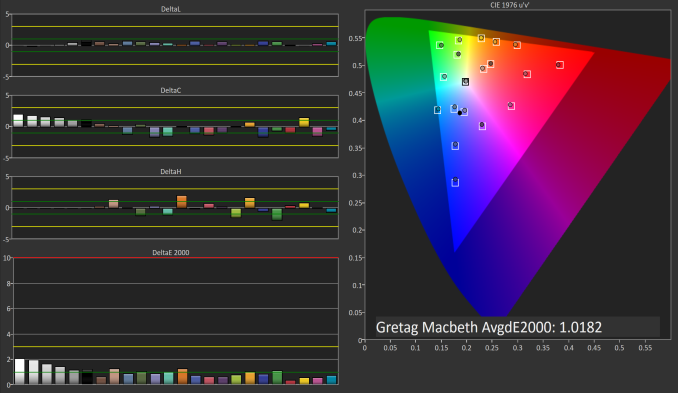
With 5000K lamps providing light, the color shift provided by True Tone is actually quite minimal. The white point average drops to 6404K, which is actually closer to the target than with True Tone disabled. Greyscale and color accuracy actually increases too which is great, and I wouldn’t mind having this as the standard mode, although it would take a toll on battery life due to the LED backlights being more efficient with a blue shifted white than a red shifted one.

Ultimately, True Tone is a success at what it attempts to do, but one shouldn’t believe that they’re going to be seeing greater color accuracy with it turned on than they do when it’s off. Anyone using the iPad Pro for color critical work will disable True Tone while the average user will find keeping it on provides a display that is pleasing to the eyes in any ambient lighting.

One final point I want to address is how True Tone relates to the inclusion of the DCI-P3 gamut. I’ve seen some speculation that the wider range of colors in the P3 gamut is what enables True Tone, but this isn’t the case. As you can see in the 3000K test above, even with True Tone enabled and the ambient lighting being as warm as household lighting goes, every color still lies within the sRGB gamut. There is an exception with one shade of orange, but it’s barely outside and the fact that the rendering is actually incorrect means that if it were to be pulled back in it would actually look more correct than it did in that situation. In any case, the fact that the colors still lie within the sRGB gamut means that the inclusion of DCI-P3 support at the same time is purely coincidental. If you happened to bring your iPad Pro into a darkroom where the only light was provided by a red lamp you may see colors shift outside the sRGB gamut, but I don’t think that’s a very common scenario.

In summary, I would say that the 9.7″ iPad Pro’s display is a significant improvement over the iPad Air 2 and the larger iPad Pro purely due to the wide gamut support. DCI-P3 will be the gamut to have when UltraHD content rolls around, and Apple choosing it instead of Adobe RGB was a well planned move. While it’s not very relevant now, it certainly will be in the future, and Apple has already ensured that iOS and its app ecosystem manages color correctly to render sRGB content and DCI-P3 content correctly. 

As for True Tone, it definitely succeeds at doing what it claims to do. The display seems more natural when your eyes have adjusted to ambient lighting, but color accuracy inevitably suffers because of it. The fact that the wider gamut and True Tone showed up at the same time is basically just coincidence, and the two features are really orthogonal. True Tone works on a similar principle to Apple’s Night Shift feature, but in a dynamic sense based on ambient light rather than on the time of day, and there’s no need for a wider color gamut for it to work correctly because the largest change being made is just an alteration to the display’s gamma curves.

While True Tone and DCI-P3 gamut support are interesting, it’ll take a full review for me to examine the color accuracy when rendering sRGB and DCI-P3 content in greater depth. I’d also like to take a look at how True Tone alters the display based on ambient brightness while maintaining the same ambient color temperature, which is a bit difficult with my current setup. I also plan to introduce some additional testing from our monitor suite, and Apple’s claims of an improved anti-reflective coating will be something to investigate as well. There’s more to come about the 9.7″ iPad Pro, so keep an eye out for the review in the near future.

Understanding the 9.7" iPad Pro's Display: How DCI-P3 & True Tone Work

Understanding the 9.7″ iPad Pro’s Display: How DCI-P3 & True Tone Work

Earlier this month Apple launched a smaller version of the iPad Pro. At 9.7″ it essentially takes the place of the iPad Air 2 as Apple’s flagship standard sized tablet. While many observers expected it to simply be a smaller version of the larger iPad Pro, the launch event brought a number of surprises which made it clear that this new iPad was not simply a miniaturization of the larger model. While I plan to go over all of the specifics in our full review, I did want to address some confusion I’ve seen regarding one of the key new aspects of the 9.7″ iPad Pro, which is its display.

DCI-P3 Gamut Support

Like Apple’s newest version of their iMac with 5K Retina display, the new iPad Pro boasts support for the DCI-P3 color gamut. The DCI-P3 standard has been used for theatrical projection for quite some time now, and Apple’s marketing specifies that the displays have a 25% greater color saturation than the sRGB displays on previous iPads. Of course, with larger color gamuts comes a need for color management, and it’s worth noting that Apple only makes mention of color saturation in their marketing. The topic of adherence to the full DCI-P3 standard is something I’ll be covering more in the full review as well, but at this time there are some important details that are already known.


iPad Pro 9.7″ Display Saturation Accuracy (DCI-P3)

As you can see in the image above, the 9.7″ iPad Pro has no trouble covering the DCI-P3 color gamut. With an average DeltaE of 1.2593, the errors in 100% saturations are basically imperceptible, and in truth the greatest contribution to the error is actually the white point which is still slightly blue shifted in the display’s standard mode like most Apple devices are. 

With a larger color gamut, my biggest question was how Apple was handing color management. A simple explanation of color management is that it’s the process through which a device should transform the original colors of a piece of content into a display’s target color space. Effective color management is critical for dealing with content that doesn’t match a display’s color space, in this case of course ensuring sRGB content is rendered correctly on a DCI-P3 display.

In the mobile world we’ve seen a number of problems crop up due to lacking color management, such as the natural oversaturation that exists on essentially all shipping AMOLED displays when they’re not running in a manufacturer-provided sRGB mode. Given that iOS has had absolutely no form of color management, I was curious as to how Apple planned to target the issue. OS X is by far the best color managed OS in the desktop world, and with iOS and OS X sharing many common parts it seemed natural that Apple would bring the color management from OS X to iOS. Sure enough, that’s exactly what they did.

Since around the time of iOS 8 Apple has been improving color management support in their APIs for iOS. With 9.3 iOS essentially has full support for ColorSync in the same way that OS X does. ColorSync has been Apple’s system for color management for many years now, and it works very well in applications that are built on top of Apple’s frameworks like Quartz, Core Animation, and the entirety of AppKit. It just so happens that basically every iOS application is built on these frameworks, and so the task of building system-wide color management in to iOS was seemingly not a difficult one.

Color management appears to be working quite fine across the entire system and within all apps. The interesting thing is, the sign that color management works is the fact that for almost all content there is absolutely no difference between the new iPad Pro and the iPad Air 2. This is expected, as almost all content on the device will target the sRGB gamut, and so if color management is working it should be mapped into the larger DCI-P3 gamut without issue. 

Apple’s own applications interpret untagged content as sRGB, and also properly understand tagged images and videos and display them correctly. Safari also renders CSS colors correctly, which is something that can’t be said for any other browser that I’m aware of. The same is true of all third party apps that I’ve tried, including Dropbox, Google Drive, AVPlayerHD, Animuplyr, among many others. While I had worried that iOS’s lack of color management prior to 9.3 would lead to many problems with accurate images on the 9.7″ iPad Pro, Apple has handled the situation better than I ever expected.

The 9.7″ iPad Pro’s display does have one oddity, which is its gamma. It still targets a power 2.2 gamma rather than the power 2.6 gamma defined for the DCI-P3 color space. While this may seem odd, I believe on iOS it’s simply a carry over from OS X. Apple’s newest iMac with Retina display uses the same gamma target, and in that case I believe it is used to preserve proper greyscale rendering in applications that may not play nice with ColorSync. While this isn’t really a problem on iOS, it allows better consistency between all of Apple’s devices using the wider DCI-P3 gamut.

Using a different gamma function may seem like a problem for the rendition of future DCI-P3 content, but in practice it actually won’t be an issue. Apple separates the actual DCI-P3 standard from their target which they call Display P3. This means that if content on the device does actually target the DCI-P3 gamut with a power 2.6 gamma ColorSync can simply perform a transform to render it correctly on the display. While it’s a bit of a cliché, it does seem that Apple has made the task of color management simply “just work” in most respects for both developers and users.

True Tone

In addition to adopting a significantly wider color gamut, the 9.7″ iPad Pro’s display has been branded as a True Tone display by Apple. Apple originally used this branding for the flashes on their iPhone cameras from the iPhone 5s onward, as they used a combination of light from two LEDs to produce a more natural white light relative to the surroundings than a single LED flash would be able to. The iPad Pro’s True Tone display follows a similar principle by adjusting the white point of the display depending on the ambient surroundings. I’ve done a few tests to see the extent to which True Tone changes the appearance of the display, and I think the data will help clear up some misconceptions regarding this feature.

To take a look at the True Tone display from a more academic standpoint, I’ve decided to measure the 9.7″ iPad Pro in three situations. The first is with True Tone disabled entirely, and so this corresponds to the display’s native calibration. The second is with True Tone enabled, and the iPad Pro placed in a controlled area where the only surrounding light was provided by 3000K bulbs. This was to test True Tone in an environment where the ambient light is of a warmer temperature, much like you’d get when in sunlight or in a room lit by incandescent or sodium lamps. The last test was similar to the second one, but with the light being provided by 5000K LED bulbs to see how far True Tone shifts the white point when the lighting is close to the levels that the standard calibration already targets.

True Tone Disabled
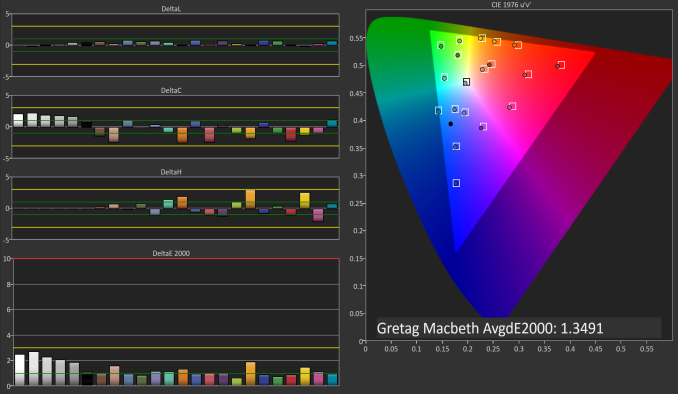
Because the overall accuracy isn’t really the focus here I’ve just done an eleven point greyscale measurement, and so I wouldn’t read too much into how straight the gamma is based on this test. It’s also worth noting that I’ve done these with the sRGB gamut as a target, which is for a reason that will become clear soon. What we can see is that the iPad Pro is quite accurate in its default mode, although the white is still more blue shifted than the 6504K target we desire. Rendition of color mixtures is excellent, and it’s clear that color management is working because they’re rendering correctly within the sRGB gamut.

True Tone With 3000K Lamps
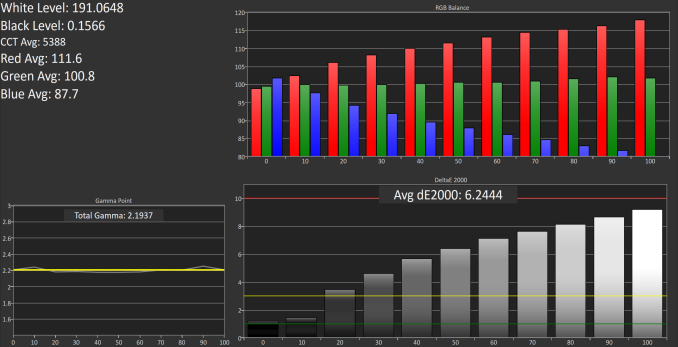
As I expected, color accuracy drops significantly when using True Tone in warm ambient lighting. I’ve seen a number of claims that True Tone is able to somehow maintain color accuracy while shifting the greyscale and white point, and that isn’t really possible because you also shift chroma and hue. It’s important to note that the entire point of True Tone is to make the display appear matched to your ambient lighting, and in this regard it does its job perfectly well. However, color accuracy suffers as a result, and this is a fairly obvious result so I’m not too sure where some of the confusion has been coming from. 

As for how far True Tone alters the display, you can see that the blue contribution to luminance drops significantly, and the colors on the display are all shifted toward red which causes visible inaccuracy with blues, and obviously large inaccuracy with shades of grey. The white point average drops to 5388K, and while it’s difficult to photograph, the display definitely appears to match my perception of what white looks like in that lighting much better than the iPad Air 2 which just hovers around 7000K in every situation.

True Tone With 5000K Lamps
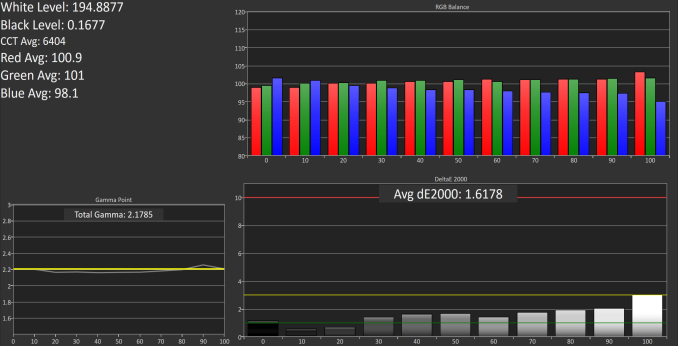
With 5000K lamps providing light, the color shift provided by True Tone is actually quite minimal. The white point average drops to 6404K, which is actually closer to the target than with True Tone disabled. Greyscale and color accuracy actually increases too which is great, and I wouldn’t mind having this as the standard mode, although it would take a toll on battery life due to the LED backlights being more efficient with a blue shifted white than a red shifted one.

Ultimately, True Tone is a success at what it attempts to do, but one shouldn’t believe that they’re going to be seeing greater color accuracy with it turned on than they do when it’s off. Anyone using the iPad Pro for color critical work will disable True Tone while the average user will find keeping it on provides a display that is pleasing to the eyes in any ambient lighting.

One final point I want to address is how True Tone relates to the inclusion of the DCI-P3 gamut. I’ve seen some speculation that the wider range of colors in the P3 gamut is what enables True Tone, but this isn’t the case. As you can see in the 3000K test above, even with True Tone enabled and the ambient lighting being as warm as household lighting goes, every color still lies within the sRGB gamut. There is an exception with one shade of orange, but it’s barely outside and the fact that the rendering is actually incorrect means that if it were to be pulled back in it would actually look more correct than it did in that situation. In any case, the fact that the colors still lie within the sRGB gamut means that the inclusion of DCI-P3 support at the same time is purely coincidental. If you happened to bring your iPad Pro into a darkroom where the only light was provided by a red lamp you may see colors shift outside the sRGB gamut, but I don’t think that’s a very common scenario.
In summary, I would say that the 9.7″ iPad Pro’s display is a significant improvement over the iPad Air 2 and the larger iPad Pro purely due to the wide gamut support. DCI-P3 will be the gamut to have when UltraHD content rolls around, and Apple choosing it instead of Adobe RGB was a well planned move. While it’s not very relevant now, it certainly will be in the future, and Apple has already ensured that iOS and its app ecosystem manages color correctly to render sRGB content and DCI-P3 content correctly. 

As for True Tone, it definitely succeeds at doing what it claims to do. The display seems more natural when your eyes have adjusted to ambient lighting, but color accuracy inevitably suffers because of it. The fact that the wider gamut and True Tone showed up at the same time is basically just coincidence, and the two features are really orthogonal. True Tone works on a similar principle to Apple’s Night Shift feature, but in a dynamic sense based on ambient light rather than on the time of day, and there’s no need for a wider color gamut for it to work correctly because the largest change being made is just an alteration to the display’s gamma curves.

While True Tone and DCI-P3 gamut support are interesting, it’ll take a full review for me to examine the color accuracy when rendering sRGB and DCI-P3 content in greater depth. I’d also like to take a look at how True Tone alters the display based on ambient brightness while maintaining the same ambient color temperature, which is a bit difficult with my current setup. I also plan to introduce some additional testing from our monitor suite, and Apple’s claims of an improved anti-reflective coating will be something to investigate as well. There’s more to come about the 9.7″ iPad Pro, so keep an eye out for the review in the near future.
LeEco Announces New Le 2, Le 2 Pro, and LeMax 2

LeEco Announces New Le 2, Le 2 Pro, and LeMax 2

Today in Beijing we had the opportunity to attend LeEco’s presentation event announcing their new flagship smartphone devices. LeEco has been a company we haven’t had the chance to cover to date, yet the company is making a lot of noise and positioning itself against its competition in the smartphone space and beyond. Today’s event was a 3 hour pandemonium where among other things we saw the launch of a new smart-TV as well as Le’s first public demonstration of their electric car.

But getting to the topic at hand, LeEco has been making a concerted push into the smartphone space. And today they are updating their smartphone lineup with a trio of devices all appropriately suffixed as 2. These are the Le 2, the Le 2 Pro, and the LeMax 2.

LeEco Le 2, Le 2 Pro & LeMax 2
  Le 2 Le 2 Pro Le Max 2
SoC Helio X20
2x A72 @ 2.3GHz
4x A53 @ 2.0GHz
4x A53 @ 1.4GHz

Mali T880MP4 @ 780MHz

Helio X25
2x A72 @ 2.5GHz
4x A53 @ 2.0GHz
4x A53 @ 1.4GHz

Mali T880MP4 @ 850MHz

Snapdragon 820
2x Kryo @ 1.59GHz
2x Kryo @ 2.15GHz

Adreno 530 @
625MHz

RAM 3GB LPDDR3-1866 4GB LPDDR3-1866 4/6GB LPDDR4-3733
NAND 32GB eMMC 5.1 NAND 32/64GB UFS 2.0
Display 5.5″ 1080p LCD 5.7” 1440p LCD
Modem 2G/3G/4G LTE Cat 6
(Integrated MediaTek SoC Modem)
2G/3G/4G LTE Cat 12
(Integrated Snapdragon X12 Modem)
Dimensions 151.1 (h) x 74.2 (w) x 7.5 (d) mm
153g
156.8 (h) x 77.6 (w) x 7.99 (d) mm
185g
Camera Rear Camera
16MP 
w/ PDAF
Rear Camera
21MP IMX230 
w/ PDAF
Rear Camera
21MP IMX230 
w/ PDAF & OIS
Front Facing Camera
8MP 1.4µm pixels
Battery 3000mAh 3100mAh
Launch OS Android 6.0 w/ EUI 5.8
Connectivity 802.11a/b/g/n/ac 2.4 & 5GHz
BT 4.2, GPS/GNSS
USB-C
no 3.5mm headphone jack
SIM Size NanoSIM + NanoSIM
Launch MSRP RMB ¥1099
(USD~170, ~150€)
RMB ¥1499
(USD~230, ~205€)
4GB + 32GB
RMB ¥2099

(USD~325, ~285€)

6GB + 64GB
RMB ¥2499

(USD~385, ~340€)

Starting at the flagship level, we have the LeMax 2. Based around Qualcomm’s popular Snapdragon 820, the 5.7” phablet’s spec sheet reads very similar to some of the other flagship phones we’ve seen launched this year. LeEco is pairing the 820 with 32 or 64GB of UFS 2.0 NAND, and as a first for any Android smartphone, up to 6GB of LPDDR4 RAM. To have the first 6GB phone show up here is admittedly unexpected, but given the prevalence of 3GB/4GB configurations elsewhere, it was only a matter of time until someone used higher capacity chips to get to 6GB.

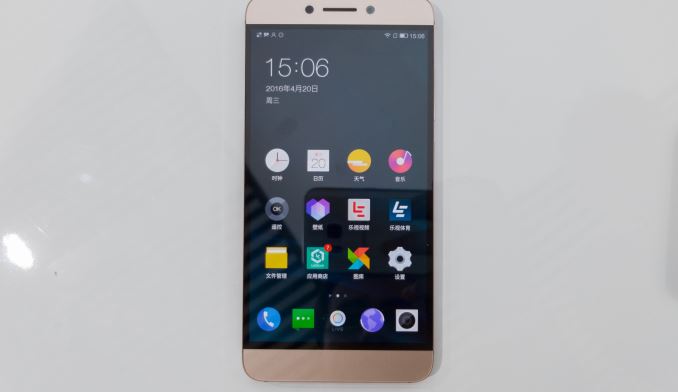
Shifting gears, the display for the phone is a 1440p LCD, which will put it in competition with the likes of the Samsung Galaxy Note5 and S7 series, and the LG G5. The display subjectively looked good with high brightness and good viewing angles. Otherwise for image capture purposes, LeEco has outfitted the phone with a 21MP OIS-capable rear camera, utilizing Sony’s IMX230 sensor. As has been the case for a number of phones this generation, there is a sizable camera hump here to house the camera while keeping the rest of the phone relatively thin. Meanwhile front facing camera duties are handled by a 8MP camera with 1.4µm pixel pitch on the sensor.

Rounding out the package, LeEco is equipping the phone with a 3100mAh battery, and while we’re still working to get the precise battery voltage, at typical voltages we’d be looking at around a total capacity of 11.9WHr. Of course you’ll also find a full suite of wireless connectivity options enabled through the Snapdragon 820, including Qualcomm’s integrated X12 LTE modem, and dual-band 802.11a/b/g/n/ac support.

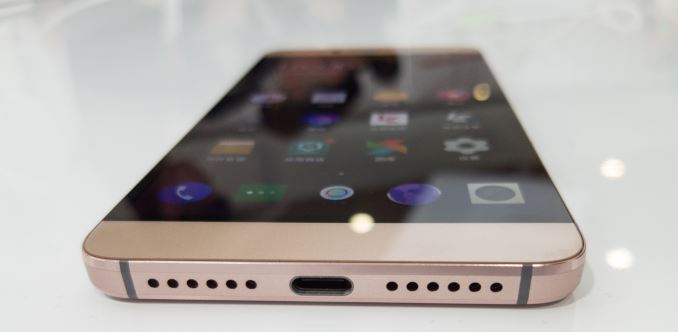
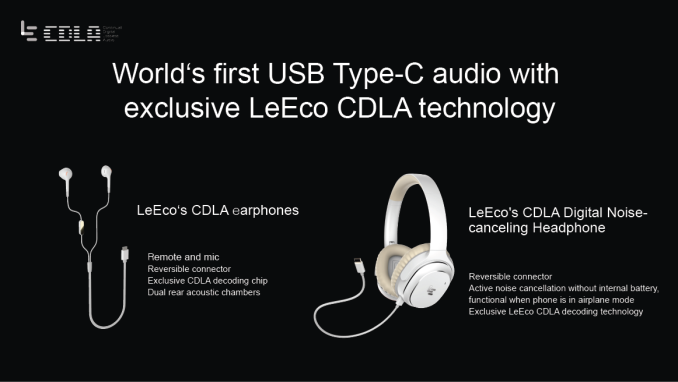
But perhaps the most notable aspect of this phone will be the I/O connectivity.  That LeEco is using the increasingly common USB Type-C port is, if anything, to be expected. However what’s unexpected is that this is the only port; a 3.5mm audio jack is not present. Instead the company is piping out audio over the USB port and including a USB Type-C to 3.5mm audio adapter to maintain compatibility with standard headsets. Underlying the USB audio connection in turn is a brand-new technology LeEco is calling CDLA (Continual Digital Lossless Audio).

At this point it’s not entirely clear why LeEco went this route; the phone seems to be thick enough to accommodate the 3.5mm jack, so whether this was done for the purposes of giving the space to another feature (e.g. larger speakers) remains to be seen. What the company does claim though is that the audio quality through the CDLA headphones is vastly superior to the 3.5mm analog counterpart, and admittedly at first glance this claim is hard to buy into. I wasn’t able to verify this and also unfortunately the devices come with no bundled stock headphones, making this a quite niche accessory.

LeEco will be offering two configurations of the LeMax 2. The 32GB NAND + 4GB RAM configuration will sell for ¥2099, or roughly $325. Otherwise the more spacious 64GB NAND + 6GB RAM configuration will sell for ¥2499 (~$385).


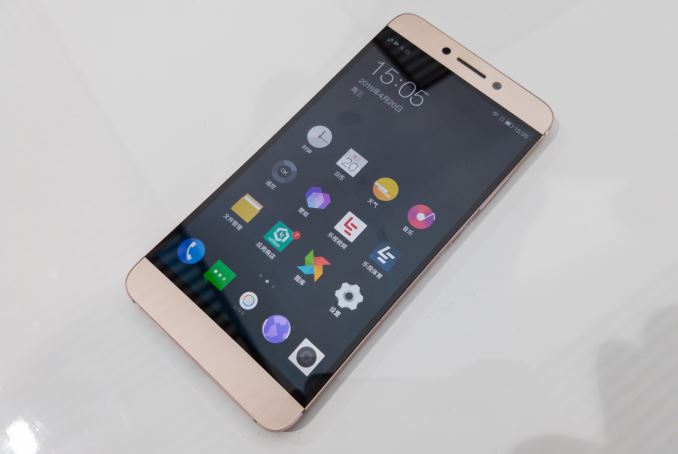
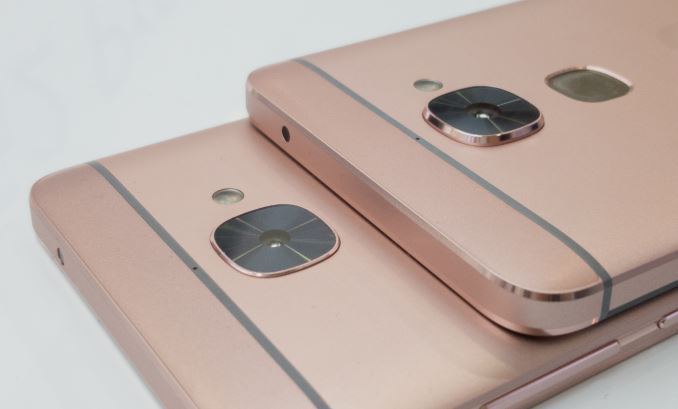
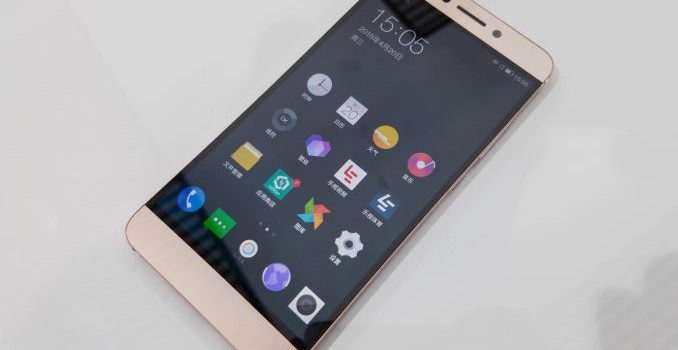
Le 2 (left) vs Le 2 Pro (right)

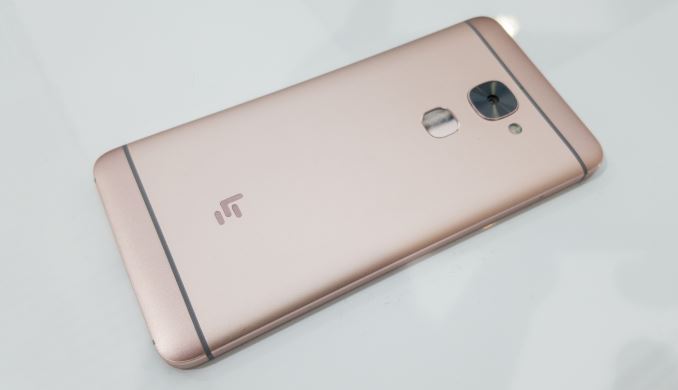
Below the LeMax 2 are the duo of Le 2 series phone, the Le 2 Pro and the simply named Le 2. Both of these phones share the same basic chassis and screen, incorporating a 1080p LCD in a 5.5” phablet form factor. The design is also the same as the LeMax 2 so except for the smaller camera bump on the basic Le 2 you wouldn’t be able to tell the difference between the Le 2 Pro and the LeMax 2. The difference, as you might expect from the name, comes from the feature set and price.

Starting with the Le 2 Pro, this phone is based around MediaTek’s Helio X25 SoC, which offers 3 clusters of ARM Cortex CPUs – 2 A53 quad core clusters at different performance/power levels, and a dual core A72 cluster. The X25 in turn is paired with 4GB of LPDDR3 and 32GB of eMMC 5.1 NAND. Also setting it apart from its more basic counterpart is the rear camera module, which like the LeMax 2 is a 21MP camera utilizing Sony’s IMX230 sensor. However OIS doesn’t seem to be available in this somewhat smaller phone.

As for the basic Le 2, this sees LeEco dropping down to the lower performance Helio X20 SoC, which cuts down on both the A72 cluster and GPU clockspeeds. The Le 2 gets a smaller 3GB of LPDDR3 RAM and the same 32GB of eMMC 5.1 NAND, however the camera module is a simpler 16MP camera utilizing a hereto-unknown sensor.

Otherwise both phones share identical specifications as far as all other features are concerned. The Helio SoC offers its own integrated Category 6 LTE modem, and both phones incorporate a 8MP front facing camera. And since both phones share the same chassis, both phones also come equipped with a 3000mAh battery. Finally, for I/O and connectivity both phones share the larger LeMax 2’s configuration: dual-band WiFi + Bluetooth 4.2 for wireless data, and the sole USB Type-C port for data and audio.

The Le 2 will be hitting the market at ¥1099 (~$170), while the more powerful Le 2 Pro adds another ¥400 to the price tag, bringing it to ¥1499 (~$230). Today’s launch is a China-only launch, however LeEco is pointing out that in the future we’ll be seeing focus on the US as its next target market outside of their established market in China and India with the possible introduction of derivative models with modifications to the specifications such as different SoC choices.