Vik


GIGABYTE BRIX Gaming UHD GB-BNi7HG4-950 mini-PC Review

The PC market has been subject to challenges over the last several years. However, gaming systems and small form-factor (SFF) PCs have weathered the storm particularly well. Many vendors have tried to combine the two, but space constraints and power c…

GIGABYTE BRIX Gaming UHD GB-BNi7HG4-950 mini-PC Review

The PC market has been subject to challenges over the last several years. However, gaming systems and small form-factor (SFF) PCs have weathered the storm particularly well. Many vendors have tried to combine the two, but space constraints and power c…

Apple Announces 4th Generation MacBook Pro Family: Thinner, Lighter, with Thunderbolt 3 & “Touch Bar”

Apple Announces 4th Generation MacBook Pro Family: Thinner, Lighter, with Thunderbolt 3 & “Touch Bar”

Much ink has been spilt over the last year on the subject of the MacBook Pro. In short, Apple hasn’t given its professional laptop lineup a real overhaul in some time. Only the smaller 13” model ever got Intel’s 5th gen Broadwell CPU – the 15” model is even further back, on 4th gen Haswell – and otherwise the laptops haven’t had major feature updates since 2013. As a result, Apple has been due as anyone can be to update their laptops. And at a special event held at their campus this morning, they have done just that, launching the 4th generation of the MacBook Pro.

For better or worse the new 4th generation family doesn’t have a catchy name like Retina to help set it apart from the prior models. But make no mistake, Apple has been busy on giving their languishing laptops a much-needed facelift.

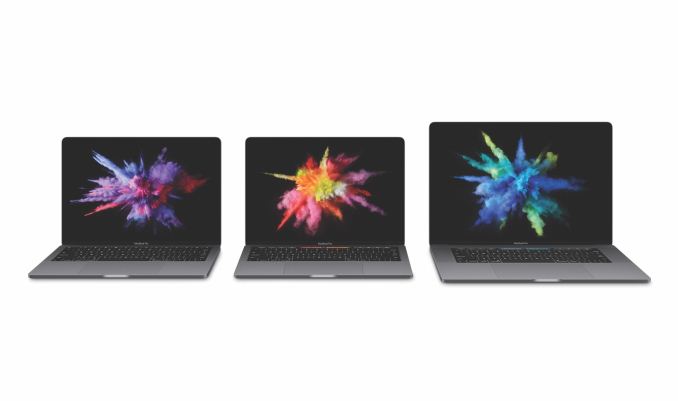
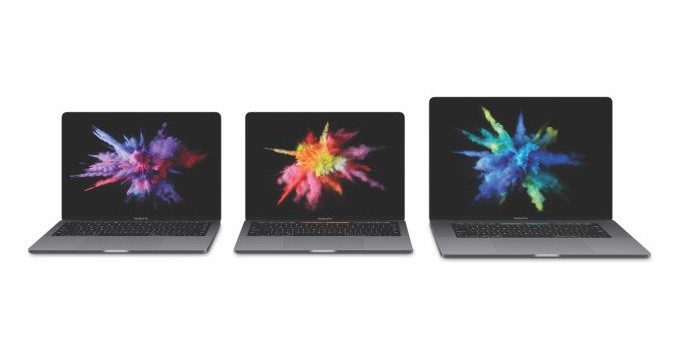
All-told, Apple has introduced 3 new MacBook Pro models: a basic 13” version, and then two full-featured versions at 13” and 15” respectively. All three models are form the same mold, so to speak. All of them get the same new unibody design, the same wide color gamut (P3) display, and the same upgraded internal hardware composed of Intel’s 6th generation Skylake CPUs, Thunderbolt 3, and new SSDs. What separates the basic 13” from the other two models, besides cost, is that it doesn’t include Apple’s new multi-touch Touch Bar (more on this in a sec).

4th Gen MacBook Pro Lineup
Model 2015 15″ 2016 13″ (basic) 2016 13″ (touch) 2016 15″
Dimensions 1.8 cm x 35.89 cm x 24.71 cm 1.49 cm x 30.41 cm x 21.24 cm 1.55 cm x 34.93 cm x 24.07 cm
Weight 4.49 lbs (2.04 kg) 3.02 lbs (1.37 kg) 4.02 lbs (1.83 kg)
CPU 2.2GHz Core i7-4770HQ
(Haswell)
2.0GHz Core i5-6360U (Skylake) 2.9GHz Core i5-6267U (Skylake) 2.6GHz Core i7-6700HQ (Skylake)
GPU Intel Iris Pro 5200 Intel Iris Graphics 540 Intel Iris Graphics 550 Intel HD Graphics 530 + AMD Radeon Pro 450 (2GB)
Display 15″ 2880 x 1800 IPS LCD
sRGB Gamut
13″ 2560 x 1600 IPS LCD
P3 Gamut
15″ 2880 x 1800 IPS LCD
P3 Gamut
Memory 16GB DDR3L-1600 8GB LPDDR3-1866 8GB LPDDR3-2133 16GB LPDDR3-2133
SSD 256GB PCIe SSD (PCIe x2) 256GB PCIe SSD
Touch Bar No No Yes
I/O 2x Thunderbolt 2 (supports DP1.2), 1x HDMI 1.4, 2x USB 3.0 (Type-A), 3.5mm Audio, SDXC Slot 2x Thunderbolt 3 (supports DP1.2 & USB 3.1 Gen 2 modes),
3.5mm Audio
4x Thunderbolt 3 (supports DP1.2 & USB 3.1 Gen 2 modes),
3.5mm Audio
Battery Capacity 99.5 Wh 54.5 Wh 49.2 Wh 76 Wh
Battery Life 9 Hours 10 Hours
Price $1999 $1499 $1799 $2399

If you’ve been watching Apple over the years, then you know that the company has a (sometimes unhealthy) obsession with reducing their products’ thickness, and the 4th gen MacBook Pro follows that obsession to a T. The new family of laptops is thinner than ever, with Apple taking them from 18mm to 14.9mm and 15.5mm for the 13” and 15” models respectively. Altogether, the total volume is down 23% for the 13” model and 20% for the 15” model.
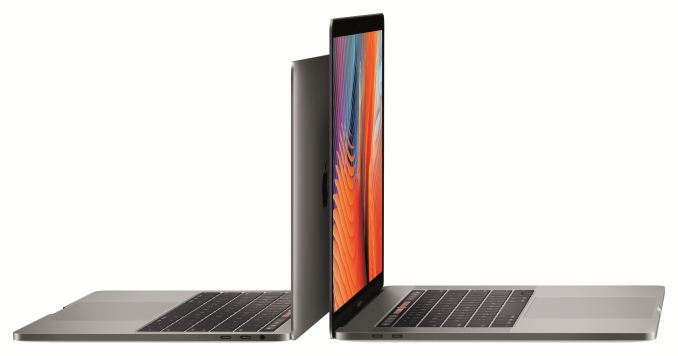
Apple is still using their now tried-and-true aluminum unibody design for the family, so if you’re familiar with the current color-coated MacBook, then you know what to expect here. Though the event was very brief on how Apple was able to shave off so much volume compared to the last generation, it sounds like they’ve gone with a thinner cooling system, and in the case of the 15” model, AMD’s low-profile Polaris 11 GPU.

Under the hood, this change in volume comes without a significant change in official TDPs (so all factors held equal, Apple would be removing the same amount of heat in a thinner design). Apple has finally made the jump across the entire family to Intel’s 14nm Skylake processors. The basic 13” model uses a 15W CPU, the higher-end 13” model uses a 28W CPU, and the 15” model uses a 45W CPU, the latter two being the same TDPs as the last generation. Apple isn’t talking up CPU performance too much here, but given how long they’ve been on Haswell on the 15” model in particular, we should see a good performance bump.

Meanwhile, in a change from the 3rd generation design, all 15” 4th gen MacBook Pros come with discrete Radeon Pro graphics. Apple has tapped AMD’s new Polaris 11 GPU, in part for the low z-height it offers, which replaces the 4 year old Cape Verde GPU in the previous MacBook Pro. Apple is offering 3 dGPU configurations at increasingly higher performance. From what AMD has told me, these chips are all in the ballpark of 35W. Relative to the previous dGPU models – or even more, the previous model that only offered an integrated Intel GPU – GPU performance should be greatly improved over the last generation. Over 2x for the top-tier Radeon Pro 460 is a very reasonable assumption right now, though one that testing will need to confirm.

On the SSD side of matters, Apple has quickly talked up the fact that the new MacBook Pros use a new SSD. Apple traditionally uses multiple vendors, but the quoted 3GB/sec read speeds are consistent with the latest generation of drives out of Samsung and Toshiba. So is the fact that Apple is now offering SSDs up to 2TB in size.
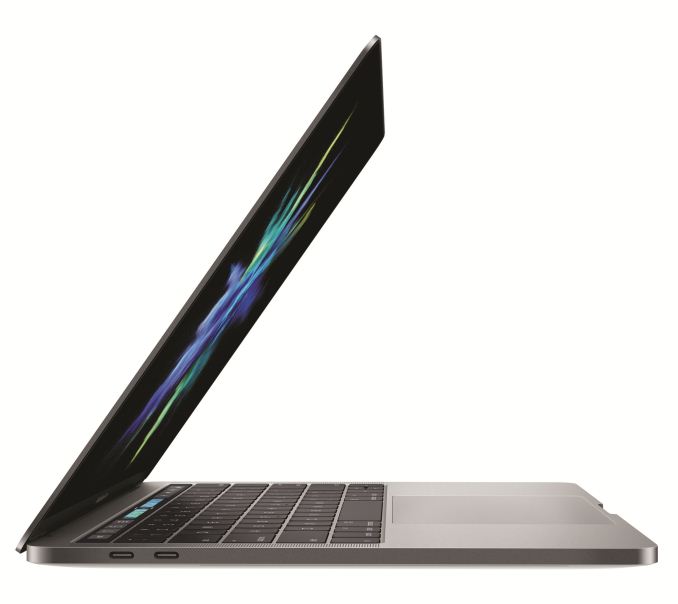
More visible is the change to the display. Apple hasn’t increased their resolutions at all – so these are the same 2880×1800 & 2560×1600 resolution configurations at before – but they have upgraded what these displays can do. All of the MacBook Pros now support the wider P3 color gamut that Apple has been championing for the last year and already offers on the iMac, iPhone 7, and iPad Pro. Meaning that the new laptops now support a wider color gamut and can display material mastered for P3 (or photos taken from the iPhone 7) at their full gamut. The new displays are also said to be quite a bit brighter than before; Apple is throwing around 500 nits, or 67% brighter.

And, perhaps most interestingly, Apple has confirmed that the new displays support “variable refresh rate” technology. I need to dig into this more, but if this is an implementation of AMD’s FreeSync tech or something similar, then it would potentially be a nice improvement in perceived screen smoothness.  Apple’s also touting that the new display consumes 30% less power, but it’s not clear how much of that is due to variable (e.g. lower) refresh rates and how much of that is from panel and backlighting improvements.

Apple has also reworked the keyboard and trackpad, in part to integrate the latest technologies and to achieve their thinness goals. The new MacBook Pros utilize a newer revision of the butterfly switch first introduced on the MacBook keyboard. This means we’re talking about a shorter travel distance than the prior generation MacBook Pros – something that may not be popular in all corners – but at the same time we’re told that these aren’t the same identical switches as on the MacBook, and that there have been some changes to improve the feel. Meanwhile the Force Touch trackpad has been enlarged; it now goes from the bottom edge of the laptop to the keyboard, the full area that Apple could hope to give it.  This is a 100% area increase for the 15” model, and a 46% increase for the 13” model.
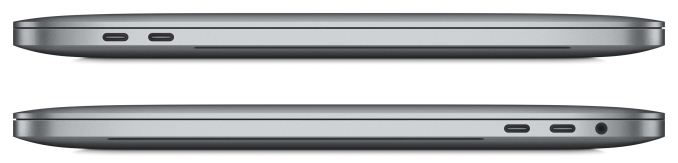
Apple has also overhauled their input/output options on the new MacBook Pros; quite radically in fact. Apple has doubled-down on Thunderbolt 3/USB Type-C. All three models contain solely either 2 (13” basic) or 4 (all other models) TB3 ports (which also double as USB-C 3.1 Gen 2 ports), and then a 3.5mm audio jack. This means the MagSafe port is gone, as are the USB Type-A ports and the Thunderbolt 2 ports. In this sense it’s very close to what has happened with the MacBook, except the MacBook Pro gets a larger number of ports. TB3 is enabled through the use of Intel’s Alpine Ridge controller; the 2 port versions have a single controller, and the 4 port versions have 2 controllers (since Intel doesn’t make a 4 port version). Furthermore all 2 or 4 ports can be used for charging or display outputs as necessary, so they are all equals in functionality.
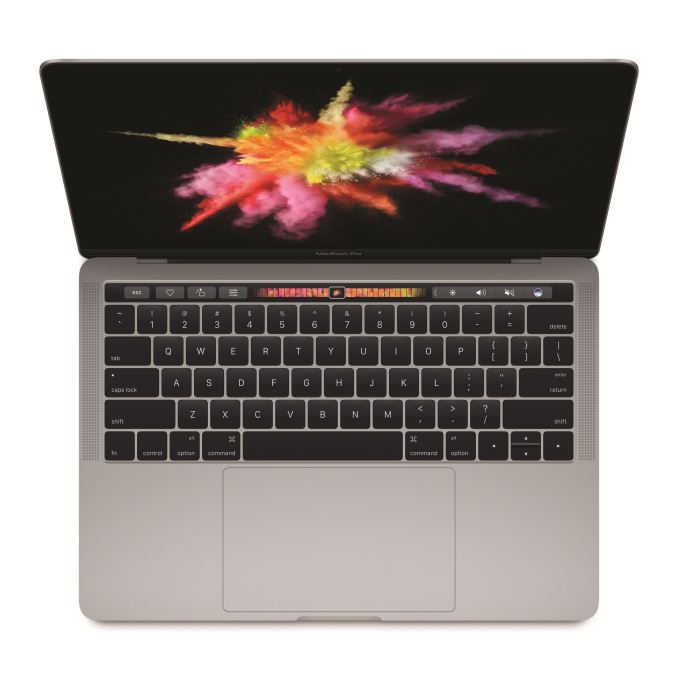
Last, but certainly not least however, is perhaps the marquee feature of the 4th generation MacBook Pros: the Touch Bar. A bit of a poorly kept secret in the run-up to today’s launch, the Touch Bar is a (presumably OLED) capacitive multi-touch display that replaces the row previously occupied by the function keys.  The idea, in a nutshell, is to make a dynamic row of virtual buttons that can be whatever an application (or user) needs them to be, bringing with it all of the advantages of multi-touch that Apple has developed over the years for their iOS devices. Note that the Touch Bar is only available on the higher-end MacBook Pros; the basic 13” model forgoes the Touch Bar in favor of a traditional row of function keys, presumably for cost reasons.

Rounding out the feature set, the Touch Bar also includes a Touch ID fingerprint sensor on its right side, and the necessary controller – what Apple calls the T1 – to handle Touch ID and the Secure Enclave duties. This sensor means that virtually everything that can be done with Touch ID on iOS devices can be extended to macOS: one-touch login, Apple Pay confirmation, etc. You can even use it to do things iOS can’t do, such as swap between users. Taking a page from those iOS devices, the Touch ID sensor is the one physical button that’s part of the Touch Bar; it is both a fingerprint scanner and the device’s physical power button.

Judging from the presentation alone, the Touch Bar is going to be divisive among users. Replacing physical buttons with a capacitive strip is a major change; if you’re used to feeling buttons, there’s nothing here to feel. On the other hand, Apple is convinced that the function keys are underutilized right now, and that space can be put to better use. Even with the track pad already offering Force Touch, the Touch Bar has the advantage of being able to display what button it is, and behave separately from the trackpad. As someone who admittedly is still old school enough to configure the function keys to work as actual function keys – and not the screen/sound/playback controls Apple defaults to – I’m definitely going to have to sit down with the new Touch Bar to get an idea of what the transition is like. It’s a bold idea for Apple; but bold ideas can be both good and bad.

Wrapping things up, the new MacBook Pros are available for order today. The basic 13” model (the one without the Touch Bar and only 2 TB3 ports) will retail for $1499 and is shipping immediately. The other two models will be at $1799 and $2399 for the 13” and 15” models respectively, and will not be shipping for another 2-3 weeks.

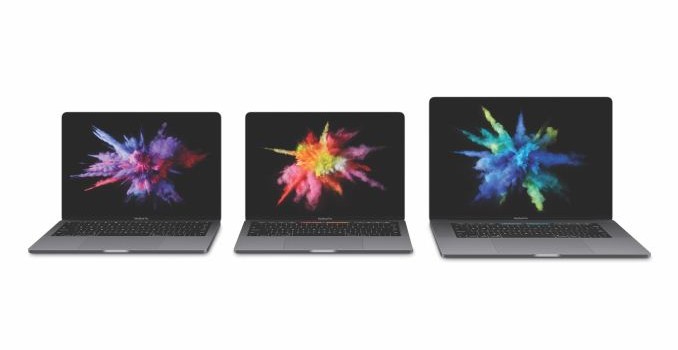
Finally, Apple has also illustrated how the overall MacBook family of laptops is organized now that they’ve added the new MacBook Pros. The 11” MacBook Air has been removed from sale entirely, while the 13” model is still for sale, but hasn’t received any update. Given that the new MacBook Pros are thinner than the MacBook Air 13”, it seems likely that it’s going to eventually be phased out entirely. Consequently the new, modern MacBook lineup consists of 4 laptops: the 12” MacBook, the basic 13” MacBook Pro, the advanced 13” MacBook Pro, and the 15” MacBook Pro.

Apple Announces 4th Generation MacBook Pro Family: Thinner, Lighter, with Thunderbolt 3 & “Touch Bar”

Apple Announces 4th Generation MacBook Pro Family: Thinner, Lighter, with Thunderbolt 3 & “Touch Bar”

Much ink has been spilt over the last year on the subject of the MacBook Pro. In short, Apple hasn’t given its professional laptop lineup a real overhaul in some time. Only the smaller 13” model ever got Intel’s 5th gen Broadwell CPU – the 15” model is even further back, on 4th gen Haswell – and otherwise the laptops haven’t had major feature updates since 2013. As a result, Apple has been due as anyone can be to update their laptops. And at a special event held at their campus this morning, they have done just that, launching the 4th generation of the MacBook Pro.

For better or worse the new 4th generation family doesn’t have a catchy name like Retina to help set it apart from the prior models. But make no mistake, Apple has been busy on giving their languishing laptops a much-needed facelift.

All-told, Apple has introduced 3 new MacBook Pro models: a basic 13” version, and then two full-featured versions at 13” and 15” respectively. All three models are form the same mold, so to speak. All of them get the same new unibody design, the same wide color gamut (P3) display, and the same upgraded internal hardware composed of Intel’s 6th generation Skylake CPUs, Thunderbolt 3, and new SSDs. What separates the basic 13” from the other two models, besides cost, is that it doesn’t include Apple’s new multi-touch Touch Bar (more on this in a sec).

4th Gen MacBook Pro Lineup
Model 2015 15″ 2016 13″ (basic) 2016 13″ (touch) 2016 15″
Dimensions 1.8 cm x 35.89 cm x 24.71 cm 1.49 cm x 30.41 cm x 21.24 cm 1.55 cm x 34.93 cm x 24.07 cm
Weight 4.49 lbs (2.04 kg) 3.02 lbs (1.37 kg) 4.02 lbs (1.83 kg)
CPU 2.2GHz Core i7-4770HQ
(Haswell)
2.0GHz Core i5-6360U (Skylake) 2.9GHz Core i5-6267U (Skylake) 2.6GHz Core i7-6700HQ (Skylake)
GPU Intel Iris Pro 5200 Intel Iris Graphics 540 Intel Iris Graphics 550 Intel HD Graphics 530 + AMD Radeon Pro 450 (2GB)
Display 15″ 2880 x 1800 IPS LCD
sRGB Gamut
13″ 2560 x 1600 IPS LCD
P3 Gamut
15″ 2880 x 1800 IPS LCD
P3 Gamut
Memory 16GB DDR3L-1600 8GB LPDDR3-1866 8GB LPDDR3-2133 16GB LPDDR3-2133
SSD 256GB PCIe SSD (PCIe x2) 256GB PCIe SSD
Touch Bar No No Yes
I/O 2x Thunderbolt 2 (supports DP1.2), 1x HDMI 1.4, 2x USB 3.0 (Type-A), 3.5mm Audio, SDXC Slot 2x Thunderbolt 3 (supports DP1.2 & USB 3.1 Gen 2 modes),
3.5mm Audio
4x Thunderbolt 3 (supports DP1.2 & USB 3.1 Gen 2 modes),
3.5mm Audio
Battery Capacity 99.5 Wh 54.5 Wh 49.2 Wh 76 Wh
Battery Life 9 Hours 10 Hours
Price $1999 $1499 $1799 $2399

If you’ve been watching Apple over the years, then you know that the company has a (sometimes unhealthy) obsession with reducing their products’ thickness, and the 4th gen MacBook Pro follows that obsession to a T. The new family of laptops is thinner than ever, with Apple taking them from 18mm to 14.9mm and 15.5mm for the 13” and 15” models respectively. Altogether, the total volume is down 23% for the 13” model and 20% for the 15” model.

Apple is still using their now tried-and-true aluminum unibody design for the family, so if you’re familiar with the current color-coated MacBook, then you know what to expect here. Though the event was very brief on how Apple was able to shave off so much volume compared to the last generation, it sounds like they’ve gone with a thinner cooling system, and in the case of the 15” model, AMD’s low-profile Polaris 11 GPU.

Under the hood, this change in volume comes without a significant change in official TDPs (so all factors held equal, Apple would be removing the same amount of heat in a thinner design). Apple has finally made the jump across the entire family to Intel’s 14nm Skylake processors. The basic 13” model uses a 15W CPU, the higher-end 13” model uses a 28W CPU, and the 15” model uses a 45W CPU, the latter two being the same TDPs as the last generation. Apple isn’t talking up CPU performance too much here, but given how long they’ve been on Haswell on the 15” model in particular, we should see a good performance bump.

Meanwhile, in a change from the 3rd generation design, all 15” 4th gen MacBook Pros come with discrete Radeon Pro graphics. Apple has tapped AMD’s new Polaris 11 GPU, in part for the low z-height it offers, which replaces the 4 year old Cape Verde GPU in the previous MacBook Pro. Apple is offering 3 dGPU configurations at increasingly higher performance. From what AMD has told me, these chips are all in the ballpark of 35W. Relative to the previous dGPU models – or even more, the previous model that only offered an integrated Intel GPU – GPU performance should be greatly improved over the last generation. Over 2x for the top-tier Radeon Pro 460 is a very reasonable assumption right now, though one that testing will need to confirm.

On the SSD side of matters, Apple has quickly talked up the fact that the new MacBook Pros use a new SSD. Apple traditionally uses multiple vendors, but the quoted 3GB/sec read speeds are consistent with the latest generation of drives out of Samsung and Toshiba. So is the fact that Apple is now offering SSDs up to 2TB in size.

More visible is the change to the display. Apple hasn’t increased their resolutions at all – so these are the same 2880×1800 & 2560×1600 resolution configurations at before – but they have upgraded what these displays can do. All of the MacBook Pros now support the wider P3 color gamut that Apple has been championing for the last year and already offers on the iMac, iPhone 7, and iPad Pro. Meaning that the new laptops now support a wider color gamut and can display material mastered for P3 (or photos taken from the iPhone 7) at their full gamut. The new displays are also said to be quite a bit brighter than before; Apple is throwing around 500 nits, or 67% brighter.

And, perhaps most interestingly, Apple has confirmed that the new displays support “variable refresh rate” technology. I need to dig into this more, but if this is an implementation of AMD’s FreeSync tech or something similar, then it would potentially be a nice improvement in perceived screen smoothness.  Apple’s also touting that the new display consumes 30% less power, but it’s not clear how much of that is due to variable (e.g. lower) refresh rates and how much of that is from panel and backlighting improvements.

Apple has also reworked the keyboard and trackpad, in part to integrate the latest technologies and to achieve their thinness goals. The new MacBook Pros utilize a newer revision of the butterfly switch first introduced on the MacBook keyboard. This means we’re talking about a shorter travel distance than the prior generation MacBook Pros – something that may not be popular in all corners – but at the same time we’re told that these aren’t the same identical switches as on the MacBook, and that there have been some changes to improve the feel. Meanwhile the Force Touch trackpad has been enlarged; it now goes from the bottom edge of the laptop to the keyboard, the full area that Apple could hope to give it.  This is a 100% area increase for the 15” model, and a 46% increase for the 13” model.

Apple has also overhauled their input/output options on the new MacBook Pros; quite radically in fact. Apple has doubled-down on Thunderbolt 3/USB Type-C. All three models contain solely either 2 (13” basic) or 4 (all other models) TB3 ports (which also double as USB-C 3.1 Gen 2 ports), and then a 3.5mm audio jack. This means the MagSafe port is gone, as are the USB Type-A ports and the Thunderbolt 2 ports. In this sense it’s very close to what has happened with the MacBook, except the MacBook Pro gets a larger number of ports. TB3 is enabled through the use of Intel’s Alpine Ridge controller; the 2 port versions have a single controller, and the 4 port versions have 2 controllers (since Intel doesn’t make a 4 port version). Furthermore all 2 or 4 ports can be used for charging or display outputs as necessary, so they are all equals in functionality.

Last, but certainly not least however, is perhaps the marquee feature of the 4th generation MacBook Pros: the Touch Bar. A bit of a poorly kept secret in the run-up to today’s launch, the Touch Bar is a (presumably OLED) capacitive multi-touch display that replaces the row previously occupied by the function keys.  The idea, in a nutshell, is to make a dynamic row of virtual buttons that can be whatever an application (or user) needs them to be, bringing with it all of the advantages of multi-touch that Apple has developed over the years for their iOS devices. Note that the Touch Bar is only available on the higher-end MacBook Pros; the basic 13” model forgoes the Touch Bar in favor of a traditional row of function keys, presumably for cost reasons.

Rounding out the feature set, the Touch Bar also includes a Touch ID fingerprint sensor on its right side, and the necessary controller – what Apple calls the T1 – to handle Touch ID and the Secure Enclave duties. This sensor means that virtually everything that can be done with Touch ID on iOS devices can be extended to macOS: one-touch login, Apple Pay confirmation, etc. You can even use it to do things iOS can’t do, such as swap between users. Taking a page from those iOS devices, the Touch ID sensor is the one physical button that’s part of the Touch Bar; it is both a fingerprint scanner and the device’s physical power button.

Judging from the presentation alone, the Touch Bar is going to be divisive among users. Replacing physical buttons with a capacitive strip is a major change; if you’re used to feeling buttons, there’s nothing here to feel. On the other hand, Apple is convinced that the function keys are underutilized right now, and that space can be put to better use. Even with the track pad already offering Force Touch, the Touch Bar has the advantage of being able to display what button it is, and behave separately from the trackpad. As someone who admittedly is still old school enough to configure the function keys to work as actual function keys – and not the screen/sound/playback controls Apple defaults to – I’m definitely going to have to sit down with the new Touch Bar to get an idea of what the transition is like. It’s a bold idea for Apple; but bold ideas can be both good and bad.

Wrapping things up, the new MacBook Pros are available for order today. The basic 13” model (the one without the Touch Bar and only 2 TB3 ports) will retail for $1499 and is shipping immediately. The other two models will be at $1799 and $2399 for the 13” and 15” models respectively, and will not be shipping for another 2-3 weeks.

Finally, Apple has also illustrated how the overall MacBook family of laptops is organized now that they’ve added the new MacBook Pros. The 11” MacBook Air has been removed from sale entirely, while the 13” model is still for sale, but hasn’t received any update. Given that the new MacBook Pros are thinner than the MacBook Air 13”, it seems likely that it’s going to eventually be phased out entirely. Consequently the new, modern MacBook lineup consists of 4 laptops: the 12” MacBook, the basic 13” MacBook Pro, the advanced 13” MacBook Pro, and the 15” MacBook Pro.
LG Introduces New UltraFine 4K and 5K Monitors

LG Introduces New UltraFine 4K and 5K Monitors

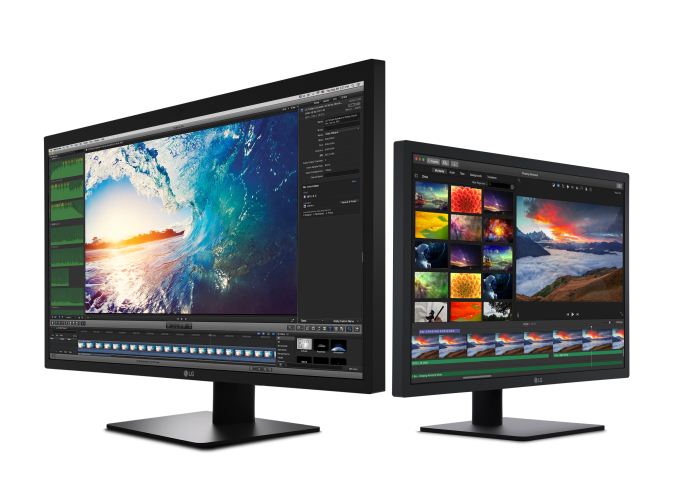
Today LG and Apple made a joint product announcement of sorts. Apple announced their new MacBook Pro, which uses four Thunderbolt 3 ports for IO. During the launch event, Apple also noted that LG would be launching a new pair of monitors to go along with the MacBook Pro. These new monitors are branded as LG UltraFine, and LG is advertising them as monitors designed to seamlessly integrate with macOS and both new models of the MacBook Pro. I’ve included the known specifications for both monitors below:

  LG UltraFine 21.5 LG UltraFine 27
Panel 21.5″ IPS 27″ IPS
Native Resolution 4096 x 2304 5120 x 2880
Refresh Rate 60 Hz
Brightness 500 cd/m²
Color Gamut Display P3
Color Depth 8bit 10bit
Viewing Angles 178°/178° horizontal/vertical
Inputs USB-C Thunderbolt 3
USB Hub 3 x 5Gbps USB-C
Audio Stereo speakers

The first LG UltraFine display is a 21.5″ 4K model. Unlike most “4K” displays which really use the 3840×2160 resolution defined in the UHD spec, this is a 4096 x 2304 display that actually has over four thousand pixels on its longer axis. The 27″ model is a 5K panel with a resolution of 5120 x 2880. Both monitors connect over a single cord. In the case of the 4K model it can be driven using a single DisplayPort 1.2 stream over a normal USB-C port. The 5K monitor requires two DisplayPort 1.2 streams and so it is a tiled display. However, using Thunderbolt 3 for the link avoids the dual-cable solution used on existing 5K monitors. These solutions also allow for data and power transfer, and so the monitors can actually charge a connected laptop while also providing three 5Gbps USB-C ports and stereo speakers.

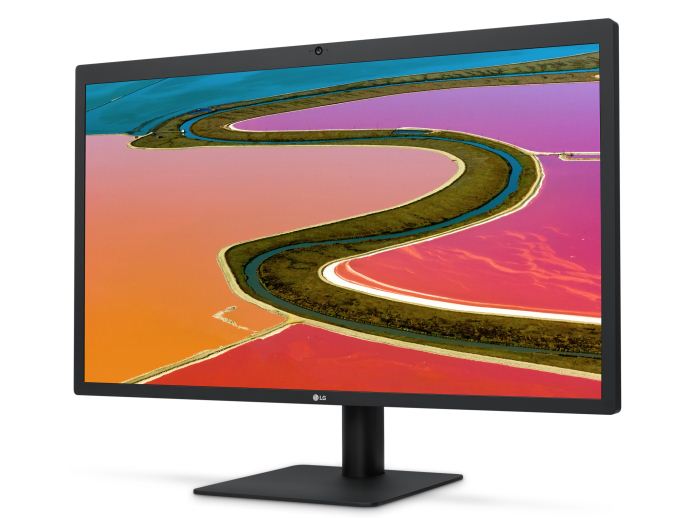
The panel characteristics for both displays are similar. Both have a peak brightness of 500 nits, and they use the P3 color gamut, although it’s almost certain that they retain the standard 2.2 gamma and white point of D65 from existing displays. The one key difference to note is that the 21.5″ model is only an 8bit display, with support for 16.7 million colors, while the 27″ model is a 10bit display supporting 1.07 billion colors. The 27″ model also has a camera and a built in microphone for audio and video calls.

At this point you may have noticed that all of these specs are the same as Apple’s iMacs. LG Display makes the IPS displays in the iMacs, so it’s very likely if not certain that these are the same panels. Given that these monitors are targeted at users of the new MacBook Pro, it’s also very likely that they do not have any sort of sRGB fallback mode, as such an option is unnecessary on macOS where there is end to end color management in any AppKit app and even in most apps that don’t use AppKit. This is important to keep in mind for anyone interested in buying these for a Windows computer. The state of color management on Windows means that in nearly every application you’ll be stuck with oversaturated colors and no workaround, so I wouldn’t recommend it even if it can work.

While I’m on the topic of Windows support, I will say that from a technical perspective, the displays should work with a Windows computer. However, product listings for the monitor specify that you need a Mac with USB-C for the 4K model, and a Mac with Thunderbolt 3 for the 5K model. This limits the 4K model to Apple’s MacBook, and the new MacBook Pros, with the 5K model only working on the latter. This also ties back to the integration with macOS. Most monitors use physical buttons for controlling brightness and volume, but the LG UltraFine displays use the integrated controls that macOS provides, meaning that it can respond to the volume and brightness keys on Mac keyboards. It doesn’t look like the monitors have any buttons to fall back on, so this may be another situation where Windows users should be wary, and it definitely explains why the monitors are being marketed specifically for their integration with macOS.

Both of LG’s new UltraFine monitors have already shown up online, although you can’t buy them directly from Apple’s online store as of right now even if you’d like to purchase one alongside a new MacBook Pro. The listings do tell us that the 4K model is priced at $699.95 in the US, and the 5K model is $1299.95. According to LG, the 4K model will be available next month, and the 5K model will launch in early December.