Vik


Updates to Skylake Discrete Graphics Performance: PCIe Optimizations Incoming
Updates to Skylake Discrete Graphics Performance: PCIe Optimizations Incoming

In our initial review of the two 6th Generation Intel Skylake-K processors launched on August 5th, the i7-6700K and the i5-6600K, our comparative analysis to the previous generations of Intel processors was for the most part, positive. On the whole, clock-for-clock performance was a marginal increase over previous generations but the cumulative end-to-end effort of several generations of upgrades, plus for those that overclock, gave a substantial reason for those in CPU limited workloads to find an upgrade (along with benefits on the chipset and DRAM side as well). However, one element of the equation was puzzling at the time – the performance of games using discrete graphics cards was marginally lower with the new platform compared to older platforms when looking at average frame rates.

Discrete Graphics Performance: Before

During our testing, it is not uncommon to see two platforms that perform similarly to have a reasonable margin of error, often ±1%, due to variations in pre-initialised cache structures, or in the case of games like GRID that rely on a random sequence to provide the end-result numbers. Despite this, we noticed that for Skylake-K we saw consistent drop in our discrete GPU testing, often around the -1% to -3% mark but sometimes as low as -5% or -7% when we compared it to both Intel’s 5th Generation (Broadwell) and 4th Generation (Haswell). Other websites such as The Tech Report also noted these results, placing Broadwell’s numbers at the top of the stack (if only marginal). Some commentary at the time focused on Broadwell’s use of eDRAM in the desktop components which can aid performance while retaining a frequency deficit, although given our analysis of the eDRAM in Broadwell as a victim cache rather than a transparent DRAM cache it seems less likely that this is the case, plus we also now have new information coming post launch about this issue. But if we remove Broadwell as a special case, it was still concerning that the i7-6700K lagged behind the i7-4770K despite being higher in frequency and clock-for-clock performance.

Before it came time to publish our Skylake review, we performed our initial analysis and ended up with our results. Whenever the results are worse than expected, we typically discuss with the manufacturer regarding any anomalies and if they can account for them (or something doesn’t seem to be configured properly). So we passed on our data to Intel as well as ASUS due to our setup at the time, and did not hear anything back for a number of weeks except the odd whisper of ‘we are looking in to it’. Then, in our meeting with Intel at the Intel Developer Forum in mid-August, an Intel processor engineer said that they were still working on it internally, but from their testing it seems that one of the registers controlling an internal frequency was not being set properly during start-up – as in not being set to Intel’s recommended value.

Another couple of weeks later, we were contacted by ASUS who shed a lot more light on the issue.  The register in question is called the FCLK (or ‘f-clock’), which controls some of the cross-frequency compensation mechanisms between the ring interconnect of the CPU, the System Agent, and the PEG (PCI Express Graphics). Basically this means it is to do with data from the processor to the GPUs. So when data is handed from one end to another, this element of the processor manages the data buffers to allow that cross boundary migration in a lossless way. This is a ratio frequency setting which is tied directly to the base frequency of the processor (the BCLK, typically 100 MHz), and can be set at 4x, 8x or 10x for 400 MHz, 800 MHz or 1000 MHz respectively.
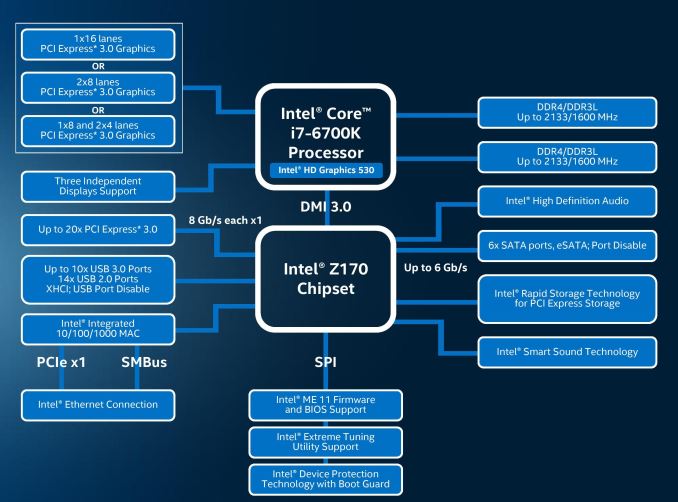

FCLK is in the top left, between the CPU and the PCIe lanes.

The default value of the FCLK is at 800 MHz for both mobile and desktop Skylake processors, and it is this value that all the motherboard manufacturers have validated their systems on – such as overclocking and margins due to external environmental factors. However, the Intel recommended value for desktops, as dictated in their ‘tuning guide’ for motherboard manufacturers was 1000 MHz, or the 10x ratio setting.  The recommended value for laptops is still the 8x ratio setting.

So going back to Skylake-K launch on the 5th of August – it is our understanding that Intel moved the launch of these processors from IDF (mid-August) to Gamescom to coincide with their push towards a gaming focused platform. So despite the fact that between Gamescom and IDF the only people who really had these processors were other media and a few system integrators selling pre-built systems, everything had to be ready to go at that time.  But at this time, the 10x ratio setting in Intel’s microcode (MRC) was not functioning as expected when motherboard manufacturers tried to initialise it during start-up. As a result, the ‘default’ value was used universally.

Discrete Graphics Performance: After

Fast forward to mid-August, and firmware update 1168 from Intel now allows motherboard manufacturers to implement the 10x setting for FCLK at POST. This means that the motherboard manufacturers now have to implement that firmware into their BIOS packages and request that all owners upgrade in order to benefit from this change.
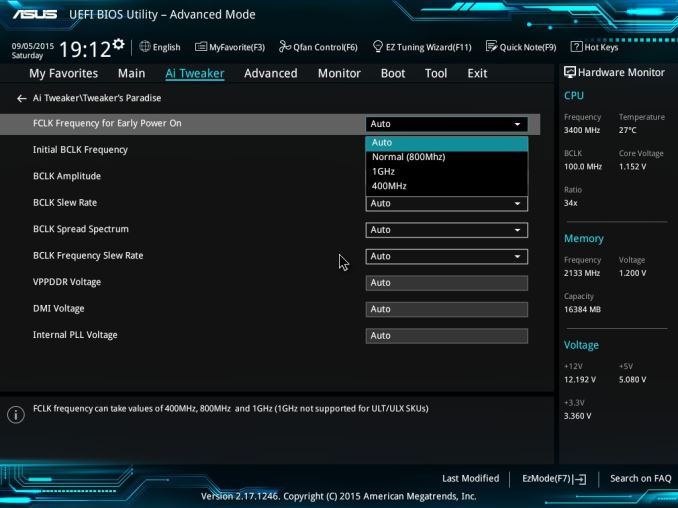

ASUS’ FCLK Setting

From what we are being told by ASUS, they will have it enabled by default (at stock) on version 0801 on the Z170-A, with 090x versions of the BIOS providing a manual option inside the Tweakers’ Paradise sub-menu. ASRock by comparison, on the 1.70 BIOS for the Extreme7+, has an option to adjust the FCLK in the CPU configuration menu, but sets 800 MHz as default and requires adjusting to 1 GHz to make the change. For motherboard manufacturers, this new change (if they want to implement it by default) requires a complete verification process to make sure everything else in the system works, all PCIe cards are properly validated and added to their QVLs, and also overclocking margins are still as advertised. That being said though, we have been told to be wary of exact benefits from the new firmware, as some internal testing has shown not that big a jump in most instances.
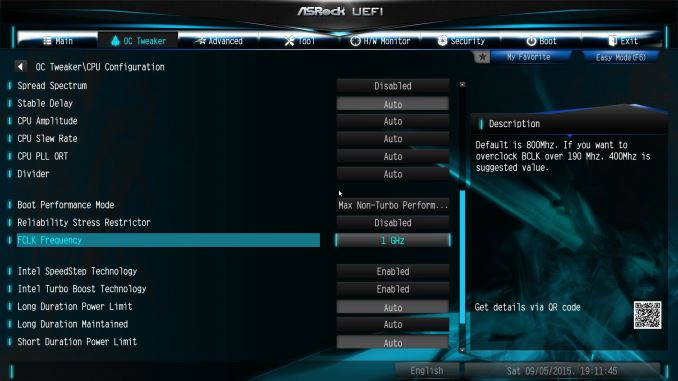

ASRock’s FCLK Setting

On the overclocking side, if a user leaves the FCLK setting at auto but initiates as base frequency overclock (from 100 MHz to 120 MHz), then the start-up sequence on the motherboard should be able to take this into account and move from the 10x ratio to the 8x ratio, giving 8 * 120 = 960 MHz, making it closer to the 1000 MHz value. This can be overridden of course, but our sources say that FCLK can be adjusted to around 1400 MHz before it starts to fail, meaning that this ‘test at start-up’ procedure has to take the BCLK into account.

Interestingly enough, this register that adjusts the FCLK ratio can be probed and changed at run-time as well, in the middle of the operating system. That lends itself to some interesting dilemmas if software detects its presence and tries to manually adjust it when a system is BCLK overclocked. We might see some software adjust this automatically (look out for general performance increase claims on Skylake only), so our hope here is that the software is also able to probe the BCLK and find the most appropriate ratio to avoid instability. Obviously this matters more for those on motherboards that still run at 8x or who have manually set their own ratio.

But does it make much of a difference? We ran our GPU suite with the processor at stock, the new BIOS, and it set explicitly to 1 GHz. The quick answer to the question is yes – it makes a subtle difference.

*For full disclosure, our initial review contained erroneous results on the GTX 770 and Shadow of Mordor due to an unknown reason. For our retest, this benchmark at 1080p Ultra and 4K Ultra was re-run at 800 MHz FCLK and our numbers in Bench are updated. The change in this benchmark result does not affect our conclusion in the initial review or this secondary set of testing.
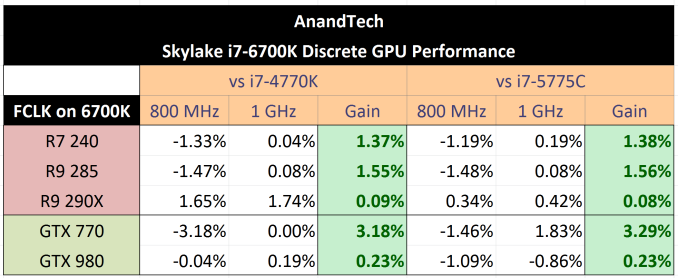
The overall results showed an increase in frame rates by 1.3% from both the Haswell (i7-4770K) and Broadwell (i7-5775C) processors. The key takeaway is that in almost every scenario where performance was worse (except the GTX 980 against the i7-5775C), the new FCLK setting makes a change. Across the board, moving from an 800 MHz value on FCLK to 1 GHz gave an increase no matter what the discrete graphics test. Previously where our individual benchmarks ranged from zero change through -1%, -2% down to -7%, most results move up slightly, usually under 1%, but some get a boost as high as 5%.

So this raises a number of questions.

Q: Firstly, does this mean our initial review results are now invalid?

A: It depends what you mean by testing the stock processor. Is it how it performs out of the box, or is it how it performs to Intel’s ‘recommended’ tuning profile. As mentioned above, it seems like motherboard manufacturers will act differently on the FCLK issue, whereas some might enable it by default and others require the user to implement the change. The fact that the 800 MHz is main setting for mobile platforms (Skylake-Y and Skylake-U, perhaps even Skylake-H) means little on the desktop, but we might be in a period of transition for motherboards as the cycle progresses. At this time, our review as posted should still be the performance out of the box, but in time everyone should migrate to the 1 GHz setting for desktop. I will add the data into Bench to act as a comparison between the two, and in time retire the older set of data.

Q: Is Broadwell still the ‘preferred’ processor by a number of journalists in terms of performance in gaming due to the eDRAM, given that this minor change produces a different result?

A: From AnandTech’s perspective, this does not change much on our side – the Skylake platform still offers access to new features such as DDR4, the Z170 chipset with increased PCIe storage, USB 3.1 controllers on most boards >$150 and a cumulative generational increase in performance over the last few years. Going back to our architecture deep-dive, it also affords better performance in certain benchmarks such as Hybrid x265 than Broadwell due to its ability to keep more load/store operations in flight. There will be benchmarks that enjoy the eDRAM, such as WinRAR and a couple of our Linux-Bench server tests, and the fact that the Broadwell with eDRAM competes with a slower frequency is an interesting exercise in cache implications for performance. But for discrete gaming it is pretty much par for the course. Arguably, the i7-6700K should be easier to get hold of over time compared to the i7-5775C as well. 

Q: Does anything change in the CPU benchmarks/performance?

A: As long as it doesn’t touch the PCIe bus/routing, then there is no difference to the operation.

Q: I am about to invest in a Skylake desktop/I have a Skylake desktop. What should I do?

A: If your system is working fine, it might be best to leave it as is for now, at least until all the motherboard manufacturers have had a chance to go through a number of updates and tweak the setting to their satisfaction. If you need to be on the bleeding edge and feel like updating your BIOS, do so and explicitly adjust the FCLK to 1 GHz, rather than leaving it on automatic. However, remember that this value is tied to the BCLK (base frequency), and treat this setting like an overclock. This means running a usual range of stability benchmarks. We tried the setting on a couple of motherboards, and it is still a little rough (crashes in a benchmark or two from time to time), which I imagine is down to the manufacturers needing to fine tune this setting (either internal voltages, or skew balancing). At this point in time we are under the impression that every Skylake-S processor should be able to run at this higher ratio when at stock speeds. As always, in overclocked environments, your mileage may vary.

Q: Will this affect the Skylake Xeons?

A: At this point, we do not know. However, given how early we are in the Skylake launch cycle, and that Intel has stated a Q4/Q1 release for the E3 v5 Xeons, we would expect it to be a non-issue when they are launched.
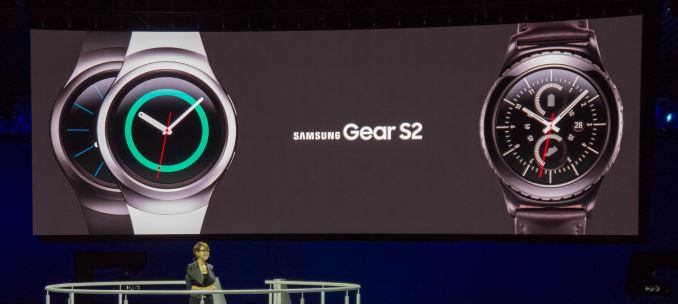
Samsung Gear S2 Launch Event & Hands-On

Samsung Gear S2 Launch Event & Hands-On

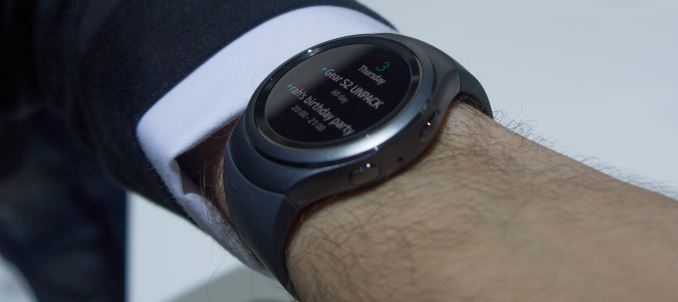
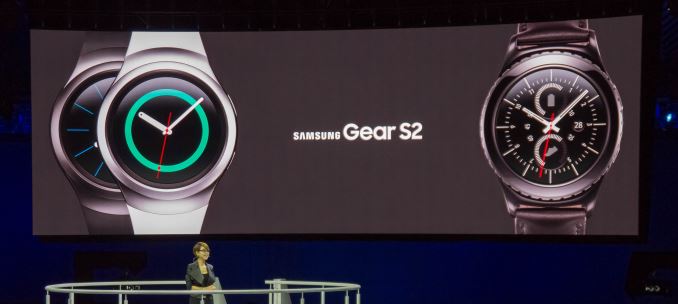
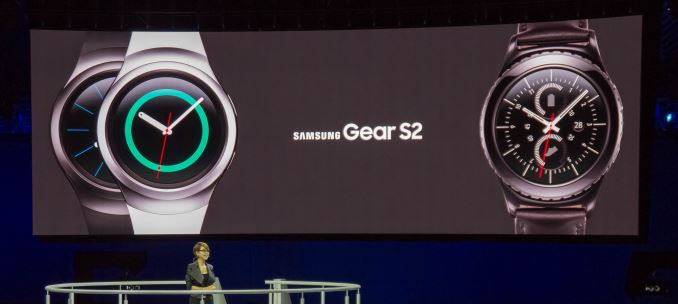
After quite a long day yesterday here in Berlin I finally managed to catch a breath to sit down and go over what was likely the biggest reveal over the course of this year’s IFA. Last night Samsung formally presented the Gear S2 to the public and demonstrated what the new smartwatch is all about.

We’ve already covered the initial paper-launch a few days ago where took a look at the basic specification sheet of the three new smartwatch models. As a reminder, we’re talking about 3 SKUs – the Gear S2 BT, Gear S2 3G and the Gear S2 Classic. 

  Samsung Gear S2 BT
Samsung Gear S2 Classic
Samsung Gear S2 3G
SoC Exynos 3250 (2x Cortex A7 @ 1.0GHz)
RAM/NAND 512MB RAM, 4GB NAND
Display 1.2″ Circular 360×360 SAMOLED (302ppi)
Dimensions Gear S2: 42.3×49.8×11.4mm (47g)
Classic: 39.9×43.6×11.4mm (42g)
44.0 x 51.8 x 13.4mm (51g)
Battery 250 mAh (0.95 Whr) 300 mAh (1.14 Whr)
OS Tizen
Sensors Accelerometer, Gyroscope, Heart Rate, Ambient Light, Barometer
Connectivity 802.11/b/g/n + BT 4.1, NFC

One additional piece of information that we weren’t sure of was the exact SoC selection. I was able to talk one of the Korean employees present during the launch and he pointed out that the Gear S2 uses the same SoC as the first Gear S – meaning an Exynos 3250. This is a SoC specifically designed for wearable use and features two ARM Cortex A7 cores at 1 GHz and a Mali-400MP2 GPU running at 133MHz.

The way the three units differ is in their design and internal function. The Gear S2 BT and Gear S2 3G both sport the same modern look and only slightly differ in their size, with the 3G version bulking up a bit in all dimensions as well as in weight. The classic shares the internal specs of the normal BT version but changes its exterior design to a more traditional watch look.

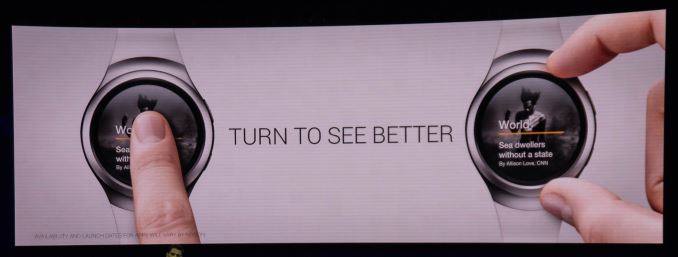
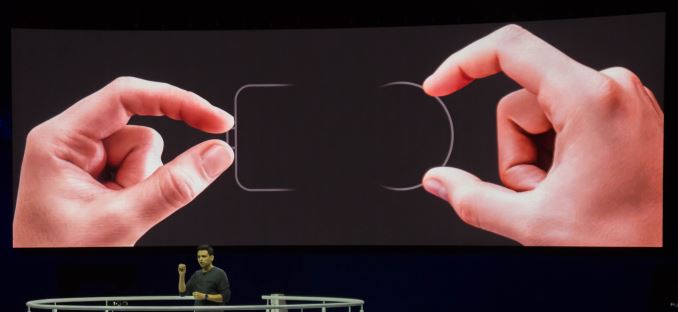
Samsung kept the presentation short and to the point – and that point is the rotating bezel. This is what makes the Gear S2 differentiate from all other smartwatches and Samsung rightfully put the feature center-stage during the talk.

Samsung argues that screen-estate on a smartwatch is valuable, and you don’t want to waste any of it by swiping the screen for navigation. Rotating bezels have existed for decades on traditional watches such as diver watches, so Samsung took inspiration from such designs and made the bezel the primary control.

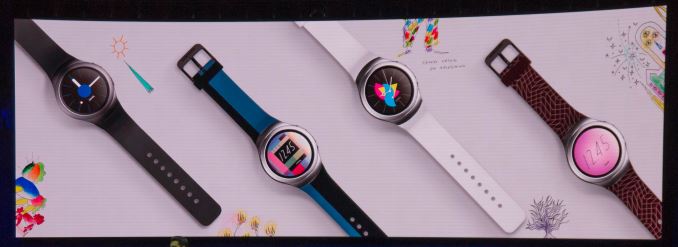
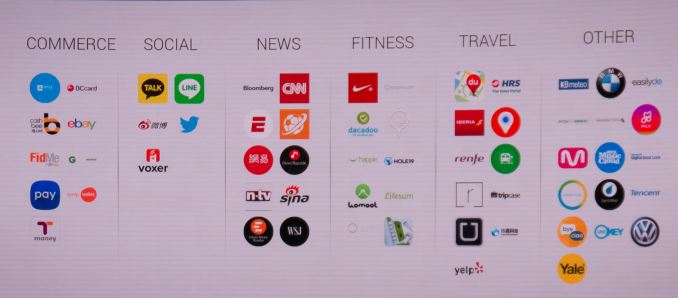
Before going into more details on how the bezel functions, we’ll have a quick look at the ecosystem that Samsung promises to build around the watch. Samsung announced various cooperations with designers as well as companies to create a base portfolio of accessories such as watch-bands and applications.

The applications the demo units were loaded with were all working well although I didn’t try too many of them rather than playing with Samsung’s new Tizen OS in general. The availability of applications is definitely going to be a crucial factor in the success of the Gear S2, so I hope that Samsung is able to push as many developers as possible in creating content for the watch.

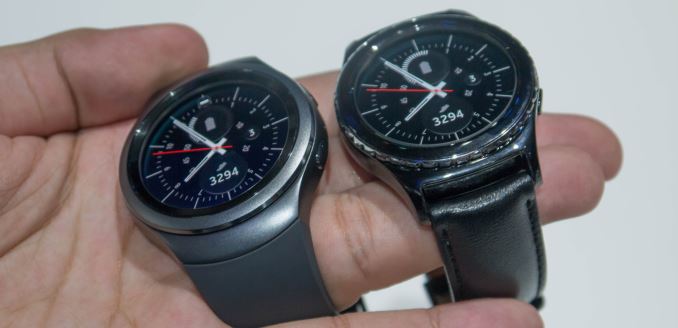
Starting off with the Gear S2 classic I was in for quite a ride in terms of design. Over the last few years ever since Samsung released the first Galaxy Gear there’s been one common denominator for all smartwatches released to date: their extremely bulky size. I think that the thickness of my wrists falls below that of the average person, so up until now all smartwatches I tried out were extremely off-putting because their large size simply didn’t fit me well. As a warning and disclosure: I’m probably the least objective person to talk about watch designs and evaluating them as my personal taste veers extremely towards minimalistic and thin watches. If I were to go into a jewllery shop with a selection mechanical watches I’d probably dismiss 95% of designs right off the bat.


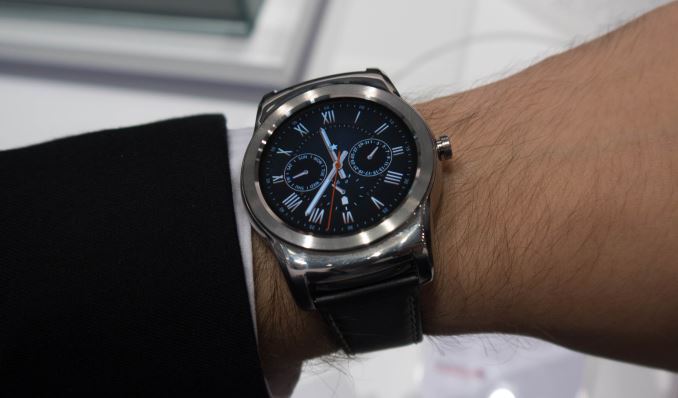
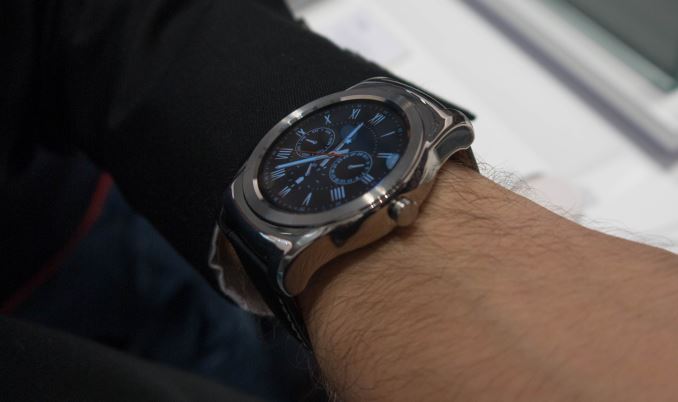
LG Watch Urbane


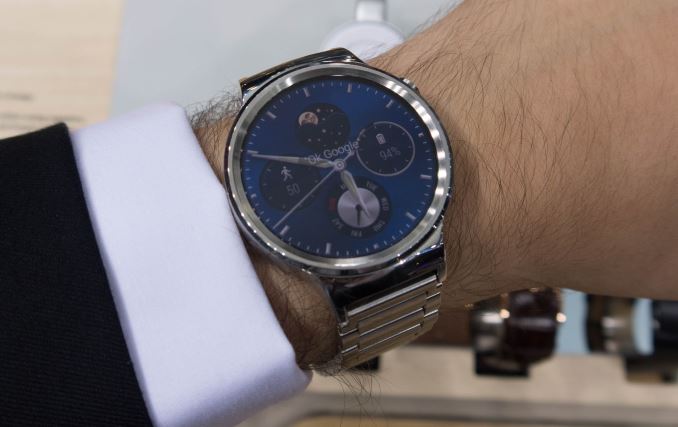
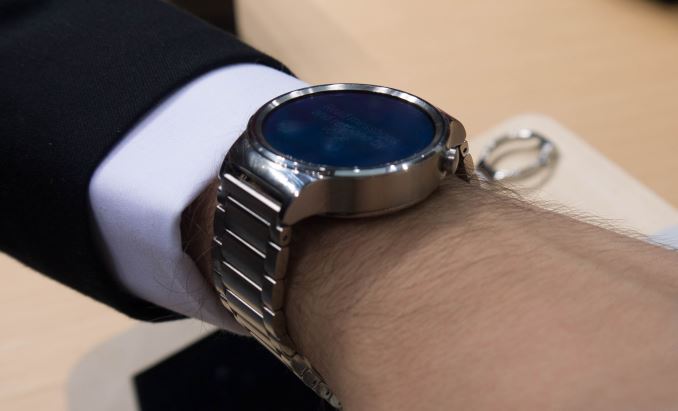
Huawei Watch

The LG Watch Urbane and the Huawei Watch are examples of what I would rather consider to be blunt weapons instead of practical watches that I would be able to wear daily. Unfortunately up until now this left small-wristed users with a lack of proper options when it came to smartwatches.

That being said, when I first put on the Gear S2 Classic it was quite a revelation to find a smartwatch that not only was a (subjective) visual fit, but more importantly was actually comfortable to wear.

The S2 Classic is a very good implementation of a smartwatch that doesn’t immediately identify as a smartwatch. Samsung here has managed the task of blending the traditional watch style with smartwatch internals resulting in something that on the street would be very hard to pick out from normal watches.

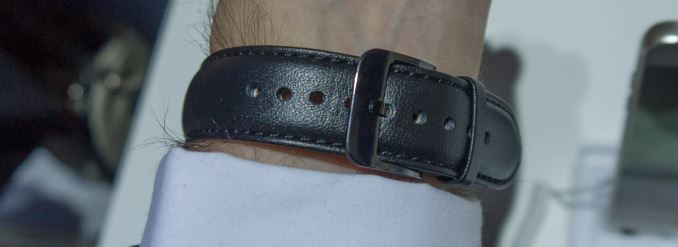
One thing I wasn’t too happy about the Gear S2 Classic was the stock leather watch-band. While I had no issues with the design and looks of the band, putting it down was quite harder than putting it on as the buckle tongue mechanism was much too stiff. I hope this was just an effect of the brand-new leather’s hardness as opposed to any functional issue with the buckle tongue itself.

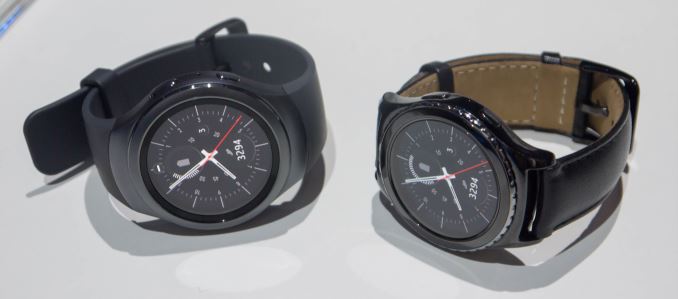
As I tried the Gear S2 Classic first, I was expecting the normal version to be bulkier and less comfortable. I was in for my second shock for the day as I actually found the differences to be minimal. Due to the more streamlined and rounded design of the Gear S2, it was able to hide the fact that it’s a few mm bigger than the Classic.

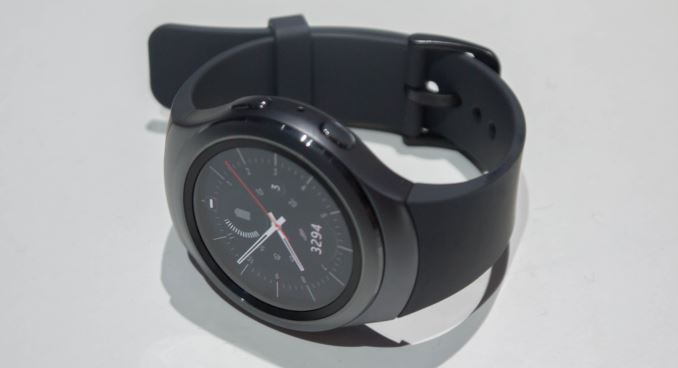
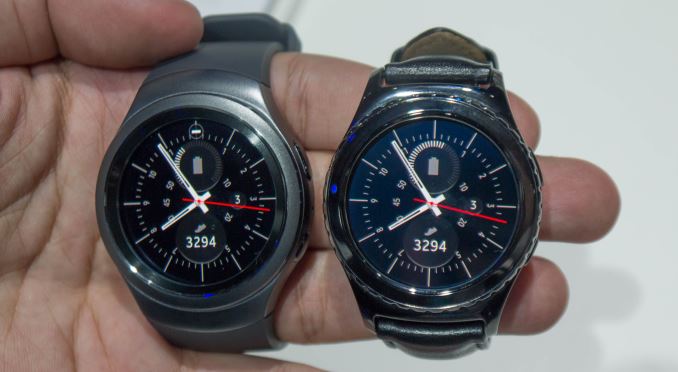
While the Gear S2 Classic has the more traditional look going for it, the normal Gear S2 expresses more modern design characteristics. One of the most important ones in terms of look and feel is the sand-blasted metal finish of the watch body that gives it a distinct feeling over the glossy surface of the S2 Classic.

The second-most noticeable difference in feel between the two variants is the rotating bezel design. The Gear S2 Classic includes little notches on the side of the bezel ring which aren’t present on the standard variant. I found the slight curve and bevelled edges of the normal version one of the factors that made it actually more comfortable to use than the Classic.

This is something I found to be extremely important, because the bezel ring navigation is something as crucial and defining to these devices as bread is to butter. I don’t think it took me more than a mere 20 seconds to adapt to the rotary nature of the controls after which it felt like something so obvious and simple as if this was the way smartwatches had always been designed to be controlled. The best way I could describe the experience is as if you simply had a mouse-wheel laid horizontally, as that is exactly how it felt to me as I scrolled through the menus and interfaces.

The physical feel of the rotating bezel could also be compared to the feel of a clicking mouse-wheel, only that the clicks are much more fine-grained and solid. I feel that Samsung managed not only to create an innovative way of input but actually nailed the physical feedback feel of the rotation mechanism.

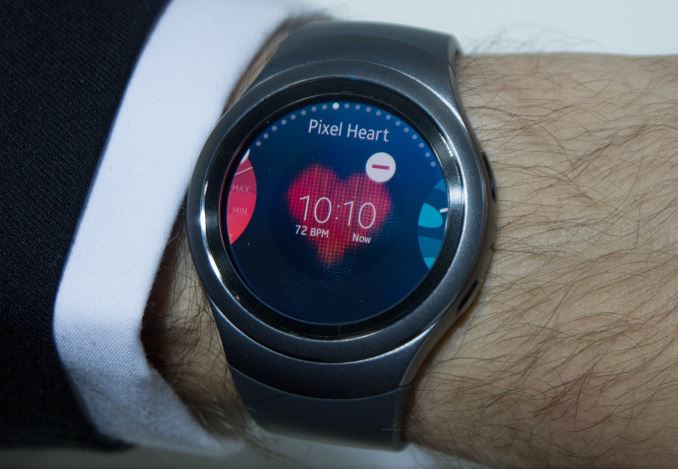
The interface seems also to be well-designed for the rotary control. The two main selection interfaces consist of the home-screen selection and the application drawer. The home-screens (or main screens) are the widgets for applications and may display any arbitrary information. At the “center” of the home screens is of course the watch face itself, which one can directly get to via the home button.

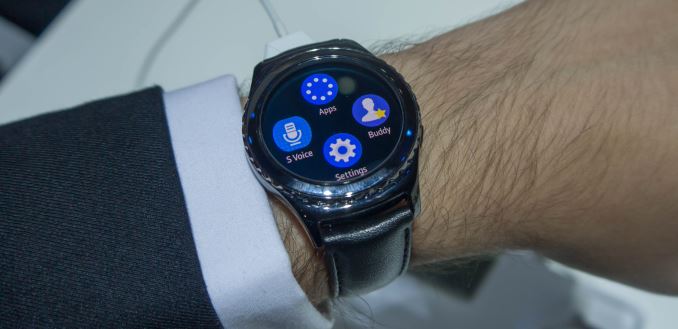
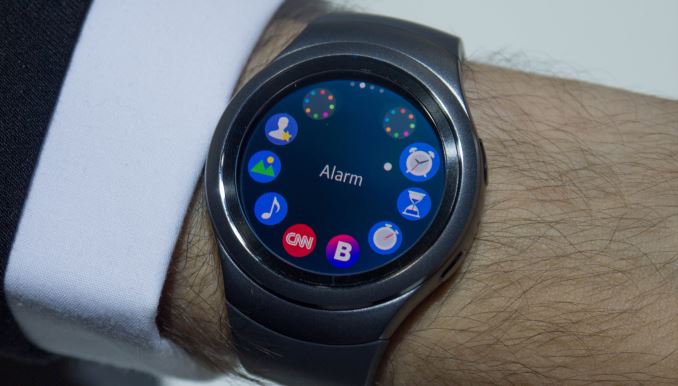
The app-drawer is also extremely intuitive to use with the rotating bezel. It functionally is nothing else than a linear menu when one scrolls through it with the bezel ring. Visually, this is represented in a circle of icons, but each circle contains 8 actual apps and 2 additional icons that jump to the previous or next 8 apps. So you can either use the touch-screen to go from selection screen to selection screen via the top “app-circle” shortcuts, or you simple turn the bezel until you get where you want. Because selection via the bezel is so fast, I found myself prefering to use this method than falling back to the touch-screen for anything other than launching an app. Launching apps or confirming a selections seems to be the last major repetitive use-case needing the touch-screen functionality, which kind of derails a bit the experience of using hardware controls. I imagine what an additional “select” button would be able to do to the experience.

As earlier mentioned, the screen on the Gear S2 comes with a pixel density of 302ppi, making this quite a reasonably sharp wearable. The screen also seemed brighter than other smartwatches. The demo units were by default set to ~70% brightness but once you manually set them to 100% via the settings menu it really brought out the contrast of the very black-dominant UI.

I had some gripes with the default DPI and density some of the interface elements used. The screen sports a high-enough resolution that it could easily accommodate more information if one designed apps to take advantage of it, so I hope that in the future there will be some option to better adjust font and element sizes, as the system font-size control did not seem to have much an effect on apps.

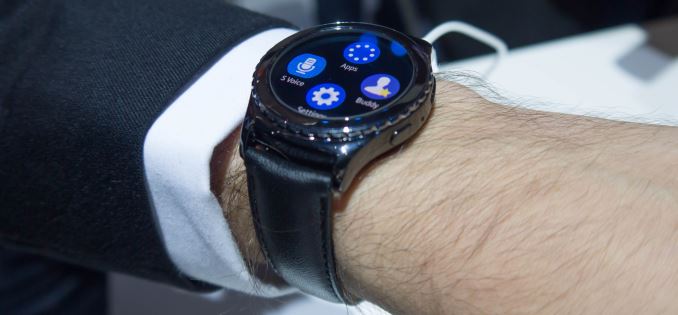
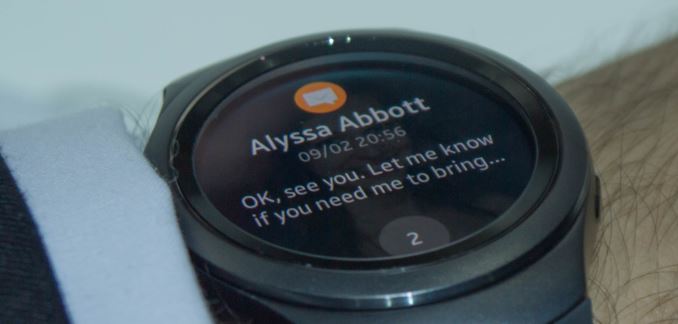
An odd characteristic of the display is that the glass seems much thicker than any other smartwatch out there. As I hope that it can be distinguished in the picture above, the actual AMOLED display sits around 1.5-2mm below the glass surface and bezel of the watch. The result is that the Gear S2 is able to replicate the “watch-face through glass” feel of a traditional watches better than any previous smartwatch attempt. In doing so it however sacrifices some of the “image pop-out” feel of zero-gap displays available on other smartwatches.

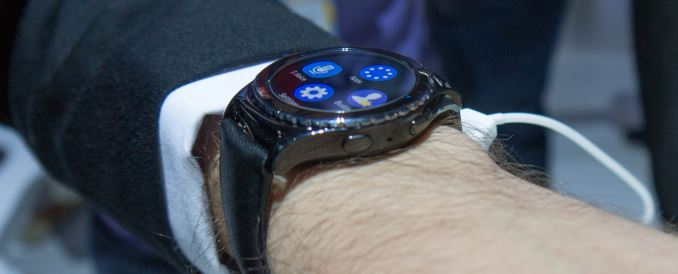
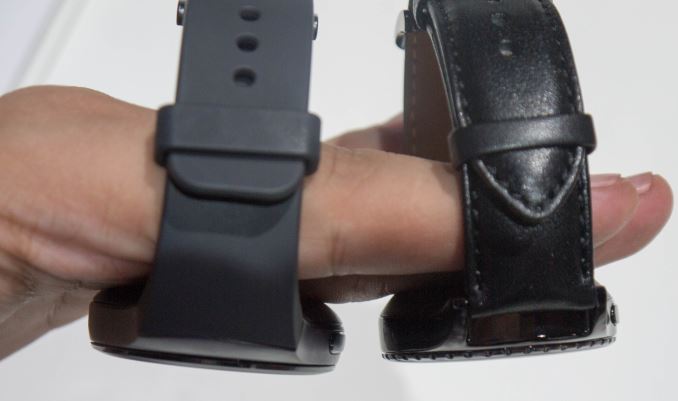
Both variants are roughly the same thickness, except that again the normal variant has rounder edges compared to the classic. The devices have two buttons on their right side; the top one acts as a back button and the bottom serves as the device’s home button. For right-hand users who wear the watch on their left arm I would have wished if they had put the home button on the bottom left side of the watch for it to be easily accessible with one’s thumb. The back button though is well located for right-handed people as it’s in good reach for one’s index finger.

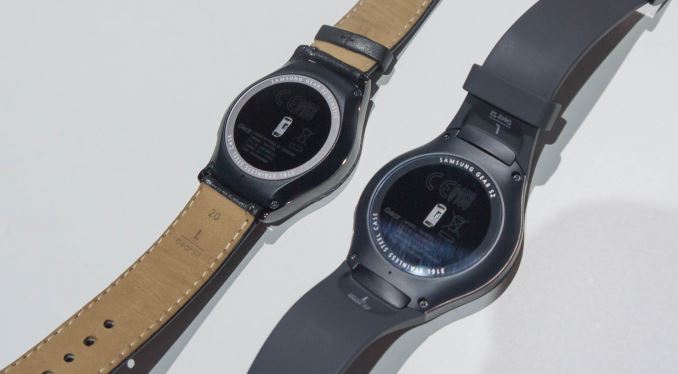
The watches are IP68 certified which means the watches are water-resistant up to 3m of depth. Due to this, they don’t have any physical charging port but rather rely on wireless charging. Samsung claims that charging will be quite fast, but we won’t be able to tell until we review the S2.

All in all, Samsung aimed high with the Gear S2 and instead of iterating on its previous designs, it chose to take on the smartwatch category from a new perspective. This seems to have paid off as the Gear S2 is the best feeling smartwatch I’ve been able to get my hands on to date. The rotary bezel design is something I envision to become a standard and defining feature for Samsung watches as I yet have to find a fault with it.

With excellent hardware and design, the success and consumer satisfaction of the Gear S2 will strictly fall in the hands of the software ecosystem. The Gear S2 presents itself as Tizen’s biggest growth opportunity to date, and unless other Android Wear vendors manage to catch up with Samsung on the hardware side, I imagine that the S2 together with Samsung’s helping push will be able to generate enough of gravity that it may pull in some much needed developer attention. More importantly, Samsung doesn’t limit compatibility Gear S2 to only Samsung devices, but is open to any and all Android 4.4 devices and up (The version of Android which introduced Bluetooth Low-Energy), which should help adoption-rate.

Samsung Gear S2 Launch Event & Hands-On

Samsung Gear S2 Launch Event & Hands-On

After quite a long day yesterday here in Berlin I finally managed to catch a breath to sit down and go over what was likely the biggest reveal over the course of this year’s IFA. Last night Samsung formally presented the Gear S2 to the public and demonstrated what the new smartwatch is all about.

We’ve already covered the initial paper-launch a few days ago where took a look at the basic specification sheet of the three new smartwatch models. As a reminder, we’re talking about 3 SKUs – the Gear S2 BT, Gear S2 3G and the Gear S2 Classic. 

  Samsung Gear S2 BT
Samsung Gear S2 Classic
Samsung Gear S2 3G
SoC Exynos 3250 (2x Cortex A7 @ 1.0GHz)
RAM/NAND 512MB RAM, 4GB NAND
Display 1.2″ Circular 360×360 SAMOLED (302ppi)
Dimensions Gear S2: 42.3×49.8×11.4mm (47g)
Classic: 39.9×43.6×11.4mm (42g)
44.0 x 51.8 x 13.4mm (51g)
Battery 250 mAh (0.95 Whr) 300 mAh (1.14 Whr)
OS Tizen
Sensors Accelerometer, Gyroscope, Heart Rate, Ambient Light, Barometer
Connectivity 802.11/b/g/n + BT 4.1, NFC

One additional piece of information that we weren’t sure of was the exact SoC selection. I was able to talk one of the Korean employees present during the launch and he pointed out that the Gear S2 uses the same SoC as the first Gear S – meaning an Exynos 3250. This is a SoC specifically designed for wearable use and features two ARM Cortex A7 cores at 1 GHz and a Mali-400MP2 GPU running at 133MHz.

The way the three units differ is in their design and internal function. The Gear S2 BT and Gear S2 3G both sport the same modern look and only slightly differ in their size, with the 3G version bulking up a bit in all dimensions as well as in weight. The classic shares the internal specs of the normal BT version but changes its exterior design to a more traditional watch look.

Samsung kept the presentation short and to the point – and that point is the rotating bezel. This is what makes the Gear S2 differentiate from all other smartwatches and Samsung rightfully put the feature center-stage during the talk.

Samsung argues that screen-estate on a smartwatch is valuable, and you don’t want to waste any of it by swiping the screen for navigation. Rotating bezels have existed for decades on traditional watches such as diver watches, so Samsung took inspiration from such designs and made the bezel the primary control.

Before going into more details on how the bezel functions, we’ll have a quick look at the ecosystem that Samsung promises to build around the watch. Samsung announced various cooperations with designers as well as companies to create a base portfolio of accessories such as watch-bands and applications.

The applications the demo units were loaded with were all working well although I didn’t try too many of them rather than playing with Samsung’s new Tizen OS in general. The availability of applications is definitely going to be a crucial factor in the success of the Gear S2, so I hope that Samsung is able to push as many developers as possible in creating content for the watch.

Starting off with the Gear S2 classic I was in for quite a ride in terms of design. Over the last few years ever since Samsung released the first Galaxy Gear there’s been one common denominator for all smartwatches released to date: their extremely bulky size. I think that the thickness of my wrists falls below that of the average person, so up until now all smartwatches I tried out were extremely off-putting because their large size simply didn’t fit me well. As a warning and disclosure: I’m probably the least objective person to talk about watch designs and evaluating them as my personal taste veers extremely towards minimalistic and thin watches. If I were to go into a jewllery shop with a selection mechanical watches I’d probably dismiss 95% of designs right off the bat.


LG Watch Urbane


Huawei Watch

The LG Watch Urbane and the Huawei Watch are examples of what I would rather consider to be blunt weapons instead of practical watches that I would be able to wear daily. Unfortunately up until now this left small-wristed users with a lack of proper options when it came to smartwatches.

That being said, when I first put on the Gear S2 Classic it was quite a revelation to find a smartwatch that not only was a (subjective) visual fit, but more importantly was actually comfortable to wear.

The S2 Classic is a very good implementation of a smartwatch that doesn’t immediately identify as a smartwatch. Samsung here has managed the task of blending the traditional watch style with smartwatch internals resulting in something that on the street would be very hard to pick out from normal watches.

One thing I wasn’t too happy about the Gear S2 Classic was the stock leather watch-band. While I had no issues with the design and looks of the band, putting it down was quite harder than putting it on as the buckle tongue mechanism was much too stiff. I hope this was just an effect of the brand-new leather’s hardness as opposed to any functional issue with the buckle tongue itself.

As I tried the Gear S2 Classic first, I was expecting the normal version to be bulkier and less comfortable. I was in for my second shock for the day as I actually found the differences to be minimal. Due to the more streamlined and rounded design of the Gear S2, it was able to hide the fact that it’s a few mm bigger than the Classic.

While the Gear S2 Classic has the more traditional look going for it, the normal Gear S2 expresses more modern design characteristics. One of the most important ones in terms of look and feel is the sand-blasted metal finish of the watch body that gives it a distinct feeling over the glossy surface of the S2 Classic.

The second-most noticeable difference in feel between the two variants is the rotating bezel design. The Gear S2 Classic includes little notches on the side of the bezel ring which aren’t present on the standard variant. I found the slight curve and bevelled edges of the normal version one of the factors that made it actually more comfortable to use than the Classic.

This is something I found to be extremely important, because the bezel ring navigation is something as crucial and defining to these devices as bread is to butter. I don’t think it took me more than a mere 20 seconds to adapt to the rotary nature of the controls after which it felt like something so obvious and simple as if this was the way smartwatches had always been designed to be controlled. The best way I could describe the experience is as if you simply had a mouse-wheel laid horizontally, as that is exactly how it felt to me as I scrolled through the menus and interfaces.

The physical feel of the rotating bezel could also be compared to the feel of a clicking mouse-wheel, only that the clicks are much more fine-grained and solid. I feel that Samsung managed not only to create an innovative way of input but actually nailed the physical feedback feel of the rotation mechanism.

The interface seems also to be well-designed for the rotary control. The two main selection interfaces consist of the home-screen selection and the application drawer. The home-screens (or main screens) are the widgets for applications and may display any arbitrary information. At the “center” of the home screens is of course the watch face itself, which one can directly get to via the home button.

The app-drawer is also extremely intuitive to use with the rotating bezel. It functionally is nothing else than a linear menu when one scrolls through it with the bezel ring. Visually, this is represented in a circle of icons, but each circle contains 8 actual apps and 2 additional icons that jump to the previous or next 8 apps. So you can either use the touch-screen to go from selection screen to selection screen via the top “app-circle” shortcuts, or you simple turn the bezel until you get where you want. Because selection via the bezel is so fast, I found myself prefering to use this method than falling back to the touch-screen for anything other than launching an app. Launching apps or confirming a selections seems to be the last major repetitive use-case needing the touch-screen functionality, which kind of derails a bit the experience of using hardware controls. I imagine what an additional “select” button would be able to do to the experience.

As earlier mentioned, the screen on the Gear S2 comes with a pixel density of 302ppi, making this quite a reasonably sharp wearable. The screen also seemed brighter than other smartwatches. The demo units were by default set to ~70% brightness but once you manually set them to 100% via the settings menu it really brought out the contrast of the very black-dominant UI.

I had some gripes with the default DPI and density some of the interface elements used. The screen sports a high-enough resolution that it could easily accommodate more information if one designed apps to take advantage of it, so I hope that in the future there will be some option to better adjust font and element sizes, as the system font-size control did not seem to have much an effect on apps.

An odd characteristic of the display is that the glass seems much thicker than any other smartwatch out there. As I hope that it can be distinguished in the picture above, the actual AMOLED display sits around 1.5-2mm below the glass surface and bezel of the watch. The result is that the Gear S2 is able to replicate the “watch-face through glass” feel of a traditional watches better than any previous smartwatch attempt. In doing so it however sacrifices some of the “image pop-out” feel of zero-gap displays available on other smartwatches.

Both variants are roughly the same thickness, except that again the normal variant has rounder edges compared to the classic. The devices have two buttons on their right side; the top one acts as a back button and the bottom serves as the device’s home button. For right-hand users who wear the watch on their left arm I would have wished if they had put the home button on the bottom left side of the watch for it to be easily accessible with one’s thumb. The back button though is well located for right-handed people as it’s in good reach for one’s index finger.

The watches are IP68 certified which means the watches are water-resistant up to 3m of depth. Due to this, they don’t have any physical charging port but rather rely on wireless charging. Samsung claims that charging will be quite fast, but we won’t be able to tell until we review the S2.

All in all, Samsung aimed high with the Gear S2 and instead of iterating on its previous designs, it chose to take on the smartwatch category from a new perspective. This seems to have paid off as the Gear S2 is the best feeling smartwatch I’ve been able to get my hands on to date. The rotary bezel design is something I envision to become a standard and defining feature for Samsung watches as I yet have to find a fault with it.

With excellent hardware and design, the success and consumer satisfaction of the Gear S2 will strictly fall in the hands of the software ecosystem. The Gear S2 presents itself as Tizen’s biggest growth opportunity to date, and unless other Android Wear vendors manage to catch up with Samsung on the hardware side, I imagine that the S2 together with Samsung’s helping push will be able to generate enough of gravity that it may pull in some much needed developer attention. More importantly, Samsung doesn’t limit compatibility Gear S2 to only Samsung devices, but is open to any and all Android 4.4 devices and up (The version of Android which introduced Bluetooth Low-Energy), which should help adoption-rate.

Toshiba Announces Q300 And Q300 Pro Consumer SSDs

Toshiba Announces Q300 And Q300 Pro Consumer SSDs

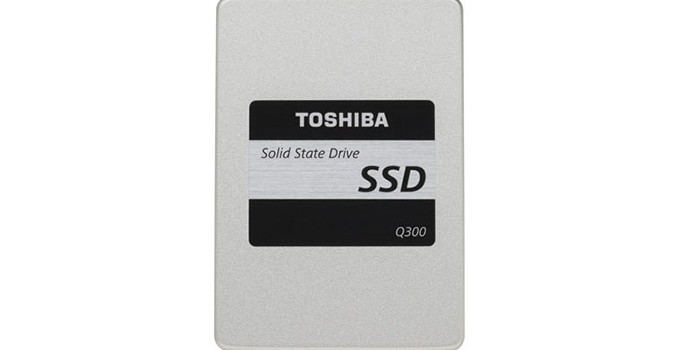
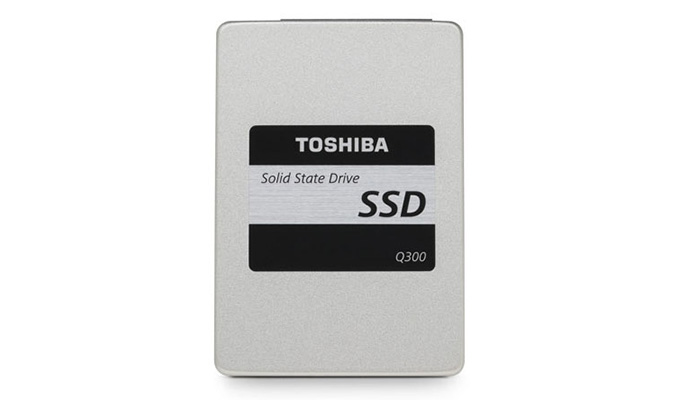
After all the enterprise and OEM drive announcements last month surrounding Flash Memory Summit, we’ve finally got a new drive to talk about that will be sold directly to consumers and available through retailers. Toshiba’s Q300 and Q300 Pro drives are client-focused SATA drives using Toshiba-branded flash and controllers. The Q300 uses TLC flash and has an endurance rating of about 0.23 drive writes per day for three years. The Q300 Pro uses MLC flash and is rated for about 0.34 drive writes per day for five years.

Toshiba Q300 SATA SSDs
Capacity 960GB 480GB 240GB 120GB
NAND Toshiba TLC
Controller Toshiba TC358790
Sequential Read 550 MB/s
Sequential Write 530 MB/s
4kB Random Read IOPS 87k
4kB Random Write IOPS 83k
Endurance Rating 240TB 120TB 60TB 30TB
SLC caching Yes
QSBC Error Correction No
Active Power Consumption 5.1W
Idle Power Consumption 1.1W
MSRP $449.99 $309.99 $159.99 $99.99

TLC-based drives require more power for writes, but the idle power rating is quite high and makes the Q300 unsuitable for mobile use.

Toshiba Q300 Pro SATA SSDs
Capacity 512GB 256GB 128GB
NAND Toshiba MLC
Controller Toshiba TC58NC1000
Sequential Read 550 MB/s
Sequential Write 520 MB/s
4kB Random Read IOPS 92k
4kB Random Write IOPS 63k
Endurance Rating 320TB 160TB 80TB
SLC caching Yes
QSBC Error Correction Yes
Active Power Consumption 3.3W
Idle Power Consumption 125mW
MSRP $389.99 $199.99 $124.99

The Q300 Pro seems tuned for a read-oriented workload, with significantly lower random write performance than the Q300, despite TLC being inherently slower for writes. On the other hand, power consumption is much more reasonable, although the Q300 Pro idle power is still a little behind the competition.

The Q300 Pro is listed as using the same TC58 controller that is in the TLC-based OCZ Trion 100, which bore suspicious similarity to the Phison S10 as seen in the Corsair Neutron XT.

The Q300 is shipping now, and the Q300 Pro will ship later this month, when ordered directly from Toshiba’s website. Our review samples are on the same timetable, so look for our benchmarks in a few weeks.